This is the first in a series of blog posts in which we outline the benefits of TDD for your organization and what are the projects to consider while adopting this agile process. Link of Part Two.
Test-Driven Development essentially lets the testing process drive the development and design of your application. This incorporates acceptance tests, functional tests, and unit tests. It leads you to create very different kinds of tests that tend to be more resilient to change in the future because you’re verifying behaviors rather than testing pieces of code.
If you are asking why TDD, we will just say that “it’s the easiest way to get both good test coverage and good quality code, which leads to 40%-80% fewer bugs in production”. Wouldn’t it be better to write the code in a manner where a bug can be spotted immediately and not after the production stage?
If this sounds good to you, let’s go to the next step. How do you successfully roll out TDD in your organization with the right team?
We’ll explore this here, as well as share some important insights on TDD.
What Are The Expected Benefits of TDD?
Better designed, extensible, and cleaner code: It helps to understand how the code will interact with other modules and will be used. It results in more maintainable code and better design decisions.
It helps in writing smaller code having single responsibility rather than monolithic procedures with multiple responsibilities. This makes the code simpler to understand.
Reduced Scrap work and Time to Repair: TDD allows problems to be detected as early as possible, which has the effect of reducing the number of bugs. De facto, the technical debt is better controlled with a reusable, maintainable, and flexible code that allows the addition of new functionalities and reduces time to repair.
Eliminates fear of change: Developers get quick alerts when a code change introduces a bug, and TDD’s tight feedback loop quickly notifies them when it’s fixed.
Better code coverage: It provides better code coverage than writing tests after the fact. Because we create code to make a specific test pass, code coverage will be close to 100%.
Faster developer feedback loop: Without TDD, developers are supposed to manually test each change to make sure that it works. With TDD, unit tests can run on-change automatically, allowing faster-debugging sessions and feedback during development.
Common Pitfalls of TDD
Time-Intensive: While TDD generally results in higher-quality code, it is often a time-consuming process. But at the same time creating and maintaining a test suite, in addition to the software itself, is a significant investment.
Many teams have seen significant reductions in defect rates, at the cost of a moderate increase in the initial development effort.
Increased Overhead: The TDD process involves a great deal of overhead in the form of unit tests. Poor choices of testing, design, or architecture strategy at the early stage can be difficult to recover later in the project. Hence, it becomes difficult or impossible to make changes in the codebase without making dozens or hundreds of existing tests fail.
Whereas, businesses that prefer to invest time in manual QA, or the ones that lack the technical resources to implement unit tests, are not the ideal candidates for TDD.
Choosing projects for TDD
Existing Project (Legacy code) And New Projects
A common TDD implementation problem rears its ugly head when an organization has inherited a system that wasn’t built with testability in mind. In such scenarios, questions arise like — Should the code be refactored? If so, how much refactoring is important to start practicing TDD in an achievable, and meaningful way?
So, if the legacy code is already out there and working, the risk associated with the technical debt is low relative to the risk of new untested work. By applying TDD to the new code you’re writing, i.e., making changes in the existing code, you minimize the risk as well as don’t increase the technical debt.
Microservices
Microservice-based architectures have far more complexities and dependencies than traditional application stacks. Creating tests for microservices-based applications and other complex architectures can be difficult due to the requirement for advanced stubbing and mocking.
A microservice-based architecture, however, presents the opportunity to leverage TDD best practices in a very efficient way. The TDD pragmatist approach becomes very useful when you think about treating the microservice as the unit, rather than the compilation unit.
Who should use it?
Most organizations simply do not have enough developers or time to cover all of their use-cases. This is especially true for enterprises that have a mix of skills and roles contributing to their projects.
Leveraging TDD helps address the issue of limited technical resources by defining tests against the contract.
With this approach, stakeholders, business analysts, testers, and other non-developer resources together can contribute to the TDD testing efforts since the Requirement Gathering phase.
Conclusion:
TDD is a process that helps you start development projects with a healthy base of tests to ensure software quality throughout the development lifecycle. It helps you to produce maintainable, testable, and efficient code. But real-world conditions do not always make TDD adoption easy. It depends totally on your product requirement and can be made easier with the kind of team you have onboard.
Contact us to know more about the development process and how we can help you to build and launch your application.
In Part Two, we enumerated the skills and factors to consider while picking the best team. And we highlighted the right questions to ask the team to ensure how your requirements will be met w.r.t. the project. About Galaxy Weblinks
We specialize in delivering end-to-end software design & development services and have hands-on experience with automation testing in agile development environments. Our engineers, QA analysts, and developers help improve security, reliability, and features to make sure your business application and IT structure scale and remain secure.
Here at Galaxy Weblinks, we realize it can be tough to balance high impact app development while also staying afloat in a weak global economy. That’s why we’re here to help! We’re a web and mobile app development firm that’s been in the game for over two decades. With over 1000 projects under our belt, we have the technical expertise and know how to help your business achieve its goals. All of our clients appreciate our dedicated project management style and how we communicate effectively in all of our projects. Whether you need Android, iOS, or Hybrid app development, we’ve got your back!
In light of our accomplishments, we’ve been considered one of the top companies for app development in Massachusetts by Clutch, a B2B market research authority. They employ a one of a kind ranking formula to compare leaders in the business services sector. Clutch’s work helps interested buyers find and partner with the vendor of their dreams!
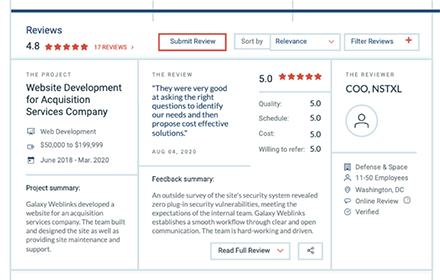
We couldn’t have earned this award without our wonderful clients! They took time out of their day to engage with the Clutch team to assess our performance. We were evaluated on the basis of quality, attention to deadlines, fairness of cost, and overall ability to drive results. We’re happy to report, we’ve earned a lovely 4.8 out of five stars on Clutch! Take a look at our most recent review below:
“We are thrilled to be listed in top 15 companies in Massachusetts for web and mobile development by Clutch”
Varun Bihani, partner Galaxy Weblinks.
We’re over the moon to be recognized for our accomplishments! Thank you to our clients and to the Clutch team for making this award a reality. Drop us a line today if you’re interested in learning more about how Galaxy Weblinks can help your business thrive!
In this episode of Agencies That Build, we have with us Chad Pytel, Founder, and COO of thoughtbot. It’s a group of designers and developers collaborating closely with clients.
Per the #ATB tradition, we picked the brains of our guest for some common industry myths and handed him the Mjölnir to bust them.
Myths
Your primary motive for getting into consulting should be to earn some money to bootstrap a SaaS product.
You should only hire experts for your agency
You must be invested in helping people scale while enjoying the process of the transition otherwise, you might get stuck on a consulting treadmill.
Be super clear about your priorities and be intentional about your work early on
Chad Pytel
If we rewind on all the episodes of this digital leadership series, this has been one common theme that every leader that appeared on our podcast talked about. This is what Chad also emphasized when we asked from a small agency perspective about what practices he recommends for leaders.
Following up on the best practices, Chad added, incorporate training into your hiring. There is one common mistake that agencies do while trying to scale. They work with unfilled positions for months and months waiting for experts to fill them. They end up paying recruiters 25% of the package for the said expert after say 3-4 months of hunting.
Instead, hire and train people that fit within your culture for 4 months for that 25%. Training is a powerful tool because it enables you to hire more people than you’d otherwise be able to and it also makes the people you hire more successful.
Then the conversation took a turn towards the hottest debate of the industry, Specialist vs Generalist.
Chad had an interesting take on the whole situation.
Generalist or Specialist – whatever you do, if you’re not consistent and intentional then your team will have a hard time working together. Even the agencies that position themselves as generalists have something that they’re good at, they provide specialization in that particular domain with small structured teams of developers and designers.
We also discussed with Chad the future of the technology and how the pricing dynamic has changed during this full remote work culture. Can we retain the prices of services as a nearshore agency while still working completely remotely? Find this and more on our Podcast and YouTube.
TL;DR | Takeaways for All About the Agency
To close any productivity and communication gaps, remove the middleman between the founder and project team. “We fundamentally believe in having a small group of people who are good at what they do working directly with clients to create something.” ~Chad Pytel.
Aspire to build successful products AND successful businesses. Training clients to facilitate a meeting or prioritize planning helps them be lucrative in the future outside of your own business.
Set specific expectations for your team in terms of communication and holding the company philosophy. This sets the bar for your team and allows them to have a growth mindset going into projects.
Training is a powerful tool that enables you to hire more people than you otherwise would have been able to and sets your team up for success. Apprenticeships and other training programs are a great way to accomplish this!
Whether you are a specialized or generalized company, the most important thing is to know what your model is and stay consistent with that. This provides a basis for your team to execute.
Career advice from Chad Pytel, have an honest conversation with your founders about expectations and what you want to achieve before starting your company.
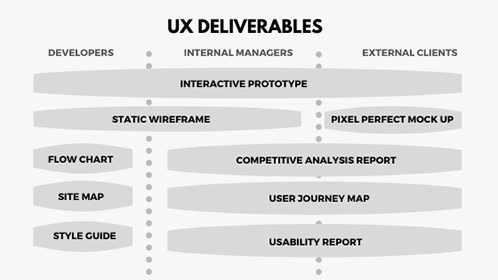
UX deliverables are a key part of building any application/product or enhancing an existing one. They may vary depending on the methods used, project, budget, and user demands, as every product is different. This, in turn, also impacts the communication between the designer and the client. Early on in the project, before the designer can share a mockup or prototype, it is common for designers to wonder what to share with clients and how often.
‘What do I show to my clients? What do they want to see? Are they concerned about my work process? When to be an open book and when to keep things to myself?’
This article lists the 7 most common deliverables created or produced by UX designers while making a new product.
These deliverables are ‘good-to-have’ in any and every project. They keep designers on track while ensuring that the clients, project managers, and designers are on the same page.
UX deliverables provide a clear foundation to build your designs on when you’re elbow-deep in developing your application, site, or any product.
Competitive Analysis Reports
An analysis of competitor’s products to map out their existing features in a comparable way. It helps UX designers to identify opportunities to innovate in a given area and understand industry standards.
Tip: A useful starting point for identifying strengths and areas for improvement is user experience heuristics. Heuristics include readability, consistency, clarity of text and labels, efficient navigation, etc.
Personas and UX Research Reports
With personas, you can easily empathize with users throughout the design process. The most effective personas are created from observation data and in-depth user interviews of real users. A good persona supports the UX research group!
The user research reports help in communicating research aims and methods, as well as getting buy-in from stakeholders. It’s also a great tool to translate the research findings into actionable items. They help in keeping everyone on track during the research project.
Pro Tip: There are many types of user research tools and techniques available like QuestionPro or LimeSurvey (survey tools), and FullStory or Hotjar (user session recording tools).
User Flow Diagrams and Product Roadmaps
Sketches are simple depictions of a design concept. They can be quickly employed because only paper and pen are necessary for their creation. They are also easily shared between designers and also between users and developers.
Similarly, a product roadmap is a product’s evolution plan with prioritized features. It could be sticky notes, a diagram, or a spreadsheet. UX designer shares the product strategy with the team that needs to be applied to achieve its vision.
Tip: Limit the number of decision points to make it clutter-free/ less complicated. Make sure the scope of the user flow diagram covers a single goal or a single task of your user.
Static Wireframes
Showing your client a visual before you get into the details of the design can save you a lot of hassle. Draw a wireframe in a notebook and take a snapshot to share with your client or use tools like Figma, Invision Studio, etc. Their main purpose is to display the arrangement of the content, expected user behavior, features, and website layout.
Wireframes can also be presented as digital illustrations that represent the organization of the website/app. They can be particularly beneficial in saving a lot of time and money because they are easy to make and adjustable to work with.
Tip: If you plan to present a wireframe to the team, try to keep Wireframes simple and include annotations that help to create context and quickly deliver key ideas.
Interactive Prototypes
With tools such as Figma, Invision, and Adobe XD, the interface design level deliverables include interaction prototypes by default. Static images just cannot convey that interaction feeling. You’ll always find many small interactions or design adjustments only after you build the interactive prototype.
An internal review of a product prototype allows everyone on the team to see how things will work, and how an actual user interacts with it. It also helps users test a product that feels 100% real, provides ideas, and gives valuable feedback.
Tip: Test prototypes on real devices as much as possible, as nothing can replace experiencing designs better on a real device.
Mood Board and Visual Design
Have you ever heard from your client wanting a site that was ‘edgy, yet safe, but also cool and blue, but not icy or depressing hospital-scrubs-blue’? A mood board is a great tool for checking that your idea of the site’s look and feel matches your client’s.
Visual design is the last step before handoff to developers and the phase where a style guide and final specs are crafted. UI style guides are generally a series of guidelines or visual references or component libraries to help designers define or set the typography, UI elements, and interactions. This ensures product consistency across different design teams, companies, and brands.
-Combined design inception worksheet
Tip: Mood Boards should be visually stunning collections of ideas, full of textures and images that transform your pitching experience at the start of a project. Whereas, a design style guide can be generated in a few seconds from Sketch, and design-handoffs can be possible easily with Zeplin.
Hopefully, you now have a good idea of what a UX designer has to deliver or communicate with stakeholders.
If you’re thinking ‘we do not have enough experience to deal with this’ or “what if I don’t have enough time”, contact us to get a free UX consultation.
About Galaxy Weblinks
We specialize in delivering end-to-end software design & development services. Our UI/UX designers are creative problem-solvers with a decade of experience in all facets of digital and interactive design. We create compelling and human-focused experiences delivered through clean, and minimalist UI.
In this episode of Agencies That Build we invited Michael Coogan, the President and Managing Partner of MC2 Design Group Inc., a strategic and digital marketing agency. MC2 works as integrated partners with clients to plan, execute, and achieve business goals.
Michael is an avid reader, and he believes in continuous learning. So get your pen and paper ready because this episode has some very practical takeaways for getting your messaging right, self-growth, leadership and bonus of good book recommendations.
Let’s start with some Myth busting.
Myths
You need to have a higher education to be a successful entrepreneur.
You need to have letters behind your name to prove that you are smart.
Like Michael we’re also firm believers of continuous learning. And being in the software design and development industry, learning is the only thing that has been constant in this space for us.
One of the learnings that we are taking from this session is that it’s critical to know what you want to say about what you’re building even before starting your business. One way to do it is by asking questions like:
Who are you?
What is the problem that you’re trying to solve?
It’ll help you get your team on the same page, philosophically.
Rolling up his sleeves Michael also shared some best practices:
Document meetings (Use tools like Otter to transcribe if you’re bad at note taking)
Figure out what to say and then communicate your message to the clients with consistency and confidence
This blog is just the tip of the iceberg, for more listen to Michael, Casey, and Varun discussing messaging, agencies, books and more on our Podcast or tune in to our YouTube channel to get the full coverage of the session.
TL;DR | Takeaways for The Road To Model Messaging
We spend so much time mindlessly taking in content. Why not take that time and put it towards something meaningful to you. “If we spend 15 minutes a day reading on a topic that we want to get better on and take a few notes, then that knowledge compounds over time.” ~Michael Coogan
It is easy to build a list of things you need to do for your business, but focusing on what to say is where things start to move forward. Uniting messaging across departments is key to building value for the customers.
Unite your team under the same philosophies. This will give them a basis of how their language and messaging with clients should be.
Outsourced partners are great for specializing projects, especially when there are spikes in business. This builds your network while not having to sacrifice the quality of your product.
Build a framework that you can teach your team in order to build a StoryBrand. Clients look for companies that will guide them through the process.
Career advice from Michael Coogan, life is fair because it is unfair to everybody. However, we have the opportunity to choose how we react to things and our attitude.
Today the majority of companies are increasingly using digital products to address industry-specific challenges, for instance, enhance customer loyalty and experience, automate reporting, boost sales, or improve document management.
But mobile app development is an expensive investment. When you want one for your business, the next big question is ‘which development approach to choose for building the mobile app?’.
So, if you are wondering whether you should take the native or hybrid route for creating your next mobile application, you’ll find this article extremely useful.
We’ve decided to compare these two options to help you understand what will be the best one for your project. The critical differentiators we’ve discussed here considering both the options will help you while developing a new application.
Let’s get started!
What is a native app?
A native mobile application is a smartphone program, which is coded in a specific programming language like Java and Kotlin for Android or Swift and Objective-C for iOS.
This type of digital solution offers a higher level of performance and reliability. Installed directly from stores (Google Play, App Store), native apps generally have access to the camera, a list of contacts, microphone, GPS, and other things on a device.
What is a hybrid application?
A hybrid app is a software program that uses elements of both native and website applications. To develop Hybrid you use HTML, CSS, and JavaScript, these are then wrapped in the Native application using a wrapper like Xamarin or Apache Cordova, or React Native.
In recent years, hybrid applications have been growing in popularity. Through using the same user interface, they can be built and released across multiple different platforms. To put it even simpler, this is the same app that can be installed from Google Play and App Store.
What should you choose: Native or hybrid apps?
Before we jumpstart with the comparisons, here are a few questions you must think about and ask yourself first that will help you make the right choice:
-Do you want to amaze your users by building an entirely native application that integrates into the platform of their choice (Android or iOS)?; Do you want to be able to tap into a user’s device functions i.e. camera, GPS, etc. to make a feature-rich and customized application?
Or
-Are you more interested in taking an MVP approach, and quickly developing a hybrid application that can be released across platforms?; Do you foresee future updates and changes that are done automatically?
Comparing Native and Hybrid Applications
Codebase
The most important characteristic of a native mobile application is that it has different codebases for each OS – iOS and Android.
Created using HTML, CSS, and JavaScript (like websites), hybrid solutions enable developers to write a single codebase. On top of that, the app can be run on all devices regardless of OS.
Native: a separate codebase for each OS
Hybrid: a single codebase
When you require a native app development, you may need a separate development team for each platform, leading to increased development costs. With this, you might need to consider that you have in-depth knowledge and understanding of specific programming languages for each platform.
Performance
Though native application development is more time-consuming, it is faster and more reliable by its very design than a hybrid one.
A hybrid app has only a wrapper that is downloaded to the user’s phone (which may or may not contain all the navigational elements) with most of the data being loaded from the server.
In contrast, as users navigate a native mobile app, the visual elements, structure, and contents are already on their phone, available for instant loading, and thereby providing a seamless experience.
Native: High
Hybrid: Moderate! Can be higher with extra efforts in the development phase
This characteristic is crucial when it comes to apps that have to ensure instant response to user actions, provide high availability through handling peak loads, even with a slow Internet connection.
User Experience (UX)
Native applications offer the best UX compared to all other types of apps. The user experience specifically for a particular OS becomes critically important to the mobile presence in the market.
To offer a good UX with a hybrid app, you would need the most brilliant user experience architect/developer that can truly build an app that caters to the two dominant user types: Android users and iPhone users, as their style guidelines are simply too different.
Native: Great
Hybrid: Good
So, in both cases, the application’s controls, interactions, visual cues, and gestures must be seamlessly integrated with your platform’s extensive style guide.
Mobile application development cost and time
Different codebases have to be written for each platform, and therefore, a native product takes more time. This also implies the team extension, which means the involvement of iOS and Android engineers.
Whereas, making a hybrid app is less time-consuming and needs less effort, which is a great advantage.
Native: High
Hybrid: Easier and faster to develop
If your programmers are fluent in several languages, libraries, and frameworks, this will reduce the time and price of building any project. Further customizations will be possible to be made, and you can also choose to release only an Android or iOS application.
Security
Enhanced security is one of the key benefits of native mobile apps over others. They enable software developers to integrate various functions such as two-factor authentication that help ensure data safety and privacy.
Whereas, a Hybrid app always has some Native code (for instance to start a Web container like a WebView). That does make them susceptible to vulnerabilities that affect web browsers and those that affect native apps.
Native: Enhanced
Hybrid: Good
Essentially, there is more work involved in securing your hybrid application, but just as much is involved in maintaining native ones.
Conclusion
The battle between hybrid apps and native apps is never going to end because there’s a place and need for both.
Ultimately, to make the best decision for you, you need to measure the benefits each one offers and evaluate them against your goals.
Contact us, if you want to discuss your business application idea. We will help you through the entire process of launching an app, and help you understand the benefits of both the approaches that fit your business needs.
About Galaxy Weblinks
We specialize in delivering end-to-end software design & development services and have hands-on experience with native, hybrid, cross-platform, PWA development. Our engineers also help in improving security, reliability, and features to make sure your business application scale and remain secure.
In this episode of ‘Agencies That Build’ we are discussing cultivating successful teams in remote settings with Jim Babcock, President, SPM Services Inc. He also serves as an Advisor to the Executive Management team at Galaxy. Jim specializes in consulting people to take their ideas and turn them into successful businesses.
This episode is a special one, not because it features our friend but because we have managed to break two ATB records. One for the Longest Guest Introduction and another for the Longest Name :D.
Here are some of the myths that Jim busted for us when Casey handed over the mighty Mjölnir to him.
Myths
Working with offshore companies is a nightmare
Expecting perfect outcomes from offshore teams without engaging like you’d with a domestic team
Transparency comes naturally to people
During this session Jim shared a lot of actionable and practical advice for project management while working with a remote team. He shared from his experiences the ups and the downsides of working with a team in a different cultural setting.
Most things are meant to be done in the traditional way only. A remote setting doesn’t necessarily mean a change in basic human tendency. Talk frequently, understand your team, their needs, and culture and plan accordingly. That’s exactly what you do with an in-house team for keeping them efficient.
Jim also shared some of the best practices that helps teams in remote settings
Great planning phase + Detailed specifications = A smoother build phase
Break work down in sprints to avoid analysis paralysis
Defining completion and designing it upfront into your contract is critical
Daily stand up meetings are a must
When Casey asked about the future of technology, James was quick to answer, as in how during the pandemic almost every business shifted to remote environments which resulted in a sudden spike in demand for video platforms. During which duration WebRTC emerged as the essential tech for the coming future as more and more businesses start to integrate video in their processes.
There is a lot that we haven’t covered in this blog but that’s what the Podcast and our YouTube channel is for. Head on there and catch up on the secret recipe to Successful Teams in a Remote Setting.
TL;DR | Takeaways for Cultivating Successful Teams in Remote Setting
Get to know your team on a personal level
Develop a good specification for your product
Meet with them in the same duration you would with your domestic team
Look at your team as your partner. You need to have a contract that is flexible rather than stringent. This allows for more growth and room for expenses in the case of emergencies.
If you are working with an offshore team, and they have multiple teams in multiple regions then you need to know that. Transparency is key to communication.
Be willing to work with every party and come to middle ground on when and how things need to be done for optimized productivity.
Don’t fall into Analysis Paralysis! Break work down into sprints to move productivity and fulfill requirements.
Career advice from Jim Babcock- take time to appreciate the blessings around you.
In 2024, web development is projected to reach a staggering $488 billion industry, with over 1.8 billion websites worldwide. These interesting statistics emphasize the significance of the web in our digital age, where every click, tap, and interaction hinges on this global platform. Yet, behind the scenes, it’s the uncelebrated heroes, the backend frameworks, that power the seamless experiences we often take for granted.
The significance of choosing the right backend framework cannot be overstated in 2024. In this article, we’ll explore the top 8 backend frameworks for 2024, providing a comprehensive overview of each framework, along with real-world examples, key metrics, and the importance of making an informed choice about the best backend framework suited for you.
The Backbone of the Web: Backend Frameworks
Backend frameworks form the backbone of the web, ensuring that applications and websites function smoothly. They provide the infrastructure for data storage, retrieval, and the logic that drives the user interface. In short, they are the invisible architects behind every online interaction.
Now, let’s explore the top 8 backend frameworks for 2024 and gain insights into their unique strengths and applications.
Node.js
Node.js continues to be a strong contender in backend development. Because of its event-driven, non-blocking architecture, it is a great option for real-time applications. In 2024, it remains a reliable option for scalable, high-performance backend systems.
Netflix utilizes Node.js to deliver seamless streaming experiences to millions of users simultaneously. With an active community and thousands of packages, Node.js remains a solid choice for backend development.
Django
Django, written in Python, is known for its simplicity and robustness.It has several built-in features and complies to the “batteries-included” principle. For startups and rapid development, Django is a wise pick. For instance, Instagram relies on Django’s capabilities to handle its massive user base and data. Django’s readability and versatility continue to attract developers worldwide.
Ruby on Rails
Ruby on Rails (RoR) advocates convention over configuration, which leads to faster development. RoR is perfect for startups aiming for quick prototypes and scaling in the future. Airbnb, GitHub, and Shopify owe their success to RoR’s efficiency and developer-friendly syntax. RoR powers some of the world’s most popular platforms, reflecting its reliability.
Express.js
Express.js pairs beautifully with Node.js to create a minimalistic and flexible backend. It is well-regarded for its speed and adaptability, making it a favorite for microservices architecture.
It is considered ideal for creating APIs and single-page applications, contributing to a smoother development process. My Fitness Pal uses Express.js to deliver a seamless fitness tracking experience to its users.
Spring Boot
Spring Boot simplifies Java backend development. With built-in features like security and database access, it streamlines the development process. Ticketmaster relies on Spring Boot to handle high traffic and ticket sales during events. Spring Boot’s track record with major enterprises attests to its high-performance capabilities.
Flask
Flask, another Python-based framework, emphasizes simplicity and minimalism. For smaller projects and startups, Flask’s lightweight nature provides a nimble development experience. For instance, Pinterest utilizes Flask for its recommendation algorithms and content discovery. Flask’s growing popularity within the Python community reflects its appeal.
ASP.NET Core
Microsoft’s ASP.NET Core is a robust and versatile framework for building cross-platform web applications. With a focus on performance and security, it’s a reliable choice for enterprise-level projects. Microsoft’s own products, like Azure DevOps, rely on ASP.NET Core’s capabilities. The trust of major companies and its cross-platform compatibility highlight ASP.NET Core’s reliability.
Laravel
Laravel, based on PHP, is celebrated for its elegant syntax and developer-friendly features. It works great for creating cutting-edge APIs and web apps. 9GAG’s backend is powered by Laravel, ensuring a seamless user experience. Laravel’s rich ecosystem and successful projects showcase its appeal.
Factors to Consider Before Choosing the Right Backend Framework
Selecting the right backend framework is pivotal for your project’s success. It’s a decision that can significantly impact your project’s efficiency, scalability, and long-term viability. Pay close attention to the following elements in order to make an informed decision:
1. Project Requirements:
Real-time vs. Batch Processing: Determine whether your project requires real-time data processing or if batch processing is sufficient. Real-time applications, such as chat platforms or live tracking systems, demand frameworks optimized for low-latency performance.
API-Driven or Full-Stack: Decide whether your project is primarily focused on providing APIs for other applications or if it’s a full-stack application. Some frameworks excel in API development, while others are better suited for building complete web applications.
Scale and Complexity: Evaluate your project’s size and level of complexity. Large-scale platforms, such as e-commerce websites or social networks, have distinct requirements compared to smaller applications. Ensure your chosen framework can handle the anticipated workload and complexity.
2. Team Expertise:
Programming Languages: Evaluate your team’s expertise in programming languages. If your developers are proficient in a particular language, it may be wise to choose a backend framework that aligns with their strengths. This familiarity can significantly accelerate development.
Framework Familiarity: Consider your team’s experience with specific backend frameworks. Using a framework they are comfortable with can lead to faster development cycles and fewer errors.
3. Scalability:
Future Growth: Plan for the future. Your chosen backend framework should be capable of scaling alongside your application’s growth. It should accommodate increased traffic, data volume, and feature enhancements without major overhauls.
Scalability Patterns: Understand the scalability patterns that your framework supports. Horizontal scaling, vertical scaling, or a combination of both may be required depending on your project’s needs.
4. Community and Support:
Community Activity: A vibrant and active community around a backend framework is a valuable asset. It indicates ongoing development, timely bug fixes, and a rich ecosystem of plugins and extensions.
Support Channels: Investigate the availability of support channels. Are there official forums, documentation, or community-driven resources that can assist your team in troubleshooting issues or learning the framework?
5. Performance:
Load Testing: Conduct load testing to assess the framework’s performance under conditions that mimic your project’s expected load. This helps identify potential bottlenecks and performance limitations.
Benchmarking: Compare the performance of different backend frameworks using benchmarking tools. Real-world performance metrics are crucial for making an informed decision.
6. Security:
Built-in Security Features: Examine the framework’s built-in security features. Robust authentication, authorization, and protection against common security vulnerabilities (e.g., SQL injection, cross-site scripting) are essential.
Security Patching: Consider how quickly security patches are released and implemented within the framework’s community. Timely security updates are vital to protect your data and users.
Benefits of Using Backend Frameworks
Backend frameworks offer several advantages like:
Efficiency: Frameworks provide pre-built components, reducing development time.
Security: Many frameworks include built-in security features.
Scalability: Frameworks often offer scalability options to accommodate growth.
Community: Access to a community of developers for problem-solving and updates.
The Future of Backend Development
As we step into 2024, the future of backend development looks promising. The relentless march of technology continues to redefine how we approach backend development, with several noteworthy trends shaping the landscape:
1. Serverless Computing:
In 2024, serverless computing stands at the forefront of backend evolution. This shift allows developers to focus on code, leaving infrastructure management to cloud providers. Scalability, cost-efficiency, and reduced operational overhead are driving the adoption of serverless architectures.
2. Containerization:
Containerization, epitomized by technologies like Docker and Kubernetes, remains a pivotal force. Containers offer portability, consistency, and efficient resource utilization. They simplify deployment and orchestration, making it easier to manage complex backend systems.
3. Microservices:
The microservices architecture continues to gain momentum. Breaking applications into smaller, independently deployable services promotes agility and flexibility. This approach enables rapid development, easier maintenance, and the ability to scale individual components as needed.
4. Edge Computing:
With the proliferation of IoT devices and the need for low-latency processing, edge computing emerges as a game-changer. Backend development is extending to the edge, allowing data processing closer to the data source. This revolutionizes real-time applications and reduces latency.
5. AI and Machine Learning Integration:
AI and machine learning are becoming integral to backend development. These technologies empower applications with predictive capabilities, data analysis, and automation, enhancing user experiences and decision-making.
6. Enhanced Security Measures:
As cyber threats grow in sophistication, backend development focuses on bolstering security. Advanced encryption, threat detection, and authentication mechanisms are integrated into frameworks to safeguard data and user privacy.
Future Of Backend Development
The future of backend development promises increased efficiency, scalability, and responsiveness. It’s a landscape where technology not only meets the demands of modern web applications but also anticipates and shapes them. Backend frameworks are evolving to embrace these trends, offering developers the tools they need to create cutting-edge, high-performance applications.”
In this dynamic environment, staying informed and adaptable is paramount for developers, ensuring they harness the full potential of these advancements to create robust and innovative backend solutions.
Your choice of backend framework lays the foundation for your project’s success. Node.js, Django, Ruby on Rails, Express.js, Spring Boot, Flask, ASP.NET Core, and Laravel all offer unique strengths for 2024. Assess your project’s needs, your team’s expertise, and your scalability requirements to make an informed choice.
At Galaxy Weblinks, we understand the evolving landscape of backend development. Our web development and backend services are tailored to meet the needs of modern businesses. Get in touch with us right now to find out how we can support your digital journey.
In the dynamic world of web development, making informed decisions is the key to unlocking the future of your digital ventures in 2024 and beyond.
We’re back with the fifth episode of Agencies That Build. Joining Casey & Varun for this super insightful session is Ben Callhan, Founder of the Build Right workshop series and President of Sparkbox; a group of web makers that develops client products and teams via projects and their Build Right training.
Following the ATB tradition we passed the Mjölnir to Ben and busted some common industry myths.
Myths
Clients always care about the tools and technologies an agency has to offer
Thinking people/companies are perfect, and they don’t make mistakes
Ben kickstarted the session with his approach to business as ‘People over tools’ and that part he also covered while busting the myths for us. He also mentioned that transparency goes a long way in building relationships.
For instance, if you’re working with a big company, and they need 10 resources. You won’t go around and hunt for new ones; that’s a recipe for disaster. Instead, you’d use your network of skilled people that you trust.
It’s not a bad thing, just be honest about it to the client that you’re swamped, and you’re working with contractors that fit in your culture, to get the work done.
You’d be surprised how many people appreciate the truth and just want to get their work done.
Ben also shared one of the most important and practical best practices for agencies:
Talk about timeline, scope, and budget every week
It’s really important to have these conversations and avoid being the company that just takes requirements, provides estimates, and shows up only when their is an issue. Both the parties bring different experiences to the table, one brings business/domain expertise and other brings tech. Frequent conversations will keep the deliveries on track and budgets in check.
The trio also discussed working with contractors, agencies and specializations, and future of the technology. Which we think is better experienced on our Podcast or YouTube.
TL;DR | Takeaways for Building Right Relationships
It’s easy to get distracted by our technology rather than having personal conversations. However, that one on one connection builds relationships further than any piece of tech could.
It is ok to mess up! Transparency is key to good communication with a client. When mistakes happen try having a mindset of continuous improvement and lean on your coworkers for support.
The core of a great business relationship is transparency, trust, and honesty. This builds stability and shows your clients you have their best interest in mind.
“There is a lot of potential reward in being a hyper-specialized company. But the risk of course is choosing an industry. If something happens external to your group then all your marketing is focused on that niche.” ~Ben Callahan
Bring different voices to the table when looking for solutions. “Have a workplace that has a lot of different perspectives, different experiences because that is going to bring a lot of interesting solutions to the surface.” ~Ben Callahan
Career advice from Ben Callahan, embrace the leader within you.
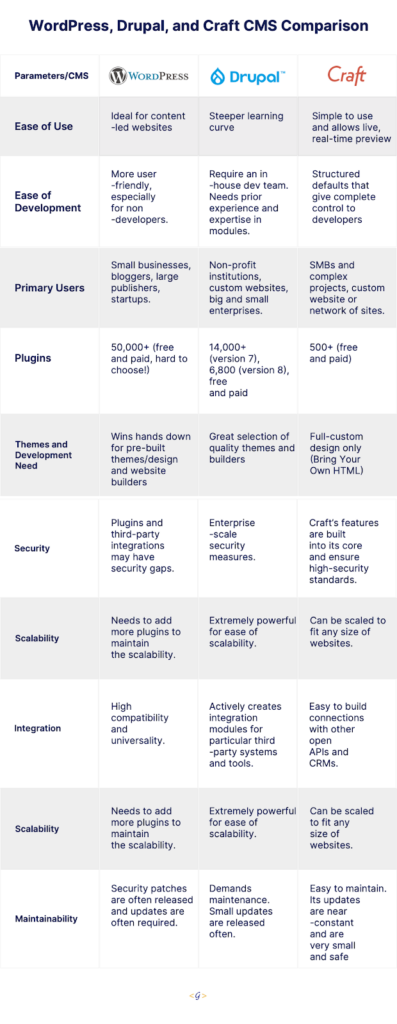
This article is an assessment and comparison of the popular content management systems WordPress, Drupal, and Craft. We’ll dig into each CMS platform’s features, ease of use, the types of businesses that are best suited to the platform, and more. We’ll also walk you through the use case scenario of each CMS and will help you understand which one could be right for your business and goals.
Before we explore the nuances of each CMS, let us quickly introduce the three stalwarts in the CMS arena.
WordPress
WordPress is an extremely versatile CMS that facilitates users (even non-developers) to create feature-rich websites and ecommerce portals. It is completely customizable, mobile-optimized, and SEO friendly. It’s also open-source, making it completely free, redistributable, and offers unlimited validity.
The most popular CMS platform powers more than 40% of the websites available on the internet. It also offers thousands of free and paid themes and plugins that the developers can choose from.
Drupal
Drupal’s open-source model encourages continuous improvement and innovation through the support and passion of the Drupal community. With a pool of diverse experts regularly working to make Drupal better, the possibility to create exceptional digital experiences expands far beyond what a single team of proprietary software developers could dream up.
Recent versions of Drupal have also prioritized user experience (UX) to empower everyone from the site editors to content creators and to build powerful customer experiences.
Craft
Craft CMS is a content management system similar to WordPress. The interface is a simple, more stripped back version of WordPress, built and tailored to the needs and requirements of the business. This simple view makes updating and adding content a much more seamless experience.
For some, this adds an increased level of comfort when migrating over to Craft due to the out-of-box understanding developers, designers, and writers are likely to have.
Comparison — WordPress, Drupal, & Craft CMS
Below are the brief use cases for each CMS, showcasing when and how the three of them are being used to help you decide which one suits your business needs, size, and scalability.
WordPress
One of the common misconceptions about WordPress is that it’s mainly for creating blogging sites. WordPress was developed as a blogging platform, but that is ancient history now. The platform has evolved radically with the various new releases over the years.
The good news with WordPress is that it is extremely flexible. It can be adapted for ecommerce websites, corporate websites, communities, and forums. WordPress is an ideal fit for startups as well, as it allows them to start small and then scale up to run even enterprise level organizations that span many countries and continents.
All you need are suitable plugins and themes. So, for instance, if you wanted to make an online portfolio for your web design business or even a blogging site, you could go with the provided themes. You can alter its source code to customize your website’s look or functionality!
You have a choice of adding extra oomph to your website by opting for customizations.
For example,
You may have a website that includes a design that should be converted to HTML, CSS, and JavaScript — being three different “technologies”, and be mobile friendly as well. That design is then integrated into a WordPress theme. Whereas all dynamic components such as menus, sidebars, footer widgets, and general content areas should be connected and coordinated with the backend.
Several custom features are then built as custom plugins by a back-end developer, who should be aware of the front-end specifics and business needs through a manager. That final product is packaged and then hosted on a specific server environment.
It will require an extra pair of hands further when it comes to security (having more people able to tackle an assignment and a project manager in charge), having potentially higher code quality when a bunch of people carry out code reviews. This process includes automated testing and ongoing scalability given the diverse expertise of our WordPress developers.
In addition to that, WordPress might be free but it is common for businesses to pay the experts to design a logo for you or adjust some of the CSS code on your site. Whereas, other WordPress users are keen on keeping graphic designers or maintenance experts on call.
So, it all depends on your experience and the scale of your website.
Drupal
Drupal is the best choice if you are building a website that needs complex data organization, that needs to be customizable.
For instance, when you’re building an advanced website, you can choose from among many technologies. Usually, the first choice is the programming language (ASP.NET, Java, Python, PHP, etc.) and then we decide whether we should code everything from scratch or use a framework to do all the heavy lifting.
There is also a third choice, a more comprehensive solution, CMF (content management framework). Drupal 9 is one of these frameworks/systems.
And by large and advanced, we mean one that is changed frequently. Content changes are carried out by at least one editor, supported by at least one developer (along with a QA tester and a sysadmin), who’s responsible for fixing the bugs, continuous development of the website, adding new functionalities, and so on.
Some examples of large and advanced websites are:
A corporate website of a medium or large production or service company.
An informational website, for example, run by a paper or magazine.
An organization’s employee portal for managing processes in the company, such as a CRM system.
A system feeding content to other systems — an API with content for other websites and mobile applications.
Besides, Drupal has almost everything you need out-of-the-box. But more often than that, you may need a functionality that is not a part of the Drupal core yet. And to fulfill that need, you need modules. Modules are bundles of code that can extend or add the functionality of Drupal websites. For example, Drupal Commerce provides everything required to sell products, services, or files online.
Craft
With Netflix, Moz, Duck Brand Duck Tape, Salesforce, PBS, and countless other brands running Craft websites, it’s a mature and competent content management system. At the same time, one of the most important things about Craft is that it is among the newest CMS solutions.
Craft CMS has ditched the traditional CMS systems that come with pre-built themes, CSS frameworks, and ready-to-go websites. It provides a bespoke solution to developers. Craft CMS neither offers posts or pages nor does it offer any bootstrap features and themes to spin up the frontend.
Everything is coded and designed from scratch which allows creating a unique experience specific to your project. And a fluent, sensible content management experience is the result.
Craft specifically targets developers responsible for building complex websites for companies with large budgets.
The primary reason for what makes Craft successful is that CraftCMS gives web professionals and developers control over websites they build.
There are many key tools in CraftCMS that are managed through the control panel of the CMS that illustrates how Craft supports and favors developers of your business:
Hundreds of Craft mediated plug-ins
Live preview during the website build
Regular releases and bug fixes
Complete control over the content and categories
An ability to manage multiple sites with one Craft installation
Custom templates
Allowing developers to write and use their own HTML
Why does it matter to your business?
When we boil this down to value for your business, all three CMS ensure a robust and feature-rich website with fewer maintenance costs, faster publishing, and quicker onboarding of new people.
The flexibility and features they offer are out of the box, along with their content-first approach, and make them our go-to for nearly every custom web project.
It’s a crucial part of our web design and development capabilities. Intrigued? Get in touch with us and we’ll be happy to talk about how they can make your site great.