OTT App Development: Key Features, Cost, and Process

Today, OTT apps have completely revolutionized how people consume entertainment. As the demand for on-demand content is rising, more people are switching to these over-the-top (OTT) platforms. And, no doubt, traditional cable TV is having a hard time. 

Since OTT app users can watch their favorite TV shows, movies, and other programs anytime, anywhere, they offer better value than traditional television programming. Consequently, there is a tremendous opportunity in OTT app development today. 

Over-the-top apps are popular globally, and one survey from Forbes reveals that 99% of US households have a subscription to at least one such platform. Undoubtedly, the opportunity is so big that many entrepreneurs, media firms, and businesses want to capitalize on it. 

While building an OTT app is a great opportunity, the market is already dominated by giants like Netflix, Amazon Prime, Disney+, Hotstar, Hulu, and Apple TV+. Competing in such a crowded space is challenging, which makes having the right app strategy, features, and user experience critical for standing out and succeeding. 

It takes more than just an idea to build a winning OTT application. In this blog, we will break down everything you need to know about OTT app development. From core features, technology stack, costs, to monetization models, it covers every aspect to help you in decision-making for mobile app development.

Key Market Trends and Stats for OTT Apps

Let’s look at some of the trends and statistics in the over-the-top content distribution market:

  1. 65% of the time, people stream videos on mobile and apps instead of browsers. (Source)
  2. By 2027, the global OTT market size is expected to reach US$476 billion.  
  3. Within the OTT video market, the number of users is expected to reach 5.11 billion by 2030. (Source)
  4. Apps were the primary source for OTT consumption in 2024, accounting for 59%. 
  5. North America commanded 37% of 2024 revenue, yet Asia-Pacific is set for the fastest regional rise at 10.3% CAGR through 2030. (Source)
  6. Earnings of creators increase by 30% on average when they launch their own OTT app. (Source)

What is OTT App Development and What’s Its Architecture?

Before we dive into understanding how OTT app development works, let’s begin by having a quick overview of what OTT apps are and understanding their architecture.   
OTT (Over-the-Top) app development involves building a platform that delivers video content directly over the internet, bypassing traditional cable/satellite channels. With OTT platform development, you can allow users to stream video, audio, or any other media content anytime and anywhere. 

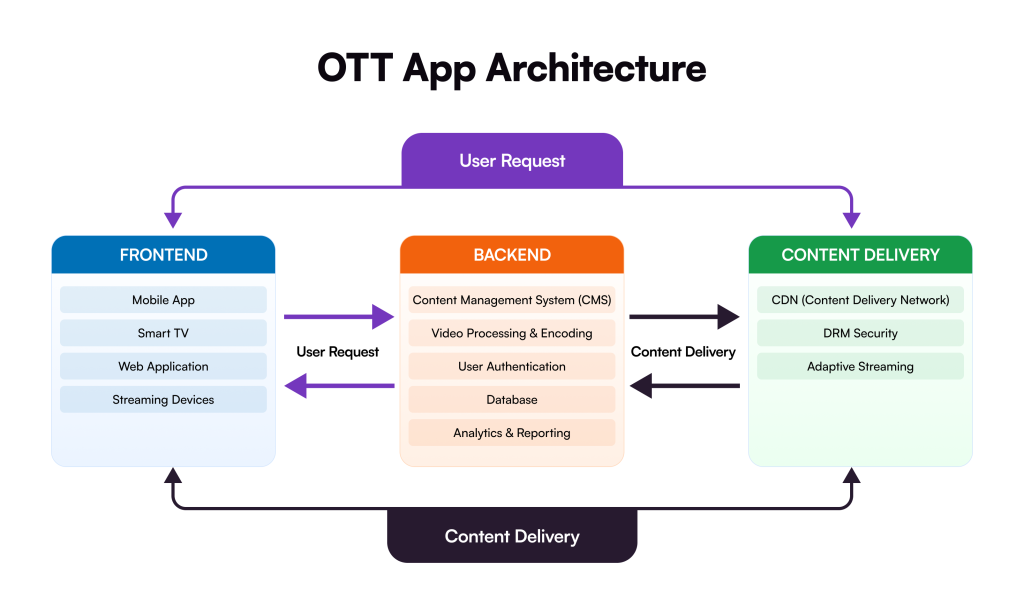
Your OTT application needs a flexible architecture that will enable it to handle heavy traffic and content demand without performance issues. It works on different components with a cloud-based or on-premises infrastructure. The architecture for a typical OTT application looks as follows: 

  • Ingestion & Encoding: Raw video is processed into adaptive formats (HLS/DASH) to ensure buffer-free playback across various bandwidths.
  • Content Management System (CMS): A centralized hub for metadata, DRM (Digital Rights Management), and monetization logic.
  • Content Delivery Network (CDN): Geographically distributed edge servers that minimize latency for global audiences.
  • Front-End/Player: The client-side interface built for cross-platform compatibility (iOS, Android, Smart TVs).

By developing a video streaming app like Netflix or Disney+, businesses can reach a massive audience and earn huge revenue. But this requires proper planning and the right OTT app development services to build a perfect app that will help you stand out and earn. 

Must-Have Features to Develop an OTT App

The right features shape a good OTT app experience. But design alone won’t keep users coming back. They expect speed, convenience, and personalization. Missing these will result in users moving away from your app.

Here comes the role of a reliable OTT app development company that brings proven expertise and tools to help you build your dream app. One that understands user behavior, platform expectations, and scale. Below are six essential features no OTT app should skip.

AI-Based Content Recommendations

People don’t want to search. They want to be guided. AI analyzes viewing patterns. What users watch. What they skip. Over time, it learns their preferences and serves content that feels relevant. The result? Longer watch time. Better retention. Stronger engagement.

Multi-Device Compatibility

Watching doesn’t happen on one screen anymore. Users start on mobile. Switch to tablets. Finish on smart TVs. Your app must follow them seamlessly. Same account. Same progress. No friction. A consistent experience across devices isn’t optional anymore. It’s expected.

Watchlist & User Profiles

A Watchlist is the simplest way to drive “Return to App” behavior. It lets users curate their own library, giving them a reason to come back. When paired with multiple user profiles, it ensures that one person’s taste doesn’t ruin the AI recommendations for the rest of the household.

Offline Viewing

Internet access isn’t guaranteed. From commutations, flights, to remote locations, there are many reasons users face challenges in accessing the internet. Offline downloads keep users engaged when connectivity drops. It’s a simple feature—but one user values deeply. And when users rely on your app, they stay loyal.

Smart Search and Filters

Endless scrolling kills interest. Strong search. Clear filters. Genre. Language. Release year. Let users narrow results instantly. Less effort. Faster discovery. More viewing. This makes searching simple, efficient, and effective.

Multi-Language Support

OTT is global by nature. Subtitles, dubbing, and localized UI are no longer optional. They remove barriers and expand reach. Multi-language support isn’t just about inclusion—it’s about growth. More users. More markets. More opportunities.

In-App Purchases & Payment Integration

Your revenue engine needs to be invisible but indestructible. You need payment integration that supports global gateways, local currencies, and recurring billing. Incorporating In-App Purchases (IAP) allows for frictionless upgrades or “Premium Access” rentals directly through the app store, keeping the conversion path short.

Parental Controls

Family-friendly apps need boundaries. Parental controls help manage screen time, restrict sensitive content, and create safe profiles for kids. For households, this builds trust. And trust drives long-term usage.

The Ultimate OTT App Development Roadmap (Step-by-Step)

Building an OTT platform isn’t just about streaming video; it’s about architecting a scalable business. Most people dive straight into the “how” without answering the “who.” That’s a mistake. Here is how you build a market-ready OTT app without wasting your budget.

1. Own Your Niche (Don’t Be “Generic”)

Before you write a single line of code, know your audience. Seriously. Most founders skip this, and it kills their ROI. Your niche dictates everything—features, content flow, even the tech stack. Are you the next Netflix, or are you building a specialized fitness portal? Pick a lane. Stick to it. Once you understand the users living inside that niche, the roadmap stops being fuzzy. Your decisions get sharper. You won’t guess anymore; you’ll just execute. That is how a dominant OTT app takes shape.

2. Pick a Scalable Tech Stack

This is where it gets real. Don’t be indecisive here because your tech stack determines your growth ceiling. You need a foundation that doesn’t crumble when you hit 10k concurrent users.

CategoryTechnologyKey Benefits (The “Why”)
FrontendFlutterFast development, single codebase.
React NativeHigh performance, huge community.
Swift / KotlinBest native device performance.
BackendNode.jsHandles high concurrent users.
Python (Django)Rapid development, secure, scalable.
Go (Golang)Superior speed for microservices.
DatabasePostgreSQLReliable, handles complex data.
MongoDBFlexible for content metadata.
RedisUltra-fast caching, low latency.
StreamingAWS ElementalIndustry-standard video processing.
WowzaHigh-quality live/VOD streaming.
Akamai / CloudfrontGlobal content delivery, no buffering.

3. Design for Frictionless Binge-Watching (UI/UX)

Tech is the engine, but UI/UX is the steering wheel. If your navigation is clunky, people leave. You must focus on an intuitive interface that makes discovery easy. Think about “three-click” rules—if a user can’t find content in three clicks, you’ve lost them. Interactive menus and personalized dashboard are not “extras”; they are requirements for retention.

4. Build the MVP: Focus on Core Features

Don’t try to build the world on day one. Start with a Minimum Viable Product (MVP). Integrate the essentials: user registration, a solid video player, and basic search. Then, layer in the smart stuff like AI-based recommendations and offline downloads. Ensure these functionalities actually align with what your users need, not just what looks cool on a feature list.

5. Stress Test, Launch, and Iterate

Don’t just launch and hope it works. That’s a recipe for a 1-star rating. Break it. See how it runs when thousands stream at once. Does it gasp for breath? Test it on everything—Mobile, Fire TV Stick, Apple TV, and tablets. Release a beta version first. Let real users play with it. See what clicks and what fails. This is your “safe zone.” Validating your idea via an MVP ensures you don’t panic when the real market hits hard.

Different Types of OTT Apps You Can Build (with Real-World Examples)

Now, it’s time to look at the types of OTT applications, existing (and ruling) today. Each category serves a unique purpose, so evaluate them properly and see which type can be the best fit for your business. 

OTT App TypeWhat It DoesReal-World Example
Audio Streaming AppsUsers enjoy music, podcasts, and audiobooks, anytime, anywhere.Spotify, Apple Music
Video Streaming AppsStreams on-demand movies, series, and documentaries.Netflix, Amazon Prime Video
Messaging & Voice OTT AppsSend voice calls, messages, or chat through video calls.Skype, Zoom
Live Streaming AppsBroadcasts real-time sports, concerts, gaming, etc. YouTube Live, Hotstar Live Sports

How Much Does It Cost to Build an OTT App?

Now comes the most awaited question: how much does it actually cost to create an OTT app from scratch? There isn’t a straightforward answer to this question because the cost to build a mobile app depends on multiple factors, such as complexity, location of the development team, requirements, and more. 

Below is a complete breakdown of OTT app development cost based on complexity, region, and development phases. So, let’s have a look at each of them one by one.

OTT App Development Cost Breakdown Based on Complexity

App ComplexityTypes of FeaturesEstimated Cost
SimpleUser authentication, search filter, video streaming$40,000 to $120,000
ModerateOffline downloads, personalization, robust security$120,000 to $250,000
ComplexAI-based personalization, live streaming, multi-lingual$250,000 to $500,000

OTT App Development Cost Breakdown Based on Region

RegionHourly Rates
North America$85 to $150
Asia$22 to $60
Europe$50 to $110
Australia$45 to $130

OTT App Development Cost Breakdown Based on Development Phases

Development PhasesEstimated Cost
Pre-Development Phase$15,000 to $30,000
Design Phase$25,000 to $60,000
Core Development Phase$100,000 to $250,000
Launch Phase$15,000 to $40,000
Post-Maintenance$20,000 to $60,000 (Yearly)

Why Now Is the Right Time to Create an OTT App

The demand for over-the-top platforms is booming as people want on-demand content. While there are many OTT apps, you have the opportunity to build something unique that gives you an edge in the market. So, investing in OTT app development is a lucrative decision today. 

Here are the top reasons why building an OTT app is worth it: 

  • The OTT market is expanding like wildfire, surpassing 4.9 billion users worldwide. That means people are interested in seeing the content online from anywhere and anytime. 
  • With an OTT application, you can earn beyond the subscription model by simply monetizing your app. Yes, you can make money. Real money. Through pay-per-view, tiered memberships. Even ads, if that fits your goal. OTT apps give you direct access to your audience. No middlemen taking your margin.
  • You control everything. Content delivery. User data. The full streaming experience. And when you own the experience, you own the growth. Users feel that. They stay longer, and they definitely pay more.

Best Practices to Develop an OTT App

Building a killer OTT app isn’t just about the video player; it’s about the whole vibe of the platform. You need to focus on things that keep users from hitting that “cancel subscription” button. Most companies fail because they overcomplicate the wrong things. Keep it lean, keep it fast, and always think about the person holding the remote or phone.

  • Prioritize Low Latency: Nobody waits for buffering in 2026; use a top-tier CDN to keep streams instant.
  • Adaptive Bitrate Streaming: Your app must adjust quality on the fly so it doesn’t crash on weak Wi-Fi.
  • Security First: Use DRM (Digital Rights Management) to stop people from stealing your content; protect your IP.
  • Data-Driven UX: Watch the analytics to see where people drop off, then fix those friction points fast.
  • Microservices Architecture: Build it in pieces so one small bug doesn’t take down the entire platform.
  • Cloud Scalability: Use auto-scaling servers so you don’t crash when a new show goes viral.

Monetization Model: How Earning Works with OTT Apps

So, how can you earn with your OTT platform? Making money with OTT isn’t just about subscriptions anymore. It’s about choice. Your users want flexibility, and you want ROI. The landscape in 2026 is diverse. You need a mix. 

Here is how you can earn with an OTT app:

  • SVOD (Subscription Video on Demand): The classic model. Users pay monthly. Reliable, recurring revenue. Great for building a loyal base.
  • AVOD (Advertising-based Video on Demand): Free for them, paid by advertisers. It scales fast. Ideal for reaching massive audiences who hate paywalls. As per the stats, AVOD user penetration is projected to reach 61% by 2029. 
  • TVOD (Transactional Video on Demand): Think digital rentals. Pay-per-view. Perfect for premium events or new movie releases.
  • Hybrid Models: The real winner. Mix ads with a cheaper subscription tier. It captures every type of spender.
  • SSA (Server-Side Ad Insertion): Harder to block. Higher revenue. It stitches ads directly into the stream for a seamless vibe.

Can You Develop an OTT App Like Netflix?

Building an OTT app like Netflix is a massive undertaking, but it’s entirely possible if you stop trying to “clone” their billion-dollar budget and start engineering for your specific niche. Most people think it’s just about the video player. 

It’s not. It’s about the invisible architecture that keeps the stream alive and the user hooked. You can build an OTT app that competes by being smarter, faster, and more targeted than the giants. Here is the breakdown of what it actually takes to develop an OTT app that scales in 2026.

The Budget (The “Real Talk” Version)

  • MVP Launch: Expect to drop $50,000 to $90,000 for a solid, high-performance starter version.
  • Full-Scale Platform: If you want AI-driven suggestions and 4K support across all devices, the bill hits $150,000+.
  • Hidden Costs: Don’t forget Content Licensing and CDN (Content Delivery Network) fees; these grow as you get popular.
  • Maintenance: Budget 15-20% of your initial build cost annually for updates and server tweaks.

The Tech Stack (The Engine)

  • Backend: Use Node.js or Golang to handle heavy traffic without the app gasping for breath.
  • Cloud & Storage: AWS (Amazon Web Services) is the gold standard; their S3 and CloudFront ensure zero buffering.
  • Frontend: React Native or Flutter lets you hit iOS, Android, and Apple TV with one codebase.
  • Database: MongoDB or PostgreSQL for managing massive libraries of content metadata.
  • Video Player: Use ExoPlayer (Android) or AVPlayer (iOS) with HLS/DASH streaming protocols.

The Strategy (The “How to Win” Plan)

  • Niche over Broad: Don’t be “Netflix for everyone.” Be “The Home of Independent Horror” or “Global Cricket HQ.”
  • Monetization Hybrid: Mix SVOD (Subscriptions) with TVOD (Rentals for new releases) to maximize your margins.
  • The MVP Approach: Launch with core features like “Continue Watching” and “Search” first; add the fancy AI later.
  • Retention is King: Use push notifications and “Watchlists” to drag users back into the app every day.
  • Device Ubiquity: You must be on the phone and the living room TV; missing one screen means losing half your audience.

Partner with Galaxy Weblinks for Your Next Big OTT App Development Project

Launching an OTT app isn’t just about having tech skills. You need a plan. A real one, not just scribbles on a notepad. Your design must feel simple. Light. Easy to move around. If users get lost, they leave. It’s that quick.

And yes, the tech stack matters. A lot. Pick the wrong one and your app struggles on day one. Pick the right one, and it grows without breaking a sweat. That’s what users want: smooth streaming, no drama.

This is where Galaxy Weblinks steps in as a leading mobile app development company. 

Our team is backed by years of experience in creating scalable, efficient, and high-performing entertainment mobile applications. We, as a team, are your end-to-end partners in the journey of turning your idea into a business reality. Apart from UI/UX design, we also offer custom development, testing, and post-launch support.

Whether you are a startup probing for new streams of revenue or an enterprise wanting to expand your reach globally, our team can help you with everything you desire. 

If you want to make your OTT idea a reality, then a partnership with Galaxy Weblinks is the way to go. Building an app that not only excites your audience but also brings you measurable business growth is what we ​‍​‌‍​‍‌​‍​‌‍​‍‌do. Contact us for a free consultation to discuss your idea and check its feasibility. 

FAQs

1. What is an OTT app?
An OTT app streams films, shows, or live events straight through the internet. It cuts out cable and satellite. The user opens the app, chooses what they want, and watches it on any screen they have. It is simple, fast, and free of old systems.

2. Why should businesses invest in OTT app development?
Because people now choose what to watch and when to watch it. An OTT app lets a business meet them there. It gives a brand a clear voice, a wider reach, and new ways to earn. Done well, it becomes a strong, steady platform that grows over time.

3. How long does it take to develop an OTT app?
A basic app may take 3–4 months. A larger, richer platform can stretch to 6–9 months or more. The time depends on the features and the weight of the idea.

4. What features are essential for an OTT app?
A clean interface. Quick navigation. Smart recommendations that help viewers find what they enjoy. Support for many devices. Offline downloads for travel or poor networks. Safe payments. Parental controls. These features keep the app sharp and ready to scale.

Job Portal Development: Features, Cost, and Tech Stack for 2026 

Today, the job portal market is highly crowded. In fact, the online recruitment platform market is expected to reach $132.13 billion by 2032, growing at an impressive 12.56% CAGR. Despite that, candidates face inconsistent communication lack of trust in the process. 

Apart from this, recruiters waste hours filtering unfit applicants. The experience has not improved for them either. 

You might think building a job portal app means importing features from Bayt or Indeed. But copying features is noise, not strategy. It does not solve the real struggle: 

  • Relevance 
  • Trust 
  • Two-sided engagement 

At Galaxy Weblinks, we have seen this story before. Projects flood us with “must-have features,” but what founders really need to answer is one question: 

What hiring or job-seeking friction am I uniquely removing? 

Because the market is not short of job boards — it’s short of better hiring experiences. Your job portal must go beyond checklists. It must close gaps that others ignore. 

This is not about tech or cost yet, but about finding purpose first, followed by custom job portal app development execution. 

In this complete guide on Job portal development, we’ll unpack the essential information you need to build one. From process and cost to challenges in developing job portal platforms, this guide covers all aspects to make the right decisions.  

What are the Different Types of Job Portals? 

Most job portals do not fail because of bad code. They fail because they are built for the wrong business intent. 

Founders often say, “We are building a job portal.” But that’s not a strategy. That’s a category. 

What matters is why the portal exists and who it serves. Each model comes with different risks, costs, and complexity. 

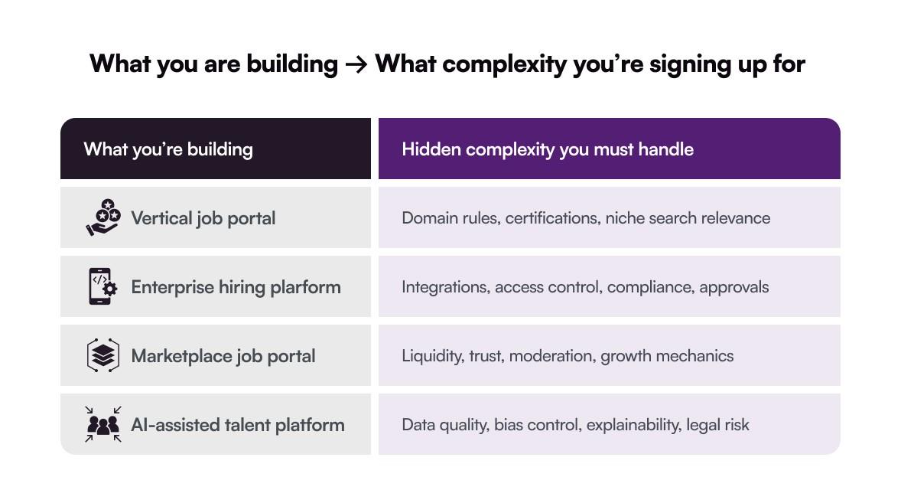
1. Vertical Job Portals 

These portals focus on a specific industry or workforce type. They win on relevance, not volume. But they demand deep domain understanding—skills, certifications, pay structures, and compliance vary widely. 

Best for: Niche markets with clear pain points and repeat hiring needs. 

2. Enterprise Hiring Platforms 

These are not public job boards. They are systems of record for hiring inside large organizations. The challenge is not traffic. It’s integration—HRIS, payroll, identity, access control, and approvals. 

Best for: Large companies optimizing internal hiring, talent visibility, and workforce planning. 

3. Marketplace-First Job Portals 

This is the hardest model to execute. Because here you are solving the liquidity problem: enough jobs and enough candidates at the same time. Growth, trust, moderation, and incentives matter more than features. 

Best for: Well-funded startups with a clear acquisition and activation strategy on both sides. 

4. AI-Assisted Talent Platforms 

These platforms promise speed and accuracy through automation. When done right, AI improves recruiter productivity. When done wrong, it creates bias, opacity, and legal risk. 

Best for: Platforms with clean data, defined hiring criteria, and human-in-the-loop decision making. 

Core Modules That Actually Matter in Job Portal Development 

Most job portals look impressive in demos. Then they fail in daily use. That’s because they are built as feature lists, not value systems. What matters is how each layer reduces friction for a specific user. 

Candidate Side 

Data Structure  

A resume is a document. A profile is a data model. If you treat them the same, matching breaks. An on-demand job portal development process should structure skills, experience, preferences, and availability in ways machines and humans can understand. Bad ones upload PDFs and hope for the best. 

Smart Search & Recommendations 

Search isn’t about filters. It’s about relevance. Candidates should see fewer jobs — and better ones. This requires clean data, intent signals, and feedback loops. Not just keywords. 

Application Tracking  

Candidates want clarity: applied, viewed, shortlisted, rejected. When status is visible, engagement stays high. When it is not, users disappear. 

Employer Side 

Job Posting Workflows 

Hiring is not linear. Roles change and requirements evolve. Portals fail when job posting is treated as a static form instead of a living workflow. 

Candidate Shortlisting, Tagging, and Collaboration 

Recruiting is a team sport. Notes, tags, and shared views matter more than fancy dashboards. If collaboration happens outside the platform, the platform has already lost. 

Hiring Analytics  

If analytics do not support decisions, they become noise. Recruiters do not need more charts. They need answers. 

  • Which channels deliver quality candidates? 
  • Where are we losing good applicants? 
  • How long does hiring really take? 

Admin / Platform Layer 

Trust & Moderation 

Fake jobs. Fake profiles. Spam applications. Ignore this, and the platform rots. Trust is not a feature. It’s an operating system. 

Role-based Access 

Hiring involves HR, managers, recruiters, and admins. Each needs different visibility and control. One-size-fits-all access breaks governance and compliance. 

Marketplace Health Metrics 

Traffic does not equal success. Applications do not equal hires. 

A feature-rich job portals track: 

  • Job fill rates 
  • Candidate drop-offs 
  • Employer response times 
  • Match quality over time 

These metrics tell you if the marketplace is working — or quietly failing. 

The Hidden Complexity No One Tells You About Job Portals 

On the surface, job portals look simple. At scale, everything cracks. 

Resume Parsing ≠ Accurate Candidate Matching 

Most systems extract keywords and call it “matching.” That works until senior titles mean different things across companies or skills are implied, not listed. Or if career gaps are intentional, not red flags. 

What breaks at scale: 
Platforms flood recruiters with “technically qualified” candidates who are contextually wrong. Recruiters stop trusting the system and go back to manual screening. 

Search Relevance vs Recruiter Intent 

Search engines rank by text. Recruiters think in outcomes. They do not want “Java developers.” But they want someone who can ship, collaborate, and start fast. 

What breaks at scale: 
As job volume grows, keyword-based search returns more results — but fewer useful ones. Recruiters scroll less. Hire slower. Blame the platform. 

Spam, Fake jobs, and Low-quality Applicants 

Fake recruiters. Scraped jobs. Mass applications. Bots do not care about UX. They care about loopholes. 

What breaks at scale: 
Candidate trust drops first. Then, the employer trusts. Once trust erodes, growth metrics lie — traffic goes up while real hiring goes down. 

Cold Start & the Liquidity Problem 

A job portal is a marketplace. Marketplaces do not work without balance. If there are no candidates available, then employers leave. And in case of no jobs, candidates don’t return. 

What breaks at scale: 
Teams overbuild features before solving acquisition on both sides. The product looks “complete” but feels empty. 

Compliance is Not Optional  

Hiring platforms deal with sensitive data, including personal identity, employment history,  and location & legal eligibility. GDPR, regional labor laws, and data retention rules differ by geography — and change often. 

What breaks at scale: 
Platforms launch fast, then freeze. Data deletion requests, audit trails, consent tracking, and regional storage were never designed in. Retrofits become expensive and risky. 

This is why job portal app development is a systems problem, not a feature problem. And why execution matters more than imitation. 

CTA

AI in Job Portal App Development: Where It Actually Works 

AI will not save a broken hiring process. But used right, it can remove real friction. 

Most job portals rush to say “AI-powered.” Few ask where AI integration enhances interaction and actually earns its keep — and where it creates risk. 

High-ROI AI Use Cases in Job Portal App Development 

  1. Resume Parsing & Normalization 

AI helps convert messy resumes into structured, searchable data. The real value is not parsing once — it’s normalizing across formats, languages, and experience levels so downstream systems don’t break. 

  1. Skill Extraction & Taxonomy Mapping 

AI works well when it extracts implied skills, maps them to a consistent taxonomy, and reduces noise from inflated job titles. This improves search, matching, and analytics without making final decisions. 

  1. Match Scoring 

AI-driven match scores help recruiters see who to review first. Humans still make the call. This keeps trust intact and reduces bias risk. 

  1. Recruiter Productivity Copilots 

This is where AI shines. It works well to summarize profiles, highlight gaps, draft outreach messages, and surface patterns across applicants. The goal is not replacement. It’s speed and focus. 

Low-ROI / Risky AI Use Cases in Job Portal App Development 

  1. Fully Automated Hiring Decisions 

Automated rejection without human review creates bias exposure, legal risk, and reputation damage. Once candidates feel judged by a machine, trust disappears. 

  1. “Black Box” Candidate Rejection 

If you cannot explain why someone was rejected, you cannot defend it. Opaque models do not scale in regulated, human-centric systems like hiring. 

  1. Unexplainable Ranking Algorithms 

When recruiters do not understand why candidates are ordered a certain way, they stop trusting the platform — or worse, over-trust it. 

Job Portal App Development Cost: What Really Drives the Budget 

Below are typical ranges based on scope, not promises. 

Platform stage What this includes Estimated cost range 
MVP (validation-ready) Core candidate & employer flows Basic search Manual moderation Single region $40k – $80k 
Growth-ready platform Scalable architecture Better search & matching Analytics Role-based access $80k – $150k 
Enterprise-grade marketplace Multi-region support Compliance AI assist Advanced moderation & reporting $150k – $300k+ 

These ranges assume custom job portal app development —not template job boards. 

Average job portal app development cost is not driven by screens or features. It’s driven by decisions. The earlier you make them, the more predictable the budget becomes. 

Here are the cost levers that actually matter. 

Single-Region vs Multi-Region Hiring 

A portal built for one geography is simpler. Language. Currency. Labor laws. Data storage. 

The moment you go multi-region, cost rises due to localization and translations, regional compliance (GDPR, data residency), and country-specific hiring rules. 

Budget impact: Moderate → High 
Multi-region portals often cost 30–50% more than single-region builds. 

Marketplace vs Internal Hiring Platform 

An internal job portal mobile app development serves one employer. A marketplace serves many — and must keep both sides active. 

Marketplaces require trust and moderation systems, abuse and spam prevention, marketplace health analytics, and more complex onboarding flows 

Budget impact: High 
Marketplaces are harder to build and harder to sustain. 

Search & Recommendation Depth 

Costs increase when you move from keyword search to intent-based relevance. Also, transition from static filters to adaptive recommendations and simple listings to ranked candidate/job results.  

Budget impact: Moderate → High 
Search quality directly affects hiring success — and long-term retention. 

AI Readiness vs AI Hype 

AI itself is not the main cost. Data readiness is. You pay more when data is unstructured or inconsistent, skills and roles aren’t normalized, and models must be retrained often.  

AI done right increases upfront cost — but reduces operational cost later. AI done for marketing slides adds cost without value. 

Budget impact: Variable 
Depends on whether AI assists workflows or pretends to replace them. 

Security & Compliance Requirements 

Hiring platforms handle sensitive personal data. Security is not optional. 

Costs rise with role-based access control and audit logs & data retention rules. Moreover, consent management, deletion workflows, and authentication further affect the cost. 

Budget impact: High for enterprise use cases 
Shortcuts here become expensive liabilities later. 

Build vs Buy vs Customize: The Decision to Job Portal App Development Most Founders Get Wrong 

Most founders choose based on speed. They should choose based on where they need control. When it comes to job portal mobile app development, there are three real paths. Each solves a different problem — and creates a different kind of constraint. 

1. Off-the-Shelf Job Board Software 

This is the fastest way to launch. Templates, plugins, and white-label job boards work when you need something live quickly. Also, if hiring is not core to your business or if differentiation does not matter yet, then off-the-shelf solutions works best.  

Where it breaks 

  • Rigid workflows 
  • Limited search and matching logic 
  • Vendor-controlled roadmap 

Hidden cost  
You do not pay in money at first but in inflexibility later. 

Exit & scale impact 
Hard to sell or scale a product you don’t truly own. 

CTA

2. SaaS APIs + a Custom Layer 

This is the middle path. You combine resume parsing APIs, search or messaging services, and payments or identity provider with a custom front end and workflow logic. 

Where it works 

  • Faster than full custom 
  • More control than templates 
  • Good for early growth 

Where it breaks 

  • API limits shape your product 
  • Pricing scales with usage 
  • Switching vendors later is painful 

Hidden cost 
Recurring API fees quietly grow with success. 

Exit & scale impact 
Viable, but acquirers look closely at third-party dependencies. 

3. Fully Custom Job Portal App Development 

This is the hardest path. It’s also the most durable. You own data models, matching logic, workflows, and roadmap.  

Where it works 

  • Clear differentiation 
  • Complex hiring workflows 
  • Long-term product vision 

Where it breaks 
Only if you skip discovery or overbuild too early. 

Hidden cost 
Upfront investment — not surprise fees later. 

Exit & scale impact 
Strongest position for scale, partnerships, and acquisition. 

A Smarter Way to Job Portal App Development 

Most job portals are built backwards. Code first. Features next. Problems later. 

We do not start there. At Galaxy Weblinks, our app development process follows a structured approach that helps you succeed.  

Discovery before development 

Before writing code, we map how hiring actually works. This prevents building a platform that looks complete but fails in real hiring conditions. 

  • Who creates demand. 
  • Who reviews candidates. 
  • Where trust breaks. 
  • Where decisions stall. 

MVP focused on liquidity and trust 

An MVP is not about proving features. It’s about proving behavior. In job portals, success depends on two things early: 

  • Employers seeing qualified candidates 
  • Candidates trusting the process enough to engage again 

Modular architecture for future AI 

AI should extend a platform, not destabilize it. We design systems so: 

  • Core logic is clean and independent 
  • Data is structured from day one 
  • Intelligence layers can be added gradually 

Design for recruiter and candidate psychology 

Recruiters want confidence in shortlists. Candidates want clarity, fairness, and feedback. A good UI/UX design increases return usage. 

Scale without rewriting the core 

Growth should not punish early decisions. The goal is simple: 

  • Add regions without rebuilding 
  • Improve matching without breaking workflows 
  • Introduce AI without starting over 

Proof this approach works beyond hiring 

We have applied the same thinking to other decision-heavy, trust-driven platforms. 

For example, in our home renovation estimation tool, homeowners struggled to find reliable contractors, navigate bidding, and manage communication and timelines—often leading to cost overruns and delays. The platform had to match the right professionals, structure complex inputs, enable transparent comparisons, and maintain trust across multiple parties. 

The challenge was not technology. It was workflow clarity, trust, and decision confidence—the same forces that make-or-break job portals at scale. 

See how Galaxy Weblinks solved this in the Home Renovation Estimation Tool case study 

Conclusion 

Most job portals do not fail because of poor engineering. They fail because of strategic missteps. 

Teams focus on copying features instead of solving hiring friction. They optimize for traffic instead of relevance. They launch quickly without designing for trust, scale, or change. 

The platforms that succeed take a different approach. They are built around clear hiring workflows, high-quality matching, and systems that can adapt as the market evolves. Trust is designed into the product. Relevance improves over time. Growth does not require rewriting the foundation. 

Hiring is not a posting problem. It’s a decision and coordination problem. Job portals that recognize this early are the ones that last. 

If you are exploring a job portal idea and want to pressure-test it before writing code, Galaxy Weblinks helps teams’ scope and de-risk complex hiring marketplaces—so you invest in the right product from day one. 

Shopify vs BigCommerce: Which Platform Should You Pick

You might have spent hours trying to find a clear, unbiased answer to the most asked question: which one is better between Shopify and BigCommerce? 

The truth is, both platforms are phenomenal. If we look at the annual revenue generated by Shopify in 2024, it was $9 billion. Whereas BigCommerce hit $310 million in 2023. That’s huge!

Both the eCommerce platforms handle inventory, process payments, and run storefronts better than anything we had a decade ago. But still, why does the decision cause so much ambiguity? 

Because it’s not about the features they have; it’s about the strategic, operational, and financial approaches they force your business to adopt.

Many businesses start well, but they fail after picking the wrong platform, which ultimately breaks the bank. But when you strategically pick your ecommerce development platform, you can build an ecommerce store that grows and scales flawlessly. 

In this comprehensive guide, we’ll offer an in-depth comparison of Shopify and BigCommerce to help you pick the right platform to build your ecommerce website. Let’s get rid of your dilemma. 

Key Takeaways:
Considering user experience and ease of use, Shopify definitely has an edge over BigCommerce. Shopify is well-suited for startups and small businesses that need a quick setup and a faster launch. BigCommerce is suitable for large businesses that need complex stores with advanced functionality.If you prioritize value, speed, and other predictable experiences, you should definitely go with Shopify.If you want to leverage advanced built-in features for your business and want better control over the API access, BigCommerce is an ideal choice. Now, both platforms’ tier pricing starts around $29/month, but their fees differ (BigCommerce is usually expensive).

What Is Shopify?

Shopify is a cloud-based ecommerce platform where entrepreneurs and businesses can sell online or in person. From developing your first-ever ecommerce website to maintaining an existing retail business, Shopify handles it all without breaking a sweat.  

It is one of the most popular ecommerce development platforms today and offers a rich set of tools and features like the drag-and-drop store editor, Shopify POS, free and paid themes, inventory and order management, secure integrated payments, AI-driven personalization, etc. 

These tools and features work together as a system that helps you set up a store in minutes and sell products anywhere. 

Shopify is ideal for:

  • Startups and small enterprises
  • Retail businesses
  • Large enterprises with scalable demand
  • Subscription-based product services 
ProsCons
User-friendly interfaceLimited core customization
Robust infrastructureApp dependency
Vast ecosystemContent limitation
Highly scalableNo email hosting
All-in-one solutionRecurring costs add up
24*7 customer supportDifficulty with migration

What Is BigCommerce?

BigCommerce is a cloud-based ecommerce solution that provides a hosting platform for building and running an ecommerce business with less coding. BigCommerce has been one of the most reliable ecommerce solutions with a wide array of features such as a drag-and-drop page editor, 130+ payment options, AI-powered personalization, and the list goes on.

From payment processing, shipping, and product features to customization, BigCommerce incorporates all the elements that are necessary to create robust ecommerce sites with advanced functionality.

BigCommerce is ideal for:

  • Mid to large-sized organizations
  • Wholesale businesses or B2B sectors
  • Businesses that need powerful SEO features
  • Companies that want to expand their marketplace
ProsCons
Robust security & complianceLimited sales volume
Multi storefrontSteeper learning curve
Unlimited staff accountsLimited customization
No transaction fees requiredNo built-in email marketing
Built-in featuresManual tax setup
Excellent scalabilityBasic blog functionality

Shopify vs BigCommerce: A Quick Takeaway

ParameterShopifyBigCommerce
Ease of UseVery beginner-friendly; simple UISlightly more complex due to more built-in features
Design & Themes100+ modern themes; strong customization using Liquid150+ themes; customization through the Stencil framework
Built-in FeaturesGood essentials, but it relies heavily on appsMore native features, fewer apps needed
ScalabilityScales well, but advanced features may require appsExtremely scalable; ideal for large catalogs and enterprises
Learning CurveVery easy to learnModerate, especially for non-tech users
PaymentsShopify Payments + 100+ gateways; extra fee if not using Shopify Payments65+ gateways; no extra transaction fees
CustomizationEasy but app-dependentMore native customization options
PricingLower starting cost, but app costs add upSlightly higher price but more included features
Best ForBeginners, small businesses, simple storesGrowing brands, enterprises, and feature-heavy stores
CTA

A Detailed Comparison Between Shopify vs BigCommerce

Choosing between Shopify and BigCommerce isn’t about which is “better”—it’s about which architecture fits your growth trajectory. While both offer hosted convenience and multichannel reach, they solve different pain points.

Let’s have a look at a more in-depth comparison between BigCommerce and Shopify:

  1. Ease of Use

Choosing a winner depends on your priority: speed or power. Shopify is the “Beginner’s Dream.” It is the most intuitive choice for those with zero tech skills. Its clean dashboard and Shopify Magic (AI) handles product descriptions and setup with almost no effort. So, it offers tools that make launching in an afternoon easy.

BigCommerce is more complex because it packs advanced features—like B2B and multi-storefront tools—directly into the core. While its robust UI has a steeper learning curve, it includes everything “in the box.” Shopify is simpler initially but relies on expensive third-party apps. BigCommerce requires more setup time but eliminates the need to manage dozens of extra plugins and fees.

Who is the winner? If you want a faster launch more intuitive user experience, Shopify wins the game.

  1. Pricing

When it comes to comparing the pricing of Shopify and BigCommerce, it’s a tie with only a minor difference. However, both the ecommerce platforms have the same pricing, starting from $29 per month. 

Here is a cost breakdown along with some alterations:

FeaturesShopifyBigCommerce
Initial Price$29 per month$29 per month
Free TrialUp to 3 daysUp to 15 days
Hidden CostsThemes Fewer apps needed
Transaction Fees2% if not using Shopify paymentZero

Who is the winner? Clearly, BigCommerce is the most suitable option because it is cost-effective compared to Shopify. Most importantly, this ecommerce platform has a 15-day free trial period. 

  1. Themes & Design

When it comes to themes, Shopify really wins, but not for the reasons most people think. In the official store, you’ll actually find around 160 curated options, with premium price tags usually landing between $180 and $390. 

While BigCommerce offers a slightly higher count of official themes at nearly 190, Shopify leads in modern theme designs. And, they are famously mobile-first; everything from the cart drawers to the navigation feels like it was built for a smartphone from day one.

BigCommerce themes are robust and great for massive, heavy-duty catalogs, but their free options can feel a bit dated compared to Shopify’s sleek aesthetic. Shopify’s “Online Store 2.0” makes moving blocks and sections feel natural with an updated theme architecture. 

Who is the winner? When it comes to themes & design, Shopify seems to be winning the race because of its mobile responsiveness and modern themes. 

  1. Payment Gateways

When comparing payment gateways, the distinction comes down to cost versus convenience. Shopify pushes its in-house provider, Shopify Payments, which simplifies setup and includes solid fraud analysis tools. However, there is a catch: if you choose a third-party gateway like PayPal or Stripe instead, Shopify hits you with an extra transaction fee ranging from 0.5% to 2%. This “platform tax” can seriously eat into your margins as you scale.
BigCommerce takes a more flexible approach. It supports over 65 pre-integrated gateways without charging any additional transaction fees, regardless of your plan. This freedom allows you to negotiate better rates with your preferred provider and keep more of your profit.

Who is the winner? BigCommerce wins for flexibility and cost-efficiency. It gives you total freedom to use your preferred payment method without being penalized for not using an in-house system. 

  1. Security

Shopify offers a fortress-like, fully managed security environment. It is PCI DSS Level 1 compliant by default, meaning it meets the highest global standards for credit card data protection from the moment you sign up. 

Every store is automatically issued an SSL certificate, ensuring all data transmitted is encrypted via HTTPS. Because Shopify is a closed, hosted ecosystem, they handle the heavy lifting of server patches and vulnerability monitoring, leaving you with zero “security debt.”

BigCommerce provides an equally robust, multi-layered defense system. Like its rival, it is PCI DSS Level 1 certified across all its servers, providing enterprise-grade protection against data breaches. It also offers a variety of SSL options, including the ability to bring your own high-assurance certificate. 

BigCommerce excels in its transparent uptime and proactive mitigation of DDoS attacks. The platform is architected to ensure that as your traffic scales, your security protocols don’t lag behind.

Who is the winner? Both platforms are exceptional in terms of security features, and it’s a tie for BigCommerce vs Shopify. 

  1. Selling Features

Shopify is built for speed and accessibility. Its native toolset—including abandoned cart recovery, automated discount engines, and multi-channel synchronization—is designed for immediate deployment. You don’t need a developer to launch a complex promo. 

While its core features are robust, Shopify relies heavily on its App Store (thousands of vetted add-ons) to provide niche functionality. This “pick-and-mix” approach keeps the interface clean but can lead to monthly “app creep” in your billing.

BigCommerce takes a “built-in” philosophy. Its Channel Manager is arguably more powerful out of the box for enterprise-level multi-channel selling. It allows you to sync inventory and orders across eBay, Amazon, and Walmart without necessarily relying on third-party apps. 

BigCommerce often includes advanced features—like customer groups and wholesale pricing—in its core product, which Shopify typically hides behind “Plus” or third-party paid apps. 

Who is the winner? Well, it’s a tie between Shopify and BigCommerce on this point.   

  1. SEO Features

Shopify is considered the gold standard in terms of SEO that truly puts the user at the forefront. It has been designed to have a clean and unfussy workflow in which nontechnical founders can optimize meta tags, product descriptions, and URL structures in seconds.

It automates all of the under-the-hood technicalities, such as SSL certificates and sitemap generation, without manual effort.

BigCommerce is for those who want granular, “pro-level” SEO tools baked into the core engine. BigCommerce provides more technical flexibility than Shopify, with examples including the ability to change URL structures entirely and a more robust native blogging engine.

With this power, however, comes a more substantial learning curve: its interface is less intuitive, and if you don’t know your technical SEO, you may find yourself needing to hire a consultant or an agency to unlock its full potential.

Who wins? Taking this factor into consideration for the Shopify vs BigCommerce battle, Shopify would win with ease of implementation, and BigCommerce for advanced technical control.

  1. Customer Support

As soon as you sign up for a free trial, you’ll receive an appointment that will be a 10-minute call. The reason for doing so is to understand your business briefly and give suggestions accordingly. 

Shopify customer service provides support via their social media channels. If you ask for assistance in the Shopify editor, it will take you to the corresponding page in the Shopify knowledge centre.

Who is the winner? BigCommerce’s help centre is useful but less clear than Shopify’s. A more streamlined help centre organization and in-app guidance may give it a small advantage, making support issues easier to resolve for Shopify merchants.

Final Words

If you’ve spent time comparing Shopify vs BigCommerce, you already know both are powerful ecommerce platforms — just built for different kinds of businesses. The real question isn’t which one is “better,” but which one fits you.

Shopify shines when speed and simplicity are your top priorities. Its clean interface and massive app ecosystem make it perfect for brands that want to launch fast, test ideas, and spend their time selling — not tinkering with backend settings.

BigCommerce, on the other hand, feels built for the engineers and growth strategists out there. It’s the go-to for complex catalogs, B2B setups, and stores that need serious customization without relying on endless plugins. It demands a bit more technical know-how, but in exchange, you get power and scalability that pay off in the long run.

Most businesses get stuck at this very decision point — and that’s where we come in. At Galaxy Weblinks, we don’t push one platform over the other. We dig into your business model, your SKUs, your operations, and your growth goals to recommend what truly fits.

Whether that means a sleek, high-converting Shopify storefront or a headless BigCommerce build that can handle enterprise-level complexity, our team knows how to make it work — and make it last.

Still unsure? Let’s talk. One quick conversation with our ecommerce experts could save you weeks of trial and error — and help you build an online store that actually grows with you.

FAQs

Q. I’m on BigCommerce—is migrating to Shopify actually worth it? 

A. It depends on your pain points. If you’re tired of fighting a clunky backend and want better design flexibility, Shopify is a no-brainer. It’s perfect for brands that want to scale fast without needing a developer for every tiny change. Shopify’s app ecosystem is massive too. Most expanding firms switch because they want that “easy-to-use” flow that saves time and money.

Q. BigCommerce vs. Shopify Plus: Which one wins for scaling a store? 

A. Honestly? Shopify Plus usually takes the crown for most high-growth brands. It’s just more versatile. Everything from the checkout experience to backend automation is built to handle massive spikes in traffic without breaking. If you want a setup that’s simple to manage but powerful enough to hit eight figures, Shopify has the edge. It’s the favorite for a reason—it just works.

Q. What’s the monthly cost for a BigCommerce subscription? 

A. Their pricing tiers are pretty standard. You’re looking at:

  • Standard: $39/mo
  • Plus: $105/mo
  • Pro: $399/mo
  • Enterprise: Custom pricing (this is for the big players). One thing to watch out for—BigCommerce has “sales caps.” If you sell too much, they’ll automatically bump you to a more expensive plan.

Q. Is BigCommerce a good fit for small businesses or startups? 

A. It can be, especially if you have a massive product catalog right from day one. But for most small teams, it’s a bit overkill. Shopify is usually the better bet for startups. You get a hassle-free interface and can launch in days. BigCommerce is great if you need “built-in” features, but Shopify is better for those who want speed and a huge library of third-party apps to customize everything.

Q. Is there actually any platform better than Shopify? 

A. “Better” is subjective. If you’re a WordPress fanatic, WooCommerce is your best friend. For someone who wants a super simple, aesthetic portfolio with a shop, maybe Squarespace works. But for a serious eCommerce business? Shopify is the most comprehensive tool on the market. It’s the industry standard for a reason—it’s hard to beat that mix of power and simplicity.

Mobile App Development for Startups:  A Comprehensive Guide

Do you own a startup and are thinking of developing a high-performing mobile app? If yes, read this guide till the end and discover everything you must know. 

Creating a mobile app opens many opportunities for startups to grow and shine. Can you guess why it is so? Just consider this: 63% of consumers rely on apps to find information about brands on mobile devices (HubSpot report). Your brand can be the next. 

You can simply increase your brand visibility and closely engage with your potential users with a mobile app. But the main question is “how can you make your mobile app unique from others?” 

The market is crowded. Mobile apps are everywhere. So if yours looks and feels the same, users bounce fast. You need something different. A hook. A reason to stay.

That’s where working with the right mobile application development company matters. They help shape the experience, not just the code. Smart flows. Better performance. Fewer drop-offs. Because standing out today isn’t optional. It’s survival.

App development for startups (like yours) will be successful when they know all the prerequisites. To gain all the in-depth insights about building apps that help startups succeed, read this complete guide. 

We​‍​‌‍​‍‌​‍​‌‍​‍‌ have covered all the topics, starting from the significance of apps for startups to understanding the key challenges you might be dealing with, and everything in between.  

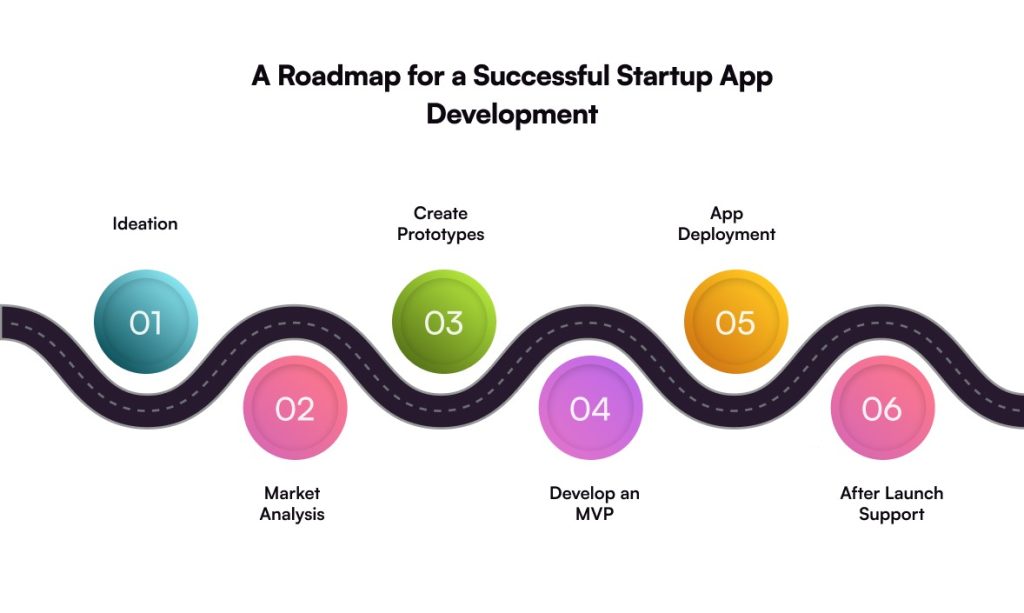
Key Steps to Develop a Mobile App for Startups

This section sets the stage. It explains what really goes into building a startup mobile app, without drowning you in theory. You’ll see how ideas turn into something usable. How early decisions quietly affect cost, speed, and scale later. It touches on validation, design thinking, tech choices, development realities, and launch readiness. Not as a checklist. More like a flow.

  • Idea Conceptualization

To begin with your startup app development, make sure to work on your ideas carefully. You need to list down certain (yet crucial) things, like defining the app’s core purpose, your targeted audience, and what unique value it will bring. This stage is like the foundation of your app development, so make the best of it. 

  • Market Research & Analysis

Once ideas are conceptualized and shared, a development company begins its market research. The team conducts competitor analysis, understands user demands (or expectations), and most importantly, finds the gaps to fill in. It helps in creating an effective app strategy to make your app stand out in the market. 

  • Prototyping & Design

Prototyping & design is where ideas stop being vague. Screens get shape. Flows start to make sense.

For startups, this phase is about speed and clarity. Not perfection. Wireframes test assumptions early. Clickable prototypes expose friction before code is written. Cheap fixes now. Expensive ones later.

Good Ui/UX design focuses on real user behavior. Not opinions. Navigation, core actions, dead ends. Everything gets questioned. This stage reduces risk, aligns teams, and sets a solid base for development.

  • MVP Development

Don’t​‍​‌‍​‍‌​‍​‌‍​‍‌ go off the deep end and create a feature-rich application for your startup app development project from day one. Rather, begin with an MVP development: Construct the client’s and the server’s parts of the app by best practice standards.

  • Keep the main features that directly contribute to solving the primary problem.
  • Get your product out there as soon as possible to collect user feedback
  • Work on the product based on the actual usage and not on your assumptions

By taking this lean route, you are essentially engaged in risk reduction and rapid learning and execution through your startup mobile app ​‍​‌‍​‍‌​‍​‌‍​‍‌development.

  • App Launch & Deployment 

Once​‍​‌‍​‍‌​‍​‌‍​‍‌ the MVP has been tested and adjusted, the next step is the deployment phase. This stage involves readying the store listings for a seamless release on iOS or Android. Being a startup owner, you need to take care that the app company meets the app ​‍​‌‍​‍‌​‍​‌‍​‍‌regulations.

  • Post-Launch Support

The app development process doesn’t end here; it’s time to maintain the app’s performance by offering post-launch support. From continuous monitoring to performance tracking and regular updates to fix bugs, this phase includes everything that ensures the app’s optimal performance.

What are the Different App Development Options for Startups?

Before you fully invest in building an app, understand exactly what type of app you want for your business that will perfectly align with your budget and requirements. Listed below are three main types of mobile apps. 

  • Native Apps

Native apps are designed for a single platform (iOS or Android) only. For this, native programming languages and tools specific to that platform are utilized. These apps deliver the best performance and smoothest user experience, but development has to be done separately for each platform.

  • Hybrid Apps

Hybrid app development has the characteristics of both native and web apps in terms of functionality and is compatible with different platforms. They provide a compromise between price and performance, and, at the same time, they might not be as fast as the native ​‍​‌‍​‍‌​‍​‌‍​‍‌ones. 

  • Cross-Platform Apps

Cross-platform apps: These apps are created with the help of a framework like Flutter or React Native and have the capacity to work on various platforms with the same codebase. This leads to a decrease in both time and money for the development process. Nevertheless, they may not have access to all the native features completely. 

  • Progressive Web Apps (PWAs)

PWAs sit in a sweet spot. Not fully native. Not just a website either. They load fast. Work offline. Install like an app. No app store drama. For startups, that’s big. One codebase. Lower cost. Faster launch. Users get push notifications, smooth UX, and instant updates. Found via search too. Not perfect for heavy hardware use. But for MVPs, marketplaces, SaaS tools? PWAs move fast. And speed matters early.

Why Mobile App Development for Startups Is Crucial

You can’t expect your startup to succeed without a mobile app. People are no longer standing in a queue at brick-and-mortar stores; they are scrolling through their screens, discovering budding businesses. 

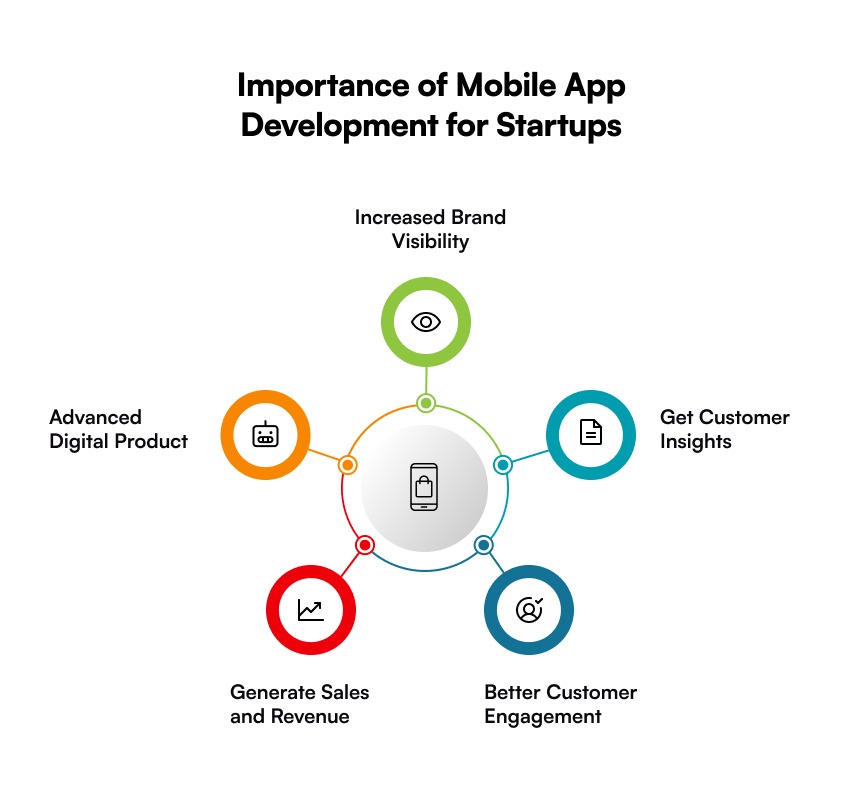
Here are 5 key reasons that tell why app development for startups is an ideal choice: 

  • Boost Brand Visibility

You want to boost your brand’s visibility? Building a mobile application can do that. A well-designed app will keep your brand right in front of the users. It will simply remind them of your product & services every time they use their mobile phone. That being said, an app development for startup owners can simply amplify their brand visibility. 

  • Gain Customer Insights

Without​‍​‌‍​‍‌​‍​‌‍​‍‌ customer insights, no business can survive, and mobile app development is a tool that helps you gain those insights. For a startup, app development is just like having a direct line that automatically detects, collects, and processes the real-time data of your users according to their preferences, behaviours, and interactions. Ultimately, the outcome is higher customer engagement and ​‍​‌‍​‍‌​‍​‌‍​‍‌loyalty. 

  • Improve Customer Engagement

As per Statista, people spent nearly 141 minutes per day scrolling through their feeds, which highlights the average mobile usage among users. It means users are likely to engage with your brand. Other than this, you can send push notifications or personalized messages for better customer engagement. 

  • Drive Sales and Revenue

Thanks to mobile apps that make your brand feasible and 24/7 accessible, resulting in increased sales and higher revenue. When users get personalized experiences or exclusive offers, they tend to become loyal customers and might even refer to their people. Other than this, you can also monetize your mobile app to earn more profit.

  • Smart Marketing Tool

In a digitally-advanced world, having a highly optimized mobile application is a powerful marketing tool for startups. From personalized communication to driving sales and increased customer engagement, a mobile app is everything your startup business needs. It’s like having a magic wand, but only when you have the right development team with you.

Common Challenges Startups Face While Creating Mobile Apps

Building apps, especially for startups, isn’t an easy task because it takes more than just an idea. From effective strategy and tools to ensuring long-term scalability, app development for startups is a complete package that comes with a certain set of challenges. 

Here is a list of key challenges you also must be facing:

  1. Budget Constraints: Plenty of startups struggle with budget and require an effective financial plan. To overcome such a challenge, an MVP development is the most common solution to test whether your app idea will work or not before investing a hefty amount. 
  2. Finding the Right Team: Most startups have brilliant app development ideas and have a budget too, but they often fail to find the right app development company. To ensure you are making the right choice, consider checking the company’s portfolio and reviews to make a better decision. 
  3. Standing Out in the Competition: The market of startup app development is already crowded. That means, you don’t just need an idea but a strong USP and an intuitive design to stay abreast of your competitors. 
  4. Data Security and Privacy Concerns: During the initial phase, startups mostly overlook the security concerns (which is definitely not ideal). Make sure your app is compliant with industry standards and strongly encrypted. 
  5. Choosing the Right Tech Stack: Startup owners often struggle with choosing the right technology, such as Flutter and React Native. Both frameworks offer speed and cost-efficiency, but it depends on the business’s project complexity and requirements. 

Also Read: Learn the difference between Flutter vs React Native. 

How Much Does It Cost to Develop a Mobile Application for Startups

The​‍​‌‍​‍‌​‍​‌‍​‍‌ price of creating a mobile app is not the same, but it depends largely on its intricacy, functionality, and the way it is created. Just to give an idea of the cost (which is always subject to change): 

App Development Cost by Platform

App PlatformBasic AppMid-Level AppComplex App
Android App Development$5,000 to $15,000$15,000 to $30,000$72,000 and increasing
iOS App Development$5,000 to $25,000$25,000 to $75,000$75,000 to $150,000+
Cross-Platform Development$5,000 to $20,000$20,000 to $70,000$70,000 to $100,000+

App Development Cost by Industry

Industry Estimated Cost Range
Healthcare App$20,000 to $500,000+
eCommerce App$10,000 to $250,000+
Fintech App$30,000 to $250,000
Social Media App$10,000 to over $120,000+
On-Demand App $25,000 to $150,000+

How Galaxy Weblinks Can Help You with App Development for Your Startup

Your startup needs more than just a mobile application; it needs a digital product that can drive growth and user engagement. And, at Galaxy Weblinks, we understand this. That is why our team focuses on building apps that are highly scalable, user-centric, and performance-driven. 

It​‍​‌‍​‍‌​‍​‌‍​‍‌ is not enough for your startup to have only a mobile application; what it really needs is a digital product capable of leading the expansion and the user engagement. We at Galaxy Weblinks certainly get this. So, our team commits to developing apps that can not only be easily scaled but are also user-friendly and performant. 

We are with you at every step of your startup app development journey. From designing an effective growth strategy for your startup to Design Thinking, QA, and providing continuous support, we have got you ​‍​‌‍​‍‌​‍​‌‍​‍‌covered. 

So, contact us, and let us know what app you have in mind, and we will make a great digital product out of ​‍​‌‍​‍‌​‍​‌‍​‍‌it. 

FAQs

Q. Why should startups work on developing their mobile app for their business?

A.​​‍​‍‌​‍The key factor that can facilitate a fast growth process in a starter business is a mobile app. The key advantage among the benefits pro​oved​​‍​‍‌​‍​​ ​ ​by a mobile application is the higher level of customer engagement and loyalty, which can be ensured through personalization. Using a mobile app, the entrepreneurs are able to gain customer insights, leading them to make more informed ​‍​‌‍​‍‌​‍​‌‍​‍‌decisions. ​‍​‌‍​‍‌​‍​​ ​​‍​‍​

Q. How much time does it take to build a mobile app for startups?

A. It might take anything from seven days to nine months or more. There is no concrete answer to this query. It is a truth that developing a mobile app from scratch takes a long time; nevertheless, it also depends upon several other elements. For example, project complexity, integration, UI/UX design, etc. Still, on average, it may take 3 to 12 months for an app with simple functionality.

Q. What is the approximate cost to develop an app for the mobile platform that would be attractive to startups?

A. For start-up companies, the cost of development will start from $5,000. However, it depends on the platform you choose, and it could be more. If you want an estimation of cost regarding your application development, you can get it from us. 

Education App Development: Features, Process & Cost

Building an education app sounds exciting. The demand is real, and the opportunity looks obvious. But most businesses are still lagging. If you are also one of them, read this guide till the end. 

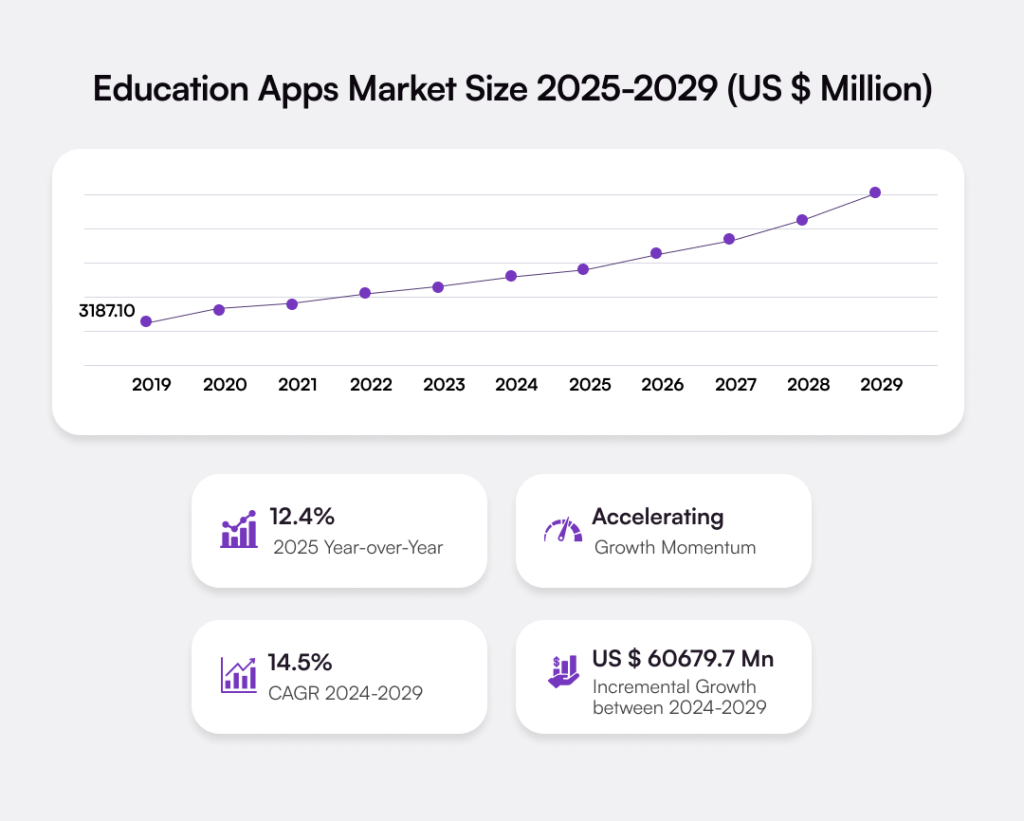
The education apps market is growing faster. The global EdTech market is expected to reach USD 348.41 billion by 2030, increasing by a CAGR of 13.3%. This rise continues as more learners choose online education platforms and apps. 

Students, professionals, and even kids now expect learning on their phones. That means apps aren’t just “nice to have”, they are now a core learning tool. Companies see higher engagement. Schools see better outcomes, and corporations see faster upskilling.

In this blog, we’ll walk you through the process to develop an education app. Apart from this, it helps you understand different types of educational apps, must-have features, cost, and more. 

What Is Education App Development?

Education app development is about building mobile-based digital learning platforms. Apps that deliver courses, training, and skill-based content on mobile and web. 

At its core, education mobile app development brings technology, content, and experience together. It’s built for access from anywhere and anytime, on phones, tablets, and the web.

These apps support schools, universities, startups, and enterprises that need learning systems to scale without breaking. Not just videos or quizzes. A complete learning ecosystem that grows with users, content, and business goals.

Modern educational apps don’t follow the old classroom rules. It stretches beyond them. Live sessions, recorded lessons, AI-driven suggestions, progress tracking, certifications, etc. Everything available inside one app.

That’s why EdTech app development isn’t limited to academic institutions anymore. Corporates use it to train teams. Coaches use it to sell expertise. Startups use it to reach learners across borders. In short, learning has changed. 

Market Overview

  • North America dominated the EdTech market and accounted for a 33% growth.
  • Personalized learning experiences are becoming increasingly prevalent, catering to diverse student needs.
  • By 2035, the education app market is expected to reach $443.62 billion. [Source]

Distinct Types of Education Apps in the Market

The education app market isn’t uniform, and never was. Learners differ in goals, needs, budgets, and challenges. That’s why education app development never follows a one-size-fits-all approach. It depends on who you’re building for and why.

  • Online Courses and eLearning Apps 

These types of apps are all about experience that includes videos, quizzes, certificates, and progress screens that users actually check. eLearning apps are popular in upskilling and professional learning. UX design decides everything. If learning feels slow, cluttered, or boring, users immediately stop using the app. 

  • Live Tutoring and Virtual Classroom Apps 

Virtual classroom apps like Google Classroom, Moodle, and Adobe Connect depend on trust that’s built in real time. One-on-one sessions, group classes, shared whiteboards, and live chat, everything happens at once. Feedback has to be instant. Even a small delay feels bigger during a live class. Users notice it, and they lose focus in no time. 

  • Exam Prep and Test Practice Apps 

Exam or test practice apps are built for results. They focus on mock tests, timed exams, and performance analytics that give actual insights. As a result, personalized improvement path helps the learners to fix their weak areas. 

  • Corporate Training and Employee Learning Apps 

Employee learning apps are responsible for resolving internal problems, like onboarding, compliance, or skill upgrades. These apps have short lessons, role-based access, and manager views. Companies invest to save time and cost. This is where enterprise-grade EdTech app development services actually matter. A lot.

No two education apps are the same as they have different users, tech, and most importantly, costs. That is why choosing the right model early saves money and time.

  • Learning Management System (LMS) 

LMS apps are at the center of structured learning. They handle courses, users, exams, reports, and a lot of data. Schools need control, and enterprises need tracking at scale. These systems are built for reliability, and not visual appeal. They support heavy usage and complex workflows. That’s why LMS app development demands a strong backend and a stable architecture. 
We’ve built enterprise-grade LMS platforms designed for structured training, role-based access, and performance tracking at scale. Check out our project in detail to get an idea of how we helped our client build a robust online learning platform that streamlines learning. 
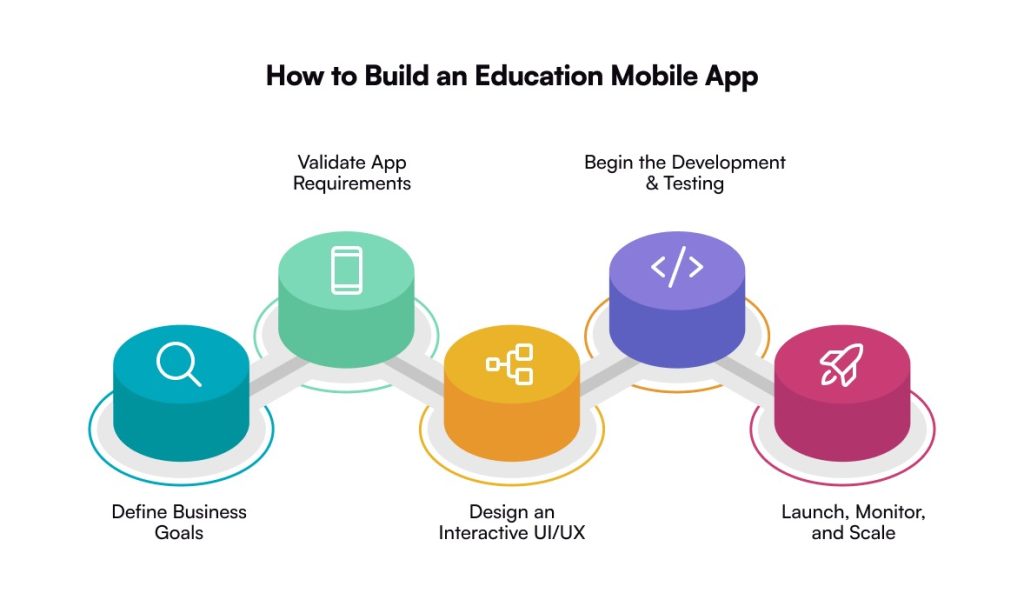
Key Steps to Build an Education App

Building an education app isn’t just about writing code. It’s a product call. A business one. Every step you take affects cost, performance, and whether users stay or quietly disappear.

1. Define the Learning Model and Business Goals

Education apps don’t start with content. They start with people. Learners, trainers, or internal teams. First, get clear on who the app is built for and how they learn. Students preparing for exams. Professionals upskilling. Teams training at scale.

Then define the outcome. Courses, live classes, assessments, certifications, or internal training. Each choice changes the product direction. This clarity shapes the entire education app development process. It influences features, UX, content structure, and technology decisions. 
2. Validate Features and App Requirements

Features should solve real learning problems. Do not copy competitors. Start by understanding what users actually need to progress. Learner roles, content formats, assessments, payments, progress tracking, and analytics.

Every feature should earn its place. If it doesn’t support learning outcomes or business goals, it doesn’t belong. This validation keeps the education app focused, usable, and scalable. Skip it, and feature overload slows development and hurts adoption.

3. Design a User-Centric UI/UX

Most education apps struggle here. Not because the content is weak, but because the experience feels heavy. Users get lost. Navigation takes effort. Onboarding feels slow.

Good UI/UX design removes friction. Clean flows. Simple screens. Clear progress. When learning feels easy to move through, engagement improves naturally. This is where UI/UX design services directly impact retention. No debate.

4. Choose the Right Tech Stack

The tech stack sets the limits of your app. Speed. Stability. Scalability. Everything depends on it. From mobile frameworks to cloud infrastructure, databases, and APIs.

Education platforms evolve fast. New content. New users. New learning formats. Many teams rely on custom software development to stay flexible and avoid rebuilding when growth kicks in.

5. Develop, Integrate, and Test the App

This is where planning turns into a real product. Frontend and backend move together. Integrations happen alongside development. Testing isn’t delayed. It runs in parallel.

Performance matters. Especially for video, live classes, and assessments. Strong mobile app development services make sure the app performs under real load, not just in demos.

6. Launch, Monitor, and Scale

Launch isn’t the finish line. It’s the starting point. Watch how users behave. Where they drop off. What they skip. Those signals guide what to fix next.

As usage grows, scale should feel planned, not rushed. More learners. More content. More traffic. Teams that think about this early scale smoothly. Others scramble later.

Must-Have Features to Include in Your Education App

Features decide whether users stay or silently leave. It’s rarely about more features. It’s about the right ones, built well.

  • Live Sessions and Tutorials: Live sessions add real interaction to digital learning. Learners ask questions, instructors respond, and attention stays longer. Miss this, and learning starts to feel one-sided.
  • Video-Based Content: Video content keeps learning flexible and easy to consume. Users pause, rewind, revisit. That freedom matters more than fancy visuals.
  • Offline Mode: Offline access removes the internet from the equation. Lessons stay available even when networks don’t. Often overlooked. Usually regretted later.
  • Push Notifications: Notifications bring users back when interest dips. Class reminders, progress nudges, missed sessions. Not too many, though. Nobody likes spam.
  • Gamification: Gamification makes learning feel lighter. Points, badges, small wins. It’s not childish. It’s psychological, and it works when done right.

How Much Does an Education Mobile App Development Cost

Education app development cost is never a fixed number. If someone gives you a single figure, pause. It’s an oversimplification most times. The cost really depends on what you’re building. How complex the app gets. And how far you plan to scale from day one. 

A basic learning app costs less, while a full LMS or a live tutoring platform can be a little expensive. 

Long-term growth is another piece people miss. An MVP development just to test an idea costs less. That’s true. But apps designed for scale need stronger architecture, deeper testing, and reliable cloud setup. That’s where the cost increases. 

Your goal should be to build cheaply. It’s to build something that doesn’t need rebuilding six months down the line.

Estimated Education App Development Cost Breakdown

App ComplexityEstimated Cost RangeEstimated Timeline
Basic Educational App$20,000 to $40,0003 to 4 months
Medium Complexity App$40,000 to $65,0004 to 6 months
Advanced App with Features$65,000 and aboveMore than 6 (or sometimes 9) months

Note: These are estimated ranges. Final education app development cost varies based on design depth, platform choice (iOS, Android, or both), third-party integrations, and ongoing maintenance needs.

Tech Stack Used for Education App Development

Following is a list of the technologies used for developing an educational app, along with the emerging tech stack that you must know:

  • Frontend (User Interface)

Cross-Platform: React Native, Flutter (single codebase for iOS & Android).

Web: React.js, Angular, Vue.js.

Native: Swift (iOS), Kotlin (Android) for platform-specific builds. 

  • Backend (Server-Side Logic) 

Languages/Frameworks: Node.js (Express), Django (Python), Ruby on Rails, Spring Boot (Java).

  • Databases (Data Storage)

SQL: PostgreSQL (robust, complex queries).

NoSQL: MongoDB (flexible, scalable for unstructured data).

Real-time: Firebase (quick setup, sync). 

  • Cloud & Deployment

Providers: Amazon Web Services (AWS), Microsoft Azure, Google Cloud Platform (GCP).

Services: Hosting, storage, machine learning, analytics.

Emerging Technologies Used for Education App Development

  • Augmented Reality: AR brings learning into the real world. Users interact, not just read. Concepts stick better. Engagement stays high. A strong fit for modern education app development.
  • Artificial Intelligence: AI makes education apps feel personal. It adapts to users. Recommends what to learn next. Tracks progress in real time with minimal guessing and better outcomes.
  • Virtual Reality: VR creates fully immersive learning environments. Users learn by doing. No physical limits. Ideal for simulation-based education apps that demand a deeper understanding.

Why Businesses Must Create an Education App in Today’s Times?

Businesses can’t rely on traditional learning models anymore. Attention spans are shorter. Teams are working remotely. Learners expect access on demand. An education app gives businesses control over how knowledge is delivered, tracked, and improved. 

Below are some of the top advantages of building an education app:

  • On-Demand Learning Access: Learning happens on demand. Anytime. Anywhere. No fixed schedules. No location limits. Users learn when it actually fits their day.
  • Scalable Knowledge Delivery: Content is built once, then reused. Updated easily. Scales as teams grow. Works for ten users or ten thousand.
  • Measurable Learning Outcomes: Progress is visible. Performance is tracked. Completion rates tell you what’s working and what’s not. Decisions get clearer.
  • Improved User Experience: Good UX removes friction. Navigation feels easy. Learning feels lighter. Users stay longer instead of dropping off.
  • Supports Remote and Hybrid Teams: Distance doesn’t break learning. Everyone gets the same experience. Same content and same standards across different locations.
  • Stronger Brand Authority: Structured education builds trust. It shows expertise. Over time, the brand becomes a learning authority, not just a provider.

The benefits are clear by now. But here’s the real truth. An education app only works if the experience works.

And this is where mobile app development services stop being optional. They shape how fast your education app runs, how easy it feels to use, and how well it scales as users grow.

Businesses that invest in tailored, user-first platforms don’t just teach. They scale knowledge. 

Common Challenges While Developing an Education App

Education app development looks simple on paper. In reality, teams face challenges that directly impact adoption, cost, and long-term scalability.

  • Balancing Content and Technology: Strong content alone isn’t enough. If the platform can’t support delivery smoothly, learning breaks and users disengage.
  • User Engagement and Retention: Getting users to install the app is easy. Keeping users active is harder than getting installs. Consistency drops fast when learning feels heavy or repetitive. Most education apps lose users here, not at launch.
  • Scalability and Performance Issues: Scalability becomes the real test. An app that runs fine for 100 users often breaks at 10,000. Slow load times. Crashes during sessions, and trust disappears quickly.
  • Complex Feature Integration: Feature integration adds another layer of risk. Live classes, video streaming, payments, and analytics must move together. When they don’t, users feel friction before teams notice the problem.
  • UI/UX Design Challenges: Learning apps carry a lot of information. If navigation feels heavy or confusing, users drop off without warning.
  • Data Security and Privacy Compliance: Education apps deal with sensitive user data. Such as student records, payment details, and activity logs. If security is weak, trust breaks fast. Compliance risks follow. And reputational damage lasts longer than any feature release.
  • Cross-Platform Compatibility: Users don’t stick to one device. They switch between iOS, Android, and web. Each platform behaves differently. Maintaining consistent performance across all of them adds complexity, but skipping it hurts experience and adoption.
  • Cost and Timeline Overruns: Unclear requirements stretch timelines and budgets. Small planning mistakes early turn expensive later.

Education App Monetization Models to Generate Revenue

Building an education app is an investment. Monetization decides whether it grows or just exists. The right model depends on who you’re building for, how deep the content goes, and what scale you’re aiming for long-term.

  • Subscription-Based Model: Users pay monthly or yearly for continuous access to learning. Revenue stays predictable. Planning becomes easier.
  • Freemium Model: Entry stays free. Value builds trust. Advanced lessons, certifications, or tools unlock only when users are ready to pay.
  • Pay-Per-Course Model: Learners pay only for what they need. Works well for niche skills and expert-led programs.
  • In-App Purchases: Extra resources sit inside the app. Practice tests, downloads, or one-on-one sessions are added when users need them most.
  • Corporate Licensing Model: Companies pay for team-wide access. Training scales faster without managing individual subscriptions.
  • Certification and Assessment Fees: Knowledge turns into credentials. Learners pay for exams and verified proof that holds professional value.
  • Ad-Based Model: Access stays free. Revenue comes from reach. Best suited for apps with high daily usage and large audiences.
  • Marketplace Model: Experts sell. The platform takes a cut. More courses, more variety, and shared growth on both sides.

Popular Education Apps 

Here is a list of some of the most widely used and downloaded education apps in today’s time:

  1. Duolingo

Designed for daily learning habits. Short, gamified lessons reduce friction and keep users consistent over time.

Known for: Gamified Learning Experience

Android Rating: 4.7

iOS Rating: 4.8

  1. Photomath

Built for instant problem-solving. Users scan equations, see step-by-step solutions, and understand the logic behind answers.

Known for: Camera Math Solver

Android Rating: 4.5

iOS Rating: 4.6

  1. Quizlet

Focused on revision and memory. Flashcards and practice tests help learners recall faster, especially before exams.

Known for: Flashcards and Practice Tests

Android: 4.5

iOS: 4.6

  1. BYJU’s

Structured for academic depth. Live classes and interactive content support guided learning across different education levels.

Known for: Live Classes and Interactive Sessions

Android: 4.2

iOS: 4.3

Conclusion

Education app development is no longer a side experiment. It’s a strategic move. It shapes how businesses teach. How they scale, compete in a market that’s already crowded, and are still growing. Choosing the right app type matters. So do features, process, cost, and the tech stack behind it. Every decision counts. Get it right, and the app grows. Get it wrong, and the struggle starts right after launch.

What stands out is this: education mobile app development works best when it’s planned end-to-end. Not rushed. Not copied. 

This is where experience makes the difference. With years of hands-on expertise in education app development services, the team at Galaxy Weblinks helps businesses turn learning ideas into scalable digital products. From MVPs to enterprise-grade platforms, the focus stays the same. Build apps that users enjoy, and systems that scale.

Check our portfolio!

FAQs

1. How long does education app development usually take?
It depends on what you’re building. A basic education app or MVP can take 3–4 months. More advanced education mobile app development, like LMS or live tutoring platforms, usually takes 6 months or more.

2. What is the average cost of developing an educational app?
There’s no fixed price. Developing an educational app can cost anywhere between $20,000 to $65,000+, depending on features, complexity, and scalability needs. The more you plan for growth, the more it impacts cost.

3. Which platform should I choose for my education app, iOS or Android?
Most businesses choose both. Cross-platform education app development helps you reach more users faster while keeping costs under control. The right choice depends on your target audience and market.

4. What features are essential in education app development?
Core features include video-based content, live sessions, offline access, push notifications, and basic analytics. Without these, even well-designed education apps struggle with engagement and retention.

5. Why should I choose professional education app development services?
Because building is easy. Scaling isn’t. Professional education app development services ensure your app is secure, user-friendly, and ready to grow without performance issues or costly rework later.

NodeJS App Development for Enterprises: Everything You Need to Know

NodeJS app development sits at the core of modern backend and full-stack systems. Not by hype. By use. Teams choose Node.js because it moves fast, scales cleanly, and fits real production needs without drama.

It runs on JavaScript. One language. Frontend to backend. That alone changes how quickly products ship and evolve.

The adoption numbers make it obvious. According to Statista, over 48.7% of developers actively use Node.js, making it one of the most cited web technologies in 2025. Hundreds of enterprise brands and millions of web apps rely on it daily for APIs, real-time apps, and backend services.

This isn’t a niche trend anymore. NodeJS app development powers large parts of today’s web and mobile ecosystem. And its footprint keeps expanding.

This guide cuts through the noise. We break down NodeJS app development in practical terms. Core features. Real use cases. And the development process that actually works.

Why NodeJS App Development Is an Ideal Choice for Enterprises?

Enterprises don’t choose technology because it’s trending. They choose it because it survives pressure, scale, load, and change. NodeJS app development fits that mindset better than most backend technologies today.

First, performance at scale. Node.js runs on a non-blocking, event-driven architecture. Which sounds technical, yes. But in practice, it means one thing: Node handles thousands of concurrent requests smoothly. 

For enterprises dealing with real-time dashboards, APIs, chat systems, or high-traffic platforms, this matters a lot. You’re not spinning up unnecessary threads. You’re using resources intelligently.

Then there’s speed of development. Enterprises move more slowly than startups, but they still want efficiency. NodeJS app development allows teams to build faster because JavaScript runs on both the frontend and backend. 

Scalability is another quiet win. Node.js plays well with microservices and cloud-native architectures. Enterprises rarely build monoliths anymore. They build systems that grow sideways. Node.js supports that naturally. Whether it’s containerized services, APIs, or event-based workflows.

Key Features of NodeJS for Mobile App Development

NodeJS for mobile app development works because it removes waiting. Removes friction. Removes unnecessary complexity. It’s built for speed, but it doesn’t sacrifice structure. Here is why it matters a lot. 

  • Non-Blocking I/O

Node.js doesn’t wait around. One request doesn’t block another. That matters when mobile apps fire multiple calls at once, APIs, notifications, and live updates. With NodeJS app development, performance stays stable even when traffic spikes.

  • Single Language Stack (JavaScript)

One language. Frontend. Backend. Less translation. Fewer misunderstandings. JavaScript keeps teams aligned and development cycles shorter. For mobile app development, this speeds things up without cutting corners.

  • Cross-Platform Capability

Mobile apps talk to many clients. iOS. Android. Web. Node.js doesn’t care. The same backend supports all of them. Same logic. Same APIs. Less duplication. More control.

  • Server-Side Rendering

Not every mobile app needs it, but when it does, Node delivers. SSR improves initial load, supports hybrid apps, and helps with content layers. Clean. Efficient. No heavy lifting.

  • Rich Package System 

Rich package system saves time. A lot of it. Authentication. Payments. Caching. Real-time features. NodeJS mobile app development benefits from a massive ecosystem that’s already tested in production. You build faster. You break less.

That’s the core strength. Node.js doesn’t overpromise. It simply supports modern mobile app development in a way that scales, adapts, and keeps teams moving forward.

Use Cases of NodeJS in Enterprise Development

NodeJS in enterprise development shows its value when systems get complex. When traffic is unpredictable. When speed and stability both matter. These use cases aren’t theoretical. They’re where NodeJS app development actually performs.

  • Real-Time Communication Apps

Chats. Notifications. Live collaboration. Real-time systems don’t tolerate delay. Node.js handles continuous connections without slowing down the server. For enterprise messaging platforms, collaboration tools, or live tracking apps, NodeJS app development keeps interactions instant and reliable.

  • High-Traffic APIs & Microservices

Enterprises run on APIs. Thousands of requests. Sometimes millions. NodeJS handles high concurrency without burning resources. Its lightweight nature makes it ideal for microservices-based architectures where services scale independently, and failures stay isolated.

  • IoT, Streaming, and Data Dashboards

IoT systems generate data constantly. Streams don’t stop. Node.js processes events in real time, making it a strong choice for dashboards, monitoring tools, and streaming platforms. Enterprises use NodeJS development to keep data flowing without bottlenecks.

  • eCommerce & Marketplace Backends

Product listings. Payments. Inventory updates. User sessions. Everything happens at once. NodeJS app development supports high transaction volumes while maintaining performance. For marketplaces and large eCommerce platforms, this balance is critical.

  • Serverless & Edge Apps

Node.js fits naturally into serverless and edge environments. Fast cold starts. Small footprints. Easy scaling. Enterprises adopt NodeJS development here to deploy features closer to users without managing heavy infrastructure.

Complete Process for NodeJS App Development 

NodeJS app development isn’t a straight line. It’s a flow. Decisions stack early. Mistakes show up later. That’s why each phase matters more than it looks.

  • Discovery & Requirement Analysis

This is where clarity starts. What are you building? Who is it for? What breaks if it fails? Enterprise NodeJS app development depends on this step more than the code itself. Miss details here, and everything downstream slows down.

  • Architecture & Technical Planning

Now the real thinking begins. Monolith or microservices? APIs or event-driven flows? Cloud, serverless, or hybrid? Good NodeJS architecture absorbs growth instead of resisting it. This phase decides scalability before traffic ever arrives.

  • Backend Development & Integrations

This is where Node.js gets to work. APIs take shape. Databases connect. Third-party services plug in. Payments. Auth. Notifications. NodeJS backend development keeps things fast, non-blocking, and stable under load.

  • Frontend Integration (React, Next.js, Mobile Apps)

The backend doesn’t live alone. It talks to interfaces. Web apps. Mobile apps. Dashboards. NodeJS app development works smoothly with React, Next.js, and mobile frameworks, keeping data flow predictable and clean.

  • Testing & Quality Assurance

Things will break. Better here than in production. Automated tests. Load tests. Edge cases. This phase protects performance, security, and sanity, especially for enterprise-grade NodeJS applications.

  • Deployment & Continuous Monitoring

Launch isn’t the finish line. It’s the checkpoint. NodeJS apps go live, then get watched. Logs. Metrics. Alerts. Continuous monitoring keeps systems healthy and issues visible before users complain.

That’s the complete lifecycle of NodeJS development. When done right, NodeJS app development stays scalable, maintainable, and ready for whatever growth throws at it.

Best Practices for NodeJS Mobile App Development

NodeJS mobile app development works best when you follow the right practices that ensure clean code. Node gives speed. Best practices keep that speed from turning into chaos. They are not rules; they are proven strategies that help keep the project on track.

  • Optimize Application Performance

Performance isn’t optional. Mobile users don’t wait. Optimize async operations. Reduce blocking code. Cache smartly. Monitor memory usage early, not after things break. In NodeJS app development, small inefficiencies scale fast.

  • Using Microservices for Scalability

One giant service rarely ages well. Break it down. Use microservices where it makes sense. Independent services scale better and fail cleaner. For enterprise-grade NodeJS mobile app development, this keeps growth manageable.

  • Use a Robust Error-Handling Strategy

Errors will happen. Plan for them. Centralize error handling. Log everything that matters. Return clean responses, not stack traces. A good error strategy keeps systems stable and teams sane.

  • Implement Security Best Practices 

Security isn’t a feature you add later. Validate inputs. Protect APIs. Secure authentication flows. Keep dependencies updated. In NodeJS app development, security gaps spread quickly if ignored.

  • Leverage Third-Party Modules with Care

NPM saves time. It also adds risk. Use well-maintained packages. Avoid overloading the app with unnecessary dependencies. Fewer modules mean fewer surprises during updates.

NodeJS mobile app development rewards teams that think ahead. Optimize early. Structure smartly. Stay cautious where it matters. That’s how apps remain fast, secure, and scalable long after launch.

Conclusion

NodeJS app development comes down to this. Speed that holds. Scale that doesn’t crack. And systems that stay calm under pressure. From APIs and real-time apps to enterprise platforms, Node.js keeps teams shipping and growing without friction. When built right, it lasts.

That’s where Galaxy Weblinks fits in. As a trusted NodeJS development company, we design, build, and scale NodeJS applications that survive real traffic and real business demands. Clean architecture. Secure code. Long-term thinking. If you’re serious about building NodeJS apps that perform today and scale tomorrow, Galaxy Weblinks is the partner to build with.

FAQs

Q. Is NodeJS suitable for large-scale enterprise applications?
A. Yes. NodeJS app development handles high traffic without panic. It manages concurrent requests well. APIs, microservices, real-time systems—this is where Node.js performs. Scale grows. Performance stays steady.

Q.Can NodeJS be used for mobile app backend development?
A. Absolutely. NodeJS for mobile app development is a common choice. It powers fast backends for Android, iOS, and cross-platform apps. Clean APIs. Smooth data flow. Easy to scale as users grow.

Q. Is NodeJS secure enough for enterprise use?
A. It is, when built correctly. Security in NodeJS depends on implementation. Input validation. Secure authentication. Updated dependencies. Strong error handling. Do these right, and NodeJS becomes enterprise-ready.

Q. How does NodeJS compare to other backend technologies?
A. NodeJS stands out for speed and efficiency. Development moves faster. Real-time apps run more smoothly. But it’s not universal. The right choice still depends on the use case and long-term goals.

Q. How long does it take to build a NodeJS application?
A. It varies. Simple NodeJS apps take weeks. Enterprise-grade systems take months. Architecture, features, and scalability decide the timeline, not just the tech stack.

How to Create a Crowdfunding Platform: A Detailed Guide

You don’t need another “cool” idea. You need a real strategy for building a crowdfunding platform that actually gets campaigns funded. One that keeps investors compliant. One that stops your platform from crashing after its first 10 projects. Simple as that.

If you’re a startup founder, fintech PM, or an agency planning to build a crowdfunding platform, this guide is for you. No fluff. Just the things that matter: development process, technical decisions, legal prerequisites, and more that help you build the right platform.

And honestly, the timing is crazy good. Reports say the global crowdfunding market will touch $5.53B by 2030, growing at a wild 17.6% CAGR from 2025–2030. So yeah, it’s big, and it’s getting bigger.

What Are Crowdfunding Platforms and How They Work?

Crowdfunding platforms are simple. A place where ideas meet money without banks breathing down your neck. Think of them as digital hubs where creators, startups, and even small businesses raise funds straight from people who actually care. No complicated loops. Just a clear campaign, a story, and supporters ready to jump in.

Here’s how it works:

A user creates a campaign, and the crowdfunding platform displays it. People browse, pledge, pay. The platform handles all the heavy stuff: KYC, escrow, payout rules, security checks. You don’t see the backend magic, but it’s there, running smoothly.

A strong crowdfunding website or crowdfunding application automates everything so fundraising feels quick and clean. And yes, it helps ideas reach more eyeballs. More trust. More growth. That’s why businesses lean into it because it actually works.

Market Analysis & Overview

  • The crowdfunding market kept climbing in 2024. Somewhere around USD 17.7–24 billion. Solid growth. Credible too.
  • 2025 is already projected to cross USD 20 billion, running on a CAGR close to 15%. Fast. Predictable. Still surprising.
  • Look ahead a bit. 2030–2032 looks wild. Forecasts stretch from USD 38B to even USD 108B. That’s what digital adoption does. Mobile-first behaviour. Instant funding flows.
  • North America still leads the game. But Asia-Pacific? It’s catching up way faster than anyone expected. Grand View Research backs that.
  • Reward-based and equity-based models stay on top. No mystery there. Better security, stronger KYC, smoother UX. Platforms feel cleaner. Safer. Easier to trust.

Different Types of Crowdfunding Platforms

This section walks you through the different types of crowdfunding platforms that are built today. 

  1. Donation-Based Crowdfunding

On these platforms, people give. They don’t ask for anything back. Simple, emotional, powerful. These platforms fuel medical fundraisers, community projects, NGO campaigns, pretty much anything driven by goodwill. Donation platforms thrive when the UI feels honest, the payment flow feels fast, and trust stays intact. That’s why this format still leads cause-driven crowdfunding today.

Examples: GoFundMe, RocketHub

  1. Rewards-Based Crowdfunding

Backers want a benefit. A product sample. Early access. Some perk that feels worth it. This is how creators, startups, and D2C brands build hype before launch. Think Kickstarter-level excitement. When you offer a rewards-based platform with clean campaigns and transparent tiers, people end up staying longer because the value feels real, not forced.

Examples: Kickstarter, Indiegogo

  1. Equity-Based Crowdfunding

Investors put in money and receive equity, actual ownership. High-growth startups love these platforms because they open doors to capital without traditional VCs blocking the way. But it demands tight compliance, identity checks, and secure investor dashboards. 

Examples: Republic, Fundable

  1. Debt-Based Crowdfunding

Peer-to-peer lending. Borrowers take money. They pay back with interest. Straight. Predictable. But it needs strong risk checks, automated lending workflows, and transparent repayment tracking. If your debt crowdfunding platform lacks trust or clarity, people leave fast. No second chances here.

Examples: Funding Circle, LendingClub

  1. Hybrid Crowdfunding

This one bends the rules a bit. Mix rewards with equity. Blend debt with rewards. Whatever fits your users’ goals. Hybrid models work because they offer flexibility that founders crave today. Platforms like Fundable show how offering multiple models boosts conversions. If your audience wants options, hybrid crowdfunding platforms give them, without making them jump platforms.

Examples: Fundable, Indiegogo

Advantages of Developing a Crowdfunding Platform

Before you build a crowdfunding platform, you need to know why people even choose them now. And honestly, the reasons are solid.

  • Access to Capital: Startups want money fast. No banking drama. No long approvals. Crowdfunding gives them quick capital through simple, mobile-friendly campaigns. People fund what they like. That’s it.
  • Market Validation: You launch a campaign, and boom, truth hits. Does the market want your idea or not? Real-time feedback received from campaigns helps creators improve their product, avoiding waste of time and money.
  • Marketing & Visibility: Crowdfunding is free marketing. Social shares, platform boosts, and community hype all build buzz without trying too hard. Brands get visibility from day one.
  • Community & Early Supporters: A campaign doesn’t just collect funds. It collects people. Loyal ones. Early adopters who test, talk, support, and stay. They turn into long-term advocates without being asked twice.
  • Keep Your Equity: Many crowdfunding models don’t ask founders to give up ownership. Raise funds. Keep control. Make decisions your way. Simple.
  • A Global Pool of Backers: Crowdfunding opens doors to basically everyone. Different countries. Different motivations. Small and big contributors. That diversity boosts the chances of your project actually taking off.

Top Features to Look for in a Crowdfunding Platform

A successful crowdfunding platform is not about one or more flashy features, but about dozens of small calls made right. Tiny choices that cut confusion, flows that just make sense, and no second-guessing.

Here is a list of features you must integrate while developing a crowdfunding platform:

Core Platform Features:

  • User-Friendly Interface: A clean interface matters. People should know where to click, instantly. No learning curve, and no second-guessing. Just a few drop-offs, and more launches.
  • Secure Payment Processing: Payments must feel safe, always. Embrace the benefits of encrypted flows and trusted gateways. Users shouldn’t think about security. They should just pay. And move on.
  • Flexible Funding Models: Not every campaign works the same. Some need all-or-nothing, and some don’t. Flexible funding models let creators choose what fits, and not what’s forced.
  • Customer Support: Support still matters. A lot. Fast replies and clear answers.
    Because when money is involved, silence kills trust.

Features for Project Creators:

  • Tools to Manage Crowdfunding Campaigns: Easy-to-use tools support the rapid launch, management, and updating of crowdfunding campaigns by creators.
  • Customizable Campaign Pages: Personalized campaign pages enhance visibility, branding, and user engagement.
  • Analytics & Reporting: Through real-time analytics, creators are able to estimate performance and develop effective fundraising strategies.
  • Communication Tools: Updates and direct built-in messaging will keep the backers informed through every step of the campaign.

Features for Investors:

  • Easy Project Discovery: Smart filters and search facilitate the process of finding crowdfunding projects relevant to investors.
  • Transparent Information: Comprehensive details about the project and the breakdown of fund usage will attract investors with confidence in their choices.
  • User Profiles & Management: Centralized dashboards allow investors to manage contributions and track activity.
  • Community Engagement: Comments and social interactions lead to trust and involvement on the platform.

Step-by-Step Crowdfunding Platform Development Process

Before you build a crowdfunding platform, you need to know what really goes on behind the scenes. Each stage matters. Each step decides whether your idea becomes a stable, scalable, money-making product or just another abandoned concept online. 

Here’s the full cycle, broken down simply.

  1. Conduct Market Research and Define Your Niche

Start with the market. Look at trends, user pain points, campaign categories, who’s struggling, who’s winning. 

See where donation, rewards, equity, or hybrid models actually fit. Pick a niche that solves a real gap, not a random “let’s build this” moment. When the niche is clear, adoption feels easier. Market fit gets stronger, too.

  1. Define Business and Monetization Models

Now talk money. Decide how your crowdfunding platform earns commission, subscriptions, listing fees, payment markup, whatever works. 

Define approvals, campaign flow, and payouts. A solid monetization model keeps revenue steady and operations predictable. Basically, you stay profitable from day one instead of guessing later.

  1. Ensure Legal and Regulatory Compliance

Compliance isn’t optional. Especially for equity or debt crowdfunding, where rules hit harder. 

Set up KYC/AML, escrow, financial regulations, taxation, regional licensing, yes, all of it. Doing this early saves you from messy legal trouble. Plus, it builds trust, security, and a clean reputation before big campaigns arrive.

  1. Design the Platform

Jump into design. Create user flows, simple wireframes, and a prototype that feels smooth. Make sign-up effortless. 

Campaign creation is clean. Payments stress-free. People trust platforms that look stable and behave predictably. A good UI/UX cuts drop-offs and pushes more campaign conversions. It’s basically your make-or-break layer.

  1. Develop the Platform

Time to build. Frontend, backend, dashboards, campaign tools, payment gateways, alerts, strong security, everything. 

Choose a scalable architecture. Write clean APIs. Keep the code modular because growth won’t slow down. Add KYC automation, analytics, and responsiveness for all devices. This is where the idea becomes real.

  1. Test and Launch

Test hard. Test again. Functional, security, load, payments, beta users, everything. Fix bugs fast. Streamline flows. 

Make sure nothing breaks under pressure. Then launch with solid onboarding and sharp marketing. Monitor live activity like a hawk. A smooth launch boosts credibility and gets users on your side instantly.

A Comprehensive Technology Stack for Crowdfunding Platform Development

Are you thinking of building a crowdfunding platform? Cool. Start by choosing the right tech stack. It’s the backbone or the foundation of your platform. Choosing the tech stack prudently is essential to building a flexible, secure, and scalable crowdfunding platform. Here are the top technology choices to accomplish your project: 

CategoryTechnologies/Tools
FrontendReact.js, Vue.js, Angular, Next.js
BackendNode.js, Python (Django/Flask), Ruby on Rails, Java Spring Boot
DatabasesPostgreSQL, MySQL, MongoDB, Firebase
Cloud HostingAWS, Google Cloud, Microsoft Azure
Payment GatewaysStripe, PayPal, Razorpay, Authorize.Net, MangoPay, Coinbase Commerce
Security & ComplianceSSL, OAuth, 2FA, Encryption, KYC/AML Tools
IntegrationsMailchimp, SendGrid, Google Analytics, HubSpot, Jira, Mixpanel

Modern technologies leveraged in crowdfunding platforms are:

  • Blockchain Integration
  • AI & Machine Learning
  • Microservices Architecture

Top 5 Successful Crowdfunding Platforms

Kickstarter

  • A space where creative ideas try their luck.
  • All-or-nothing campaigns. Risky, but exciting.
  • Great for artists, innovators, and early-stage product makers who just want that first push.

GoFundMe

  • Pure donations. No rewards.
  • People use it for medical bills, emergencies, and sudden community needs.
  • Nonprofits jump in, too. Simple, emotional, quick to launch.

Patreon

  • Memberships. Subscriptions. Loyal fans pay every month.
  • Perfect for creators who don’t want “one big campaign” but a steady income.
  • Writers, artists, influencers, they all build tight communities here.

Fundable 

  • A little more serious. Business-driven.
  • Mix of rewards and equity.
  • Startups use it when they want structured investments, not just hype money.

Mightycause

  • Made for nonprofits from day one.
  • Charities run events, donation pages, and long campaigns without juggling ten tools.
  • Best for NGOs, community programs, and anyone building long-term donor trust.

Essential Regulations and Standards for Crowdfunding Platforms

Crowdfunding platforms don’t survive on ideas alone. They survive on trust. And trust comes from doing compliance right, from day one. Regulations protect donors, platforms, and fund flows. Miss them, and growth stalls fast. Get them right, and scale feels easier.

  • KYC & AML Compliance: Verify users. Track transactions. Prevent fraud early. KYC and AML laws keep fundraising clean and regulators off your back.
  • Data Privacy Regulations (GDPR, CCPA): User data is sensitive. Protect it. Clear consent, secure storage, and transparency are not optional anymore.
  • Payment & Financial Regulations: Follow PCI-DSS standards. Secure payments. Handle refunds and chargebacks properly, always.
  • Securities & Fundraising Laws: Equity or donation-based? Rules differ. Know local and global crowdfunding regulations before launch.

Wrapping Up

Building a crowdfunding platform is not about rushing to launch and fixing things later. That mindset usually fails here. Money is involved. User trust is on the line. And once people face broken flows or shaky security, they don’t come back. Early decisions matter more than speed. They decide if your platform survives past the first few campaigns or slowly disappears.

A scalable crowdfunding platform needs more than a long feature list. It needs an architecture that stays stable when traffic spikes. At Galaxy Weblinks, this isn’t just theory. We’ve built crowdfunding platforms that operate in real conditions, with real users and real pressure.

One solid example is a crowdfunding platform we built for nonprofits and mission-driven teams. The goal was simple. Build trust fast. Keep fund flows visible. Lock down security and compliance. No friction for donors. No confusion for NGOs.

If you want to build a crowdfunding platform that scales and earns confidence, the path is clear. Start with strategy. Bake compliance into the core. Pick tech that grows without breaking. Work with a team that’s done this before.

Clean architecture matters. Cloud setup matters. Performance planning decides everything. High traffic either holds or the platform crashes mid-campaign. Let’s talk. Share your vision. Use our experience to turn it into something real.

FAQs

1. What makes a crowdfunding platform successful?
Clarity. Trust. Smooth flow. When users understand what to do and feel safe doing it, campaigns perform better. Simple UX and secure payments matter more than flashy features.

2. Which features are essential in a crowdfunding platform?

Easy campaign creation. Secure payment gateways. Transparent fund tracking. Flexible funding models. And basic things like fast load time, which people notice when it’s missing.

3. How important is security in crowdfunding platforms?
Critical. Money is involved. One weak link breaks trust fast. Strong encryption, compliance, and fraud protection aren’t optional. They’re expected.

4. Can a crowdfunding platform scale as campaigns grow?
Yes, if it’s built right from day one. Clean architecture, cloud infrastructure, and performance planning decide whether the platform survives high traffic or crashes mid-campaign.

5. How long does it take to build a crowdfunding platform?
It depends on complexity. A basic platform can take a few months. A scalable, compliant, production-ready platform takes longer. Rushing usually costs more later.

Dating App Development Guide: Process, Features, Cost, and Challenges

So, you also want to build a dating app like Tinder or Bumble and have a winning idea in your head? If yes, this guide is for you. 

This year, the dating app industry has gained a lot of traction, increasing its market size by 15.7%, where iOS was responsible for nearly 80% of the mobile revenue in the dating app industry. 

Today, building a dating app isn’t just about matching profiles. That part is easy. The hard part is the experience. How it feels. Why users stay. Why will they come back tomorrow?

So founders don’t really ask, “How do I build a dating app?” anymore. They ask something deeper. How do I make it addictive, safe, and worth people’s time? That’s the real question now.

As a result, it makes entrepreneurs (like you) ask many questions like:

What strategies can I use to create a dating app? How can I make my dating app grow, or can I generate revenue from it?

data

If this is the case with you too, read this guide till the end, where we have talked about the nitty-gritty of building a dating app, key features to integrate, how much the development will cost, etc. 

What Is Dating App Development?

Dating app development is more than swipes and matches. It’s about building a robust mobile app where people discover connections, start conversations, and stay engaged. Fast. Naturally.

The process covers everything. Clean UI/UX design. Smart matching logic. Secure messaging. Solid backend. Then comes launching, where the app is deployed on iOS and Android devices without friction.

This needs proper planning, research, and the right people with you along the way. Creating a dating app in today’s world means providing an experience that is seamless, comfortable, and human. This ensures users not only download the app but also realize its true potential.

It requires effective planning, research, and the right team by your side. Building a dating app today means delivering an experience that feels smooth, comfortable, and human. It ensures that users don’t just download the app. They come back.

CTA

Market Overview for Dating App Development

The dating app market is moving fast. And it’s not slowing down.

  • Globally, online dating apps are projected to hit $14.42 billion by 2030. That’s real money. Real demand. [Source]
  • AI development and other advanced technologies are now playing a crucial role in the online dating application industry.
  • Over 300 million people already use dating apps worldwide. Around 20 million of them pay for premium features. Subscriptions. Boosts. Better matches. [Source]
  • Tech is changing the game, too. AI-driven matching. Smarter recommendations. Better safety tools. Market leaders are investing heavily here. And the competition? Intense. Tinder led downloads in 2024. Bumble followed close behind. For founders, this means one thing. Big opportunity. But only if the product actually stands out.

Complete Process for Developing a Dating Mobile App

The​‍​‌‍​‍‌​‍​‌‍​‍‌ development process of a dating app is different from merely coming up with a unique idea; it requires a detailed plan, comprehending the issues faced by the target audience, getting the right team on board, etc. 

These are the essential stages that you need to be aware of:

  • Know Your Target Audience

Building a dating app starts with people. Not features. Not code. First, get clear on who this app is really for. Age. Location. Interests. What they want. And what they don’t.

Dig into behavior. How they match. How they talk. Why they leave. This research shapes everything next.

Better audience clarity means better features. Smarter decisions. Fewer guesses. And a dating app that actually connects with users, not just exists in an app store.

  • Do Competitor Analysis

Make sure you do competitor analysis deeply. Identify gaps in existing dating app platforms to offer better value to users. Look for the gaps that your competitors are missing, and you can offer in your dating app. 

Such detailed market research will help you lay a strong foundation for your dating mobile app by understanding what the users actually need. 

Since there are plenty of successful dating apps ruling the market (already), you need a USP to stand out. You can experiment with innovative features, like video profiles, an icebreaker quiz, or something else.

  • Focus on the App’s UI/UX Design

UI/UX is the soul of your dating application that will build the experience that keeps users engaged. It entails interactive prototypes and user flow designs that help give your idea a visual shape to evaluate and build your product most precisely. 

Want more actionable design tips? We’ve created a full guide that breaks down the best UI/UX practices you can apply right away: UI/UX Tips To Significantly Enhance Your App Design.

  • Hire the Right Dating App Development Company

Now comes the most crucial step, and that is: picking the right app development partner for your next big project. Make sure to interview the company properly and test its team’s skills. 

From checking their technical expertise to their creative and communication skills, evaluate everything because every factor plays an important role. Other than this, review the team’s portfolio carefully, and ask what methodology they follow. 

  • Development and Testing

The next phase is coding. This is where your idea gets real. Developers build the brain—the matching algorithm—and the heart—the chat. You can go for native app development services or build a cross-platform app. It depends on your project needs and business goals. 

After this comes testing. Unit tests, integration tests, the works. If a bug exists, it gets fixed. Users hate crashes. Especially on a first date. QA teams try to break it. They find the weak spots. Security is huge. Testing helps identify and fix weak spots that may result in data leaks.

  • Deployment

Launch day is big. But stressful. You submit to Apple and Google. They have strict rules. Follow them or get rejected. You handle the screenshots and descriptions. Once live, watch the data. 

Must-Have Features for Dating App Development

Core FeaturesDescription
User ProfileCreate and customize your profile with photos, bios, interests, and preferences.
Geolocation Get relevant matches from your nearby or preferred location.
Search FiltersRefine your user preference based on age, caste, distance, or preference. 
Real-Time MessagingSend a “hi” instantly to your match and start a conversation.
Video and Voice CallingEnjoy better interaction with your match by connecting through audio or video. 
Push NotificationsReceive notifications once you get your match, message, or any new app update.
User VerificationSecure your profile authenticity through ID checks or photo verifications.

How Much Does It Cost to Build a Dating App?

An approximate estimation of the dating app development cost ranges between $25,000-$125,000. 

The total dating app development cost shows high variability because it depends on multiple elements, which strongly influence the final amount. 

These elements include the complexity of the application and the location of developers and the chosen technology platform, and various other factors.

Here is a complete cost breakdown of building a dating app:

Cost Breakdown by Phases & Features:

  • Planning and Discovery: $5K to $10K
  • UI/UX Design: $5K to $15K (Can be more than this)
  • Basic MVP Development: $25K to $50K
  • Testing & QA: $5K to 15K

Key Cost Influencers:

  • Team Location: $25 to $150/hr (Asia: lower $25, the USA and Europe: higher – $60 – $50)
  • App with Medium Complexity: $80K to $1,00,000
  • Complex [Full-Scale]: $1,20,000+

What Are the Technologies Used in Dating App Development?

A diverse tech stack is used to create a dating mobile application, and the major technologies are:

  • Mobile Development:

iOS: Swift, Objective-C.

Android: Kotlin, Java.

Cross-Platform: React Native, Flutter (for a single codebase across platforms)

  • Backend & Server Side:

Languages/Frameworks: Node.js (Express), Python (Django/Flask), Java (Spring).

Databases: MongoDB, PostgreSQL, MySQL (for user data, matches).

Caching: Redis (for speed).

  • APIs & Integrations:

Maps: Google Maps API (for location-based matching).

Messaging/Chat: Twilio (for SMS, voice, video).

Payments: Stripe, PayPal (for subscriptions).

Authentication: Social media logins (Facebook, Google) for easy sign-up.

Key Challenges in Building Dating Apps in 2026

Key Challenges in Dating App Development

Dating apps look simple on the surface. Swipe. Match. Chat. But in 2026, building one is harder than ever. User expectations are high. Competition is brutal. Trust is fragile. One bad experience and users leave. Fast. The real challenge isn’t features. It’s keeping people engaged, safe, and emotionally invested over time.

User Retention & Match Fatigue

People swipe too much. They get bored fast. Endless profiles feel the same. If matches don’t feel meaningful, users churn. Building smart matching logic, pacing interactions, and reducing swipe fatigue is tough. Small UX mistakes kill engagement quietly.

Trust, Safety, and Fake Profiles

Scams are smarter now. Fake profiles look real. AI makes it worse. Users demand safety without friction. Strong verification, moderation, and reporting systems are expensive and complex. Miss this, and the platform loses credibility overnight.

Privacy and Data Protection

Dating data is sensitive. Very. Messages. Preferences. Location. One breach destroys trust. Global privacy laws keep changing. Compliance adds cost and complexity. Security can’t be an afterthought anymore.

Monetization Without Killing Experience

Ads annoy. Paywalls frustrate. Freemium balance is hard. Push too much monetization and users leave. Push too little and revenue suffers. Finding that balance is constant work.

Scalability and Real-Time Performance

Chats must feel instant. Matches must sync in real time. As users grow, systems break under load. Poor performance kills emotional moments. And users remember that.

Popular Examples of Dating Mobile Apps

The top 5 dating apps are:

  1. Tinder

Monthly Subscription: Around $10-$50/per month (Basic plan)

Android Rating: 4.1
iOS Rating: 4.2

  1. Bumble 

Monthly Subscription: $39.99/month (Premium)

Android Rating: 4.1

iOS Rating: 4.3

  1. Hinge 

Monthly Subscription: $15-$35/month

Android Rating: 4.0

iOS Rating: 4.4

  1. Happn

Monthly Subscription: $25/month

Android Rating: 4.2

iOS Rating: 4.3

  1. OkCupid

Monthly Subscription: $44.99 (for a single month)

Android Rating: 3.9

iOS Rating: 4.3

How to Earn: Monetization Models for Dating Apps

Do you also want to know how to earn money after developing a high-performing dating app? If yes, we have curated a list of the top 4 effective monetization models that will work for you:

  1. Advertisement: The first monetization model you should integrate into your dating app is advertising. You can display ads of other brands (obviously, not of the same niche), and on every view or click, the advertiser will pay you. 
  2. Freemium Model: Make the basic app version free, and offer the premium (or advanced) features at a price. But make sure the user experience will be worth it.
  3. Account Boost: Integrate an account boost feature and make it a paid version. That means whoever wants to boost their account for a perfect match has to pay to get the great spot.
  4. Sponsorships: You can also do partnerships or sponsorships by promoting other companies’ products or services, and in return, you can simply ask them to pay you. 

In a Nutshell 

By now, you have gained a crystal understanding of dating app development, from knowing its market value and must-have features to the step-by-step process and the cost. 

And with all this clarity in place, it is quite evident that the market growth of dating apps is bright and encouraging for investments. But to stand out in such a competitive landscape, having just an idea will not help you generate higher revenue. It is important that you have a strategic plan, uniqueness, and the right app development team that gets you there. 

This is where you can rely on Galaxy Weblinks. With proven experience in dating app development, we are the right mobile app development company to fulfill your dreams. From proficiency in the latest technologies and frameworks to an understanding of intricacies in the dating app domain, we are the right tech partner to help you build your app.

We’ve done this for our client Poze. We built a mobile dating app that blends connection with purpose. Value-based matching. A charity-centric algorithm. Even a gamified bidding system where dates fund real causes. It scaled.

Users grew 25% month over month. That’s dating app development with depth, not just swipes. This is the kind of thinking Galaxy Weblinks brings to every product we build. Explore the case study to learn more. 

So, if you have an idea or just need a solution for your query, give us a call!

The Complete Enterprise App Development Guide: From Strategy to Scale

Most enterprise teams aren’t sitting around asking for “a new app.” They’re asking why a simple process still needs three tools, two spreadsheets, and five approvals. Why does work slow down for no clear reason? Why teams work around systems instead of trusting them.

That gap between how a business needs to operate and how its systems actually behave is where enterprise initiatives quietly bleed time, money, and momentum. Not in big failures. In daily friction. In delays that compound. In decisions that stall.

Legacy software can’t keep up with modern demands. Off-the-shelf platforms force compromises that don’t quite fit. Internal tools built years ago no longer match how teams collaborate, share data, or move fast today. The result is patchwork systems that hold the business back.

That’s why enterprise app development is no longer just an IT concern. It’s a boardroom decision. A growth decision. A risk decision. And with the global enterprise software market projected to reach $517.26 billion by 2030, the stakes are only getting higher.

This guide goes beyond surface-level benefits. It breaks down how to plan, architect, and deliver enterprise applications that actually work—covering tech stack choices, cost considerations, and how to scale without breaking what already runs.

What Is Enterprise Application Development?

Enterprise application development builds software for real business challenges. Not for everyone. For your teams and operations, specifically tailored to your work needs. These enterprise applications help you streamline your workflow, automate tasks, and manage operations like customer relationship, HR, finance, and more.

The goal is simple: help teams work faster and smarter. Information flows instead of getting stuck in silos. That being said, decision-making gets easier because data shows up when you need it.

Build vs Buy vs Modernize: What’s the Best Strategy for Enterprise Apps?

Most enterprises don’t fail because they chose the wrong technology. They fail because they chose the wrong approach. 

Build, buy, and modernize; each solves different problems, but many teams rush into decisions based on speed, pressure, or what competitors are doing without asking what the business really needs. 

So, which approach is best? The following table summarizes the differences to help understand it.

StrategyKey AdvantagesTrade-OffsBest Fit For
Build (Custom Enterprise App Development)Full control over features, workflows, and data logicHigher ownership responsibility for roadmap, maintenance, and upgradesCore enterprise operations, competitive differentiation, complex workflows
Buy (Off-the-Shelf Enterprise Software)Faster implementation, lower upfront effortLimited customization, rising license costs, workflow compromisesStandard functions like payroll, basic CRM, and expense management
Modernize (Enterprise App Modernization)Lower risk, protects past investment, gradual improvementRequires careful planning and integrationLegacy systems, ERP/CRM extensions, long-term scalability

Build, buy, and modernize aren’t competing options. They solve different enterprise realities. 

  • Build works best when software is core to how the business wins—custom workflows, deep integrations, and long-term control matter more than speed. 
  • Buy makes sense for standardized functions where differentiation isn’t critical and fast rollout is the priority. 
  • Modernize sits in between, ideal when legacy systems still hold value but need better performance, scalability, or integration. 

The right choice depends less on technology and more on how central the system is to operations, growth, and competitive advantage.

Detailed Enterprise App Development Process

Developing a robust and high-performing enterprise application is not rocket science but requires the right strategy and planning, and, of course, the right team with you. It requires efficient planning and execution. Let’s have a closer look at the different steps for creating enterprise applications:

How to Build an Enterprise App
  • Requirement Analysis

The first step of developing any enterprise application is to comprehend the actual needs of the organization. This phase is mostly about asking the right questions. Sometimes the wrong ones, too.

You meet stakeholders. You sit with teams, see how work actually happens, not how it looks on slides. You spot gaps. Broken flows. Systems that technically work, but slow everyone down.

Bit by bit, clarity forms. Business goals start making sense. Security concerns surface. Workflow pain points show up. Technical needs become real, not abstract.

It includes:

  • Identifying core business goals and success metrics
  • Mapping current workflows and friction points
  • Defining security, compliance, and access needs
  • Prioritizing features based on business impact
  • Architecture

Once the requirements are clear, the real work begins. This is where ideas turn into structure. Developers and designers sketch how everything connects. How data moves, and where it rests.

Databases get shaped. Security is layered in the early stage, and scalability is planned now, because growth always comes faster than expected. 

An experienced app development company like ours (Galaxy Weblinks) helps you develop an architecture that is both scalable and reliable. The mission is quite straightforward: create a foundation that is strong enough to build a scalable, flexible, and secure enterprise application.

It includes:

  • Choosing backend, frontend, and data architecture
  • Planning integrations with existing systems (ERP, CRM, APIs)
  • Designing for scalability, resilience, and security early
  • Avoiding tight coupling that blocks future change
  • UI/UX Design

The functionality of enterprise applications is expected to be frictionless and interactive. Intuitive designs are highly appreciated. So the next phase is all about UI/UX design. It gives priority to user experience (UX) and a clean, professional interface (UI). 

Collaborating with the right team is crucial here. They offer the best expertise in the industry regarding the interface design and flow of navigation.

It includes:

  • Designing role-based user flows
  • Reducing steps, approvals, and context switching
  • Validating designs with real users early
  • Ensuring accessibility and consistency across modules
  • Development

The development process for your enterprise application begins with the approved design and architecture. The developers involved in the whole process will do the coding, integrate the needed external services, and put together the whole enterprise app.

It includes:

  • Building features in prioritized phases
  • Integrating third-party and internal systems
  • Following secure coding and enterprise standards
  • Maintaining clean, modular codebases
  • Testing and QA

Testing is an essential phase in business application development. It involves rigorous functional, performance, security, and other assessments. Enterprise apps break under edge cases. Testing catches them before production does.

It includes:

  • Functional and integration testing
  • Security and performance testing
  • User acceptance testing with business teams
  • Fix issues before rollout, not after complaints
  • Deployment and Maintenance

The last stage is the deployment stage, where your application is ready to be accessed easily by users. However, deploying an enterprise application isn’t the end of the story; there is more to the lifecycle. Enterprise applications need constant upgrades and monitoring to remain valuable and perform well. 

It includes:

  • Deploying to cloud or on-prem environments
  • Monitoring performance and usage patterns
  • Releasing updates without disrupting operations
  • Evolving features as business needs change

Must-Have Features for Your Enterprise Mobile App

Below is a list of core features that you must consider integrating into your enterprise mobile application:

  1. User Experience: The app should be easy to use from the first tap. Clear screens. Simple menus. No unnecessary steps. When users can move through the app without confusion, they finish tasks faster and make fewer mistakes. A straightforward user experience is the base of any strong enterprise mobile application.
  2. User Authentication: Enterprise apps deal with people at scale. Employees. Partners. Vendors. Not everyone should see everything. Strong user authentication keeps access clean. SSO saves time. MFA blocks risky logins. Identity stays tied to roles, not devices. When login feels simple, users adopt faster. When it feels messy, they bypass it. That’s when problems start.
  3. Strong Security: Security isn’t a checkbox. It’s the backbone. Role-based access limits damage. Encryption protects sensitive data, even when systems talk to each other. Audit trails show who did what and when. This matters during incidents. And audits. Strong security reduces internal fear. Teams trust the system. Compliance stops slowing things down.
  4. Automation: Manual work kills momentum. Approvals stuck in inboxes. Status updates repeated everywhere. Automation fixes that quietly. Workflows move on their own. Rules trigger actions. Humans step in only when needed. Fewer errors. Faster execution. More consistency. Enterprise apps should reduce thinking fatigue, not add to it. Automation does exactly that.
  5. Collaboration and Data Sharing Features: Enterprise work is shared work. Data should flow, not hide. Real-time dashboards. Shared records. Contextual comments. Everyone sees the same truth. No version confusion. No endless meetings. When collaboration lives inside the app, decisions speed up. Silos break down naturally. Teams move together, not sideways.
  6. Analytics & Reporting: Your app should show you what people do inside it. You need to see which features they use, how often they return, and where they slow down. Simple reports help teams understand these patterns. With this information, leaders can adjust processes and make decisions based on real numbers.
  7. Offline Access: If you don’t want to ensure uninterrupted app usage even when the network goes out, your enterprise app must have offline access. This feature allows users to access the application in a poor or slow network.

How Much Does It Cost to Develop an Enterprise App?

On average, the mobile app development cost for an enterprise can easily vary from $50,000 to $300,000. Several factors, such as the UI and UX of the app, the functionality, and the geographical location of the development team, influence the app development cost in enterprises.

Also, the cost of developing an enterprise mobile app or web-based application depends on its overall complexity. For example, if your app is a little complex with advanced features, it will be costlier to develop than a simple enterprise application.

App TypeOverall CostDevelopment Duration
Simple$50,000 to $85,0003-6 months
Medium$95,000 to $200,0007-8 months
Complex$250,000 to $300,0009-12 months

Types of Enterprise Applications

Enterprise apps are of different types, and each of them plays a distinct role in fulfilling the needs of the business in a unique way. Let’s see them one by one: 

  • Customer Relationship Management (CRM)

Businesses need a solid CRM app. It keeps client relationships from slipping through cracks. You see leads, track them, and surprisingly, you don’t forget who followed up last. Sales movement stays visible. Always. You know what’s moving or what’s stuck, and why. Contacts stay organized. 

  • Supply Chain Management

These applications keep things moving: products, services, and information. All flowing through the supply chain without chaos. Inventory doesn’t guess anymore, it predicts. They move on time. Sometimes, even before problems show up. SCM software automates the boring, risky parts. Stock levels. Shipments. Vendor updates. Less manual work. Fewer surprises.

  • Enterprise Resource Planning (ERP)

ERP solutions cover a wide range of departments and company operations, including finance and human resources. In the end, enterprise software development aids businesses in monitoring and automating enterprise operations as well as enhancing productivity and data accuracy. 

  • Business Intelligence

Making smart decisions starts with clear data. BI tools help you collect it. Clean it. Understand it. Microsoft Power BI and Tableau stand out here. They use advanced analytics and machine learning to uncover patterns you’d otherwise miss. Trends become visible. Forecasts feel less like guesses. Teams move faster because insights are already there.

  • Human Resource Management

Hiring isn’t simple anymore. Managing people isn’t either. HRM software takes the load off. Tools like Workday and Oracle handle workforce planning, payroll, benefits, and recruitment in one place. HR teams save time. Compliance stays in check. Employee engagement improves because processes feel smoother, not scattered.

  • Content Management System

Content needs structure. CMS platforms make that happen. They help businesses create, edit, manage, and publish digital content without chaos. Blogs, articles, press releases, and website pages are all organized. Version control keeps things clean. Publishing stays consistent. Content teams focus on quality, not firefighting.

  • Collaboration & Communication Tools

Work doesn’t happen in silos anymore. Teams need to talk. Share. Align. Collaboration tools make that easy. Messages stay clear. Files stay accessible. Decisions move quicker. Whether teams are remote or in-office, communication tools keep everyone connected and productive.

What are the Technologies Used in Enterprise App Development?

The development process of enterprise applications uses both traditional languages, like Java, Python, C#, and cutting-edge technologies, like AI, ML, IoT, and Blockchain. 

The following is a list of core technologies used to build enterprise applications:

  • Programming Languages: Java, Python, C#, Kotlin, and Swift
  • Frontend: HTML5, CS3, JavaScript
  • Backend: .NET Core, NodeJS, Django
  • Databases: MySQL, Oracle, MongoDB, SQL Server
  • Cloud Computing: AWS, Azure, Google Cloud Platform
  • Predictive Analytics and Automation: Artificial Intelligence and Machine Learning
  • Big Data Analytics: Power BI, Tableau

Benefits of Building Enterprise Applications

Offering enterprise teams direct access to information and resources with a tailored application boosts productivity, streamlines operations, and communication. It provides many advantages to your business, including enhanced decision-making, engagement, and cost-efficiency.

The following is a list of key benefits offered by enterprise app development:

  • Boost Productivity

Enterprise apps save your team a great deal of time by automating tasks and streamlining and simplifying business processes. For example, custom ERP enterprise solutions help businesses manage core functions like HR, finance, and operations with a single system that boosts efficiency.

  • Cost-Effective

By reducing errors from human data entry or process execution, these apps lower expenses. In order to guarantee accuracy, they also automate repetitive tasks, which eventually results in significant cost savings.

  • Improved Client Experience

Mobile corporate apps that are well-designed make it simple to access data or services on any device, at any time, and from any location. Revenue opportunities, retention rates, and customer happiness all increase as a result.

  • Promote Collaboration

No matter where they work, enterprise apps encourage teamwork. They increase overall productivity and foster teamwork.

  • Security of Data

Investing in custom apps might be prudent because they offer more robust security measures than pre-made software, which is crucial for protecting company data. Sensitive corporate data must be protected.

Popular Examples of Enterprise Applications

There are numerous enterprise applications that are already successful in the market, and some of them are:

  1. Trello: Trello is a web-based application that allows users to organize their work. Trello is used for organizing tasks for yourself or with your team. It lets you create lists and flag the tasks in different colors. 
  2. MailChimp: You probably would have heard of MailChimp before. It was one of the earliest and easiest ways to create an email for people without any technical background. 
  3. Slack: Slack has become the fastest-growing workplace app out there. The user experience feels great, with cheerful messages and helpful notifications popping up. It’s become one of the top choices for companies everywhere.
  4. Zoom: Zoom is one of the preferred applications that is free, and individuals can connect across the globe at any time as long as the application is downloaded and running on a smartphone, PC, tablet, or laptop. 

Key Challenges in Enterprise Application Development

Enterprise apps fail quietly. Not because teams lack skill. Because complexity creeps in early and stays hidden. Multiple stakeholders. Legacy systems. Security pressure. Scale expectations. Everything moves at once. Decisions made too fast or too late both hurt. The challenge is not building features. It’s building alignment. Across tech, business, and people.

Managing Legacy Systems & Integrations

Most enterprises don’t start from zero. Old systems exist. ERPs. CRMs. Custom tools built years ago. Integrating with them is painful. APIs break. Data formats clash. One small change ripples everywhere. Without a clear integration strategy, teams slow down. Technical debt grows silently. Progress feels heavy.

Scalability, Security, and User Adoption

Enterprise apps must scale from day one. More users. More data. More risk. Security rules tighten. Compliance audits show up unannounced. At the same time, users expect simplicity. If the app feels slow or confusing, they resist it. Adoption drops. ROI follows. Balancing scale, security, and usability is hard. But unavoidable.

Cross-Team Alignment & Decision Bottlenecks

Enterprise apps involve too many voices. Business heads. IT. Security. Ops. Everyone has input. Few have ownership. Decisions slow down. Priorities clash. Features get stuck in review loops. Without clear governance and decision rights, momentum dies. The app ships late. Or worse, ships diluted. Alignment isn’t soft stuff here. It’s critical.

Changing Requirements Mid-Build

Enterprise priorities shift fast. New regulations. Mergers. Market pressure. Suddenly, requirements change mid-build. If architecture is rigid, teams panic. Rework piles up. Costs spike. Good enterprise application development plans for change. Modular design. Flexible workflows. Otherwise, small changes turn into big delays.

Performance Under Real-World Load

Apps work fine in demos. Then real users arrive. Thousands of them. At once. Performance drops. Reports lag. Dashboards freeze. This kills trust fast. Enterprises expect systems to work under pressure. Load testing, capacity planning, and monitoring are often skipped early. That mistake shows up later. Loudly.

Conclusion

Enterprises can enhance their efficiency and optimize their processes by developing tailored enterprise applications. These applications offer enterprise-grade functionality that matches their unique requirements while aligning with their scale, performance, and security needs. 

As an experienced custom software development company, we at Galaxy Weblinks utilize advanced technologies to create high-performing and scalable enterprise applications.

Our team has extensive experience in creating enterprise-grade solutions for a wide range of businesses. With proficiency in advanced technologies like AI and ML as well as top app development frameworks like Flutter and React Native, we build the right enterprise applications with the best security, functionality, and performance.

If you need a reliable custom enterprise app development company for your project, Galaxy Weblinks is the right partner you can engage with. We have proven experience and essential skills to help you turn your idea into a real solution that aligns with your expectations. 

FAQs

What is enterprise app development?

Enterprise mobile app development is a process of building software applications for large organizations, and its primary audience is the employees of that organization. These apps help streamline daily operations and communication among teams across all levels. 

How much does it cost to build enterprise applications?

On average, a basic app will cost you somewhere between $50,000 and $100,000; on the other hand, a complex app with advanced features will range anywhere between $250,000 and $500,000. 

What are the best strategies to ensure security in enterprise app development?

You can follow these: use strong security measures like multi-factor authentication, encryption, setting up permission levels, running security checks, and using threat monitoring tools.  

What are the advantages of enterprise software development?

There are multiple benefits of enterprise app development, like improved productivity, better customer engagement, data-driven decisions, and automated workflow.

On-Demand Food Delivery App Development: A Comprehensive Guide 

The food delivery market is growing fast. Really fast. It’s expected to cross $500 billion by 2030. That kind of expansion changes everything. Consumer habits. Ordering frequency. Expectations around speed and convenience.  

In this landscape, food delivery apps aren’t optional anymore. They’re the main channel. The place where customers discover, order, complain, and come back. Or don’t. Apps now shape brand perception more than storefronts ever did.  

That’s why restaurants, cloud kitchens, and entrepreneurs are building their own delivery apps. Not just to keep up. To stay relevant. To own the experience end to end.  

Third-party platforms like Uber Eats and DoorDash made it easy to go online. Fast onboarding. Instant reach. That part helped.  

But there’s a cost. High commissions eat margins. Workflows feel boxed in. And customer data? Not really yours.  

At first, teams tolerate it. Growth hides the pain. But once online orders become the main revenue stream, cracks show up. Profits shrink. Control disappears. Scaling feels harder than it should. 

So, businesses are opting out. Slowly. Deliberately. Building their own apps means control – over pricing, over data, over operations. And that control is worth far more than reach alone. 

A custom food delivery app flips the script. You own the experience. You set the rules. Operations stay flexible. Data stays with you.  

Over time, that control compounds. Better loyalty. Smarter decisions. More repeat orders. Real, long-term value. 

This guide breaks down: 

  • The food delivery business models that actually work 
  • What to build first (and what to avoid early) 
  • The development process from MVP to scale 
  • Realistic food delivery app development costs in 2025 

The Food Delivery App Development Market: Growth, Trends & Opportunities 

Food delivery app experienced a sharp increase during the Covid pandemic. And, today, that momentum hasn’t faded thanks to changed consumer habits. As a result, on-demand food delivery apps have now become a steady revenue channel instead of a short-term change in consumer behaviour. Below are the latest market trends for food delivery apps.  

Market Growth Backed by Data 

  • The global online food delivery market value will $2.02tn by 2030, growing at a 7.63% CAGR. (Statista) 
  • The global “Meal Delivery” segment alone is projected to generate more than $500 billion in revenue in 2029 in the USA. (Statista) 
  • Food delivery has tripled its global market worth since 2017, reaching more than $150 billion. (McKinsey) 

Key Trends Driving This Growth 

  • Hyperlocal Delivery is Expanding Fast 

Hyperlocal delivery services are projected to grow at over 13.32% CAGR between 2025–2032. (Fortune Business Insights) 

  • Dark Kitchens / Cloud Kitchens Are Accelerating 

The global cloud kitchen market was valued at $73.18 billion in 2024 and is expected to reach $141.08 billion by 2030 at a 11.9% CAGR. (Statista) 

The Core Interfaces of Food Delivery App Development (And Related Features) 

This is the backbone of any modern on-demand food delivery app development project — and the foundation that influences everything from user satisfaction to unit economics. 

Interface What It Is Essential Features 
Customer App The primary touchpoint where users browse, order, pay, and track deliveries. – Fast restaurant & menu discovery – Seamless cart and checkout flow – Secure, flexible payment options – Real-time order & delivery tracking – Order history, reordering, and notifications – Clear pricing, ETA, and status updates 
Restaurant Dashboard The operational interface used by restaurants to manage incoming orders and menus. – Menu and availability management – Real-time order acceptance and status updates – Prep-time controls and throttling – Order history and performance insights – Simple, low-friction UI for busy kitchen staff 
Delivery Agent App The logistics interface guiding drivers through pickup and delivery. – Task assignment and delivery queues – Optimized routing and navigation – Live order status updates – In-app communication with customers and restaurants – Proof of delivery and issue reporting 
Admin Panel / Super Admin The control layer used by founders and operators to oversee the platform. – Real-time visibility into orders and users – Restaurant and driver onboarding & management – Payouts, commissions, and promotions control – Dispute and issue resolution workflows – Analytics and reporting for strategic decisions 

Must-Have Features for Food Delivery App Development  

What to build now, what to add later, and what actually drives engineering cost. 

Choose a mobile or web development company to validate demand, improve retention, and finally scale operationally. Below is a pragmatic breakdown of features by stage, based on how modern food delivery products evolve. 

MVP Features (What you need to launch quickly) 

These are the essentials. They validate the model, get real orders flowing, and give you the data you need to iterate. Most of your initial food delivery app development cost sits here, because these features set the foundation for every interface. 

1. Smart Searching  + Browsing: Search features with advanced filters enable users to quickly search food.   

2. Real-Time Order Placement & Tracking: Customers expect transparency. Live updates also reduce support load. 

3. Payments: A seamless checkout flow is non-negotiable. The fewer steps, the higher the conversion. 

4. Delivery Assignment: Automatically connects orders to the right delivery partner. Critical for operational reliability. 

5. Notifications: Keeps customers informed and lowers uncertainty. Also improves retention and re-engagement. 

V2 Features (What you add once the app grows) 

These features deepen engagement and differentiate your app once you’ve proven demand. They don’t belong in the MVP because they add complexity — and therefore cost — without accelerating early validation. 

1. Multiple Delivery Modes: Expands your use cases and improves customer convenience. 

2. Ratings & Reviews: Builds trust and helps restaurants improve service quality. 

3. Promotions & Coupons: Boosts conversion and nudges repeat orders. 

4. Wallet & Loyalty: Encourages customers to stay within your ecosystem instead of returning to aggregators. 

Advanced / Scalable Features 

These features support growth at scale and unlock operational efficiency. This is where the cost to build a food delivery app increases — not because of the features themselves, but because they require strong architecture, automation, and internal alignment across all user roles. 

1. AI-Powered Recommendations: Personalizes the experience and lifts order value with minimal manual effort. 

2. Route Optimization: Improves delivery speed and reduces chaos for riders. A major step toward predictable operations. 

3. Automated Support (Chatbots): Cuts support load and improves customer response time. 

4. Multi-Location Restaurant Support: Essential for franchises, cloud kitchens, and brands expanding into multiple territories. 

Architecture & Tech Stack for High-Performance Food Delivery App Development 

A food delivery platform lives or dies by its architecture. It’s the invisible layer doing the heavy lifting. Orders flowing fast. Systems staying calm under pressure. No cracks when traffic spikes.  

The tech stack you choose isn’t just a dev call. It’s a business move. It decides how smoothly you scale. And how much pain you avoid later. 

Below is a high-level look at what matters in modern food delivery app development, framed by outcomes. 

Layer What It Covers Typical Choices 
Backend Architecture Real-time updates, multi-role logic, routing, API performance Node.js, Django, Ruby on Rails, Go 
Frontend (Customer, Restaurant, Driver, Admin) Mobile apps and web dashboards React Native, Flutter, Swift, Kotlin, React (Web) 
Real-Time Communication Layer Live order status, tracking, driver assignment, instant notifications WebSockets, Firebase, Pusher, Socket.io 
Cloud Hosting & DevOps Deployment, scaling, performance stability, monitoring AWS, GCP, Azure, Docker, Kubernetes, CI/CD Pipelines 
Security & Compliance Payment safety, data encryption, access control, fraud prevention JWT auth, SSL, PCI-compliant payment gateways, role-based access 

How to Build a Successful Food Delivery App: Step-by-Step Process 

A clear, product-led approach grounded in how Galaxy Weblinks delivers digital platforms. 

High-performing food delivery apps aren’t built in one big sprint. That never works. They grow in layers. With a clear process. One that cuts risk, speeds up launch, and stays close to real user behavior and messy ops on the ground.  

Below is the end-to-end approach we follow when working with founders and enterprise teams on on-demand food delivery app development. It’s structured. Practical. Built for scale, not slides. 

Step 1: Discovery & Scoping 

Every strong product starts with clarity. Discovery identifies your business model, required interfaces, operational constraints, and success metrics. This stage defines what belongs in the MVP and what should wait until growth. 

What we establish here: 

  • Core workflows (customer, restaurant, driver, admin) 
  • Feature prioritization (MVP → V2 → scale) 
  • Technical feasibility and platform requirements 
  • A realistic delivery roadmap 

The outcome: a build plan that’s grounded, aligned, and avoids costly pivots later. 

Step 2: UX/UI Design 

Design is not decoration — it’s operational efficiency. A clean design system gives customers clarity, restaurants confidence, and drivers frictionless workflows. 

What happens in this phase: 

  • UX journeys mapped across all interfaces 
  • Wireframes and interactive prototypes 
  • Design system foundations for long-term consistency 
  • Brand-driven UI for customer trust and retention 

This stage shapes your product’s first impression and long-term usability. 

Step 3: Architecture & Development 

This is where strategy turns into software. We lay the technical foundation that supports real-time ordering, routing, multi-role access, and secure transactions. 

What we build: 

  • Backend architecture capable of real-time updates 
  • Customer app, restaurant dashboard, delivery agent app 
  • Admin panel with full operational oversight 
  • Core ordering, tracking, and communication flows 

The focus: shipping a stable, scalable MVP without overbuilding. 

Step 4: Integrations 

Payments · Maps · SMS · Multi-Restaurant Workflow 

A food delivery product relies on precise integrations to function flawlessly. 

Critical integrations include: 

  • Payment gateways for smooth checkout 
  • Maps & location services for accurate tracking 
  • SMS/Push for real-time communication 
  • Restaurant & menu modules for multi-merchant workflows 

This layer ensures your app works in the real world — reliably and predictably. 

Step 5: QA, Performance Testing & Security Checks 

Galaxy Solutions: DevOps & CI/CD Accelerator 

A delivery platform is a live operational system — it must work even under pressure. Before launch, we stress-test the product, validate workflows, and secure all data pathways. 

What we test: 

  • Functional QA across all user roles 
  • Performance under load (peak hours) 
  • Security of payments, data, and API access 
  • Real-time flows like order updates and routing 

This step prevents post-launch chaos and protects your brand from avoidable failures. 

Step 6: Launch & Iterate 

Data-driven updates, new modules, and growth features 

Launch isn’t the finish line — it’s the starting line for optimization. We monitor how users behave, where friction appears, and which features drive repeat orders. 

Post-launch improvements often include: 

  • Enhanced personalization and recommendations 
  • Loyalty and reward mechanics 
  • Operational automations 
  • Expanded restaurant or delivery partner features 
  • New modules based on real usage data 

The goal: evolve the product into a platform that scales smoothly and outperforms competitors. 

How Much Does Food Delivery App Development Cost? 

Platform Type What’s Included Timeline Cost Range 
Basic MVP – Customer app (browse → order → track) – Restaurant dashboard – Admin panel 10–14 weeks $40,000–$80,000 
Mid-Level Platform – Everything in MVP – Delivery agent app – Analytics dashboards – Loyalty & retention features – Multi-location workflows 4–6 months $80,000–$150,000 
Full-Scale Platform – AI-driven recommendations – Automation for ops & routing – Multi-location or franchise architecture – Enterprise analytics – Highly extensible infrastructure 6–12+ months $150,000–$300,000+ 

Your app development cost depends on the product you’re building — not the category you operate in. 

Food delivery platforms vary widely in complexity. An MVP built just to test demand is a very different solution from a full-scale marketplace running across cities or franchises. Scope changes everything. So does complexity.  

Below is a clear, decision-friendly breakdown of what teams usually invest, based on feature depth, scale, and real operational needs. 

1. Basic MVP 

For early-stage validation and controlled market entry. 

Who this is for: 
Founders validating a model, independent restaurants launching direct ordering, or operators testing new delivery zones. 

Cost range: 
Varies by feature depth, region, tech choices, and design sophistication. Ideal when speed, simplicity, and learning are the priorities. 

2. Mid-Level Platform 

For growing operations with more roles, more volume, and more complexity. 

Who this is for: 
Cloud kitchens, multi-location brands, or startups moving from proof-of-concept to real operational scale. 

Cost range: 
Influenced by custom workflows, real-time features, and the complexity of operational logic across roles. 

3. Full-Scale Platform 

For brands building a high-performance, multi-tenant delivery ecosystem. 

Who this is for: 
Established operators, franchise networks, enterprise food brands, or VC-backed startups aiming to compete with category leaders. 

Cost range: 
Driven by automation depth, custom routing logic, AI layers, scale requirements, and the need for long-term extensibility. 

Factors That Affect Food Delivery App Development Cost 

While feature lists help frame scope, the variables below determine the actual cost of building a food delivery app. 

1. Product Complexity 

The number of user roles (customer, restaurant, driver, admin) and the depth of workflows determine how much logic needs to be built. 

2. Feature Depth 

Live tracking, advanced search, routing, personalization, loyalty, and multi-location support all add layers of engineering and testing. 

3. Tech Stack & Architecture Choices 

Real-time communication, multi-tenant setups, and cloud infrastructure decisions influence both initial cost and long-term operating expense. 

4. Geography & Development Model 

Different regions have different engineering rates. Onshore, hybrid, and offshore models each impact cost, speed, and collaboration style. 

5. Design Requirements 

A simple interface costs less than a bespoke, brand-driven experience — especially when multiple apps and dashboards need consistent design systems. 

6. Integrations 

Payments, mapping, delivery-routing APIs, identity verification, restaurant POS integrations, and communication services all add complexity. 

7. Scalability Requirements 

Platforms built for a single city have different needs than platforms built to support franchise networks or nationwide rollouts. 

8. Timeline & Build Approach 

Accelerated timelines and larger development pods can shorten delivery but raise the cost. A staged rollout keeps investment controlled. 

Key Business Models for On-Demand Food Delivery App Development 

One of the most important decisions is which business model your food delivery app is built to support. Each model drives different revenue mechanics, operational complexity, and scalability constraints. 

The wrong model inflates food delivery app development cost and friction. The right model aligns customer experience, logistics, and unit economics from day one. 

  1. Aggregator Model 

Multiple restaurants list on a shared marketplace. Revenue comes from per-order commissions. 

Best for: High-volume marketplaces focused on customer choice and discovery. 

Trade-offs: 

  • Intense competition between restaurants 
  • High marketing and acquisition costs 
  • Thin margins due to commission dependence 
  1. Marketplace + Logistics Model 

The platform manages both ordering and delivery operations. 

Best for: Brands that want consistent service quality and end-to-end experience control. 

Trade-offs: 

  • Higher operational complexity 
  • Requires coordination across restaurants, drivers, and routing systems 
  • Greater investment in logistics and real-time infrastructure 
  1. Cloud Kitchen / Virtual Restaurant Model 

Delivery-only brands operate without physical dine-in locations. 

Best for: Operators focused on speed, experimentation, and multi-brand scaling. 

Advantages: 

  • Lower overhead 
  • Faster market testing 
  • Ability to launch multiple virtual brands from one kitchen 

4. Subscription or Membership Model 

Customers pay recurring fees for benefits like free delivery or exclusive offers. 

Best for: Platforms optimizing for repeat orders and predictable revenue. 

Outcomes: 

  • Higher customer retention 
  • Increased order frequency 
  • More stable revenue streams 

5. White-Label / Branded App Model 

Restaurants run their own branded delivery apps instead of relying on aggregators. 

Best for: 
Restaurants, chains, and franchises prioritizing ownership and margins. 

Advantages: 

  • Full control over pricing, branding, and promotions 
  • Direct access to customer data 
  • Ability to build loyalty and long-term relationships 

Monetization Models of Food Delivery App Development Cost That Actually Work 

The most successful food delivery app platforms layer multiple revenue streams so they can scale without relying on a single income source. Below are the models that consistently drive predictable revenue and healthy unit economics in food delivery. 

1. Commission Revenue 

Restaurants pay a percentage per order in exchange for visibility and demand. When positioned correctly, this model becomes a recurring, scalable revenue stream and incentivizes more restaurants to join the platform. Great for marketplaces that want volume-based growth. 

2. Delivery Fee Markup 

Customers pay a fee per delivery, and the platform keeps the margin after compensating the driver. This works well when paired with smart routing and high-density delivery zones where efficiency creates natural profit. 

3. Surge Pricing 

During peak demand, delivery fees adjust automatically to balance order volume and driver availability. This keeps deliveries moving efficiently and creates a premium revenue layer when demand is highest. 

4. Ads & Promotions for Restaurants 

Restaurants pay for top placement, featured listings, spotlight menus, and promotional boosts. It’s one of the highest-margin revenue streams because it monetizes visibility, not logistics. 

5. Membership / Subscription Programs 

Customers pay a monthly or annual fee for perks like free delivery, exclusive offers, or priority support. This stabilizes revenue and increases order frequency — perfect for platforms aiming to build long-term loyalty. 

6. White-Label Revenue Model 

Restaurants license your delivery technology under their own brand. This model expands your reach without expanding your operations. It’s ideal for platforms with strong tech infrastructure looking to sell or white-label their system to chains, franchises, or regional operators. 

Common Challenges in Food Delivery App Development (And How to Solve Them) 

Food delivery looks simple on the surface: an order comes in, food gets prepared, a driver picks it up, and a customer receives it. 
In reality, dozens of micro-systems must sync perfectly for that promise to hold. Below are the core challenges teams run into during on-demand food delivery app development — and the solutions that actually work in production. 

1. Real-Time Order Synchronization 

Challenge: 
Customers, restaurants, and drivers all depend on live updates. Any delay or mismatch creates confusion and support load. 

Solution: 
Use event-driven architecture and real-time communication frameworks that sync orders across all interfaces instantly. 
This is the same principle that powers high-frequency eCommerce platforms — something we’ve executed in complex inventory and fulfillment flows for brands like the beauty retailer featured in our Shopify case study. Precision syncing isn’t industry-specific; it’s architecture-specific. 

2. Delivery Routing & ETA Accuracy 

Challenge: 
Inaccurate ETAs lead to failed deliveries, unhappy customers, and operational inefficiency. 

Solution: 
Implement dynamic routing that adapts to traffic, driver availability, and kitchen prep times. Pair this with continuous ETA recalculation so customers see what’s happening without guessing. 
Our experience in quick-commerce and time-sensitive fulfillment translates directly into building routing logic that feels reliable, not approximate. 

3. Restaurant Delays & Operational Bottlenecks 

Challenge: 
Most delays happen inside the kitchen, not on the road. When the restaurant dashboard isn’t optimized, orders pile up and timing breaks. 

Solution: 
Give restaurants clear prep-time tools, automated reminders, and workload visibility. The dashboard should feel like an operational command center, not just a feed of orders. 
We’ve built similar operational workflows in eCommerce, where product teams need fast coordination between catalog, order management, and fulfillment — the same principles apply here. 

4. Multi-Role Experience Consistency 

Challenge: 
Customer, restaurant, driver, and admin experiences often evolve unevenly, creating gaps and misalignment. 

Solution: 
Design all four interfaces as parts of a unified system, not isolated apps. 
Shared design systems and aligned user flows reduce friction and create predictable behavior across the platform. 
This approach mirrors how we build multi-touchpoint experiences in eCommerce where customers, warehouse teams, and admins all use different layers of the same ecosystem. 

5. Commission & Fee Calculation Complexity 

Challenge: 
Fees differ by restaurant, region, time, and promotions. Manual logic becomes unmanageable fast. 

Solution: 
Implement a rule-based pricing engine that supports tiered commissions, dynamic markups, and promotional structures. This ensures transparency for restaurants and accuracy for finance teams. 
We’ve delivered similar pricing engines in commerce platforms where tax, promotions, and multi-vendor settlements must sync cleanly. 

6. Peak-Time Performance Load 

Challenge: 
Dinner rush, weekends, and holidays create traffic spikes that can bring poorly architected systems to a halt. 

Solution: 
Autoscaling infrastructure, load balancing, caching, and distributed services keep the platform stable even when volume surges. 
Our work in high-traffic retail and subscription commerce — as seen in the Shopify beauty brand project — demonstrates our ability to build platforms that stay reliable under real-world pressure. 

Why This Matters 

Every food delivery app faces these challenges. What sets winning platforms apart is how they anticipate and engineer around them. 

Galaxy Weblinks brings experience not only in food delivery and quick-commerce, but also in complex eCommerce ecosystems where reliability, real-time updates, and multi-role operations are non-negotiable. 

This cross-industry foundation is what allows us to build delivery products that scale cleanly, perform consistently, and feel effortless to use. 

Why Businesses Choose Galaxy Weblinks for Food Delivery App Development 

A food delivery app is a multi-role, real-time system that has to feel effortless for customers, restaurants, delivery agents, and operators. Businesses choose Galaxy Weblinks because we build these systems with the same precision and scalability we bring to enterprise eCommerce, quick-commerce, and high-volume transactional platforms. 

Even if a project comes from a different industry, the underlying challenges are similar: multi-step workflows, inventory or order syncing, complex admin layers, storefront-to-backend communication, and high uptime expectations. A strong example is the Shopify platform we built for a custom furniture brand, where we architected a scalable product catalog, seamless checkout flows, and a highly controlled admin system to support operational growth. 

This level of system thinking translates directly into on-demand delivery ecosystems — because the operational logic is equally intricate.