
9 Reasons Why you Should Not Accept Auto Update of Google for GA4

Reasons Why you Should Not Accept Auto Update of Google for GA4

Are you aware of the auto-update functionality of GA4?

Before you consider clicking that button, you need to understand the risks involved. Yes, there are risks. GA4 is different from UA in several aspects, especially in the way it is configured.

It is important to carefully weigh the risks and benefits of auto-updating versus conducting a manual migration to ensure accurate and reliable data. When it comes to websites that require multiple attributions and tracking parameters, it is highly recommended to opt for manual migration rather than depending on an automatic upgrade to ensure data capturing operates without interruptions.

Why Choose Manual GA4 Migration Over Auto-Update?

It’s better to do a manual migration when upgrading to GA4 rather than an automatic update because you have more control over the process. This means you can make sure all your data gets transferred accurately and you don’t lose any important information.

Manual migration also lets you customize GA4 to fit your specific business needs, giving you better insights. It also reduces data discrepancies that can happen during an automatic migration, so it’s easier to compare data across both platforms.

A recent survey found that 30% of businesses that did an automatic update had these issues.

Learning how to manually migrate to GA4 can also help you understand the platform better and what it can do. Doing it this way can help minimize the risks of having data discrepancies and problems with data quality. 

Benefits Of Choosing Manual Migration Over Auto Update

Manual GA4 migration provides a more accurate, customizable, and informative experience compared to automated migration. Here are 9 benefits for you to understand why exactly Manual GA4 migration is essential over auto-update:

  1. Accurate Mapping of Existing Metrics

UA and GA4 are different in several aspects, especially when it comes to certain properties like views. 

Existing properties of UA cannot be completely mapped to GA4 automatically. With manual migration, it is possible to ensure that the required metrics are obtained by using the tracking and reporting mechanism provided in GA4.

  1. Preservation of Custom Tracking Code and Implementation

While GA4 provides enhanced reporting and tracking as compared to UA, custom configuration is always required to track specific events. 

For example, if you have an eCommerce site, then you would want a breakdown of user interactions at different stages to optimize the user journey. 

Manual migration gives an opportunity to configure custom tracking based on key business objectives..

  1. Better Handling of Cross-Domain Tracking and Subdomain Tracking

With GA4, it is possible to get a consolidated reporting for domains and subdomains with better accuracy. 

The data is pulled into the central repository and presented via new reporting metrics which give better indication of user acquisition, behavior, engagement, and retention. 

With manual migration, it is easier to ensure proper setup of cross domain and subdomain tracking.

  1. Ability to Define Custom User Properties and Audiences

With GA4, it is possible to define custom user properties that will help in creating different audience segments. 

Not only are these segments useful for analysis, but also for initiating retargeting campaigns for re-engaging with users. 

Custom property creation and configuration is usually not possible with automatic updates as the process involves mapping existing configurations in the new environment. 

  1. Migration of Data from Multiple Sources and Platforms

The biggest change with GA4 is its ability to acquire metrics from multiple platforms (web and mobile), and provide a blended view of data that helps to understand user interaction and user journey better. 

Overall, this is crucial for understanding the engagement of target users with the brand through the available digital assets. If a particular brand had separate analytics for the website and mobile platforms, automatic update will not ensure collective tracking setup on GA4.

  1. Implementation of Proper Data Governance and Privacy Settings

Over the last few years, data privacy and consent have gained significance, especially when it comes to acquiring metrics. 

With GA4, the implementation of data governance and privacy settings is easier, especially when it comes to monitoring multi-platform analytics. Manual migration ensures that the configuration is done in keeping with the applicable compliances and policies.

  1. Preservation of Data Retention Policies and Data Deletion Settings

Google Analytics provides the option to define the retention time for data that is tracked by the system.

This option is driven by rules or policies that allow auto-deletion of data after a specific time duration. With the auto-update feature, the existing settings will be carried forward.

However, there is a possibility of setting up a new configuration based on the capabilities of GA4. With manual migration, you can ensure that the data deletion protocols are configured as per your business requirements (current and projected).

  1. Better Alignment of Data Collection and Reporting with Business Goals

Whether it be GA4 or UA, the eventual outcome is alignment of data collection and business goals to help key stakeholders make informed decisions. 

Automatic updates to GA4 will not be sufficient in aligning things with the current as well as project goals of the business. 

This is why it is important to get the migration done by an expert who can understand the metrics required by you and configure the relevant properties to obtain the data.

  1. Implementation of Proper Data Validation and Quality Control Checks

The GA4 auto-update is provided with the intention of assisting business owners migrate quickly to the new analytics environment without losing data. However, this does not guarantee data validation. 

It is possible that due to changes in the way GA4 is set up, some data may not come through as intended. With manual migration, you can be assured of validated and tested data collection which is usually done by the person or team undertaking the end to end migration of the analytics tool.

How Does Manual Migration Impact Reporting?

If you have a simple website that uses only the basic or standard parameters of data collection, then it really doesn’t matter whether you opt for manual or automated update. However, even if you have a single custom tracking implemented in the tool, it is important to proceed with manual migration.

Manual migration ensures:

  • Preservation of existing tracking parameters
  • Alignment of data collection with current and projected business goals
  • Setting up of custom tracking events in keeping with the capabilities of the new GA4 tool
  • Setting up for multi-platform and cross-domain tracking for unified reporting
  • Ability to get enhanced tracking metrics and insights that can help in making data driven decisions
  • Assisting in the identification of key areas which require optimization to ensure business progress.

Most importantly, the manual migration process allows the entire configuration to be validated based on different tests that are conducted for all applicable scenarios. This is really crucial for ensuring uninterrupted tracking of data as you move from UA to GA4. 

Moreover, with manual migration, you will usually get the option to get a documented backup of the historical UA data that can be stored and used as required. 

While this data cannot be integrated into GA4, it is definitely important from a business perspective to be able to evaluate past trends and prepare future forecasts. 

Is GA4 Migration Only About Adding The New Code?

Well, at the very basic level, the migration does involve replacing the analytics code. But that will not guarantee proper tracking of required metrics. So, GA4 migration is not only about adding the new code, but also about ensuring that it works as per expectations. 

The analytics team at Galaxy has been helping businesses like you migrate from their current analytics tool to GA4. As you read this, 150+ websites have already made a hassle-free migration to the new tool and have received the complete backup of their historical data.

If you are still unsure about clicking the auto-update button or negotiating with the right vendor to help you migrate to GA4, feel free to book a free consultation with our expert to know which option would be a better fit for your business.


What will happen if I don’t migrate to GA4?

Google Analytics (GA) has been a go-to tool for collecting and analyzing website data and user behavior. With the launch of GA4, many people now have to decide whether to switch over or stay with Universal Analytics. This article will provide an in-depth overview of the potential repercussions of not switching to GA4. You will gain insight into the risks associated with this choice and its consequences.

Migrate to GA4

Why migrate to GA4?

The latest version of Google Analytics, GA4, was introduced in October 2020, and it is equipped with some exclusive features/benefits unavailable with Universal Analytics. These features include:

1. Enhanced User Analysis: GA4 gives you more accurate and in-depth insights into the behavior of your website visitors, allowing you to understand how they navigate and which pages they view.

2. Automatic Data Collection: With GA4, you don’t have to manually set up tracking codes to monitor user interactions on your website, like clicks, scrolls, and form submissions. It automatically collects this data for you.

3. Machine Learning Capabilities: GA4 utilizes machine learning algorithms to review your data and predict how users will act. This helps you make more educated decisions about your promotional tactics.

Risks and Consequences of not migrating to GA4

Failing to migrate to GA4 could have numerous consequences, such as

1. Limited Data Analysis: GA4 provides more detailed and accurate data, which helps to understand user behavior. Without GA4, you may not have access to new analysis tools, making it difficult to make effective decisions about your website or business.

2. Inability to Access New Features: You must upgrade to GA4 as many features are unavailable on Universal Analytics. This includes automated data collection, machine learning capabilities, and much more. You will benefit from all the advantages these extra features provide without migrating.

3. Loss of Data Access: Google has revealed that they will be phasing out Universal Analytics and will only provide technical assistance to those who still use it. If you switch over to using the GA4 version of Google Analytics, you could avoid a situation where your data and tracking information become inaccessible.

Conclusion

The switch to GA4 might appear intimidating, but its new functionalities and enhanced reporting make it worth considering. That being said, if you don’t migrate to GA4, your website will miss out on valuable data that can be used to optimize the user experience. Our team of experts at Galaxy Weblinks helps businesses like yours to make the transition of your data from existing Universal Analytics to GA4 easier and more efficient. With our help, you can rest assured that you will get all the essential insights and data.

To get started with us and to learn more about our GA4 migration service, get in touch with us today!

How to migrate to Google Analytics 4: A step-by-step guide

Google Analytics 4 (GA4) is the latest version of Google Analytics, which was announced on October 14, 2020. It replaces the previous version, Universal Analytics. It includes new features such as enhanced machine learning, improved data collection and processing, and the ability to analyze cross-device and cross-platform user behavior.

Migrate to Google Analytics 4

GA4 was developed in response to the increasing complexity of the modern digital landscape, which includes a wide range of devices, platforms, and interaction types.

It was designed to provide a more comprehensive and accurate view of user behavior across all of these channels and help businesses better understand and engage with their customers.

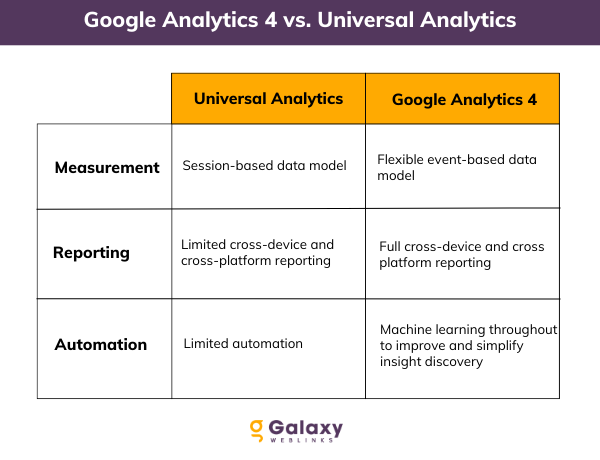
Take a quick look at some key differences between Universal Analytics and GA4.

google analytics 4

Overall, GA4 represents a significant advancement in the capabilities of Google Analytics and is expected to become the primary version of the tool for businesses worldwide.

Steps you need to take for a successful migration to Google Analytics 4

In this step-by-step guide, we’ll walk you through the process of migrating from Universal Analytics to GA4.

Before we get started, it’s important to note that GA4 is a complete rewrite of Google Analytics, and as such, it requires a separate property in your Google Analytics account. This means you’ll be able to continue using your Universal Analytics property while you test out GA4 and make any necessary adjustments. With that said, let’s dive into the steps you need to take to migrate to GA4.

1. Set up a new GA4 property: The first step in migrating to GA4 is to create a new property in your Google Analytics account. To do this, log in to your account, click on the “Admin” tab, and then select “Create Property” from the menu on the right. Choose “Google Analytics 4” as the property type, and follow the prompts to complete the setup process.

2. Install the GA4 tracking code: Next, you’ll need to install the GA4 tracking code on your website. This code is similar to the tracking code used in Universal Analytics, but it includes some additional parameters that are specific to GA4. You can find the tracking code in the “Tracking Info” section of your new GA4 property.

3. Configure your events and parameters: In GA4, data is collected and analyzed using events and parameters. An event is a specific action taken by a user on your website, such as clicking a button or making a purchase. Parameters are additional pieces of information that can be associated with an event, such as the value of a purchase or the category of a product. You’ll need to configure your events and parameters in GA4 to ensure you’re collecting the data you need.

4. Set up your conversion goals: Conversion goals are specific actions you want users to take on your website, such as making a purchase or signing up for a newsletter. You can set up conversion goals in GA4 using the “Goals” feature in the “Admin” tab of your property.

5. Test and verify your setup: Before you entirely switch over to GA4, it’s a good idea to test your tracking code and verify that it’s working correctly. You can use the “Realtime” report in GA4 to see if data is being collected and reported in nearly real-time. You should also check that your events and parameters are being collected and processed correctly.

6. Migrate your data: Once you’ve verified that your GA4 setup is working correctly, you can begin the process of migrating your data from your previous analytics tool. This can typically be done using the “Import” feature in GA4, which allows you to import data from various sources. Be sure to thoroughly test your data after the migration to ensure everything has been transferred correctly.

7. Turn off your previous analytics tool: Once you’ve successfully migrated all of your data to GA4 and verified that everything is working correctly, you can turn off your previous analytics tool and begin using GA4 as your primary analytics solution. Be sure to double-check that all of your tracking code has been removed from your website, and consider archiving any old analytics data that you no longer need.

By following these steps, you should be able to successfully migrate to Google Analytics 4 and begin taking advantage of its new features and capabilities.

Conclusion

Google Analytics 4 can make all the difference in managing your organizational digital analytics. From setup assistance, data migration, and ongoing training, you can rely on our experts for all your needs. Contact our certified Analytics expert for a free consultation today – we’ll be happy to talk!

Why you need to switch to Google Analytics 4

Google Analytics 4 (GA4) is the latest version of Google Analytics, a web analytics service offered by Google that tracks and reports website traffic. It was released in October 2020 and is the successor to the previous version, Universal Analytics.

Google-Analytics-4

One of the main differences between GA4 and Universal Analytics is that GA4 is designed to be more closely integrated with other Google products, such as Google Ads, and to make it easier for users to get a complete view of their customers across different devices and channels. GA4 also includes new features such as automatic event tracking and setting up audiences based on user behavior.

Why is GA4 necessary?

Google Analytics 4 (GA4) is a new version of Google Analytics that was designed to better meet the needs of modern businesses and organizations. It includes several new features and capabilities that are not available in earlier versions of the product, such as:

  • Enhanced user privacy controls: GA4 includes more robust rules for managing user data and protecting user privacy, including the ability to automatically delete user data after a specified time period.
  • Improved data collection and analysis: GA4 uses machine learning algorithms to better understand user behavior and provide more accurate and detailed insights about how users interact with websites and apps.
  • Enhanced integration with other Google products: GA4 integrates more seamlessly with other Google products, such as Google Ads and Google BigQuery, making it easier to use data from multiple sources to inform marketing and business strategy.

Overall, GA4 is intended to provide businesses and organizations with a more comprehensive and powerful tool for understanding and engaging with their customers.

Benefits/Advantages of GA4

  • Customizable Interface

Google Analytics 4 has a more intuitive and customizable interface than ever before – which addresses some of the previous pain points Google Analytics users have faced.

You can now easily customize the timeframe of your data reports, making the tool more enjoyable to use. Plus, you can access important data with just a quick glance.

  • Control Over Custom Reporting

Google Analytics 4 is a powerful tool that focuses on custom reporting. And better yet, it allows you to quickly view any data of your choice and make decisions in an efficient manner!

Universal Analytics was challenging to work with before, but that’s all in the past. You can create custom reports and precise, insightful data visualizations that make it easier to understand your users in more detail.

  • Detailed Reporting

Google Analytics 4 is also capable of providing more detailed data. Allowing you to see the type of traffic that’s been coming in for the last few days, weeks, or months.

This new data model introduced by Google Analytics 4 is inspiring and has made it easier to work on reports. You can customize your events to fit your brand or business needs. For instance, you might want them to represent a specific user action that you would like to analyze, or perhaps you could use them as a means of differentiating one set of users from another.

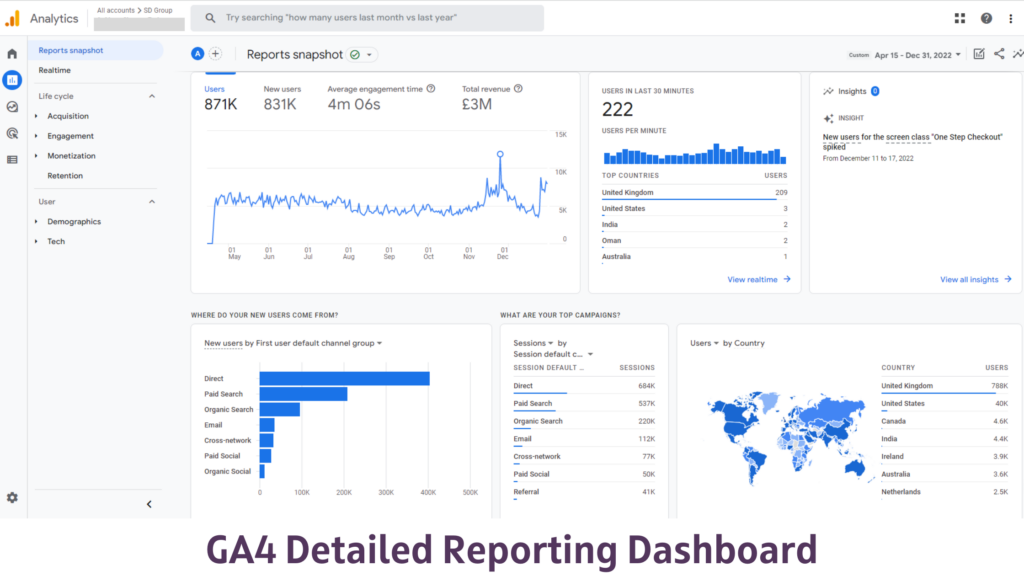
GA4 Dashboard
  • Better Real-Time Data

There are some improvements in Google Analytics 4 that Universal Analytics doesn’t have. For example, it offers real-time reports to see what users do as they interact with your site. You can even see individual user actions!

With DebugView in Google Analytics, 4 allows checking the incoming data at a more granular level.

  • New Automatic Tracking

Google Analytics 4 has made some exciting changes, including a more robust and easier-to-use Enhanced Measurement feature. This feature automatically tracks how much time people spend on a page and how many outbound links they click. This is a powerful tool to increase engagement with your website.

Because of this, custom campaign tracking is not needed. And the actions are automatically tracked for you.

  • More Effective Data Exporting

You will get much more data with Google Analytics 4 and can export that data more effectively. Having access to more detailed and more personalized data means you’ll be able to get more in-depth data that are tailored specifically for your needs, plus much more data per export.

On top of all this, you could even send your data to Google BigQuery if you want to be in total control of the data you collect.

Conclusion

With real-time insights, machine learning, and cross-device tracking, GA4 offers various advanced features that can help you better understand your customers and optimize your marketing efforts. Plus, with Universal Analytics set to be retired in July 2023, now is the perfect time to make the switch.

Whether you need help with setup, data migration, or ongoing support and training, our team of experts has you covered. Don’t miss out on the benefits of GA4 – contact our certified analytics expert for a free consultation today!

Performance Testing: An Overview of its Importance, Metrics, and Examples

The performance of your software is important for its success. Project managers, developers, and marketers measure the performance using testing tools to know how an app is performing when live.

Performance testing has its own set of challenges. For instance, changes in application behavior in scaled-down environments. However, we must first understand why performance testing is necessary in the first place.

To name a few things, we’ll talk about:

  • Why performance testing is needed
  • Types of performance testing
  • What does performance testing measure
  • Performance testing success measure
  • Performance testing process
  • Performance testing example

Why is performance testing needed?

Following are some of the reasons:

1. Mobile app errors are now much higher than ever. Mobile applications face network issues, especially when the server is overloaded. It becomes even more difficult if the applications are running on unreliable mobile networks. Some of the issues that apps face in such a situation are as follows:

  • Problems downloading images or images that are broken.
  • Massive gaps in the content feed.
  • Errors in booking or checkout.
  • Timeouts are used frequently.
  • Freezing and stalling.
  • Uploads that failed.

2. Poor application experience means frustrated customers, which leads to lost revenues. Research shows that over 47 percent of the respondents would exit the application when faced with a broken image, and switch to a different platform.

3. Application speed changes as per region. It is critical to ensure that users of the application all over the world can use it easily and without experiencing any network issues.

4. Moreover, a system may run smoothly with only 1,000 concurrent users, but it might behave randomly if the user base increases to 10,000. Performing performance tests on a system determines whether or not it is stable, scalable, and fast enough to handle high demand.

While there are different tools to test the above criteria, there are different processes that determine if the system works per the established reference point. It is also important to plan how performance tests should be performed.

Types of Performance Testing

Spike testing

A technique known as spike testing examines how quickly the software responds to sudden, large increases in the amount of load generated by the system.

Load testing

An application’s ability to handle anticipated user loads is tested during a load test. The goal is to identify performance bottlenecks before a software application goes live.

Scalability testing

Testing for scalability – Determines the application’s ability to “scale up” in response to an increase in user load. It aids in the planning of software capacity expansions.

Stress testing

Stress testing entails putting an application through its paces under extreme workloads to see how it reacts to spikes in traffic or processing demands. The objective is to identify applications that are just about to be submitted.

Endurance testing

Ensures your software can handle the expected load for a long period of time through endurance testing.

Volume testing

Data is populated into a database during volume testing, so the overall behaviour of the software system is monitored. The goal is to see how well a software application performs with varying database sizes.

What does performance testing measure?

Response times and possible errors are among the things that performance testing looks at. In this way, you’ll be able to confidently identify performance bottlenecks, bugs and mistakes – and choose a way to optimize your application for the problem (s). Tests of performance have shown that speed, response time, load time, and scalability are the most common problems. 

Excessive Load Times

To start an application, you’ll need a certain amount of load time. Delays should be kept to a minimum to provide the best possible user experience.

Poor Response Times

Latency is what elapses between a user entering information into an application and the response to its action. Long response times significantly reduce the interest of users within the application.

Limited Scalability

Limited scalability is a problem with an application’s ability to scale up or scale down as needed to accommodate more or fewer users. While the appliance works well with a small number of users, it starts to struggle as the number of users grows.

Bottlenecks

Bottlenecks are performance-degrading impediments in a software system. They’re usually the result of faulty hardware or bad code.

Performance Testing Success Metrics

The critical metrics in your tests must be clearly defined before you begin testing. These parameters generally include:

  • Hits per second – the number of hits on an online server during each second of a load test.
  • Hit ratios – cached data instead of expensive I/O operations handles the number of SQL statements. If you’re serious about solving the bottleneck problem, you should start here.
  • Amount of connection pooling – the number of user requests met by pooled connections. The more requests met by connections within the pool, the higher the performance is going to be.
  • Maximum active sessions – the utmost number of sessions that may move directly.
  • Disk queue length – When a sample interval occurs, the average number of ‘read and write’ requests that go into the disc queue during that time are recorded.
  • Network output queue length – Length of the network output queue in packets (instead of bytes). Anything less than two indicates the presence of a delay or bottlenecking, which must be addressed immediately.
  • Network bytes total per second – Bytes sent and received on the network interface, including framing characters, are measured in network bytes per second.
  • Response time – the amount of time it takes for a user to enter a letter of invitation and receive the first character of the response.
  • Throughput – The rate at which a computer or network receives requests per second is known as throughput.

Performance Testing Process

Performance testing methodology varies widely, but the goal remains the same regardless of the methodology used. With the help of this, you can demonstrate that your software system meets certain performance criteria. It’s used to see how well two software systems compare to one another. It can also help you find performance bottlenecks in your software system.

Here is the performance testing procedure. 

  • Recognize your testing environment – Understand your physical test environment, production environment, and testing tools. Before you begin testing, learn about the hardware, software, and network configurations that will be used. It will assist testers in creating more efficient tests. It will also aid in identifying potential issues that testers may face during the performance testing. 
  • Determine the performance acceptance criteria – This includes the throughput targets and constraints, response times and resource allocation. In addition to these objectives and limitations, defining project success criteria is also necessary. Testing should be empowered to set performance criteria and goals because project specifications may not always include a diverse set of performance benchmarks. Sometimes there may be none at all. Whenever possible, find a comparable application and use that to set performance goals.
  • Plan and design performance tests –Determine how end-user usage differs and identify key scenarios to test for them. A wide range of end users must be simulated, performance test data planned and metrics outlined.
  • Setting up the test environment – Before starting the test, make sure your testing environment is ready. Organize tools and other resources as well.
  • Implement test design – Create performance tests in accordance with your test plan.
  • Run the tests – Put the code into action and monitor the results.
  • Analyze, fine-tune, and retest – Compile, analyze, and disseminate the results of the tests. Then make any necessary adjustments and retest to see if the system’s performance has improved or deteriorated.

Example Performance Test Cases

  • When 1000 users access the website at the same time, the response time is no longer than 4 seconds.
  • When network connectivity is slow, ensure that the response time of the Application Under Load is within an acceptable range.
  • Examine the maximum number of users that the application can support before crashing.
  • Analyze the database execution time when 500 records are read and written simultaneously.
  • Make sure to keep an eye on CPU and memory usage, especially when the system is under heavy load.
  • Test the application’s response time under various load conditions, including light, normal, moderate, and heavy.

During the execution of the performance test, vague terms such as acceptable range, heavy load, and so on are replaced by concrete numbers. These numbers are determined by performance engineers based on business requirements and the technical landscape of the application.

Conclusion

Software engineers must conduct performance testing on all new products before releasing them to the market. There is no risk of a product failure, so customer satisfaction is guaranteed. Gaining a competitive advantage usually outweighs the costs of conducting performance testing.

About Galaxy Weblinks

We specialize in delivering end-to-end software design & development services and have hands-on experience with automation testing in agile development environments. Our engineers, QA analysts, and developers help improve security, reliability, and features to make sure your business application and IT structure scale and remain secure.

7 Clever Ways to Boost Ecommerce Store Sales in 2021

Increasing conversions and enhanced customer engagement is the primary goal of all Ecommerce businesses, both large and small. This leads to more sales. However, increasing sales and conversions is not a cakewalk. 

There are numerous ways to increase your online sales, many that can be implemented with an immediate effect. We have curated 7 such practices which will help you get more conversions and thereby, more sales swiftly. 

#1 Cross-selling is BIG in Ecommerce right now

It is a strategy for selling products that are related to the items that are already in the customer’s shopping cart. They may fall into a completely different product category! Did you know that using a cross-sell on the checkout page can increase conversions by up to 3%?

Cross-sell items should be at least 60% less expensive than the item added to the cart. If you offer your customer a complete package, such as a camera and batteries at a lower price, they will not hesitate to purchase both.

#2 Create a streamlined UI/UX

How simple is it for a typical user to interact with your store? A streamlined user experience and interface are critical for your website’s growth. Put product recommendations at the bottom, for example, and include “frequently bought together” options as well.

#3 Optimize newsletter sign-ups

Email newsletters are the go-to option for promotions in both B2B and B2C market space. Digital marketers understand the importance of email newsletters in shaping a brand’s tone and image. It is convenient to capture customer’s attention with the help of a simple newsletter sign-up popup.

#4 Offer a range of filters

Your existing customers have an understanding of your online storefront. The new browsers, however, need some guidance to navigate through your store. Consider them to be the online equivalent of window shoppers. 

This is where product filters come in handy. They help organize your products in a manner that enables visitors to easily pick and choose products based on their preferences.

#5 Enable guest checkout method

If you want to convert your customers into repeat buyers, instead of forcing them to create an account, offer them the option of checking out as a guest. Allowing for a guest checkout option could do wonders for your online business. 

Currently, many Ecommerce websites require a user to sign up for an account – and this may be doing more harm than good to your business because many website visitors do not have ample time to create accounts.

#6 Cover a Range of FAQs

Because you are not physically available to answer every other customer question, provide all of the information necessary for your customers to make a decision. Don’t overestimate your customers’ knowledge. Make as many arrangements as you can for them.

Be clear and transparent in your conversations and transactions with them, from Frequently Asked Questions to Return Policies, and from Shipping Dates to your Shipping Policies.

Put yourself in the shoes of a buyer and consider what questions they are likely to ask. Cover everything you can think of.

#7  Work on Improving Loading Times

KissMetrics report state that 47% of customers expect a web page to load in two seconds or less. A simple 1-second delay can result in a 7% decrease in conversion rate. 

You might be frustrated when a website you’re trying to access takes forever to load. If your website’s loading speed is slow, your visitors will likely feel the same way. Consider the following factors:

  • Optimize images
  • Optimize CSS delivery
  • Prioritize above-the-fold content
  • Reduce the number of plugins
  • Reduce redirects
  • Minimize HTTP requests
  • Reduce server response time
  • Enable compression
  • Enable browser caching
  • Minify resources

To sum up!

Although there are numerous other Ecommerce best practices that entrepreneurs should consider, incorporating these listed seven will not take much time and effort. We recommend evaluating your conversion rates regularly and making changes to your strategies as needed. Keep in mind that what works for one brand may not work for you. Simply continue to be unique, and your customers will reward you with the loyalty you seek.

We hope this practical piece curated from our experience in Ecommerce will help you drive sales. And if you want to interact with your customers in a whole new different way and enhance your conversion rate, contact our experts here.

4 ways to reduce customer churn using analytics

Customer churn rate is the percentage of your customers or subscribers who cancel or don’t renew their subscriptions during a given time.   

A higher percentage of customer churn could be attributed to bad customer service calls, slow response, or even no response. Even if you do have a great influx of new customers, customer churn is never good news. It is important to retain the existing customer base as they aid and abet sustained growth. 

How can you reduce customer churn? The answer lies in data-driven insights. Read on to know more. 

Laying out a roadmap and implementing it 

You can reduce your customer churn with the help of insights drawn from your raw database. To draw up actionable conclusions, start by defining your primary KPIs (not more than five, three being the ideal number). Take inputs from stakeholders in this discussion to ensure the right selection of KPIs.

Often data is collected and goes to different teams but no action is taken to derive actionable insights from that data or implement them. This can be due to – 

  • Communication gaps among the teams 
  • A miscalculation in the implementation timeline that leave teams frustrated
  • Drawn action plans are not being implemented due to a lack of resources

So you need experts who can pinpoint the right patterns and come up with practical conclusions. 

Mapping your customer journey

When you try to map your user journey and be with them as they go through your website/ app, you will be able to see exactly where they are dropping off. You can then work from there to see what is the obstacle that your users are facing that’s leading to a churn. 

You can retrace their steps, get a complete look at their journey. You can not always blame just one trigger for your long-term customers leaving you. Evaluating the final nail in the coffin is not what you should do, you need to go after the other issue and obstacle that can lead you to identify the problem area. 

You need to quantify the major dropout points and work out ways to undo the harm done. This way you can also predict your user’s next possible actions. And if there is something you can do to win them back, you would know the right interaction point as well. Your ‘moments of truth’ will decide whether your customer trusts you or not. 

When mapping your customer journey, find answers to questions like:

  • Emphasize heavily on the ‘why’ at varying stages – why will the customer need two CTAs here, why will they click on the link that you want them to, why will they be motivated to come back to you or why not, etc. the derived answers will give you insight into your customer’s behavior. 
  • What will keep them engaged with your product or service, and when will different interaction points become a hindrance in their journey? You can go back to previous stages where your customers visited before they dropped off. 
  • Which way is the easiest for your customers to reach their ultimate goal, can that goal be achieved in three steps or ten steps? And what can you do to ensure that users don’t leave in between the process? 
  • How are you different from your competitors? Again ‘why’ will they choose you over others?  

As you try to put a number or a measurement scale at various steps, you will be able to understand what is working in your favor and what is not. 

Focussing on user segmentation

Your resources are limited, be it in terms of time, manpower, or customer incentives. You will have to focus on high-quality leads. You can use customer journey mapping data to predict who is more likely to stay like how well they interacted with offers, did they drop off very early or stayed till last, did they leave any feedback, etc. 

You can also use your buyer personas to match with potential buyers for predicting the right fit for your product and divert your efforts accordingly. You can develop and implement algorithms based on buyer personas, deep dive into their characteristics for an accurate prediction model, and anticipating who is more likely to stay. 

You will have multiple user segments depending on your product/ service offering. But do ensure that your assumptions are precise and use your existing data as well for future models. 

Using predictive analytics and text analysis

At any given point in time, you have access to tons of data. To manually curate it or even factor in different variables is overwhelming. Therefore you will need machine learning and AI for developing predictive and text analytics. 

Your text feedback is a gold mine for you to understand what your customers feel, and what improvements are they expecting. You can combine these insights with your customer churn prediction models to anticipate possible churn and take actions accordingly. 

Also with your user segmentation, you can see which users can be let go and which have a higher lifetime value to your business. Your algorithm once developed, will continually evolve as per customer inputs and their possible future actions. Thus you will be able to prevent the churn from happening, especially for your most valued customers saving you the cost of acquiring new customers. 

All this said and done, the data volume will keep on accumulating each day, it’s highly advised to use it to your advantage and get an edge over your competitors. 
The more personalized you make your users’ experiences, the higher the recall value you get. Furthermore, data-driven insights give you precisely that. If you are still not convinced or are looking for insights to be interpreted for you, get in touch with us here to discuss what we can do for you.

How To Get Started With SEO In Craft CMS?

Forget the gold rush days of keyword stuffing and black-hat tactics. Today’s SEO landscape is a carefully cultivated ecosystem, and Craft CMS stands tall as a fertile ground for organic growth. Craft CMS, known for its flexibility and user-friendly interface, offers a fertile ground for implementing effective SEO strategies. This guide explores how to harness the full potential of SEO within Craft CMS, ensuring your website not only ranks higher in search results but also meets the evolving expectations of both search engines and users.

Setting the SEO Foundation in Craft CMS

To ensure your Craft CMS site ranks well in search engine results and offers an outstanding user experience, focusing on foundational SEO settings is critical. Let’s explore some of the essential steps for optimizing your Craft CMS site, providing a more detailed and structured approach to each key area.

1. Enhancing SEO with Built-in Fields

Utilizing Meta Titles and Descriptions:

Craft CMS is equipped with specific fields for meta titles and descriptions, crucial for telling search engines what your page is about. To make the most of these:
  • Craft Compelling Meta Titles: Keep them under 60 characters to ensure they display fully in search results. Incorporate main keywords at the beginning and your brand name towards the end.
  • Write Descriptive Meta Descriptions: Aim for about 160 characters, using active voice and including a call-to-action. Mention primary keywords naturally to improve relevance and click-through rates.

2. Customizing URLs for Enhanced SEO

Implementing SEO-Friendly URL Structures:

Craft CMS offers the flexibility to tailor your URLs, a feature you should leverage to boost your SEO:
  • Include Relevant Keywords: Ensure URLs reflect your content’s primary keywords, enhancing relevance and searchability.
  • Maintain Simplicity and Readability: Use hyphens to separate words, keep URLs short, and avoid unnecessary parameters or numbers.
  • Follow a Logical Structure: Organize your content hierarchically, using URL paths that indicate the relationship between pages, which helps users and search engines navigate your site more effectively.

3. Maximizing Visibility with Rich Snippets

Implementing Schema Markup:

Schema markup is a form of structured data that you can add to your Craft CMS site to help search engines return more informative results for users:
  • Identify Appropriate Schema Types: Depending on your content, choose from a variety of schema types like Article, Local Business, Event, or Product.
  • Use Craft CMS Plugins: Tools like SEOmatic for Craft CMS can simplify the process of adding schema markup to your site, automating much of the work and ensuring your pages stand out in SERPs with rich snippets.
  • Test Your Implementation: Utilize Google’s Rich Results Test tool to verify that your schema markup is correctly implemented and visible to search engines.

Advanced SEO Techniques in Craft CMS

Here are the strategies to master advanced SEO techniques for enhanced visibility and user experience of your Craft CMS site.

1. Site Speed Optimization

Why Site Speed Matters:

A fast-loading website is essential for both SEO and user satisfaction. Google prioritizes site speed in its ranking algorithm, understanding that users prefer websites that load quickly.

How to Optimize Site Speed in Craft CMS:

  • Optimize Images: Use Craft CMS’s built-in image transformation capabilities to serve images at the correct size and format, reducing unnecessary file size without compromising quality.
  • Implement Caching: Craft CMS supports several caching strategies, such as template caching, that can significantly reduce load times by storing copies of dynamic content for faster retrieval.
  • Minimize and Combine Files: Minify CSS and JavaScript files to eliminate unnecessary characters. Consider combining multiple files into one where possible to reduce the number of HTTP requests.

2. Mobile Optimization

The Importance of Mobile-Friendliness:

With over half of global web traffic coming from mobile devices, having a mobile-optimized site is non-negotiable for SEO success.

Achieving Mobile Optimization in Craft CMS:

  • Responsive Design: Ensure your Craft CMS theme is responsive, meaning it automatically adjusts to fit the screen size of the device it’s being viewed on. Craft CMS’s templating system allows for flexible design implementation.
  • Touchscreen Readiness: Make sure all elements are easily navigable on a touchscreen, with adequately spaced links and easily accessible navigation menus.
  • Speed Considerations: Mobile users often rely on cellular data, making site speed even more critical. Apply all site speed optimization strategies with a mobile-first mindset.

3. Strategic Content Creation and Management

Content’s Role in SEO:

Quality content drives engagement, shares, and backlinks, all of which are critical factors in SEO rankings. Consistently publishing relevant, high-quality content positions your site as an authoritative source in your niche.

Maximizing Content Impact in Craft CMS:

  • Keyword Optimization: Research and integrate relevant keywords naturally into your content, titles, and meta descriptions to improve visibility.
  • Content Structure: Use headings (H1, H2, H3) to structure your content for easy readability. This not only benefits users but also helps search engines understand the hierarchy and relevance of your information.
  • Update Regularly: Keep your content fresh and up-to-date. Regular updates signal to search engines that your site is active, encouraging them to crawl your site more frequently.

Leveraging SEO Plugins and Tools in Craft CMS

The integration of Google Analytics and Google Search Console with Craft CMS sites offers valuable insights into traffic patterns, keyword rankings, and user behavior, enabling data-driven decisions to refine SEO strategies. Craft CMS’s ecosystem includes powerful plugins like SEOmatic, which simplify tasks like generating sitemaps and optimizing meta tags, ensuring your site is fully optimized for search engines.

Boost Your Craft CMS Site with Strategic SEO Implementation

As we navigate the digital landscape of 2024, the significance of SEO in crafting a successful online presence cannot be overstated. By implementing the strategies outlined in this guide, you can utilize the full potential of your Craft CMS site, ensuring it not only ranks high in search results but also delivers an exceptional user experience. However, SEO is an ongoing journey that requires expertise, dedication, and a keen eye for evolving trends. This is where Galaxy Weblinks comes in. Our team of SEO specialists and Craft CMS experts are equipped to take your website to the next level. From strategic SEO planning to execution and monitoring, we provide comprehensive solutions tailored to your unique needs. Ready to enhance your site’s SEO and drive measurable results? Contact Galaxy Weblinks today for a free discovery call. Let’s collaborate to ensure your Craft CMS site is perfectly aligned with your business goals and poised for success in the competitive digital arena of 2024.