10 Tips For Ensuring The Security Of Your Custom Software Solution

One of the most high-profile security breaches in recent years was the Zoom incident in 2020, where personal information of over 2.5 million users was found to be for sale on the dark web due to a vulnerability in the software.

In the same year, Microsoft disclosed that it had suffered a data breach that exposed the personal information of 250 million user service records. The breach was caused by a misconfigured database in one of its customer service systems.

According to a report by Ponemon Institute, the average cost of a data breach is $3.86 million, which includes costs such as business disruption, lost revenue, and legal fees.

Whether it is a custom software or standard software, solutions are prone to security issues, but cost and brand elements can impact the level of security measures implemented. It is crucial for businesses to understand the potential security risks of custom software solution and take appropriate measures to prevent such incidents.

Types of Security Issues In Custom Software Solution

Security issues are not restricted to only malware attacks and viruses, there are other issues equally more critical in nature. Here are some of the most common types of security issues faced by custom software solution:

01. Authentication and Access Control Issues

List of issues:

  • Weak authentication and access control policies
  • Insufficient encryption and protection of sensitive data
  • Inadequate employee training and awareness

Example:
In 2013, Target Corporation, a major US-based retailer, experienced a massive data breach that compromised the personal and financial information of up to 110 million customers. The breach was initiated through a third-party vendor’s compromised credentials and allowed hackers to access Target’s payment systems for several weeks undetected.

Impact:
The breach resulted in significant financial losses, damage to Target’s brand reputation, and lawsuits from affected customers. The incident also highlighted the importance of third-party risk management and the need for strong authentication and access controls in retail businesses.

Cost:
The total cost of the Target data breach was estimated at $202 million, including legal settlements, fines, and other expenses.

02. Data Breaches & Data Loss

List of issues:

  • Insufficient data backup and recovery procedures
  • Human error or negligence in handling data
  • Hardware or software failures

Example:
In 2012, the Knight Capital Group, a US-based financial services firm, suffered a data loss incident due to a software malfunction. The malfunction caused the company’s algorithmic trading system to purchase large volumes of stocks at inflated prices, leading to a loss of over $440 million in less than an hour.

Impact:
The data loss incident led to significant financial losses, damage to the company’s reputation, and a drop in its stock value. It also highlighted the importance of proper testing and monitoring of software systems in the financial industry.

Cost:
The total cost of the Knight Capital Group data loss incident was estimated at $460 million, including trading losses, regulatory fines, and other expenses.

03. Malware & Viruses

List of issues:

  • Infection with viruses and malware
  • Lack of system updates and patches
  • Insufficient antivirus and security measures

Example:
In 2019, the Monroe County School District in Florida, USA, experienced a virus attack that impacted the district’s computer network and forced the schools to shut down for several days. The virus was initially introduced through a phishing email and led to the loss of critical data and disruption of normal operations.

Impact:
The virus attack led to disruptions in the delivery of education services, including cancellations of classes and delays in grading and reporting. It also caused financial losses due to the cost of recovery efforts and legal fees.

Cost:
The total cost of the virus attack was estimated at $600,000, including expenses for IT recovery, forensic analysis, and additional cybersecurity measures.

04. Insecure Coding Practices

List of issues:

  • Lack of security testing in software development process
  • Vulnerabilities in code due to poor coding practices
  • Inadequate code review and testing by third-party vendors

Example:
In 2015, Fiat Chrysler Automobiles (FCA) recalled 1.4 million vehicles after it was discovered that a security flaw in the car’s software could allow hackers to take control of the vehicle remotely. The flaw was due to poor coding practices and lack of proper security testing during the custom software development process.

Impact:
The insecure coding incident led to significant damage to the company’s reputation, a drop in its stock price, and potential safety hazards for drivers and passengers. It also highlighted the importance of secure coding practices and third-party vendor management in the automotive industry.

Cost:
The total cost of the FCA recall was estimated at $105 million, including expenses for vehicle repairs, legal fees, and other costs associated with the incident.

05. Insufficient Encryption

List of issues:

  • Lack of appropriate encryption techniques for sensitive data
  • Insufficient protection of data in transit or at rest
  • Insufficient security measures for online banking transactions

Example:
In 2014, JPMorgan Chase, one of the largest banks in the United States, experienced a data breach that impacted the personal information of 76 million households and 7 million small businesses. The breach was due to insufficient encryption of sensitive data and inadequate security measures for online banking transactions.

Impact:
The data breach led to significant damage to the bank’s reputation, a drop in its stock price, and potential financial losses for affected customers. It also highlighted the importance of strong encryption practices and cybersecurity measures in the banking industry.

Cost:
The total cost of the JPMorgan Chase data breach was estimated at $575 million,

What Security Issues Businesses Ignore In The Initial Stage Of Developing A Custom Software Solution?

When developing custom solutions, businesses often overlook or underestimate the importance of ensuring proper security measures in place for a long run. As they move forward with the custom software product development, the unattended and overlooked security aspects impact the functioning of the solution. This can lead to serious security issues that may not be discovered until it’s too late.

01. Input Validation

If a website fails to clean user input or doesn’t check the data type, it can be very important because it can lead to attacks.

Impact: These attacks can cause problems and allow unauthorized people to access the website or sensitive data.

02. Unencrypted Data Storage

Businesses might ignore data encryption during the initial stages, leaving data vulnerable to theft or unauthorized access in case of a security breach.

Impact: It can lead to loss of confidential data, breaches of security and privacy, regulatory fines, and financial harm.

03. Error Handling and Logging

Both are necessary to identify and fix security incidents. Clear error messages and sufficient logging can make incident response faster and more effective.

Impact: It can result in more significant damage to the business, such as financial loss, reputational damage, and loss of user trust.

04. Third-Party Support

Using vulnerable components and not updating third-party libraries can be of medium importance.

Impact: It introduces vulnerabilities and makes it hard to patch them, risking the website or application being compromised.

05. Secure Configurations

Insecure default settings and unused services or ports that aren’t disabled can be of low to medium importance.

Impact: It increases risk at the attack surface and potentially allows unauthorized access to sensitive data and resources.

Note: The importance levels assigned to each security issue may vary depending on the specific context of the custom solution. It is important to conduct a thorough security assessment to identify all potential risks and vulnerabilities, and prioritize remediation efforts accordingly.

10 Tips For Securing Custom Software Solution

Here are 10 essential security tips for businesses to ensure their custom software solutions’ security.

01. Use Secure Development Practices

  • Task: Implement secure coding practices and use security testing tools
  • Importance: High
  • Implementation: Conduct code reviews for security issues and implement it from the planning stage to the deployment stage.

02. Implement Access Controls

  • Task: Restrict access to sensitive information and systems
  • Importance: Medium
  • Implementation: Access controls such as two-factor authentication and role-based access control to test and validate the controls to ensure they are working effectively.

03. Backup Data

  • Task: Regular backups of data
  • Importance: High
  • Implementation: Use an automated backup system to regularly save copies of important data to secure off-site locations. This ensures that important data is not lost due to hardware failure, cyberattacks, or other unforeseen events.

04. Implement Network Security

  • Task: Secure network devices and connections
  • Importance: High
  • Implementation: Assess the network, select and configure appropriate tools like firewalls and VPNs, and test and update the security measures to ensure their effectiveness.

05. Conduct Regular Security Assessments

  • Task: Evaluate custom solutions for vulnerabilities
  • Importance: High
  • Implementation: Conduct regular security assessments, identify the scope and goals, select appropriate testing tools and methods, analyze the results, and create a plan to address any issues found.

06. Use Secure Third-Party Services

  • Task: Vet and monitor third-party services for security
  • Importance: Medium
  • Implementation: Perform due diligence to assess risks, establish a risk management process, monitor security practices, and create a contingency plan in case of any incidents.

07. Implement User Training and Awareness Programs

  • Task: Educate employees about cybersecurity risks and best practices
  • Importance: High
  • Implementation: Improve cybersecurity, implement a cybersecurity awareness program and conduct training to educate employees on best security practices and potential threats.

08. Implement Disaster Recovery and Business Continuity Plans

  • Task: Prepare for and respond to cyber incidents
  • Importance: High
  • Implementation: Develop and test disaster recovery and business continuity plans by identifying critical systems, testing the plan, and updating as necessary.

09. Conduct Regular Security Audits

  • Task: Regular security audit
  • Importance: High
  • Implementation: Hire a professional security firm to perform a thorough audit and provide you with actionable insights

10. Implement Latest Security Measures

  • Task: Keep solution up to date with the latest security patches and updates
  • Importance: High
  • Implementation: Regularly check and install updates and patches. Consider setting up automatic updates for added convenience and security

Auditing Security Issues

One of the most important steps in ensuring the security of your custom solution is conducting regular security audits. But how often should you conduct these audits, and what should they include?

What Should A Security Audit Include?

A thorough security audit should include a review of your software solution’s source code, configuration files, and network architecture. It should also include a review of your security policies and procedures, as well as any third-party software or services that you use.

01. Purpose Of Each Type Of Audit:

Risk Assessment

This type of audit is designed to identify vulnerabilities in your software solution, such as weak passwords or unsecured ports. The purpose of a vulnerability assessment is to help you proactively address these vulnerabilities before they are exploited by attackers.

Identify Security Flaws

By conducting a thorough check-up of your software solution, you can identify any potential weaknesses that could make it vulnerable to cyber attacks, this process is known as penetration testing. This is a way to test your software’s security by simulating an attack to see how it would hold up against a real-world threat. By doing so, you can ensure that your software is as secure as possible and protect your users’ data.

How Often You Should Audit Security Issues?

The frequency of security audits will depend on various factors such as the size of your organization, the complexity of your software solution, and the level of risk associated with your business.

As a general rule, it’s recommended to conduct vulnerability assessments at least once a year, and penetration testing (identifying weaknesses) at least once every two years.

A Checklist For Businesses To Maintain Security For Custom Software Solutions

Here a checklist for businesses to implement and ensure their custom solutions remain secure:

Data Encryption:

  • Is sensitive information kept safe both when it’s stored and when it’s being sent?
  • Is the way it’s encrypted secure and strong?
  • Are the people in charge of the encryption key doing a good job?
  • Is there a backup plan in case something goes wrong?

Access Control:

  • Is the system only available to people who should have access to it?
  • Are the different types of users organized well and only allowed to do what they’re supposed to?
  • Is there a policy for passwords, and are they being kept safe?
  • Are login attempts limited to prevent unauthorized access?

Code Security:

  • Are programmers following good practices to make sure there aren’t any security issues in the code?
  • Are any issues that pop up being dealt with?
  • Are third-party tools being used safely?
  • Are updates to these tools being applied quickly?

Network Security:

  • Is the network set up so that only authorized people can access it?
  • Are there tools in place to monitor for any suspicious activity?
  • Is there a secure way to access the network remotely?
  • Is the network set up in a way that helps keep it safe?

Audit Logging and Monitoring:

  • Is there a way to track what’s happening on the system?
  • Are the logs being collected and checked regularly?
  • Is there a plan for dealing with any issues that do arise?
  • Is there a way to get notified about any potential problems in real time?

Physical Security:

  • Is the computer server being kept safe in a secure location?
  • Is there a plan in place for how to deal with problems that could damage the server?
  • Are backups being stored in a safe place?
  • Is the server kept cool so it doesn’t overheat?

Disaster Recovery:

  • Is there a plan in place to help the company recover if something goes wrong?
  • Are backups being taken regularly and tested?
  • Is there a way to restore data if something goes wrong?
  • Is there a plan for keeping backups safe and keeping them for the right amount of time?

Compliance and Regulation:

  • Is the software following all relevant laws and regulations?
  • Is sensitive information being kept safe in accordance with the law?
  • Is the company following any industry-specific regulations?

Build Trust & Confidence With Reliable Custom Solution

Custom software solution has become an integral part of businesses. It is imperative to maintain their security to safeguard sensitive information from cyber threats.

Galaxy provides custom software development services with top-notch security assistance to protect your user data. With regular security checkups, advanced development practices, and identifying the potential security risks, Galaxy ensures your business is safe from potential cyber attacks.

Contact Galaxy today to secure your custom software solution. Protect your business and your users with our advanced security development services.


Security in the Cloud: How to Enhance it Using Security Controls?

Traditional IT security is no longer what we’ve known it to be for the past few decades. There is a massive shift to cloud computing that has changed how we see and perceive IT security. We have grown accustomed to the ubiquitous cloud models, their convenience, and unhindered connectivity. But our ever-increasing dependence on cloud computing for everything also necessitates new and stricter security considerations.

Cloud security, in its entirety, is a subset of computer, network, and information security. It refers to a set of policies, technologies, applications, and controls protecting virtual IP addresses, data, applications, services, and cloud computing infrastructure against external and internal cybersecurity threats.

What are the security issues with the cloud?

Third-party data centers store the cloud data. Thus, data integrity and security are always big concerns for cloud providers and tenants alike. The cloud can be implemented in different service models, such as:

  • SaaS
  • PaaS
  • IaaS

And deployment models such as:

  • Private
  • Public
  • Hybrid
  • Community

The security issues in the cloud fall into two categories. First, the issues that cloud providers (companies providing SaaS, PaaS, and IaaS) face. Second, the issues faced by their customers. The security responsibility, however, is shared, which is mentioned in the cloud provider’s shared security responsibility or shared responsibility model. This means that the provider must take every measure to secure their infrastructure and clients’ data. On the other hand, users must also take measures to secure their applications and utilize strong passwords and authentication methods.

When a business chooses the public cloud, it relinquishes physical access to the servers that contain its data. Insider threats are a concern in this scenario since sensitive data is at risk. Thus, cloud service providers do extensive background checks on all personnel having physical access to the data center’s systems. Data centers are also checked regularly for suspicious behavior.

Unless it’s a private cloud, no cloud provider stores just one customer’s data on their servers. This is done to conserve resources and cut costs. Consequently, there is a possibility that a user’s private data is visible or accessible to other users. Cloud service providers should ensure proper data isolation and logical storage segregation to handle such sensitive situations.

The growing use of virtualization in cloud implementation is another security concern. Virtualization changes the relationship between the operating system and the underlying hardware. It adds a layer that needs to be configured, managed, and secured properly. 

These were the vulnerabilities in the cloud. Now let’s talk about how we can secure our cloud, starting with security controls:

Cloud Security Controls

An effective cloud security architecture must identify any current or future issues that may arise with security management. It must follow mitigation strategies, procedures, and guidelines to ensure a secure cloud environment. Security controls are used by security management to address these issues.

Let’s look at the categories of controls behind a cloud security architecture:

Deterrent Controls

Deterrents are administrative mechanisms used to ensure compliance with external controls and to reduce attacks on a cloud system. Deterrent controls, like a warning sign on a property, reduce the threat level by informing attackers about negative consequences.

Policies, procedures, standards, guidelines, laws, and regulations that guide an organization toward security are examples of such controls.

Preventive controls

The primary goal of preventive controls is to safeguard the system against incidents by reducing, if not eliminating, vulnerabilities and preventing unauthorized intruders from accessing or entering the system. Examples of these controls are firewall protection, endpoint protection, and multi-factor authentication like software or feature implementations. 

Preventive controls also consider room for human error. They use security awareness training and exercise to address these issues at the onset. It also takes into account the strength of authentication in preventing unauthorized access. Preventative controls not only reduce the possibility of loss event occurrence but are also effective enough to eliminate the system’s exposure to malicious actions. 

Detective Controls

The purpose of detective controls is to detect and respond appropriately to any incidents that occur. In the event of an attack, a detective control will alert the preventive or corrective controls to deal with the problem. These controls function during and even after an event has taken place. 

System and network security monitoring, including intrusion detection and prevention methods, is used to detect threats in cloud systems and the accompanying communications infrastructure.

Most organizations go as far as to acquire or build their security operations center (SOC). A dedicated team monitors the IT infrastructure there. Detective controls also come equipped with physical security controls like intrusion detection and anti-virus/anti-malware tools. This helps in detecting security vulnerabilities in the IT infrastructure.

Corrective Controls

Corrective control is a security incident mitigation control. Technical, physical, and administrative measures are taken during and after an incident to restore the resources to their last working state. For example, re-issuing an access card or repairing damage are considered corrective controls. Corrective controls include: terminating a process and implementing an incident response plan. Ultimately, the corrective controls are all about recovering and repairing damage caused by a security incident or unauthorized activity.

Here are benefits of selecting a cloud storage solution.

Security and Privacy

The protection of data is one of the primary concerns in cloud computing when it comes to security and privacy.

Millions of people have put their sensitive data on these clouds. It is difficult to protect every piece of data. Data security is a critical concern in cloud computing since data is scattered across a variety of storage devices. Computers, including PCs, servers, and mobile devices such as smartphones and wireless sensor networks. If cloud computing security and privacy are disregarded, each user’s private information is at risk. It will be easier for cybercriminals to get into the system and exploit any user’s private storage data.

For this reason, virtual servers, like physical servers, should be safeguarded against data leakage, malware, and exploited vulnerabilities.

Identity Management

Identity Management is used to regulate access to information and computing resources.

Cloud providers can either use federation or SSO technology or a biometric-based identification system to incorporate the customer’s identity management system into their infrastructure. Or they can supply their own identity management system.

CloudID, for example, offers cloud-based and cross-enterprise biometric identification while maintaining privacy. It ties users’ personal information to their biometrics and saves it in an encrypted format.

Physical Security

IT hardware like servers, routers, and cables, etc. are also vulnerable. They should also be physically secured by the cloud service providers to prevent unauthorized access, interference, theft, fires, floods, etc. 

This is accomplished by serving cloud applications from data centers that have been professionally specified, designed, built, managed, monitored, and maintained.

Privacy

Sensitive information like card details or addresses should be masked and encrypted with limited access to only a few authorized people. Apart from financial and personal information, digital identities, credentials, and data about customer activity should also be protected.

Penetration Testing

Penetration testing rules of engagement are essential, considering the cloud is shared between customers or tenants. The cloud provider is responsible for cloud security. He should authorize the scanning and penetration testing from inside or outside. 

Parting words

It’s easy to see why so many people enjoy using it and are ready to entrust their sensitive data to the cloud. However, a data leak could jeopardize this confidence. As a result, cloud computing security and privacy must build a solid line of protection against these cyber threats.

If you’re overwhelmed with the sheer possibilities of threats in cloud computing or lack the resources to put in place a secure cloud infrastructure, get on a call with us for a quick consultation. 

The Future of Cloud Computing: How Will Cloud Look Like in 2025

The Internet changed the way we communicate, share information, handle money transactions, and do shopping. Another defining change that the internet has facilitated is how we store information. Earlier, network servers were locked in secure rooms with only a few people having access to them. The internet and cloud computing decentralized the data. Data is now available through apps and cloud storage services while ensuring security and privacy. 

Cloud technology is among the recent and emerging technology services along with AI, IoT, Edge and Quantum computing. The cloud paved the way for businesses to grow and innovate. We already discussed the ways to scale in the cloud in one of our previous articles. But what do you think the future has in store for cloud computing? 

Cloud computing by 2025!

Today, the cloud is merely a technology platform for most businesses. By 2025, this perspective will change with all the companies adopting a cloud-first principle. Cloud will be the only approach for delivering applications and will serve as the key driver of business innovation. 

Legacy IT like wireless access points or mainframe computers will not go to the cloud. But, other applications and workloads will resort to the cloud, including servers, storage, and networking. Cloud will become the ubiquitous style of computing. Any non-cloud applications or infrastructure will be redundant by the year 2025.   

Two specific predictions on the future of the cloud that should be in your digital strategies:

  1. Cloud will be the foundation for business innovation –

Cloud is creating new business models and revenue streams. It will transform IT departments from cost centers to digital business bases.

Business innovation through the cloud – three core ways:

  1. Cloud democratizes access to cutting-edge technology. This makes it the platform of choice for most IT services. Consumption-based pricing and the ubiquitous availability of cloud services will provide next-generation capabilities to organizations.
  2. Cloud will connect organizations to a vast ecosystem of partners and suppliers.
  3. Organizations will create agile, innovative business designs using the cloud to enhance their core competencies. Cloud can provide opportunities in different business processes including customer service to supply chain management.

Cloud computing is the common denominator for the success of leading digital pioneers. They leverage the cloud and its principles to expand their services to create and monetize new services.

These organizations evolved into platform businesses. This is a trend that will be common by 2025. Enterprises must become platform businesses to compete with the digital giants.

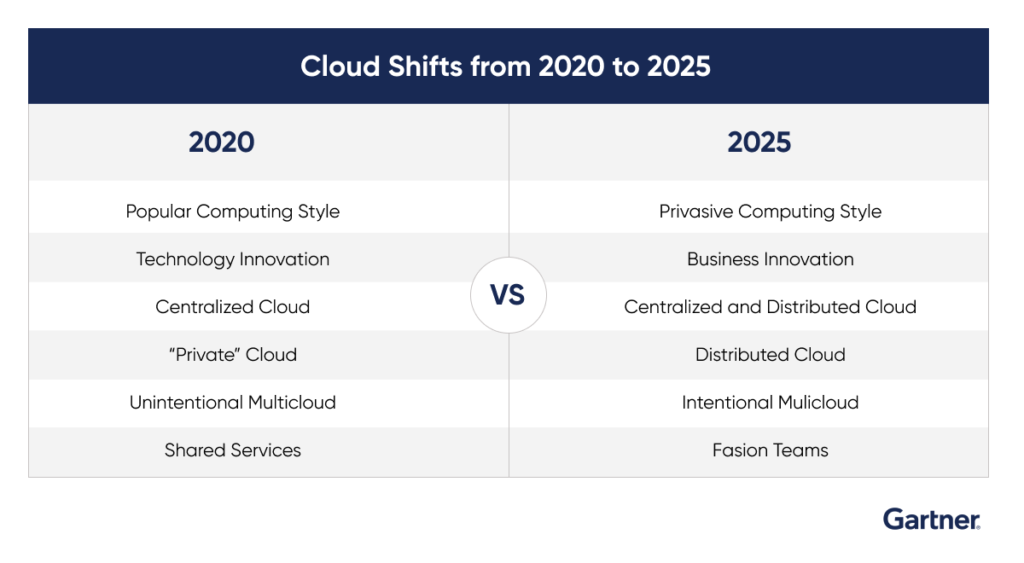
cloud in 2025, Gartner prediction
  1. Intentional multi-cloud and distributed cloud
  • In a 2018 survey by Gartner, 80% of respondents said their organization runs load on multiple clouds. This approach is described as unintentional multi-cloud.
  • Another Gartner study in 2020 recorded respondents identifying the top reasons their organization uses multiple public clouds – improving availability, selecting best-of-breed capabilities, and satisfying compliance requirements.

By 2025, 50% of enterprises (up from fewer than 10% today) will adopt intentional multi-cloud where they use cloud services from multiple public cloud providers. With this approach, organizations can reduce the risk of vendor lock-in, maximize commercial leverage, and address broader compliance requirements.

Distributed cloud is another future-looking computing mechanism. It is the distribution of public cloud services to different physical locations. The operation, governance, and evolution of the services are the responsibility of the public cloud provider.

More than three-quarters of respondents in the Gartner 2020 Cloud End-User Behavior study preferred cloud computing in a location of their choice. Gartner anticipates half of the businesses using distributed cloud by 2025.

The rise of cloud computing!

  • Cloud spend will surpass the non-cloud spend – Gartner 2020 Cloud End User Behavior study.
  • More than 80% of large corporations are using cloud computing. This will increase to more than 90% up to 2024.
  • In 2025, the public cloud computing market will be worth $800 billion.
  • By 2024, enterprise cloud spending will be 14% of total IT revenue worldwide.

The technology landscape is highly unpredictable. Something like cloud computing can and will see multidimensional growth. Predictions can go on and on. We will be talking more about the future possibilities of cloud computing in future articles. Stay tuned for more and keep reading.

 Contact us for cloud computing support here! 

Cloud Strategy for Companies in a Post-Pandemic World

Being an early adopter of new technology can often come at a higher cost than it is worth. As a result, businesses all over the world are slow to embrace digital innovation. Many of us were caught off guard by the pandemic, which forced hundreds of millions of workers to seek shelter and essentially move all operations and most daily life online. Not all businesses had the technological tools they needed to deal with these new challenges.

Pre-Covid-19, for example, most businesses had only just begun their cloud-migration journeys. According to Accenture research from 2019, 90 percent of enterprises have “adopted cloud technology in some form.” On average, these businesses only had 20-40% of their workloads in the cloud.

Even the preliminary steps were significant. Technavio, a market research firm, predicted a 7.1% increase in the cloud migration services market before the pandemic hit ($7.1 billion in 2024). This would imply a compound annual growth rate of 24%.

These figures, however, are expected to skyrocket following the pandemic. According to a study conducted after Covid-19’s impact, 87 percent of “global IT decision-makers” believed Covid-19 would cause organizations to accelerate their cloud migration. Businesses must transform numerous processes and functions within their organization by implementing an integrated cloud strategy and embarking on a transformation journey. A “cloud-first strategy” is formed by combining all of these factors.

Why cloud will continue to explode post-COVID

According to another study conducted by a cloud-native logging and security analytics company, up to 81 percent of organizations reported that COVID-19 had accelerated their cloud timelines. Companies plan to move more than 75% of their apps/workloads to the cloud, up by 200 percent. Eighty-six percent of companies consider cloud options when developing new applications, and more than 40 percent choose the cloud as their first choice.

The reasons are well known by this point. Using public clouds eliminates many of the pandemic risks associated with maintaining your own data center, hardware, network, and software. During quarantine, many companies that were not in the cloud encountered issues.

Public cloud providers remove these problems by making everything virtual. During the pandemic, public cloud service providers demonstrated their dependability as well as their ability to scale up quickly. In light of COVID-19-related problems with on-premises systems and a move to remote work, many businesses moved their processing to the cloud.

Three ways you can get more out of your cloud investments

1. Start Me Up (Once More) – BCP in the Cloud

It may appear overwhelming, but to achieve digital transformation, you must initiate a complete cultural shift. Business Continuity Plan or BCP is one area that must be approached with a fresh perspective.

A cloud-first business that operates with an inflexible BCP created at the beginning of the fiscal year – and then forgotten – is the polar opposite of lean and agile. To aid in the mindset shift, you could even retire the term BCP entirely!

With cloud platforms correctly used, plans for fast failover to backup data centres and data backups on tape are not required in any case. Instead, the objective is to identify the best strategies for providing employees with secure access to everything they need while moving from the office to the train to the home to a coffee shop without missing a beat.

While user business continuity is critical, organizations must also ensure data continuity. AWS and other public cloud providers have this down pat, offering data replication across multiple zones and regions.

2. Shine a Light on Cost-Optimization

It may seem obvious but only invest in cloud projects that will help your company achieve its goals. One of the motivators for many organizations to invest in the cloud is to save money. However, this rarely begins smoothly.

Many businesses experience “bill shock” after migrating to the cloud because they failed to put in place safeguards to prevent enthusiastic overuse of AWS accounts and instances. We’ve also seen large organizations turn off everything in AWS, stifling innovation.

The emphasis here should be on establishing a robust set of controls that do not prevent the use of cloud services but rather set boundaries. You can set up alerts and controls when certain quotas are met, such as when a developer spends £500 on AWS time on an experiment.

3. Engage the Boardroom Beasts

Today, technology is a boardroom issue. However, board members who are cloud illiterate can hinder a company’s ability to succeed. The most effective way to overcome this is to ensure that all board members understand, are involved in, and agree with the cloud journey.

As organizations shifted rapidly to remote working, a significant shift to cloud-based platforms and solutions occurred. Many C-suite executives were also compelled to accelerate their cloud migration plans during this time period. 27.5 percent of IT leaders polled in a recent Cloudreach- sponsored IDC study of 200 IT leaders agreed that large-scale cloud migrations were “essential for business survival” in the future.

Conclusion

The first step in a cloud-first strategy is to identify an optimal cloud strategy and execution plan, which is followed by a secure and cost-effective migration and modernization to the cloud. Using the right expertise and cloud data models, it unlocks existing intelligence and insights, and then reimagines business functions to emerge as a stronger innovation enterprise.

All of these elements must be present for businesses to transition from non-agile and capital-intensive infrastructures to cloud-based innovation platforms that are industry-specific.

About Galaxy Weblinks

We specialize in delivering end-to-end software development & testing services. We also offer effective solutions for Cloud support & maintenance to help our global clients with cloud storage, public, private & hybrid application development, among other things. Contact us to speak with our cloud experts.

DevOps For Enhanced Business Growth

DevOps has been around for a good number of years now. Thanks to the promise of streamlined business and growth operations, it has gained a lot of popularity as well. However, many organizations when faced with numerous implementation challenges, are unable to make a complete transition.

Everyone needs to up their game to thrive in such a highly competitive business world. DevOps will help you in fulfilling many customer expectations like:

  • Prompt bug fixes
  • Fast release of new features and functionalities
  • Responsive feedback system
  • Storage of customer data and its safekeeping

So let’s see how you can leverage DevOps to minimize implementation challenges and provide an enhanced user experience.

Continuous Iteration and Continuous Delivery

The essential rule here is to keep iterating the code numerous times for removing any errors and bugs. CI and CD help you in getting real-time feedback from your website and iterate accordingly. When your program code is entered into a repository, it will be assembled and tested (more on this below) before it goes live. This will create a streamlined CI/CD pipeline, assisting you in numerous ways.

  • Less number of bugs reach your production cycle and QA engineers
  • Iterative deployments cycles will help in releasing new features quickly
  • You are at a lesser risk of causing high disruption as the changes are done in smaller batches
  • Deployments are automated hence your time, especially in the smaller iteration done

Automated Testing

When customers see the 404 error, they may never return to your website. Automated testing can help you avoid such situations. It works on predefined conditions and removes any new bugs that may hamper your user experience. You will benefit in the following areas:

  • The system detects errors before they snowball into bigger problems and fix them with minimum human interventions
  • The right QA tools will decrease the possibility of human errors
  • Your teams can focus on building new test suites and kits

Cultural Shift

DevOps integrated with Agile methodology will result in a lot of changes within your organization. DevOps is driven by a responsible, responsive, and collaborative approach to change.

Automation in processes and tools will lead to a learning environment. Developers, designers, and testers should come together to solve issues before it hampers the user experience. There needs to be a balance among organizational, technology, and innovation goals. Developers and QA engineers can collaborate to create products that end-users demand.

Security 

Any misuse of your user’s data can cost you dearly. DevOps helps you build a secure website so that you can collect, process, and secure your customer’s sensitive data like personal information, payment modes, and banking data. All this can be ensured via:

  • Server updates to be automated
  • SSL/ TLS configurations to be done correctly
  • Code vulnerabilities especially from a security point of view to be checked regularly
  • 2-FA for an added level of security
  • Data encryption
  • Source control
  • Restriction on data access

All the points above are an integral part of DevOps. Its implementation will build a more secure environment for your customers. Given below are a few questions that we encourage our clients to think about before they go in for a complete change.

  • Is your current setup ready to handle faster updates and features?
  • How much transparency and visibility is there throughout your SDLC?
  • With no new cost, can your current infrastructure generate more revenue?
  • How receptive is your team for new changes and an everlasting optimization process?
  • Which processes are you ready to automate right away and the ones in near future?
  • In the current setup, how are you planning on increasing the stability and performance of your business?
  • How much financial liberty is available for future expansion plans?

All these questions are pretty intense but so will be the transformation that you wish to take on. Agile and DevOps go hand in hand. If you have any doubts or need to talk to a DevOps expert, contact us here and we will be happy to help you.

3 Cloud Problems That Needs Your Attention

2020 is almost at a close and it would be a safe bet to say that out of all the technologies, Cloud surged the most. Some may believe that they may have figured out the Cloud completely. However, there still are some underlying issues that need to be addressed. Let’s have a look at what needs fixing:

Cost management

Most businesses would agree that cloud providers keep changing their billing practices, adding unwarranted complexity to what is supposed to be a fairly simple thing. When you look at all the possible configurations it’s easy to get lost in the services enlisted in the invoice by your provider. It’s not that just providers are at fault here! Businesses often make several mistakes that can increase their expenses. Sometimes, IT professionals like developers turn on a cloud instance implied to be utilized temporarily and then forget about it later. If you cannot make sense of your bill, what you save on the infrastructure will be lost on bandwidth and other hidden things.

Compliance

Enterprises use the cloud to store all sorts of information, personal and otherwise. With all that information and migration of this information, GDPR compliance poses a challenge. While handling complex cloud environments, there is little time for organizations to worry about the implementation of GDPR. Any breach of the compliance and the business goes under. Add to this mix the fines which can range from 2-4% of the company’s annual revenue, if found violating the law. Many organizations turn to employ a data protection professional who can anticipate data security and privacy according to the needs of the law. These professionals are aware of the compliance needs of the organizations they are employed in, concentrating on the duties for compliance will help organizations fulfill every legal responsibility.

Cloud Security

According to a Unisys-sponsored survey, 64% of U.S. Federal Government IT leaders view identity management solutions as critical to cybersecurity. When we talk about security, we’re just scraping the surface of the cloud concerning what we know about the cloud and how to secure it. Furthermore, the cloud providers do not give us any choices besides using their native security solution the platform comes equipped with. A recipe for a complex system we must add. IAM or Identity Access Management means seamlessly controlling access and rights for every user on the network. Almost every enterprise has IAM best practices in place. However, they are only effective if strictly followed across the organization. Unchecked or mismanaged exceptions and exemptions to IAM policies are some of the leading causes of compromised data. Multifactor authentication is our best bet at securing our clouds and will eventually become ubiquitous.

To Conclude

When compared with the benefits, the cloud limitations seem to get dwarfed. However, there is still a lot of work that needs to be done by both – the services providers as well as the enterprises. Organizations can steer clear of these challenges if they have verified cloud experts by their side to guide them through. Need help with your cloud implementation?? Let us help you. About Galaxy Weblinks  Galaxy has a proactive cloud team that works round the clock to deploy and ensure the safety of the systems across various clouds like AWS, Google Cloud, and Microsoft Azure.

5 common but extremely important DevOps practices

Gone are the times when teams worked in departmental silos on a single project. The IT industry was convinced long ago that internal collaboration is a vital for delivering high quality products with maximum efficiency.

And DevOps is known for bringing together teams and building a common platform for teams to collaborate right from the early stage of software development. This results in frequent deployments, less error codes, more clarity and transparency in any organization.

But when it comes to finding the suitable path for you, this can be a nightmare. To lessen the intensity of this nightmare, we have searched for most common practices followed by industry giants which helped them in getting the best ROI from devops.

Version control system

When there are more than two developers working on the same project, version control will help in keeping a log of all the changes which can be referred by other developers.

Version control will make the error identification process quicker by giving you a centralized platform to compare different versions, and locate the one causing trouble. Introducing new features can go wrong in many ways, version control will help you in retrace your steps.

Source code, database changes, configuration docs all can be seen and stored via version control softwares like GitHub and BitBucket. They allow you to save multiple versions of the source code and switch between them as per your needs.

Test automation

Automated tests can be executed at every stage of the SDLC. You can write cases and scenarios based on the functions specification documentation, run them multiple times in a day, and validate their results in the development stage itself. This way you are actively looking for issues from the start instead of fixing them after, like in QA or worse after deployment.

And not to forget, automation will save your coders and developers from the monotonous task of carrying out testing which are repetitive in nature. Tests which can be automated are:

  • Regression testing
  • Stress and load testing
  • Integration testing
  • Smoke testing
  • Black box testing

To automate the whole testing process there is a range of tools available like Selenium, JMeter, Appium, TestRail, etc. Automating the testing process will result in increased testing frequency thus, getting you step closer to an bug-free software.

Configuration and change management

Dealing with new configurations in any sphere of your product can be troublesome at any point of time, especially after the deployment. Configuration management helps you in finding change requests, change logs and current status of all configurations in one place. It lets you see the configurations done within servers, storage bases, networks, etc, thereby giving you a holistic view of the system.

Change management on the other hand deals with the process of configurations carried out. It will paint a picture highlighting all the possible affected areas because of any new configurations, determining its ripple effect on the existing product. It will consider and recognize any red flags that you will need to take into consideration.

CI/CD

Continuous Integration looks out for any troubles in the current and modified code which may lead to  in the future. It does so by leveraging Version Control System and automation testing tools which look out for any vulnerabilities on a frequent basis. Jenkins, TeamCity, Bambooa are some of the popular CI tools.

Continuous delivery is facilitated in devops as new features are pushed as and when they are developed and tested instead of being restricted to a specific timeline. Any glitches found can be solved in the early stage itself, thus the feedback loop is cut short. This also reduces the time between user feedback and its subsequent corrective actions.

Automated dashboard

Automated dashboard provides data insights via detailed reports. These reports will let you know the success and failure rate of testing, number of tests done, their duration, errors found etc. This database is a goldmine of insights for developers, testers, coders to find the loopholes and avoid any repetitive errors.

The graphical representation of the information will help in drawing comparisons for all the changes done in the system and pinpoint the most effective ones. A track of all the deployments done and the effects of them can be seen in one place, making it accessible for all the teams involved.

The above mentioned practices have helped companies like Netflix, Etsy, Facebook, Walmart, Target to increase their overall efficiency and collaboration. They have adopted the practices after many failed and successful attempts.

Devops planning and implementation take years to master, but taking inspiration from our surroundings will smoothen this journey for you and all your stakeholders. At the end of the day, deploying high qualit