Flutter vs. Kotlin: Which One is the Right Choice for Your Business? 

In 2025, mobile apps are no longer side projects as they have become the digital revenue engines of modern brands. With the global mobile application market value estimated at roughly USD 330.6 billion in 2025, and projected to exceed USD 1.1 trillion by 2034, the playing field has shifted decisively. For business owners, the choice of development framework now carries far more weight than simply “which language works best.” It defines scalability, performance, and user experience. The very signals of brand credibility in a mobile-first world. 

When you decide between Flutter vs. Kotlin, you are making a strategic business decision. One framework can push you to market faster, another can enable deeper platform-control; one influences how quickly you iterate, the other how reliably you scale. The real question is not which one is “best” in a vacuum—it’s which aligns with your business vision, your market context, and your long-term product trajectory. 

Flutter vs. Kotlin: Head-to-Head Comparison 

A concise comparison matrix that delivers analytical clarity: 

Criteria Flutter Kotlin (KMP or Native) 
Development Approach Single codebase for iOS, Android, Web, Desktop Separate native codebases, shared logic with KMP 
Performance Near-native, but depends on UI complexity True native performance 
UI/UX Design Highly consistent across platforms via widgets Platform-specific UI; native look and feel 
Development Speed Faster for cross-platform apps Slower initially, faster for Android-only 
Scalability Excellent for small to mid-scale apps Better for enterprise and complex apps 
Maintenance One codebase simplifies updates Multiple codebases unless KMP used 
Community & Support Fast-growing Flutter ecosystem Mature Android + expanding KMP ecosystem 
Team Skill Requirement Easier learning curve Requires native Android expertise 
Cost Efficiency Lower for multi-platform launches Higher initial cost, lower over long-term 
Best For Startups, MVPs, UI-driven products Enterprise apps, Android ecosystems, complex logic 

Introducing Flutter: The Cross-Platform Power Play 

In a market that rewards speed as much as stability, Flutter has become the go-to framework for businesses seeking reach without redundancy. Developed by Google, Flutter is an open-source SDK designed to let teams build for Android, iOS, web, and desktop — all from a single codebase. 

Under the hood, it runs on Dart, Google’s expressive, modern language built for reactive, high-performance UIs. But Flutter’s real strength isn’t its syntax; it’s its philosophy — to remove the walls between design and development. 

Key Features and Capabilities 

  • Single Codebase Efficiency 
    Flutter’s biggest advantage is its unified development model — one codebase powering every major platform. This not only reduces duplication but ensures simultaneous updates and cohesive experiences across ecosystems. 
  • Widget-Based Architecture 
    Everything in Flutter is a widget, allowing unparalleled design precision and brand fidelity. Whether your app runs on an iPhone or an Android tablet, the visual and interaction patterns remain consistent — a crucial factor for companies investing in brand trust and design consistency. 
  • Hot Reload for Instant Iteration 
    Designers and developers can modify code and instantly preview results, collapsing the traditional build-test cycle into seconds. This capability transforms development velocity, particularly for MVPs and dynamic user testing environments. 
  • Expanding Ecosystem and Integrations 
    Flutter’s ecosystem has matured rapidly, with thousands of open-source packages, official Google plugins, and an active global community. Its increasing adoption by large enterprises signals confidence in long-term support and scalability. 

Strategic Business Benefits 

At a strategic level, Flutter directly impacts time-to-market, brand cohesion, and team efficiency — all of which translate into measurable ROI. 

  • Reduced Development Cost and Timeline 
    One engineering team. One design system. Multiple platforms launched simultaneously — lowering cost and accelerating deployment cycles. 
  • Simultaneous Feature Rollouts 
    Feature parity is no longer a concern. Flutter enables synchronized updates, ensuring that customer experiences evolve uniformly across ecosystems. 
  • Cross-Functional Collaboration 
    With shared code and visual consistency, designers and engineers operate in closer alignment — improving delivery speed, reducing miscommunication, and enhancing user experience coherence. 

Introducing Kotlin: The Native Strength of Precision 

Developed by JetBrains and backed by Google, Kotlin has become the foundation of modern Android development—favored by organizations that build for scale, not speed. 

It runs natively on Android, integrates cleanly with Java, and delivers the kind of performance that enterprise systems rely on. Where cross-platform frameworks prioritize convenience, Kotlin focuses on control. It gives teams full access to device-level functions, system APIs, and runtime behavior—ensuring every interaction feels consistent and predictable. 

As mobile ecosystems mature, Kotlin has also evolved. Kotlin Multiplatform (KMP) now extends this reliability beyond Android, allowing shared business logic across iOS, desktop, and web without compromising native integrity. It’s an approach that supports code reuse while keeping platform-specific experiences intact—a practical balance of efficiency and authenticity. 

Key Features and Capabilities 

Native Android Integration 
Kotlin works directly with Android’s native environment, giving developers full access to hardware, APIs, and runtime features. The result—uninterrupted performance and predictable behavior across devices. 

Interoperability with Java 
It integrates smoothly into existing Java-based projects, enabling enterprises to modernize without rewriting entire systems. This makes Kotlin particularly effective for organizations managing legacy Android infrastructure. 

Coroutines for Concurrency 
Kotlin simplifies real-time operations such as data streaming, syncing, or background processing. Its concurrency model ensures applications remain stable and responsive even under high load. 

Kotlin Multiplatform (KMP) 
KMP allows shared business logic across multiple platforms while preserving native UI. It’s a step toward unified development—without giving up the advantages of native execution. 

Strategic Business Benefits 

Native-Level Performance 
Kotlin runs directly within Android’s runtime, ensuring speed, stability, and low memory overhead—critical for performance-driven products. 

Seamless Modernization 
Its Java interoperability reduces migration friction. Teams can adopt Kotlin progressively, modernizing legacy systems without disruption. 

Ecosystem Confidence 
Backed by JetBrains and Google, Kotlin benefits from mature tooling, active community support, and long-term stability—making it a dependable investment for enterprise environments. 

Matching the Technology Choice to Business Goals 

Your choice should depend on what you value most. Flutter is about speed. Kotlin is about control. Kotlin Multiplatform is about balance. 

When the goal is speed to market, Flutter leads. One codebase, fast build cycles, and unified design make it ideal for testing ideas, launching MVPs, or scaling consumer apps quickly. It’s the framework for brands that want to move first and learn fast. 

When the priority shifts to performance and scalability, Kotlin holds the advantage. Running natively within Android, it delivers precision, security, and long-term reliability—qualities that matter when an app becomes core infrastructure, not an experiment. 

For teams building cross-platform ecosystems but unwilling to sacrifice native quality, Kotlin Multiplatform offers a middle ground. Shared business logic, native UI, and cleaner maintenance. It’s a sustainable way to scale without duplicating effort. 

Talent and cost structure play a role too. Flutter talent is abundant and accessible, making team assembly easier. But Kotlin’s maturity compounds value over time—experienced engineers, stable tooling, and lower long-term maintenance overhead keep total cost of ownership predictable. 

The decision isn’t about code—it’s about intent. 
Flutter accelerates ideas. 
Kotlin sustains systems. 
Kotlin Multiplatform connects both, creating room for growth without compromise. 

Flutter vs. Kotlin: What to Consider Before Making the Choice? 

A few fundamentals shape the Flutter vs. Kotlin decision more than anything else: 

Product Lifecycle – Is this an MVP designed for validation or a long-term platform meant to evolve? Flutter accelerates prototypes. Kotlin sustains mature systems. 

Team Composition – What skills already exist in your engineering team? Flutter’s learning curve is lighter, but Kotlin aligns better with experienced Android and backend developers. 

User Expectations – How sensitive is your audience to performance and platform nuances? For consumer apps, parity matters; for enterprise apps, precision does. 

Scalability and Maintenance – Will your product evolve across platforms or deepen within one? KMP offers code reuse across ecosystems, while Kotlin ensures consistency in high-scale Android environments. 

Total Cost of Ownership (TCO) – Faster development doesn’t always mean cheaper in the long run. Flutter saves in early releases. Kotlin repays over time through stability and lower maintenance cost. 

Decision Framework: The Right Choice Between Flutter and Kotlin 

The Flutter vs. Kotlin choice is not about technology. It’s about alignment between what you are building now and what you plan to sustain later. 

Go Flutter when speed defines success. 
If your product roadmap depends on faster releases, unified design, and lower upfront cost, Flutter keeps you ahead of the cycle. It’s built for MVPs, agile teams, and brands that prioritize reach and velocity over platform nuance. 

Go Kotlin when performance and precision can’t be compromised. 
If your product is Android-first, data-heavy, or infrastructure-critical, Kotlin gives you native access, long-term reliability, and complete control over how your system evolves. It’s the choice when stability is a strategy, not an afterthought. 

Go Kotlin Multiplatform when your vision spans ecosystems. 
If your roadmap includes mobile, web, and desktop—and you want shared logic with native execution—KMP delivers a balanced architecture that scales cleanly without fragmenting your team. 
CTA

The Future View: Beyond Frameworks 

The conversation is already moving past frameworks. The next evolution is not Flutter vs. Kotlin—it’s about how well you can orchestrate experiences across platforms, teams, and technologies. 

In the years ahead, the advantage won’t come from choosing the “right” SDK. It’ll come from how seamlessly your digital systems connect—how your front-end, backend, and data intelligence shape one unified experience. 

Businesses that align technology choices with brand velocity—not just platform compatibility—will move faster, adapt quicker, and stay ahead longer. Frameworks will evolve. Architectures will shift. What remains constant is the intent: creating experiences that deliver value at every touchpoint. 

“The frameworks will change. The goal won’t — building experiences that move at the speed of your ambition.” 

Why Choose Galaxy Weblinks for Your Next App Development Project? 

Choosing the right partner for your Flutter app development services is about technical capability and strategic alignment. At Galaxy Weblinks, we approach app development as a business decision, not a code exercise. Our teams combine product insight, design clarity, and engineering depth to help brands build apps that perform, scale, and evolve with purpose. 

Whether it’s a Flutter build for fast cross-platform releases or a Kotlin architecture engineered for longevity, we tailor every solution to fit the product’s lifecycle and your business vision. 

With expertise spanning enterprise-grade systems, user experience strategy, and AI-driven innovation, we help companies move beyond development and toward measurable digital outcomes. 

Your next app deserves more than functionality. It deserves focus, speed, and intent — the kind that turns technology into a strategic advantage. 

Hybrid App Development: An Expert Guide to Accelerating Success  

The race to create seamless mobile experiences is redefining how modern applications are built. Businesses now operate in ecosystems filled with countless devices, platforms, and user expectations. Each interaction must be fast, consistent, and accessible. 

The scale of this shift is clear. According to Statista, the global mobile app market is projected to exceed $613 billion by 2030, driven by faster deployment cycles and the growing adoption of hybrid and cross-platform frameworks. This marks a deeper transformation as development is no longer a choice between web and native, but a blend of both to achieve efficiency and scalability. 

Hybrid app development captures that balance. It merges native performance with web flexibility through a shared codebase and unified architecture. The outcome is faster releases, easier maintenance, and consistent performance across platforms, without sacrificing user experience. 

This guide breaks down the fundamentals of hybrid app development, how it differs from native and cross-platform models, and why it has become central to enterprise mobility strategies.  

What is Hybrid App Development? 

Create once and deliver everywhere 

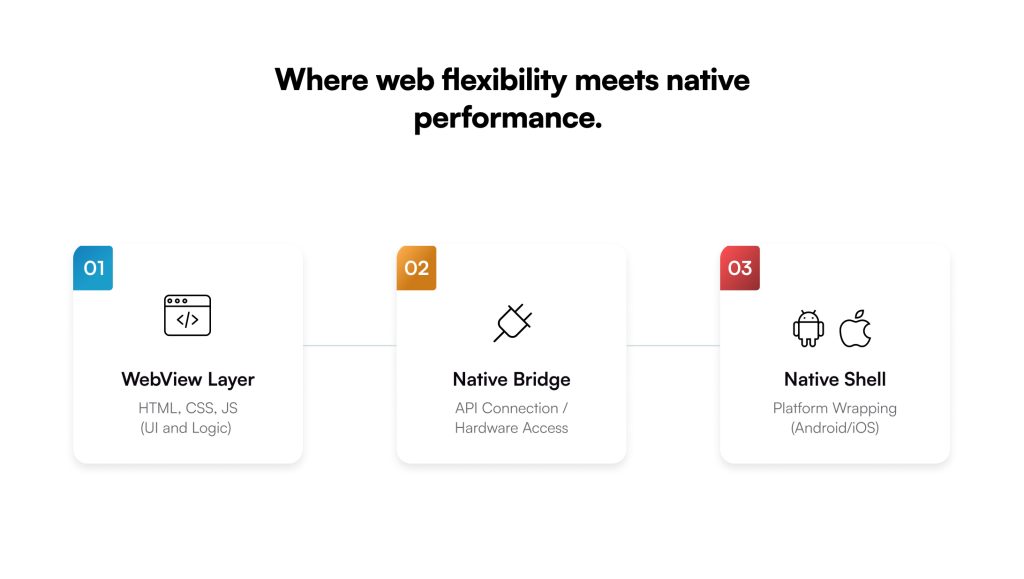
Where web flexibility meets native performance 

Hybrid mobile app development uses one codebase to create apps that run on both Android and iOS. The goal is simple: 

  • Reduce effort 
  • Increase reach 
  • Keep performance close to native 

At its core, a hybrid app runs inside a native shell. The shell connects the web code to the device. Inside it, a WebView layer renders the interface and bridges access to hardware features like camera or GPS. Everything feels native to the user, even though much of the app is powered by web technologies underneath. 

Developers build these apps using HTML5, CSS, and JavaScript, supported by frameworks like React Native, Flutter, Ionic, and Xamarin. Each framework brings its own strengths — some favor performance, others speed or flexibility. 

Native vs. Hybrid Mobile App Development 

Factor Native App Development Hybrid App Development 
Codebase Separate codebases for each platform (iOS, Android) Single codebase for all platforms 
Performance Highest, optimized for specific OS Near-native, slightly lower for complex tasks 
Development Time Longer — separate builds and testing Shorter — shared development and faster releases 
Maintenance Complex — dual updates and bug fixes Easier — one update for all platforms 
Access to Hardware Full access to device features Partial, via plugins or APIs through WebView 
UI Consistency Tailored for each platform Uniform design across platforms 
Scalability High, but resource-intensive High, with faster iteration cycles 
Cost Efficiency Higher initial and maintenance cost Lower upfront and lifecycle cost 

Once you start planning your mobile app, the first decision you face is how to build it. Native or hybrid. Both deliver apps. But they take very different paths to get there. 

Native mobile app development builds separate apps for each platform. Swift for iOS. Kotlin or Java for Android. It gives complete access to device hardware, delivers the best performance, and offers fine control over UI. The trade-off is cost and time. Two teams. Two codebases. Two release cycles. Every update doubles the effort. 

Hybrid mobile app development takes a more unified route. It uses one codebase wrapped inside a native shell, making it run across platforms. The app feels native but draws its interface from web code through a WebView layer. Development is faster, updates are simpler, and the overall cost stays lower. 

Performance is close to native for most use cases. The gap may show only in high-intensity applications like heavy gaming, advanced graphics, or hardware-dependent tasks. That’s where native still makes sense. 

For everything eCommerce, enterprise dashboards, banking, logistics, healthcare apps hybrid strikes the right balance. 

Explaining the Hybrid App Development Frameworks 

Write once, run anywhere. 

Hybrid app development connects web code with native device features. 

The architecture is layered. At the top sits the WebView, where HTML, CSS, and JavaScript render the interface. Beneath it lies the Native Bridge, the layer that lets web components talk to device hardware — camera, GPS, storage, and sensors. Plugins extend this bridge, giving access to native APIs that the browser alone can’t reach. Together, these layers make the app feel and behave like a native one while maintaining the flexibility of the web. 

This framework design allows code reusability at scale. Developers build once and reuse the same modules across operating systems. It also supports native API integration, enabling smooth performance and offline access through caching or local storage. The result — faster builds, consistent updates, and fewer moving parts to maintain. 

Several frameworks dominate the hybrid ecosystem today, each built with a slightly different purpose. Each brings its own balance of performance, flexibility, and ecosystem support. The choice depends on what matters more, be it UI fluidity, team skill set, or integration depth. 

Comparison of Leading Hybrid App Development Frameworks 

Framework Supported Platforms Ideal Use Case Community & Support 
React Native iOS, Android Enterprise apps with native-like performance Strong, active, backed by Meta 
Flutter iOS, Android, Web Design-heavy apps, startups, and enterprise prototypes Rapidly growing, backed by Google 
Ionic iOS, Android, Web, Desktop Content-driven apps, internal enterprise tools Large, open-source community 
Apache Cordova iOS, Android Lightweight apps, quick MVPs Moderate, legacy but stable 
Xamarin iOS, Android, Windows Enterprise systems integrated with .NET Reliable, backed by Microsoft 

A well-chosen hybrid app development framework does more than simplify code. It accelerates product velocity, strengthens maintainability, and ensures that design and performance scale together. For enterprises balancing speed with structure, it is the foundation that turns hybrid development from an experiment into a long-term strategy. 

What are the Benefits of Hybrid App Development? 

The benefits of hybrid app development go beyond cost or convenience. They touch speed, scalability, and sustainability that decide how fast a product grows. 

  • Speed to Market: The first advantage is speed to market. With a single codebase, teams build once and deploy across Android, iOS, and the web. No duplication. No platform lag. This allows faster releases and quicker validation of product ideas. 
  • Scalability: The second is scalability. Hybrid apps grow easily across markets and devices. The same code adapts to multiple screen sizes and OS versions, reducing dependency on platform-specific rebuilds. 
  • Maintenance: Maintenance is simpler too. Updates roll out once and reflect everywhere. Bug fixes, version changes, and security patches require less coordination between teams. That translates into lower downtime and smoother operations. 
  • Offline Capability:  Hybrid frameworks also support offline capability through caching and local storage. This ensures access to critical app functions even without network connectivity — a vital feature for enterprise and field applications. 
  • Cost Efficiency: Then there’s cost efficiency. One development effort means fewer resources, lower testing overhead, and easier maintenance. Over time, this lowers total cost of ownership without compromising user experience.
  • Consistency:Finally, consistency. Hybrid apps maintain a uniform design and interaction pattern across platforms. For brands, that means unified identity and predictable user behavior everywhere. 

Best Examples of Hybrid Mobile App Development 

Some of the most widely used apps today run on hybrid mobile app development platforms. Their success proves that hybrid isn’t a compromise — it’s a strategy built for scale. 

Instagram is one of the clearest examples. Built using React Native, it merges web speed with native experience. The shared codebase allows quick feature rollouts and consistent performance across iOS and Android. For a platform handling billions of user interactions daily, that efficiency is critical. 

Uber follows a similar model. Its driver and rider apps rely on hybrid frameworks to maintain real-time functionality while managing constant updates. The hybrid layer enables faster iteration cycles, ensuring both apps evolve together without separate rebuilds. 

Evernote uses a hybrid structure to manage its multi-device ecosystem. The app’s web foundation keeps note synchronization smooth, while native integrations ensure fast search, camera access, and offline usability. 

Amazon Appstore also embraces hybrid architecture to support its massive catalog across devices and regions. The shared core allows Amazon to maintain design consistency, add new features faster, and streamline global deployment. 

Each of these brands balances hybrid scalability with native optimization layers. Performance-critical elements — like animations or real-time features — often run on native modules, while hybrid components handle structure, layout, and data flow. The result is a blend that delivers reach without losing responsiveness. 

For enterprises, these examples show what hybrid can achieve at scale — faster updates, unified design, and global reach without the complexity of maintaining separate native codebases. 

Hybrid isn’t the future of mobile development. It’s already powering it. 

Analyzing Hybrid App Development Cost 

The cost of hybrid mobile app development is never a flat number. It shifts with structure, complexity, and the depth of integrations behind the interface. Two apps may look similar, but the engineering beneath defines the difference. 

Below are the key factors that drive cost — and why understanding them early helps you plan smarter. 

Key Cost Drivers 

  1. Framework Selection 
    The foundation decides performance and cost. Frameworks like React Native and Flutter deliver near-native quality but need experienced developers. Ionic or Cordova work faster for simpler builds but may add effort later if you scale. 
  1. App Complexity 
    A minimal MVP costs less than an enterprise-grade app. Advanced apps involve multiple modules, user roles, databases, and security layers — all of which raise time and budget. 
  1. Integrations and APIs 
    Adding payment systems, analytics, CRMs, or push notifications increases build hours. Each integration requires testing and compliance checks, especially in enterprise environments. 
  1. Backend Architecture 
    A strong backend is essential for speed and scalability. Microservices, caching, and database design all add to engineering time. It’s the backbone that defines how well the app handles growth. 
  1. UI and UX Design 
    Complex UI elements, animations, or adaptive layouts require more effort. Clean design costs less to build but may offer limited flexibility. 
  1. Deployment and Maintenance 
    Post-launch costs often exceed initial builds. Hybrid reduces this burden through a single codebase — one update, one QA cycle, one deployment. 

Approximate Cost Range by App Type 

App Type Description Estimated Cost Range (USD) 
MVP / Prototype Basic UI, minimal features, few integrations $15,000 – $30,000 
Mid-Complexity App Multi-screen, multiple APIs, moderate backend $30,000 – $70,000 
Enterprise-Grade App Scalable backend, security layers, dashboards $70,000 – $200,000+ 
High-Interactivity App Real-time sync, animations, offline support $100,000 – $250,000+ 
Ready to understand your website development cost with clarity

In-House vs. Offshore Hybrid Mobile Development Team 

Building in-house gives direct oversight but comes with higher fixed costs — salaries, management, and infrastructure. 
Partnering with an offshore hybrid mobile development team often reduces expenses by 30–50%. It brings specialized expertise, flexible engagement models, and faster turnaround without compromising quality. 

Long-Term Value 

Hybrid development lowers total ownership cost by consolidating updates and reducing team size. The same codebase powers multiple platforms — simplifying support, versioning, and maintenance across releases. 

The real value lies in control — predictable budgets, faster delivery, and scalable growth built on a single, maintainable core. 

Partner Galaxy Weblinks for Hybrid App Development 

Choosing the right partner defines how well your hybrid strategy performs. The technology may decide speed, but execution decides success. 

At Galaxy Weblinks, we offer enterprise-grade hybrid app development services built for scale, stability, and performance. Our teams bring deep technical expertise across leading frameworks like React Native, Flutter, Ionic, and Xamarin, enabling faster builds and consistent cross-platform results. 

Every project follows a structured, full-lifecycle approach from architecture design and UI development to integration, testing, and deployment. Our engineering processes emphasize the three pillars of reliable enterprise software: 

  • Security 
  • Scalability 
  • Maintainability 

We design hybrid apps that move as fast as your business does. Whether it’s improving time-to-market, streamlining updates, or scaling across platforms, our goal is simple — to help you build once and deliver everywhere. 

Discover how our hybrid app solutions can accelerate your product’s journey from concept to scale. Contact us Today! 

How Much Does It Cost to Develop a Website? 

Imagine this: your enterprise is ready to revamp its digital presence. You have aligned your branding, finalized the objectives, and set your expectations for performance. But the moment you start requesting quotes for your new website, the numbers vary drastically. One agency quotes $10,000, another says $80,000, and yet another pushes the figure beyond $150,000. 
That’s when the confusion begins. 

If you are a business owner, you have probably faced this exact uncertainty  

But why does the website development cost differ so widely? The truth is, there is not a one-size-fits-all answer because your website cost directly depends on its scale, functionality, and infrastructure depth. 

According to GoodFirms, the average cost to develop a website ranges between $3,000 and $150,000+, depending on requirements like design complexity, backend integrations, and compliance needs. 

For enterprises, this gap is even broader because performance, scalability, and security are non-negotiable. A startup landing page may cost a few thousand dollars, but an enterprise web portal with dashboards, multi-region deployment, and cloud integrations could easily cross six figures. 

Here’s a simplified breakdown to set the context: 

Website Type Purpose Approx. Website Development Cost (USD) 
Basic business website Brand presence, minimal integrations $5,000 – $10,000 
Corporate website Multi-page, CMS-enabled, moderate traffic $10,000 – $25,000 
eCommerce website Product listings, cart, secure checkout $25,000 – $60,000 
Enterprise-grade platform APIs, cloud hosting, data security, scalability $60,000+ 

These figures only set the base layer. The real cost of development lies in the complexity of integrations, the design-first approach, and the architecture that powers it. 

At Galaxy Weblinks, a trusted website development company, we have seen enterprises underestimate their website cost not because of mismanagement, but because most industry oversimplifies the equation. The truth is: 

“Website development cost is not just about coding hours—it’s about engineering a digital system that grows with your business.” 

That’s where this blog goes deeper. Unlike surface-level guides, this piece will break down the average cost to develop a website with real technical factors in play — from design systems to infrastructure, deployment, and post-launch maintenance. 

Below, we will decode the complete deduction of what defines your website development cost, helping you make confident, data-driven budgeting decisions. 

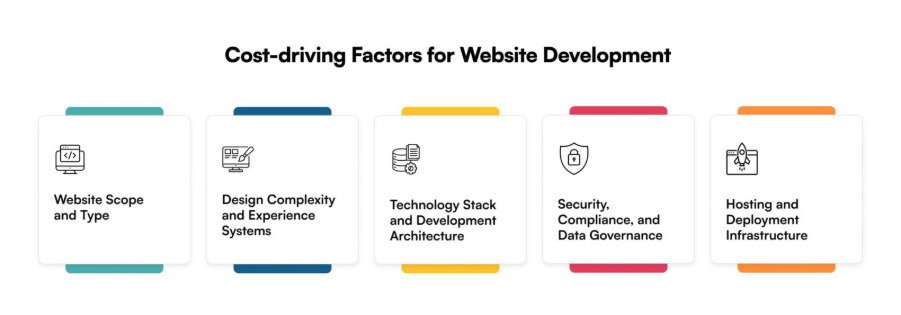
Factors That Influence Website Development Cost 

Once you start estimating your website development cost, you will realize that numbers vary not just by company but by what is happening behind the build. Two websites may look similar on the surface, yet one can cost twice as much because enterprise websites are not priced on visuals alone. They are priced on what powers them underneath. 

Below are the key factors that truly decide the average cost to develop a website, and why understanding them early helps you budget smarter. 

Website Scope and Type 

Your website’s scope defines its cost foundation. A basic business website serves as a digital brochure; a corporate site handles content workflows; a SaaS dashboard or eCommerce platform demands user authentication, analytics, and secure integrations. 

Every added layer—from an interactive dashboard to multi-region deployment—increases the website development cost, not arbitrarily but proportionally to the engineering required behind it. 

Think of it this way: you are not paying for “pages” but for architecture, reliability, and the ability to scale. 

That’s why at Galaxy Weblinks, we often help enterprises map this phase first. Once your purpose is clear, your cost becomes predictable. 

Design Complexity and Experience Systems 

Design does not just affect how your website looks but how it performs. An enterprise website must balance aesthetics with logic: how fast users can find what they need, how accessible it is across devices, and how consistently it performs under heavy traffic. 

This is where a strategic UI/UX design process changes the equation. Wireframes, interaction maps, and accessibility checks may add time to early development, but they cut rework and redesign costs drastically later. 

A design-first system is not an expense; it’s a cost-control strategy. 

Our design teams at Galaxy Weblinks treat UI/UX as the blueprint for performance, ensuring every visual decision supports the backend logic that follows. 

Technology Stack and Development Architecture 

The tools you choose define what your website can do and how far it can go. A React or Angular front-end can make your platform lightning-fast. A scalable software architecture built on microservices ensures future updates do not break your system. But these advantages come with initial setup and planning that directly affect your website development costs. 

Choosing the right tech stack early helps balance cost, performance, and maintainability. It’s a decision that defines your website’s lifespan, not just its launch. 

Security, Compliance, and Data Governance 

Enterprises handle data and data needs protection. That means SSL encryption, firewalls, identity management, and compliance with regulations like GDPR or HIPAA. These layers often go unnoticed during budgeting but significantly impact the average cost to develop a website. 

They are not optional but risk management investments that protect your brand, your users, and your revenue. 

Hosting and Deployment Infrastructure 

The last major cost driver is where your website lives and its infrastructure. A shared hosting plan may be fine for a startup, but enterprises demand resilience, uptime, and flexibility. That’s why most shift toward cloud hosting and DevOps systems like AWS or Azure. They allow continuous updates, backups, and performance monitoring across global regions. 

Web Development Cost Breakdown by Website Type 

Once you understand what drives your website development cost, the next question is inevitable—how much does it cost to develop a website like mine? 

The answer depends on what you are building. A marketing site for brand visibility is vastly different from a web platform designed to handle transactions, dashboards, or multi-level integrations. At the enterprise level, the difference lies not just in scale but in purpose. 

Here’s a practical overview of what different types of websites typically cost in 2025, based on their function, depth, and performance expectations: 

Type of Website Key Features Average Cost to Develop a Website (USD) Timeframe 
Basic business website Static pages, CMS integration, contact forms $5,000 – $10,000 3–5 weeks 
Custom corporate portal Multi-user dashboards, content workflows, analytics $15,000 – $30,000 6–8 weeks 
eCommerce platform Product listings, cart, payment gateway, security layers $25,000 – $60,000 8–12 weeks 
Enterprise-grade web app Microservices architecture, compliance, integrations $50,000+ 12–20 weeks 

These figures are not arbitrary. They represent structured estimates drawn from real-world enterprise builds where every functionality, integration, and compliance layer adds measurable time and technical effort. 

A basic business website offers an entry-level digital presence. It’s ideal for small brands needing visibility and credibility. But as soon as you introduce workflows, analytics, or real-time dashboards, the website creation cost grows because engineering complexity grows. 

When you move toward eCommerce or enterprise-grade systems, you are not just building a website—you are building infrastructure. Security audits, microservices, and integration testing add layers of precision and reliability that basic sites do not require. 

Whether you are planning a custom web app development or scaling an existing digital system, the scope defines your final website creation cost—not the size of your homepage. 

What truly determines long-term cost efficiency is the architecture you choose at the start. Cloud-native foundations, modular codebases, and a solid DevOps setup make scaling faster and cheaper later. 

Cost by Development Approach: In-house vs Outsourcing vs Agency 

Even after you have finalized the scope and features, one key decision still determines your overall website development cost—who will build it? This single choice can change your budget by tens of thousands of dollars — and more importantly, decide how stable, scalable, and maintainable your website will be in the long run. 

For enterprises, the three most common approaches are: hiring an in-house team, working with freelancers, or partnering with a professional agency. Each comes with a different mix of cost, control, and accountability. 

In-house Team 

An in-house team gives you full oversight—your developers, designers, and QA specialists are always available. But that control comes with significant fixed costs. You will need to manage salaries, tools, cloud environments, and ongoing maintenance—even when active development slows down. 

For large organizations with multiple ongoing projects, this investment may make sense. But for most enterprises that only need one or two major builds a year, maintaining an internal tech team often pushes the average cost to develop a website much higher than expected. 

Freelancers 

Freelancers appear to be the most affordable route, and for small-scale websites, they might be. But when the project expands beyond a few static pages, things get complicated. 

Managing multiple freelancers across design, backend, and testing can quickly turn into a coordination puzzle. Missed handoffs, inconsistent design systems, or unaligned timelines are common pain points. 

You might save money upfront, but lose time — and eventually, quality. 

Professional Agency 

A professional agency combines flexibility with structure. You do not just hire people — you hire a process. Agencies bring cross-functional teams that work in sync, use proven frameworks, and deliver measurable outcomes. 

Partnering with a digital transformation partner ensures technical precision, clear ownership, and faster time to market without the chaos of managing multiple vendors. 

At Galaxy Weblinks, this is exactly where we step in. We have helped enterprises build and revamp complex web ecosystems, managing end-to-end delivery through structured sprints, clear documentation, and scalable systems that grow with your business. 

Ultimately, the right choice depends on your priorities. If you value full-time availability, in-house may suit you. If you want flexibility, freelancers can work for smaller projects. But if your goal is long-term reliability, performance, and ROI, working with a dedicated agency delivers the strongest balance between cost and continuity. 

Additional Factors That Add to Website Development Cost 

Even after budgeting for design, development, and hosting, most enterprises still find their website development cost shifting once the project begins. Not because of hidden fees — but because of the hidden layers of what makes a website secure, scalable, and future-ready. 

These are the quiet contributors to cost—the things not always discussed during proposal calls, yet the ones that make the difference between a website that merely works and one that performs effortlessly at scale. 

Hosting & Domain Infrastructure 

Your hosting environment is where your website lives, and it directly impacts speed, uptime, and reliability. A shared hosting setup may save money at launch, but it often struggles when user traffic spikes or security standards evolve. 

Enterprises usually move toward multi-cloud or dedicated infrastructure early, as it supports global availability and faster disaster recovery. Yes, it increases initial website development costs, but it also ensures stability that prevents expensive downtime later. 

The short-term expense of reliable hosting often saves tenfold in operational and reputational costs over time. 

Security Certificates & Compliance Layers 

Implementing SSL, firewalls, authentication protocols, and meeting compliance frameworks like GDPR or HIPAA are not optional anymore. They are essential to safeguarding customer data and protecting your brand’s credibility. 

Each layer adds minor increments to your average cost to develop a website, but collectively, they create resilience. And resilience is priceless when your business operates across regions or industries that demand airtight data handling. 

Integrations with AI-Driven Systems 

Modern enterprises do not stop at static websites. They integrate automation, personalization, and analytics to improve user engagement and efficiency. That’s where AI in web development plays a pivotal role. 

As AI in web development becomes mainstream, integrations such as chatbots, predictive personalization, and adaptive analytics directly influence your website development cost but also redefine your ROI. 

From conversational assistants to product recommendation engines, these AI layers transform your website into a self-learning digital ecosystem that grows smarter with time. 

Content Updates & Scalability Upgrades 

A website is never truly “done.” It’s a living system that needs updates, fresh content, new integrations, and ongoing optimization. 

A robust scalable software architecture makes these updates easier, faster, and cheaper in the long run. Without it, even minor upgrades can become expensive and disruptive. Similarly, a thoughtful performance optimization strategy ensures your site loads quickly, retains users, and supports global access—all of which influence both cost and conversion outcomes. 

While a scalable foundation might slightly increase upfront costs, it dramatically lowers the lifetime maintenance spend. 

How Galaxy Weblinks Simplifies Your Website Development Process 

When enterprises invest in a new website, two questions often surface before anything else: How much will it cost, and how soon can it go live? 
Both are fair questions — and both are notoriously difficult to answer when development happens in silos. Delays pile up, communication breaks, and what starts as a fixed website creation cost soon becomes a moving target. 

At Galaxy Weblinks, we have solved that problem by reengineering the process itself. We combine design intelligence, automation, and human expertise to make every stage —from planning to deployment — faster, more predictable, and more cost-efficient. 

Design-First Execution, End-to-End Accountability 

What makes our process different is that design never takes a back seat. We do not start with code but with intent. Every interaction, layout, and system logic is purpose-built to support your business goals. 

A Partnership Built on Clarity 

We do not overpromise; we show exactly what’s achievable within your timeline and budget. Whether you are building from scratch or modernizing legacy infrastructure, our web development services are designed to give you transparency. 

Curious about your exact website development cost? Explore our web development services to get a clear, enterprise-ready estimate. 

At Galaxy Weblinks, we don’t just develop — we help enterprises build digital systems that last. 

Final Takeaway 

In the end, your website development cost is defined by the decisions behind it. Every factor, from your design complexity and development architecture to hosting, compliance, and integrations shapes how much you’ll invest and what value you’ll receive in return. 

On average, here’s what you can expect as the final website cost: 

  • Basic business website: $5,000–$10,000 
  • Corporate or mid-level website: $15,000–$30,000 
  • eCommerce platform: $25,000–$60,000 
  • Enterprise-grade web system: $60,000–$150,000+ 

But here’s the part most decision-makers overlook: spending wisely on design and architecture early can save you exponentially more in maintenance and upgrades later. A smart, scalable foundation reduces friction, improves performance, and makes future innovations seamless. 

Flutter vs React Native: Which One is Better in 2025?  

When it comes to cross-platform app development, Flutter and React Native are the two frameworks dominating the game. Thanks to these frameworks, you can develop robust mobile apps that run on both Android and iOS devices. Besides, they are also used to develop desktop apps for Windows, Linux, and Mac OS as well as web-based applications.  

Cross-platform app development frameworks like React Native and Flutter offer many advantages, such as cost-effective development, faster-to-market, single codebase, easy maintenance, and more. Therefore, these frameworks are quite popular for developing apps for mobiles, desktops, and the web.  

Indeed, Statista’s report states that Flutter and React Native are among the top frameworks for developing mobile apps. While both these frameworks fall in the category of cross-platform frameworks, they differ in terms of their design, architecture, and technology. So, when it comes to developing apps, a dilemma about Flutter vs React Native arises.  

While both these frameworks are great, understanding which one suits your mobile app development project is crucial to developing a top-notch app. This comprehensive blog on which one is better in React Native vs Flutter in 2025 provides essential information that will clear your confusion. So, let’s see which framework is best for cross-platform apps in 2025. 

info

A Quick Overview of Flutter vs React Native Differences 

The primary difference between Flutter and React Native is the programming language they use. While Flutter uses Dart, React Native leverages the JavaScript programming language to create apps. The following table provides a detailed comparison of these two popular cross-platform frameworks.  

Basis  React Native  Flutter 
Primary Language  JavaScript (with TypeScript)  Dart 
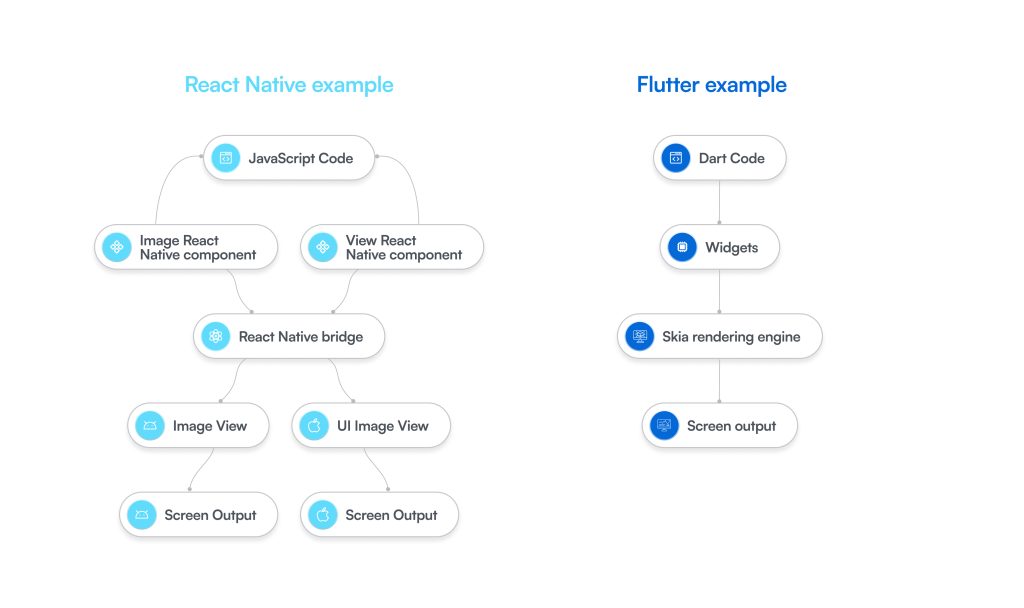
Architecture  It uses Fabric Render for UI rendering and TurboModules to create native modules that were previously handled by the JavaScript bridge. JavaScript code is converted to native components for Android and iOS devices.   Flutter has its own rendering engine, known as Skia, that draws UI from scratch. It offers a widget-based system for creating and rendering components.  
Performance  React Native offers near-native performance for apps. But sometimes minor issues may arise if you use the JavaScript bridge, but with the new rendering methods can address this problem well.   It usually delivers more consistent and superior performance, especially in the case of UIs or animations, due to the Flutter AOT compilation.  
UI/UX  By default, React Native offers a more native look and feel because it converts code to native components of iOS or Android. But it also requires extra effort to ensure a consistent user experience.  Flutter offers high UI consistency across different devices. It offers built-in customizable widgets (Cupertino for iOS and Material for Android) to create appealing and consistent UIs. 
Learning Curve  Moderate learning curve if your team is already proficient in JavaScript and React.   Steeper because your team has to learn Dart, which is a language similar to Java or C#. 
Ecosystem  React Native is a vast and mature cross-platform development framework with a large number of third-party libraries.  The Flutter framework is relatively new, but it’s growing rapidly. There are several official packages available for development and maintenance by Google.  
Tooling  Good tooling like Expo for quick prototyping and Fast Refresh for quick iterations.  Excellent tooling like Hot Reload for rapid iterations and Flutter Doctor command utility for diagnosing Flutter development environment on a PC.  

Understanding Flutter and React Native in Detail 

React Native is an open-source component-based cross-platform framework that was created by Facebook (now Meta). Facebook React Native was released in 2015 and has 124k stars on GitHub. It uses JavaScript to develop applications and creates a single codebase to build apps that run across multiple OS.   

Real-world examples of React Native apps include Facebook, Skype, Uber Eats, Microsoft Teams, Discord, Instagram, and Tableau. The following table shows the advantages and disadvantages of React Native development.  

Advantages  Disadvantages 
It is based on the write once and run anywhere philosophy. It means a single codebase is used to develop apps that run both on Android and iOS.  Native module dependence requires developers to write native code in Java/Kotlin for Android and Swift/Objective-C for iOS for certain features or libraries. So, separate codebases might have to be maintained in such cases. 
The hot reload feature known as “Fast Refresh” speeds up iteration cycles in app development as it instantly reflects code changes.   When using the JavaScript bridge, there are performance overheads due to communication between JavaScript and native layers in the case of complex UIs or heavy computations.  
There are a lot of options for libraries and third-party integrations due to the vast JavaScript ecosystem.  There is an inconsistent and fragmented set of tools and libraries that React Native depends on that could make app development challenging.  
Developers are easily available for React Native development due to its dependence on web-based technologies. It is also easy to find support for troubleshooting.    React Native offers a real native feel, but it’s not truly native.  
Code reuse and component-based coding ensure compact structure and easy maintenance.   It can be difficult to debug apps if issues arise beyond JavaScript, React, and native layers. 

Flutter is also an open-source cross-platform framework for developing mobile apps. It is often referred to as a UI framework. You can use Flutter to build stunning mobile apps, web apps, desktop apps, and embedded experiences. It was developed by Google and is now maintained by it.  

Google Flutter is also among the most popular frameworks for developing apps for a wide range of platforms, and it has over 173k stars on GitHub. With a single codebase, you can deploy your app on multiple platforms and offer an excellent user experience.  

Real-world examples of Flutter apps include Google, Alibaba, BMW, eBay, Google Pay, Google Earth, and Capital One. The following table shows the advantages and disadvantages of Flutter.  

Advantages   Disadvantages 
Flutter excels in terms of performance and efficient UI rendering due to its own rendering engine Skia, and compilation of components to native code. It offers a smoother UI.   Due to a larger bundle size, Flutter apps APK or IPA) are larger in size compared to native or React Native apps.  
It is a flexible framework that works cohesively with its widget-based structure. All components, or the full UI, are created with the use of customizable widgets that simplify development.  This framework is based on the Dart language, which has a limited talent pool compared to other popular languages like JavaScript.  
The hot reload feature helps inject code changes in a running app that reflect instantly, offering faster development and iteration cycles.   It is still in the growing stage and is a new framework with a smaller ecosystem of third-party libraries and packages.  
Flutter is backed by Google, which gets constant support, maintenance, and updates. It has good documentation for troubleshooting issues.   Custom rendering ensures that the UI looks consistent, but it may not perfectly match the native UI subtly.  
Truly support different types of platforms, including mobile, desktop, and the web.   Though Flutter and Dart have strong tooling, but support for them is less ubiquitous across various IDEs and code editors. 

Flutter vs React Native: A Head-to-Head Comparison in Detail 

React Native and Flutter are two robust frameworks for cross-platform app development. Although there are several commonalities between these two frameworks, they also stand out from each other in many aspects. Let’s check out a detailed comparison of these cross-platform frameworks to know how they differ from each other.  

Popularity 

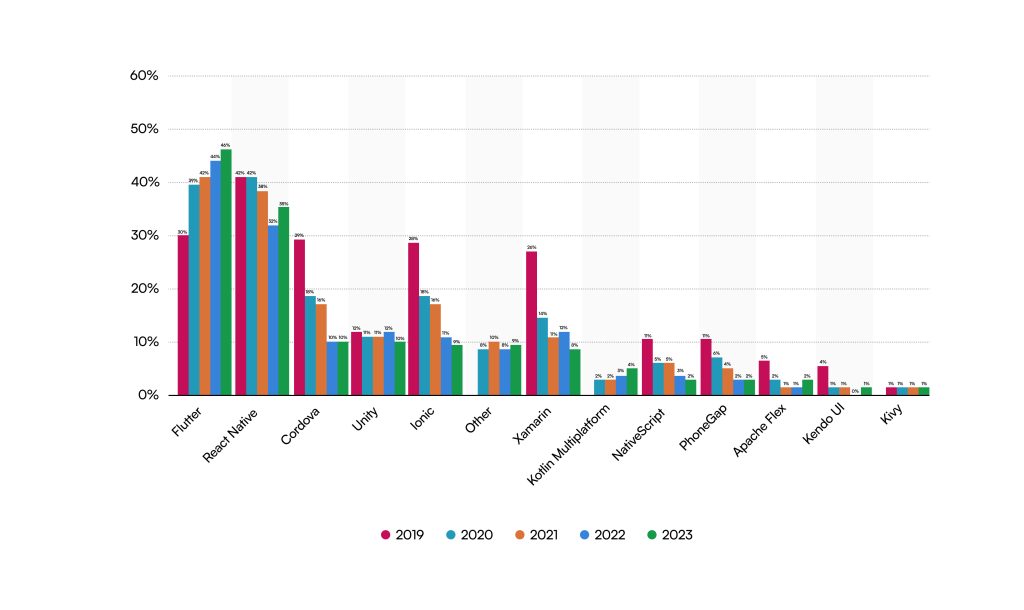
Both frameworks do well in terms of popularity, as they are among the top technologies to build mobile apps, as shown in the image below.  

Flutter

The above image shows the top cross-platform mobile frameworks used by developers from 2019-2023, presented by Statista. Flutter has consistently increased in position, reaching the top of this chart, and React Native follows it.  

Although React Native is a well-established framework compared to Flutter, because it was launched earlier, the latter has gained a significant edge over the years. Since JavaScript is a popular programming language and fundamental to web development projects, many developers desire to work on it due to the shorter learning cycle.  

Performance 

Performance is another crucial factor to consider for the React Native vs Flutter dilemma. When comparing these two frameworks from a performance point of view, Flutter usually holds a distinct advantage because of its architecture. Since Flutter depends on its own render engine Skia, it draws every widget from scratch on a native canvas, thus offering smoother and more consistent UI. 

On the other hand, React Native uses a bridge to convert JavaScript code to native UI components for Android and iOS. In this case, UI can lag in case of heavy animations or updates. So, based on their approach to rendering, the performance of these frameworks varies, and Flutter could be better in some cases.  

Community Support 

When perusing cross-platform development, community support plays a vital role in overcoming challenges and ensuring a successful project. React Native, being a mature framework compared to Flutter, offers a more vibrant community support. Besides, the JavaScript foundation is another reason for extensive support.  

Flutter is constantly growing, and there is also sufficient community support for this framework. Besides, it is actively maintained by Google, and there is a robust community that helps to resolve various issues and difficulties in app development projects.  

External Dependence 

Flutter is usually touted as a “batteries included” cross-platform framework, which means it offers plenty of built-in widgets and libraries that are enough to build consistent UIs for iOS and Android. It can work without even depending much on third-party libraries.  

On the other hand, React Native is highly dependent on third-party libraries for creating mobile apps. Developers have to repeatedly refer to third-party libraries when it comes to developing apps. Therefore, Flutter makes development speedier and smoother compared to React Native. 

What is the Right Choice: React Native or Flutter? 

Now that you have plenty of information about React Native and Flutter, it’s time to ponder the question: which one is better? However, there isn’t a straightforward answer to this question because both frameworks are best for developing mobile apps with excellent features and benefits.  

Moreover, which one is better depends on many factors, such as project requirements and business goals. There are many cases when Flutter app development is the best option, and there are many cases when React Native app development is the right choice.     

Choose React Native when: 

  • Looking to scale your app with cross-platform functionality. 
  • To build apps with low memory consumption, especially on Android. 
  • Looking to build lightweight and feature-rich native apps. 
  • Your app depends on native features such as GPS, Camera, Bluetooth, etc. React Native offers robust integration with native APIs. 

Choose Flutter when: 

  • Looking to build apps with pixel-perfect UIs and customizable designs. 
  • Your app doesn’t require much native functionality. 
  • Need to build and publish your app faster. 
  • Want an app with a single codebase supported on the web and desktops with a uniform user interface.  
  • Your app has heavy graphics and complex UI that must be handled with high performance. Flutter’s own rendering engine can handle this well. 

Galaxy Weblinks Can Help You with React Native vs Flutter Dilemma 

Developing the right mobile app is crucial to building your space in crowded marketplaces. Just like a unique idea is important to build an app that stands out, the underlying tech stack you choose plays an equally important role. Choosing between Flutter and React Native can be confusing.  

Galaxy Weblinks can help you build a robust mobile app for your business by picking the best framework between Flutter and React Native that best aligns with your requirements and goals. Our team cautiously listens to your requirements, identifies your challenges, and recommends the best option based on scalability, performance, and time-to-market. 

We help you build the right mobile app by leveraging Flutter and React Native. Our expertise in these frameworks enables us to develop top-notch apps that align with your expectations. We implement top security features, craft seamless UI/UX, and make sure your app adheres to industry standards and compliance.  

Contact us to discuss your project and let us make your dream come true with a winning mobile application.  

Leveraging AI to Transform Customer Experience 

In a world where customer expectations shift faster than product launch cycles, AI is not just supporting service—it’s rewriting the rules of engagement in real time. From Starbucks delivering hyper-personalized offers on its app to Home Depot guiding customers through complex DIY projects via AI chatbots, the brands that win aren’t reacting—they’re anticipating. 

Generative AI and AI-driven services are the core engines behind better conversations. AI now predicts what customers need before they ask. It personalizes every touch. And it turns routine support into action that feels human. Nike uses predictive analytics to suggest the right shoe at the right time. JPMorgan Chase uses AI to see a client’s need before it appears. That’s not magic. That’s precision—done at scale. 

The scale is undeniable: Accenture predicts AI could lift corporate profitability by 38% by 2035. But beyond numbers, the real shift is experiential. It’s about personalized customer journeys that feel intuitive, real-time service that feels human, and proactive support that feels thoughtful. 

AI is everywhere. But you get success by using it right. The winning brands don’t chase numbers. They chase clarity. Brands use AI in customer experience to predict. Smart systems now recommend before customers even ask. Chatbots fix problems before they appear. The future of customer experience isn’t coming—it’s here. 

Moving From Traditional Customer Support Towards AI-driven Customer Experience 

Aspect Conventional CX AI-Powered CX 
Customer Support Reactive Customers reach out after an issue arises Proactive AI predicts issues and offers solutions before they occur 
Resolution Time Long wait times Manual escalation Real-time assistance Use of chatbots, voice AI, and automated workflows 
Personalization Generic interactions and solutions to everyone Hyper-personalized experiences Analysis of behavior, history, and preferences 
Scalability Limited  Requires more staff and resources to handle volume Unlimited AI scales effortlessly across regions, languages, and channels 
Customer Journey Mapping Fragmented across platforms and often siloed Unified, omnichannel view powered by AI-driven insights 
Decision-Making Based on historical data, often outdated Predictive — real-time analytics and forecasting for smarter engagement 
Cost Efficiency High operational costs due to manual processes Reduced costs through automation and optimized resource allocation 
Customer Satisfaction Inconsistent and heavily dependent on agent expertise Consistently high, driven by instant, tailored, and seamless experiences 

Customer service has always been reactive: A call came in. An agent replied. The customer waited again. That world is ending. 

AI has changed the rhythm. Chatbots and generative tools don’t react—they move first. They turn friction into flow. 

Look at Sephora. Its AI chatbots don’t just answer—they guide. They help customers find products, suggest what fits, and even book appointments. Every click feels smoother. Every step feels planned. 

This is where the edge appears. 
Proactive support sees trouble before it hits. An e-commerce site can spot a shipping delay and fix it before the buyer knows. 
Amazon does it. Zappos does it. 
That’s why their customers stay. Because trust begins before the problem ever does. 

The numbers underline the opportunity: Gartner reports that AI can reduce 80% of common customer service issues by 2029. But the real story is not efficiency—it’s the scale of engagement. AI lets brands deliver personalized, timely, and context-aware experiences without losing the human touch. 

In this landscape, the edge is not just integrating AI in customer experience—it’s applying it intelligently. From AI chatbots that anticipate needs to generative AI shaping dynamic experiences, the brands that lead turn service interactions into a competitive advantage. 

AI in Customer Experience: Crafting Personalized Customer Journeys at Scale  

From browsing history and click patterns to past purchases and in-app behavior, AI in customer journeys is not just tracking data—it’s turning it into action. Personalized customer journeys are no longer about segmentation—they’re about anticipation at scale. 

Generative AI crafts content that feels human and contextual. Product recommendations, marketing messages, visuals—everything adapts to the individual, in real time. Stitch Fix predicts your next outfit. Sephora suggests your next shade. Netflix serves your next binge. Every interaction is personalized, timely, and predictive. 

The impact is tangible. McKinsey finds personalization can boost revenue by up to 40% and generate over $1 trillion in value. But the real advantage is not the numbers—it’s the experience. Customers do not just engage—they feel understood. They do not just shop—they stay loyal. 

AI in CX is a vision. Generative AI builds campaigns made for one person at a time. AI insights shape every touch. 

The best brands make journeys that feel easy. Fast. Predictive. Human. 

Integrating AI Across Channels: Omnichannel Experiences 

AI

Customer journeys move fast. Faster than most businesses can follow. 

A shopper discovers on Instagram, compares on mobile, buys on desktop, and wants support on WhatsApp—all before lunch.  

AI-driven CX is stitching the entire experience together. 

1. Personalized Engagement Across Platforms 

The old model of personalization—static email offers and cookie-based retargeting—is obsolete. Customer engagement AI now builds unified profiles that move with customers across every channel. The payoff? Consistency, trust, and higher conversion at scale. 

  • Starbucks: Deep Brew AI stitches together app orders, in-store purchases, and loyalty rewards so every interaction feels like it comes from one brain. 
  • Nike: Their AI ecosystem connects browsing, purchase history, and even Nike Run Club data, creating a loop where fitness activity informs product drops and offers. 

2. Conversational AI at Scale 

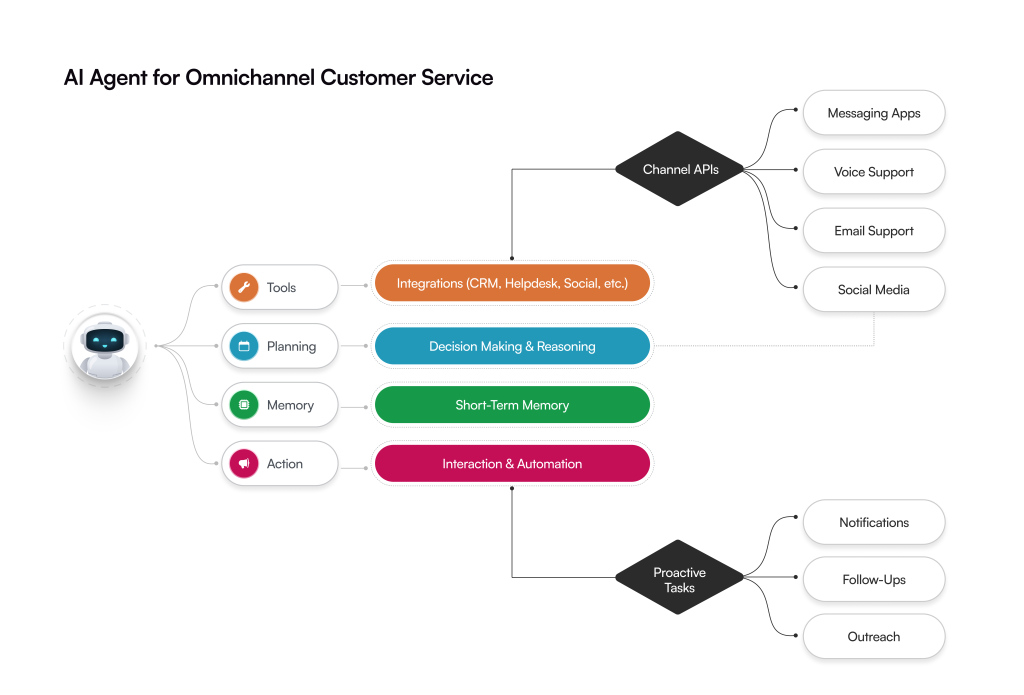
Customer service can no longer reset at every channel switch. AI chatbots and voice assistants are rewriting this playbook by carrying context forward—making support continuous, not fragmented. 

  • Sephora: Start with a Messenger chatbot to discover a product, move to WhatsApp to book a consultation, and still see synced recommendations in-app. Context is not lost; it compounds. 
  • Domino’s: With “Dom,” voice orders flow across Alexa, Google Home, app, and phone calls. The system remembers preferences everywhere, creating loyalty through ease. 

3. Inventory and Fulfillment Sync 

When promises break in e-commerce, it’s not marketing that failed. It’s connection. 

AI demand forecasting fixes that. It links digital intent to physical delivery. It makes sure what’s promised is what’s received. 

That’s where trust lives—and where loyalty begins. 

  • Walmart: AI demand forecasting aligns online orders with local inventory, making delivery estimates accurate instead of aspirational. 
  • H&M: Customers see live in-store stock while browsing online, reserve items instantly, and pick them up the same day. Convenience becomes part of the brand’s value. 

4. Predictive Customer Journeys 

Reactive support is table stakes; proactive customer support is the differentiator. Predictive AI anticipates needs before customers voice them, reducing friction while deepening trust. 

  • Amazon: Predictive engines rewrite homepages, emails, and push notifications in real time, anticipating what you’ll want next across every device. 

5. Bridging Online and Offline 

The future of omnichannel is not digital versus physical—it’s both, seamlessly blended. Generative AI and AR bring context from one world into the other, erasing the boundaries customers do not care about. 

  • IKEA: With its AR-powered app, customers visualize furniture at home and instantly check in-store availability. The transition from screen to store is effortless. 
  • Disney: MagicBand remains the benchmark—AI-powered personalization that connects rides, hotels, retail, and dining into one continuous guest journey. 

Future Trends: Preparing for the Next Wave of AI in CX 

The next wave of AI in customer experience will not just automate—but anticipate, empathize, and co-create. Organizations aren’t looking for incremental improvements; they’re looking for the platforms, intelligence, and foresight that define the next decade of customer engagement. 

1. Emotion and Context-Aware AI 

AI will read not just clicks, but moods. Facial recognition, voice sentiment, and behavioral cues will allow brands to adapt interactions in real time. 

  • Example: Affectiva’s emotion AI is being used by automotive and retail brands to measure customer reactions, enabling real-time adjustments to marketing messages or in-store experiences. Imagine a digital assistant adjusting tone, offers, and even visuals based on your emotional state. 

2. Predictive Marketing at Scale 

Beyond anticipating service needs, AI will forecast intent before it manifests, triggering proactive engagement and hyper-timed offers. 

  • Example: Amazon’s anticipatory shipping lays the groundwork; soon predictive engines will pre-launch marketing campaigns tailored to an individual’s predicted purchases across channels. 

3. Hyper-Personalization with Generative AI 

Personalization will become truly dynamic—AI creating copy, visuals, and recommendations per individual in real time. Static templates will be obsolete. 

  • Example: Netflix experiments with AI-generated thumbnails tailored to each viewer’s preferences. In retail, Shopify merchants are beginning to auto-generate custom product visuals and descriptions for micro-audiences. 

4. Voice and Conversational Commerce as Primary Channels 

Voice interactions will move from novelty to first-class channels, with AI managing intent, context, and even predictive ordering. 

  • Example: Domino’s and Starbucks are early adopters, but the next phase is fully predictive: voice assistants proactively suggesting purchases (“Your usual latte is ready—should we add your favorite pastry?”). 

5. AI-Driven Spatial and Immersive Experiences 

The intersection of AI, AR/VR, and spatial computing will redefine “shopping” and engagement. Experiences will be contextually aware, visually personalized, and fully interactive. 

  • Example: IKEA’s AR app hints at the future; soon, AI will create immersive digital showrooms where layouts, lighting, and product recommendations evolve in real time based on a user’s behavior and preferences. 

6. Autonomous Customer Experience Orchestration 

The ultimate frontier: AI not just informing decisions but running entire CX journeys autonomously—from marketing and sales to support—adjusting in real time for individual customers at enterprise scale. 

  • Example: Early pilots in banking and e-commerce use AI to autonomously route high-value clients, preempt friction points, and tailor experiences end-to-end without human intervention. 

Strategic Takeaway: Beyond Tools, Building AI-First CX 

From AI-driven personalization to omnichannel orchestration, trusted CX consulting services demand design, strategy, and execution fused into one. The UI/UX-first approach of Galaxy Weblinks does not layer intelligence on top of clunky interfaces; it makes every interaction feel seamless, intuitive, and human. 

With 100+ enterprises transformed and 670+ professionals pushing the boundaries of CX, we do not just implement tools—we craft experiences that move the needle. Brands like NETGEAR, Pepsi, and Staples partner with us to turn predictive journeys, AI chatbots, and generative personalization into real business impact as well as for various other services. 

In a world awash with AI, we make it strategic, intelligent, and creative. With us, your CX is not just responsive—it’s visionary. Partner with us to make every customer interaction count. 

FAQs 

1. How is AI redefining customer experience today? 

AI is changing how customers connect with brands. Chatbots now solve problems in seconds. Personalization happens in real time. The shift isn’t slow—it’s sharp. Enterprises using AI-driven service close tickets 40% faster. Their loyalty scores beat industry norms. The result is simple: speed builds trust. 

2. Where does generative AI add the most value? 

Its strength isn’t in quantity—it’s in clarity. Generative AI shapes journeys that feel personal. It crafts offers, messages, and content that change with the moment. E-commerce companies using it see 15–25% higher conversions. More people come back to buy again. That’s the proof. 

3. Why is proactive customer support becoming the new baseline? 

Because reacting is old thinking. Proactive support sees trouble before it hits. It predicts intent, reduces churn, and earns trust early. Brands using AI for engagement report 25–35% fewer tickets. Their customers stay longer. Their bonds grow stronger. 

4. What does omnichannel AI execution actually look like? 

It isn’t about being everywhere. It’s about being the same everywhere. AI connects web, mobile, social, and voice into one line of experience. When companies adopt it, resolution times drop by half. Brand loyalty deepens. The journey feels effortless—and that’s what customers remember. 

5. What’s next in AI technology trends for CX? 

The next step isn’t more automation—it’s smarter empathy. AI will read tone, predict needs, and respond with understanding. It will blend emotion with precision. Hyper-personalization, voice commerce, and predictive marketing are already here. Early adopters see double-digit engagement gains. The future isn’t coming—it’s already speaking. 

Top Web Development Trends in 2025 

Web development is a constantly evolving field, and changing user behavior is the driving force behind it. How users interact with websites and web applications today differs from how they used to interact a few years ago.  

Indeed, there was a time when websites looked like a directory of information with little or no user interactions, and today’s websites are more dynamic, interactive, and feel much like a desktop or mobile application.  

Thanks to different web development trends, over the years, user experience has significantly improved. As every year there are changes in user behavior, new trends in web development emerge – AI chatbots and voice search for example.  

If you are considering developing a website or web application, understanding the latest web development trends in 2025 is essential to develop a state-of-the-art solution to stay competitive. By implementing the latest trends in web development, you can create the best user experience.  

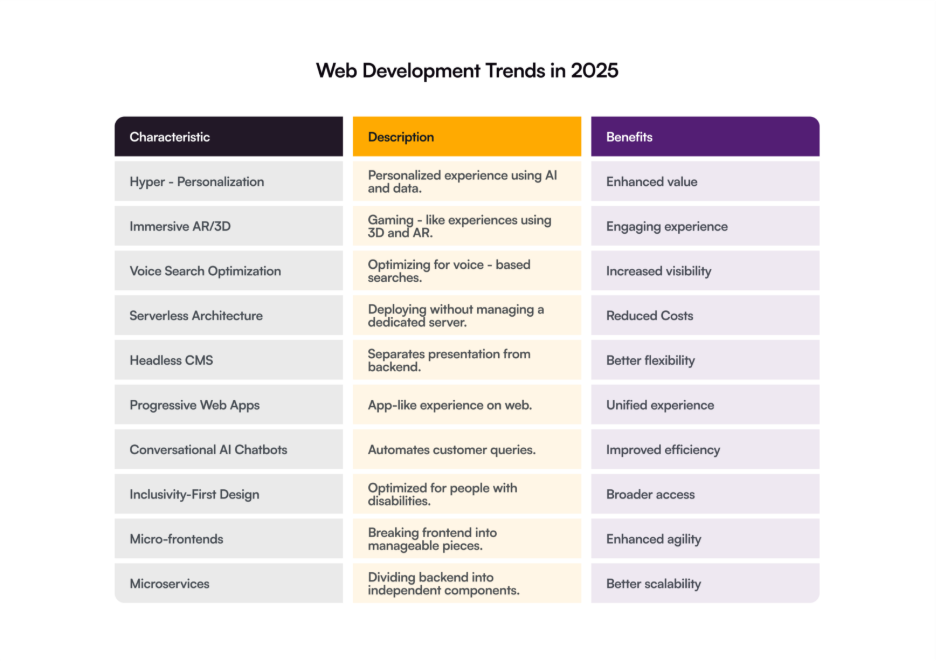
Hyper-Personalization  

A major shift in user behavior today is their expectation for a personalized experience. Imagine when a user logs in to your website, they find recommendations for products, articles, news content, or anything else that it has to offer. This is the practical use of hyper-personalization.  

Such functionality improves user experience and reduces user churn by offering enhanced value. Hyper-personalization uses AI and data to offer personalized services and product recommendations by analyzing users’ search/purchase history, physical location, and other factors. 

Today’s customers expect brands to know them and understand what they need. Brands that value personalization are 71% more likely to earn loyal customers compared to only 48% of the possibility for brands that don’t offer personalization, as per Deloitte research.  

Businesses are widely using the hyper-personalization web development trend, and you can also use it with the following features.  

  • AI-driven dynamic content delivery is a data-driven content delivery strategy for websites and web apps to offer personalized experience.  
  • Personalization offers content that resonates with users, making them more likely to engage with content.  
  • Your business can gather data from CRMs, websites, feedback, and other sources to offer personalization. 

Immersive AR and 3D Experiences 

Gaming-like experiences are quite popular among younger generations. Many businesses have recognized it and adapted UIs for their websites and web apps to attract such users. Therefore, websites and web apps with rich 3D and AR experiences have emerged among the top web development trends in 2025.  

The use of APIs like WebGPU enables web developers to create immersive web experiences with 3D worlds, parallel computing, high-performance graphics, and advanced features. You can develop more interactive and realistic web experiences by leveraging AR/VR technologies.  

Apart from creating gaming-like experiences, AR/VR has many other excellent uses for websites and web apps. For example, IKEA Place is a good example of how VR works in which customers use their smartphones to visualize virtual furniture and place them in different places in their house to see where it fits the best.      

Similarly, virtual try-ons help customers virtually try clothes to see how they fit and look. These features on websites and web apps help users make decisions. 3D elements and graphics in UIs create an engaging experience that not only attracts users but also encourages them to take specific actions.   

Voice Search Optimization 

Although it’s not a new trend, voice search optimization remains one of the top trends in web development in 2025. The increasing popularity of virtual assistants like Google Assistant, Siri, and Alexa have accelerated this trend. Users are leveraging voice assistants and smart speakers not only for listening to music and searching for information; they also leverage them for shopping.  

With voice-based commands, virtual assistants can help users conveniently search for information and order food, book movie tickets, or purchase a product. So, optimizing voice search has become crucial to ensure that your website is visible in these searches. Voice recognition and artificial intelligence are the key technologies behind voice search functionality.  

Serverless Architecture 

Serverless architecture is one of the top web development trends becoming popular to build efficient and high-performance web solutions. It is a revolutionary technology in web development that enables you to deploy your website or web application and its functions without managing a dedicated server. You can use the cloud to deploy, manage, and scale your website or web app. 

There are many advantages to using this model like faster time-to-market, reduced operational costs, and automatic scaling because resources are dynamically allocated. The cloud resources can be scaled up easily on demand to handle increased traffic for your website and web app. 

With serverless architecture, you can focus on developing a robust website or web app without being concerned about the deployment environment. This allows you to create a customizable frontend of your website or web app while using a plug-and-play backend.  

Headless CMS 

Managing content on your website or web app can be challenging without a CMS (Content Management System) that provides a single interface for managing all content. There are many top CMS platforms like WordPress, Drupal, Joomla, etc.  

Moreover, the use of headless CMS is one of the key trends in web development today that offers a more flexible way to manage content. A headless CMS separates the presentation layer from the backend layer. APIs play a vital role in connecting the backend to the frontend. So, the data is managed via APIs by fetching data from backend to presenting it on the frontend.  

There are several headless CMS like Strapi, Contentful, and Umbraco that separates the content repository from the presentation layer and allows managing content through APIs. Headless CMSs offer better flexibility and customization in presentations over traditional CMS. Besides, you can freely decide which framework or technology to choose for frontend. 

Progressive Web Apps 

Among the different web development trends is PWA that has taken web experience to a whole new level. A progressive web app (PWA) is downloadable and can be installed on a mobile or desktop. It offers an app-like experience with offline functionality. Companies like Pinterest, Instagram, Starbucks, and Uber have already launched their PWAs.  

The use of PWAs is a popular web development trend that will continue in 2025 and beyond. You can increase user engagement, attract more audiences, and increase revenue by investing in PWA development.    

Progressive web apps offer many app-like features like push notifications, installation, and offline accessibility. These applications ensure a unified experience across different platforms like desktops and mobile devices.  

Conversation AI Chatbots 

Customer support is often hectic, time consuming, and slow. The introduction of conversational AI bots has revolutionized this field. Conversational AI bots transform overall customer experience by improving operational efficiency, enhancing user engagement, and offering personalized experience. 

With the advancements in natural language processing and machine learning, AI bots are now widespread, and companies use them to streamline their customer support services. With the use of these bots, your business can automate customer queries and minimize time while improving overall user experience.  

These bots offer many advantages for your business, from interactively handling customer queries to providing help to fix their issues instantly. Conversational AI bots transform the way users interact and fix their issues.  

Inclusivity-first Design 

Inclusivity-first design focuses on developing web solutions that are optimized for over 1 billion people living with disabilities worldwide. It focuses on creating an accessibility-first and inclusive web solution that allows a broader spectrum of people to use it without a hitch.  

This is a vital web development trend and requires you to build solutions that comply with WCAG (Web Content Accessibility Guidelines). These guidelines provide necessary recommendations for creating interactive and inclusive web solutions.  

Micro-frontends 

Micro-frontend is another popular web development trend today that helps create flexible and scalable architectures for web apps and websites. It involves breaking a monolithic frontend application into manageable pieces. Each piece in such a front-end application is an independent and self-contained module.  

Each of these micro-frontends are created, tested, and deployed independently that enhances agility, scalability, and maintainability. These modules create a cohesive and unified interface providing a smooth user experience.  

Each of the modules in micro-frontends can be managed by separate teams that reduce complexity. It is a suitable architecture for larger applications that require multiple teams to manage it. Netflix is an ideal example of such applications that leverage micro-frontends. 

Microservices 

Microservices are akin to micro-frontends but define the architecture for the backend of an application. In this case, an application is divided into smaller components called microservices that are independent from each other and can be developed, tested, and deployed individually.  

Microservices have emerged as a prominent web development trend in 2025 and have been adopted by many companies like Amazon, Spotify, Netflix, and PayPal. The key advantages of microservices include flexibility, scalability, security, and easy maintenance.  

Just like micro-frontends, microservices can be managed by different teams, and they are self-contained deployed or managed without affecting other microservices. These microservices work cohesively to make a web application functional.  

To Wrap Up 

Web development has been evolving rapidly over the years, and there are many new innovations that are shaping the future of this domain. If you want to develop a website or web application, knowing and implementing these trends is crucial to developing a top-notch solution. 

As 2025 unfolds, trends like AI-driven personalization, progressive web apps, voice search optimization, and headless development are setting new benchmarks for user experience and performance. Staying ahead means more than just keeping up — it’s about embracing change with a future-focused mindset.  

Whether you’re starting fresh or upgrading an existing platform, adopting these cutting-edge web development trends will help your business stay relevant, competitive, and ready for the next digital leap.   

At Galaxy Weblinks, we leverage these top trends to help businesses create cutting-edge websites and web applications. We are a well-established web development company with 25+ years of experience in the domain.  

Contact us to discuss your project and help you develop a robust website or web application.   

What Are the 6 Core Elements of Digital Transformation? 

By 2028, global spending on digital transformation will reach $4 trillion. Yet, 78% of initiatives still fail to meet their goals. 

Most failures don’t come from weak technology. They come from weak execution — unclear goals, rigid structures, and missing alignment between people and purpose. 

Digital transformation is more than technology. It is a change in how a business thinks and acts. 

It touches every part of an organization. The way people work. The way products are built. The way customers are served. 

It asks simple but difficult questions: 

  • What still works? 
  • What must change? 
  • What creates real value? 

Transformation is not about speed. It is about direction. It is about doing the right things, not just doing things faster. 

The businesses that last are the ones that adapt with intent. They see digital not as a tool but as a mindset. 

Six core elements form the heart of this change. Together, they turn vision into action and action into growth. 

Here’s a closer look at these six elements and how they shape true digital transformation. 

What Digital Transformation Truly Means 

Digital transformation touches every part of a business. Not just the tools. Not just the systems. The way work flows. The way decisions are made. The way value is created. 

Its aim is simple: 

  • Make work faster. 
  • Make customers matter. 
  • Make ideas real.  

It is not enough to change technology. People must change. Processes must change. Culture must change. 

Those who adapt thrive. They respond quickly. They act with insight. They move before others catch up. 

What Are the Key Elements of Digital Transformation? 

Element 1: Customer Experience (CX) 

Customer experience is how every interaction feels. It is planned, yet natural. Digital tools extend reach but do not replace judgment. 

Where every touchpoint sends a signal. Each decision shapes trust. CX consulting services connect work, process, and outcome into a seamless journey. 

Significance 

  • It builds loyalty. It earns trust. 
  • It keeps people returning. 
  • It turns casual users into advocates. 

Key Focus Areas 

  • Map the journey from first contact to ongoing engagement. 
  • Listen and observe. Act on what customers show, not just what they say. 
  • Every interaction must add value. Clear. Relevant. Memorable. 
  • Decisions in one area must reinforce the experience in all others. 

Suggesting to read: How AI in Customer Journeys can Enhance Interactions 

Element 2: Operational Processes 

Operational processes are how work moves inside an organization. They are planned, yet flexible. Digital transformation shapes them to flow faster, with fewer errors and less friction. 

A smooth operational process connects people, tasks, and information so the organization can respond quickly. Each step shapes speed, accuracy, and resilience. Therefore, CI/CD automation is one of the core steps of digital transformation. 

Significance 

  • It allows faster decisions. 
  • It responds to change without chaos. 
  • It lowers cost and error. 
  • It makes the organization stronger and adaptable. 

Key Focus Areas 

  • Find tasks that are repetitive or slow. Simplify or remove them. 
  • Connect systems so information moves freely across teams. 
  • Encourage collaboration across functions for decisions that are timely and informed. 
  • Align processes with the overall goals of transformation. 

Element 3: Business Models 

Business models define how a company creates value and earns from it. In digital transformation, they evolve. Technology becomes a means, not the goal.  

Value shifts from product to experience, from ownership to access. It is about seeing what others miss — finding new ways to serve customers, new paths to growth, and new forms of revenue. A transformed model is built to change, not to last unchanged. 

Significance 

  • It opens new markets and reaches new customers. 
  • It keeps innovation alive. 
  • It builds a foundation that can scale and endure. 

Key Focus Areas 

  • Look beyond what is sold. Focus on how value is delivered. 
  • Revisit offerings to uncover digital potential. 
  • Experiment with models — subscription, platform, or data-led. 
  • Design for movement. Let the model evolve with time and demand. 

Element 4: Data and Analytics 

Using data as a strategic driver for decisions, performance evaluation, and business growth. A mature data culture requires governance, accessibility, and cross-departmental collaboration — ensuring that decisions are consistent, timely, and insight-driven. 

Significance: 

  • Turns insights into informed decisions. 
  • Improves forecasting accuracy and operational efficiency. 
  • Enhances understanding of customer behavior and preferences. 

Key Focus Areas: 

  • Build reliable data collection and governance frameworks. 
  • Encourage data-driven decision-making across all levels. 
  • Use analytics to identify trends, measure progress, and guide future strategy. 

Element 5: Technology Integration 

Technology integration is how systems, platforms, and applications speak to each other. In digital transformation, it turns scattered tools into one working whole. The goal is not more technology, but smarter use of it. Integration creates clarity, speed, and control — a digital backbone that supports every function without slowing it down. 

Significance 

  • It builds flexibility and scale. 
  • It allows information to move freely across teams. 
  • It removes silos and waste. 
  • It lets people focus on outcomes, not systems. 

Key Focus Areas 

  • Modernize old systems to fit the new vision. 
  • Ensure platforms work together and share data without barriers. 
  • Build an infrastructure that grows with the business — secure, stable, and ready for change. 

Element 6: Culture and Leadership 

True transformation begins in mindset — in the belief that progress is constant and learning never stops. Culture is the force that holds transformation together. A strong culture does not wait for change; it creates it. It shapes how people think, act, and respond to change.  

Leadership sets the tone. It builds trust, gives direction, and keeps momentum when challenges rise.   

Significance 

  • It decides how long transformation lasts. 
  • It builds ownership, clarity, and courage. 
  • It helps people accept change and move with it. 

Key Focus Areas 

  • Lead by example. Encourage curiosity, experimentation, and open thought. 
  • Give teams the tools and knowledge to adapt and grow. 
  • Celebrate progress — it turns change into shared purpose. 

Implementing the Elements of Digital Transformation 

Digital transformation is seen in outcomes. It moves people, processes, and priorities together. Only deliberate action, aligned strategy, builds something lasting. 

Assess Current Maturity 

Scrutinize everything from systems, workflows, and mindsets. Find gaps that slow progress. Measure not just technology, but readiness — skills, culture, and trust. 

Define Clear Objectives 

Tie goals to value — revenue, experience, resilience. Share them widely. Clarity prevents wasted effort. Your objectives should guide every move. 

Prioritize High-Impact Areas 

Look for quick wins that demonstrate value and build confidence. Focus on areas that reduce friction, unlock revenue, or improve customer trust. Early results can reveal what works and what doesn’t. 

Develop a Roadmap 

A roadmap is more than a plan. It is a sequence of choices that keeps the organization moving in unison. 

  • Map actions, resources, and timelines. 
  • Align people, processes, and systems. 
  • Anticipate dependencies and obstacles. 

Measure and Optimize 

Metrics are mirrors. They reflect the reality and status of your digital transformation process. Based on that, decide what matters. Track it. 

Refine constantly. Repeat what works. Drop what slows progress. 

Embed Through Culture 

Change sticks in daily practice, not in memos. Encourage curiosity, experimentation, and ownership. Reward visible progress. Reinforce behaviors that align with transformation. Culture is the vessel that carries every other element. Without it, transformation drifts. 

Why Galaxy Weblinks is Your Strategic Digital Transformation Partner 

Galaxy Weblinks works with enterprises across finance, healthcare, retail, and manufacturing. We guide strategy, execution, and adoption through our digital transformation services and deliver measurable value. 

We connect people, processes, and technology. We modernize operations. We improve engagement. We create outcomes that last. 

With NETGEAR, we optimized the Orbi Mobile App to ensure it ran smoother with improved user experience. With our solutions, the interface became simple and clear. Legacy code was refactored. New features could be added without delay.  

This is the kind of impact our digital transformation services create. Deliberate. Measurable. Built on experience. 

Partner with Galaxy Weblinks. Achieve results. Scale with confidence. 

How to Reduce Complexities in Software Product Development? 

When it comes to developing a software product, one critical challenge that enterprises face is managing complexities. It becomes even more vital because it directly affects costs and efficiency. In fact, complexity is among the biggest reasons for software project failures.  

As per Gartner’s estimates, 55% to 75% of ERP projects fail to achieve their goals. Moreover, these complexities in software product development put businesses under stress, not only financially but also with regard to the future of their investments.      

Sometimes these complexities in a software project arise due to frequently changing market needs, or wrong decisions, or technological mismatches, or sometimes accidentally arise because of unavoidable factors.  

Fortunately, there are ways that businesses can reduce complexity and build software products successfully – choosing DevOps and Agile is one of them.  This blog sheds light on the complexities of software product development and ways to overcome them to build the right solution. It is your guide to successful software development for your business.   

So, let’s get started! 

Understanding the Complexities in Software Product Development 

We are all aware of what complexity is, but this isn’t the usual case with software products. Complexities in developing software solutions are multifaceted. So, in software product development, complexity refers to how difficult it is to design, build, and maintain a software solution.  

It involves the following complexities: 

  • Code complexity: this entails the intricacy of the code of the software.  
  • System complexity: this is also architectural complexity that defines how many components interact and their dependence on each other. 
  • Domain complexity: it is about the complexity of the real-world that the software tries to solve. 
  • Process complexity: challenges related to syncing teams, tools, and workflows. 

The complexity in software engineering can affect the quality, sustainability, performance, and longevity of the software. Businesses need to tackle the complexity smartly to build an efficient, secure, and high-performance software solution. Choosing the right software development process, tech stack, and architecture helps reduce the complexity and build the best quality software for your business.    

Types of Software Product Development Complexities  

Software product development usually encounters various types of complexity that affect cost, quality, and delivery times. Technical complexity is one of the most significant types, resulting from the application of complex technologies, interfacing with several platforms, and providing performance, scalability, and security.  

The example of creating a system that integrates cloud services, IoT, and mobile applications involves high technical complexities.  

The other important type is functional complexity, based on the demands of the product itself. When software has to provide numerous features, serve more than one workflow, or cover a wide range of user cases, its design and its testing become much more challenging.  

Domain complexity is the difficulty that arises from the industry or issue the software is solving. It also includes complexity related to software alignment with industry standards or regulations. For example, there is strict compliance for healthcare, finance, and aerospace with regulations like GDPR, HIPAA, and PCI DSS. It results in complex business rules that add an extra level of complexity.  

Lastly, there are complexities that directly arise from an organization and its processes, like managing distributed teams, adhering to development processes, and team alignment. Additionally, miscommunication and unclear processes can also affect a project’s success.  

So, these are the important complexities related to software development. By identifying and tackling these software development complexities early on, you can form realistic expectations, choose the right development approach, and use the best practices to develop a top-notch product that will align with your business expectations.  

Challenges in Finding Software Complexity  

It is not always easy to identify and quantify complexity when it comes to software product development. Perhaps the most significant reason is the subjectivity of complexity—that which is complex to one developer may be obvious to another, based on the experience and knowledge of the developer and the domain or technology area. This complicates the ability to define a universal measure.  

Yet another challenge is latent dependencies in the code. Intricate interactions between modules, APIs, and third-party integrations might not be apparent on the surface, but can raise maintenance and debugging work considerably. Likewise, legacy codebases tend to have improper documentation, so it is hard to determine their actual complexity level.  

Changing needs also bring ambiguity. As functions are added or changed, the complexity of the software dynamically alters. Often, metrics change; they are not the same all the time. Some metrics considered useful at one point in time may be inappropriate at a later time.  

Apart from this, balancing the quantitative measures (like cyclomatic complexity, lines of code, or function points) against qualitative factors (like readability, modularity, and usability) is also difficult because there can be no single measure to present the complete picture.  

Lastly, development teams feel immense pressure and struggle to meet deadlines with the time and resource limitations that make them bypass an in-depth analysis for complexity, which undervalues the risk in the end.  

So, these are the various challenges faced in developing software products. By being aware of these challenges, you can pick superior tools, measures, and cooperation strategies that help you tackle software challenges. 

Key Indicators of Software Product Development Complexities 

Software development complexity can sneak up like a plot twist in a thriller, derailing even the best-laid plans. Understanding its layers—technical, management, process, and strategic—gives your team the ability to tackle these complexities smartly. So, let’s check out these indicators of complexity to build the best software peacefully.  

Structured Indicators 

Technical issues, such as difficult integrations or performance requirements, can bring development to a standstill if not addressed. Project management obstacles, such as confusion around scope or stakeholders out of sync, inject chaos into schedules.  

Process mistakes, such as the selection of the wrong method, cause workflow tangles, while strategic threats require advanced mitigation. Identifying these software development issues upfront is your key to staying ahead. It’s like finding your way through a maze—you require a map, not a flashlight.  

Practical Indicators 

Software development best practices begin with identifying certain signs: intricate architecture, resource bottlenecks, or deployment issues.  

Actual conditions, such as an expedited schedule or communication breakdown with stakeholders, indicate where it all falls apart. A software development firm can assist by providing actionable models to evaluate and control these situations, making your software development process seamless. 

Process Specific Indicators  

For developers, this means catching red flags like tangled codebases early. Project managers gain tools to streamline resources and align teams. Stakeholders get clear communication to tackle software development challenges head-on.  

Risk mitigation strategies, like early warning systems, let you adjust before small issues become project-killers. By monitoring these complexity categories, you’re not just reacting—you’re planning smarter.  

Complexities in software product development can hamper your project’s success and delay the launch. You need to follow an optimal approach that promptly identifies these indicators of software development complexities and acts on them by guiding your team, optimizing the development process, and turning these pitfalls into an opportunity to innovate.  

Ways to Reduce Complexities in Software Product Development 

There are many strategies that organizations can leverage to reduce software complexities and build better software products frictionlessly. These strategies help you build scalable and flexible software that can be managed seamlessly. Let’s summarize these strategies below. 

Ensure Clean Code 

Code quality is the primary technical factor in software complexity. A well-structured code is vital to reducing complexity and building a manageable codebase. To make your code readable, use names for functions and variables that are meaningful.  

Follow the SRP (Single Responsibility Principle) when creating functions to keep them focused on a specific task and make them shorter. As a result, this will make testing and maintenance easier for your software product.  

Choose a Modular Architecture 

Another reason for complexity in software is choosing an architecture that is way more complex to implement. It makes testing and maintenance difficult. Besides, in such architectures, the components are tangled, and each of them has higher interdependence.      

Choosing a modular architecture helps you reduce the complexity and avoid interdependence on too many components. For example, microservices-based architectures can have separate modules that can be tested and maintained independently.  

Use Design Patterns 

Using design patterns can help you make your software product more understandable, maintainable, and reusable. They offer solutions to a generally occurring software development problem, adaptable to different situations.  

You can use design patterns like Singleton, Observer, and Factory to address complexities in your software development project. You can also combine different patterns to make it more effective.  

Code Reviews 

With regular code reviews, you can ensure it meets the best practices and avoid complexity in the long term.  Often, developers write code that is over-engineered. Code review can help detect such code early in software engineering to replace it with a more manageable and maintainable alternative. 

Code reviews also implement a standard approach for coding and help avoid developers creating shortcuts that might increase the complexity in software development.  

Use Version Control Systems 

Using version control systems like Git, Bitbucket, and Subversion can help manage and track code changes. VCS helps track changes, reduce bugs, and avoid confusion. With the use of branches, multiple developers can work on different features and bugs, which helps avoid chaos.    

In a Nutshell 

Complexities in software development are a key roadblock to successful project delivery. So, managing the complexity is crucial to building software products that are easy to maintain, scale, and implement into your business processes.  

Understanding the complexities, their types, challenges, and ways to reduce them, as we discussed in this blog, helps you overcome these challenges in software development and build the best solutions. You can reduce these complexities by taking proactive steps.  

At Galaxy Weblinks, we are aware of the common software development pitfalls and have handled various challenges for our clients, which enable us to build the best software solutions. We can help you build the right software product and guide you through complexity.  

Contact us to help you reach your goals and develop software while addressing the complexities.   

Essential Things You Must Consider During Web Application Development 

Today, web apps are an indispensable part of our daily routines. From using Gmail to send emails, Facebook for social communication, Evernote for organizing ideas, to Trello for team collaboration, there are plenty of web apps that have received a special place in our lives.    

Their accessibility, ease of use, and significance in solving real-world problems make them vital to us. From a business perspective, they help build a loyal user base, generate steady revenues, and help scale globally. Owing to these benefits, many businesses are gravitating to invest in web application development.  

However, not every web app development project reaches the success milestone; many of them become a disaster. The reasons for the failure of most software projects vary, and you need to analyze them before making an investment to ensure success.  

Whether you are a business owner or a developer, this blog guides you in creating a foolproof web app by introducing you to the essential things you must consider during web app development. It will ensure your project goes in the right direction, and you build the perfect web app instead of ending up in vain.   

What Makes Web Application Development Attractive? 

Web apps are software applications that are accessed via web browsers or can be installed on a device, like in the case of a progressive web application. It is a client-side program built on front-end technologies like HTML, CSS, and JavaScript, or using frameworks like ReactJS, Angular, VueJS, etc. 

The key benefits of accessibility, scalability, and usability make web apps attractive to both users and businesses. They can be easily accessed regardless of the target device. Their ability to handle increasing user traffic without major changes makes them highly scalable.  

User adoption is great for web apps due to their intuitive user interface. Besides, they are ready for third-party integrations, enabling you to extend the functionality of your app without refactoring or re-coding it.  

So, web applications have become a hotcake for investments. Businesses in different industries like healthcare, ecommerce, education, finance, etc, are investing in these apps. A major reason is that they are more cost-effective than native applications.  

If we look at the data regarding web application development, you will understand why it is creating hype among businesses. Statista’s report shows that the projected revenue in the web application market is USD 295.77 billion by the end of 2025.  

Important Considerations While Developing a Web Application 

Web apps are useful for businesses and open new opportunities. But developing them the wrong way can result in losses instead of revenues. The following are the key considerations for developing a robust web application. 

Ease of Use 

Needless to say, a good user interface will not only attract users but also increase engagement. While users today crave next-gen functionalities and innovative designs, the simple UI keeps them engaged with seamless interactions.  

Usability matters most to every user, while they expect up-to-date features. Web apps with complicated navigation, features, and excessive options that confuse users fail to win users’ hearts. Poor user experience will lead users to leave negative feedback about the app, resulting in decreased adoption and engagement. 

Simple and Short Login Screen 

Another mistake often made during custom web application development is creating a login screen with excessive options. Such practices not only annoy users, but your login screen also feels exhaustive with so many options.  

Avoid lengthy login and keep this screen simple and concise for a faster registration or login process. In most cases, when it comes to web application development services, this point becomes the main concern. Lengthy login screens will make users frustrated and prompt them to exit.  

Such a type of UI design of your web application will impact user retention. The best approach you can follow is to offer a login screen for only first-time users and use cookies or any other authentication mechanism for login. Also, you can add a login via social media.  

Faster-loading Speed 

With the improvement in internet speeds around the world and decreasing attention span for users, it’s essential for a web app development services provider to create web apps that load within seconds. Faster speed helps users perform their tasks quickly, increasing retention and engagement.  

On the other hand, users feel frustrated when your application takes longer to load. Higher app loading speed offers an impressive user experience as well as builds trust. You can relate this by recalling a time when you tried using a web app, but that took ages to load, and you felt frustrated.  

Say No to Frills 

You always want to deliver the best web application experience to your users and might decide to add extra features. But did you think these features would add value or just make the user interface more clunky? That will surely hurt your brand value if the extra features are useless or not required. 

The more elements you add to the same web app interface, the more cluttered and complex it feels. This only makes web application development expensive and complicated. So, a professional web application development services provider takes a smarter approach by identifying the users’ needs when it comes to adding more features.  

It starts with MVP development and then rolls out more features in phases after user feedback. With this approach, your web app will have the right features added to it after understanding the requirements of your user base, instead of integrating features based on intuition or ongoing trends.  

Seamless Transitioning 

How does the UI of your web app feel when a user jumps from one page to another? Well, a smooth transition from one interface to another creates a delightful user experience that ensures user engagement and retention. This is one of the key considerations during web application development.  

The smooth transition becomes even more important when your web application is accessed from multiple platforms. You need to optimize the app according to different screens for smoother navigation. 

Stronger Security 

Often, businesses take security for granted, and that’s when they fall prey to cyberattacks. Common security bugs and vulnerabilities creep in during the web development process that should be identified and fixed before deployment to avoid potential cyberattacks. Even the top web applications like Uber, Yahoo!, and Facebook have faced cyberattacks in the past.  

Web apps used across different industries are being targeted by attackers. For today’s businesses, security is imperative and must be considered at every level of the development process, from design to deployment, to build a very secure application. From encryption, access controls, and HTTPS, to firewalls, a responsible web app development company will take every measure to build a secure web application for your business.  

Choose the Right Tech Partner 

Now this might seem a trivial thing to consider for web application development. But this is one of the most important things indeed. Just like a bad chef will cook bad food, similarly, a wrong tech partner will deliver subpar solutions.  

So, carefully choose a web application development services partner to build a robust app for your business. Check their skills, experience, tech stack they use, and portfolios to choose the best company to build your web app. This will ensure that your project is in the right hands. 

Consider a Modern Architecture 

You can build a more flexible and scalable web application by choosing a modern architecture like serverless, microservices, monolithic, single-page application, or progressive web application. Depending on your requirements and user base, you can choose the architecture that fits best. 

Moreover, decoupled architecture is also becoming a popular choice, especially for ecommerce applications known as headless commerce. In this architecture, frontend and backend are separated, unlike a monolithic architecture in which both are intertwined.  

How Does Galaxy Weblinks Help in Web App Development?  

Businesses invest in web applications due to several benefits they provide and the new opportunities they generate. For different industries, web applications have become a vital tool to build loyal customers and earn steady revenues.  

Nevertheless, the real challenge comes when it comes to developing a web application that may become a failure if not created properly. This is when you can rely on Galaxy Weblinks for our real-world experience and years of expertise in creating top-notch web apps for diverse businesses. 

As a trusted web app development company, we don’t just help you build your app; we guide you through the process, from selecting the right tech stack to implementing functionalities that align with your goals. We combine features with a stunning UI/UX design to build an application that will be loved by users and give you an edge on competitors.  

Contact us and discuss your requirements now to help you turn your ideas into a functional reality. 

Frequently asked questions 

What are the best technologies to build web applications? 

There are many top technologies to build web applications, but the right tech stack for your business may be different from others, depending on your requirements, business goals, IT infrastructure, preferences, etc. Key frontend and backend techs for web app development include: 

Frontend 

  • HTML 
  • CSS 
  • JavaScript 
  • AngularJS 
  • ReactJS 
  • VueJS 
  • ASP.NET 

Backend 

  • NodeJS 
  • Laravel 
  • Django 
  • MySQL 
  • PostgreSQL 
  • Cassandra 
  • MongoDB 

What are the main types of web apps? 

There are different types of web applications as given below: 

  •  Dynamic web apps 
  • Static web apps 
  • Single page web apps 
  • PWAs 
  • Multi-page applications 
  • Web apps with CMS 
  • E-commerce web apps 
  • Portal web apps 

Are web apps and mobile apps the same? 

No, web apps and mobile apps are two different things. While a web app runs in a browser and is accessible via the internet from anywhere without installation, a mobile app is a native app that is installed on mobile devices and can be accessed even without the internet.  

The Ultimate Guide to Hospital Management System Development 

Managing a large number of patients at any point in time is overwhelming for a hospital that still depends on paper-based systems. It is not only inefficient but can also prove risky when every second matters.  

Therefore, hospitals are rapidly transforming their processes with tech-driven systems and platforms. Hospital management systems are among the vital solutions they are leveraging for their digital transformation journey.   

A hospital management system (HMS) allows hospitals and healthcare centers to streamline their operations, manage patient records, and reduce time in the process.   

The market for hospital management software is rapidly growing, and there are several key driving factors for it, including increasing adoption of cloud-based HMS, government initiatives, rising demand for efficient HMS, and more. As per the GrandViewResearch report, it is estimated to grow at a CAGR of 18.44% from 2025 to 2033, reaching above USD 680 billion.  

Many healthcare centers and hospitals invest in tailored HMS development that is customized to their specific requirements.  With such a custom HMS solution, hospitals and healthcare centers can conveniently manage their records, patients, and overall operations.  

In this blog, we are going to provide comprehensive information about hospital management systems, their importance, types, key features, and other essential details. Keep reading to make an informed decision about Hospital Management System development.  

An Overview of Hospital Management System 

A hospital management system, or HMS, is a software suite that allows hospitals to manage their operations and administrative processes efficiently. Such a software solution encompasses a wide range of functionalities, including patient registration, managing records, appointment scheduling, billing, and more.  

All in all, it is a comprehensive software solution that caters to the different requirements of an entire healthcare facility. A custom HMS is a software solution that is tailored to meet the specific requirements of a hospital or healthcare center. They get customized features and benefits by investing in a custom solution.  

Data shows that doctors spend around 35% of their time in documentation. The use of software solutions like a hospital management system can significantly reduce this time, helping to improve overall patient care.  

Key Benefits of Hospital Management System Development 

Integrating an HMS into their processes enables healthcare centers and hospitals to not only manage their operations but also cut down the costs. Apart from this, there are many other benefits they get from custom hospital management system development.  

Better Services 

By investing in custom hospital management software, hospitals and healthcare centers can improve their services. From efficient data management, appointment scheduling to faster documentation, they can quickly process information and easily share it across the organization, which improves patient care.  

Digital recording of data makes check-ins, appointment booking, and registration faster. HMS also helps in managing resources like beds, staff, medical supplies, and equipment efficiently to deliver the best patient care.  

It also enhances overall patient experience with online appointments, reminders, access to test reports on the go, and seamless payment processing. 

Reduced Timeframe 

The tasks done manually take a lot of time and effort. Investing in custom hospital management system development can help reduce this significantly. With automation and streamlined workflows, hospital management systems cut down the time in various processes.  

Digital registration automates time in paperwork, doctors can access patient data instantly on their devices, lab reports can be shared in real-time, automated billing, and centralized communication are what make overall medical processes smoother and faster.  

Reduced Errors 

Manual processes are prone to human errors that result in unexpected results or mismatched data. This can be critical for a field like healthcare. Automated processes with hospital management systems streamline everything and offer more accurate information.  

With such systems, hospitals and healthcare centers can ensure up-to-date information for various stakeholders within the organization, reducing errors. For example, doctors can get access to accurate reports and patient history instantly via a mobile app or a desktop-based HMS platform. 

Centralized Control 

A hospital management system offers a centralized platform for everyone in a hospital and healthcare center. As a result, it makes administrative operations easier and faster. With a centralized platform, staff can easily coordinate, and data can be shared instantly, resulting in faster execution of different tasks with improved productivity.  

Reduced Costs 

Another crucial benefit of investing in hospital management software development is reduced costs. By having a robust HMS, hospitals and healthcare providers can significantly reduce costs in their operations. They can effectively manage resources, improve patient care, and reduce time in processes that directly result in cost savings.  

Understanding the Different Types of Hospital Management Systems 

Now you have seen the importance of an HMS, now let’s understand the different types of it. By knowing the different types of hospital management systems, you can make a prudent choice and invest in a solution that precisely aligns with your requirements.  

On-Premises HMS 

These types of hospital management systems are hosted on on-premises platforms that are installed within a healthcare facility. So, there are dedicated servers and other hardware that run from within an organization.  

On-premises HMS is suitable for large hospitals and healthcare centers that have a huge budget and staff for this. They can invest in a custom HMS solution and deploy it on premises to manage their resources and data.  

They are highly customized solutions that offer full control to the organization. However, the development and maintenance costs are higher in this case. 

Cloud-based HMS 

Another cheaper alternative is a cloud-based hospital management system. These systems are hosted on cloud services like Amazon Web Services, Google Cloud, or Azure and are accessible via the internet across an organization. In this case, a hospital doesn’t need to invest in hardware and software solutions.   

The key benefit of using a cloud-based HMS is that a healthcare organization doesn’t need to bear the costs of maintenance, configurations, and other operating expenses, as they are taken care of by the cloud service provider. A healthcare organization has to pay a certain subscription fee for leveraging cloud services. They are suitable for mid-sized or smaller hospital units.  

Open-source HMS 

Another cheaper and cost-effective solution is open-source HMS. It is a hospital management system that is available with full source code access and a free public license. These systems can be customized to meet the specific requirements of a hospital or healthcare unit. With the help of an experienced custom software development company, a healthcare organization builds a tailored solution.  

Different Modules of a Comprehensive Hospital Management Software

HFS 

A comprehensive hospital management system is a software solution that entails various components, solving different problems in managing operations. From scheduling appointments to managing medical inventory, there are diverse modules that streamline everything. Let’s understand these modules to develop a robust hospital management system.  

EHR and EMR 

Electronic Medical Records (EMR) and Electronic Health Records (EHR) are two widely used platforms across healthcare organizations. An EHR is a software that helps store and retrieve data related to a patient’s health information, such as medications, lab reports, medical history, diagnoses, and more.  

While an EHR is shared among multiple healthcare providers, an EMR is managed by a single healthcare entity to store, process, and handle patients’ data. Although both do the same function, store and manage patients’ information, EHR has a broader scope.  

Laboratory Information Management System 

Another important module of a hospital management system is the laboratory information management system. This module handles operations related to lab tests, reports, sample collection, and more. It provides real-time for test reports and helps track tests.  

Appointment Scheduling System 

An appointment scheduling system makes booking appointments smooth and hassle-free. With the use of this platform, patients can conveniently book, reschedule, or track appointments. They also get reminders for appointments.  

System to Manage Insurance Claims 

Faster processing of insurance claims is crucial for efficient patient care. This module of a hospital management system streamlines insurance-related processes, minimizing time in treatment and improving patient experience.  

Patient Management System 

This module deals with all the information related to patients. From faster registration to quick admission, this module plays a vital role in ensuring a seamless patient experience. It handles all information related to patient treatment, billing, admission, discharge, etc.  

Billing and Accounting System 

This module helps manage everything related to healthcare billing and accounting. It helps handle invoicing and payment processing. It helps collect data precisely and helps prepare more accurate financial reports.  

Pharmacy Management System 

This module deals with information related to medicine inventory, dispensing, managing prescriptions, and more. This module is vital to ensure a proper stock of various medicines and to dispense the right drugs.  

Analytics and Reporting System 

With this module, a hospital or healthcare provider can get a bird’s eye view of different processes and how efficient they are. It provides data and reports that help identify gaps in processes for improvements. They also help leaders make informed decisions. 

Essential Features for Hospital Management System Development 

Developing hospital management software requires careful planning and execution. You need to understand your organization’s needs to implement the right features. Moreover, the following is a list of the essential features for an HMS.  

  • Appointment Scheduling: This will allow patients to book appointments and get alerts. They can also track progress to reach on time.  
  • Outpatient Registration: This feature ensures that patients who are not already admitted to the hospital can register for treatment or admission. 
  • Reporting: With this feature, patients will be able to access their lab test reports and other documents. 
  • Prescription Management: This will provide a single interface to manage prescriptions created by doctors. 
  • Data Security: Robust security features are essential for protecting patient data. This requires the implementation of encryption, access control, HTTPS, and other security measures. It should also be compliant with HIPAA regulations.  
  • Billing: This feature automates the processing and compilation of payment-related information.  

Final Thought 

Manual processes in hospitals and other healthcare centers are costing them both time and money. This also results in a higher turnaround time for patient care, which is risky for a critical field like healthcare. Therefore, they are now leveraging diverse technologies to boost their efficiency and processes.  

Increasing investments in custom healthcare solutions are a testimony to this change. However, they need the right custom healthcare software development services to make their transformation journey smooth and hassle-free. This is where Galaxy Weblinks steps in. We are a leading digital transformation service provider helping organizations in healthcare and other industries build robust software solutions to enhance and scale up their operations.  

We can help healthcare providers build a cutting-edge hospital management system tailored to their unique requirements. Our development team has experience in developing a wide range of healthcare solutions. We can develop a secure, scalable, and industry-compliant HMS solution for you.  

Contact us for further discussions and queries.  

Frequently asked questions 

How much does it cost to develop a hospital management system? 

The cost of developing a healthcare management system can vary depending on the project requirements, complexity, third-party integrations, features, and more. However, the typical range for the cost is $45,000 – $200,000 or more, depending on the project scope.  

What kinds of challenges can we face in developing an HMS?  

There are a few challenges that may arise in hospital management system development, like legacy systems, outdated tools, regulatory compliance, and cybersecurity.  

Is a custom HMS better than an off-the-shelf HMS? 

Well, the answer to this question mainly depends on your requirements and organization. While a custom HMS solution is best, it offers specific features and fits well with your organization’s existing processes since it’s tailored to it; however, it requires more time and investment to implement. On the other hand, an off-the-shelf HMS is readily available and can be implemented quickly, but lacks organization-specific features and may not fit your processes properly.