10 Tips to Improve Your Website Accessibility

Have you ensured to follow WCAG 2.1 guidelines before building your website? You may be in for a rude awakening if your beautiful, meticulously planned website is inaccessible to people with disabilities.

You can begin by identifying your most pressing and easily remedied accessibility issues. This will reduce your risk of lawsuits and make an immediate difference for your disabled customers. Of course, this is only the first step in the process.

Consider this blog as an accessibility triage.

Why Web Accessibility is Vital

The first web accessibility ADA lawsuit occurred in 2017, and it went all the way to federal court. Everything because a website was incompatible with screen reading software.

Consider how inconvenient it can be for a visually impaired person to be unable to order a product they require from a website. Especially during a pandemic, when online shopping is the only option to shop safely.

Making your website accessible to people with disabilities is important not only for avoiding lawsuits, but also for better serving your customers. Here are a few quick tips for testing and improving the accessibility of your website.

#1 Take Stock of all Digital Experiences 

The first step is to examine your entire digital profile, just as you would an inventory of your store.

  • Take your time and carefully review all websites (including content behind gateways), mobile apps, videos (on all platforms), and PDFs that are available for download. 
  • Make a list of every digital access point your company has for both internal and external customers.

#2 Test Your Website

You should begin by selecting strategic samples of what to test and focus on. This is important to quickly assess the current state of your site’s accessibility. This also helps identify major issues that your customers are likely to encounter, 

This should include your most popular and valuable pages, such as the following:

  • Your website’s home page
  • The header and footer of your page
  • Your desktop and mobile navigation menus (as well as general navigation)
  • The most important user tasks
  • Forms and templates are frequently used
  • Core business functions that customers may require.

The goal here is to quickly test these high-value pages so that you can triage and address high-risk issues.

ProTip – 

A good place to start is with the Google Lighthouse tool, which allows you to run a free website audit. It checks for website accessibility, among many other things. You can also use the WAVE tool or the aCe accessibility tool, which are designed specifically for testing the accessibility of websites.

#3 Initial Accessibility Tests

After you’ve established your sample, you should put it through these three tests.

  • Allow a screen reader user to read through each page. Request that they attempt to complete basic tasks such as logging in, navigating to different features, and filling out forms.
  • Experiment with only keyboard navigation. 
  • Make use of an automated testing tool to identify easily flaggable issues. However, it is critical to continue running manual tests because automated tests can help but do not catch all issues.

#4 Create Alt-Image Text and Video Captions

This is an easy-to-implement, easy-to-overlook step toward accessibility that you should not overlook.

If your images don’t have alt-text and your videos don’t have either transcripts or closed captions (or both), you’re putting yourself at risk of an accessibility lawsuit. These are extremely simple for automated software to locate, and they also prevent major accessibility issues.

#5 Label Forms and Keep Them Readable

Always use the label tag to associate each field description with its field, as this provides more context about each field to screen readers and other accessibility systems.

The use of placeholder text in form fields is another potential accessibility issue in forms. Placeholder text—the text suggestions that appear by default when no text is entered into a field—is frequently useful.

#6 Enable Font Size Adjustments

One disadvantage of allowing the user to zoom in and out to adjust element sizes is that it changes the size of everything on the page. A better solution would be to include plus and minus icons somewhere on the page that allows the user to change the size of the base text on the fly, and to save that setting on the client. This would be as simple as a JavaScript function that changes the size of the base font for the text styles in the document.

#7 Use Descriptive URLs 

A descriptive URL like https://magazino.com/article/ten-best-harrison-ford-films/2125451 tells us quite a bit at a glance about the destination

A descriptive URL reduces the amount of work a visitor must do to figure out what the article is about. As a result, a well-designed website will devote some of the URLs to a brief textual description of the contents, while the article ID is used by the server to determine which article to serve.

#8 Choose Color Blind-Friendly Visuals

It is something you should always keep in mind when selecting visuals for your website design. Everything from the contrast between the background and the content to the colors used in the images should be carefully chosen to make them accessible to people with various types of visual impairments.

Some websites, for example, use color to emphasize the importance of buttons and links. Those buttons will have completely different meanings for someone who is colorblind.

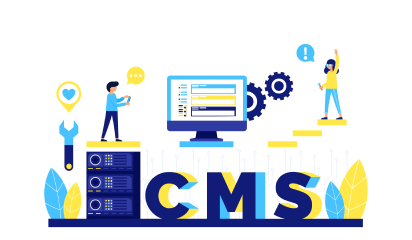
#9 Use a Content Management System

Web accessibility is also affected by the flexibility of your website. It is much easier to make the necessary changes to improve website accessibility with a more flexible website. Using a content management system (CMS) is an excellent way to accomplish this goal.

CMS software, for example, allows you to easily customize your website in any way you want. You can optimize your design for web accessibility with page builder plugins like Elementor without writing a single line of code.

#10 Document The Process

When working on accessibility, it is critical to meticulously document everything. This not only keeps your team focused, but also establishes that you are working to improve accessibility in the event of a lawsuit.

Here are some things to think about documenting:

  • Your accessibility policy and statement
  • An executive summary outlining your website’s and mobile apps’ budgeting and resource allocation.
  • The items that need to be repaired, organized by specific issues and components.
  • A collection of preliminary feedback from user testers on major barriers and accessibility issues, as well as preliminary audit results.

Conclusion

By making your website more accessible to a wider range of audiences, you will not only increase the number of people who can access your product or service, but you will also gain a competitive advantage over your competitors. You’ll also save a lot of time and money by avoiding potential lawsuits.


Angular v12 Update – All you Need to Know

The latest update of Angular was released on May 12. It’s got a bunch of major changes that are essentially facilitating the Angular ecosystem’s transition to Ivy. They are calling it “Ivy Everywhere”. Deprecation of IE11 support along with other changes were also announced. 

Let’s check out all these changes-

What is “Ivy Everywhere” 

It means that the ‘View Engine’ will now be excluded in future releases. Existing libraries on View Engine will however still work with Ivy apps. It is supported for now but it’s only a matter of time, so it is advised that library authors start working on the transition to Ivy. 

New Canonical message ID format

According to Angular’s official blog, the team is ditching the legacy message ID formats for a new canonical message ID. A conical message Id is more resilient and intuitive as compared to multiple IDs in the i18n system. 

According to Angular.io

“These legacy message-ids are fragile as problems can arise based on whitespace and the formatting templates and ICU expressions. To solve this problem we’re migrating away from them. This format will reduce the unnecessary translation invalidation and associated retranslation cost in applications where translations do not match due to whitespace changes for example.”

Protractor Pushed Further

The community-driven end-to-end testing framework was given a pass for this release. The angular team is currently working with Cypress, WebdriverIO, and TestCafe to help users adopt alternative testing frameworks until the protractor becomes a part of a future release. 

Nullish Coalescing in Angular 12 

The Nullish coalescing operator is great for clean coding in Typescript classes. It has also made its way to Angular 12 templates to simplify complex conditionals. 

For example:

{{age !== null && age !== undefined ? age : calculateAge() }}

Becomes:

{{ age ?? calculateAge() }}

Stylish Enhancements

  • Angular components now support inline Sass in the styles field of the component decorator. 
  • You can add inlineStyleLanguage”: “scss” to angular.json to enable this feature, otherwise it’s available by default for new projects using SCSS.
  • Angular CDK and Angular Material now use Sass’s new module system. node-sass is no longer maintained, hence ensure that you’ve switched from node-sass to the sass npm package. 

Other Notable Features

  • Angular now supports Webpack 5
  • ng build now defaults to production
  • By default Strict mode is now enabled in the CLI.
  • Language service is also included as a default in the new update
  • Typescript version support updated to 4.2
  • Angular v12 will now show a deprecation warning for IE11 and it plans to end support with Angular v13

Conclusion

It’ll be exciting to see how all these new changes unfold and what Ivy has in store for the Angular v12 platform. With the focus converging towards more modern solutions and an evolving ecosystem, Angular v12 is doing away with certain features while adopting new ones. It’ll only help them better focus on what matters and provide better support to developers and users in the process.


Our Angular team here at Galaxy is also looking forward to testing how migrations and new projects on Angular 13 will turn out. If you’re in the market for Angular development partners then get in touch with us here and let’s discuss your project.

UI/UX Tips To Significantly Enhance Your App Design

Personalized communication, a friendly voice, and intuitive interaction are all essential components of application design. 

Do you want to create a technologically advanced product that speaks to the hearts of your users? In this article, you’ll get a taste of the best UI/UX tips for mobile app design in 2021 and learn how they can help you increase sales and retain users.

…

The Importance of App Design In 2021

Simple, human-centered app design is essential for building long-term client relationships. Not long ago, having an appealing and distinctive product design was sufficient. However, times have changed. The human-centered tips and tricks have completely replaced the system-centered approach and will be the dominant trend in 2021.

But first, let’s take a recap of the benefits of UI design.

Check out our list of 7 UX and UI tips and tactics that will help you achieve immediate growth while saving your brainpower for more complex UX and product challenges.

1. Declutter UI  

Too many design elements like buttons, images, text can make any phone app complicated and impossible to use. We recommend that instead of showing every task icon, you should reduce the user’s memory load by making the most important actions and options visible. The main CTA or navigation should be available at all times, not just when we expect a user to need it.

2. Use clear titles and status 

Users should be able to look at settings screens and understand all of the individual settings and their values with a quick glance. Display the status below the title to emphasize the importance of the setting. Instead of simply describing the title, show the specifics. Ambiguity should be avoided to ensure that users can access such elements when they are needed.

3. Make your dropdowns stand out

Dropdown options with search or auto-suggest options are useful when you have long lists where the user already knows the answer. We also suggest that you use whitespace. Even the subtle amounts of white space allow your designs to breathe and look more elegant. Whereas, adding images can be very useful when you want to show the difference between elements.

4. Save space with easy-to-recognize icons

Icons are easy to recognize at a glance (if well designed) – this is especially true for common icons that people have seen and used before. Icons do not need to be translated for international users. In short, the use of icons speeds up data perception and enhances memorability of the element via visual images rather than using text.

5. Grab attention with visual design in your CTA

Create a visual design to accompany your CTA. This will help to pique your audience’s interest and draw them in. Not a lot of people are going to pay attention to or click on a block text.

6. Never underestimate your empty states

Empty states are a great way to improve your product’s user experience, from onboarding to encouraging users to interact with your app. Tell your users to do something. Use-friendly and approachable copy in your empty state design. We recommend that you opt for bespoke and fitting illustrations. 

7. Design efficient forms

Organize related data into logical blocks or sets. The transition from one set of questions to the next will be more like a conversation. Grouping related fields together will also assist users in making sense of the information they must fill out.

Conclusion

At the end of the day, the user should have a smooth user experience without having to scratch his head to figure out how the product works. We understand our target audience before beginning mobile app design by creating lean personas, a customer journey map, and user research. So that it’s clear who we’re making the product for. The better you know your audience, the better the experience you can create for them.

If you do not have the necessary time and ample experience, contact us to get a free UX consultation.

About Galaxy Weblinks

We specialize in delivering end-to-end software design & development services. Our UI/UX designers are creative problem-solvers with a decade of experience in all facets of digital and interactive design. We create compelling and human-focused experiences delivered through clean, and minimalist UI.

The Cost of Building an Ecommerce Website

Do you wish to start an online business and would like to know how much it would cost? How we wish there was a simple answer to this question. Numerous factors come into play while developing an Ecommerce website, and each of them will have an impact on the overall cost.

You can overshoot your budget if you do not have a clear action plan. We have penned this blog to give you a clear idea of how much an Ecommerce website costs.

How to Estimate the Cost of Creating an Ecommerce Website?

Several factors contribute to the overall cost of developing an online store. In general, some Ecommerce stores cost a few hundred dollars to set up, while others can cost tens of thousands of dollars to set up.

You will have to pay for the following:

  • Ecommerce software
  • Domain name
  • Ecommerce hosting
  • SSL certificate
  • Store theme and designs
  • Add-ons and extensions
  • Payment Gateway costs
  • Marketing and SEO
  • Maintenance

Ecommerce Software

The cost of Ecommerce solutions varies depending on their out-of-the-box features, the type of software, and the level of service they provide. There are numerous platforms to choose from, and selecting the right one is a critical step in launching an Ecommerce store. Let’s take a look at some of the platforms you might want to look into few platforms:

– Magento:- Magento provides both on-premise and cloud-hosted options, but many businesses are now turning to SaaS models because they provide continuous updates, including security patches. Magento does not include training wheels. There are also no on-site developers to whom you can turn for assistance in building your site. To build your site, you will need either a developer or a team of developers.

You can choose from Magento Community Edition or the Enterprise edition for your Ecommerce website. A Magento website is likely to cost you $5000 onwards. 

– Shopify:- Shopify was created to meet the needs of small businesses looking for an easy way to create online stores. If you’ve never worked with code before, it’s fairly simple to build a site using drag-and-drop areas. You can quickly set up a simple website; however, if you want to add more advanced features, you will need to add additional apps or custom coding. 

Domains purchased through Shopify start at $11 per year. Whereas, the majority of our Shopify website design projects start from $5,000. 

– WooCommerce:- You can use it to build your online store by going through the installation process. However, to make your Ecommerce website attractive, flexible, and functionally operable you need to spend money on other essential things like- hosting, domain registration, themes, extensions, and customization.

However, to run your WooCommerce store, you need hosting, domain name, extensions, and a developer that can charge a monthly/yearly fee. You can build a feature-rich Ecommerce website using this platform for around $3,500. 

Ecommerce Hosting Costs

After you’ve registered a domain name, you’ll need to find a web host. BigCommerce and Shopify, for example, are cloud-based solutions that include web hosting as part of the subscription. That means, unlike Magento, you won’t have to look for third-party hosting or deal with the challenges of managing it.

Hosting Costs for Self-Hosted Ecommerce Website:- A basic website hosting plan can range from $40-$200/year, a domain name can cost $10-$15/year, and an SSL certificate can cost $70-$300/year. All of these expenses add up to a small but significant investment to create a starter Ecommerce store. For example, the Magento domains generally cost you from $10 – $15 per year. 

Hosting Costs for SaaS Ecommerce Platforms:– Shopify offers three membership levels: Basic Shopify ($29.99/mo.), Shopify ($79.99/mo), and Advanced Shopify ($299/mo.).

Note: This cost estimate is intended for small to medium-sized online stores. For high-volume stores, you’ll most likely need to upgrade to Shopify Plus, which costs thousands of dollars per month.

Ecommerce Website Design Costs

Creating a unique user experience with a website design that reflects your brand and keeps customers coming back is an important part of developing your ecommerce store. There are some standard costs associated with the design of your online store.

Store theme and design costs:- Some themes may not cost anything more than what you already pay to use the platform, whereas others may range in price from $60 to $200 per theme.

Add-on, plugin, and extension costs:- No ecommerce solution has everything you need for your online store, no matter how hard you look. This is where add-ons, plugins, and extensions, as well as their associated costs, come into play. For example:

Magento add-ons typically necessitate custom development, which can be costly. Magento’s marketplace has thousands of extensions ranging in price from $0 to $15,000. Whereas, Shopify merchants have access to hundreds of free and premium apps, with prices varying depending on the app.

Cost of Payment Gateway 

When selecting an Ecommerce platform, many beginners fail to consider payment processing fees. This can have a serious impact on your business by significantly increasing your costs and decreasing your profits. You’ll have to pay fees to each payment gateway you want to provide. Here’s an example of how it works:

PayPal charges 2.9 percent plus $0.30 for transactions exceeding $10.

Stripe charges 2.9 percent plus $0.30 per transaction.

They also offer some of the most flexible payment options.

Maintenance

Aside from the costs of technical maintenance, there are also costs for store maintenance. Larger companies may need to train and hire customer-service executives to improve their service. Random bugs and glitches add to the maintenance costs as well.

So, if you own a small to medium-sized business, expect to spend $500 to $1,250 per year on maintenance. 

We hope this article provided you with a good idea of how much an Ecommerce website costs in real dollars. If you want out-of-the-box solutions, you should consider hiring a professional Ecommerce website development agency to create a site for you.

4 Steps to Take Before Hiring a Mobile App Development Agency

So you’ve got a great mobile app idea and you’ve done your research to understand the competitive landscape. And you’re probably reading this because you’re well aware of the tech space and the potential it has to offer, but you also understand that you need the right mobile app development agency to unlock that potential. 

But before you go about hiring an agency here are some things you need to do before starting your development journey. Any experienced agency will walk you through these steps. 

In this blog we’ll cover what to do after you’ve finalized an app idea. Let’s see what these next steps are:

  • Understanding of Feasibility and Bottlenecks
  • Having clarity about Funding
  • Preparing Go-to-market and Customer Acquisition strategies
  • Planning a Monetization Model

1. Understanding of Feasibility and Bottlenecks

When you’ve identified your competition, it becomes easier to learn and understand the feasibility and bottlenecks the existing players in the market face.  

Validate your idea against these players. Would it be possible for one person to accomplish all the non-technicals of that model, funding development, and take a competitive share of the market at the same time? And is the general technology capable of executing your vision? 

If you don’t have all the answers it’s alright, because that’s why you have development agencies like Galaxy for. Our experts will help you validate your ideas and suggest possible workarounds for bottlenecks. 

2. Having clarity about Funding

This stage is more about understanding where the money goes and if you’re trying to understand costs you can follow how much it costs to build a mobile app in 2021? 

Let’s see what all you’ll be paying for bringing an app to market to ensure that the budget estimates are on point.

  • The visual identity
  • Product minimum viable product (MVP– the first version of your app)
  • Continuous feature development
  • Support & infrastructure
  • Marketing & customer acquisition

To help you with a rough estimate of costs we’ve covered what it costs to build an app in great detail. We say rough estimates because these costs are variable depending on your skills, your network, your partners (if any), the complexity of your app, and your business model. 

For instance, if you come from a development background, perhaps you can handle some of those mock development responsibilities or your partner from a marketing background could tackle some design and promotion responsibilities. 

All this means that the cost factor can vary from person to person. A simple app could be done with little to no outside help and in contrast, an app could cost millions to bring to the market if it requires rare expertise, innovation, intensive advertising, and is complex to build. 

3. Preparing Go-to-market and Customer Acquisition strategies

You don’t necessarily need a perfectly detailed plan to get your idea to market. You’ll probably be hiring outside help for this because this kind of creative heavy-lifting is better left to people with product or marketing expertise. 

Even though you’re probably going to hire someone else for planning, it’s highly advised that you have at least a rough or high-level idea for bringing your app to market and customer acquisition. 

A common mistake that businesses make is that they think marketing and user acquisition can be dealt with after the production. User acquisition is just as important as your design or development, it requires serious strategy, efforts, and money to bring in users to make your app successful. The earlier you start thinking about it, the greater the chances of success become.  

4. Planning Monetization Model

When building apps people forget to factor in the costs of maintenance and infrastructure. This expense is an ongoing one and you need a good monetization strategy to offset these costs alongside the building costs.

There are plenty of monetization models to choose from. For instance, you could go with one of the most popular ones, the freemium with a subscription fee model. It’s a difficult route but an honorable one for starter apps. Earns you loyal customers.

Here are some parameters to factor in when you’re choosing the freemium monetization model:

  • The App Store cut (15%-30% of in-app transactions)
  • The expected conversion rate from free to paid (2.5% on average)
  • Your recurring subscription fee

This will get the ball rolling for you. You can also explore other monetization strategies that are more relevant for your business and app. Ad-based monetization can be tempting at first, but we highly recommend seeking other options unless ads are necessary. 

Conclusion

You can push boundaries and ship your idea quickly but only if you have the right partners by your side. They’ll walk you through research, funding, and maintenance-like aspects beforehand to ensure that you’re well aware of the risks and benefits of the field. 
Galaxy is here to help you validate your ideas and make your app the next big thing. Get in touch with us here.

3 UX Gamification Techniques to Boost Engagement

Retaining your users is just as important as getting them on board for the first time. While curiosity could drive the initial engagements, sustaining those leads is another picture. Here’s where UX practices come into play. Gamification is one of the popular UX techniques that engage users within a challenge and reward cycle. It is primarily used in computer games but is also gaining popularity in the app development world as well. 

In this blog, we’ll cover the top 3 gamification techniques to keep your user engaged. 

1. Challenges

Sometimes people get lost in work when it’s challenging and fun. Most of us like to call this state, the “zone”. Hungarian-American psychologist, Mihaly Csikszentmihalyi, dubbed this mental state as “flow”. During flow, people typically experience deep enjoyment. 

Solving challenges can be a rewarding experience and hence keep your users engaged. 

You should opt for gamification in your design if you are looking to improve user engagement and make your product fun to use in the process. Learning and fitness apps are great use-cases for this UX engagement technique. If you look closely you can find several products that use gamification to motivate behaviors, Activity Monitor on Apple Watch for example encourages you to close all the rings. 

How to do it right

  • Define and state clear goals in a way that the user understands what and how to do to achieve the goal. 
  • Validate your assumptions for the user’s understanding of the complexity of challenges. Both novice and experienced users should be able to go through the challenges with ease. 
  • There should be a system of levels to provide a sense of progress to the user. You can fine-tune complexity based on the levels, difficulty increases as the user proceeds through the levels.  
  • Alleviate user anxiety by providing immediate feedback for user actions. 
  • Introduce tooltips if the user is having a hard time. Keep a check of user skill and fine-tune challenge complexity based on their responses. Too easy or too hard challenges can result in drop-offs.

2. Unlockable Features/Content

This Gamification technique is most popular among the freemium apps, where the whole experience is free with some content/features restricted to a certain profile level or is only accessible to premium members.

Users don’t shy away from spending time and money on features/content that is of great value to them. Besides, having worked to unlock a feature/content gives users a sense of ownership and as a result, makes them value your product more than before they signed up.

The pursuit to unlock features will encourage users to explore your app, improving engagement and retention in the process. 

How to do it right

  • Unlockable features/content shouldn’t be used exclusively to motivate users to use your product.
  • The path to unlocking the features should be clear and concise. 
  • Only restrict things that are unique and have value.  

3. Achievements

Achievements are the rewards users earn for completing tasks or challenges. It can be in the form of badges, trophies, or in-app currency.  Rewards motivate users to complete their journey and keep moving forward. You can use it in your app to direct users towards a particular goal, like subscribing to a service. LinkedIn for example sets clear expectations on how the profile strength works, and hence encourages you to complete your profile.

How to do it right

  • You need to have an end goal. What you want your user to do at the end of their journey.
  • Map out expectations and communicate progress. Also ensure that user is aware of remaining steps to complete for rewards, at all times.
  • Carefully define the gap between two milestones, as to where to reward your users to keep them invested in the app.

Conclusion

Getting users to stick to your app can be a great challenge. Most of them drop off from the onboarding if they find it cumbersome or uninteresting. Gamification techniques mentioned in this blog solve the retention problem with age-old lessons from games.


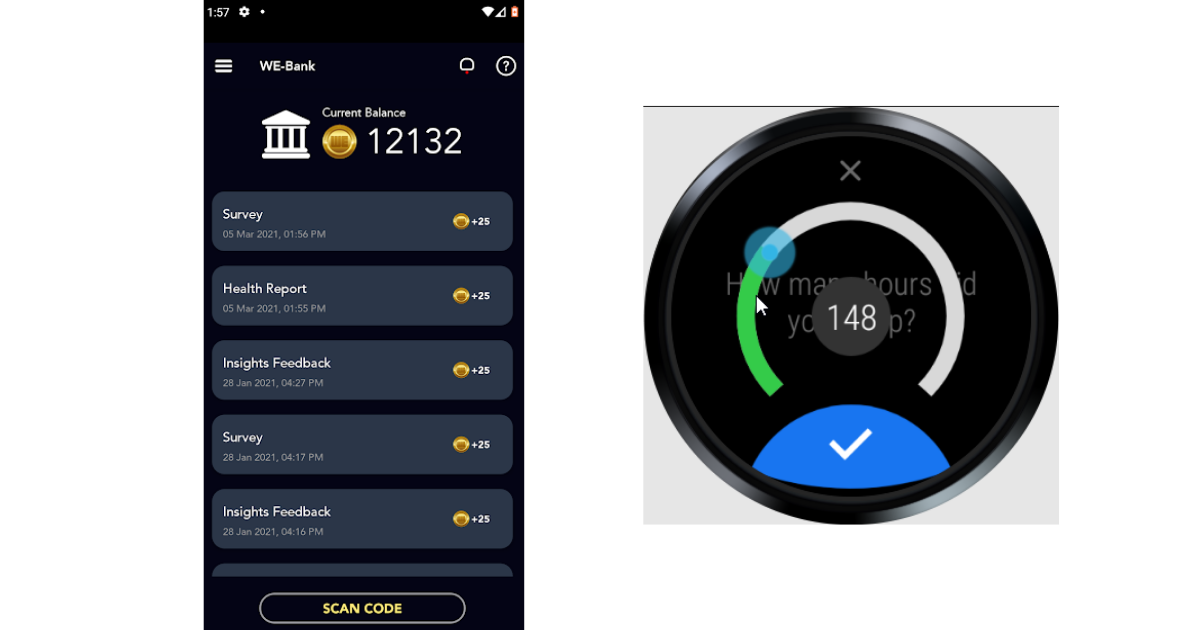
uvm-we

People find games engaging because it’s progressively challenging and rewards for completing certain tasks and journeys. You can also boost your app engagements from a cycle of challenge and rewards. We have done gamification for an excellent fitness/wellness app for our client at University of Vermont. You can also get in touch with us if you’re looking for design and development assistance for your project.

5 WordPress Trends For Business Growth in 2021

Regardless of the stiff competition, WordPress has been growing steadily since its inception. It is constantly evolving with new trends and technologies. 

Our blog uncovers the most significant WordPress trends that will help future-proof your business. As a business owner, adopting these practices can give you an edge over your competitors.  

1. AI in CMS

Our lives are faster than ever. Chatbots, voice search, and other AI-powered utilities have become essential for our need for speed. 

Modern CMS platforms are now equipped with AI-powered functionalities that seamlessly integrate backend to a website’s front-end. Wix for example utilizes AI to help web developers and designers to create custom web templates based on their preferences. 

These CMS platforms are so advanced that a headless CMS can deliver content using chatbot interfaces on mobile devices just through API integration.

2.  Hybrid CMS

To make up for the lack of a visual interface to design and preview content in a Headless platform, businesses are adopting the hybrid way.  

The hybrid approach comes with the scalability of a headless CMS architecture and at the same time keeps things traditional with a content control perspective. WordPress paired with REST APIs is a great example of this hybrid approach. 

A hybrid approach offers the best of both worlds with a structured presentation while giving the essential content control to marketers to manipulate content for customers.

3. Focus on Accessibility

Smart speakers with voice capabilities have dramatically improved access to online content, as has captioned media, simplified navigation, and increasingly accurate voice search technology. With increased dependency on IoT for work, school, entertainment, commerce, and social connections, the importance of maintaining and improving accessibility for people with disabilities is more profound than ever. 

WordPress offers integrations for accessibility and encourages development for the same in the community. There are millions of accessibility themes and plugins like WP accessibility that highlight accessibility issues within your website. 

4. Motion UI

According to a rough estimate by Siteefy, 547200 websites are registered daily. With these many websites being released every day, the competition for user’s attention is a great challenge. You cannot rely on the traditional ways of gaining user’s attention. 

Users need visual stimulation, and we recommend Motion UI to do just that. You can offer a unique experience in a motion user interface by adding movement, animated elements, and transitions to your design.

Motion UI is not just for the aesthetic and edginess, you can also use it to direct visitor’s focus on important things. 

For instance, this website of a music band does a great job of grabbing one’s attention. It is interactive, keeps you engaged, and ticks the right boxes, helping them achieve their business goals. 

5. Voice Interface

Voice-based experiences are no longer just some novelty feature that companies use to sell their products. It facilitates web accessibility, thereby making the web more inclusive than it was 10 years ago. And besides everyone just loves interacting with their phones and other mobile devices via voice interfaces. Google reports that 27% of the online global population is using voice search on mobile.

Summing Up

These trends are reshaping the web and the way we use it. Your WordPress website can also take advantage of these trends to change your content management strategy for the better and drive your business. 

You can get in touch with us if you’re looking to partner with WordPress experts. Our team will understand your requirements and provide you with a robust and cutting-edge solution that puts your business on a fast track to success. 

About Galaxy

We are your offshore CMS development partner and have state-of-art infrastructure and development expertise on the latest CMS technology trends. We have hands-on experience in end-to-end WordPress CMS development solutions catering to different business needs. We offer assistance from building custom CMS websites to website migration and maintenance processes.

Dos and Donts to Keep in Mind for Building an Ecommerce Website

Despite stiff competition from the brick-and-mortar stores, the Ecommerce space is thriving. 

  • Digital Commerce 360 estimates that the consumers worldwide spent nearly $4.29 trillion online in a pandemic-fueled 2020, up from $3.46 trillion in 2019. 
  • By 2023, Ecommerce sales are expected to double to an astounding $6.5 billion.

In the post-pandemic world, people are likely to opt for online shopping for their regular and not-so-regular shopping. If you currently run an online business or plan to launch an Ecommerce venture soon, you have a great chance of success. 

We would however like to point out that attracting and retaining customers largely depends on how your Ecommerce website is built and the user experience. Failing this, your customers are likely to abandon their efforts to purchase your products or services. 

How can you ensure that your Ecommerce website meets (or even exceeds) the expectations of your customers? We have listed 8 ‘Dos and Donts’ that you must keep in mind while developing your Ecommerce website. 

Do These Things When Developing an eCommerce Site 

#1 Failing to Plan = Planning to Fail 

Whether you’re starting an online store, redesigning your website, or preparing to launch a new marketing campaign, solid execution needs careful coordination of numerous activities. Therefore, we recommend that you start with a plan that covers all the contingencies. Your plan should include key objectives as well as a timeline for when you want to reach certain milestones. Aside from that, it should include key metrics for measuring your progress and success. Don’t forget to plan financially to help get your business off the ground and save for future investments.

#2 Ensure Your Website is Responsive

A web search accounts for approximately 39 percent of global Ecommerce traffic — and with more people using their mobile devices than ever before, you’ll likely have a good number of prospective customers who will try to visit your site from their smartphones. If you’re wondering why you need a mobile-friendly website, one good reason is that a non-responsive website will immediately deter anyone who finds your site on their phone or tablet. When you hire a company to create a custom web design for your Ecommerce business, make certain that their work is responsive. Otherwise, you risk alienating mobile customers who are otherwise eager to place an order.

#3 Focus on Shopping Cart Design

Customers will not take the risk of checking out if the shopping cart does not function properly. It is preferable to have a cart that allows the customer to easily add different products and quantities as well as make revisions or deletions. You must provide pricing transparency, especially when discount codes or gift vouchers are used, and allow customers to get a clear idea of the shipping charges they may incur before proceeding to the next step in the process. If a product in a customer’s shopping cart sells out before they can buy it, it’s a good idea to include special notifications. 

#4 Open Source or SaaS – Choose wisely

You’ll have a significant decision to make as you enter the world of Ecommerce, depending on a variety of factors such as your company’s current and future needs, as well as budgetary and other constraints. Should you host your online store on an open-source or SaaS platform?

If you don’t need a highly customized online store and instead want to focus your energy and time on running and scaling your business rather than managing technology, a SaaS platform will suffice. It will save you a lot of time and money while allowing you to focus on your business goals. 

If you want a highly customized shopping experience, open-source is a good option.

Avoid These Habits When Building an Ecommerce Site

#1 Don’t Make Customers Do the Work

You’ll want to make the customer’s journey as clear as possible with any type of custom web design. This is especially true for Ecommerce websites, where any confusion or frustration can cause a customer to abandon their cart. Make certain that your website is simple to use and that there are no inherent complications that would cause anyone to reconsider placing an order. Your custom web design should be created in such a way that achieving any specific result requires only a few clicks. In general, you should not waste the customer’s time.

#2 Don’t Forget Call to Action

A call-to-action is essential, especially when encouraging customers to make an immediate purchase. While you should avoid overcrowding your custom web design with too many buttons, links, or pop-up advertisements, you should also not pass up an opportunity to create an incentive. Weigh your options carefully and ensure that all calls to action serve a specific purpose and can demonstrate real pay-off.

#3 Don’t Think Ecommerce as a One-time Project

Setting up Ecommerce for your business requires a great deal of care and attention to detail to ensure that everything is perfect. You must update your website regularly to reflect the most recent products and their prices. Check that all of the pages and links are functional and that the checkout process is working.

#4 Don’t Try To Do Everything at Once

While it is true that juggling multiple activities is required to achieve online success, keep in mind that you cannot do everything at once. Attempting to accomplish everything right away will work against you, leaving you feeling overwhelmed, overworked, and discouraged. Instead, plan wisely, set realistic goals, and carry out your activities per your pre-established schedule. 

Wrapping Up

An Ecommerce website has the potential to completely transform your business. It can not only increase your sales but also help you establish your company on a global scale – all without the hassle of opening a physical store.
Developing an Ecommerce website indeed necessitates a significant amount of sweat, time, effort, and money. A good Ecommerce site, on the other hand, can not only increase sales but also retain more long-term customers than you could ever expect if you know the right techniques.

Our team at Galaxy prides itself in designing some of the best Ecommerce solutions for businesses globally. Contact Us right away for a free consultation!

Mobile App vs Mobile Site: Which One Is Good For Business?

Businesses must go mobile, especially since the vast majority of Americans – 85 percent – now own a smartphone. 

If you haven’t gone mobile as yet, you’re giving your competitors leverage over your business. This blog will explain the difference between a mobile application and a mobile website, how it helps your businesses, and which one to choose. 

…

Your users will pay close attention to both websites and mobile apps. You should, however, be aware of the similarities and differences between a mobile app and a mobile website. Let’s explore this. 

Similarities: 

Let us begin by examining the similarities between the two. 

  • Intended for use with a mobile device such as a smartphone or tablet.
  • Include mobile-only features like click-to-call and geo-location mapping.
  • Design elements are scaled to look good and function properly on smaller mobile screens
  • Easy social sharing with friends and followers.
  • Can be built around e-commerce/m-commerce.
  • Assist with certain mobile marketing functions.

Before we get into the differences between mobile websites and mobile apps, it’s important to note one important distinction: a responsively designed website is not the same as a mobile website.

Differences: 

Here is how a mobile application differs from a mobile website. 

  • A mobile app is stored on the device and must be downloaded and installed from the app store.
  • It usually includes features and content that can be accessed without internet connectivity.
  • An app interacts with and frequently integrates mobile device features like a camera, contact list, calendar, and so on.
  • It provides a real-time communication channel between the business and the user.

Takeaway: A mobile website should be the first initiative in your mobile presence. A mobile app, on the other hand, would give an amazing user experience to your customers. 

…

Mobile Apps

A mobile app is a software application designed specifically for use on smartphones and other small wireless devices such as tablets and smartwatches. They are created entirely apart from your website.

Initially, apps were designed to provide users with an experience similar to that of a desktop website. Apps are typically highly specialized pieces of software that are used as part of a company’s mobile strategy.

Why and When You Need a Mobile App?

  • Mobile apps provide a superior user experience: Apps can perform a variety of tasks. They can provide general information such as prices and events, facilitate booking and search, serve as a platform for personalized service, have messengers, and much more. Perhaps the most significant advantage of having an app is that you can provide the user with a complete experience while they are inside your app.
  • Mobile apps give you a direct communication channel to your customers: It either reinforces your brand or allows you to create a smaller branding subset via your app. You can use your app to market to a specific segment of your customer base and target audience.

For example, if you own a bakery and baking supply store, you can market to home cooks and stay-at-home moms using a specialized app that considers this specific customer segment when it comes to design, messaging, and other brand components. 

…

Mobile Websites

A mobile website is a scaled-down version of your desktop website. It is distinct from your desktop site and is intended solely for mobile use. Mobile websites typically have less content than desktop websites. It has a limited number of pages, and each page is optimized to match what people typically need when accessing websites via mobile.

Why and When You Need a Mobile Website?

  • Mobile websites make your company accessible from any mobile device with a browser. And, because all smartphones now have browsers, your company will be easily available to 85 percent of the US population, if you have a mobile site.
  • There are no downloads required. Users can access your site with only a browser.
  • Mobile sites boost your search rankings, even if you have a desktop site. Search engines such as Bing and Google openly state that they prefer sites that provide a good mobile experience when ranking on the search page.
  • If your site is hosted on WordPress or Joomla and you don’t want to develop a separate mobile site for your business due to cost, time, or other considerations, it’s not difficult to create a mobile-friendly version of your site simply by adding a responsive component.

So, which is good for business?

The answer depends on your current business. Both the mobile app and the mobile website are useful. Growing businesses and brands that engage in e-commerce, on the other hand, should always prioritize a website. In many ways, the mobile website serves as a central “hub” for consumer activity. The best part is that your mobile-optimized website does not require your users to download anything extra.

On the other hand, a mobile application is required if you want to take your company’s mobile presence to the next level. You may be able to generate new revenue and provide better service to your customers through your app.

Still confused? Talk to us and we can help you decide whether to opt for a mobile application or a mobile website. 

About Galaxy Weblinks

We specialize in delivering end-to-end software design & development services and have hands-on experience with mobile app and site design in agile development environments. Our designers, engineers, and developers help improve security, reliability and features to make sure your business application and IT structure scale and remain secure.

7 Business Benefits of Choosing an Enterprise CMS

An enterprise content management system is the beating heart of your organization’s digital presence. CMS users can avail themselves of a variety of document types and content on a website, then modify and expand the information posted without the need for a web programmer to set up the site and make updates.

When evaluating a content management system, managers need to contemplate numerous factors, including: 

  • How is what you have now compared to what is available in the market? 
  • What is the longevity of the solution you have chosen?
  • If you decide to invest in something different, how do you know it will be worth your while?

In this guide, we’ll help you learn everything you need to know about modern enterprise CMS, including:

  • Why an enterprise CMS specifically is key
  • What are the benefits of choosing a solution for enterprise CMS
  • Important factors to consider when you’re choosing an enterprise CMS

What is Enterprise CMS?

A content management system (CMS) is a software system that allows businesses to create, manage, and publish content for their websites, apps, and other digital assets.

As a central hub and publishing engine for marketing content, the CMS is critical to the success of any company’s marketing team. This is why it is critical for enterprise marketing leaders to select a specific enterprise CMS.

An enterprise CMS is a content management system that provides enterprise marketing departments with the features and capabilities they require to engage prospects and ultimately drive revenue.

Why go for Modern Enterprise CMS?

A content management system is used by more than 60% of websites. The following advantages demonstrate why choosing the right CMS is important to most businesses with an online presence – and why it should be important to you.

#1 Increase Your Website’s Functionality With Plugins

Most CMS provides a standard set of features and functions that are sufficient for the majority of users to have a basic platform. It is very likely that your requirements are different or that you require additional functionality. A plugin can fill this void and provide features that aren’t included with the standard CMS.

There are thousands of free and paid plugins available for almost any job or feature you can think of. There is an active community that develops software plugins that can extend the functionality of popular CMS platforms. Some are paid, while others are free to use.

#2 Omnichannel Selling Support

Omnichannel selling is another important advantage of using a CMS platform. Organizations frequently need to entice customers to visit their websites by marketing through various channels with different content that provides each user with insight into their brand. Marketing on each channel necessitates entering all of the brand’s information on each channel separately.

#3 Control Over Your Website Design

One of the most significant advantages of CMS over traditional websites is complete control over your website’s design. The main advantage of using CMS platforms is that they make website design and customization very easy and simple.

With a traditional website, you or your web development agency will need to scrap your old website in order to redesign a new one from scratch. The existing content will also need to be manually transferred to the new website design. This is inefficient and complicates and prolongs the website design or redesign process when compared to using a CMS.

#4 Multi-language Capabilities

Personalization is becoming increasingly important for brands that operate in more than one country to engage customers in meaningful ways. Having an enterprise CMS that can handle multi-language content, including translation and localization tools, helps ensure that you can deliver the right content in the right context no matter where it is needed in the world.

#5 Mobile Readiness

Over 90% of websites now report that mobile devices generate more unique visitors than desktop computers. According to Google, mobile visitors are 5X more likely to abandon a website that hasn’t been optimized for mobile use. According to Google, “mobile-friendly sites rank higher in search results.” At this point, an enterprise CMS capable of delivering content to your mobile apps and experiences is required.

#6 Automation Through Integration

As your business expands, so will your content workload, which is a great reason to use automation to do more of the heavy lifting. Through integrations with artificial intelligence-enabled tools, an enterprise CMS can enable content teams to leverage technology to automate routine tasks that would otherwise take humans a long time to complete.

#7 Easy Website Maintenance 

CMS websites make it simple for you to manage your site’s upkeep. If you believe you should have control over your site or if you want an in-house team member to maintain it, CMS makes it simple and quick. A CMS’s template-based structure makes it simple and quick to create pages and posts.

Wrapping Up

If you’re looking for a CMS that can help automate the many manual tasks associated with content management, enable efficient team-wide collaboration, facilitate content delivery that improves customer experience, and make the most of all your content assets and data, look no further. It’s time to implement an enterprise CMS.

If you aren’t quite ready to abandon your current traditional CMS, this in-depth guide will help you learn about 3 Things To Know Before Switching To A New CMS. Want to see what an enterprise CMS looks like in action? Contact our CMS team today.

About Galaxy Weblinks

We are your offshore CMS development partner and have state-of-art infrastructure, and development expertise on the latest CMS technology trends. We have hands-on experience in customizing websites using multiple platforms, be it Shopify, WooCommerce, Magento, catering to different business needs. We offer assistance from building custom CMS websites to website migration and maintenance processes.