In this blog, you’ll uncover how interactive and aesthetically-pleasing UI/UX design can help your business achieve higher conversions and lower bounce rate.
Business owners like you are not only investing their money in making the product functional but also in enhancing its overall look and feel. The first impression is the last; that is why no market leader risks losing a customer over a poorly designed digital product.
Every dollar spent on UI/UX design services has an incredible $100 return, or 9,900% ROI. So why consider UI and UX as just an option? The UI and UX are now a necessity that helps to grow your business at the most extreme rate possible.
In this blog, we will guide you through what UI/UX design is and its importance, UI design vs UX design, and so on.
What Is UI/UX Design?
When was the last time you assessed the website or a mobile application on its easy navigation, or even stopped scrolling in the middle because everything looked so messy? That’s what UI/UX is meant to do.
The buttons, icons, colors, typography, and layout that guide your gaze and clicks are simply the user interface or UI. Whereas the User Experience or UX describes the feeling associated with everything. The feeling of how the whole process works, how quickly you find what you need, and whether the entire contact leaves you feeling good or bad.
In other words, UX is about the “how it works”, UI represents the “what you see”. Collectively, they help your users determine whether they are going to stick around longer, trust your brand, and come back or quickly move on. Empathetic design, viewing the experience from your users’ eyes, and ensuring every click, tap, and scroll feels automatic is part of a great user interface/user experience property (UI/UX).
Key Differences Between UI and UX Design Solution
UI refers to the look and feel of the app or the site; however, UX refers to the feel of the experience for the user. It is necessary for both UI and UX design concepts to occur, but they each have a different purpose.
Here are the key differences between UI and UX you must know:
Aspect
UI (User Interface)
UX (User Experience)
Focus
Visual design and aesthetics
Overall usability and functionality
Purpose
To make the product attractive and engaging
To make the product useful, intuitive, and enjoyable
Elements Involved
Colors, typography, buttons, icons, layouts
Navigation flow, information architecture, wireframes, user journeys
Driven By
Creativity and design trends
Research, user behavior, and problem-solving
Outcome
Builds visual appeal and first impression
Builds satisfaction, trust, and loyalty
Tips and Tricks to Follow for an Effective UI/UX Design
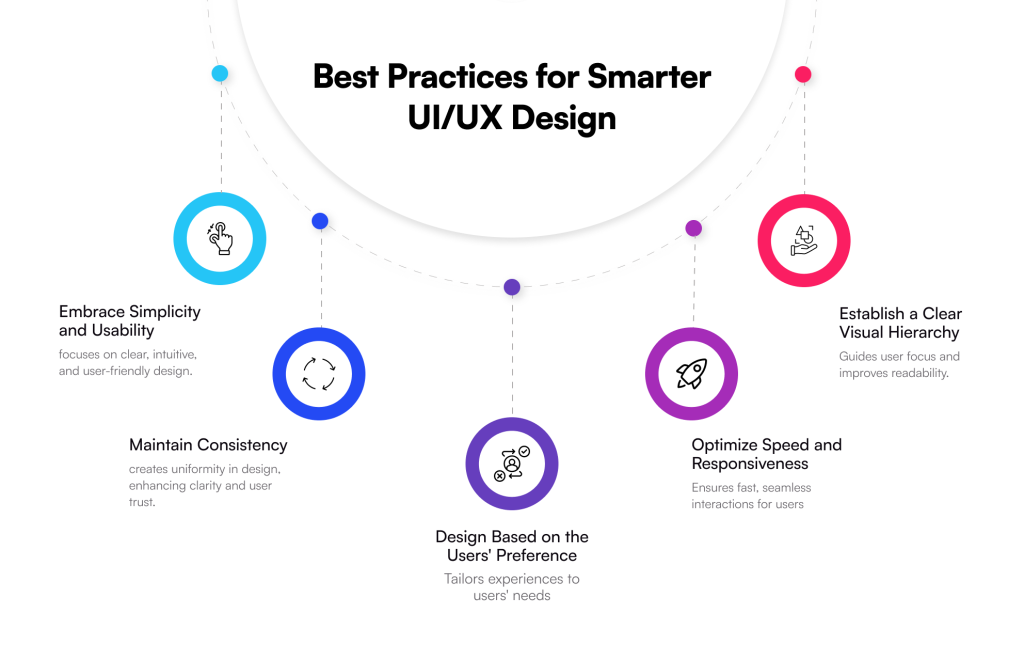
When it comes to creating an interactive UI/UX design, the standalone focus is not following the rules but maintaining the right balance between functionality and aesthetics. To help you deliver experiences that your targeted audience will love, we have curated a list of some of the best tips & tricks you must know:
Tip 01: Embrace Simplicity and Usability: A lot of the time, users have little time to waste, and they prefer simple designs, etc., therefore, do not fill your website or mobile app with unnecessary features, just focus on the important things and avoid distractions.
Tip 02: Be Consistent: Consistency in typography, colour palette, principles of navigation, shapes of buttons, etc., is key to providing a successful and seamless user experience. Be consistent throughout your app or website to inspire confidence and trust.
Tip 03: Design Based on the Users’ Preference: Design for the end-user, think about you as a visitor to an app or website, and what you would like to see, think about scrolling, etc., in other words, think like a user when considering preferences, behaviour, or needs.
Tip 04: Optimize Speed and Responsiveness: Users are likely to leave if they have to wait longer to access content. Think of the loading speed and the ability to adapt to different devices and sizes of screen sizes.
Tip 05: Establish a Clear Visual Hierarchy: Visibility of the important message of substantial brand value will promote increased perceptions. For example, you can enhance font-size, focus on spacing or strip down to the opposing messages you would like users to see at first glance.
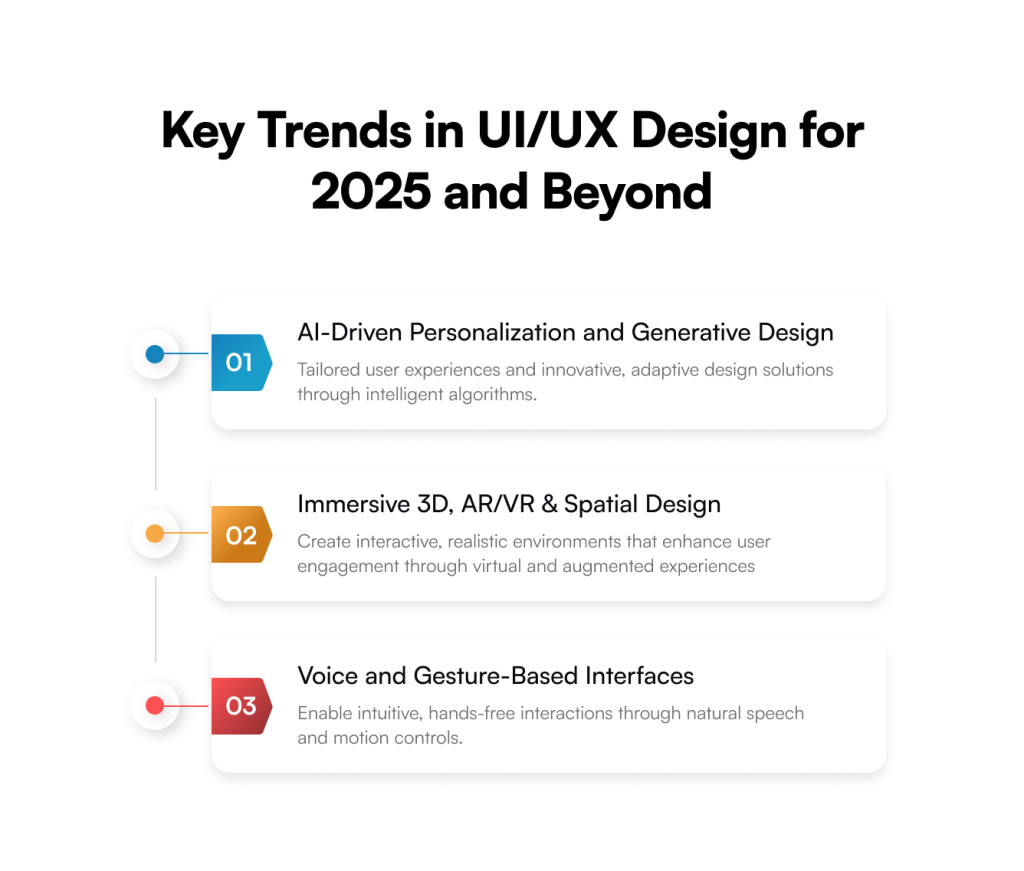
Key Trends in UI/UX Design for 2025 and Beyond
As digital experiences continue to become more personalized, immersive, and sustainable, these are the key trends changing the design landscape this year:
AI-Driven Personalization and Generative Design
AI development is no longer just an add-on feature, but a creative partner in UI/UX design. Companies are embracing this futuristic tech to provide personalized experiences in real time, based on user behaviour, preferences, and context. When it comes to generative design, there are only a few tools like Napkin AI or Canva, which means we also have access to their layouts. The same goes for interactive prototypes, and if you are an IDEO pop-up case study planner, you are graduating towards “productive practice” integrated into your workflows. AI can provide directions and a space for ideation and be actionable.
Immersive 3D, AR/VR & Spatial Design
The distinction between digital and physical design is becoming increasingly hazy. While AR and VR are revolutionizing user experiences by enabling immersive product try-ons, virtual showrooms, and collaborative digital spaces, 3D elements are being widely used to provide depth and engagement to interfaces. In order to make interactions more realistic and natural, interfaces created for 3D settings, or spatial design, are increasingly becoming more popular.
Voice and Gesture-Based Interfaces
Are you aware that voice-based user interfaces have become even more user-friendly and have the ability to control difficult tasks as conversational AI advances? Yes, and nowadays people have hands-free control of their devices; digital products are becoming more efficient and more inclusive. Additionally, gesture-based navigation is on the rise, allowing even more flexible user interaction with applications and devices by means of taps, pinches, and swipes.
Top Tools Used by UI/UX Designers
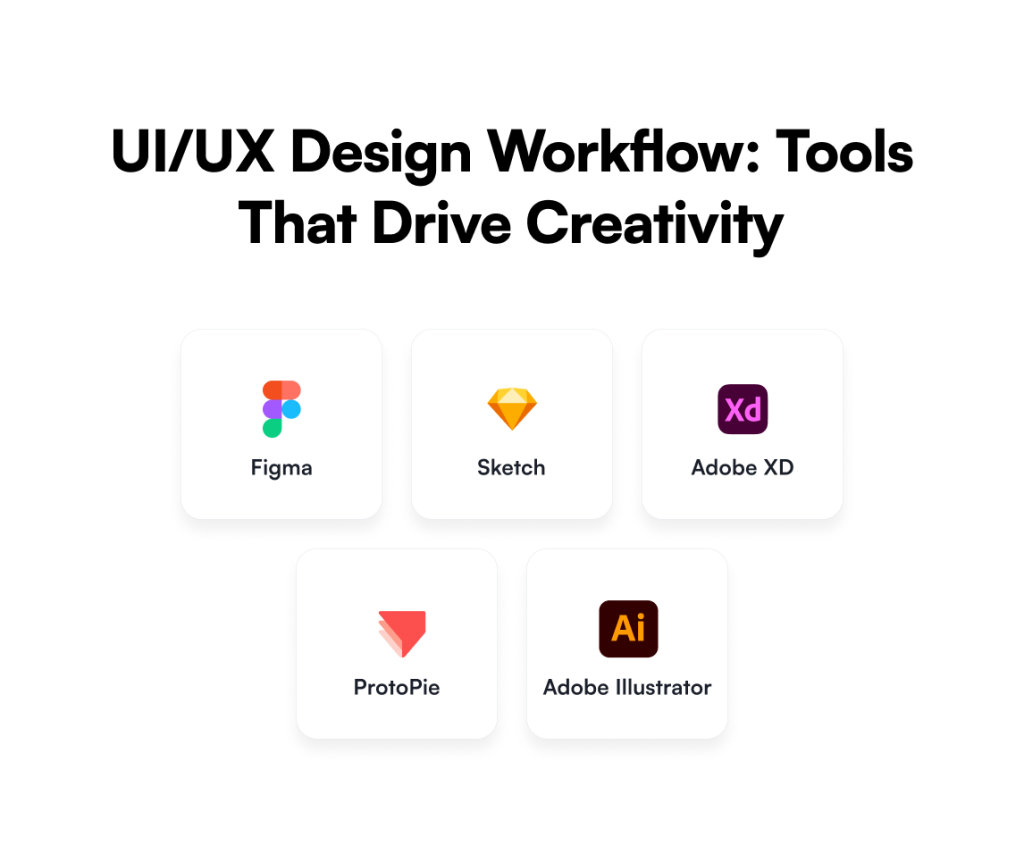
Some of the best tools and the preferred choice of UI and UX designers are:
Figma
The most popular tool for UX/UI designers is Figma. Its improvements in real-time feedback and cloud-based prototyping have made collaborative design more effective and efficient. It is a web-based tool that improves design collaboration and makes it possible for several designers to collaborate on a single project at once.
Sketch
For UX design, Sketch is a vector-based design tool. For many years, it has been the most widely used design tool for simple UI and UX design requirements. It’s a fantastic design tool with some awesome features, like a vector editor, artboards for multiple screens, reusable symbols, and more.
Adobe XD
Adobe Inc. created and released Adobe XD, a vector design tool for online and mobile applications. In addition to versions for iOS and Android that allow users to preview work directly on mobile devices, it is available for macOS and Windows.
ProtoPie
ProtoPie is the ideal design tool if you’re all about sophisticated prototyping. ProtoPie can be used to build intricate and highly configurable prototypes for usability testing. In the advanced prototyping category of UX Tools, it is the most widely used and highly regarded design tool.
Adobe Illustrator
Adobe’s vector-based design tool is called Illustrator. This design tool is useful for designing apps, websites, and other UX-related projects. Illustrator may also be used to create logos and icons. It needs an Adobe CC subscription, just like any other Adobe application.
Partner with Galaxy Weblinks to Build Exceptional Digital Experiences
In today’s competitive digital environment, UI/UX design is not only about creating a great-looking product, but creating an interactive experience that your users will care about, and help you grow your business. A great interface can mean the difference between a visitor leaving your site or app or becoming a customer.
When designers are tasked with the challenge of designing experiences, they must find a way to achieve a balance between usability, function, and visual appeal. Doing so requires more than creativity; it requires knowledge, insights from research, and purposeful execution. That is why it makes sense to collaborate with design specialists.
Partnering with a team of Galaxy Weblinks will give you the results you’re looking for and deliver a user-centric, conversion-focused digital product. A digital product that looks great and surpasses your expectations. A product that delivers a buttery smooth experience and separates you from your competitors in the marketplace.
FAQs
Q1. Why does UI/UX design matter for my business?
UI/UX design creates the first impressions and formats the interactions between your users and your digital product! Once the users are engaged, UI/UX design enhances usability, creates trust, and converts users into fans. UI/UX design is an effective growth lever:
Organizations that utilize UI/UX design can expect up to a 9,900% ROI!
Q2. How do I know if my digital product needs a UI/UX redesign?
If your website or app has a high bounce rate, low conversions, confusing navigation, slow load speeds or exploits out-of-date visuals – it’s likely time for a UI/UX redesign! You might also check user feedback for indications that users are not satisfied, or qualitative and quantitative data through analytic testing that will provide correlational signals that your product is resulting in any positive user outcomes.
Q3. What is the difference between UI and UX in action?
UI – User Interface – is the visual aspect of a product, which includes colors, typography, layout, and other visible elements the user will see. UX – User Experience – is the journey the user is on and how intuitive, smooth and pleasurable they feel the interaction was. In consideration of both UI and UX together, they create the complete digital experience prescribed to the user, which ultimately determines whether they become loyal or not!
Q4. What can expert designers do to enhance my product’s UI/UX?
Expert designers apply a research-based process, leveraging ingenuity and their technical knowledge of user-centred design to create rewarding user experiences. They are also able to not only balance aesthetics, functionality, performance, responsiveness, and device interoperability, but do so in a way that increases engagement and satisfaction.
Q5. What trends do I need to watch for in the UI/UX of the future?
Emerging trends like customization through AI, immersive AR/VR experiences, voice & gesture-based interfaces, and environmentally sustainable design are shaping the future of UI/UX design. Not only do these trends impact usability, but they also ensure that your digital product will remain relevant and competitive.
Building a fintech app isn’t just about coding features; it’s about creating secure, compliant, and engaging experiences, and this guide shows you exactly how.
Do you remember the last time you stood in a bank queue? Well, it was indeed a long time back. Ever since financial services have slipped into our pockets, every transaction has become faster and a lot easier.
The shift from traditional financial transactions to modern ones hasn’t happened over time; it’s been more than a decade. The massive demand for fintech app development has completely transformed the way people now think about money.
Therefore, businesses consider hiring a reputed mobile app development company that can meet their expectations and build top-tier fintech apps, aligning with their business goals. In this comprehensive guide, we will walk you through the nitty-gritty of fintech application development that includes a lot more than just coding and designing.
Let’s get ready to explore!
Different Types of Fintech Applications
If you think fintech is just an app, it’s not, because it is a whole ecosystem of digital tools that has changed the way people access financial services. There are different types of fintech mobile app development, and each has a different role to play.
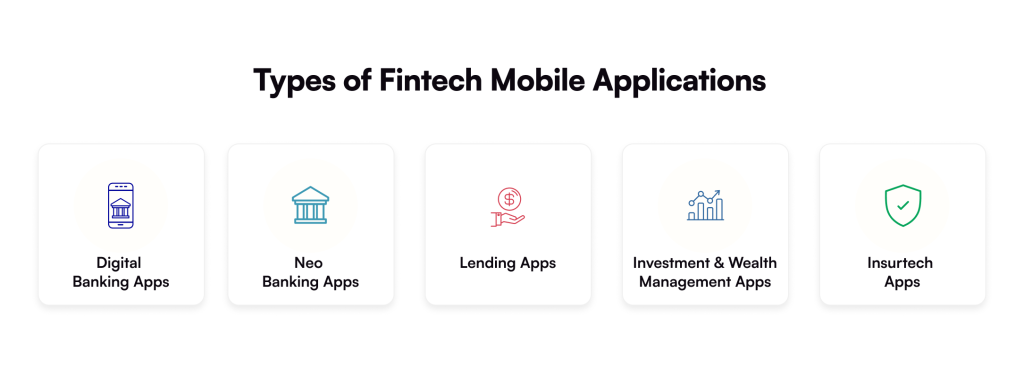
Here are the top 5 finance apps that you must know about:
Digital Banking Apps
Digital applications are disguised as banks, but they are right in your pocket. Popular digital banking apps like PayPal or Venmo are the backbone of financial convenience at the moment.
These apps allow users to transfer, receive, and manage money quickly and conveniently while retaining excellent security, speed, and other features. The banking industry is changing as a result of digital apps that incorporate AI-powered features.
Neobanking Apps
Neobanking apps are a new era of digital finance, making traditional banking services outdated and a bit slow. The modern approach towards finance app development has eliminated the long waiting lines, resulting in a smooth user experience.
In the year 2023, Neobanking apps made $33.5 billion in revenue, where NuBank was the biggest contributor. The revenue growth highlights how this category is modernizing the financial landscape, offering lower fees, greater transparency, and faster transactions.
Lending Apps
Imagine you are in urgent need of cash and there is too much paperwork waiting for you. Seems like a burden, right? But with lending apps, like LendingClub or Cash App, you can easily borrow money by directly getting in touch with money lenders.
Do you know what’s even better? These apps leverage futuristic technologies, like AI and data analysis, to assess your financial data quickly and accurately. Lending applications take advantage of a personalized approach and guide you to secure funds based on your financial profile.
Investment & Wealth Management Apps
With robo advisors, like Betterment and apps like Robinhood have made it possible for people to create a diversified portfolio in just a few clicks. From stocks and ETFs to cryptocurrencies, users can now easily invest as per their own convenience.
If you are a startup owner or looking to manage a substantial portfolio, these apps will help you make your investments simpler, faster, and transparent than ever. You will feel like you have a financial advisor by your side, but a lot more affordable and convenient.
Insurtech Apps
Lastly, we have “Insurtech Apps”, which are completely transforming the insurance industry by combining technology with traditional insurance services. Thanks to the digitally-advanced world and smartphones, you can easily get real-time quotes, purchase insurance, and compare policies.
Do you want health insurance or life insurance for yourself or your family? Insurtech apps, like Oscar Health or Gradient AI, have got your back. These apps have features, like instant claims, digital ID cards, and round-the-clock support, delivering a seamless user experience.
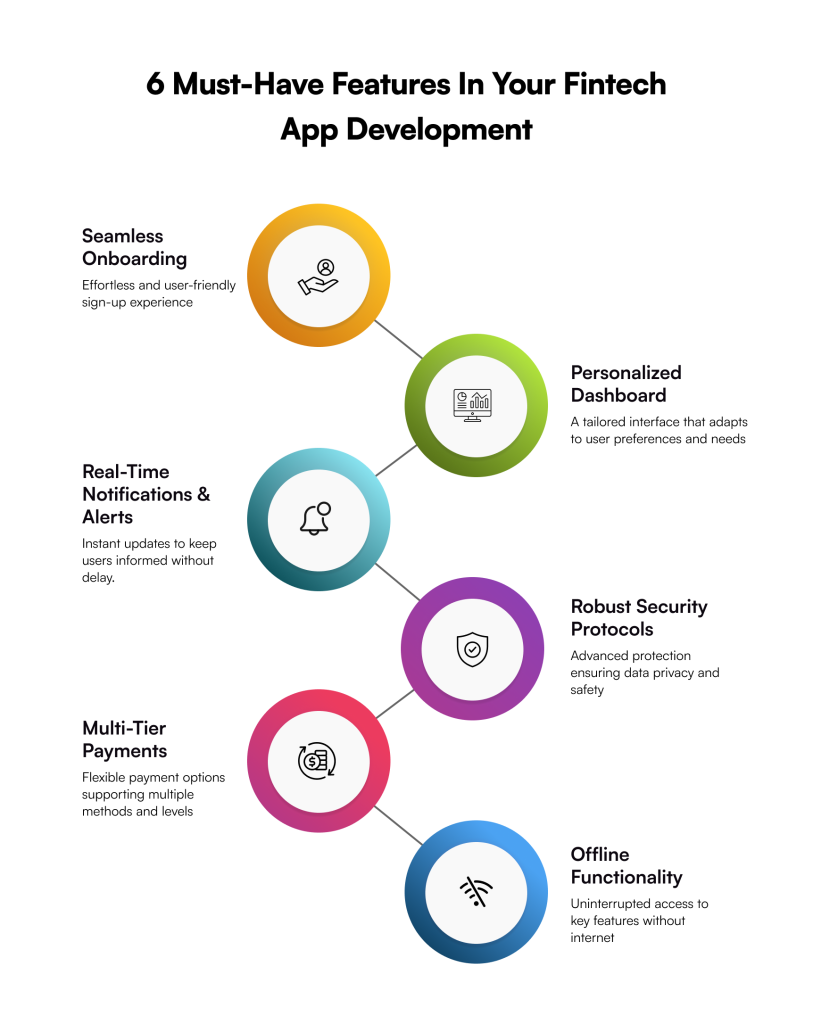
Must-Have Features for Your Fintech Mobile App Development
While you get your brand new fintech application, it is important to know that you are not just adding up the features just for the sake of it. You must make sure that each feature is adding value, serving the purpose, and boosting the user experience at the same time.
Here is a list of top-notch features that you must consider adding to make your finance app stand out in the market.
Seamless Onboarding
The first and foremost thing you must take care of is a seamless onboarding because the first impression is the last, so make it count. You can introduce auto-fill options with seamless KYC integration and instant verification. A smooth entry point while still meeting the compliance standards will not only boost the user experience but also build trust & credibility.
Personalized Dashboards
Making a dashboard that is easy to use and really intuitive is crucial because managing funds is already a daunting to-do list. Emphasize investment recaps, spending breakdowns, saving objectives, and AI-powered suggestions in a clear and structured format. It will transform unprocessed data into insightful knowledge.
Real-Time Notifications & Alerts
Users like it when they are timely updated with every transaction or other financial activities. That is why sending instant updates about low-balance warnings, unautorized transactions, or upcoming bills is necessary. It keeps the users informed and in control, resulting in building trust through transparency.
Robust Security Protocols
When it comes to finances, security automatically becomes essential because no user can compromise on their personal or financial safety. It is important to integrate features, like two-factor authentication, biometric login, data encryption, and detection alerts. Remember that finance mobile app development without robust security is not just a risk but a dealbreaker.
Multi-Tier Payment Options
Don’t just restrict your fintech application development to certain payment methods. From credit cards and net banking to UPI, digital wallets, and even crypto integrations, give multiple options to your users. The offering of diverse payment options helps you reach the audience at a global level.
Offline Functionality
Imagine you want to check your balance or need to make an urgent payment, and suddenly your internet connection goes off. Probably the bad time, right? That is why make sure your fintech application is functional even without an internet connection and has capabilities, like cached account data.
Future-proof your fintech app with emerging tech innovations that enhance security, scalability, and customer trust.
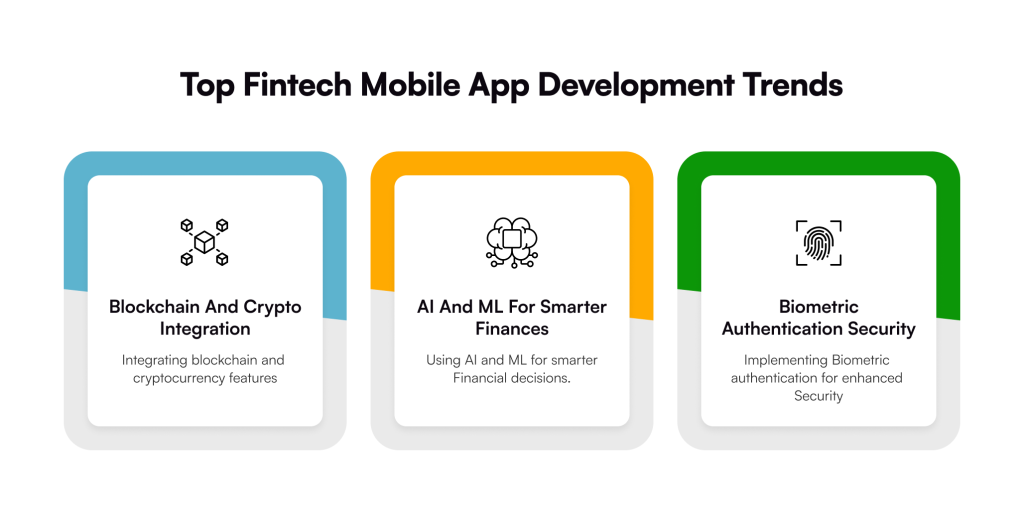
Top Fintech Mobile App Development Trends to Watch in 2025 and Beyond
The finance industry is changing so quickly that what is novel now could be outdated tomorrow. Additionally, companies that adapt to these changes are simultaneously influencing and surpassing user expectations.
To remain competitive and ahead of the curve, one must, nevertheless, keep up with the most recent developments in fintech app development. The following are the main trends you should look at:
Blockchain and Crypto Integration
The integration of Blockchain has completely transformed the way users trust in their financial transactions. Many fintech apps are now integrating crypto wallets, decentralized finance (DeFi) services, and smart contracts to give users greater transparency at lower prices.
AI and ML for Smarter Finance Handling
Personal recommendations, fraud detection, and predictive analytics are all results of the integration of AI and machine learning, which is becoming a requirement rather than a luxury. The financial landscape has become smarter thanks to AI and ML, which can be used for anything from scanning transactions to optimizing savings plans.
Biometric Authentication Security
At a compound annual growth rate (CAGR) of about 8%, the cybersecurity market is expected to reach $271.9 billion by 2029. Therefore, adding biometric features, such as facial recognition or fingerprint scanning, improves security and facilitates logging in order to thwart such an attack.
How to Create a Fintech Mobile Application
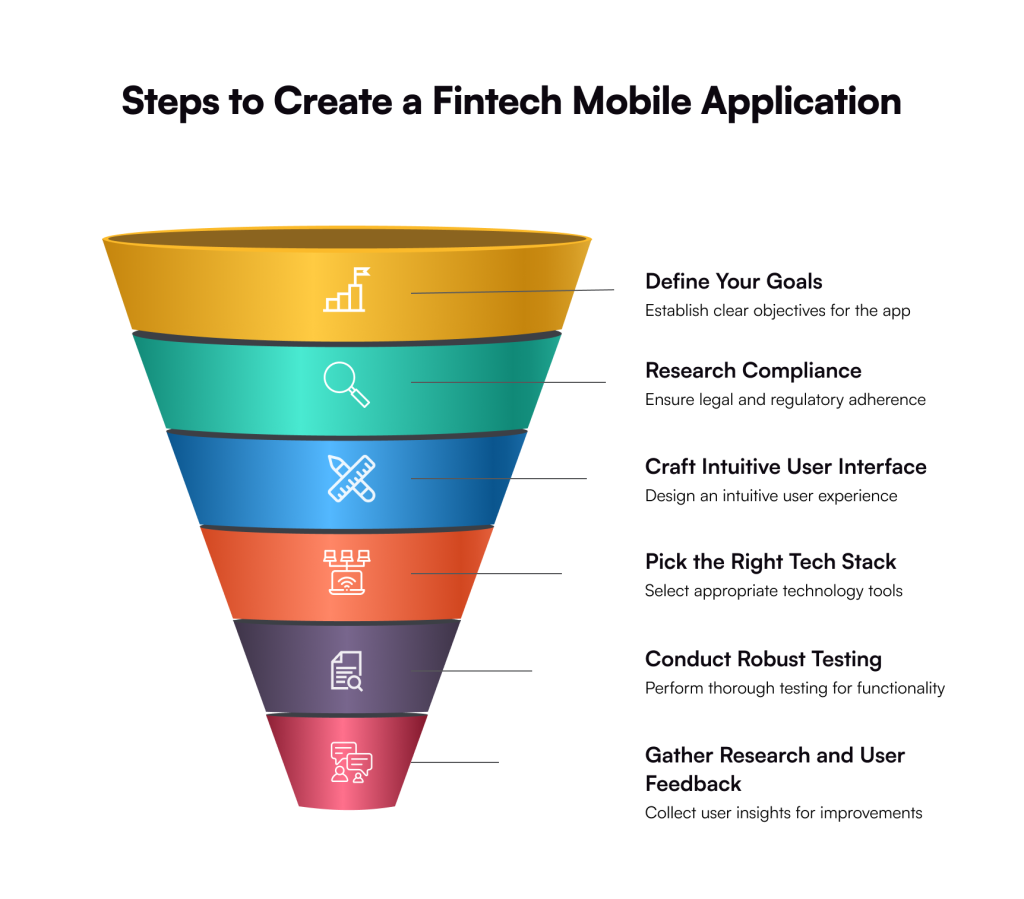
A full-fledged fintech app development doesn’t just mean coding; it’s about building a secure and user-friendly app, aligning with business requirements. Here is a step-by-step process followed by the development team:
Step 01: Define Your Niche and Goals
The very first step for creating a fintech mobile app is defining the business niche & goals for the development team. This way, it becomes easier for both parties to align on the same level, and the clearer the goals are, the better it is to set the right set of features.
Step 02: Research Regulations and Compliance
Understanding that the fintech ecosystem functions in highly regulated contexts is crucial after establishing your company’s objectives. The development of a safe and secure environment that conforms with GDPR, KYC, and AML should take precedence over merely creating the apps.
Step 03: Design the User Experience (UI/UX)
The UI/UX design of your software will be better if it is simpler. Therefore, confirm that the team you hired is developing an app that is easy to use, aesthetically beautiful, and extremely intuitive. Keep in mind that your financial app’s foundation is the trust of its users, so make sure they have a positive and seamless experience.
Step 04: Choose the Right Tech Stack
A safe, scalable, and future-ready technological stack that supports high performance and smooth integrations should be used to design your app. To target both iOS and Android users, you should choose cross-platform frameworks like React Native or Flutter.
Step 05: Conduct Robust Testing
Before the final launch, make sure to conduct robust testing, as it will keep your fintech app operational all the time and error-free. Your app will handle a lot of users’ sensitive information, so the team you are hiring must have impeccable encryption and authentication methods.
Step 06: Launch and Gather Feedback
Even after the app has reached the marketplace, the final stage is to deploy it and work on the feedback. Following the launch, keep a careful eye on analytics, track user behaviour, and get immediate feedback. The secret to keeping your app current and new is constant iteration.
How Much Does It Cost to Build a Fintech App?
The cost of building a FinTech app can vary significantly depending on several key factors. For instance, the type of app, its complexity and features, the development team’s location and more.
Build Future-Ready Fintech Apps with Galaxy Weblinks
The fintech app development landscape has evolved, and there is no sign of stopping any time soon; rather, it will grow more in the future. Businesses that have already adapted this are already growing and gaining a competitive edge. If you also want to be at the forefront, get in touch with our experts.
At Galaxy Weblinks, we don’t just build apps; we craft secure, high-performing, and user-centric apps to deliver exceptional financial experiences. What makes us stand out is our approach towards the fintech mobile application development by leveraging cutting-edge technologies, like Blockchain, AI, and cloud stability.
Whether you have just started with a disruptive idea or a well-established enterprise, to modernize your existing financial app, Galaxy Weblinks can be your go-to partner.
FAQs
1. How long does it take to develop a fintech app?
The timeline depends on the app’s complexity, features, and compliance requirements. A basic MVP can take 3–6 months, while a full-scale fintech solution with advanced features may take 9–12 months or more.
2. What security measures are essential for fintech apps?
Key measures include end-to-end encryption, biometric authentication, two-factor authentication (2FA), fraud detection systems, and regular security audits. These ensure user trust and regulatory compliance.
3. How do I make sure my fintech app complies with regulations?
Compliance starts with understanding your target region’s regulations, such as KYC (Know Your Customer), AML (Anti-Money Laundering), GDPR, or PCI DSS. Partnering with experienced fintech developers ensures compliance is baked into the development process from the start.
4. What is the average cost of fintech app development?
On average, building a fintech app can cost anywhere from $50,000 to $150,000+, depending on factors like app complexity, design, development team location, and security requirements.
5. Why should I choose Galaxy Weblinks for fintech app development?
Galaxy Weblinks offers end-to-end fintech expertise—from UX-driven design and advanced tech stacks to compliance support and post-launch maintenance. We focus on building secure, scalable, and future-ready apps that help your business stand out in a competitive market.
Are you considering developing an eCommerce app but are concerned about the expense? With the help of this guide, you may prepare with confidence by uncovering hidden aspects, actual data, and cost-effective advice.
Having an eCommerce app is not an option in today’s digitally-first marketplace; it is a must. Global retail eCommerce sales topped $4.3 trillion in 2025. Nevertheless, companies that have yet to make an investment in mobile commerce run the danger of missing out on a significant source of income.
But one of the first and important questions that comes into every entrepreneur, startup, or enterprise’s mind is: “How much does an eCommerce app development cost?” Now, to give you an answer, there is no definite number. This is due to the fact that it depends on a variety of factors, including platform selection, third-party integrations, app complexity, and more.
We have produced a comprehensive guide to assist you in determining the precise cost of developing an eCommerce mobile app. We’ll outline the main factors that influence eCommerce app development expenses, provide reasonable price estimates, and point out ways to cut costs without sacrificing quality.
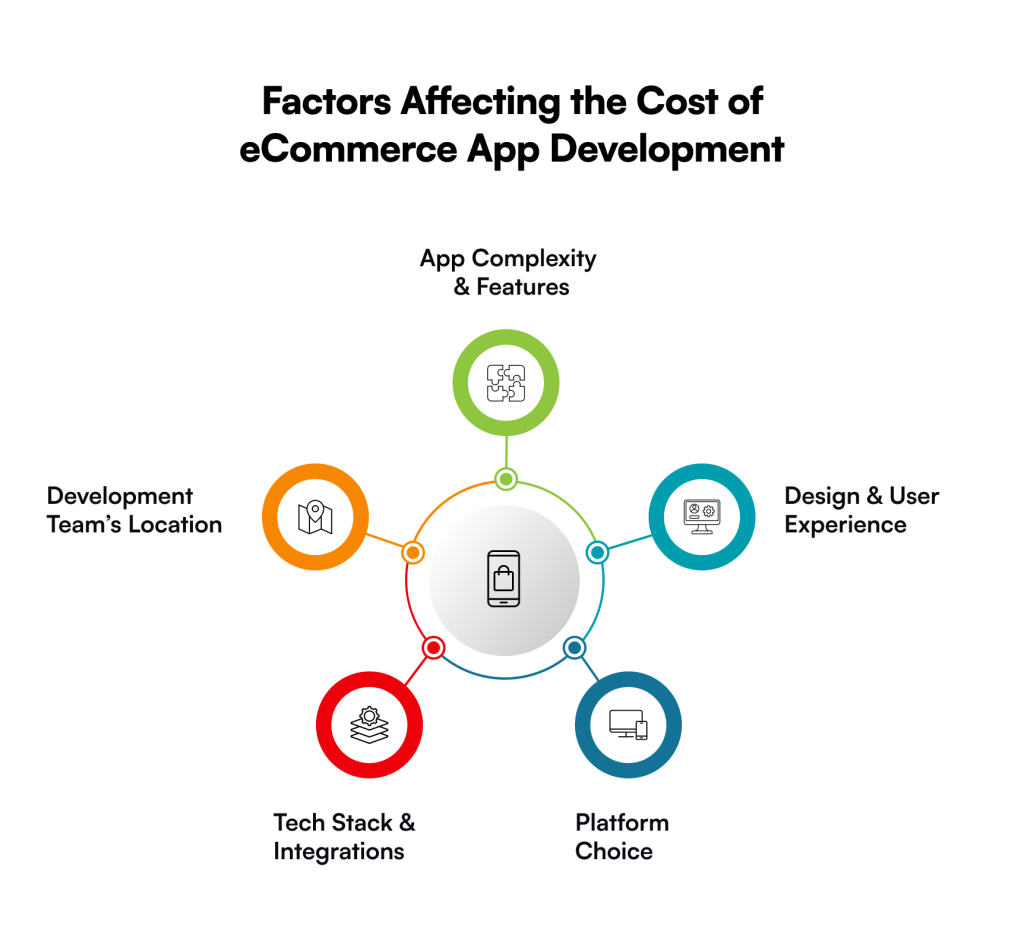
Factors Affecting the Cost of eCommerce App Development
If you are expecting a straightforward answer to “how much does it cost to create an eCommerce app?”, you might not get one. Do you know why? There are multiple factors influencing the cost of eCommerce app development.
Here are the top 5 factors that might break your bank a little, but they will be worth every penny once you start receiving higher ROI:
App Complexity & Features
Naturally, a basic eCommerce software with features like product listings, a shopping cart, and secure payments will be less expensive than one with advanced analytics, AR try-on, or AI-driven suggestions. The cost increases as more features are added.
Design & User Experience
An eCommerce app’s UI/UX has a direct impact on conversions in eCommerce; it’s not simply about appearances. Although it requires more time (and money), a well-designed, user-friendly layout with seamless navigation and customized experiences results in increased client retention.
Platform Choice
It is less expensive to build for one platform, but development expenses will go up if you want your program to run on both iOS and Android. To strike a compromise between reach and budget, many companies choose cross-platform frameworks like Flutter or React Native.
Tech Stack & Integrations
Cost is significantly influenced by the backend technology, payment gateways, CRM/ERP integrations, and APIs you use. For instance, using sophisticated third-party solutions (such as bespoke analytics or AI chatbots) raises the total outlay.
Development Team’s Location
Your choice of backend technology, payment gateways, CRM/ERP integrations, and APIs greatly influences the price. The total investment is increased, for instance, by incorporating sophisticated third-party solutions (such as AI chatbots or custom analytics).
Here is an estimated cost for each platform:
App Platform
Basic App
Mid-Level App
Complex App
Android App Development
$5,000 to $15,000
$15,000 to $30,000
$72,000 and increasing
iOS App Development
$5,000 to $25,000
$25,000 to $75,000
$75,000 to $150,000+
Cross-Platform Development
$5,000 to $20,000
$20,000 to $70,000
$70,000 to $250,000+
Hidden Factors Affecting the Cost of eCommerce Mobile App Development
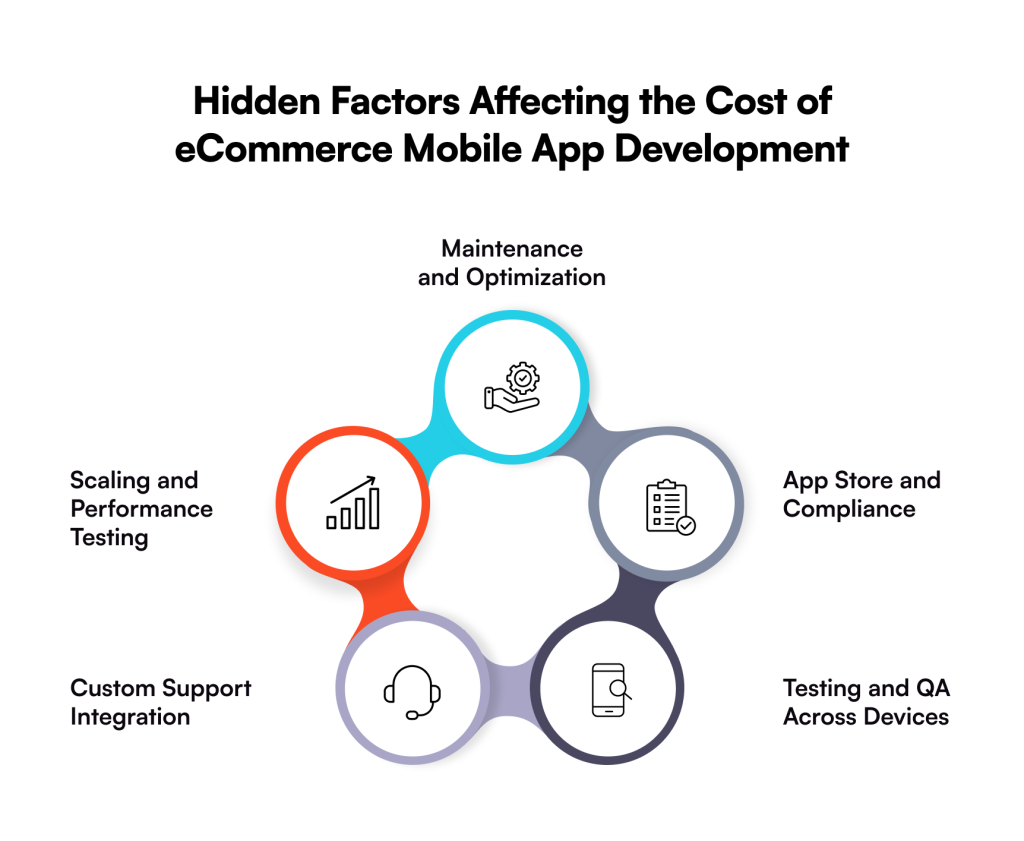
The total cost of developing an eCommerce software can be significantly increased by hidden costs like maintenance or support, which go beyond the obvious elements like features or design. You can save a lot of money if you can identify them early.
The following are a few hidden fees that you should avoid.
Maintenance and Optimization
You cannot overlook post-launch optimization and maintenance services because you will not only make your eCommerce app error-free, but it will also stay up-to-date. So, this might cost you money, yet they are crucial to make your app functional and competitive.
App Store and Compliance
If you think publishing your app on the Google Play Store or App Store is free, you are wrong because it does require annual fees. Apart from this, adhering to the respective marketplace’s policies is a different addition to the cost, and rejecting them will automatically increase the price.
Testing and QA Across Devices
Real-world testing isn’t going to work; you must make sure your eCommerce app is being tested across multiple devices, screen sizes, and OS versions. Additionally, user research testing is also being conducted to make sure the user experience remains intuitive and up-to-the-mark. So, this kind of testing demands dedicated resources that ultimately lead to an increased price.
Custom Support Integration
Integrating live chat support in an eCommerce app is a must to resolve customer queries instantly without hampering their experience. So, the third-party integrations come with a cost, which you must pay only to avoid the increasing bounce rate in the future.
Scaling and Performance Testing
When your eCommerce app starts scaling and starts experiencing high transaction volumes, you must optimize your app. Performance tuning or caching strategies are some of the hidden charges that come up while your app scales.
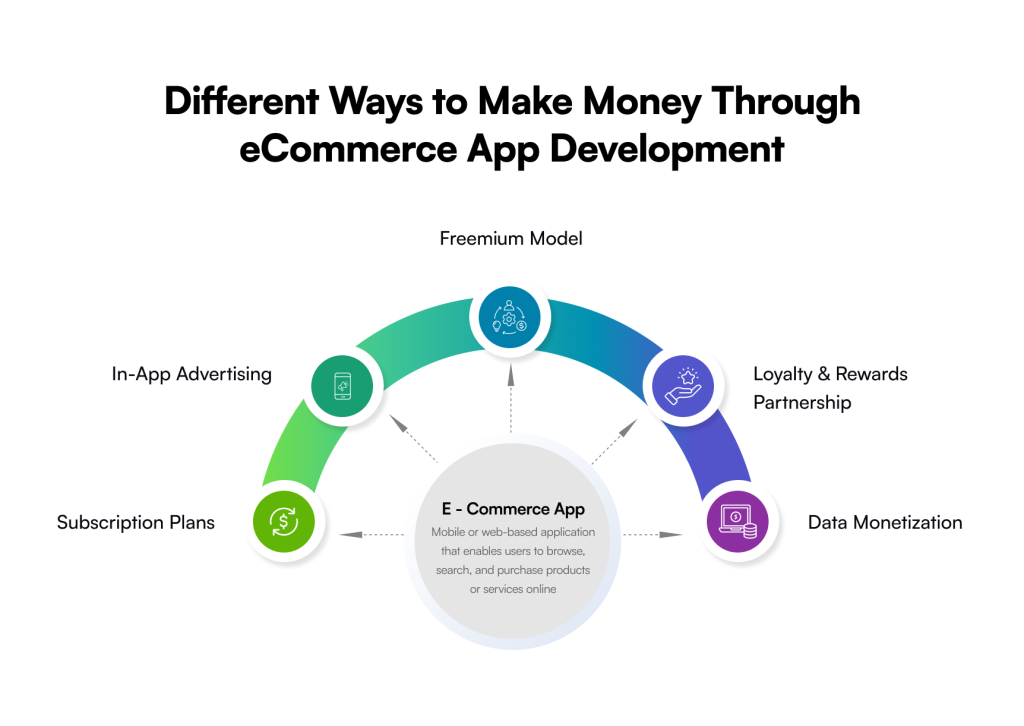
How You Can Make Money Through an eCommerce Mobile Application?
Now that you are spending money on developing an eCommerce app of your dreams, it is crucial to know how you can earn a profit out of it. Below is a list of some of the effective ways:
Subscription Plans: With this, users pay a recurring monthly or yearly fee for premium features or an ad-free experience in your eCommerce application.
In-App Advertising: You can make money through interactive ads, videos, or native ads by displaying them in your eCommerce app.
Freemium Model: You can attract users and provide them with the basic features for free, and in case of utilizing the advanced features, you can charge them.
Loyalty & Rewards Partnership: Partner with other companies or service providers to provide consumers with special offers, rebates, or incentives for making regular purchases or using the app.
Data Monetization: By offering market insights to outside researchers, companies, or advertisers who want to learn more about consumer behaviour, the anonymized and aggregated data can be made profitable in a number of ways.
Partner with Galaxy Weblinks to Build a Cost-Effective eCommerce Mobile App Development
Although the price of developing an eCommerce software may seem prohibitive, the true query isn’t “How much will it cost?” “How much value will it create?” is the real question.
At Galaxy Weblinks, we make sure every dollar you invest works harder for you, whether you’re developing a full-featured eCommerce platform with sophisticated integrations or launching a lean MVP to test your idea.
We concentrate on striking the ideal mix between price, quality, and scalability so that you receive more than simply an app; you receive an engine that generates income. Working with Galaxy Weblinks entails more than just development; it entails having professionals on your side to create an eCommerce app that is ready for the future and will pay for itself many times over.
You can get in touch with our expert team, which can guide you and turn your app idea into reality!
FAQs
1. How much does it cost to develop a basic eCommerce app?
A simple eCommerce app with core features like product listings, cart, and secure checkout typically costs between $15,000 – $30,000. However, the price can go higher depending on design complexity and integrations.
2. What factors influence the cost of eCommerce app development the most?
The biggest cost drivers are features, app complexity, design (UI/UX), chosen platform (iOS/Android), integrations, and developer location. Advanced features like AI recommendations, AR try-on, or multi-vendor support significantly increase development costs.
3. Is it cheaper to build an app for iOS or Android?
Developing for a single platform is usually cheaper than building for both. The cost difference between iOS and Android isn’t huge, but if you want to target both, opting for cross-platform frameworks like Flutter or React Native can be more budget-friendly.
4. Do I need to budget for app maintenance after launch?
Yes. Post-launch costs include bug fixes, server costs, updates, and new feature rollouts. On average, businesses spend 15–20% of the initial development cost annually on maintenance.
5. How can I reduce the cost of developing an eCommerce app?
You can optimize costs by starting with an MVP (Minimum Viable Product), choosing the right tech stack, using cross-platform development, and partnering with an experienced development team that balances cost with quality.
Today, eCommerce is a multitrillion-dollar industry and retail commerce sales could exceed USD 4.3 trillion by this year end. Apparently, there is humongous opportunities in this domain and as an entrepreneur you are eager to get a slice of the pie. But the road ahead is bumpy.
One critical challenge in creating your online storefront is the selection of the right eCommerce Content Management System (CMS) platform. Choosing the right CMS is crucial for your investment and building a robust scalable and secure eCommerce store.
The right CMS will help you easily manage your product catalog, simplify adding, updating, or removing content (like product images, descriptions, etc), enables you to launch seasonal offers or campaigns faster, and do other tasks without any hassle.
It helps you seamlessly manage hundreds or thousands of products from a single interface and provides best features to build a scalable, secure, and lightning-fast online store. In this blog, we have listed the ten most reliable, high-performance, and trusted eCommerce CMS that you can leverage to build top-notch websites.
Top 10 CMS Platforms for eCommerce Development
Making a choice for a CMS to build your eCommerce store can be confusing given so many options. However, selecting the right CMS is crucial to build a secure, scalable, and user-friendly eCommerce site that will attract customers, and drive conversions.
1. WordPress + WooCommerce
One of the best CMS and most popular options for eCommerce is WordPress with WooCommerce plugin. With more than 4 million eCommerce stores using WooCommerce and WordPress holding 60.8% of the CMS market share, the duo dominates the game.
As a user-friendly platform, WordPress allows you to create any website within a few minutes even with zero technical know-how. Plus, managing websites is also hassle-free with a simple, clean, and clutter-free dashboard. It’s a useful CMS for eCommerce development.
The bonus: a huge library of different website themes and plugins allows you to build engaging websites, and the open-source nature makes it highly customizable.
Pros
Cons
Open source, no license fees
Too many plugins can affect performance
Highly customizable
Advanced customization requires developer support
Convenient admin panel
Not a dedicated eCommerce platform
Quick and easy installation on any web hosting
Abundant resources for learning and support
2. Adobe Commerce
Adobe Commerce is a comprehensive eCommerce platform that also includes a CMS to manage content for all B2B and B2C websites. It is a proprietary platform for eCommerce development that was formerly Magento.
It is a suitable eCommerce CMS platform for large, enterprise-grade companies that need a flexible and customizable solution. As a cloud-native platform, Adobe Commerce enables you to build multi-brand, multi-lingual, and high-performance storefronts in the cloud.
Creating an eCommerce site is quick and convenient with its integrated tools and features. It offers content creation with Gen AI and prebuilt storefronts with integrated commerce functionality.
Pros
Cons
Highly suitable for enterprise-grade storefronts
High costs of development and license
Adequate options for customization
Set up and website management isn’t beginner-friendly
Advanced features for B2B and B2C experiences
Costly integrations and extensions
Robust analytics and marketing tools
Support for multi-currency, multi-language, and multi-store
3. PrestaShop
PrestaShop is another popular CMS for eCommerce development that offers a freemium model – both free and paid versions. It is considered among the best CMS for eCommerce website for startups and small businesses.
With more than 250k eCommerce platforms using PrestaShop, it is a reliable choice to build your store with the best features and security. It is fully customizable with diverse website templates, modules, and extensions.
As a versatile and lightweight CMS, it is well-suited for small to mid-size eCommerce stores. However, it’s not beginner-friendly – building and setting up your eCommerce requires tech expertise.
Pros
Cons
Both open source and premium version
Technical knowledge is required for customization
Full customization with themes and modules
Paid add-ons are needed for advanced features
Support for multiple currencies and languages
Not best-suited for large enterprises
User-friendly admin interface
Limited support
Wide range of payment plugins
4. OpenCart
OpenCart offers everything you need to run, scale, and manage your eCommerce business. It is one of the top open-source CMS for eCommerce development. It is an ideal platform for those that are starting eCommerce business with a small budget.
With a variety of extensions and templates, you can customize your store as per your preferences. Additionally, the OpenCart marketplace offers a wide range of add-ons or modules for payments, shipping, and more.
Pros
Cons
Lightweight and fast CMS
Limited built-in features
Many themes and extensions
Complex customization
Open source and free
Compatibility issues with multiple plugins
Multi-store support
Limited scalability
Multi-currency and multi-lingual
5. Drupal
Now this CMS isn’t an eCommerce platform out of the box. It’s a usual CMS like WordPress. However, in a similar way, you can build pleasing and efficient eCommerce sites even on Drupal with extensions (plugins).
Drupal is a powerful and feature-rich CMS which is suitable for developing complex websites. But it’s not user-friendly and requires technical expertise to build even a basic site.
Moreover, as an open-source CMS platform, it is ideal for creating highly customizable websites. Since there aren’t any license costs, it is also suitable for small businesses and startups.
Pros
Cons
Customizable and scalable platform
Steep learning curve
Open source and free
Extensive development
Strong integration capabilities
Limited prebuilt themes
Strong security
Relatively higher maintenance costs
Great headless development
6. Joomla
Joomla is another CMS platform that you can use for creating eCommerce websites. Though it is also not a dedicated eCommerce CMS, you can build an appealing storefront by integrating plugins. It is an open-source CMS for creating web applications and eCommerce sites.
It is a free and open-source platform that is customizable with full coding possibilities. It is a flexible CMS that can be used to create a wide range of websites. Additionally, there is good community support to help website owners get solutions to problems.
Pros
Cons
Versatile and flexible
Moderate learning curve
Strong user management
Dependency on extensions for advanced features
Multilingual and multi-currency
Limited templates and extensions
Built-in SEO features
Thousands of extensions
7. Shopify
Shopify is a comprehensive eCommerce platform that allows businesses to easily build and manage online storefronts. It offers a wide range of features including AI-powered store builder. There are lots of quality website themes that you can use to build top-notch eCommerce stores.
With its easy and user-friendly dashboard, managing content is no brainer and can be done without any technical knowledge. It provides a consolidated dashboard where you can manage everything from inventory to payment processing.
What makes Shopify stand out from other CMSs is its omnichannel and multi-channel capabilities that allows businesses to offer a consistent user experience across multiple customer touchpoints such as smartphones, desktops, social media, and in-personal shopping. It offers Shopify Plus which is an enterprise to build high-performance and scalable stores for large businesses.
Pros
Cons
Easy and user-centric interface
High subscription costs
Customizable themes
Extra transaction fees when not using Shopify Payments
Hosted solution, no need to manage servers
Some advanced features depend on paid apps
Strongest security and performance
Scalable and extensive marketplace
Multiple payment options
24/7 customer support
8. BigCommerce
It is another eCommerce platform with an integrated CMS that allows users to manage website content easily. It is a flexible and powerful solution to build even complex eCommerce sites. BigCommerce is a SaaS platform with an open API.
It is possible to integrate BigCommerce with other platforms to easily sell on multiple platforms. BigCommerce offers basic website building features such as drag-and-drop page design that helps small businesses to create pretty websites.
Pros
Cons
Smoothly handles large product catalogs and traffic
If revenues cross a certain threshold, plans upgrade automatically and cost more
Built-in features for multi-currency, product reviews, SEO, and other essentials
Advanced features aren’t beginner-friendly
No transaction fees
Limited themes and high-quality themes require a purchase
Strong security with HTTPS, automatic updates, and PCI DSS Level 1 compliance
Native marketing tools are limited
Flexible, customizable, and supports headless commerce
Backend could be a bit complex for non-tech individuals
9. Squarespace
As an all-in-one SaaS-based eCommerce platform, Squarespace stands out with its unique functionalities and benefits. It offers an integrated CMS that allows businesses to manage their stores, product catalogs, payment gateways, themes, and everything without any hassle.
With drag-and-drop functionality, Squarespace allows you to build beautiful and functional eCommerce sites without any technical skills.
Pros
Cons
Visually attractive and mobile-friendly website templates
Not very scalable and not suitable for very large enterprises
Its drag-and-drop platform makes it beginner-friendly
Supports limited payment gateways
No transactional fees like many other platforms
Challenging in international selling due to no multi-currency support
Built-in marketing tools
Limited customization
Round-the-clock customer support
10. Magento Open Source
It is an open-source dedicated CMS platform for eCommerce. It is built to develop various types of eCommerce stores whether B2B or B2C. Currently, there are 100k+ eCommerce stores running on this platform.
A wide range of themes and extensions allow you to customize your eCommerce website easily to build engaging storefronts. As a free eCommerce CMS, Magento helps you avoid costly subscriptions and license fees to build and manage a full-fledged online storefront.
Pros
Cons
Scalable for large online stores
Steep learning curve for beginners
Extensive customization
Costly development and maintenance
Robust options for managing inventory and products
Extensions can be expensive
Multi-language and multi-store support
Managing regular updates and patches isn’t easy
Tools for marketing
To Wrap Up
Choosing an eCommerce platform or CMS isn’t just about creating an eCommerce store, it is more about ensuring frictionless growth, customer satisfaction, security, and ease of managing content. You can effortlessly run, manage, and update your website with a good CMS without any deep technical skills.
At Galaxy Weblinks we help you build feature-rich eCommerce websites choosing the best CMS that fits your business requirements the best. We build high-performance, intuitive, scalable, and secure eCommerce websites that complies with essential standards like GDPR, PCI DSS, and more.
Whether you want to build your website on monolithic architecture or a decoupled architecture with a headless CMS, we take care of your needs with our years of expertise and experience. With the right CMS paired with our exceptional skills, we help create future-ready eCommerce stores. Contact us to discuss your requirements now!
Frequently Asked Questions
Q1. What is a CMS in the context of eCommerce?
A CMS or Content Management System is a software that allows you to manage, create, and update content on your eCommerce site. For example, if you have to upload product images, add new features, or update product descriptions, a CMS makes it easy.
Q2.Why is choosing the right CMS important for my eCommerce store?
The right CMS not just makes it easy to manage content and features of your eCommerce site, but it also ensures hassle-free growth and expansion of your store over time.
Q3. Which CMS is best for large-scale eCommerce businesses?
There are many popular and reliable CMSs like Adobe Commerce), Shopify Plus, and BigCommerce for enterprise eCommerce stores as they efficiently handle large traffic and huge product catalogs.
Q4. How does a CMS improve store security?
The right CMS offers role-based access control, SSL, security updates, and other essential features to protect your customers’ sensitive data.
Q5. Can I switch CMS platforms later?
Yes, it is possible to change a CMS for eCommerce. However, switching later can be complex, costly, and time-consuming.
Q6. Do all CMS platforms support scalability?
Not every eCommerce CMS provides scalability on an equal level. Some CMS for eCommerce can have better scalability than others and vice-versa.
Q7. What features should I look for in a CMS for eCommerce?
The following are some essential features that you must look in a CMS for eCommerce to pick the best one:
Tools for managing products
SEO capabilities
Mobile-responsive themes
Support for third-party integration
Customizability of templates
Strong security measures and compliance.
Q8. Is open-source CMS better than a hosted solution for eCommerce?
Hosted solutions are simple and requires little or no technical knowledge to set up and maintain sites. On the other hand, open-source platforms offer high-level customization but they require technical expertise to manage and maintain eCommerce stores. So, it depends on your choice.
You have a brilliant app idea, but failing to estimate the overall mobile app development cost can be a barrier to your success – do not let it happen to you! Read this guide to get a complete app development cost breakdown.
Have you ever wondered why most of the apps fail even before they come into the marketplace? Because many entrepreneurs overlook the financial realities that might make or break the app.
However, an app development cost is not just a number that you can simply Google because it heavily depends on various factors, including app complexity, features, platforms, and more. An average app development cost with basic features starts from $40,000, while others might charge even more.
This confusion often leads business owners to a dead end, where they just end up abandoning their app idea or compromising on the quality, only to pay more later. To save you from facing such a situation, we have put together a guide to the mobile app development cost.
After reading this blog, you will be able to cut unnecessary spending and make smarter financial decisions.
Let’s dive into the details!
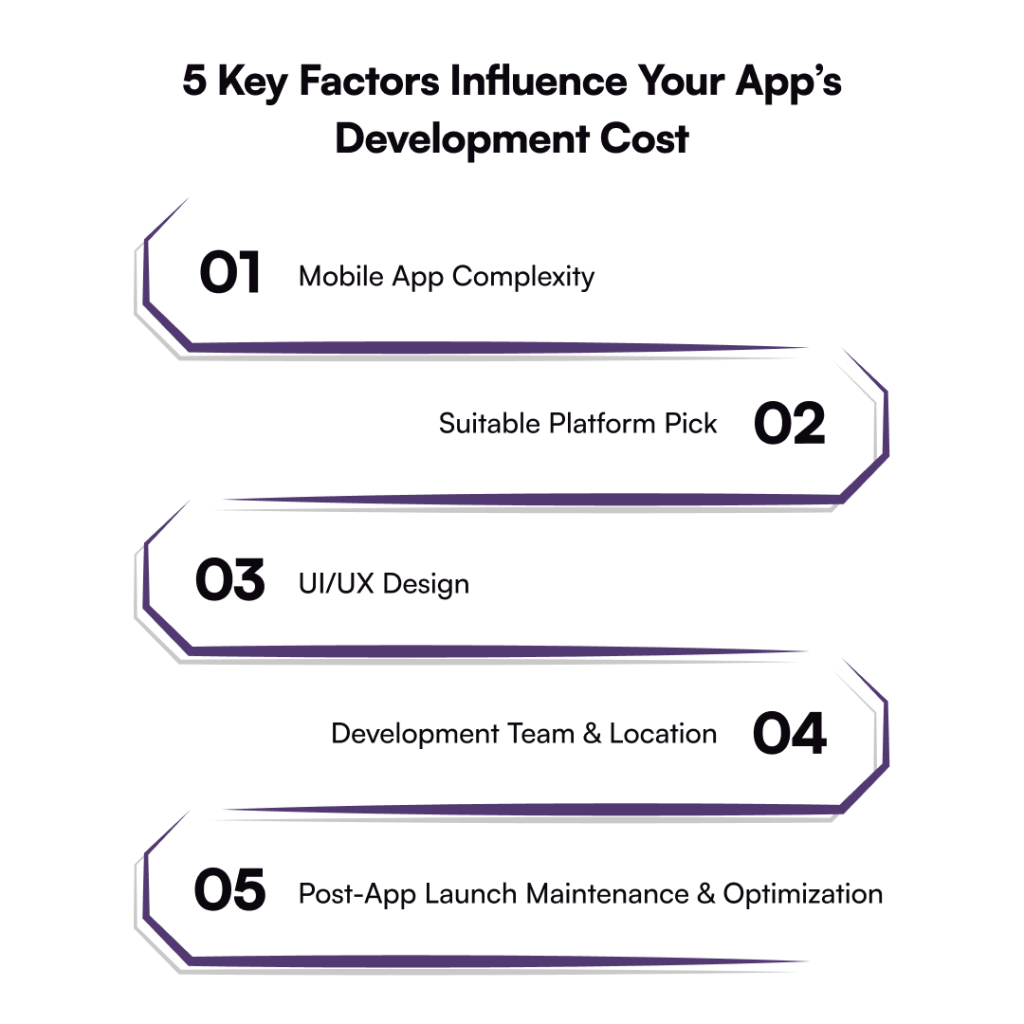
Top 5 Factors Affecting the Cost to Develop an App
How much does it cost to create an app?
Well, the answer to this question is not as direct as you might expect because every mobile app is unique in its way, which ultimately affects the overall development cost. Here is a list of the top factors that influence the app development price.
Mobile App Complexity
A mobile app with basic features might be a cost-effective option for your business, but it will not be suitable for the long run. However, if you have a complex app idea with advanced features, like payment gateways or AI development, your wallet will definitely feel the weight. On the bright side, it will give you a competitive edge in the market. Furthermore, the app complexity also includes the backend architecture and scalability requirements that automatically raise the price.
Platform Choice – iOS or Android
Choosing a suitable platform for your mobile app development is another influential factor, affecting the overall cost to develop an app. For instance, if you want native app development for iOS and Android, two different code bases will be required. Do you know what that means? The pricing will skyrocket, but the investment will pay off higher in stability and long-term success.
UI/UX Design
Ever since the low-code development market is expected to reach $264.4 billion by 2032, businesses are inclining more towards this approach for cost-effective mobile application development. But low-code alone cannot help you achieve your results; you would want an aesthetically pleasing app, which ultimately affects the cost of app development. In short, it will cost you money, but it is a necessary investment.
Development Team & Location
Another factor affecting the app development cost is the team you hire and the location they are based in. For example, app developers based in North America or Western Europe charge premium rates ($120-$200/hour). Whereas, skilled team of developers may cost significantly less (starting from $50-$110/hour). Beyond this, hiring freelancers or a set of experienced developers also affects the overall app development price.
Post-Launch App Maintenance & Optimization
Once the app development is completed, post-launch maintenance comes into the picture, which includes regular updates, bug fixes, integrating new features, etc. With that being said, the cost of optimization and maintenance starts from 15% to 20% of the actual app development price. So, if you want to keep your app operational all the time, invest your money and ensure long-term success.
App Development Cost Breakdown Across Platforms & Industries
The cost to develop an app varies significantly depending on the platform you choose (whether it is Android, iOS, or cross-platform). Additionally, which industry you are catering to is also an affecting factor of the app development cost.
Here is the breakdown of the average cost to develop an app, specially designed for you:
App Development Cost by Platform
App Platform
Basic App
Mid-Level App
Complex App
Android App Development
$5,000 to $15,000
$15,000 to $30,000
$72,000 and increasing
iOS App Development
$5,000 to $25,000
$25,000 to $75,000
$75,000 to $150,000+
Cross-Platform Development
$5,000 to $20,000
$20,000 to $70,000
$70,000 to $250,000+
App Development Cost by Industry
Industry
Estimated Cost Range
Healthcare App
$20,000 to $500,000+
eCommerce App
$10,000 to $250,000+
Fintech App
$30,000 to $250,000
Social Media App
$10,000 to over $120,000+
On-Demand App
$25,000 to $150,000+
How to Estimate Mobile App Development Cost?
Now that you know the cost breakdown of a mobile app development across platforms and industries, it’s time to focus on the factors to consider while estimating your app development cost.
Do You Want to Hire an Agency or a Freelancer?
Choosing the appropriate development team plays a vital role in figuring out the overall mobile app development cost. You can either hire a freelancer or a mobile app development agency to turn your dream project into reality. And, to be honest, hiring any of them will indeed profit your business; however, both options have their own pros & cons.
However, many organizations choose an agency over freelancers because developing a mobile app is not just about writing a line of code. There are a hundred other things as well, like offering post-launch support & maintenance services.
Hiring a freelancer for your next big project might cost you around $20 per hour, but that’s it. Outsourcing to a full-time app development agency is considered a more reliable option because they will offer you:
Accountability
Smooth project management
Easy communication
Quality assurance
Efficient involvement
What Is Your Mobile Application Type?
Another influencing factor we have is the type of app you want to build for your business. There are tons of options that you can choose for your project that will ultimately impact the overall development cost. For instance:
On-Demand Services App: These types of apps have features, like geolocation, payment integration, and service provider management. As a result, an on-demand app can cost you between $60,000 – $1,20,000.
Social Networking Apps: Building a high-performing social media app with features, like real-time notifications, AI personalizations, or advanced-level privacy controls, ranges anywhere from $30,000 to $1,00,000.
Data-Driven Apps: Developing a data-driven app might cost you from $25,000 to $80,000 since it relies on data processing and analysis. These apps include calendars, weather forecasting, and maps that ultimately increase the cost.
Hidden Factors Affecting the Overall Cost of Mobile App Development
Here, you’ll learn about the top hidden factors that also influence the mobile app development cost. Let’s have a look at them in detail:
Quality Assurance
Quality assurance is something you can’t ignore because it is important to ensure your app is bug-free, has no glitches found, and more. It includes a variety of tests, like functional, usability, performance, and security. If you are ignoring this phase for now to save some money, remember it’ll definitely cost you in the future.
Infrastructure & Backend Cost
Infrastructure powers your app with monthly expenses, whereas backend development comes with an upfront cost. It includes the recurring costs for data storage, server maintenance, and app hosting. With time ,your app’s user base will expand so that your app can handle more data & traffic. As a result, it ultimately increases the cost.
App Security
Your mobile application contains the user’s sensitive information that you cannot compromise on. To ensure the app’s security, you must spend a good amount of money to avoid costly data breaches, regulatory fines, or reputational damage.
App Publishing Costs
Publishing a mobile application on the Google Play Store or App Store comes with an additional publishing cost. If you want to release your app on the Play Store, the one-time cost will be $25, and the App Store will charge $99 per year.
IT Support Costs
If you want to maintain the exceptional performance of your mobile app, you need technical support. The IT team will help you resolve the issues (or glitches) before the end users encounter them. When you spend your money on IT support, you get bug fixing, API maintenance, cloud services, application security, and more.
Effective Strategies to Lower Your Mobile App Development Expenses
To maximize the cost of app development, a business owner must employ the appropriate combination of tactics and make wiser financial choices.
Code Reusability
Code reusability lowers app development costs by allowing developers to reuse or recycle certain features or components of the app. In comparison to creating each component from scratch, it can also increase productivity, save development time, and improve overall quality.
Pick the Right App Development Approach
Which development approach, native or hybrid, is ideal for your company is up to you. Because native apps are created specifically for the iOS and Android platforms, they can offer superior performance and user experience. However, compared to hybrid app development, which allows you to construct an app using cross-platform frameworks, it takes twice as much work.
Better Communication Flow
Facilitating improved communication and teamwork within the development team is another crucial consideration. In addition to cutting down on development time and lowering cost, it will guarantee improved oversight of the process and clarity for all parties involved.
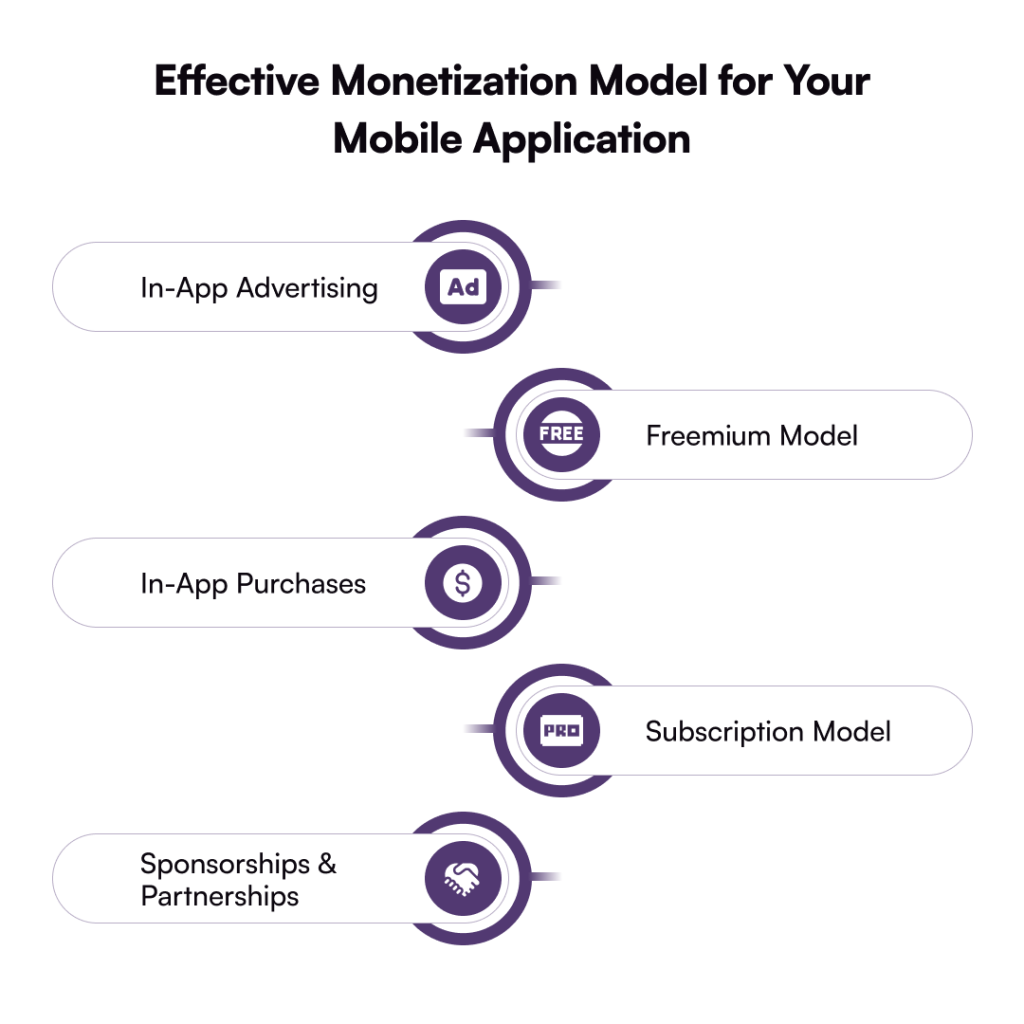
Proven Monetization Models That Actually Work for Your Mobile App
Congratulations on building a highly intuitive and user-friendly mobile application! But now what?
Have you thought of ways to make your mobile application profitable? Well, you certainly need an effective monetization strategy to generate revenue. Here is a list of proven models you can choose from:
In-App Advertising
The first and foremost effective monetization model is in-app advertising, where advertisements are displayed inside the app only. You can make money through interactive ads, videos, or native ads. Remember that earning through ads is an excellent option, but too many displays of ads might frustrate users. So, maintain a balance.
Freemium Model
Another interesting model through which you can get a higher ROI is leveraging the freemium model. You can attract the users and provide them with the basic features for free, and in case of utilizing the advanced features, you can charge them. Such a model is highly useful for apps like Spotify and LinkedIn that give users a wonderful experience before committing to paid features.
In-App Purchases
In-app purchase is another way to monetize. This lets users buy extra content or features. It works well for gaming apps where users can buy virtual items or exclusive content. This model is also common in lifestyle, education, and entertainment apps for unlocking premium features.
Subscription Model
On the other hand, if in-app purchases or a freemium model don’t suit your app, a subscription model could be the answer. With this, users pay a recurring monthly or yearly fee for premium features or an ad-free experience. Many successful apps like Netflix, Amazon, and Spotify use this model effectively. If your app provides high-quality content or unique features, a subscription is a solid option.
Sponsorships & Partnerships
Sponsorships and partnerships are another good way to make money with your app. This works really well if you have a loyal and active user base in a specific market. You can then team up with brands that want to reach your audience, which benefits both you and the brand.
Which Is More Cost-Effective: Hiring an In-House Team or Offshore?
When it comes to developing a mobile application, one of the thoughtful decisions entrepreneurs have to make, whether to hire an in-house team or an offshore team. While the average cost of app development can give you a rough idea, it’s important to recognize that the choice between these two approaches significantly influences both your expenses and long-term outcomes.
Let’s find out which is the suitable choice:
In-House Development Team
If you are thinking of hiring an in-house team, get ready to have more control, easier communication, and better alignment with your company’s goals. However, it will come with a price because, on average, the app developers based in Western Europe can cost as much as $150,000+ per year. Just know that we haven’t mentioned the cost of designers, QA testers, and so on.
Offshore Development Team
Investing your money in hiring an offshore development team is a cost-effective option, giving you access to a pool of talented & experienced developers. This gives you relaxation from overpaying and lets you focus on maintaining an in-house staff.
However, it completely depends on the type of business and budget you have. For startups or businesses with a small budget, an offshore development team is definitely the right choice. But if your enterprise is on a large scale and has enough money, go for an in-house development team.
Just remember, cost matters, but the right team matters the most!
How Galaxy Weblinks Helps You Build Apps Within Budget
At Galaxy Weblinks, we have a team of developers who specialize in crafting mobile applications that balance cost, quality, and scalability.
From creating a simple MVP to developing a complex enterprise-level application, we will ensure you receive a higher return on investment. Our team will also help you choose the right tech stack to optimize UI/UX and deliver advanced features without breaking your bank.
The outcome:
Cost-effective development that never sacrifices quality.
Applications engineered for scalability and sustained, long-term expansion.
A reliable partner committed to supporting you at every phase of your project.
Q1. How much does it cost to create an app in 2025?
The cost of developing an app in 2025 typically ranges from $40,000 to $150,000+, depending on factors like app complexity, features, design, and platform choice. A simple MVP can be more budget-friendly, while complex enterprise-grade apps require a higher investment.
Q2. What factors influence the cost of app development the most?
The biggest cost drivers are app complexity, chosen platform (iOS, Android, or cross-platform), UI/UX design, developer location, and post-launch maintenance. Each of these adds layers of effort, impacting the final price tag.
Q3. Is it cheaper to build a cross-platform app than two native apps?
Yes. Cross-platform development allows you to reuse a single codebase for both iOS and Android, saving development time and costs. Native apps, while offering better performance, usually cost more because they require separate builds.
Q4. Are there hidden costs in mobile app development?
Many businesses overlook post-launch expenses, such as hosting, app store fees, bug fixes, feature updates, and marketing. These can add 15–20% of the initial development cost annually, so budgeting for ongoing maintenance is crucial.
Q5. Should I hire an in-house team or outsource app development?
It depends on your goals and budget. In-house teams give you full control but are more expensive (salaries, tools, benefits). Outsourcing or hiring an offshore team can be more cost-effective while still ensuring quality if you partner with the right vendor.
Suppose you’re launching your business across multiple geographies, integrating newer sales channels, and constantly tweaking the customer experience but your systems can’t keep up. What should be a seamless rollout turns into months of coordination between frontend teams, backend engineers, and third-party vendors. Every minor update, be it a product carousel or a localized payment method triggers a domino effect of dependencies. Managing digital commerce at scale was never meant to be this disrupted.
For many enterprises, this rigidity is no longer just a tech problem—it’s a growth blocker.
Traditional commerce architectures were designed in an era where customer journeys were linear, and touchpoints were predictable. That era is over. Today, users jump from app to web to in-store within hours. And they expect consistency, speed, and personalization at every point.
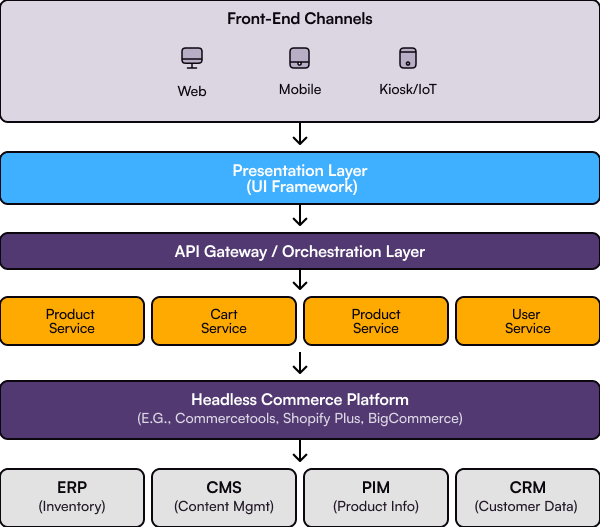
Headless commerce emerged not as a trend, but as a response to this very problem. It decouples the customer-facing layer from the backend engine—giving enterprises the ability to move fast on the frontend, while keeping backend logic stable and secure.
But transitioning to headless is not a plug-and-play job. It’s a strategic shift. It demands clarity on architecture, business needs, integration maturity, and long-term scalability.
That’s what this guide will help you with—a complete blueprint to understand, evaluate, and plan your enterprise headless commerce journey.
What Is Headless Commerce and Why Enterprise Leaders Are Choosing It
Definition:
Headless commerce refers to a decoupled architecture where the frontend (what users see) and backend (where business logic and data live) operate independently, connected via APIs. This separation gives enterprises the flexibility to build fast, scalable, and personalized user experiences without being constrained by legacy systems.
How Headless Commerce Came to the Picture?
Traditional commerce platforms were built to centralize control, not to support agility. As customer expectations shifted toward faster, personalized, and cross-platform experiences, these systems started showing their limits.
Every team in an organization has a separate goal, but leads to a cohesive business success:
Marketing wants to experiment across channels.
Developers need to release front-end improvements without waiting on backend changes.
Business teams are looking for ways to enter new markets without rearchitecting the core.
But when every update requires a backend overhaul, speed becomes a bottleneck.
Headless commerce changes that. Separating the presentation layer from the backend using APIs, it provides a flexible structure where the backend remains stable and secure, while the front end can be customized and scaled as fast as the market demands.
This shift is already underway. The global headless commerce market is expected to estimate at $1.74 billion by 2025. Moreover, this market is anticipated to reach $7.6 billion by 2032, showing a compound annual growth rate (CAGR) of 22.4% in the growth period.
For enterprise teams navigating global operations, omnichannel delivery, and AI integrations, this approach offers the adaptability that legacy systems can’t. Headless isn’t just another architecture. It’s how modern commerce stays competitive.
So, what makes this architecture worth betting on? That’s what we explore next.
Top Enterprise Benefits of a Headless Commerce Architecture
Enterprise commerce is no longer about just building an online storefront. It’s about building a responsive, intelligent, and integrated digital ecosystem that evolves with market demand. Headless commerce architecture enables that shift by improving technology and realigning how teams work & systems scale.
Here’s a closer look at how enterprises are seeing value:
1. Speed that Impacts Core Business Metrics
Performance isn’t just a technical KPI. It’s a business outcome. Studies show that conversion rates drop by up to 7% for every one-second delay in page load time. By decoupling the front-end from the back-end, headless commerce allows developers to optimize each layer independently, leading to various lucrative outcomes:
faster load times
better Core Web Vitals
significantly improved performance across global regions
2. Front-End Agility for Real-Time Iteration
With a headless setup, front-end teams are no longer bound to the release cycles of backend systems. Want to launch a new landing page, test a microinteraction, or localize content for a new region? You can ship those updates without waiting for back-end dependencies to be resolved. This kind of speed to iterate directly supports business agility.
3. Modular Scaling and Lower Total Cost of Ownership
Legacy systems often require scaling the entire application stack, even when the demand spikes are limited to specific services. Headless architecture allows enterprises to scale services independently—whether it’s the CMS, product catalog, or checkout logic. Over time, this modularity reduces infrastructure waste and lowers maintenance overhead.
4. Seamless API-Driven Integrations
Enterprise commerce doesn’t run in isolation. It has to plug into ERP systems, CRMs, inventory databases, CMS platforms, analytics dashboards, and more. A headless architecture, built on APIs, allows smoother integrations with existing tools while future-proofing the stack for new ones—whether it’s a PIM solution or a Gen AI-powered analytics engine.
5. AI-Ready Personalization at Scale
Personalization today means more than product recommendations. It includes dynamic pricing, real-time content adaptation, and behavior-based journeys. Headless architecture enables tight coupling with AI/ML engines that operate outside the commerce platform, ensuring these features don’t slow down core workflows. According to a McKinsey study, companies that personalize digital experiences see 10 to 15% increases in revenue.
6. Developer Productivity and Engineering Velocity
Because each component in a headless system can be built, tested, and deployed independently, engineering teams move faster. This modularity supports modern CI/CD workflows, shortens sprint cycles, and reduces time spent managing dependencies. As a result, innovation becomes continuous—not scheduled.
Key Architecture Patterns and Platform Examples
Modern commerce infrastructure isn’t just about having the right tech—it’s about how that tech is structured to respond to evolving needs. As customer expectations shift and personalization becomes the norm, businesses are turning to composable approaches that allow flexibility without compromising speed or stability.
MACH: The Framework That Powers Modern Commerce
At the core of headless commerce lies the MACH architecture, which stands for:
Microservices:Instead of monolithic platforms, every function (search, checkout, pricing, etc.) operates as an independent service. This means you can update or scale just one component without touching the entire system.
API-first: Every service communicates via APIs, making integration with other tools, platforms, and custom interfaces seamless.
Cloud-native: Built to run in distributed cloud environments, allowing automatic scalability, global availability, and cost efficiency.
Headless: The front-end is decoupled from the back-end, so you can build interfaces for web, mobile, kiosk, or even smart TVs without constraints.
This architecture is becoming the baseline for future-ready digital commerce. It’s what powers personalization engines, omnichannel delivery, and lightning-fast deployment cycles.
Platforms Putting MACH Into Practice
Several enterprise-grade platforms have translated MACH principles into full-fledged products. Here are a few leaders that teams across industries rely on:
1. commercetools One of the pioneers in true MACH architecture, commercetools is entirely API-driven and built for composability. Enterprises use it to roll out localized storefronts, integrate AI-driven pricing engines, or even deploy voice-based commerce features, all without altering their core logic.
2. Shopify Plus (Headless Mode) While Shopify is traditionally known for its all-in-one model, Shopify Plus offers headless capabilities that give enterprise teams full control of the front-end experience. With its Storefront API and Hydrogen framework, developers can create highly customized experiences while relying on Shopify’s battle-tested commerce engine.
3. BigCommerce (API-first Capabilities) BigCommerce offers 90% of its platform via APIs, making it a reliable option for businesses looking to go headless without building from scratch. It integrates well with CMS systems, payment gateways, and personalization tools, and supports multi-region scaling right out of the box.
4. Spree Commerce An open-source framework that developers love for its flexibility. Spree is built on Ruby on Rails and is ideal for teams that want full control over customization, hosting, and third-party integrations. It’s often used by mid-size businesses or fast-scaling DTC brands looking for ownership and performance.
These platforms don’t just enable front-end freedom—they allow businesses to create tailored experiences across channels, backed by a robust API infrastructure and scalable cloud setup. They’re also well-suited for future enhancements like integrating Gen AI models for product discovery.
When to Choose Headless: Use Case Scenarios & Migration Triggers
Not every business needs headless. And not every team is ready for it. That’s why identifying when and why to make the shift is a strategic step.
Understanding the right use case scenarios isn’t just helpful; it’s essential. Because without that clarity, teams risk:
Over-engineering when a simpler stack could’ve scaled
Missing out on performance gains when legacy tech throttles growth
Locking in cost-heavy migrations without matching ROI
The goal here isn’t to follow a trend. It’s to align architecture with business reality, whether that means serving five markets with distinct buyer journeys or building the agility to launch on a new touchpoint in two weeks.
So, instead of asking “Is headless commerce better?” ask “Is headless commerce better for us, right now?”
Let’s break down the scenarios where the answer starts leaning towards yes.
Global Expansion with Local Nuance
If your enterprise is growing across markets, each with its own language, currency, and buying behavior, then monoliths start to strain. Headless commerce lets you localize experiences without rebuilding the core logic. Front-end teams can tailor interfaces for Southeast Asia while backend systems remain untouched in the EU region.
Case in Point: Enterprises with multilingual storefronts (like Nestlé or Unilever) often use headless for regional brand autonomy without platform-level chaos.
Peak Traffic Isn’t Just Black Friday Anymore
Brands are no longer defined by product drops—they’re defined by how they scale when everyone shows up at once. From flash sales to influencer-fueled spikes, headless ensures backend stability and front-end performance even at increased traffic.
Peak periods—such as launches, holiday sales, or viral campaigns—expose architectural weaknesses. Retailers like Nike and John Lewis have faced site outages during high traffic days. With headless architecture, front-ends scale autonomously, minimizing downtime risk and safeguarding revenue.
Multi-Frontend Strategy is Now Default
You’re not just selling via a website anymore. There’s a mobile app. A marketplace storefront. A smart kiosk. Maybe even a wearable. Headless gives each touchpoint its own front-end freedom—without creating 5 different platforms to manage.
Real-World Parallel: Think of a headless setup like a centralized kitchen serving multiple restaurant counters—different dishes, same core.
Omnichannel + Personalization at Scale
Headless plays well with Gen AI and real-time engines. It allows instant adaptation to user behavior, integrating LLM-based recommendation systems, dynamic content rendering, and consistent brand presence across web, voice, and in-store screens.
For Advanced Teams: This is especially critical for those building composable experiences or integrating with CDPs, AI chat assistants, or CRM-linked content engines.
Headless vs Traditional vs Composable Commerce: A Strategic Comparison
Choosing the right commerce architecture isn’t about chasing the most modern-sounding term. It’s about aligning your tech stack with how your business needs to operate, scale, and innovate.
Here’s how Traditional, Headless, and Composable commerce architectures compare across real enterprise demands
Traditional Commerce A monolithic platform where the front-end and back-end are tightly connected. Any change in customer experience, functionality, or UI requires code-level updates across the entire system. It’s predictable but rigid—fine for early-stage use, but limiting when growth demands agility.
Headless Commerce This model decouples the front-end and back-end, allowing each to evolve independently. APIs act as the bridge. It gives brands more control over user experience and speed of delivery across channels, without being tied to a single system’s release cycle or templated structure.
Composable Commerce A modular, API-first approach where you build your stack using best-in-class solutions—CMS, checkout, search, payments—all integrated through orchestration layers. It’s designed for enterprise-grade flexibility, enabling teams to plug and play components based on evolving needs and innovation goals.
Parameters
Traditional Commerce
Headless Commerce
Composable Commerce
Architecture
Monolithic (Tightly coupled front-end & back-end)
Decoupled (Front-end and back-end communicate via APIs)
Modular (Built from interchangeable best-of-breed services)
Flexibility
Low (Rigid structure, slow to change)
Medium (Allows independent front-end changes)
High (Full control over every component, swap as needed)
Speed to Market
Slower (Long development cycles)
Faster (Parallel development enables quicker rollouts)
Often limited under load; dependent on full-stack stability
Optimized for faster front-end performance
Highly performant (Choose best tools per function)
Omnichannel Support
Minimal (web-first, hard to extend)
Good (Supports multi-touchpoint experiences)
Best (Designed for seamless omnichannel orchestration)
Developer Control
Limited (Developers constrained by platform)
More control over UI/UX, but backend is often fixed
Maximum control (Each service is an independent choice)
Integration Complexity
Minimal (Everything’s baked in)
Moderate (Requires API integrations)
High (But pays off in flexibility and innovation)
Total Cost of Ownership
Initially lower, higher in long run due to limitations
Balanced (Less maintenance, faster iterations)
Potentially higher upfront; long-term cost savings with scale
Best For
Small businesses with simple needs
Fast-scaling D2C/B2B brands, focused UX teams
Enterprises building future-proof, innovation-first ecosystems
Preparing for Headless Migration: Tech, Team & Timeline
Headless isn’t just a technology shift—it’s an operating model change. Use this checkpoint-driven toolkit to assess readiness across tech stack, team maturity, and long-term business goals.
Self-Assessment: Are You Ready for Headless?
Before you commit, answer these baseline questions internally:
Question
Why It Matters
Do your marketing and dev teams often clash over release timelines?
Headless separates front-end and back-end ownership.
Are you planning to launch new digital channels in the next 12–18 months?
A headless architecture supports omnichannel rollout without backend rework.
Are slow site updates impacting campaign performance or SEO?
Traditional CMS bottlenecks are removed in a headless model.
Do you have the internal capability (or partner support) to manage microservices and APIs?
Headless adds flexibility—and complexity.
Is your current platform vendor limiting speed, customization, or integrations?
Time to reconsider architecture neutrality.
“Is Headless Right for Us?” Criteria Matrix
Evaluate headless suitability across five dimensions.
Dimension
Low Suitability
High Suitability
Content Deployment Frequency
Monthly or ad hoc
Daily or real-time
Channels in Play
Just website
Web, mobile, kiosk, IoT
Marketing Autonomy
Needs dev help for updates
Owns content workflows
Tech Team Maturity
Monolith-oriented
Comfortable with APIs and decoupling
Business Growth Roadmap
Stable product mix
Frequent launches, market expansions
Vendor & Partner Evaluation Toolkit
When shortlisting CMS or MACH vendors, don’t just go by demos. Ask:
Evaluation Criteria
Key Questions
Architecture Fit
Does it support true decoupling or just headless-lite?
Editorial Experience
Can non-tech teams preview and publish easily?
Scalability
Is the system optimized for geo-redundancy and API performance under load?
Support & SLAs
What’s the uptime guarantee? How fast is dev support during critical deployments?
Integration Flexibility
Are APIs open, well-documented, and compatible with your stack (ERP, CRM, PIM)?
TCO
What’s the true 3–5 year cost of ownership, including training, upgrades, and support?
Note: Avoid vendor lock-in under the “headless” label as true composable systems allow you to replace individual components without replatforming again.
5-Step Enterprise Headless Migration Guide
Moving to headless or composable architecture? Here’s how successful digital-first enterprises de-risk and drive value across the migration lifecycle.
1. Define Business Drivers, Not Just Technical Bottlenecks
Too often, architecture decisions are made in isolation by IT. Instead, bring business and tech leads to the same table.
Ask:
Is performance slowing down during campaigns or sale peaks?
Are front-end changes delayed due to backend limitations?
Are new channels (voice, apps, kiosks) hard to deploy?
2. Select Your Frontend Stack & CMS Based on Use Case, Not Trends
Avoid the trap of picking “modern” stacks for the sake of it. Your front-end framework (React, Vue, Next.js, etc.) and CMS (Contentful, Strapi, Storyblok) should align with how frequently content is updated, who’s managing it, and how fast pages need to load across geographies.
Example: If your marketing team is launching multiple micro-campaigns weekly, a headless CMS with visual editing capabilities is non-negotiable.
3. Map Out Integrations with ERP, CRM, and Inventory Systems
This is where most migrations stall and i.e., integrations. Your new architecture must communicate seamlessly with legacy systems like SAP, Microsoft Dynamics, Salesforce, or Netsuite.
Note: Build middleware or use API orchestration tools like MuleSoft or WSO2 to manage third-party dependencies without overloading your commerce stack.
4. Run Controlled Pilots—Not Full Swaps
A smart migration doesn’t flip the entire system overnight. Start with one region, one product category, or a specific channel (e.g., mobile-first store).
Monitor:
Load times under peak
API response accuracy
Conversion shifts post-UX overhaul
5. Iterate, Observe, and Optimize
Your architecture isn’t “done” after launch.
Set up observability dashboards (Grafana, DataDog)
Monitor P95 response times, cart latency, and funnel leaks
Establish a quarterly roadmap for component upgrades and refactoring
Note: Make feedback loops between engineering, product, and business part of your operating model—not a one-off check-in.
Enterprise Controls: Security, Compliance & Best Practices
Modern commerce stacks aren’t just about speed and flexibility, they must also defend trust. Especially in headless and composable architectures, where APIs proliferate and multiple front-ends interface with a shared backend, governance and security are no longer backend concerns alone. They’re enterprise-wide mandates.
API Security: Your First Line of Defense
When your entire ecosystem relies on APIs, from checkout to content delivery, you’re opening multiple doors to your digital store. Implementing token-based authentication, rate-limiting, and zero-trust policies becomes non-negotiable.
Best Practice: Use API gateways like Kong or Apigee to centralize security policies and ensure observability across distributed services.
Data Governance & Identity Management
With consumer privacy laws tightening across regions (think GDPR, CCPA, and upcoming APAC equivalents), organizations must ensure that customer data isn’t just protected, but responsibly managed.
Role-based access control (RBAC)
Single sign-on (SSO) across admin systems
User activity logging for audit trails
Cloud Compliance and Infrastructure
If you’re running headless on AWS, Azure, or GCP, compliance needs to be continuous, not quarterly. Whether it’s ISO 27001, SOC 2, or HIPAA (for med-commerce), automated compliance monitoring through tools like Lacework, Prisma Cloud, or AWS Config can ensure your cloud setup meets audit-readiness 24/7.
SLAs & Vendor Accountability
When you stitch together services, from content platforms to payment gateways, every dependency matters. Make sure every vendor you integrate comes with transparent SLAs, clear uptime guarantees, and support tiers that match your incident response expectations.
How Galaxy Weblinks Engineered Headless Commerce for Enterprise Brands
With our modernization-ready Headless commerce services at Galaxy Weblinks, we help enterprise brands unlock agility, performance, and long-term digital scalability.
Whether it’s decoupling legacy platforms or building new front-end experiences, our team has delivered high-impact solutions tailored to modern commerce needs. From integrating with enterprise-grade ERPs and CRMs to launching multi-site storefronts across geographies, our migrations are built for resilience and speed.
The outcome:
Faster time-to-market
Unified customer experiences
Architecture that evolves with your business
Ready to reimagine your commerce stack? Contact Us
FAQs
1. What does headless commerce architecture actually solve? Headless commerce services decouple the presentation layer from the backend, enabling product, content, and engineering teams to operate in parallel. The result: faster releases, performance-first delivery, and architecture that scales with complexity.
2. Why are traditional eCommerce platforms becoming a bottleneck? Coupled architectures constrain flexibility. Enterprise brands pushing omnichannel or modular content strategies often find traditional stacks unable to deliver dynamic experiences, integrate with modern CMS, or adapt fast enough to changing market conditions.
3. How does headless architecture affect SEO, performance, and uptime? Handled right, it improves all three. Pre-rendered pages, CDN-level delivery, and granular control over APIs enable near-instant load times and stable rankings. SEO only takes a hit when frontend frameworks are misconfigured—not because of the architecture itself.
4. How do you select the right CMS for a headless setup? Start with business velocity. Contentful and Strapi are flexible for large teams; Sanity offers real-time collaboration. For highly governed ecosystems, hybrid CMSs with GraphQL layers allow backward compatibility. The CMS should reflect your editorial and deployment workflows—not just tech preferences.
5. What’s the hidden cost of headless commerce migration? Architecture debt, if not handled proactively. Enterprises that skip orchestration layers, API governance, or integration design often trade one bottleneck for another. The cost isn’t in the build—it’s in the rework.
6. What’s the average migration timeline for a mid-to-large enterprise? 3 to 6 months for a structured migration—assuming discovery is handled upfront, and there’s alignment on CMS, design system, and API contracts. Parallelizing integrations and front-end work is key to speed.
It seemed like a smart move: implementing that new AI tool to help streamline your SME’s hiring process. But then you read the headlines from just last month (April 2025) about several small businesses facing scrutiny – and even initial warnings from consumer protection bodies – for “black box” AI tools that inadvertently introduced bias, effectively filtering out qualified candidates from certain backgrounds. Over 60% of consumers, your potential customers, state they’d lose trust if an AI showed bias. This isn’t just a big business problem anymore. As AI becomes a core operational component for many SMEs by May 2025, the question of AI accountability isn’t just looming—it’s knocking on your door.
With this rapidly adopted power comes a fast-approaching and critical consideration: AI governance and compliance are becoming non-negotiable. Leading analysts like Gartner forecast that by late 2026, over 80% of enterprises deploying AI will face new regulations focusing on data handling, algorithmic bias, and operational transparency. While this prediction often highlights large enterprises, the ripple effects and foundational principles will undoubtedly impact SMEs. The question every SME owner needs to ask is: are you prepared for this new era of AI accountability?
This is where the “AI Accountability Test” comes in. It’s not a formal examination, but a crucial self-assessment of your business’s readiness to use AI responsibly, ethically, and in compliance with emerging standards. Passing this “test” means ensuring your AI practices build trust, mitigate risks, and position your business for sustainable growth. Failing it, or ignoring it, can expose your SME to significant vulnerabilities.
So, how can your SME ensure it’s on the right side of AI accountability, ready to harness its power without falling prey to its pitfalls? It starts with a clear-eyed view of the real-world implications of unchecked AI. From there, we can build a practical framework for responsible AI use. Let’s explore the common dangers first, and then walk through four straightforward pillars you can implement to use AI confidently, turning potential risks into tangible business advantages.
Understanding the Stakes: Why the “AI Accountability Test” Matters Urgently for Your SME
Before building your AI accountability framework, let’s be crystal clear about what happens if your SME isn’t prepared. In May 2025, with AI tools more accessible than ever, the allure of quick efficiency gains can sometimes overshadow critical risks. For SMEs, these aren’t distant corporate problems; they are immediate threats that can have disproportionately severe consequences due to typically tighter budgets and fewer specialist resources. Failing the “AI Accountability Test” isn’t just a theoretical concern—it’s a direct route to tangible business pain.
Here’s a sharper look at the stakes:
The Financial Sting: Beyond Big Headlines to SME Reality You’ve seen the headlines about multi-million dollar penalties for data misuse under laws like GDPR or CCPA. While the average global data breach cost hit a staggering USD 4.45 million in 2023, even a fraction of that could be existential for an SME.
SME Scenario: Consider your AI-powered CRM. If it inadvertently mishandles customer consent for marketing emails, or if a cloud-based AI tool suffers a breach exposing your client list, the fines are just the start. You could also face loss of crucial payment processor agreements or banking relationships, directly impacting your ability to trade. Are you truly confident about the data practices of every AI tool you’ve adopted?
Brand Betrayal: When Your AI Offends Your Customers & Community AI learns from data, and if that data (or the AI’s design) reflects societal biases, your AI can become a PR nightmare. Over 60% of consumers state they’d lose trust if an AI showed bias.
SME Scenario: Imagine your new AI-driven scheduling tool consistently offers less favorable appointment slots to customers with names from a particular ethnic group, or a locally-focused AI ad campaign uses imagery that’s unintentionally offensive to a segment of your community. For an SME, brand trust is often built on close community ties and personal reputation. Such AI missteps don’t just cause online backlash; they can lead to a direct loss of local customers, negative word-of-mouth that’s hard to counter, and difficulty attracting local talent who see your business as unfair.
Operational Gridlock & Losing Your Market Edge Relying on “black box” AI – systems whose internal workings are unclear – can bring your SME’s operations to a halt.
These examples aren’t meant to scare you away from AI, but to underscore why proactive AI accountability is a non-negotiable for SMEs in May 2025. You likely don’t have a dedicated AI ethics board or a large legal team. This makes understanding these risks, and taking practical steps to build an accountable AI framework, even more critical for your resilience and success.
Pillar 1: Smart Data Governance – Your AI’s Trustworthy Fuel Source
For any SME in May 2025, your AI is only as good and as safe as the data it uses. Whether you’re leveraging an AI-powered CRM, an e-commerce recommendation engine, or a marketing automation tool, smart data governance is the absolute bedrock of AI accountability. It’s not about complex corporate bureaucracy; it’s about clear, “right-sized” practices ensuring you handle data responsibly, legally, and in a way that builds unshakable customer trust. Without this, even the most promising AI initiative can become a source of risk.
Why “Smart” Data Governance is a Non-Negotiable for SMEs Using AI:
Beyond Compliance – It’s Customer Confidence: Yes, data protection laws like GDPR or CCPA equivalents carry hefty fines for misuse (the average data breach cost hit USD 4.45 million in 2023). But for an SME, the immediate impact of poor data handling for AI often comes from lost customer confidence. If your AI uses customer data in unexpected or opaque ways, that vital trust erodes fast.
The Hidden Data Practices of “Easy AI”: Many SMEs adopt off-the-shelf AI tools that promise simplicity. However, these tools often have their own data collection and processing protocols. Smart governance means you’re not just a passive user but an active steward, understanding and validating how these third-party tools treat the data they access.
Fueling Accurate & Fair AI: The quality, relevance, and ethical sourcing of data directly dictate your AI’s performance. “Garbage in, garbage out” is an old adage, but it’s amplified with AI. Poor data governance can lead to your AI inadvertently learning biases or making inaccurate predictions, directly impacting your business decisions and customer interactions.
Practical “Smart Data Governance” Steps for Your SME’s AI:
Implementing effective data governance doesn’t require a dedicated legal team. It’s about integrating thoughtful practices:
Interrogate Your AI’s Data Appetite – Especially Third-Party Tools:
Map the Data Flow: For every AI tool, especially those from vendors, ask: What specific data does it actually need to function? Where does this data come from (your customer inputs, your website, other systems)? Where is it stored, and for how long?
Vendor Due Diligence (Simplified): Don’t just tick a box. Ask vendors pointed questions: How do they ensure compliance with data protection laws relevant to your customers? Can they provide clear documentation on their data security and privacy measures? What happens to your data if you stop using their service?
Purposeful Data Collection: Embrace data minimization. Only allow your AI tools to collect and use the data that is absolutely essential for the specific, declared purpose. Avoid creating vast data lakes “just in case.”
Implement “Right-Sized” Internal Data Safeguards:
Simple Team Guidelines: Create a basic, easy-to-follow internal checklist for handling customer data that interacts with AI. For instance: “Always verify customer consent before adding data to AI marketing tool X,” or “Delete customer query data from AI chatbot Y after 90 days unless explicitly saved for quality improvement with consent.”
Access Control for AI Tools: Limit who on your team has administrative access to AI tools that process sensitive customer or business data. Basic password hygiene and user role management go a long long way.
Be Ready for Customer Data Rights:
Understand that customers have rights regarding their data (to access, to correct, to delete). Think about how you would handle such a request if the data is being processed by an AI tool. Does your AI vendor provide mechanisms for this?
Smart data governance for an SME means being conscious, questioning, and transparent. It’s about treating customer data with respect, especially when AI is involved. This pillar not only helps you meet compliance needs but also transforms data handling from a potential risk into a powerful trust-builder with your customers, solidifying your foundation for AI accountability.
Pillar 2: Keeping AI Fair – Smart Bias Checks for Your SME
As your SME increasingly relies on AI, ensuring these tools operate fairly isn’t just a “nice-to-have”; it’s a crucial part of your AI accountability that directly protects your brand and your customer relationships. The challenging part? AI bias often isn’t obvious. It can hide within the everyday AI tools you might be using for marketing, customer service, or even simple hiring aids, quietly skewing results and potentially alienating customers or missing out on great talent. For an SME in May 2025, proactive bias mitigation means being a savvy AI user, not necessarily an AI expert.
AI Bias: The SME Reality – It’s Not Just for “Big Tech”
You might think AI bias is a concern for global tech giants. But consider this:
Your New “Smart” Email Campaign Tool: Many SMEs use AI to personalize email campaigns. What if the underlying algorithm, trained on broader internet data, subtly starts favoring language or offers that resonate more with one demographic, effectively making other customer segments feel ignored or misunderstood? This isn’t a hypothetical; it’s a common pitfall with off-the-shelf AI where the training data isn’t perfectly aligned with your specific, diverse customer base.
The “Helpful” AI Recruitment Filter: You’re using an affordable AI tool to help screen CVs for a new role. It promises to save time. But if that tool was predominantly trained on CVs from a historically male-dominated industry, it might inadvertently downgrade highly qualified female candidates or those from non-traditional backgrounds, all without raising an obvious red flag. Research indicates that over 60% of consumers would lose trust if an AI showed bias – imagine the impact if job seekers feel your process is unfair.
E-commerce AI: Personalized or Prejudiced?: Your online store’s AI recommendation engine is great at suggesting products. But what if it starts pushing higher-priced items primarily to customers whose data profile suggests higher income, while showing clearance items to others, even if their Browse history is similar? This could lead to perceptions of unfair treatment.
You don’t need a PhD in data science to make a difference. Here’s how to be proactive:
Become a “Smart Shopper” for AI Tools:
Ask Pointed Questions Before You Buy: Don’t just ask about features. Ask vendors: “How do you test for and mitigate bias in this AI tool?” “Can you share information about the diversity of the data your AI was trained on?” “Do you offer any features that allow us to monitor for potential bias in how it performs for our specific customer base?” Their answers (or lack thereof) can be very telling.
Look for Transparency Features: Prefer AI tools that offer some level of insight into why they make certain recommendations or classifications, rather than being a complete “black box.”
“Test Drive” with Diversity in Mind:
Small-Scale, Diverse Data Tests: Before fully rolling out an AI tool that interacts with customers or makes important decisions (like CV screening), test it with a small, diverse set of your own data or scenarios. For example, if it’s a CV screener, run a few dummy CVs representing different backgrounds through it. Do the results make intuitive sense?
Involve Your Team: Ask team members from different backgrounds to interact with the AI tool and share their perceptions. Do they notice anything that feels “off” or potentially unfair?
Implement “Real-World Performance Reviews” for Your AI:
Track Key Fairness Metrics (Simplified): You don’t need complex dashboards. Even simple tracking can help. For example, if an AI helps with lead scoring, are leads from certain geographic areas or industries consistently scored lower without a clear business reason?
Create a Simple Feedback Loop:
Make it easy for your customers and your staff to report any instances where an AI-driven interaction felt unfair, biased, or just plain wrong. This feedback is invaluable for catching issues early.
For an SME, tackling AI bias isn’t about achieving algorithmic perfection overnight. It’s about adopting a mindset of critical awareness, asking better questions of your AI vendors, and putting in place simple, practical checks and balances. This approach not only helps you meet your AI accountability obligations but also builds a more equitable and trustworthy experience for your customers and employees, which in May 2025, is a significant competitive advantage.
Pillar 3: Making Sense of Your AI – Practical Transparency for SMEs
As your SME uses AI more, you’ll inevitably hit a point where someone – a customer, an employee, or even you – asks, “Why did the AI do that?” If the answer is a shrug because the AI is a complete “black box,” you’ve got a problem. This is where practical transparency comes in as the third pillar of AI accountability. For an SME in May 2025, this isn’t about becoming an AI algorithm expert; it’s about choosing and using AI tools in a way that makes their actions generally understandable, helping you troubleshoot, build trust, and maintain control.
Why “Making Sense” of Your AI is Crucial for Your SME:
Think about these common SME frustrations where a lack of AI transparency is the culprit:
The Mystery of the Misfiring AI Marketing Campaign: Your AI-powered ad tool just blew through its weekly budget targeting an audience segment that makes no sense for your product. If you can’t get any insight into why the AI made those choices, how do you fix it and prevent future wasted spend?
Team Skepticism Towards AI “Magic”: You’ve invested in an AI tool to help with sales forecasting or inventory management. But if your team feels its recommendations are “plucked from thin air” with no understandable rationale, they’ll resist using it, and your investment will gather digital dust. Your newsletter mentioned maintaining human oversight over critical AI decisions, and that oversight is crippled without understandability.
Practical Steps for SMEs to Boost AI Transparency (Without Needing a Data Scientist):
Ask “How Does It Show Its Work?” When Choosing AI Tools:
Simple Vendor Questions: When looking at AI tools, especially for marketing, customer service, or analytics, ask vendors: “Can this tool give me a basic idea of why it made a certain recommendation or took a particular action?” “Are there any logs or dashboards that explain its behavior in simple terms?” “If it makes a mistake, how easy is it to understand what went wrong?”
Prefer “Glass Box” Over “Black Box” (Where Possible): If you have a choice between two similar AI tools, lean towards the one that offers more built-in clarity or reporting on its operations, even if it’s not full XAI.
Document Your Own AI “Settings” and “Why”:
Your “Human Logic” Layer: When you configure an AI tool – setting rules for your email automation, defining customer segments for your AI CRM, choosing keywords for your AI ad optimizer – clearly document your business reasons for those settings. This human-created record is often the first and most practical layer of “explainability.”
Regular Review: Don’t let these configurations become outdated. As your business strategy evolves, revisit them to ensure the AI is still aligned with your understandable, documented goals.
Empower Your Team to be “AI Sense-Checkers”:
Train for “Does This Make Business Sense?”: Encourage your team to use their human intuition and business knowledge to evaluate AI outputs. If an AI sales forecast looks wildly off compared to their on-the-ground experience, or if an AI-generated customer response sounds completely off-brand, they should feel empowered to question it and flag it.
Simple “Show Me an Example” for Customers: If a customer questions an AI-driven interaction (e.g., “Why was I recommended this product?”), train your team to provide a simple, plausible explanation based on how the AI is supposed to work (e.g., “Our system looks at recent Browse history and popular items in that category to make suggestions”). Honesty about AI use, explained simply, builds trust.
Prioritize Human Review for High-Impact Decisions:
As your newsletter wisely noted, maintaining human control over critical AI decisions is key. For any AI output that directly and significantly impacts a customer (e.g., a large quote generated by AI, a denied service based on AI analysis) or your business operations, ensure a human reviews and validates it. This human “sign-off” is a practical form of accountability and explainability.
For an SME, transparency in AI isn’t about complex technical deconstructions. It’s about choosing tools that offer some clarity, applying your own business logic consistently, and empowering your team to be a common-sense check on automated decisions. This practical approach ensures your AI remains a helpful, understandable tool, not an unpredictable black box, reinforcing your overall AI accountability.
Pillar 4: Smart Human Oversight – Your SME’s Control Tower for AI
As your SME leverages AI for speed and efficiency, the final, crucial pillar of AI accountability is ensuring smart human oversight remains firmly in place. For SMEs in May 2025, this isn’t about resisting automation; it’s about strategically integrating human wisdom, ethical judgment, and contextual understanding where AI alone falls short. Without this, even well-intentioned AI can lead to costly errors or damage customer trust. The goal is to design “Human-in-the-Loop” checkpoints that are both effective and efficient for your specific business needs.
Beyond the “Automation Hype”: Why Human Judgment is Irreplaceable for SMEs
AI can process data and execute tasks at incredible speed, but it lacks genuine understanding, common sense, and the ability to navigate novel or ethically ambiguous situations. Here’s where strategic human oversight becomes an SME’s superpower:
Preventing AI Misinterpretations Before They Escalate:
SME Scenario: An SME uses an AI tool to automatically categorize and route customer support emails. The AI misinterprets an urgent, nuanced complaint from a high-value client as a low-priority query, leading to delayed response and client frustration.
Smarter Oversight: Instead of letting all AI categorizations go unchecked, implement a rule where emails containing specific high-stakes keywords (e.g., “legal threat,” “contract cancellation,” “severe issue”) or those originating from your top 10% of clients are automatically flagged into a priority queue for immediate human review. This doesn’t require reading every email but strategically filters for AI’s riskiest decisions.
Upholding Ethical Boundaries in AI-Assisted Decisions:
SME Scenario: An e-commerce SME uses AI to personalize promotional offers. The AI, optimizing solely for conversion, inadvertently creates offer combinations that could be seen as predatory towards financially vulnerable customers or discriminatory based on inferred demographics.
Smarter Oversight: Before launching large-scale AI-driven promotional campaigns, implement a “human spot-check” protocol. Have a team member review a diverse sample of the AI-generated personalized offers, specifically looking for any that seem ethically questionable, unfair, or off-brand. Documenting these “ethical guardrails” for AI helps maintain brand integrity.
Ensuring Customer Trust When AI Interacts Directly:
SME Scenario: An SME uses an AI chatbot for initial customer interaction. The chatbot provides incorrect information or gets stuck in a frustrating loop.
Practical Steps for Implementing Smart Human Oversight in Your SME:
Integrating human oversight efficiently means:
Mapping Critical AI Decision Points:
Review all AI tools and identify exactly where they make decisions with significant customer or business impact (e.g., final pricing, access to services, personalized medical/financial information if applicable, major stock reordering). These are your non-negotiable points for potential human review.
Designing “Exception-Based” Review Workflows:
Don’t aim to review every AI action. Configure AI systems to flag only exceptions or high-risk decisions for human approval. For instance, an AI that drafts client proposals might require human sign-off only if the proposal value exceeds a certain threshold or if it includes non-standard terms. This balances efficiency with control.
Empowering Your Team with Clear Override and Escalation Protocols:
Ensure staff can easily override an AI decision if they detect an error or believe a different approach is better. They shouldn’t feel “stuck” with a bad AI output.
Have a simple, documented process for escalating complex AI issues or repeated errors to a designated person or small team within your SME.
Conducting “AI Performance Huddles” Regularly:
Once a month, have a brief meeting with key team members who interact with your AI tools. Discuss: What’s working well? What’s causing frustration? Were there any “near misses” where AI almost made a big mistake? This qualitative feedback is invaluable for refining oversight processes.
For SMEs, smart human oversight means AI works for you, amplifying your team’s capabilities while your human expertise guides the critical decisions. It’s about making AI a trusted partner, not an unpredictable black box, ensuring you pass the “AI Accountability Test” with confidence.
Worried About AI Accountability? Here’s How Galaxy Weblinks Makes it Achievable & Advantageous for Your SME
You’ve seen the stakes. You understand the pillars of AI accountability. But the big question for many SME owners in May 2025 is: “How do I realistically implement this without a dedicated AI ethics team or a massive budget, and still focus on growing my business?”
This is where many SMEs get stuck. They might:
Try a DIY Approach: Get bogged down in complex regulations and technical jargon, leading to partial solutions or complete overwhelm.
Hire Generalist Consultants: Who might understand business but lack deep, specialized knowledge in the practicalities of AI governance and trust for your scale.
Use Off-the-Shelf AI Blindly: Hope for the best, exposing themselves to the risks we’ve discussed.
Galaxy Weblinks offers a smarter, more effective path. We’re not just another IT services company; we are specialists in making AI trust and accountability practical, efficient, and a genuine competitive advantage for SMEs. Our proprietary “AI Trust Accelerator Framework” isn’t about generic advice; it’s about targeted, real-world solutions designed for your business reality.
Here’s How We Help Your SME Differently:
Your Problem: “AI compliance feels too complex and time-consuming for my SME.”
Our Solution: We don’t drown you in regulatory documents. Our “Rapid Blueprint for Compliance” process is designed for speed and clarity. We quickly assess your specific AI tools and use cases against the key emerging standards (whether you’re eyeing US markets, Middle Eastern expansion, or need to align with GDPR/CCPA principles). You get an actionable, prioritized roadmap, not a 100-page academic report. This means you know exactly where to focus your efforts for maximum impact, saving you countless hours of guesswork.
Your Problem: “Implementing technical AI safeguards seems too technical or expensive.”
Our Solution: Our “Targeted Tech Implementation” is surgical. We don’t advocate for overhauling your systems. Instead, we identify the most critical points where safeguards like auditable data flows, practical explainability features for the AI you use, smart bias mitigation checkpoints, and efficient “Human-in-the-Loop” controls will provide the biggest risk reduction and trust enhancement. We focus on pragmatic integrations that fit your existing tech stack and budget, making robust governance achievable.
Your Problem: “How do I know if this AI accountability stuff will actually benefit my bottom line, beyond just avoiding trouble?”
Our Solution: We help turn compliance from a cost center into a demonstrable business advantage. For example, we recently partnered with a mid-market e-commerce SME concerned about their new AI recommendation engine’s compliance and trustworthiness. Using our “AI Trust Accelerator Framework,” we helped them achieve AI compliance readiness an estimated 30% faster, ensuring CCPA alignment and auditable decision logs. Critically, beyond just compliance, they saw a 15% uplift in conversions because their customers found the AI-driven recommendations more relevant and trustworthy. This is the tangible ROI of well-implemented AI accountability – better performance and peace of mind.
Galaxy Weblinks’ Core Advantage for Your SME:
We Understand SMEs: We’re not pushing enterprise-level complexity onto your business. Our framework and approach are built for your scale, your pace, and your resources.
Specialized Expertise, Made Accessible: We bring deep knowledge of AI trust, ethics, and even cross-cultural UX (vital if you serve diverse customers or eye international markets) and translate it into practical, actionable steps.
Focus on Efficiency & Results: Like you, we value efficiency. Our goal is to get your SME AI-accountable and trust-ready faster and more effectively than you could on your own or with a non-specialist partner.
Take the SME AI Accountability Challenge: Score Your Readiness Today!
Understanding AI accountability is vital, but action is what transforms risk into readiness. For SMEs in May 2025, here’s a practical “AI Accountability Challenge” with specific, implementable steps. For each action you’ve already fully completed, give your business 1 point. If not, consider it a priority action item. Let’s see how prepared you are!
(Your AI Accountability Score: __ / 5 )
Action: Inventory & “Mini-Risk Assess” Your Top 3 AI Tools (This Week)
How to Implement:
Identify the top 3 AI-powered tools or software critical to your SME’s daily operations (e.g., your CRM’s AI features, your primary marketing automation tool, your customer service chatbot).
For EACH of these 3 tools, create a simple document and answer these specific questions:
Data Input: What exact customer or business data does this tool access/require? (List the specific data fields if known).
Data Output/Decisions: What key decisions or outputs does this AI generate? (e.g., customer segments, email content, support answers, sales forecasts).
Biggest “Oops” Potential: What’s the single biggest negative thing that could happen if this AI tool made a significant error or misused data? (e.g., “Send wrong offer to all customers,” “Chatbot gives harmful advice,” “Misclassify all new leads”).
Why it’s Actionable: This isn’t a full audit, but a focused check on your most impactful AI, forcing you to confront specific data usage and potential failures.
(Score 1 point if you’ve fully done this for your top 3 AI tools in the last 3 months)
Action: Designate & Announce Your “AI Oversight Champion” (By End of Next Week)
How to Implement:
Choose one person on your team (even if it’s you, the owner) who will be the designated point of contact for AI-related concerns and responsible for staying generally informed (they don’t need to be a tech expert).
Send a brief internal email or make an announcement in your next team meeting: “To ensure we use AI tools responsibly, [Name] will be our AI Oversight Champion. If you have questions or spot any issues with our AI tools, please discuss them with [Name].”
Schedule a 30-minute chat with this Champion within the next month to discuss their role (primarily to encourage mindful AI use and flag concerns).
Why it’s Actionable: This creates immediate, visible internal accountability with minimal effort.
(Score 1 point if you have a designated, announced AI Oversight Champion)
Action: Add a Simple “AI Usage Transparency Snippet” to Your Website/App (Within 2 Weeks)
How to Implement:
Identify where your customers most directly interact with AI (e.g., your website chatbot, personalized product recommendations on your e-commerce site, AI-assisted booking forms).
Add a concise, easy-to-understand sentence at that point of interaction. Examples:
Chatbot: “Hi! I’m [Your Company]’s AI assistant. I can help with X, Y, Z. If you need a human, just type ‘speak to agent’.”
Product Recommendations: “Psst! Our smart system suggests products you might like based on your Browse and what’s popular. Learn more in our Privacy Policy.”
Review your Privacy Policy and add one or two sentences explicitly stating if/how AI is used with customer data in simple terms.
Why it’s Actionable: This directly addresses transparency with minimal technical changes and boosts customer trust.
(Score 1 point if you have clear, simple AI usage snippets at key customer interaction points AND in your Privacy Policy)
Action: Conduct One “AI Tool Spot-Check & Override Drill” with Your Team (This Month)
How to Implement:
Pick one AI tool your team uses regularly (e.g., an AI for drafting email responses, an AI for scheduling, an AI for generating social media captions).
In a team meeting, present a scenario where the AI produces a slightly “off” or clearly incorrect output relevant to that tool.
Ask your team:
“What looks wrong or risky about this AI output?”
“What’s our process for not using this output?” (i.e., how do they override or ignore it?)
“Who should be informed if the AI consistently makes this kind of error?”
Document the agreed-upon override/escalation process, however simple.
Why it’s Actionable: This actively tests and reinforces your human oversight capabilities and empowers your team.
(Score 1 point if you’ve conducted such a drill for at least one AI tool in the last 3 months)
Action: Schedule Your No-Obligation “AI Accountability Check-up” (Today)
How to Implement:
Recognize that expert guidance can fast-track your AI accountability and de-risk your AI initiatives.
During this focused session, you can discuss your top AI project, get an answer to a pressing compliance question, and receive an immediate, practical insight to improve your AI governance.
Why it’s Actionable: It’s a concrete step to gain expert advice tailored to your business with no cost or obligation, directly addressing any uncertainties you might have after your initial self-assessment.
(Score 1 point if you have scheduled or completed such a check-up/consultation with an AI governance expert recently)
What’s Your Score? A lower score doesn’t mean failure; it means you have a clear, actionable path to significantly improve your SME’s AI accountability starting now. A higher score means you’re well on your way – keep up the great work and continue refining!
Turn AI Accountability from Risk to Your SME’s Advantage
For SMEs in May 2025, AI is a powerful engine for growth, but true success hinges on responsible use. Passing the “AI Accountability Test” isn’t just about avoiding pitfalls like fines or brand damage; it’s about proactively building a resilient, trustworthy business.
By implementing Smart Data Governance, Fair Bias Checks, Practical Transparency, and Smart Human Oversight, your SME can confidently navigate the AI landscape. The “AI Accountability Challenge” in the previous section gives you a starting point to assess your readiness.
This journey is about transforming AI accountability into a competitive edge, fostering deeper customer loyalty, and innovating safely. Building trust in AI is indeed key.
Ready to ensure your SME is AI-accountable and future-ready?
Take the Definitive Next Step: Galaxy Weblinks invites your SME to a Complimentary 30-Minute AI Accountability Check-up. Get expert, practical insights on your top AI initiative and key compliance questions. Book Your Free AI Accountability Check-up Now
Connect and Continue the Conversation: I regularly discuss practical AI adoption and governance on LinkedIn. Let’s connect!
Let Galaxy Weblinks help your SME lead with responsible and effective AI.
Your agency just delivered that sophisticated AI-powered personalization engine your client championed. The potential seems vast. Yet, three months later, engagement is flat, or worse, “creepy” or “unfair” experience complaints are surfacing. Sound familiar?
Welcome to the agency frontline in May 2025. Client AI demand is soaring – with AI integration in marketing and customer service jumping over 40% in the last 18 months alone. But a dangerous “AI Trust Gap” is actively eroding project ROI and becoming a direct agency liability. Forget broad statistics; Q1 2025 pulse checks show AI projects without upfront trust and cultural attunement strategies see up to 30% lower end-user adoption. This means solutions underperform, with agencies caught in the middle.
Compounding this, the regulatory environment is a rapidly forming storm system. This April, sent a clear shockwave: AI harm accountability is sharpening, and ignorance is no longer a defense.
Many agencies inadvertently operate with a 2023 mindset in today’s AI landscape, prioritizing feature velocity while underestimating the complexities of building verifiably trustworthy and culturally intelligent AI. This blog isn’t another generic sermon; it’s a practical guide for agency leaders to navigate three fundamental market shifts – critical pivot points that will determine who thrives by transforming AI trust into a powerful competitive advantage.
These shifts are:
From Capability Showcase to Consequence Mastery.
From Ethical Lip Service to Embedded Trust Architecture.
From One-Size-Fits-All AI to Culturally Fluent Experiences.
Let’s dissect the first shift.
Shift 1: From Capability Showcase to Consequence Mastery
For years, agencies have been mesmerized by AI’s capabilities, racing to integrate generative AI, machine learning, and AI analytics. The brief was often simple: “Make it smart, automated, cutting-edge”. The focus was on features and technological prowess.
When Capabilities Outpace Consequence Awareness: The Real Agency Cost
Consider these May 2025 scenarios:
The KPI Nosedive: An AI dynamic pricing model, technically brilliant, inadvertently triggers perceived price gouging during a local event. Result? Social media backlash, a 15% drop in conversions, and a furious client. Capability was there; consequence comprehension was not.
The Brand Reputation Black Eye: An AI content tool produces subtly biased or outdated articles. The client’s brand credibility is damaged before it’s caught. Your agency delivered “efficiency” but also the reputational hit.
The Engagement Paradox: An AI chatbot boasts a 90% query deflection rate, but user frustration is up 25% due to impersonal interactions. The AI functioned but failed the human experience.
These aren’t edge cases. They show how AI can impact client metrics, brand equity, and regulatory standing. Traditional agency QA often isn’t equipped for these AI-specific consequences.
Achieving “Consequence Mastery” as an Agency
This means a proactive, systemic approach to understanding AI’s ripple effects. Key practices include:
Expanding Discovery & Risk Assessment: Integrate “Consequence Mapping” workshops early, brainstorming negative outcomes, biases, and misuse scenarios with diverse stakeholders.
Prioritizing Human-Centric KPIs: Rigorously measure AI’s impact on human experience and client business goals (trust scores, task success by diverse segments, perceived fairness, LTV).
Developing Pre-Mortem & Mitigation Playbooks: Before launch, conduct “AI failure pre-mortems”: If this failed spectacularly, what were the likely causes? Develop mitigation strategies before going live.
Insisting on Data Transparency & Provenance: Understand dataset lineage, limitations, and biases. Scrutinize third-party AI data practices. Regulators increasingly view data provenance as key for AI accountability as of early 2025.
Cross-Functional Team Education: Ensure strategy, design, development, and client service teams grasp AI ethics and potential consequences.
Mastering consequence comprehension means becoming an AI realist, asking harder questions upfront to safeguard clients and your reputation. This mastery is essential groundwork for the next shift: building verifiable trust.
Shift 2: From Ethical Lip Service to Embedded Trust Architecture
Understanding AI’s negative consequences is crucial, but in May 2025, awareness isn’t enough. For too long, “AI ethics” risked being a checkbox exercise. This era of “ethical lip service” is closing. Clients, users, and regulators demand verifiable proof of trustworthiness.
This is the second shift: advancing from generic ethical guidelines to an Embedded Trust Architecture. Trust becomes an intentional, foundational component of AI development, not an add-on. Transparency, fairness, explainability, and reliability are core design principles, demonstrably built-in.
The Shortcomings of a Superficial Approach
Vague ethical statements are insufficient because of:
Lack of Actionability: “AI should be fair” is meaningless without methods to define, measure, and enforce fairness.
Invisibility to End-Users: A company value of “responsible AI” doesn’t make an opaque AI tool feel trustworthy.
Difficulty in Verification: How does a client know an AI solution is genuinely unbiased without clear mechanisms or audit trails? This is a key contention by mid-2025.
Poor Defense Against Scrutiny: An ethics slide deck offers little defense when AI falters. Documented processes and safeguards are needed.
Pillars of an Embedded Trust Architecture for Agencies
This means operationalizing trust. For forward-thinking agencies in May 2025, this includes:
Radical Data Transparency & Governance: Provide clear, user-accessible explanations of AI data collection and use, including plain-language policies in AI interfaces. Implement granular consent mechanisms, especially with increasing data privacy stringency seen globally through late 2024 and early 2025.
Pragmatic Explainable AI (XAI): Leverage tools (LIME, SHAP, newer integrated XAI features) for clear rationales for AI decisions, for internal audits and end-user clarity. Tailor explanations to the audience (technical vs. user-friendly).
Proactive Bias Detection & Mitigation Frameworks: Implement regular bias audits (dataset evaluation with tools like AI Fairness 360 or Google’s What-If Tool, model testing, post-deployment monitoring). Work with clients to define “fairness” for their specific application.
Verifiable Audit Trails & Accountability Protocols: Ensure key AI decisions are logged securely and auditable for compliance and forensic analysis. Establish clear responsibility chains for AI oversight.
The Power of “Verifiable”
An Embedded Trust Architecture lets your agency demonstrate its commitment. This could be through:
Trust & Safety Reports on AI performance, bias, and data handling.
Interactive “Trust Dashboards” for clients/users.
Third-Party Certifications (emerging by May 2025).
Adopting this isn’t just defense; it’s an offensive strategy. Confidently answer “Yes, and here’s how” when clients ask if your AI is trustworthy. This builds deeper client relationships, justifies premium pricing, and attracts talent. But even robust architecture needs to translate across human experiences, leading to our third shift.
Shift 3: From Monolithic AI to Culturally Fluent Experiences
Mastering consequences (Shift 1) and architecting for trust (Shift 2) are vital. But what happens when technically sound, “ethically checked” AI meets global human culture? This is where well-intentioned AI can stumble and where leading agencies find profound differentiation in May 2025.
This is our third shift: designing Culturally Fluent AI Experiences. Trust, engagement, and value perception are not universal; they’re filtered through cultural lenses. An AI interaction intuitive in one culture might be confusing or offensive in another.
When “Good AI” Fails the Cultural Test
Assuming a single AI design works globally is a flawed, outdated notion, especially as markets like India and the UAE show explosive AI adoption. Consider:
Language & Communication: Beyond translation, AI must handle cultural nuances in tone, directness, and honorifics. Casual US slang can alienate users expecting formal address (e.g., in Japan or parts of the Middle East).
Visuals & Symbols: Colors, icons, imagery, and UI layouts (e.g., right-to-left for Arabic) are culturally conditioned. A positive Western visual might be inappropriate elsewhere.
Privacy Perceptions: Willingness to share personal data with AI varies enormously. An AI system requesting certain data points might seem normal in one culture but trigger privacy concerns in another. “Transparent data use” (Shift 2) needs cultural contextualization.
Decision-Making & Authority: Response to AI advice is influenced by cultural views on expertise. An AI “expert” might be well-received by some, skeptically by others.
Ethical Nuances: “Fairness” in AI resource allocation can differ based on societal values (individualism vs. collectivism).
Ignoring these dynamics means AI solutions may fail to connect, engage, or build deep trust, leading to suboptimal performance and brand damage.
The Imperative of Cultural Fluency in AI
For agencies with global ambitions, cultural fluency in AI design is a core competency for:
Maximizing Global Reach & ROI.
Building Deeper User Engagement.
Mitigating Cross-Cultural Brand Risk.
True Differentiation: Offering AI sophistication beyond technical features.
Achieving this requires deep research, cross-cultural design expertise, diverse user testing, and specialized frameworks – where one-size-fits-all AI ethics and UX definitively break down. This challenge is what frameworks like Galaxy Weblinks’ “Cultural Trust UX Framework” address. Mastering all three shifts defines successful agencies.
IV. Galaxy Weblinks’ Blueprint: Your Agency’s Catalyst for AI Trust and Cultural Advantage
The critical shifts are clear, but the path for many agencies in May 2025 remains elusive. Building deep in-house expertise in AI ethics, robust UX, and nuanced cross-cultural intelligence is monumental and risky.
This is where Galaxy Weblinks offers a distinct, powerful advantage. We provide a specialized, proven capability – a catalyst for your success in the responsible AI era. Our strongest value proposition is our unique fusion of:
Innate Cross-Cultural Acumen, Sharpened by Global Experience: Headquartered in Indore, India – a nation of immense diversity – we possess an intrinsic understanding of complex cultural landscapes. This is amplified by our dedicated experience delivering sophisticated AI UX for demanding markets like the United States and the Middle East. We live cross-cultural communication and design.
Specialized Focus on the AI Trust & Cultural UX Nexus: We are not generalist developers. Our core expertise is where AI meets UX, focusing on verifiable trust and deep cultural resonance. This laser focus cultivates rare depth and methodologies.
The “Cultural Trust UX Framework”: A Proven Accelerator: This framework is the codified embodiment of our expertise – a battle-tested system demonstrably accelerating delivery of ethically sound, culturally attuned AI.
The EdTech Breakthrough: Proof of Differentiating Value
Our engagement with the digital agency developing an AI EdTech platform for the Middle East faced immense challenges: a complex, trustworthy AI solution, aggressive timeline, and nuanced cultural context.
Our Unique Contribution: Using the “Cultural Trust UX Framework,” we embedded specialists, rapidly translating cultural requirements into concrete UX – from culturally specific user journeys to data usage explanations tailored for Middle Eastern parental concerns. Our understanding of educational hierarchies and UX patterns for Arabic-speaking users was pivotal.
The Result: The agency launched a platform with high voluntary adoption because it felt intuitive and respectful. The 25% faster delivery stemmed from our ability to preempt cross-cultural UX challenges efficiently. This is the impact of specialized, culturally ingrained expertise.
How Galaxy Weblinks’ Unique Strengths Address the 3 Critical Shifts for Your Agency:
Accelerating Consequence Mastery: Our framework’s cross-cultural foresight helps mitigate negative consequences before they impact diverse users.
Achieving True Cultural Fluency, Efficiently: Gain immediate access to our proven methodologies for markets like the US or Middle East, ensuring your AI solutions are truly culturally fluent.
The Strategic Imperative: Partnering for Specialized Excellence in May 2025
In today’s AI landscape, being a jack-of-all-trades is a path to mediocrity. Smart agencies partner with specialists for critical components like AI trust and cultural adaptation. Partnering with Galaxy Weblinks means your agency:
De-risks complex AI deployments.
Enhances service offerings with demonstrable ethical and culturally intelligent AI capability.
Accelerates time-to-market.
Boosts client satisfaction and end-user adoption.
Galaxy Weblinks acts as your specialized force multiplier, empowering you to deliver solutions that build lasting client relationships and a reputation for responsible innovation.
V. Actionable Steps for Agencies: Your Roadmap to AI Trust Leadership in May 2025
Navigating these shifts is urgent for agencies in May 2025. Here’s a practical roadmap:
Initiate an “AI Consequence & Trust” Audit (This Month):
Review Current AI Portfolio: For every AI tool/solution, ask about intended vs. actual outcomes (including unintended negative ones); data usage transparency; bias checks and monitoring; and cultural design considerations and impact.
Assess Agency Processes: How are you evaluating ethical implications before development? Is “AI trust” a formal part of discovery/QA?
Educate and Empower Your Entire Team (Starting Next Quarter):
Cross-Functional Awareness: AI trust is an agency-wide responsibility. Organize internal training on responsible AI, bias, data ethics, and culturally sensitive design (leverage resources from NIST, Partnership on AI, etc.).
Appoint AI Ethics Stewards: Identify champions within key teams to raise awareness and flag issues.
Elevate Client Conversations Around AI Trust (Immediately):
Proactive Dialogue: Introduce AI ethics/trust proactively in project scoping and reviews. Frame it as a value-add enhancing effectiveness, reputation, and adoption.
Co-create Trust Metrics: Discuss with clients what “trustworthy AI” means for their brand and audience. Define success beyond technical AI performance.
Pilot a “Cultural Trust UX” Approach on a Contained Project:
Select a Test Case: Choose a project targeting a diverse user base or specific cultural market (US/Middle East).
Apply Principles: Consciously apply cultural fluency principles. If lacking in-house expertise, consider a specialized partner.
Take the First Step: Your Complimentary AI Trust & UX Strategy Session
In this no-obligation session, we’ll explore your AI challenges, discuss how our “Cultural Trust UX Framework” can de-risk projects, and identify actionable first steps. Gain expert insights tailored to your agency.
Building a reputation for AI your clients trust is a marathon, but these deliberate steps create formidable competitive advantage in May 2025.
VI. Conclusion: The Future of AI is Responsible – And It’s Your Agency’s Opportunity to Lead
The May 2025 AI landscape is complex, but the path for ambitious agencies is clear: lasting success hinges on mastering AI’s consequences, embedding verifiable trust, and delivering culturally attuned AI experiences. These are pillars for a resilient, respected agency.
This evolution is a profound opportunity for agencies to lead in building AI that is intelligent, responsible, trustworthy, and culturally fluent – unlocking significant competitive advantages, deeper client relationships, and solutions of genuine value.
Galaxy Weblinks is committed to partnering with you on this journey. We believe the most powerful AI solutions fuse technological innovation and deep human understanding. Our “Cultural Trust UX Framework” empowers your agency with specialized expertise to turn the challenge of responsible AI into your distinct market advantage.
Ready to Build AI Your Clients (and Their Customers) Truly Trust?
The most impactful journey begins with a conversation tailored to your agency.
Take the Definitive Next Step: We invite you to a complimentary “Al Trust & UX Strategy Session for Agencies”. Let’s explore how our Ethical & Culturally-Adaptive AI UX expertise can empower your agency for the US, Middle Eastern, and other global markets. Discuss your challenges and gain actionable insights from our specialists. Book Your Free AI Accountability Check-up Now
Connect and Continue the Conversation: I’m often discussing these nuances on LinkedIn. Let’s connect.
The future of AI will be shaped by those who build it responsibly. Let Galaxy Weblinks help your agency lead the way.
It was a typical Monday morning, and I was catching up with our CTO over coffee. We were discussing the latest trends in e-commerce, and he mentioned something that really struck me: “Mobile commerce is exploding. If businesses aren’t prioritizing mobile, they’re missing out on a huge opportunity.”
This casual observation sparked a deeper dive into the numbers. In 2021, a staggering 72.9% of all e-commerce sales were made on mobile devices. And by 2025, experts predict that mobile commerce will generate over $4.5 trillion in revenue. It was clear that mobile wasn’t just an option anymore; it was the main stage for e-commerce.
This realization led us to explore the common pain points that many e-commerce businesses face today. Mobile users are becoming increasingly discerning, and their expectations are higher than ever. They demand lightning-fast loading times, seamless navigation, and a personalized shopping experience. Yet, many businesses struggle to deliver, leading to high bounce rates, abandoned carts, and missed opportunities for growth. As our CTO put it, ‘It’s not enough to simply have a mobile presence; we need to create an experience that truly captivates and converts.’
This challenge has driven many businesses to explore various paths in search of a solution. There’s the traditional responsive website, adapting to various screen sizes but often lacking the speed and engagement that mobile users crave. Then there are native apps, offering a premium experience but requiring hefty investments and separate development for each platform. We’ve also seen the rise of hybrid apps, attempting to bridge the gap but often falling short in performance or user experience. And of course, there are the increasingly popular low-code/no-code platforms, promising speed and simplicity but potentially sacrificing customization and scalability. Each path has its merits, but as we’ll see, none quite strike the perfect balance like Progressive Web Apps.
As a co-founder of a company that specializes in Progressive Web Apps (PWAs), I believe the answer lies in this innovative technology. PWAs offer a unique blend of web and native app capabilities, providing a fast, reliable, and engaging user experience that rivals native apps while maintaining the accessibility and reach of the web.
Understanding the Mobile Commerce Landscape
Just having a website that works on phones isn’t enough to succeed in mobile commerce anymore. You need a good plan and the right tools to stand out from the competition and do well. That starts with defining what ‘success’ means for your business. For some, it might be about boosting conversion rates and sales figures climbing. For others, it could be about building a loyal customer base that keeps coming back for more. And for some, it’s all about maximizing customer lifetime value. Setting clear goals and metrics will guide your mobile strategy and help you choose the right technology for your needs.
The Responsive Route: A Solid Foundation, But Not the Destination
Responsive web design (RWD) has long been the go-to solution for creating mobile-friendly websites. Think of it like this: you have one website that adjusts itself to look good on any screen, whether it’s a large desktop monitor or a small smartphone. This is a great starting point, but it often doesn’t provide the best possible experience for mobile users. Responsive websites can be slow to load on mobile devices, lack the interactivity and personalization that mobile users expect, and may not provide the same level of functionality as other solutions. For example, imagine a customer trying to browse your online store on their phone while they’re on their daily commute. If your website takes a long time to load or is difficult to navigate on a small screen, they might get frustrated and leave without making a purchase.
Native Apps: The High-Cost, High-Risk Gamble
Native apps, built specifically for a particular platform (iOS or Android), offer excellent performance and access to device features. Think of it like building a custom-designed house. You get exactly what you want, but it takes a lot of time and money to build. Similarly, native apps can provide a great user experience, but they are expensive to develop and require separate versions for different platforms. For businesses with limited budgets or tight timelines, native apps might not be the most viable option. Additionally, maintaining separate codebases for different platforms can be a significant challenge, especially for smaller businesses with limited resources.
Hybrid Apps: A Compromise That Often Disappoints
Hybrid apps attempt to bridge the gap between web and native apps by combining web technologies with a native container. Think of it like building a house using prefabricated parts. It’s faster and cheaper than building a custom house, but you might have to compromise on some of the design and functionality. Similarly, hybrid apps can be quicker to develop, but they may not provide the same level of performance or user experience as native apps. Hybrid apps can be slow to load, lack the native feel and functionality of true native apps, and may not be as easily discoverable as other options.
Low-Code/No-Code: The Allure of Simplicity, the Reality of Limitations
Low-code/no-code platforms offer the promise of rapid development with minimal coding knowledge. Think of it like assembling furniture from a kit. It’s easy to get started, but you might find that the options are limited, and you can’t customize it to your exact needs. Similarly, low-code/no-code platforms can be quick and easy to use, but they may not provide the flexibility and customization that complex e-commerce businesses require. These platforms may lack the flexibility and customization options needed to create a truly unique and engaging mobile shopping experience. Additionally, businesses may face scalability issues and potential vendor lock-in, limiting their long-term growth and flexibility.
Choosing the Right Solution for Your Business
Feature
Responsive Web Design
Native Apps
Hybrid Apps
Low-Code/No-Code
PWAs
Development Cost
Low
High
Medium
Low to Medium
Medium
Time-to-Market
Fast
Slow
Medium
Fast
Medium
User Experience
Good
Excellent
Fair
Fair
Excellent
Performance
Fair
Excellent
Fair
Fair
Excellent
Scalability
Fair
Good
Fair
Fair
Excellent
Offline Access
No
No
Limited
Limited
Yes
Push Notifications
Limited
Yes
Limited
Limited
Yes
SEO Friendliness
Good
Poor
Fair
Fair
Excellent
Navigating the mobile commerce landscape requires careful consideration of your business goals, target audience, and technical capabilities. Each of the solutions we’ve discussed—responsive web design, native apps, hybrid apps, and low-code/no-code platforms—offers a different set of advantages and disadvantages. The key is to choose the solution that best aligns with your specific needs and priorities. This is where many businesses stumble. They get caught up in the hype or the latest trends, but they fail to truly assess what’s right for their business.
Choosing the optimal path for your mobile commerce journey requires careful consideration of your business goals, target audience, and technical capabilities. We’ve explored various options, each with its own strengths and weaknesses. The key takeaway? There’s no one-size-fits-all solution. The best choice depends on your specific needs and priorities.
In my experience, Progressive Web Apps (PWAs) offer a compelling combination of benefits that can help businesses dominate the mobile commerce landscape. They provide a unique blend of accessibility, performance, and engagement that can drive conversions, enhance customer loyalty, and position your business for growth.
Let’s dive deeper into the world of PWAs and explore why they are a powerful solution for businesses looking to thrive in the mobile-first era.
Deep Dive into PWAs: The Catalyst for eCommerce Innovation Across Industries
Progressive Web Apps (PWAs) represent a fundamental shift in how we think about web applications. They’re not just a website or a mobile app; they’re a unique blend of both, offering the best of both worlds for e-commerce businesses.
PWAs offer a fast, reliable, and engaging experience that rivals native apps while maintaining the accessibility and reach of the web. But what truly sets PWAs apart is their ability to bridge the gap between the online and offline worlds. With features like offline functionality and push notifications, PWAs can deliver a seamless and engaging experience, regardless of network connectivity.
To illustrate this, let me share a story about a retail client we worked with recently. They were struggling with a high bounce rate on their mobile site, especially in areas with poor internet connectivity. Customers were getting frustrated with slow loading times and often abandoned their shopping carts.
We helped them develop a PWA that addressed these challenges head-on. The results were remarkable. The retailer saw a 30% increase in conversions and a 15% reduction in cart abandonment rates. Customers were happier, and the business was thriving.
This is just one example of how PWAs can transform the mobile commerce experience. Let’s take a closer look at the key features and benefits that make PWAs so powerful:
Key Features and Benefits of PWAs
Lightning-Fast Loading: PWAs are designed for speed. They can load in a matter of seconds, even on slow connections, providing a smooth and responsive experience that keeps customers engaged. Studies have shown that PWAs can reduce bounce rates by up to 40% and increase conversion rates by up to 20%.
Offline Functionality: PWAs can work offline, allowing users to browse products, add items to their cart, and even complete purchases without an internet connection. This is a game-changer for businesses that want to provide a seamless shopping experience, regardless of network conditions. For example, a study by Google found that PWAs can increase conversions by up to 50% in areas with poor internet connectivity.
Push Notifications: PWAs can send push notifications to re-engage customers, provide updates on orders, or announce special offers. This helps businesses increase customer interaction and drive sales. Research has shown that PWAs can achieve open rates of up to 75% for push notifications, significantly higher than traditional email marketing campaigns.
App-like Experience: PWAs offer a user experience similar to native mobile apps. They can be added to the home screen for easy access and provide a familiar interface, leading to increased engagement and retention. For instance, a study by Comscore found that PWAs can increase user engagement by up to 45%.
Enhanced Security: PWAs are served over HTTPS, ensuring that all data transmitted between the user and the server is encrypted and secure. This helps build trust with customers and protect sensitive information.
SEO Friendliness: PWAs are highly discoverable by search engines, which can help businesses increase their organic traffic and reach a wider audience. This is because PWAs are built using web technologies and can be indexed by search engines like any other website.
Cost-Effectiveness: PWAs are generally more cost-effective to develop and maintain than native apps, as they can be built using web technologies and deployed across multiple platforms with a single codebase. This can be a significant advantage for businesses with limited budgets or resources.
By leveraging these features, businesses can create PWAs that provide a superior mobile shopping experience, leading to increased customer engagement, higher conversion rates, and improved brand loyalty.
Building a Successful Mobile Commerce PWA
Building a winning mobile commerce PWA requires a deep understanding of both technology and the customer journey. It’s like assembling a Formula One race car, where every component must work together seamlessly to achieve optimal speed, efficiency, and reliability.
To achieve mobile commerce success, your PWA needs to be more than just a functional app; it needs to be a high-performance engine that drives customer engagement and conversions. To achieve this, consider the following:
Stay Updated: Adapt to evolving PWA technologies and best practices
By carefully considering these key aspects and using this checklist to guide your development process, you can create a high-performing, user-friendly, and secure mobile commerce PWA that drives business growth and customer satisfaction.
PWAs and the Future of Mobile Commerce
As I reflect on my journey in the world of e-commerce, I can’t help but marvel at the transformative power of mobile technology. The way people shop has changed dramatically, and businesses need to adapt to this mobile-first reality to stay competitive.
Throughout this article, we’ve explored the challenges and opportunities of mobile commerce, and I’ve shared my insights on how Progressive Web Apps (PWAs) can be a game-changer for businesses looking to enhance the customer experience and drive growth.
PWAs offer a unique blend of web and native app capabilities, providing a fast, reliable, and engaging experience that rivals native apps while maintaining the accessibility and reach of the web. They can help businesses:
Enhance the mobile shopping experience with features like lightning-fast loading times, offline functionality, push notifications, and enhanced security.
Improve user engagement and drive conversions by providing a seamless and user-friendly mobile shopping experience.
I believe PWAs are more than just a trend; they are a fundamental shift in how we think about web applications. They offer a unique opportunity for businesses to not only adapt to the mobile commerce revolution but also to lead the way in innovation and customer experience.
If you’re ready to take your mobile commerce strategy to the next level, I encourage you to explore the potential of PWAs. Let’s connect and discuss how we can help you build a PWA that delivers exceptional results.