Streamlining Software Design with Effective Diagrams in 2024

In 2024, the complexity of software development projects continues to escalate, driven by advancing technology and market demands for faster, more reliable applications. Within this landscape, the clarity and efficiency of the software design process have never been more critical. Effective diagramming techniques stand out as indispensable tools for architects, developers, and project managers aiming to navigate this complexity, transforming abstract ideas into tangible, actionable design plans.

The Importance of Software Design Diagrams:

Software design diagrams are fundamental tools that go beyond mere illustration to play a pivotal role in guiding the software development process. They help us “talk” about complex software architecture, design choices, and how different parts of a system work together, making it easier for everyone involved—from the tech wizards to those who might not speak “tech” as fluently—to stay on the same page. As we dive deeper into 2024, with projects needing more teamwork and different departments working closely together, the importance of using diagrams to keep everyone aligned has grown significantly.

A study by Lucidchart shows that teams using diagrams and other visual tools work 43% more efficiently and cut down on having to redo work by 32%. In a world where teams might not share the same office or even the same time zone, and where project goals and needs can change quickly, diagrams have become key tools for several important reasons:

  • Better Communication: Diagrams act as a bridge, connecting different people on a project, from the ones who build the technology to those who make sure it meets the user’s needs. They turn tricky technical concepts into something everyone can grasp, making sure the whole team is moving in the same direction.
  • Spotting Issues Early: With a clear visual of the project’s structure, it’s easier to see problems or snags early on. Catching these before they turn into bigger headaches saves time and effort later.
  • Making Smarter Choices: Diagrams give a bird’s eye view of how everything fits together, highlighting how information moves, where things link up, and where there might be weak spots. This overview helps everyone make better, informed decisions as the project moves forward.
  • Speeding Up Development: By laying out design choices clearly and helping everyone understand them, diagrams cut down on confusion and backtracking. This means the team can move faster, turning great ideas into reality sooner.

Types of Software Design Diagrams and Their Applications:

  • Unified Modeling Language (UML) Diagrams: 

UML diagrams, including class diagrams, sequence diagrams, and use case diagrams, provide a standardized way to visualize system architecture and object interactions.

  • Entity-Relationship Diagrams (ERDs): 

Essential for database design, ERDs help in mapping out the data landscape of an application, highlighting the relationships between different data entities.

  • Architecture Diagrams: 

These diagrams offer a high-level view of software architecture, showcasing the system’s structure and the interaction between its components.

Streamlining Software Design with Diagrams:

Enhancing Communication: 

Diagrams act as a universal language, bridging gaps between technical and non-technical stakeholders, ensuring everyone has a clear understanding of the project’s architectural vision.

Facilitating Problem-Solving: 

By visualizing complex systems, diagrams allow teams to identify potential issues early in the design phase, saving time and resources.

Improving Documentation: 

Well-crafted diagrams serve as valuable documentation, aiding new team members in coming up to speed and providing a reference point for future maintenance and scalability efforts.

Effective Diagramming Techniques:

  • Start Simple: Begin with high-level diagrams to outline the system architecture before delving into detailed component or class diagrams.
  • Iterate and Refine: Treat diagrams as living documents that evolve with the project, updating them to reflect design changes and decisions.
  • Choose the Right Tools: Leverage modern diagramming tools that support collaboration, version control, and integration with development environments.

Selecting Diagram Tools for Software Design:

The choice of diagramming tools can significantly impact the effectiveness of your software design process. In 2024, tools that offer intuitive interfaces, collaborative features, and compatibility with industry standards like UML are in high demand. Whether it’s cloud-based platforms enabling real-time collaboration or desktop applications with extensive customization capabilities, selecting a tool that fits your team’s workflow is crucial.

Choosing the Right Tools for the Job:

Navigating the software design landscape in 2024 means having the right tools in your toolkit, especially when it comes to diagramming. With the sheer variety of tools available, each boasting its own set of features, choosing the right one can significantly impact your project’s success. Here’s a rundown of some of the most popular diagramming tools out there:

  • Lucidchart: 

This cloud-based tool shines with its extensive template library, real-time collaboration capabilities, and seamless integrations with many development tools. It’s a go-to for teams looking for flexibility and ease of use.

  • Draw.io: 

Perfect for those on a tight budget or small teams, Draw.io is an open-source, web-based tool that’s straightforward yet effective for basic diagramming needs.

  • Microsoft Visio:

For projects that demand intricate diagrams, Visio is a powerhouse desktop application suited for complex, enterprise-level undertakings with its advanced features.

  • PlantUML:

If you prefer working with text to create UML diagrams, PlantUML is a standout choice. It’s praised for its simplicity and how well it works with version control systems, making it ideal for developers who like to keep things straightforward.

Choosing the best tool for your project isn’t a one-size-fits-all decision. It depends on various factors, including the size of your team, your budget, the specific needs of your diagramming project, and how you like to collaborate. Trying out different tools can lead you to the one that best fits your team’s workflow and project requirements. In the quest to streamline software design with effective diagrams in 2024, picking the right diagramming tool is a crucial step towards ensuring clear communication, early problem detection, and a smoother development process.

Best Practices for Creating Software Diagrams:

  • Maintain Consistency: Use consistent notation and symbols across all diagrams to avoid confusion.
  • Focus on Clarity: Avoid cluttering diagrams with excessive detail that could obscure the overall design intent.
  • Engage the Team: Encourage contributions from all team members, fostering a collaborative design process.

Visualizing Software Architecture in 2024:

As software systems become more complex, the ability to effectively visualize architecture is paramount. Architectural diagrams in 2024 serve not just as design aids but as strategic tools for decision-making, helping teams to choose between design patterns, frameworks, and technologies that best meet their project’s objectives.

The Business Impact of Streamlined Software Design:

Streamlined software design, facilitated by effective diagramming, directly contributes to project success, reducing time-to-market, enhancing product quality, and increasing stakeholder satisfaction. In an era where digital transformation initiatives drive business strategy, the efficiency of the software design process becomes a competitive advantage.

Boosting Your Software Design Strategy with Galaxy Weblinks

In the rapidly evolving software development landscape of 2024, the strategic use of effective diagrams has emerged as a critical factor in streamlining software design. Galaxy Weblinks recognizes the power of visual tools in transforming complex system concepts into clear, actionable designs. Our team of experts specializes in employing advanced diagramming techniques and leveraging the latest tools to refine your software design process, ensuring your projects are not only successful but also aligned with the latest industry best practices.

Partner with Galaxy Weblinks to harness the full potential of effective diagramming in your software design projects. Together, we can build a foundation for clarity, efficiency, and innovation that propels your software solutions forward. Reach out to explore how we can help you to streamline your software design strategy, ensuring your projects lead the way in 2024 and beyond.


Google Analytics 4 | The Vital Updates That You Need To Know

A lot is happening at Google, particularly on the analytics front with the new GA4 version. Apart from some practical UI choices, this Google Analytics update has made some much-needed amendments for user privacy, as well. A long-awaited successor to Universal Analytics, let us explore what this version has in store for all of us.

Web and Mobile analytics combined

GA4 will combine your web and mobile numbers for you. Your marketing team will be able to leverage this for their campaign results. And as a brand, you will be able to assess your user behavior across platforms in a single place. All this is possible because Firebase Analytics is now deployed in the backend by Google.

Increased focus on user privacy 

GA4 will not rely on tracking pixels (cookies). Instead, it will cash in on Google Signals and machine learning for the assessment of user behavior.

Changes in reporting and UI 

UI changes are visible in this update. Reporting categorization has changed, like the early Audience, Acquisition, Behavior, and Conversions groupings are replaced with Engagement, Retention, and Analysis. What remains unchanged is that data visualization is on the right and report selectors are on the left.

You will also find an ‘Analysis Hub’ that will assist in creating reports with ease. The region, device used, device model, user resource, age, language preferences, etc all can be seen in a single place under user properties. These changes reflect that shortly, your users and their experience is all that matters.

Enhanced Built-in event tracking capabilities 

This upgrade is all about tracking and measuring real time conversions. It includes page scrolls, video engagement, outbound link clicks, etc. Via this, you will be able to engage with your users right from the beginning and grab their attention for a longer duration.

This reporting is a major shift and focuses on event based tracking as opposed to session based tracking in Universal Analytics. Additionally, you do not need additional code for all this or even setting up event tracking in Google Tag Manager.

AI powered predictions 

GA4 will leverage AI and machine learning for predicting trends and decoding patterns in customer centric data. Marketers can benefit from this data in various ways, like seeing the surge in demands in a particular product, potential revenue and churn rate estimates, and plan their marketing campaigns accordingly.

Greater flexibility

GA4 enabled the option to create custom reports as per their requirements. Pre-made reports are a thing of the past now. You will see only the data relevant to your business and a clean dashboard that is also easy to get a hold of.

Some more noteworthy updates 

  • There is no bar on the volume of data that you send to the GA4 property but there is a limitation on the number of unique events that you can use.
  • Free BigQuery export for all (free version included) and you can access raw data and even run SQL queries.
  • Cohort analysis will help in grouping your users with specific common characteristics, say the average time spent on your app/ website or users who signed up for your newsletter, etc.
  • The bounce rate has now been replaced with the engagement rate. And many other new engagement metrics are seen like engagement time, engaged sessions per user, etc.
  • You will find debugging in the reporting interface itself.
  • You can also find total unique users from various platforms in the reporting view present in the GA property report.

The GA4 train is all set to jump into the future. It’s best to get on board as early as possible as  Google has ensured that the updates are done in anticipation of the future user needs. If you need someone to do the migration for you or handle analytics for you in the future, do get in touch with us.

About us 

We, at Galaxy Weblinks, are all for new ideas and experiments. We believe that being up-to-date in this fast-paced world gives us adequate time to explore and implement new changes. Our analytics team is proficient in building apps that are well aligned to our client’s and platform requirements. Contact us for a free consultation!

GWL 2020 Wrapped: Top 10 Blogs You Must Read for App/Website Design & Development

At Galaxy Weblinks, we build high-performing software solutions that help teams scale. And write about it in the process. You may have spotted us on some of the popular platforms such as Hackernoon, The Startup, Level Up Coding, and Muzli to name a few.

In hopes of helping you fine-tune your design and development strategy, we fetched this blog list to help designers, developers, project managers, or decision-makers with:

  • Tips on automating the redundant tasks and improving the productivity level using tools that worked wonders while collaboration.
  • Best practices in design and development processes for building apps that scale and perform better.
  • Give updates on best in industry trends for website and app development technologies.

Here are Galaxy’s most read and interesting Medium pieces from 2020. This is an opportunity to learn from the best in the design and development processes, so feel free to peruse our comprehensive list!

1. Migration Plan to the All New Vue JS 3 

Published in: The Startup Main topics covered:  Vue 2 to Vue 3 upgrade, app migration process, new features.

If you have been involved in building a custom or single-page application with Vue.js, you will find its development nitty-gritty interesting for your project. If you want your Vue.js application to become faster, smaller, more maintainable, you should check out this blog that focuses on upgrading to Vue 3 with an easier approach to target native.

In this article, you’ll get a comprehensive insight on how you can upgrade your Vue.js 2 application into Vue 3, and what are the breaking changes you should expect in Vue 3.

2. 6 Productivity Tools that all Developers Should Try

Published in: Level Up Coding Main topics covered: Code editing, collaboration, development tools.

A developer’s life is filled with many unknown errors and glitches waiting to pop up at the most inconvenient times. The blog entails some interesting tools focused on keeping your developers’ productivity levels at their peak while assisting you in improving your project deliveries and turnarounds. The tools it vouched for include Typora, Codernotes, Mindly, and others.

There are numerous software tools available to assist and streamline the development team and decrease their cognitive load. These tools mentioned will help you as a developer to concentrate more on creating robust solutions quickly.

3. Atom vs Sublime: Which text editor to choose in 2020?

Published: Internal release Main topics covered: Text editor, code editing.

Developers are familiar with code editors that contain features like quick navigation, syntax highlighting, automatic indenting, etc. This blog focuses on the side by side comparison between these two popular text editors, Atom and Sublime.

Both Text Editors offer a more familiar code editing experience without an integrated terminal and debugger. It will help you in understanding the core differences between the two to choose from, depending on your development needs.

4. How To Decide The Right Tech Stack For Web/Mobile App

Published: JavaScript in Plain English Main topics covered: Frontend and backend technologies, web and mobile app tech stack.

A well-chosen tech stack gives a competitive advantage and helps your mobile or web application grow, whereas the wrong technology can set you back by months. This blog focuses on things you need to know about choosing the right tech stack, and some clues for making smart decisions for the same.

The decision will determine whether your mobile and web application will perform well and be scalable. The blog also involves some useful resources for frontend and backend technologies. A checklist for choosing the tech stack is a must-check.

5. A Practical Checklist for Quickest App Release

Published: Bits and Pieces Main topics covered: software development process, app development speed, best practices.

In this blog, we have churned out best practices for ensuring that your software development and deployment takes place within the set timeline. Practical tips like avoiding technical debt and investment in automated tools will help you shorten your SDLC.

These best practices will help you immensely in taking your product to the market faster. Your team will be able to save time, work on more complex tasks and increase their knowledge base.

6. 5 Alternatives To WordPress that You Should Try

Published: Dev Genius Main topics covered: CMS platforms, website development.

In this blog, we curated CMS platforms that are tried and tested by our team. We have worked on them, so we know where they trump and where they lack. It will be a great piece for you if you are planning to switch your CMS platform or looking for a new platform other than WordPress.

The list will prove to be a huge deciding factor for you to choose the right CMS platform for you according to your business requirements.

7. 10+ Best UX Practices For Your Ecommerce Store

Published: Muzli Main topics covered: Ecommerce, UX design, website development.

In this blog, we have covered some best practices that we employ while designing our client ecommerce stores. From optimizing your website’s loading time to streamlining your checkout process, we have mentioned design hacks that will help you improve your website traffic.

All the mentioned practices will get you closer to your growth goals. And since the online marketplace is a crowded one, you can either nail the fundamentals perfectly or do something out of the box.

8. Why should you build a UI Component Library?

Published: Design + Sketch Main topics covered: Design system, UI component library, Collaboration, and design tools.

Building a component library is an optimized way to reduce the overhead that comes with maintaining multiple repositories for multiple components. This blog focused on the benefits, and the practices to build a component library for your design system that will facilitate tighter integration between design and development.

From building and distributing components, documentation, and leveraging the right tools, this piece will help you collaborate with your team smoothly.

9. How to improve your design workflow with Zeplin and Sketch?

Published: Design + Sketch Main topics covered: Design system, UI design workflow, web, and app development.

The designers need to transfer their ideas or designs of a digital product for development. Tools, such as Zeplin enable this handover, while also supporting design tools like Sketch. In this article, we guided through how the winning combination of Zeplin and Sketch can improve the transition of design towards development.

This blog will help you identify the similarities between projects more quickly to help plan out how code or designs should be managed.

10. 11 Collaboration Tools for Designers, Developers, and PMs

Published in: Level Up Coding

Main topics covered: Collaboration tools, Design tools, Productivity tools

We curated a list of tools for all our fellow designers, developers, and project managers to help them find the best-suited one for their team, including the ones that meet your remote collaboration requirements.

Our teams use all the listed tools for smooth collaboration, and many industry experts vouch for them too.

These are some of the most-read pieces of 2020 curated for you. Do read our other blogs here and on our Medium as well. And in case you have some 2021 revamping plans for your online product, we have got a team for you. Just drop us your details here, and we will connect with you.

Galaxy Weblinks

We specialize in delivering end-to-end software design & development services. Our digital product experts are creative problem-solvers with a decade of experience in all facets of digital and interactive design and development. We create compelling and human-focused web and mobile experiences delivered through clean, and minimalistic UI.

Test-Driven Development (TDD): How to choose the Right Team To Drive TDD (Part 2)

This is the second in a series of blog posts in which we outline the roadmap to TDD for your organization and how to choose the right experts for your projects. Find Part 1 here. TDD works in very small increments of coding a test, writing the program code, and improving the code. This results in many (in fact hundreds) of automated small tests that need to be executed. This is not easy, especially when it comes to legacy code, proper unit test isolation, and other integration tests. To ensure that the people you are going to bring on board have mastered that, you have to understand the factors to consider while collaborating with them. Below are the important aspects that you should not ignore while hiring dedicated testers and QA team for projects based on the TDD process:

Skills Needed

Technical and Analytical Skills of Business Analysts:
  • Ability to analyze a set of techniques and tasks to be used to work as a liaison among stakeholders and recommend solutions that enable the organization to achieve its goals.
  • Collecting requirements and analyzing how they’ll work as a product. And what will be the future problems they may face. According to that unit tests are defined and the acceptance criteria are defined for further development.
Technical Skills of Testers/Developers:
  • Writing a unit test before writing the code and able to write code sufficiently to make a failing test pass.
  • Expertise in “test-driven bug fixing”, i.e. when a defect is found, writes a test exposing the defect before correction.
  • Knows and can name several tactics to guide the writing of tests (for instance “when testing a recursive algorithm, first write a test for the recursion terminating case”).
  • Able to factor out reusable elements from existing unit tests, through using situation-specific testing tools.
  • Creating a “roadmap” of planned unit tests for macroscopic features (and revising it as necessary).
  • Ability to “test drive” a variety of design paradigms: event-driven, functional, and object-oriented; Also the technical domains like persistent data access, user interfaces, and computation.
Soft skills of QA manager:
  • Communicate properly with non-technical as well as technical people, especially explaining the technical challenges to the management team.
  • Understand the client provided specs and visualize a real-time business situation. He/She must also be ready for a knowledge-sharing session with either his/her team or higher management every time the situation arises.
  • Must also have a strong programming base to keep up with their team w.r.t. understanding what the client needs.

How To Pick the Right Team?

Evaluate your company’s methodology: If you’re a startup or an established firm looking for an overhaul in methodologies, then it’s important to determine what type of team you prefer that can successfully collaborate with your company. Check out websites and portfolios: A company’s website is the face you can judge it by. If the website works smoothly and the interface and user experience are user-centric, it means the company pays a great deal of attention to details. Assess the testing experience of the team: It is important to find out what types of testing a team can provide in general; what approach the team applies in each particular case, and understand what tests the team has performed on specific projects. Find out the industry focus of tested products: The quality assurance and testing team you hire needs to be experienced in testing apps or websites similar to yours. Compare the size/complexity of the company’s projects with yours: The size/complexity of the project also matters a lot. If a QA team has worked only on simple projects, it may not be ready to step up on a large and more complex project and test it comprehensively.

Asking The Right Questions 

In-depth questions will help you learn how they create and maintain quality assurance procedures, as well as filter out what meets your requirements. Here are some examples of questions you should ask: – What will TDD give us that we can’t get by building tests later? This question will help determine how well they understand and practice the benefits of TDD as mentioned above in the benefits section. – What quality assurance and testing process do you use and why? Gauge their understanding of QA processes and whether they have experience establishing these processes. This will also include the type of model they use to design the test plan. – What are the best practices, automation toolkits, and testing methodologies the team employs? This will enable you to understand the general testing approaches the team uses. Whether the team knows how to do automation testing, how they use automation testing, and with what tools they conduct it. – Do you use TDD for accessibility concerns as well? Since accessible features are getting a lot of attention, you can ask about their plans and involvement of accessibility concerns in your project. The concerns such as “does the correct ARIA hints are used for components?” and “is the correct semantic markup being used?” can be easily unit tested. -How will you evaluate that testing was successful? At this stage, specific expectations of testing may be revealed. Often, expectations don’t match that can be usually obtained through testing. In this case, it’s important to explain what exactly is impossible to do and why. -What will be the format for bug reports and testing results? This will help you agree on a specific format of bug reporting and testing results to ensure that you have all the information you need.

Conclusion

Collaboratively discuss the complete project with the team and clear all the queries that you may have in your mind. Remember to be transparent, honest, and open about everything. Define your budget prior. Use the opportunity to build a personal connection with the offshore development agency. This rapport will decide to work with you in a better manner. Not only the Quality Assurance team, but you can also hire highly skilled developers, designers, testers, and digital product development experts. We follow agile methodologies like TDD to build robust custom applications for our clients. Contact us to know more about the development process and how we can help you to build and launch your application. About Galaxy Weblinks We specialize in delivering end-to-end software design & development services and have hands-on experience with automation testing in agile development environments. Our engineers, QA analysts, and developers help improve security, reliability, and features to make sure your business application and IT structure scale and remain secure.

Test-Driven Development (TDD): How to choose the Right Team To Drive TDD (Part 1)

This is the first in a series of blog posts in which we outline the benefits of TDD for your organization and what are the projects to consider while adopting this agile process. Link of Part Two. Test-Driven Development essentially lets the testing process drive the development and design of your application. This incorporates acceptance tests, functional tests, and unit tests. It leads you to create very different kinds of tests that tend to be more resilient to change in the future because you’re verifying behaviors rather than testing pieces of code. If you are asking why TDD, we will just say that “it’s the easiest way to get both good test coverage and good quality code, which leads to 40%-80% fewer bugs in production”. Wouldn’t it be better to write the code in a manner where a bug can be spotted immediately and not after the production stage? If this sounds good to you, let’s go to the next step. How do you successfully roll out TDD in your organization with the right team? We’ll explore this here, as well as share some important insights on TDD.

What Are The Expected Benefits of TDD?

Better designed, extensible, and cleaner code: It helps to understand how the code will interact with other modules and will be used. It results in more maintainable code and better design decisions. It helps in writing smaller code having single responsibility rather than monolithic procedures with multiple responsibilities. This makes the code simpler to understand. Reduced Scrap work and Time to Repair: TDD allows problems to be detected as early as possible, which has the effect of reducing the number of bugs. De facto, the technical debt is better controlled with a reusable, maintainable, and flexible code that allows the addition of new functionalities and reduces time to repair. Eliminates fear of change: Developers get quick alerts when a code change introduces a bug, and TDD’s tight feedback loop quickly notifies them when it’s fixed. Better code coverage: It provides better code coverage than writing tests after the fact. Because we create code to make a specific test pass, code coverage will be close to 100%. Faster developer feedback loop: Without TDD, developers are supposed to manually test each change to make sure that it works. With TDD, unit tests can run on-change automatically, allowing faster-debugging sessions and feedback during development.

Common Pitfalls of TDD

Time-Intensive: While TDD generally results in higher-quality code, it is often a time-consuming process. But at the same time creating and maintaining a test suite, in addition to the software itself, is a significant investment. Many teams have seen significant reductions in defect rates, at the cost of a moderate increase in the initial development effort. Increased Overhead: The TDD process involves a great deal of overhead in the form of unit tests. Poor choices of testing, design, or architecture strategy at the early stage can be difficult to recover later in the project. Hence, it becomes difficult or impossible to make changes in the codebase without making dozens or hundreds of existing tests fail. Whereas, businesses that prefer to invest time in manual QA, or the ones that lack the technical resources to implement unit tests, are not the ideal candidates for TDD.

Choosing projects for TDD

Existing Project (Legacy code) And New Projects A common TDD implementation problem rears its ugly head when an organization has inherited a system that wasn’t built with testability in mind. In such scenarios, questions arise like — Should the code be refactored? If so, how much refactoring is important to start practicing TDD in an achievable, and meaningful way? So, if the legacy code is already out there and working, the risk associated with the technical debt is low relative to the risk of new untested work. By applying TDD to the new code you’re writing, i.e., making changes in the existing code, you minimize the risk as well as don’t increase the technical debt.

Microservices

Microservice-based architectures have far more complexities and dependencies than traditional application stacks. Creating tests for microservices-based applications and other complex architectures can be difficult due to the requirement for advanced stubbing and mocking. A microservice-based architecture, however, presents the opportunity to leverage TDD best practices in a very efficient way. The TDD pragmatist approach becomes very useful when you think about treating the microservice as the unit, rather than the compilation unit.

Who should use it?

Most organizations simply do not have enough developers or time to cover all of their use-cases. This is especially true for enterprises that have a mix of skills and roles contributing to their projects. Leveraging TDD helps address the issue of limited technical resources by defining tests against the contract. With this approach, stakeholders, business analysts, testers, and other non-developer resources together can contribute to the TDD testing efforts since the Requirement Gathering phase.

Conclusion:

TDD is a process that helps you start development projects with a healthy base of tests to ensure software quality throughout the development lifecycle. It helps you to produce maintainable, testable, and efficient code. But real-world conditions do not always make TDD adoption easy. It depends totally on your product requirement and can be made easier with the kind of team you have onboard. Contact us to know more about the development process and how we can help you to build and launch your application. In Part Two, we enumerated the skills and factors to consider while picking the best team. And we highlighted the right questions to ask the team to ensure how your requirements will be met w.r.t. the project.  About Galaxy Weblinks We specialize in delivering end-to-end software design & development services and have hands-on experience with automation testing in agile development environments. Our engineers, QA analysts, and developers help improve security, reliability, and features to make sure your business application and IT structure scale and remain secure.

Galaxy Weblinks Proud to be Named a Top Development Partner in Massachusetts by Clutch!

Here at Galaxy Weblinks, we realize it can be tough to balance high impact app development while also staying afloat in a weak global economy. That’s why we’re here to help! We’re a web and mobile app development firm that’s been in the game for over two decades. With over 1000 projects under our belt, we have the technical expertise and know how to help your business achieve its goals. All of our clients appreciate our dedicated project management style and how we communicate effectively in all of our projects. Whether you need Android, iOS, or Hybrid app development, we’ve got your back!

In light of our accomplishments, we’ve been considered one of the top companies for app development in Massachusetts by Clutch, a B2B market research authority. They employ a one of a kind ranking formula to compare leaders in the business services sector. Clutch’s work helps interested buyers find and partner with the vendor of their dreams!

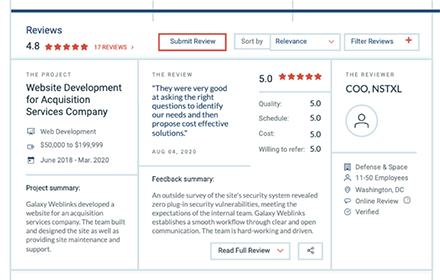
We couldn’t have earned this award without our wonderful clients! They took time out of their day to engage with the Clutch team to assess our performance. We were evaluated on the basis of quality, attention to deadlines, fairness of cost, and overall ability to drive results. We’re happy to report, we’ve earned a lovely 4.8 out of five stars on Clutch! Take a look at our most recent review below:

image
“We are thrilled to be listed in top 15 companies in Massachusetts for web and mobile development by Clutch”  Varun Bihani, partner Galaxy Weblinks.

We’re over the moon to be recognized for our accomplishments! Thank you to our clients and to the Clutch team for making this award a reality. Drop us a line today if you’re interested in learning more about how Galaxy Weblinks can help your business thrive!

Agencies That Build #8 All About the Agency | Chad Pytel

In this episode of Agencies That Build, we have with us Chad Pytel, Founder, and COO of thoughtbot. It’s a group of designers and developers collaborating closely with clients.
Per the #ATB tradition, we picked the brains of our guest for some common industry myths and handed him the Mjölnir to bust them.

Myths

  • Your primary motive for getting into consulting should be to earn some money to bootstrap a SaaS product.
  • You should only hire experts for your agency
You must be invested in helping people scale while enjoying the process of the transition otherwise, you might get stuck on a consulting treadmill.
Be super clear about your priorities and be intentional about your work early on Chad Pytel
If we rewind on all the episodes of this digital leadership series, this has been one common theme that every leader that appeared on our podcast talked about. This is what Chad also emphasized when we asked from a small agency perspective about what practices he recommends for leaders. Following up on the best practices, Chad added, incorporate training into your hiring. There is one common mistake that agencies do while trying to scale. They work with unfilled positions for months and months waiting for experts to fill them. They end up paying recruiters 25% of the package for the said expert after say 3-4 months of hunting. Instead, hire and train people that fit within your culture for 4 months for that 25%. Training is a powerful tool because it enables you to hire more people than you’d otherwise be able to and it also makes the people you hire more successful. Then the conversation took a turn towards the hottest debate of the industry, Specialist vs Generalist. Chad had an interesting take on the whole situation. Generalist or Specialist – whatever you do, if you’re not consistent and intentional then your team will have a hard time working together. Even the agencies that position themselves as generalists have something that they’re good at, they provide specialization in that particular domain with small structured teams of developers and designers. We also discussed with Chad the future of the technology and how the pricing dynamic has changed during this full remote work culture. Can we retain the prices of services as a nearshore agency while still working completely remotely? Find this and more on our Podcast and YouTube. TL;DR | Takeaways for All About the Agency
  • To close any productivity and communication gaps, remove the middleman between the founder and project team. “We fundamentally believe in having a small group of people who are good at what they do working directly with clients to create something.” ~Chad Pytel.
  • Aspire to build successful products AND successful businesses. Training clients to facilitate a meeting or prioritize planning helps them be lucrative in the future outside of your own business.
  • Set specific expectations for your team in terms of communication and holding the company philosophy. This sets the bar for your team and allows them to have a growth mindset going into projects.
  • Training is a powerful tool that enables you to hire more people than you otherwise would have been able to and sets your team up for success. Apprenticeships and other training programs are a great way to accomplish this!
  • Whether you are a specialized or generalized company, the most important thing is to know what your model is and stay consistent with that. This provides a basis for your team to execute.
  • Career advice from Chad Pytel, have an honest conversation with your founders about expectations and what you want to achieve before starting your company.

Agencies That Build #7 – The Road To Model Messaging | Michael Coogan

In this episode of Agencies That Build we invited Michael Coogan, the President and Managing Partner of MC2 Design Group Inc., a strategic and digital marketing agency. MC2 works as integrated partners with clients to plan, execute, and achieve business goals. Michael is an avid reader, and he believes in continuous learning. So get your pen and paper ready because this episode has some very practical takeaways for getting your messaging right, self-growth, leadership and bonus of good book recommendations.
Let’s start with some Myth busting.

Myths

  • You need to have a higher education to be a successful entrepreneur.
  • You need to have letters behind your name to prove that you are smart.
Like Michael we’re also firm believers of continuous learning. And being in the software design and development industry, learning is the only thing that has been constant in this space for us. One of the learnings that we are taking from this session is that it’s critical to know what you want to say about what you’re building even before starting your business. One way to do it is by asking questions like:
  • Who are you?
  • What is the problem that you’re trying to solve?
It’ll help you get your team on the same page, philosophically. Rolling up his sleeves Michael also shared some best practices:
  • Document meetings (Use tools like Otter to transcribe if you’re bad at note taking)
  • Figure out what to say and then communicate your message to the clients with consistency and confidence
This blog is just the tip of the iceberg, for more listen to Michael, Casey, and Varun discussing messaging, agencies, books and more on our Podcast or tune in to our YouTube channel to get the full coverage of the session.

TL;DR | Takeaways for The Road To Model Messaging

  • We spend so much time mindlessly taking in content. Why not take that time and put it towards something meaningful to you. “If we spend 15 minutes a day reading on a topic that we want to get better on and take a few notes, then that knowledge compounds over time.” ~Michael Coogan
  • It is easy to build a list of things you need to do for your business, but focusing on what to say is where things start to move forward. Uniting messaging across departments is key to building value for the customers.
  • Unite your team under the same philosophies. This will give them a basis of how their language and messaging with clients should be.
  • Outsourced partners are great for specializing projects, especially when there are spikes in business. This builds your network while not having to sacrifice the quality of your product.
  • Build a framework that you can teach your team in order to build a StoryBrand. Clients look for companies that will guide them through the process.
  • Career advice from Michael Coogan, life is fair because it is unfair to everybody. However, we have the opportunity to choose how we react to things and our attitude.

Agencies That Build #6 – Cultivating Successful Teams in Remote Settings | Jim Babcock

In this episode of ‘Agencies That Build’ we are discussing cultivating successful teams in remote settings with Jim Babcock, President, SPM Services Inc. He also serves as an Advisor to the Executive Management team at Galaxy. Jim specializes in consulting people to take their ideas and turn them into successful businesses. This episode is a special one, not because it features our friend but because we have managed to break two ATB records. One for the Longest Guest Introduction and another for the Longest Name :D.
Here are some of the myths that Jim busted for us when Casey handed over the mighty Mjölnir to him.

Myths

  • Working with offshore companies is a nightmare
  • Expecting perfect outcomes from offshore teams without engaging like you’d with a domestic team
  • Transparency comes naturally to people
During this session Jim shared a lot of actionable and practical advice for project management while working with a remote team. He shared from his experiences the ups and the downsides of working with a team in a different cultural setting. Most things are meant to be done in the traditional way only. A remote setting doesn’t necessarily mean a change in basic human tendency. Talk frequently, understand your team, their needs, and culture and plan accordingly. That’s exactly what you do with an in-house team for keeping them efficient. Jim also shared some of the best practices that helps teams in remote settings
  • Great planning phase + Detailed specifications = A smoother build phase
  • Break work down in sprints to avoid analysis paralysis
  • Defining completion and designing it upfront into your contract is critical
  • Daily stand up meetings are a must
When Casey asked about the future of technology, James was quick to answer, as in how during the pandemic almost every business shifted to remote environments which resulted in a sudden spike in demand for video platforms. During which duration WebRTC emerged as the essential tech for the coming future as more and more businesses start to integrate video in their processes. There is a lot that we haven’t covered in this blog but that’s what the Podcast and our YouTube channel is for. Head on there and catch up on the secret recipe to Successful Teams in a Remote Setting.

TL;DR | Takeaways for Cultivating Successful Teams in Remote Setting

  • Get to know your team on a personal level
  • Develop a good specification for your product
  • Meet with them in the same duration you would with your domestic team
  • Look at your team as your partner. You need to have a contract that is flexible rather than stringent. This allows for more growth and room for expenses in the case of emergencies.
  • If you are working with an offshore team, and they have multiple teams in multiple regions then you need to know that. Transparency is key to communication.
  • Be willing to work with every party and come to middle ground on when and how things need to be done for optimized productivity.
  • Don’t fall into Analysis Paralysis! Break work down into sprints to move productivity and fulfill requirements.
  • Career advice from Jim Babcock- take time to appreciate the blessings around you.

Agencies That Build #5 – Building Right Relationships | Ben Callahan

We’re back with the fifth episode of Agencies That Build. Joining Casey & Varun for this super insightful session is Ben Callhan, Founder of the Build Right workshop series and President of Sparkbox; a group of web makers that develops client products and teams via projects and their Build Right training.
Following the ATB tradition we passed the Mjölnir to Ben and busted some common industry myths.

Myths

  • Clients always care about the tools and technologies an agency has to offer
  • Thinking people/companies are perfect, and they don’t make mistakes
Ben kickstarted the session with his approach to business as ‘People over tools’ and that part he also covered while busting the myths for us. He also mentioned that transparency goes a long way in building relationships. For instance, if you’re working with a big company, and they need 10 resources. You won’t go around and hunt for new ones; that’s a recipe for disaster. Instead, you’d use your network of skilled people that you trust. It’s not a bad thing, just be honest about it to the client that you’re swamped, and you’re working with contractors that fit in your culture, to get the work done. You’d be surprised how many people appreciate the truth and just want to get their work done. Ben also shared one of the most important and practical best practices for agencies:
Talk about timeline, scope, and budget every week
It’s really important to have these conversations and avoid being the company that just takes requirements, provides estimates, and shows up only when their is an issue. Both the parties bring different experiences to the table, one brings business/domain expertise and other brings tech. Frequent conversations will keep the deliveries on track and budgets in check. The trio also discussed working with contractors, agencies and specializations, and future of the technology. Which we think is better experienced on our Podcast or YouTube.

TL;DR | Takeaways for Building Right Relationships

  • It’s easy to get distracted by our technology rather than having personal conversations. However, that one on one connection builds relationships further than any piece of tech could.
  • It is ok to mess up! Transparency is key to good communication with a client. When mistakes happen try having a mindset of continuous improvement and lean on your coworkers for support.
  • The core of a great business relationship is transparency, trust, and honesty. This builds stability and shows your clients you have their best interest in mind.
  • “There is a lot of potential reward in being a hyper-specialized company. But the risk of course is choosing an industry. If something happens external to your group then all your marketing is focused on that niche.” ~Ben Callahan
  • Bring different voices to the table when looking for solutions. “Have a workplace that has a lot of different perspectives, different experiences because that is going to bring a lot of interesting solutions to the surface.” ~Ben Callahan
  • Career advice from Ben Callahan, embrace the leader within you.