In 2024, web development is projected to reach a staggering $488 billion industry, with over 1.8 billion websites worldwide. These interesting statistics emphasize the significance of the web in our digital age, where every click, tap, and interaction hinges on this global platform. Yet, behind the scenes, it’s the uncelebrated heroes, the backend frameworks, that power the seamless experiences we often take for granted.
The significance of choosing the right backend framework cannot be overstated in 2024. In this article, we’ll explore the top 8 backend frameworks for 2024, providing a comprehensive overview of each framework, along with real-world examples, key metrics, and the importance of making an informed choice about the best backend framework suited for you.
The Backbone of the Web: Backend Frameworks
Backend frameworks form the backbone of the web, ensuring that applications and websites function smoothly. They provide the infrastructure for data storage, retrieval, and the logic that drives the user interface. In short, they are the invisible architects behind every online interaction.
Now, let’s explore the top 8 backend frameworks for 2024 and gain insights into their unique strengths and applications.
Node.js
Node.js continues to be a strong contender in backend development. Because of its event-driven, non-blocking architecture, it is a great option for real-time applications. In 2024, it remains a reliable option for scalable, high-performance backend systems.
Netflix utilizes Node.js to deliver seamless streaming experiences to millions of users simultaneously. With an active community and thousands of packages, Node.js remains a solid choice for backend development.
Django
Django, written in Python, is known for its simplicity and robustness.It has several built-in features and complies to the “batteries-included” principle. For startups and rapid development, Django is a wise pick. For instance, Instagram relies on Django’s capabilities to handle its massive user base and data. Django’s readability and versatility continue to attract developers worldwide.
Ruby on Rails
Ruby on Rails (RoR) advocates convention over configuration, which leads to faster development. RoR is perfect for startups aiming for quick prototypes and scaling in the future. Airbnb, GitHub, and Shopify owe their success to RoR’s efficiency and developer-friendly syntax. RoR powers some of the world’s most popular platforms, reflecting its reliability.
Express.js
Express.js pairs beautifully with Node.js to create a minimalistic and flexible backend. It is well-regarded for its speed and adaptability, making it a favorite for microservices architecture.
It is considered ideal for creating APIs and single-page applications, contributing to a smoother development process. My Fitness Pal uses Express.js to deliver a seamless fitness tracking experience to its users.
Spring Boot
Spring Boot simplifies Java backend development. With built-in features like security and database access, it streamlines the development process. Ticketmaster relies on Spring Boot to handle high traffic and ticket sales during events. Spring Boot’s track record with major enterprises attests to its high-performance capabilities.
Flask
Flask, another Python-based framework, emphasizes simplicity and minimalism. For smaller projects and startups, Flask’s lightweight nature provides a nimble development experience. For instance, Pinterest utilizes Flask for its recommendation algorithms and content discovery. Flask’s growing popularity within the Python community reflects its appeal.
ASP.NET Core
Microsoft’s ASP.NET Core is a robust and versatile framework for building cross-platform web applications. With a focus on performance and security, it’s a reliable choice for enterprise-level projects. Microsoft’s own products, like Azure DevOps, rely on ASP.NET Core’s capabilities. The trust of major companies and its cross-platform compatibility highlight ASP.NET Core’s reliability.
Laravel
Laravel, based on PHP, is celebrated for its elegant syntax and developer-friendly features. It works great for creating cutting-edge APIs and web apps. 9GAG’s backend is powered by Laravel, ensuring a seamless user experience. Laravel’s rich ecosystem and successful projects showcase its appeal.
Factors to Consider Before Choosing the Right Backend Framework
Selecting the right backend framework is pivotal for your project’s success. It’s a decision that can significantly impact your project’s efficiency, scalability, and long-term viability. Pay close attention to the following elements in order to make an informed decision:
1. Project Requirements:
Real-time vs. Batch Processing: Determine whether your project requires real-time data processing or if batch processing is sufficient. Real-time applications, such as chat platforms or live tracking systems, demand frameworks optimized for low-latency performance.
API-Driven or Full-Stack: Decide whether your project is primarily focused on providing APIs for other applications or if it’s a full-stack application. Some frameworks excel in API development, while others are better suited for building complete web applications.
Scale and Complexity: Evaluate your project’s size and level of complexity. Large-scale platforms, such as e-commerce websites or social networks, have distinct requirements compared to smaller applications. Ensure your chosen framework can handle the anticipated workload and complexity.
2. Team Expertise:
Programming Languages: Evaluate your team’s expertise in programming languages. If your developers are proficient in a particular language, it may be wise to choose a backend framework that aligns with their strengths. This familiarity can significantly accelerate development.
Framework Familiarity: Consider your team’s experience with specific backend frameworks. Using a framework they are comfortable with can lead to faster development cycles and fewer errors.
3. Scalability:
Future Growth: Plan for the future. Your chosen backend framework should be capable of scaling alongside your application’s growth. It should accommodate increased traffic, data volume, and feature enhancements without major overhauls.
Scalability Patterns: Understand the scalability patterns that your framework supports. Horizontal scaling, vertical scaling, or a combination of both may be required depending on your project’s needs.
4. Community and Support:
Community Activity: A vibrant and active community around a backend framework is a valuable asset. It indicates ongoing development, timely bug fixes, and a rich ecosystem of plugins and extensions.
Support Channels: Investigate the availability of support channels. Are there official forums, documentation, or community-driven resources that can assist your team in troubleshooting issues or learning the framework?
5. Performance:
Load Testing: Conduct load testing to assess the framework’s performance under conditions that mimic your project’s expected load. This helps identify potential bottlenecks and performance limitations.
Benchmarking: Compare the performance of different backend frameworks using benchmarking tools. Real-world performance metrics are crucial for making an informed decision.
6. Security:
Built-in Security Features: Examine the framework’s built-in security features. Robust authentication, authorization, and protection against common security vulnerabilities (e.g., SQL injection, cross-site scripting) are essential.
Security Patching: Consider how quickly security patches are released and implemented within the framework’s community. Timely security updates are vital to protect your data and users.
Benefits of Using Backend Frameworks
Backend frameworks offer several advantages like:
Efficiency: Frameworks provide pre-built components, reducing development time.
Security: Many frameworks include built-in security features.
Scalability: Frameworks often offer scalability options to accommodate growth.
Community: Access to a community of developers for problem-solving and updates.
The Future of Backend Development
As we step into 2024, the future of backend development looks promising. The relentless march of technology continues to redefine how we approach backend development, with several noteworthy trends shaping the landscape:
1. Serverless Computing:
In 2024, serverless computing stands at the forefront of backend evolution. This shift allows developers to focus on code, leaving infrastructure management to cloud providers. Scalability, cost-efficiency, and reduced operational overhead are driving the adoption of serverless architectures.
2. Containerization:
Containerization, epitomized by technologies like Docker and Kubernetes, remains a pivotal force. Containers offer portability, consistency, and efficient resource utilization. They simplify deployment and orchestration, making it easier to manage complex backend systems.
3. Microservices:
The microservices architecture continues to gain momentum. Breaking applications into smaller, independently deployable services promotes agility and flexibility. This approach enables rapid development, easier maintenance, and the ability to scale individual components as needed.
4. Edge Computing:
With the proliferation of IoT devices and the need for low-latency processing, edge computing emerges as a game-changer. Backend development is extending to the edge, allowing data processing closer to the data source. This revolutionizes real-time applications and reduces latency.
5. AI and Machine Learning Integration:
AI and machine learning are becoming integral to backend development. These technologies empower applications with predictive capabilities, data analysis, and automation, enhancing user experiences and decision-making.
6. Enhanced Security Measures:
As cyber threats grow in sophistication, backend development focuses on bolstering security. Advanced encryption, threat detection, and authentication mechanisms are integrated into frameworks to safeguard data and user privacy.
Future Of Backend Development
The future of backend development promises increased efficiency, scalability, and responsiveness. It’s a landscape where technology not only meets the demands of modern web applications but also anticipates and shapes them. Backend frameworks are evolving to embrace these trends, offering developers the tools they need to create cutting-edge, high-performance applications.”
In this dynamic environment, staying informed and adaptable is paramount for developers, ensuring they harness the full potential of these advancements to create robust and innovative backend solutions.
Your choice of backend framework lays the foundation for your project’s success. Node.js, Django, Ruby on Rails, Express.js, Spring Boot, Flask, ASP.NET Core, and Laravel all offer unique strengths for 2024. Assess your project’s needs, your team’s expertise, and your scalability requirements to make an informed choice.
At Galaxy Weblinks, we understand the evolving landscape of backend development. Our web development and backend services are tailored to meet the needs of modern businesses. Get in touch with us right now to find out how we can support your digital journey.
In the dynamic world of web development, making informed decisions is the key to unlocking the future of your digital ventures in 2024 and beyond.
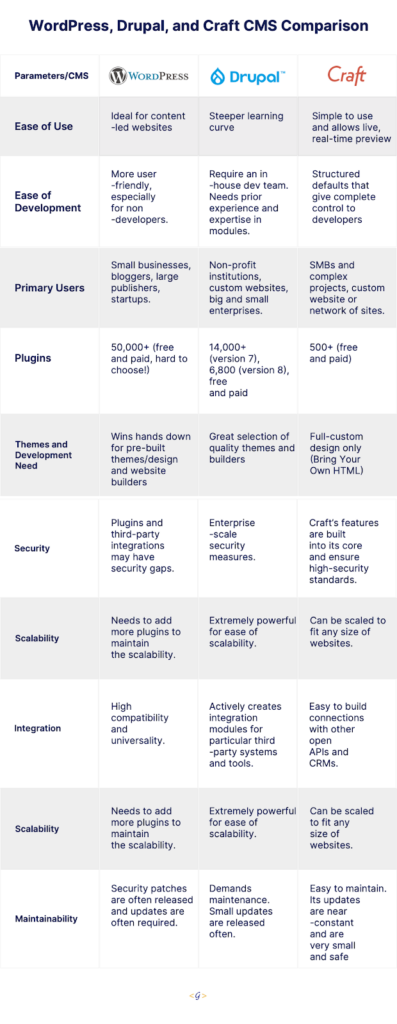
This article is an assessment and comparison of the popular content management systems WordPress, Drupal, and Craft. We’ll dig into each CMS platform’s features, ease of use, the types of businesses that are best suited to the platform, and more. We’ll also walk you through the use case scenario of each CMS and will help you understand which one could be right for your business and goals.
Before we explore the nuances of each CMS, let us quickly introduce the three stalwarts in the CMS arena.
WordPress
WordPress is an extremely versatile CMS that facilitates users (even non-developers) to create feature-rich websites and ecommerce portals. It is completely customizable, mobile-optimized, and SEO friendly. It’s also open-source, making it completely free, redistributable, and offers unlimited validity.
The most popular CMS platform powers more than 40% of the websites available on the internet. It also offers thousands of free and paid themes and plugins that the developers can choose from.
Drupal
Drupal’s open-source model encourages continuous improvement and innovation through the support and passion of the Drupal community. With a pool of diverse experts regularly working to make Drupal better, the possibility to create exceptional digital experiences expands far beyond what a single team of proprietary software developers could dream up.
Recent versions of Drupal have also prioritized user experience (UX) to empower everyone from the site editors to content creators and to build powerful customer experiences.
Craft
Craft CMS is a content management system similar to WordPress. The interface is a simple, more stripped back version of WordPress, built and tailored to the needs and requirements of the business. This simple view makes updating and adding content a much more seamless experience.
For some, this adds an increased level of comfort when migrating over to Craft due to the out-of-box understanding developers, designers, and writers are likely to have.
Comparison — WordPress, Drupal, & Craft CMS
Below are the brief use cases for each CMS, showcasing when and how the three of them are being used to help you decide which one suits your business needs, size, and scalability.
WordPress
One of the common misconceptions about WordPress is that it’s mainly for creating blogging sites. WordPress was developed as a blogging platform, but that is ancient history now. The platform has evolved radically with the various new releases over the years.
The good news with WordPress is that it is extremely flexible. It can be adapted for ecommerce websites, corporate websites, communities, and forums. WordPress is an ideal fit for startups as well, as it allows them to start small and then scale up to run even enterprise level organizations that span many countries and continents.
All you need are suitable plugins and themes. So, for instance, if you wanted to make an online portfolio for your web design business or even a blogging site, you could go with the provided themes. You can alter its source code to customize your website’s look or functionality!
You have a choice of adding extra oomph to your website by opting for customizations.
For example,
You may have a website that includes a design that should be converted to HTML, CSS, and JavaScript — being three different “technologies”, and be mobile friendly as well. That design is then integrated into a WordPress theme. Whereas all dynamic components such as menus, sidebars, footer widgets, and general content areas should be connected and coordinated with the backend.
Several custom features are then built as custom plugins by a back-end developer, who should be aware of the front-end specifics and business needs through a manager. That final product is packaged and then hosted on a specific server environment.
It will require an extra pair of hands further when it comes to security (having more people able to tackle an assignment and a project manager in charge), having potentially higher code quality when a bunch of people carry out code reviews. This process includes automated testing and ongoing scalability given the diverse expertise of our WordPress developers.
In addition to that, WordPress might be free but it is common for businesses to pay the experts to design a logo for you or adjust some of the CSS code on your site. Whereas, other WordPress users are keen on keeping graphic designers or maintenance experts on call.
So, it all depends on your experience and the scale of your website.
Drupal
Drupal is the best choice if you are building a website that needs complex data organization, that needs to be customizable.
For instance, when you’re building an advanced website, you can choose from among many technologies. Usually, the first choice is the programming language (ASP.NET, Java, Python, PHP, etc.) and then we decide whether we should code everything from scratch or use a framework to do all the heavy lifting.
There is also a third choice, a more comprehensive solution, CMF (content management framework). Drupal 9 is one of these frameworks/systems.
And by large and advanced, we mean one that is changed frequently. Content changes are carried out by at least one editor, supported by at least one developer (along with a QA tester and a sysadmin), who’s responsible for fixing the bugs, continuous development of the website, adding new functionalities, and so on.
Some examples of large and advanced websites are:
A corporate website of a medium or large production or service company.
An informational website, for example, run by a paper or magazine.
An organization’s employee portal for managing processes in the company, such as a CRM system.
A system feeding content to other systems — an API with content for other websites and mobile applications.
Besides, Drupal has almost everything you need out-of-the-box. But more often than that, you may need a functionality that is not a part of the Drupal core yet. And to fulfill that need, you need modules. Modules are bundles of code that can extend or add the functionality of Drupal websites. For example, Drupal Commerce provides everything required to sell products, services, or files online.
Craft
With Netflix, Moz, Duck Brand Duck Tape, Salesforce, PBS, and countless other brands running Craft websites, it’s a mature and competent content management system. At the same time, one of the most important things about Craft is that it is among the newest CMS solutions.
Craft CMS has ditched the traditional CMS systems that come with pre-built themes, CSS frameworks, and ready-to-go websites. It provides a bespoke solution to developers. Craft CMS neither offers posts or pages nor does it offer any bootstrap features and themes to spin up the frontend.
Everything is coded and designed from scratch which allows creating a unique experience specific to your project. And a fluent, sensible content management experience is the result.
Craft specifically targets developers responsible for building complex websites for companies with large budgets.
The primary reason for what makes Craft successful is that CraftCMS gives web professionals and developers control over websites they build.
There are many key tools in CraftCMS that are managed through the control panel of the CMS that illustrates how Craft supports and favors developers of your business:
Hundreds of Craft mediated plug-ins
Live preview during the website build
Regular releases and bug fixes
Complete control over the content and categories
An ability to manage multiple sites with one Craft installation
Custom templates
Allowing developers to write and use their own HTML
Why does it matter to your business?
When we boil this down to value for your business, all three CMS ensure a robust and feature-rich website with fewer maintenance costs, faster publishing, and quicker onboarding of new people.
The flexibility and features they offer are out of the box, along with their content-first approach, and make them our go-to for nearly every custom web project.
It’s a crucial part of our web design and development capabilities. Intrigued? Get in touch with us and we’ll be happy to talk about how they can make your site great.
For the past few years, Frontend developers have shown partiality towards React, with Vue.js and Angular tagging behind closely. Comparative interest in Vue has held back a bit due to the long-awaited and somewhat delayed Vue 3.0 release. Similarly, the interest in Angular has decreased due to the long delay in shipping Ivy (its frontend renderer).
The NPM Trends graph above shows us the number of downloads of each framework over the last few months.
However, regardless of who dominates the battle of most popular JavaScript frameworks, there are some next-generation reactive frameworks available. They may soon rise as the lean alternatives to these popular web app development framework ecosystems in 2021.
We’re already seeing significant interest in next-generation front-end frameworks. Svelte tries to provide reactivity on top of normal DOM structures. Also, Dojo has broken the surface as a reactive TypeScript-first framework with intelligent defaults for a faster out-of-the-box experience. Just like Svelte, Stencil is a framework that is focused on web components and efficient compilation.
Let’s take a look at the most in-demand and promising front end development frameworks for your web development projects in 2021.
React
React makes it easy for developers to create interactive user interfaces. The framework is designed with backward compatibility and component-centric applications in mind, so you can be assured about the longevity of your application.
One of its major advantages is the ability to use it for native development. Reusable components, better performance, support from Facebook, a large developer community, and SEO friendliness, are some of its added advantages.
When To Use React:
Developing small enterprise-level apps
Creating SPA or cross-platform applications
Angular
Angular is generally used to build front-end applications in both large enterprises and small-sized companies. However, its popularity has taken a dip in the past few years.
Angular increases the performance of browser-based applications by dynamically updating the contents in no time since it uses two-way data binding.
When To Choose Angular
Large scale applications
If you need a scalable architecture or prefer TypeScript
Building real-time applications
It supports many popular websites and web apps like Sony, PayPal, Upwork, and the Guardian.
Vue
One of the most popular front-end frameworks nowadays! Vue is a straightforward and simple framework. It’s good at removing the complexities that Angular developers face. It’s smaller in size and offers two major advantages – a visual DOM and a component-based approach in building user interfaces. It’s also a 2-way binding ecosystem that can handle both dynamic and simple processes with ease.
Why Choose Vue.js:
Helps design everything from scratch and is successful in developing giant projects as well
Assists in multiple tasks
Helps in building web applications, mobile apps, and progressive web applications
Vue is the framework behind Alibaba, 9gag, Reuters, Xiaomi.
Ember.js
Ember.js is an open-source JavaScript framework. It is used to create scalable, enterprise-grade, single page web applications. It provides custom properties, useful binding, and ready configuration to render the page as needed. Even though Ember is one of the older front-end frameworks compared to Svelte, Vue, and React, it still has a big user base and packs a punch.
Reason to use Emberjs:
Well-organized
Fastest framework
Two-way data binding
Companies like Microsoft, LinkedIn, Netflix, Twitch, etc. are among its clients
Svelte.js
Svelte.js is an open-source, component-based frontend JavaScript framework written in Typescript. It is touted as a game-changing and revolutionary idea.
Svelte, unlike React or Vue, has no virtual DOM and does not require high browser processing. Instead, you build components boilerplate-free in simple JavaScript, CSS, and HTML code.
Reasons to choose Svelte.js:
Lightning-fast apps with excellent performance
Zero client-side dependencies, and no need for complex state management libraries
Used by Godaddy, Razorpay, 1password, New York Times
Backbone.js
Backbone.js is an easy-adoption framework that lets you develop SPAs swiftly. It’s based on the MVC architecture. The platform also allows you to develop projects that require different types of users, where the arrays can be used to distinguish the models.
So, regardless of whether you intend to use Backbone.js for backend or frontend, this is an ideal choice as its REST API compatibility offers seamless synchronization between the two.
Reasons to choose Backbone.js are as follows:
Backbone.js is used for dynamic applications like Trello.
Helps in building client-side models, updating faster, and reuse the code.
Easy to learn
Lightweight framework
Preact.js
Preact.js follows a component-based approach with Virtual Dom, the same as React – while being completely compatible with React. It can even use React packages without compromising on leaner size, performance, and speed.
In cases where the full potential of React isn’t necessary, most developers even use React during development and switch to Preact for production.
Reasons to choose Preact.js:
Lightweight, swift, and high-performance library
Simply 3kb in size (minified and zipped) and yet gives you all the necessary functionality of React
Many major companies like Lyft, Uber, and Tencent are using Preact
Conclusion
Many companies hire a front-end development partner with extensive experience to maintain or extend your code. This carries considerable weight, especially with project managers.
To team up with front-end experts that can build modern and faster applications with hands-on experience with the above frameworks, Contact Us.
About Galaxy Weblinks:
We specialize in delivering end-to-end software design & development services and have hands-on experience with native, hybrid, cross-platform, PWA development. Our back-end and front-end engineers also help in improving security, reliability, and features to make sure your business
First things first, yes there are no new features in this update! There are several upgrades and a few eliminations which we believe are worth discussing.
So here’s our take on the all-new React 17.
This new version comes after a long wait of nearly two years. We believe that there are a lot of improvements vis-a-vis the previous version. The focus is largely on the gradual updates to this version and the future ones.
So, let’s see what all they are!
Changes in event delegation
The React 17 update eases the nesting of applications that are built using different React versions. A lot of conflicts were seen when many versions of React are being used together. With this update, event handlers will not be attached at document levels. In its place, it will go to the root DOM container where your React tree is rendered.
Also, with React 17 going in for gradual changes, developers will have more freedom when it comes to migration of apps in one go or smaller chunks.
Native component stacks
Finding errors with javascript function; its name and location stack trace can lead to a needle in a haystack hunt while sifting through hundreds of coding lines (if not a thousand).
To pinpoint errors in React 17, there is an unorthodox approach taken by the React team. Here is what they are thinking, in their own words:
Currently, the browsers don’t provide a way to get a function’s stack frame (source file and location). So when React catches an error, it will now reconstruct its component stack by throwing (and catching) a temporary error from inside each of the components above, when it is possible.
This improvement will come in handy during the production environment.
No More Private Exports
The new update of React has withdrawn private exports. This was a much-awaited update for React Native for Web. The dependency of React Native for Web was on certain internals of the event system. This dependency was fragile and now will be addressed with this update.
No Event Pooling
Event pooling optimizations are no longer a part of React 17. It failed abysmally to enhance the performance in older browsers. Its initial purpose was to reuse the event objects between events along with setting all fields to ‘null’ between processes. However, it ended up causing more confusion for developers. Following this change, the need to use e.persist() is also eliminated.
Properties of React Components
React 17 is now compliant with ES6. There are talks of using key or codes and in case you are working with it, you are required to code property to keyboard event objects. On similar lines, capture phase events use real browser capture, there are no bubbles in onScroll events, etc.
In addition to the above-mentioned updates, two new functions are being introduced in this update, namely ‘getDerivedStateFromProps’ and ‘getSnapshotBeforeUpdate’.
All this said, React 17 is surely working towards making React more prominent within the developer community and making it easier for all to understand, deploy, and migrate to React in the future. Feel free to get in touch with us here if you need help with your React development.
About us
We, at Galaxy Weblinks, are all for new ideas and experiments. We believe that being up-to-date in this fast-paced world gives us adequate time to explore and implement new changes. Our developers are constantly striving for improvement and a better user experience. Contact us for a free consultation!
Vue 3 is here and everyone is looking forward to catching up with the upgrade ASAP.
Vue JS is the best client-side framework out there! It has improved its bundle size and performance under the hood, making this new version appealing to the developers.
What’s the catch? Some breaking changes, deprecations, and new syntax might make your migration plan slightly harder than expected. Let’s dive in and see what you should expect.
In this article, we’ll look at how you can upgrade your Vue.js 2 application into Vue 3, and what are the breaking changes you should expect in Vue 3.
How to upgrade from Vue 2 to Vue 3
Let’s assume a scenario where you have a usual Vue.js project. You would also have a main.js file where you import the Vue router and Vuex configuration and set it to the Vue instance.
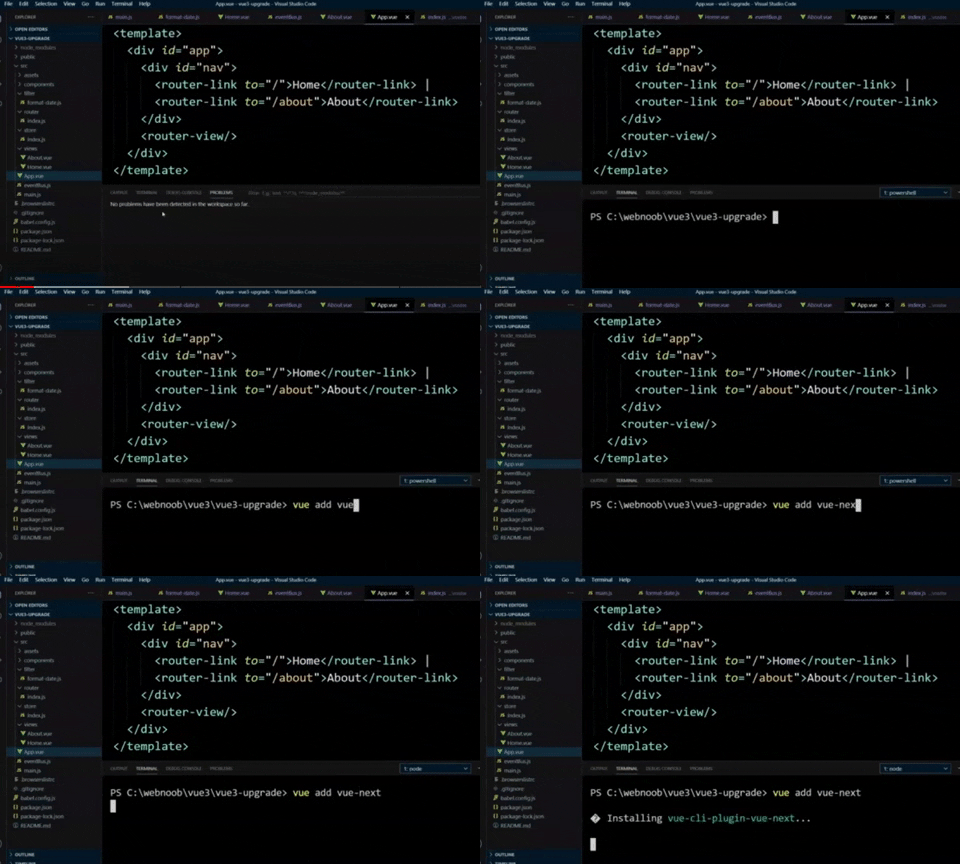
Using the CLI
Now to upgrade a Vue.js 2 project to Vue.js 3 project, you can simply add an official CLI for Vue projects, the Vue-next plugin. Besides deployment and development tooling, it simplifies the upgrade to a one-line command:
This plugin upgrades and installs the new dependencies for Vue Router, Vue, and Vuex. It also modifies the code to be compatible with Vue 3 version.
So it becomes important to create a backup of your project at the very start.
Installing Dependencies
Installing the plugin upgrades the packages @vue/test-utils, eslint-plugin-vue, vue-router, vuex, and vue to the new version. Also, a new package appears among the development dependencies, named @vue/compiler-sfc.
It helps in compiling the new Vue single file components into runnable Javascript code. Now, you can use your source control panel to see and compare all the changes.
Code Comparisons
The first thing you will notice is that the way of instantiating and configuring your application has changed. It looks and works much better than before.
Same for the Vue router. If you take a look at the configuration file, a new VueRouter becomes a call to createRouter, and the global plugin setup must be left. Instead, you’ll be using some functions from this library.
The same goes for the Vuex Store. You can use the new ‘createStore’ function to create a new instance and set the store configuration.
Breaking Changes You Would See in Vue 3
The above modifications are done automatically by the Vue CLI.
All you have to do now is to start experimenting with all the below new features that Vue 3 offers for which you will need experienced developers. Let’s understand this better.
Vue Filters and Eventbus are deprecated in the new version. EventBus was there in the Vue development whenever you’re facing a situation where you need to make a shortcut to emit events from a child to parent, or vice versa. Whereas, filters were there to help you ‘format’ your value, for example: to short URL, add currency, uppercase, etc.
You will need experts in complex cases to make the required changes in your application code and refactor both of them.
You should expect a more maintainable, smaller, faster version with the new features. Most of them are additions and improvements over the existing API.
Composition API
Composition API is Vue 3’s biggest feature so far, which provides an alternate syntax for using TypeScript, reusing code across components, and writing larger components.
This is an alternative syntax and not the new way we code components in Vue 3. You might choose to use it based on the above three reasons.
Another good thing is that the existing Options API is not deprecated. Everything is for handling advanced use cases and mainly replace mixins usage that admittedly has caused a lot of problems in large scale applications.
Mounting
As we mentioned before, the first thing that you will notice is the difference in initializing your app. In Vue 2 you use Vue constructor with the $mount method and a render function like this:
In Vue 3, you will find a more elegant syntax
Fragments
In Vue 2, multi-root components were not supported. The solution was to wrap your code in a wrapper element.
In Vue 3, components can have multiple root nodes now. This removes the use of wrapper elements and enables writing a cleaner markup.
Teleport
Having part of your component mounted in a different position in DOM than the Vue component hierarchy has been seen as a difficult situation to solve.
The teleport feature helps in creating a component that includes a full-screen modal. In most cases, you’d want the modal’s logic to live within the component, but either it starts requiring a change in component composition or the positioning of the modal quickly becomes hard to solve through CSS.
You can still interact and pass props to it like being inside the component!
Conclusion
If you want your Vue.js application to become faster, smaller, more maintainable, you should upgrade to Vue 3 with an easier approach to target native.
If you want to wait for Vue.js Migration Build release for the whole upgrade process, you can still stick to using Vue.js 2, as it’s stable and it works with any third-party library or tool.
If planning for migration, we recommend that you hire experts who can assist you with a proper migration plan and ensuing and development process, especially as the supporting libraries are still getting updated.
Contact us for your new custom or single-page application Vue.JS project.
About Galaxy Weblinks
We specialize in delivering end-to-end Vue.js software development services, apart from other popular JS frameworks. Our team of skilled and dedicated Vue.JS developers provides initial consultation, migration plan, and the final Vue.JS web app development & support. We deliver powerful front-ends, real-time applications, and single-page apps (SPAs) with on-time delivery with an agile & devOps approach.
Hey! We’re back again with the brand-new episode of Agencies That Build. This time around helping Casey with his hosting duties is Varun from Galaxy Weblinks as the co-host.
The latest episode highlights the need for independent contractors and offshoring. We are in conversation with Entrepreneur and Strategic thinker, Jason Williams, Co-founder & CEO of a one of its kind Boulder-based Digital Experience Agency Dfuzr.com. They harness the power and individuality of independent contractors/collaborators to build, deploy, and distribute amazing products.
Before diving further into the session Casey brought out the Mjölnir for some classic myth-busting. Here are some of the myths that Jason busted for us:
Myths
To have an agency you need W2 workers, not independent contractors.
There is less commitment from freelancers/contractors!
Offshore/near shore, the boundaries are becoming irrelevant! Choose the best person/ team to get the job done.
You give people a long rope, and they use it
Jason Williams
On one of the issues that Varun highlighted about establishing a culture in a distributed environment, Jason summed up culture for a distributed team something like this:
Culture creates and self corrects itself
Do what you said you were going to do
Deliver it on time
Show up for meetings
Communicate
The trio went on to dig deeper and uncover the secrets of working with offshore agencies/Independent contractors and how it’s actually more efficient than working with W2 full-time employees.
“How do you find the right contractors?”
Strong network of people
Vetting comes collaboratively through this network of people
Background checks
Efficiency and quality is gauged even before you start talking
Offshore/Onshore, boundaries between those have become irrelevant. You work with whoever is the best person to get the job done.
Jason Williams
On the future of technology, Jason added –
Just like the Internet connects the world, APIs will help establish an interconnected network of businesses that provide services.
For a better experience we highly recommend you give the Agencies That Build Podcast a listen. We’re also on YouTube if in case you prefer video over other mediums.
Takeaways:
Using a contractor model allows businesses to scale up or down as there is a need
Invest in contractors as well, give them access to agency attorney and accountant, so they can take charge of their finances
Using a subscription-based model, customers know that the job will get done in a certain amount of time, given a certain level of service, within a certain capacity
Building robust web solutions that transform businesses into online management tools facilitate Galaxy Weblinks to embellish amongst the top web service providers in Massachusetts at GoodFirms.
View the Galaxy Weblinks’ GoodFirms’ profile to know about its robust services and other parameters that enable them to thrive in the cutting-edge competition in the web industry.
Overview of the Company
Galaxy Weblinks incepted in 2000 is a new generation of e-business solutions based in Massachusetts, catering to clients of different enterprises. The team develops robust web solutions that convert businesses into online administration tools. From startups to authorized companies, the expert developers’ team at Galaxy Weblinks helps people turn their web presence into an asset by creating competitive advantages through e-strategy, development, rapid deployment, and continuous management. The professionals at the company believe that the future belongs to those who prioritize variation in their business applications.
Furthermore, the team is looking into the digital horizon to explore the opportunities. Since its inception, Galaxy Weblinks has remodeled many businesses into vibrant Portals, Vortals, and Profit Gateways.
Besides this, the team also helps small to medium size companies leverage their inherited strengths and technologies to take full advantage of e-business by profiting on the growth and productivity that can be accomplished by blending many companies into common marketplaces. Moreover, expert professionals continuously strive to exceed customer expectations in all engagements with an optimal mix of technical intensity and performance capability while ensuring high employee spirit. The company holds expertise in varied technologies such as – PHP, core PHP, Laravel, Yii, WordPress, Drupal, Craft, Magento, .Net, Java, NodeJS, Spring, React, Hibernate, Angular, Python, MYSQL, AJAX, HTML5, Android, iOS, WebRTC, and data analytics.
GoodFirms’ Research Process
GoodFirms begets more than 15k legitimate reviews from verified purchasers from different companies & software. Furthermore, GoodFirms holds more than 9000 services and businesses listed with their accurate data. These listed firms are judged based on the three fundamental principles – Quality, Reliability, and Ability. Likewise, GoodFirms also evaluated Galaxy Weblinks and asserted it to the best web development, mobile app development companies in Massachusetts, and New York, respectively, at GoodFirms. It also concluded that the company would soon thrive amongst software service providers at GoodFirms.
The in-depth evaluation report of the research process for the Galaxy Weblinks conducted by GoodFirms is as follows:
Builds Modern Websites that Scale
The full-stack web development services empower different businesses across various industries in curating everything from a simple website to complex business websites, e-commerce portals, and SaaS applications. Websites developed at Galaxy Weblinks are easily connected to multiple third-party services, starting with payment gateways and ending with business automation services. Moreover, expert developers focus on making the websites highly secured by executing role-based permission systems, transactions, and data sharing protection. The professional group developed websites that are of high-speed performance, scalability, reliability, easy maintenance, 24/7 availability, and are delivered at a lower cost, which makes cloud platforms an excellent choice for web apps. Besides this, the team strives to produce mobile-responsive websites so that the users can access the functionality and content of websites at any time and from any place and device. All the data are synchronized in real-time. Thus, backed by the team of such professional web developers endows Galaxy Weblinks to burgeon amongst the top web development companies in Massachusetts at GoodFirms.
The review obtained at GoodFirms is confirming the quality of websites developed at Galaxy Weblinks.
Mobile Applications Build with a Focus on Business Growth
At Galaxy Weblinks, the app developers craft mobile apps that empower a team to engage with clients’ brands and meet their demands faster. The professional team will build highly performant and scalable mobile apps using the most advanced programming languages and frameworks. The app developers’ expertise is not limited to traditional native apps like iOS, Android, Windows, and cross-platforms but includes the most advanced technologies such as IoT, AR, and VR. Excellent outcomes catered to the clients are the result of continuous research, unceasing creativity, and scrupulous execution performed by the experts.
Moreover, the in-house app development team helps businesses to design, develop, and launch their iOS application cost-effectively and within the time-frame. Besides this, the in-house team is also well-acquainted in Android app development by using clear workflows that will help clients to reach the goal. Android applications developed at Galaxy Weblinks bring strength, creativity, and innovation. Thus, the team of mobile app designers and developers and quality assurance specialists follow clear workflows to deliver solid and fully functional mobile apps. This approach opted by the app developers team accredits Galaxy Weblinks to tap into the list of leading mobile app development companies in New York amongst the enlisted ones at GoodFirms.
The review displayed below given by one of the service-seekers listed with GoodFirms proves the potentialities of app developers at Galaxy Weblinks.
Custom Software Solutions that Boosts Clients’ Business
The expert software engineers at Galaxy Weblinks builds software that aligns with clients’ processes and workflows instead of picking up off the shelf solutions. Custom software developed at the company will provide flexibility, minimizes security risks, and increases the revenue of the clients’ business. The dedicated software engineers’ team renders a strategic solution to the most complex custom software application provisions. Moreover, the expert team adept at developing products that utilize innovative technologies for solving challenges that demand modern new-world solutions. The group helps clients automate their processes so that they can free up resources and focus on delivering better services to their users. Once the team at Galaxy Weblinks has scoped the requirements, they adopt responsibility for project implementation to deliver the best possible software solutions that enhance clients’ business resulting in high profits. Thus, looking to the dedication for delivering high-end results, the GoodFirms team believes that Galaxy Weblinks would soon get dubbed as one of the top custom software development companies in the USA at GoodFirms.
To confirm the quality service offerings, one can check the review displayed below obtained at GoodFirms.
About GoodFirms
Washington, D.C. based GoodFirms is a maverick B2B research and reviews company that helps in finding the web development, mobile app development, and software development companies rendering the best services to its customers. GoodFirms’ extensive research process ranks the companies, boosts their online reputation and helps service seekers pick the right technology partner that meets their business needs.
About the Author
Anna Stark is presently working as a Content Writer with GoodFirms – Washington D.C. based B2B Research Company, which bridges the gap between service seekers and service providers. Anna’s current role lingers to shape every company’s performance and critical attributes into words. She firmly believes in the magic of words and equips new strategies that work, always in with ideas, something new to carve, and something original to decorate the firm’s identity.
Google has released Flutter 1.22 on October 1st, 2020 following the 1.20 release in August. This update is focusing on syncing well with iOS 14 and Android 11 updates, among other features.
This cross app development platform is set to make developers and app users happy. So let’s see how this will happen.
Flutter iOS 14 Updates
iOS app development is now set to be a better process than before with Flutter 1.22 update. There is now support for XCode 12 and as Xcode requires iOS 9.0 or higher versions, the default template is now 9.0 (previously it was 8.0).
Developers are getting preview support for App Clips too. Crashes reported specific to iOS and font rendering issues were also fixed in this update. And not to miss, when a developer is using cupertino_icons 1.0 with Flutter 1.22, they are getting access to almost 900 new icons via the CupertinoIcons API.
Flutter Android 11 Update
There are two updates for Android developers. Flutter now supports exposing the safe insets of various Android displays i.e. notches, cutouts, and the display of waterfall edges. This will facilitate the placement of elements via MediaQuery and SafeArea APIs.
And the second one is that animations are now in synchronization with the Android keyboard.
Google Maps And WebViews
Both these plugins are now ‘production ready’. One can write the code, build the APK, and release it, as per convenience. There is a note here by the Flutter team. They say that Android developers will have to manually enable webview_flutter until it becomes a default setting.
Extending The Buttons Family
Keeping up with the Material guidelines, there is now an additional ‘universe’ of buttons. Now developers won’t have to make widgets from scratch because of the lack of a few buttons. One can mix and match the older and newer buttons as per their requirements.
Analysis Tool For App size
Your developers won’t be quizzed for app sizes ever again. They can get their hands on the breakdown of native codes, assets, and even package level details of the compiled dart code. This size and composition summary is given by the analysis size tool. Such insights will help your team for keeping the app size within the set limits.
Smooth Scrolling
This feature is still in preview but it is an interesting one. It is present to bridge the gap between input and the display frequencies when they are not the same. Enters, resamplingEnabled flag. Flutter claims that you can see almost 97% improvement by enabling this flag and removing said discrepancies. Once there is a certain consensus about this feature, you can expect it to be the default setting.
Apart from the above-mentioned features, there are some notable ones listed below:
Support for new internationalization and localization
Improved navigator 2.0
Improvement in the output linking of VSCode
State Restoration option in Android (In Preview)
Developers can host the inspector tab from Dart DevTools directly inside IntelliJ.
We’re excited about Flutter 1.22, so much so that we have even started exploring it from our end, yes we are nerds that way :D.
In case you too want an inside look at how we are planning to use this update to the fullest in our new projects, you can ping us here.
About us
We, at Galaxy Weblinks, are all for new ideas and experiments. We believe that being up-to-date in this fast-paced world gives us adequate time to explore and implement new changes. Our mobile development team is proficient in building apps that are well aligned to our client’s and platform requirements. Contact us for a free consultation!
In this ever-changing and highly competitive technological landscape, people swear by the Hustle Mentality. “One needs to work 18 hours a day to be successful”. Well, our guest here thinks differently!
In the first-ever podcast by Agencies That Build, we invited Jay Owens, CEO – Design Extensions, a flourishing Florida-based Digital Agency to be our guest speaker. With Thor’s Mjölnir in hand, Jay Owens busted this and other interesting entrepreneurial myths with us.
In this episode, the ‘Agency Whisperer’, Jay Owens talks about his journey as an agency owner and striking a balance in personal and professional life. We also talk about the best ways to achieve business goals, giving optimum value to the customers and banishing uncertainties around outsourcing.
Jay says and we have to agree – “The customer is not always right, that can be enabling.” He has a way with words and the experiences he brings to the table are very relatable.
He shares that when you know that your customer is making an error in judgment or taking the wrong decision, you don’t ‘yes man’ them. You tell them the best way to address the problems and get them back on the right track. After all, that is why they hired your services!
Jay stressed on the value you are providing while building the solution for your customers. The agencies need to ponder, “what is the product that you are good at producing, that provides real value for people, that you are excited about selling?” Then get a system in place to sell it.
In the quest of maximizing the value you provide to your clients, you may need to bring in the right development partners, and if needed, outsource to the devshops overseas. Clients may be a little skeptical! But, you know that for quicker turnarounds and the best quality of work, offshoring to development partners is the best bet; so you ease them into it.
After all, everyone is just trying to get the job done. No matter where they are geographically based.
Some of the other key highlights of the podcast –
You need to physically write down your goals, what you want your life to look like in 1 year, 3 years, and 10. Then ask, “what needs to be true today for that to be true tomorrow? What needs to change?”
Be intentional about relationships and the people around you- have great people to look up to, people standing beside you and you need someone to look up to you, to mentor.
Our podcast will help you put your outsourcing fears to rest, as Jay Owens takes you through his journey as an agency owner. Listen to the podcast here!
Galaxy Weblinks is a software development partner of Digital Marketing agencies. We use cutting edge technologies, mature processes, and proven methodologies to build future-ready digital solutions. Contact us today!
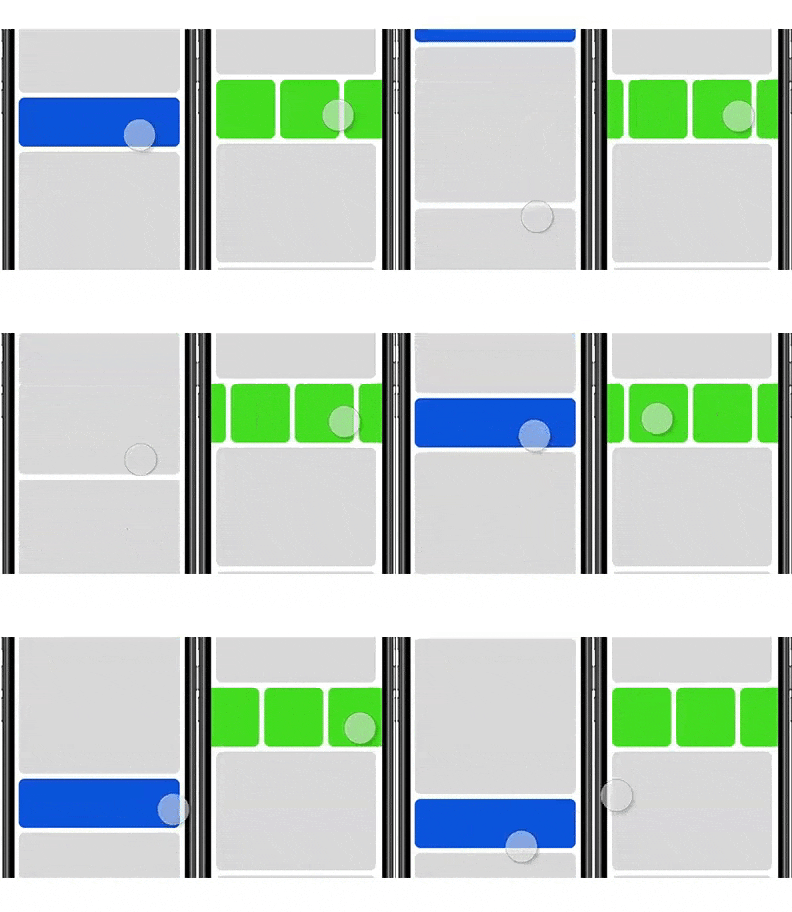
Incessant scrolling while using an application is perceived as a flaw on both mobile and desktop. To address this concern, a shift to horizontal scrolling of elements is in trend now.
We are seeing an increase in designs using non-breaking lists that are scrolled horizontally for more content especially on mobile, where horizontal space is limited.
On the other hand, vertical scrolling works as a mainstay of virtually every digital interaction you’ll come across.
A few years ago, the users used to remain reluctant to move sideways through content. However, the users have evolved since then and are more receptive to the idea of scrolling in both directions. It is more preferable to scroll through vis-a-vis clicking multiple pages or screens. Scrolling is completely natural and more efficient.
Users have learned to scroll. Never-ending newsfeeds and content have taught this interaction to users over and over again. In a mobile-first world, scrolling has become the number one interaction with digital content.
Users are impatient. They don’t wait to get a page fully loaded to scroll and discover the content later.
Although, the whole shift has led to the challenge of designing a smooth bidirectional scrolling experience without compromising the responsive design.
Creating desktop and mobile experience a mess while trying to ensure the same user experience
Hiding content behind menus
Having to scroll down and across in a zig-zag fashion
Taking more clicks (or flicks) to horizontally scroll the content into view on desktop
Here are two best practices for bidirectional scrolling to figure out when horizontal scrolling is great for UX:
Horizontal scroll works best when you want to display a subset of a category
Websites like Netflix have been using the responsive principle to showcase huge libraries in a way that lets you get to what you’re interested in extremely quickly.
Even e-commerce shoppers are scrolling more frequently than ever and are doing a great job when it comes to responsive design.
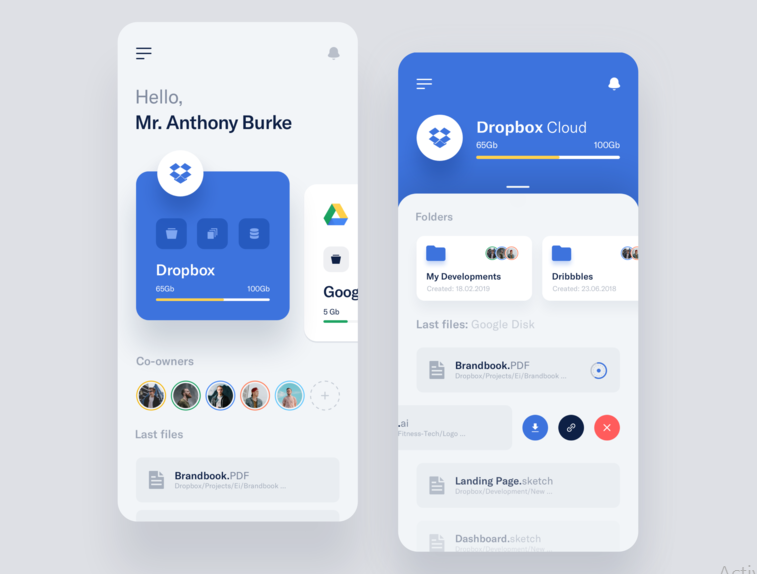
Image source: Vlad Ermakov for widelab
You’ll see a section, and there’s a plethora of content towards the right if you keep scrolling. When you scroll down, it’s just one line for each topic or section, making it easy to get to what you want quickly, then scroll to the right to dive deeper into that section.
The main principles that these sites have in common and have seen success with are:
Displaying a large catalog of products or items so that different product categories can be easily shown.
Displaying discrete sections or slides of information on applications like recommended or similar products on e-commerce websites.
Make your navigation more obvious and attractive
This seems to be the biggest problem faced by visitors when it comes to horizontal scrolling based websites. Even those that look incredible can end up confusing and turning off their users. That will result in leaving your website and finding one that is easier to get around on.
So navigation should be clear and easy so that your users don’t have to sit on your page for too long trying to determine how to get somewhere.
Make sure there is a visible label, and easy to use menu options of some kind that will get them to the information they want, especially about the bidirectional scrolling at the home page.
“Users are encouraged to scroll when it’s easy for them to see what is visible on the page without even requiring any action.”
If you fail to provide the right e-commerce site elements and above the fold and create an enjoyable digital shopping experience, you’re going to have difficulty getting shoppers to scroll.
The honest truth is that you need just the right mix of vertical and horizontal scrolling.
Conclusion
There is a lot of debate over the internet about the usage of the bidirectional scroll and its impact on UX. But it helps a lot in compartmentalizing the content and saves a lot of vertical space on an app if used wisely.
If your app and website are struggling with responsive design issues, feel free to contact our experts.
About Galaxy Weblinks
We specialize in delivering end-to-end software design & development services. Our design process stems from an agile and a responsive digital development that incorporates effective collaboration, streamlined projects which strives for better results.