Managing And Minimizing Your Technical Debt

Technical Debt – also known as Code Debt, Design Debt, or Tech Debt is often the byproduct of speedy deliveries of the software.

There are times when the project manager has to make a strategic choice between speedier delivery and code quality. There may be scenarios where along with a tight deadline, you stumble across some new bugs or want to add on some interesting features in your product. The project managers may choose to opt for shortcuts and temporary fixes to speed-up the deliveries and come back to the bugs after the release. This leads to technical debt.

Technical debt is inevitable as software design and development decisions are also driven by business goals and deadlines. However, like other debts, it has to be paid off within a certain period to avoid defaults and even complete rework. We have also covered some tools that will make the payoff and technical debt management easier.

A Technical Debt leaves you with two options, either fix everything wrong in the code and miss the deadline or fix only what’s necessary and come back to the rest on a later date (without fail). However, many fail to do so, subsequently adding to the existing debt, which is even worse. So how to deal with it?

Let’s learn more about Technical Debt, its relation to software quality, and where to draw the line.

So, when is Technical Debt unavoidable?

  • When another high-priority feature/ functionality needs to be attended because of a high opportunity cost.
  • You are on a mission to get your product tested with your real users and can not miss the launch deadline. This implies you choose to go-live with a working product over a ‘flawless code’.

When is technical debt beyond tolerance?

  • It’s hindering your user experience in numerous ways
  • There’s a mountain of older debt that was never attended to in the first place
  • It’s coming in the way of your product’s scalability and expansion plans
  • Technology and tools used are obsolete in the current scenario.

Is there a connection between Software quality and Technical debt?

The answer is a yes, but not necessarily in a negative way. If someone claims that their technical debt level is low, it can mean several things. They could have missed many deadlines, deployed more resources (in terms of employees, efforts, and time) than required, or even went down the rabbit hole of over-engineering.

And the opposite can also be true. The answer varies from person to person. Finding the right balance isn’t easy, but one can always strive for it.

Managing your technical debt efficiently

As discussed above, there is a good and bad side to everything, technical debt included. A perfect, error-free code is never a possibility. There will always be some small bug, patchwork done to meet deadlines.

However, technical debt should not be the culprit behind sleepless nights. Here is how we manage it for our clients:

  • Schedule regular clean-ups that go to the root of your technical debt. This means that you will have a spare more than a day regularly to keep your product’s technical debt within manageable limits.
  • Make sure that any shortcuts, omitted code lines, or such trade-offs decisions are taken in your development stage are documented in a single and accessible place. Also, it must be recorded in a way that every team member can understand it and don’t end up wasting time in decoding the documents themselves.
  • Inform stakeholders about your present technical debt levels. This will ensure that there is no surprise sprung on them when certain deadlines are missed.
  • Implement automated unit tests during development stages. This will provide faster feedback and lead to quicker iteration cycles.
  • Be on the lookout for newer technologies and possible industry disruptors. This will help you in anticipating the current relevance of the technologies deployed in your product. Also, when finalizing the tech stack of your products, ensure that the tools and technologies selected will be around for a long time and have active communities.
  • If possible, have a dedicated team (can be a small one) exclusive for managing technical debt. Unanimously decide on the permissible level of technical debt with this team. And keep them involved in your development and testing process.
  • This is specific to legacy codes. Factor in the relevance, time and efforts required, possible delays, testing, and team capabilities before you deep dive into it.

Leaving behind loads of technical debt is no wise decision. In the future, your team will dread going back to it, or even think of rewriting the entire code. But it is complementary to quicker iterations and release cycles. So ensure that you follow through with technical debt reviews regularly.

Feel free to get in touch with us here for any discussions on this or newer projects. We are always up for challenges and unique ideas!

About Galaxy Weblinks

We specialize in delivering end-to-end software design & development services. Our engineers also help in improving security, reliability, and features to make sure your business application scale and remains secure. Get in touch with us here.

Prioritizing Your Product’s Features – Dos And Don’ts

“Is this a must-have?”
“That one is good to have.”
“Is this functional or just a visual aid?”

As project managers, this is just one of the many conversations that you may have when it comes to deciding on the features for your product. Given the numerous options and limited resources, feature prioritization is inevitable. As you continue reading, you will find the non-negotiable dos and don’ts of this process. 

Place your features into themes

You need to start by categorizing all your current features and future feature requests. This can be done with the help of ‘themes’. These themes can be established or you can make use of the existing vision, growth plans of your product, product’s current roadmap, or even time-bound milestones. 

For instance- for deciding on the product features, there are communication channels, engagement, integrations available, user flow, etc. Time-sensitive milestones can be like increasing our newsletter subscribers by x% by the next quarter or reducing the churn rate by a certain percentage. 

Asking questions related to a feature’s implementation 

Saying yes or no to a feature that can aid in your growth plans is a tough call. But you can start by asking the right questions that will back you and your team’s reasoning, like:

  • Can the proposed feature’s functionality be fulfilled with existing features, or with some minor tweaks?
  • How much effort, time, and cost will be needed for development and implementation?
  • How good is the ROI?
  • Will it be vital in attracting new customers?
  • How will it help the current customers?
  • How many customers will benefit from it (an approx estimate)?
  • What will be the usage frequency?
  • Do your competitors have the said feature? How is it working out for them? Is there any data available for the same?
  • If the feature is unique, how will you educate your users for its utility? 

The list may look a little long, but it will give you enough information to back your final decision.  

Collaborate and bring all ideas to the table

Collaboration is important for ideation and bringing out something unique from a mixed bag of ideas. Therefore, it’s vital that you talk to all stakeholders, and encourage maximum participation. You can ask your teams to answer a common set of questions (like the ones mentioned above). 

This gives everyone a fair chance to validate their suggestions and their implementation. Have open discussions about shortlisted features and brainstorm with other team members about the execution. As a project manager, you are the center point of interaction among teams and you can facilitate communications regarding your product with ease.  

Get feedback from your customers on the selected features

Your existing group of customers and their feedback is a great way for understanding their needs. You can ask users to volunteer for testing your features and get their first-hand reactions to them. One can also go for focus groups, in case you are just starting.  

All the responses can then be cross verified with assumptions and expected results. If possible, you can also give some incentive to your users to sign up for the trial runs and be a part of the beta testing group. 

All the points mentioned above are just the tip of the iceberg, we know a lot goes into feature prioritization. 

Thanks to our wide experience, we also believe in what should not be a deciding factor of this process, here are the absolute don’ts:

Heavy reliance on gut feelings  

You and your team’s “gut feeling” can not be in the driver’s seat of feature prioritization. Like said earlier, there must be a good support for passing on or implementing any feature. No one wants to retract features after it goes live, it’s a lot of unnecessary workloads which can be avoided.  

Ad hoc requests implementation

Once in a while, urgent implementation of features is understandable, but it should not be a habit. This goes for all requests, internal ones, short-lived inspiration from competitors, and even customer requests. And this should not be seen as a barrier to creativity. You need to ensure all your teams understand this. We suggest that take the time to ascertain the viability and feasibility of a feature before you dive into the execution. 

Prioritizing many options 

Prioritize a limited number of features. And this does not imply that you are refusing all others, make sure that you keep revisiting old requests. Focus on the bigger features, but ensure that the smaller iterations are also taken into consideration from time to time. 

Doing internal/ external evaluation only

This may seem obvious but always gather internal and external feedback, especially for major feature rollouts. Relying on just one at any point in time can backfire, so try to take a holistic decision and get inputs from a majority of stakeholders.

As pointed earlier, these dos and don’ts are ones that you can not go without. Planning your features takes a lot of effort and to stay ahead of your competitors and in your user’s mind, some extra thoughts will not go waste. While no one can guarantee a 100% success rate of all the new features, going by the experts’ advice can help you in being a step closer to your organization’s goals. Get in touch with us for more discussions about your product and its features.

How To Build An Easily Maintainable Application

Among the many operational challenges, businesses continually face the question of how much time and money they should allocate to application maintenance.

A robust and high-performing application delivers expected business functions with rare instances of manual intervention. If you can succeed in building such an application, you have with you the very coveted almost-zero maintenance app.

However, the drive toward zero-maintenance has its own set of drawbacks. By over-optimizing the applications, the software development process may become “less friendly” to the business. You may face issues such as increasing budgets for future-proofing the solutions, unwillingness to accommodate “unrealistic timelines,” denying complex changes, etc.

End-to-end optimization may be theoretically attainable, but from an ROI perspective, the cost of achieving it may not be justifiable. Zero maintenance, as an objective, may not be easy to achieve. On the other hand, as an initiative, it can be a driver for delivery improvements. In sync with the best practices to build easily maintainable applications right from the initial stage of the development lifecycle, you can expect transformational results.

In this article, we will help you understand the significance of software applications maintenance, just like the maintenance of any other business asset. We’ll also cover the best practices to build an easily maintainable web application.

Why should application maintenance be more of a thing?

Your system’s specifications will change from time to time. They are much more likely to be in constant flux: you learn new facts, business priorities change, architectural changes due to system growth, old platforms replacements, users request new features, legal or regulatory requirements change, previously unexpected use cases, etc. Complying with new regulations, altering a particular table, upgrading to a newer release, interfacing with a different OS, or porting an application to a new server – all necessitate application maintenance.

By ensuring high maintainability practices in your software development, you will be able to:

  • Fix issues or add new features without introducing new bugs.
  • Improve performance or other attributes.
  • Adapt to a changing environment efficiently.
  • On-board new developers quickly.
  • Have a minimal impact on other components because of change to one component.
  • Establish test criteria effectively and efficiently.

Best practices to build an easily maintainable application

Eliminate Dependencies To Clear Technical Debt

Technical debt piles up as we add more and more code, by nature. If the imported code gets updated by the owner, then that code needs to be updated in the programs that use it as well. So, the tech debt that you incur is all the code that you borrow, and all the code they borrowed from, and so on.

Refactoring has made life easier as we started to understand the development processes. For example, rewriting some business logic or it could be switching to different frameworks, etc. You can pick a small chunk of tech debt in every sprint so that you don’t have to suddenly stop taking new features, and clear tech debt.

Adopt Test Driven Development

We all know that the development process is not complete if you haven’t tested your code. No doubt, writing tests might seem like extra work in the beginning. However, you will notice values of test cases when you are about to commit buggy code, only to find out that one of the test cases has failed. Test cases help to make sure that the new piece of code isn’t breaking any available functionality.

But tests become part of the maintenance overhead of a project. Badly written tests are expensive to maintain. For example, ones that include hard-coded error strings, are themselves prone to failure. It is possible to write tests for low and easy maintenance under the guidance of the right TDD team, for example by the reuse of error strings, and this should be a goal during code refactoring.

Balance Modularization And Re-Usability

A modularized solution with reusable components is one of the best practices to design a maintainable solution. Adopting modularization of every single feature and highly reusable components will require expert developers, which may increase the cost. But, these aspects will be significant in the long run due to the decreased cost of flexibility to make changes and maintenance. Every developer must still consider these aspects while writing code, irrespective of the fact that most of these aspects can be handled by using a good framework.

Incorporate Automation

Automation is the crucial part of every app development because it speeds up the delivery of products, simplifies developers’ workflow, and requires the use of fewer tools. There are two ways you can do that by making code testing a shared responsibility. Quality assurance (QA) and developers share the same goal in the SDLC: delivering a quality product on time and on/under budget. To ensure cooperation and alignment towards this goal, developers should share the responsibility of quality testing or can use required automation tools for visual QA as well. Every module must include meaningful regression, functional, and unit tests.

Following the agile methodology, all members of our team (including development and QA) are responsible for testing code. The build is then thoroughly tested including unit and integration testing via a CI process, and then reaches the QA department for black-box testing. it has already been thoroughly tested. Load tests are applied to make sure that undesirable situations are caught.

Create API And Method-Level Documentation

It is far better to not rely on inline comments to explain the logic and write self-documenting code. Although, this does not mean you should adopt zero documentation. This is especially needed when working with multiple teams or when developing an extensible application or consumable library. Because zero documentation leads to poor code readability and hard maintenance for other team members. For example, the public API should be documented precisely, describing the functionality, outputs, and inputs. This enables API users to understand and use the available functionality.

Conclusion

The zero-maintenance journey can be effective only if adopted holistically:

  • From the initiation stage, always involve key stakeholders cutting across multiple IT layers, to derive synergic benefits.
  • Look for improvements in key focus areas such as infrastructure, tools, services, operating models, and processes.

Your task is not over even after you’ve leveraged mobile/web app maintenance. Application maintenance requires frequent attention as it is not a mere one-time task. You would need to continue to monitor it to stay ahead of your competitors or have a competitive advantage over them. Regular monitoring will keep your app/system bug-free and will ensure an efficient and seamless user experience.

About Galaxy Weblinks

We specialize in delivering end-to-end software design & development services and have hands-on experience with automation testing in agile development environments. Our engineers, QA analysts, and developers help improve security, reliability, and features to make sure your business application and IT structure scale and remain secure.

10 VS Code Shortcuts To Code Faster In 2021

VS Code is loaded with lots of features by default that makes it powerful, even without the themes and extensions.

However, even experienced developers may not be aware of these useful features. Not everyone has the time to explore every tip and trick to find the ones that help them code faster. With each new update of VS Code, new features are introduced that often remain unexplored.

Here we’ve listed the 10 most useful VS Code tricks that can help you code faster this year.

1. Multi cursor selection

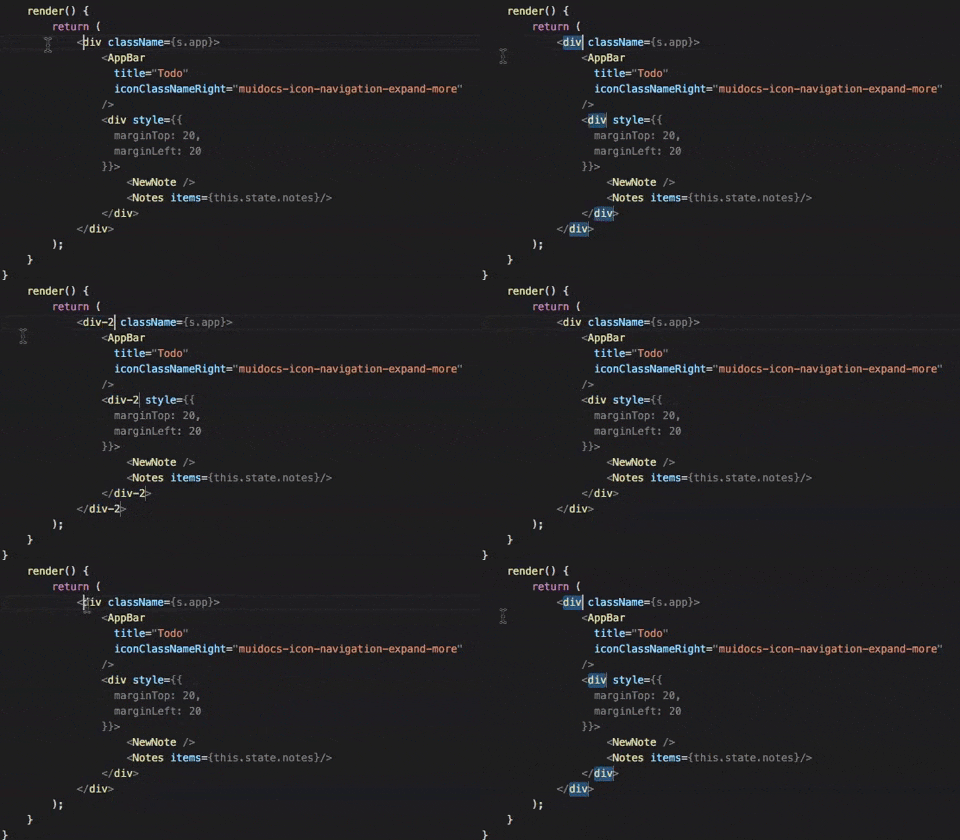
Defining multiple cursors helps in editing a document in more places simultaneously. Multi-cursor mode can be used for column-mode editing. You can place as many cursors in as many places as you want in a single editor view. You can continue editing once you have your cursors placed, and all operations will be implemented to all cursors at the same time.

To set cursors above or below the current position use Ctrl+Alt+Up or Ctrl+Alt+Down. To add cursors at arbitrary positions, select a position with your mouse and use Alt+Click. You can add additional cursors to all events of the current selection with Ctrl+Shift+L. To go back to a single cursor, just hit the Escape key.

2. Open/Close terminal with one hand

It is convenient to have a pop-open terminal window in VS Code. No need to switch out to another application window to deal with the terminal. It’s also readily accessible by pressing Ctrl + (the backtick key).

What’s nice about this feature is that the shortcut is a one-hand operation, so you can open or shut the window without touching the mouse.

3. Type to find any command

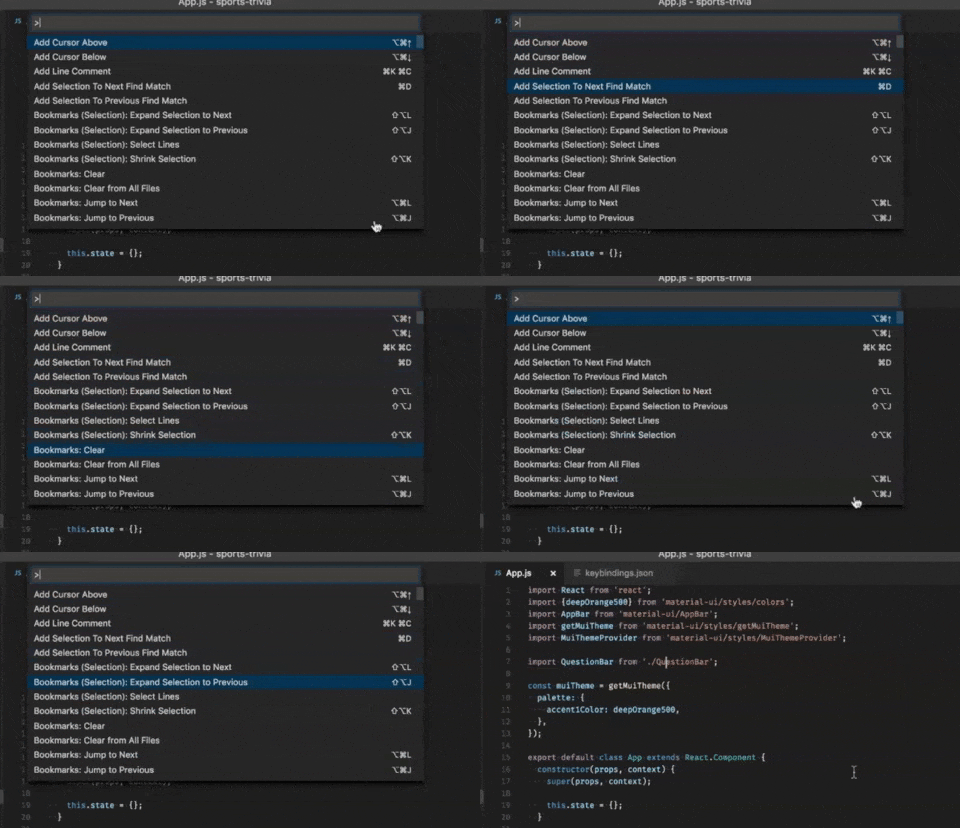
From Command Palette, you have access to all of the functionality of VS Code, including keyboard shortcuts for the most common operations and any registered command, or those provided by add-ons. Press Ctrl-Shift-P and start typing.

Further, if there’s a key binding related to a given command, it’s available in the type-to-search drop-down list. So that you can cut straight to the key shortcut in the future.

4. Open the new editor window to the side

Sometimes we want to open the definition to the side so that we can use “Command + Option + Click.”

5. Github pull requests and issues 

If you are working with Github, you can install Github pull requests and issues extension to search for any project and clone a repository to the editor itself. This saves you time to go directly to github and bring it to your terminal.

6. Source Code Navigation

When we read codes or after reading the definition, we often need to jump from the source code to their definition. Here you can use the following shortcut keys to complete the source code navigation.

Go to Definition: F12

Go back: Control + –

Go Forward: Control + Shift + –

You can also use F12 to continuously jump between different definitions. When you want to go back to continue coding, you can use “ control + -” to go back, but the efficiency of doing so is too low. At this time, you can go back to coding with only one step i.e. by using the command “Go to Last Edit Location.”

7. Grid Editor Layout

Editor groups are placed in vertical columns, by default (for example, when you split an editor to open it to the side). You can easily place editor groups in any layout you like, both vertically and horizontally:

You can create empty editor groups, to support flexible layouts. There are also a predefined set of editor layouts in the new View > Editor Layout menu:

8. Code Folding

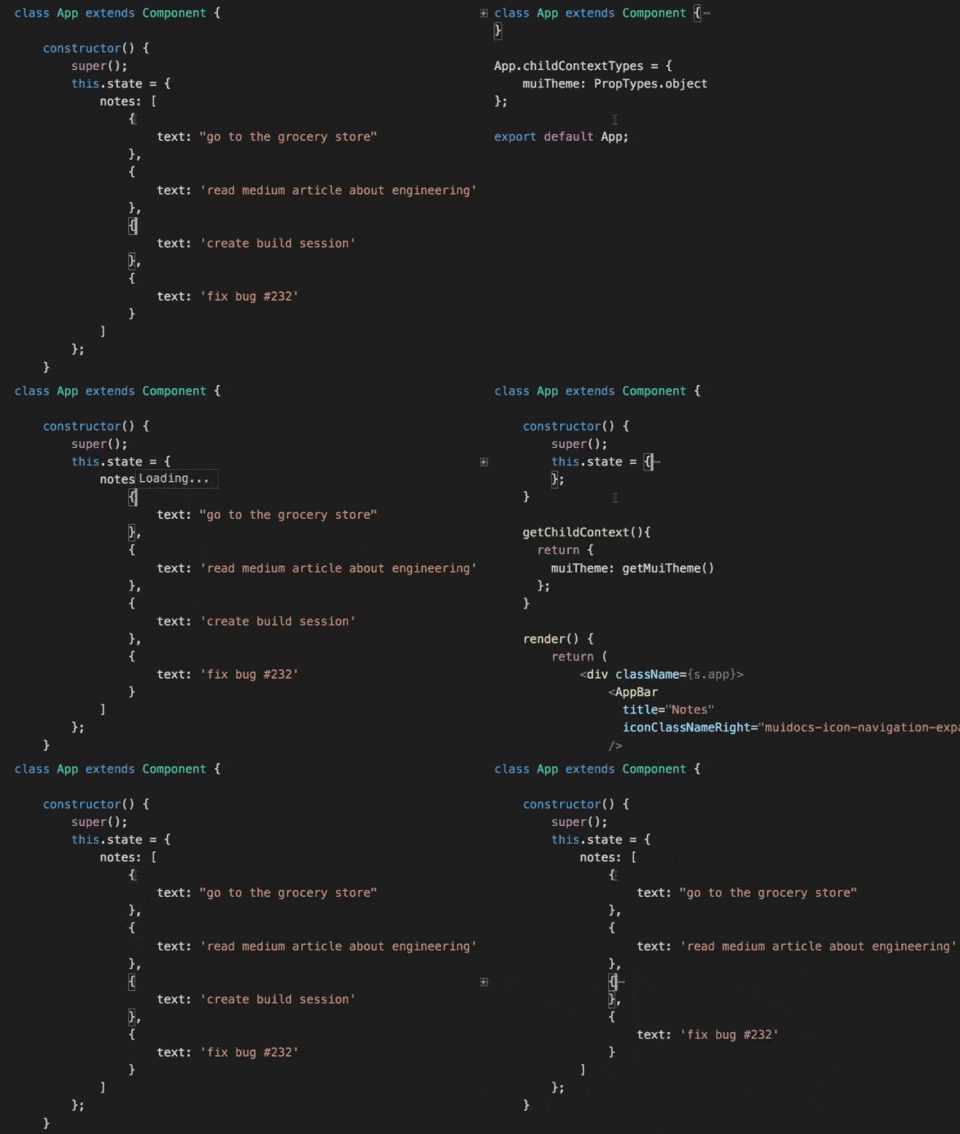
Code folding is required when the file size is big and you just want to get an overall understanding of the code.

1. To fold the innermost uncollapsed region at the cursor:

On Mac: Command+ Option + [

On Ubuntu/Windows: Ctrl + Shift + [

2. Unfold will re-open the collapsed region at the cursor:

On Mac: Command+ Option + ]

On Ubuntu/Windows: Ctrl + Shift + ]

9. See Visual Studio Code’s internal process list

Similar to any other task manager in every OS, VS Code has its own internal Process Explorer that lets you see a list of all the current subprocesses running inside the code editor. You can see every externally spawned process, extension, window, and so on. For each process, Process Explorer displays the memory usage, the CPU, and process ID.

Search for “Process Explorer” in the command palette or just select “Open Process Explorer” from the Help menu to open Process Explorer. You can right-click on a process to kill it or copy its information.

10. Remote Development

Since remote development has become the norm for developers, many have started using remote development extension packs. This comes with remote wsl, containers, and ssh, or you can separately search for an extension that lets you work inside the browser, also known as VS Codespaces.

It is split into two components – the UI component which would run on the local machine and another one is the server component, which would let you run, edit and debug your code on the remote machine. The VS Code server can run anywhere, and the remote extension will help you communicate b/w VS Code and the server.

This helps avoid having huge mono repositories, where devs would connect to a huge vm and nothing would be available on their local machine so that they can deploy changes and fixes.

Give It A Shot!

Now that you are armed with the useful productivity tricks, go ahead and give it a try. Once you get the hang of all these shortcuts, you will wonder how you survived without them. You may even blow the minds of some of your Emacs or Vim friends or co-workers with your efficient coding tricks!

Galaxy Weblinks

We specialize in delivering end-to-end software design & development services and have hands-on experience with large, medium, and startup business development requirements. Our engineers also help in improving security, reliability, and features to make sure your business application scale and remain secure.

Top 5 Python Frameworks To Opt For

Building the backend for a web application or service?

It doesn’t matter if it’s simple or complex, there’s a Python framework that can address your needs. Choosing the right one can make tedious implementations like user management, data design, form submissions, and security, less of a headache.

If your project is simple you can opt for something implicit and minimal rather than explicit and complex. Whereas, if you’re working on a big project then you’d need all the firepower a framework can pack. Here are 5 Python backend frameworks that you might want to consider for the backend of your web application.

1. Django

Undoubtedly one of the most known and deployed frameworks, Django has been the go-to choice for enterprises for building web applications for years. With its 3 stable releases, Django has come far in terms of deployment speed. It is now equipped with the new asynchronous ASGI standard for Python web applications.

One of the reasons that Django is so popular is that it comes with batteries-included, meaning all the components that you’d need to develop a generic web application. For instance – user management features like tracking, sessions, passwords, and admin permissions, etc. are common to most web applications. Django provides these features natively.

From a safety POV, Django has some practical defaults to prevent attacks and cross-site scripting issues. While placing a variable in a page template, such as a string with HTML or JavaScript, the contents are not rendered literally unless marked safe.

This Python framework sure is powerful but it comes at the cost of unnecessary complexity; even simpler applications need a lot of configuring to install and run. Django applications are heavy and come with many moving parts. Django is monolithic, meaning apps are chunky and tightly coupled, so everything gets deployed together.

2. CubicWeb

CubicWeb is an object-oriented semantic web app framework. It uses reusable building blocks of code called “cubes”. Cubes are made up of a schema, logic, and views. These components can be utilized as in any other modular framework, each having its function. It lets you build apps by reusing your code and of others.

It’s a powerful Python framework featuring the fundamental building blocks of a modern web application. In CubicWeb, you set up and manage instances with a command-line tool and its built-in templates let you generate HTML output conveniently.

Since CubicWeb doesn’t support the native async functionality some workarounds are required. One of which is to use the cubicweb-worker cube to perform tasks asynchronously. Moreover, it also comes with a lot of dependencies which translates to a daunting list of manual tweaking on the local environment. You can use pip install instead to get them all in one go or you could also use a Docker container to set up shop.

The CubicWeb development has been slow and is not the most promising but it still powers some of the large-scale semantic web and linked open data applications.

3. Web2py

Inspired by the simplicity of Rails, Professor Massimo di Pierro created a simple and easy to set up framework called Web2py. It’s a scalable, open-source full-stack framework for Python which comes with its web-based development environment and features like Role-Based Access Control (RBAC), Database Abstraction Layer (DAL), and support for internationalization.

The data abstraction system in Web2py is a bit different from Django’s ORM, which uses Python classes to define models, whereas Web2py uses constructor functions like define_table to instantiate models.

Just like CubicWeb, Web2py doesn’t explicitly use Python’s Async functionality, but it makes up for it with a scheduler for handling long-running tasks.

4. Weppy

Looking at features like data layers and authentication, Weppy will remind you of Django. But when you look at the code it starts looking like Flask, with minimal instruction to get a basic single route setup ready.

Weppy is a lightweight framework and comes with convenience functions, which makes it great for building RESTful APIs. You just have to use @service on a route to get data that is automatically formatted in the format of your choices like JSON or XML. Though lightweight, it packs some big framework features sans the weight and complexity. Validation mechanisms, form handling, response caching, internationalization, and user validation among others are such features.

The not so complex ‘Just enough’ features come with some trade-offs. Weppy extensions try to make up for these trade-offs but unfortunately the list of official add-ons is not that long.

The upcoming Weppy 2.0 will support async and sockets as low-level first-class entities. Also, all the upcoming versions will require Python 3.7 and above to run.

5. Zope

In contrast to every framework mentioned in the list (except for Django) Zope is meant to be a full-blown, enterprise-grade application server stack. For templating, Zope uses a flexible Zope Page Templates (ZPT) system or a basic DTML markup system. While ZPT can be a powerful way to design templates but the syntax takes some getting used to.

While the complexity can be beneficial for enterprise-grade applications, when it comes to installation Zope can be a bit difficult. So much so that it also offers a specialized setup tool called zc.buildout for installation .

If there are no resource constraints and you can look past the unnecessarily complex setup then Zope might prove to be the best for a large undertaking.

One thing to note is that there is no direct support for Python’s async. However, Zope utilizes the zc.async package to distribute tasks across machines and synchronize them in a ZODB instance.

There are a host of choices to base your backend on. It boils down to how much functionality and freedom to tweak are you looking for? All of these frameworks offer something that makes it a unique offering. You just need to truly understand what your solution needs and your choice will be easy and best suited.

Galaxy Weblinks

With over a decade of experience in creating and delivering robust software design and development services, our developers know the backend technologies like the back of their hands. Galaxy has expertise in all major backend technologies, be it PHP, Java, Node, and Python. You can spell out your requirements and leave the rest to us. For more information, do visit us here.

What are the key Mobile App design considerations?

Mobile devices are an integral part of our lives. They are used to cater to different needs of the users, including business and social networking, banking, entertainment, and even grocery shopping. Mobile apps are a great way to improve your product or service and reach out to more users. One of the key differences between a successful mobile app and the one that fails are the design elements – user experience (UX) and user interface (UI). UI is the components and the layout of the mobile app with which the users can interact, whereas UX is the overall experience of the user using the app.

The UI/UX design is one of the most important factors to consider while building a mobile app. Having said that, the global trends in UX design and UI design are constantly changing and it may seem like a challenge to keep up with the latest trends. In this article, we have compiled some of the key mobile app design considerations.

Keeping the app simple

Mobile devices are short in real estate, and hence knowing what are the most important elements of your offering is crucial for a successful mobile design. Keeping the app layout simple ensures easy navigation and a great user experience. It is very important that the app navigation is easier, faster, and smoother to use. Having unnecessary features in the app reduces the app speed and leads to a poor user experience.

However, simplicity does not mean minimalistic design. The design should be creative and such that the users complete their tasks in as few steps as possible. Unnecessary steps will likely leave your user frustrated and unhappy with their experience.

Finger-friendly design

With mobile devices, we use our fingers to navigate through the app. Hence, having a finger-friendly design is a crucial consideration while designing your app to understand how your users will interact within the app. Over time, users have been familiarized with certain finger movements and these have become standard use for tasks such as swiping to go to the next page, double tap and pinch to zoom, etc. Additionally button design plays an important role in designing the app. These buttons should be adequately sized and should be located at the right places on the screen. Excessive scrolling inside an app can be frustrating and lead to a bad user experience.

Responsiveness

Mobile devices have a very wide range of sizes and your app should be able to respond to these. Additionally, each device have two different screen modes in which the devices can be viewed — landscape and portrait mode. App designers should design the app such that important elements respond to different screen sizes and orientations and are displayed appropriately. Hence, mobile responsiveness has become an integral part of the app front end development.

Consistency of design

Maintaining consistency across your app provides familiarity and ease of use for the end user. A good practice is to define your elements and then repeat them throughout the app. These elements include but are not limited to style, color, fonts, buttons, etc. A consistent app design ensures a rich user experience. On the other hand, a non-consistent hampers your app’s intuition and will mostly frustrate the user leading to a poor user experience.

Conclusion

Mobile apps are increasingly becoming part of our daily life and the focus of good developers remains to keep the user happy. Keeping the basic mobile app design considerations in mind ensures that the focus remains on the user. If you’ve any doubts related to mobile app development and if you need assistance developing one, then feel free to talk to us here.

What are the best practices to build a Mobile App?

Turning your great mobile app idea into reality requires a significant amount of time, effort, and money. Mobile app development is a complex and long process that involves different tasks to get the final product. These tasks require decision-making and can be crucial to an efficient overall development process that not only has cost implications but also determines the overall success of your app.

This necessitated the need for a well-outlined app development process. In this article, we have compiled some of the key mobile app development best practices for developers.

Carrying out research and formulating a plan

Each app idea aims to solve a specific problem catering to the needs of its user base. So it is a crucial first step to –

  • Carry out thorough research to know your market
  • Understand the target audience
  • Identify the market gap
  • Research your competition, and differentiate your product offering.

Better research leads to a better product when it comes to app development. If you don’t invest your time in research, you will end up with a lot of iterations which would mean increased manhours and capital.

Choosing the right development platform and app type

Choosing the right platform for your application at an early stage is crucial since the iOS and Android app development processes are different from each other and take time to develop. It is important to choose the right app type (native, hybrid, or web apps). All these types have benefits and limitations, and the right selection is usually determined based on answers to these questions.

  • What is the objective of building your app?
  • What are the key features to be included in your app?
  • What is your budget to develop the app?
  • How quickly do you want to develop the app?
  • Are you more interested in building an MVP across different platforms?
  • Do you want to build it in-house or outsource?

Focusing on design and user experience (UX)

Design is the most important aspect that helps you build a connection between your users and your product.  A good design enhances usability, accessibility, and pleasure the user has while interacting with your app and ultimately your company. Before starting coding for the app development, the focus should be on carrying out a detailed design phase to create prototypes to check their effectiveness. If an app is built without a good UX and after spending huge amounts of time and money, the customers will not stick to the product. So a revamp after launch would be very expensive and brand-damaging in many cases.

Carrying out debugging and testing 

Debugging and testing are the most important parts of mobile app development best practices. Tests need to be carried out extensively to ensure that your app is running efficiently. These tests should run for different test scenarios and conditions to make sure the app is ready for the users.

Focusing on app security 

App security is crucial when it comes to customer data and sensitive user information. Many times developers ignore the security risks while developing the mobile app and thus allow vulnerabilities risking user information while collecting, using, and transferring such data. A developer should carefully implement best practices around privacy at all stages of the app’s life cycle. New privacy rules and policies are developing quickly and developers should be on top of these changes in regulation and policy matters as well as follow the app development rules and guidelines for the different operating systems (App store, Play store, etc).

Planning app updates post-launch

An app requires frequent updates and maintenance support post-launch to accommodate user feedback, feature enhancements, technology enhancements, privacy policies, operating system updates, etc. A good development team should plan for these updates timely to roll out bug fixes, minor changes, or features enhancements.

A few common mistakes during the app development process

We highlight below a few common mistakes that are mainly due to not following the best practices during the app development process.

  • Lack of research around the market, users, competitors, etc
  • Not addressing user requirements and incorporating user’s feedback
  • Focusing only on budget and not adhering to budget management
  • Poor design UI/UX
  • Overloading the app with complex features and functionalities that are not user friendly
  • Not creating an MVP and testing out different prototypes
  • Hiring a development team that does not follow best practices and are misaligned with the overall objective
  • Poor planning and communication during the app development process
  • Lack of maintenance activities and no timely updates of the app

Conclusion

Mobile app development is an ongoing process and it will continue to evolve over time and during the development process. Following these best practices during the app development process can help you avoid common mistakes that can prove to be expensive and damaging to the company’s brand. If you’ve any doubts related to mobile app development and if you need assistance developing one, then feel free to talk to us here.

Micro Frontend | 4 Things to know before switching

The first part of this series uncovered the idea of Micro Frontends that is to break down the frontend monolith into smaller, more manageable pieces. (Read the blog here)

Each team can constantly deliver small incremental upgrades, work in their proprietary codebase, independently release versions, own their features end-to-end, and also integrate with other teams via APIs so that they can manage and compose applications and pages together.

This article will share some important decision points to help you decide whether micro-frontends are right for your project, and if so, how do you proceed?

1. Consider the size of your team

Micro frontends enable teams to develop faster and deploy end-to-end features from the database to the user interface on large web applications. An independent team can own and maintain a component without sharing technology or a release process with other teams. That means when a team uses components from other teams, all they need to know is the custom HTML element and its attributes.

Whereas, companies with multiple teams each using a different frontend framework can build a unified component library. For shared code like cookies, local storage, the DOM, and CSS, teams would agree on a namespace convention without any dependencies.

Sep Nasiri from Upwork who leads its UI Infrastructure Team says, “Migrating to a micro frontend architecture introduced some challenges but the benefits of modernizing Upwork’s frontend along the way made it worthwhile. Modernization will help deliver more consistent user experience, streamline certain services, and future-proof our site for Upwork’s 17 million global registered users.”

In essence, micro frontends will help change technologies for an existing application. The team could deliver value gradually by launching parts of the application without attaining much technology debt whenever there is a change in the existing application.

2. Organizational Structure

Similar to building microservices, the basic idea is to allow the DevOps teams to operate and build their micro frontends without any dependency. Remember, their goal is to ship something of value to the business people faster. To allow them to work quickly regarding integration and platform complexity, there should be a Platform Team to support them. The Platform Team is responsible for the platform and ensuring guidelines so that new micro frontends can integrate easily. Ideally, the DevOps teams can ship, develop and plan a new micro frontend without the Platform Team. Besides, they should be able to monitor operational problems and access logs by themselves. Otherwise, the Platform Team will be overloaded and the approach will not scale.

Here is a simplified diagram of the organizational structure:

What is missing from the structure is Governance. If you’re using this approach on a large scale, you need some supervision to avoid uncontrolled growth and to maximize the reuse of existing micro frontends. If you already have a lot of microservices or a WebService catalog, you can do something very similar in that scenario as well.

3. User Experience

Beyond any doubt, User Experience and User Interface Design are the most decisive parts when building systems with micro frontends. This is because a completely heterogenous UI with different behaviors, fonts, and colors is difficult to accept by users and business people alike. So, choose to implement micro frontends after ensuring these decisive points:

  • Provide the developers with CSS (a theme) they can apply during development so they can see how it will look when integrated.
  • Define all common UI components in pure CSS. Then the teams can use the JavaScript framework of their choice as they just have to use the predefined CSS classes.
  • Make sure you have an expressive UI component library that covers not only the single UI elements but also the most important interaction patterns.

4. Multiple client-side libraries and frameworks

Should a team use Vue, Angular, or React for the frontend of a particular component? There are reasons why one library or framework fits better in a situation over the others, and there are pros and cons for each as well. Irrespective of your choice, keep in mind you are not building the web application just so you can use the frameworks; you are choosing the frameworks so that you can build your web application. Just like any architecture, the users will benefit from faster response times from the fewer number of libraries and frameworks you are loading on the client-side.

Because adding another framework means the user experience might become slower due to the additional load. The teams should mutually agree on using the same JavaScript framework whenever possible.

Let’s imagine, the teams got to agree on the same JavaScript framework. Now the teams need to decide that because of the given independence, whether they’re gaining efficiencies on deployment and development or not.

Build modern web apps using microservices with Galaxy Weblinks

The micro frontends and microservices approaches are great techniques to help divide the workload for multiple teams and to isolate code for each Custom Element. It might not be a good idea to choose the added complexity before you need it! Keeping in mind that micro frontends come with extra overhead, the considerations in this article will hopefully help you before implementing this approach.

About Galaxy Weblinks

We specialize in delivering end-to-end software design & development services and have hands-on experience with backend and frontend technologies. With our hands-on experience with Kubernetes, Docker, you can automate the deployment of scalable, future-proof applications.

Micro Frontends – A Nimble Approach Towards Frontend Development

This is a two-parter series on Micro-Frontend and it’s implementation. And if you’ve already read this one, head on to the part two for 4 Things to keep in mind while working with Micro Frontends.

As the business and product expands, the software architecture leaves us with a monolithic frontend and backend, and the inflexibility that comes with this.

The prevalent practice, microservices architecture, has been used as the foundation on which feature-rich applications can be built. This made many product developers adopt microservices on the backend-side, and start extracting logic one-by-one into separate microservices. The typical setup looks like this:

These microservices get aggregated and consumed by the frontend through an API gateway. Broadly, it appeared that we cannot scale UI on the front-end. The applications, thus, developed are known as Frontend Monolith.

This time, the whole hype is about facilitating a co-existence of different front-end frameworks. And approaching the front-end development process of web apps with the concept and idea of microservices, calling them micro frontends.

To help you figure out whether you need the integration of micro frontends in your development process, let’s take a closer look at micro frontends.

What Micro Frontends can mean for your web apps?

The most popular development approach used for modern web applications is the single-page application (SPA).

The typical SPA application flow follows standard steps:The user visits the web application

-The browser requests the JavaScript and CSS

-The JavaScript application runs and provides the initial content to the browser document

-The user interacts with the application – such as adding a product to the basket or clicking a navigation link

-To show the changes, the application rewrites browser document parts

SPAs are critical to modern development, but they aren’t perfect. SPA comes with many disadvantages.

  • Framework complexity: Many frameworks can provide the SPA experience and allow you to build a solid SPA, but each targets different needs, and knowing which to adopt can be hard.
  • Browser performance: Because the SPA does all the rendering and processing of the user interactions, it can have a knock-on effect depending on the user’s configuration. Not every user will be running the application in a modern browser and at a high-speed connection. It’s important to have low processing time and keep bundle size down as much as possible to have a smooth user experience.

The above-mentioned reasons showcase the common issue, which is scale. Building a huge or complex application requires multiple developers that can help fit all your user’s needs. Working on a SPA with a monolith frontend can lead to many people working on the same code trying to make changes and causing conflicts.

So what’s the solution to all of these problems? Micro frontends!

“Micro Frontend Architecture is about considering a web application as a composition of features owned by independent teams. Each team has a distinct area of business that it specializes in. It is an architecture pattern for building a scalable web application that grows with your development team and allows you to scale user interactions.” – micro-frontends.org

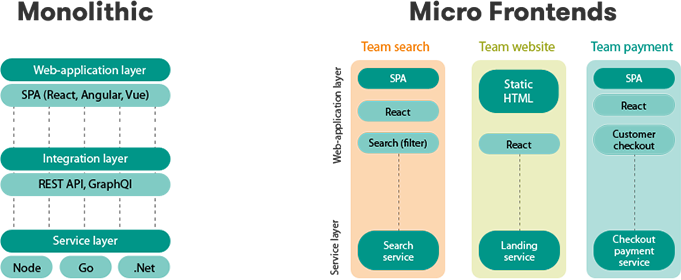
The typical setup looks like this:

pasted-image

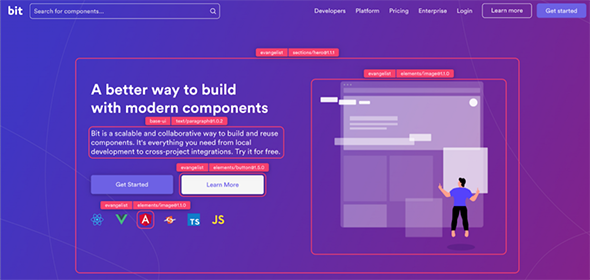
Whereas, a real example looks something like this:

bitdev

The above home page is developed by the Bit team and used modern component-driven technologies like React and Bit to build micro front-ends.

In the above image, you will see two sets of components, developed by two teams. One is “evangelist’”, owned by their marketing team. The second is a “base-ui” set of components, handled by their front-end infrastructure team. Components from both sets are combined to quickly create the homepage you look at. As well as other pages like the Support Page or Enterprise Page, and even to compose more applications.

The pros: Complete Technology Isolation: you can have dotnet on one side and node.js on the other side irrespective of what technology is used in both systems.

Complete Deployment Isolation: you can implement each frontend release and batches without affecting the other component.

Fast Load Time: because you don’t need to load all libraries and resources you have in your store to the payment system.

Easy Cache: as the 2 systems are completely isolated so managing the cache is very easy.

Reasons why Micro Frontends are for you?

Here are some good reasons to accept the extra complexity and integration costs while choosing to implement micro frontends. Apart from the above reasons, there could be others as well:

-You are going to build a huge web application that cannot be maintained as a monolith (at least not for a long period).

-You want to add new features to a legacy application that is no longer maintained (or no developers are available any more for integrating new technologies).

-Your company has invested in some commercial systems like a portal, CRM, or a CMS. But when the system is going to be replaced, you want to prevent your internally developed applications from becoming useless. Also, you want to integrate existing applications there.

-Newly hired developers are not that productive throughout the development process – ideally using the technologies they prefer and are used to.

-Your business applications tend to live 5+ years and you want to avoid relying on a single web framework that might get obsolete.

Here is how Galaxy can help you

Your business is often left unable to deliver modern online experiences when release cycles take months instead of weeks. Development hold-ups slow your ability to make application updates, keeping you from innovating and iterating. And outdated or clunky UX keeps you from retaining your customers and winning over them.

Galaxy’s experts will help you implement an end-to-end vision by creating a modern development stack for building enterprise applications using required frontend and microservice technologies for your business. We will enable your team to rapidly build, design, and launch applications from microservices.

Learn about Galaxy’s suite of Frontend, Microservices and DevOps capabilities to help your enterprise build better and faster apps, sites, and portals.

About Galaxy Weblinks

We specialize in delivering end-to-end software design & development services and have hands-on experience with backend and frontend technologies. Our engineers, frontend developers, and UX/UI experts help improve security, reliability, and features to make sure your business application and IT structure scale and remain secure.

What Are the Best Practices to Build an Enterprise Software Application?

Building an enterprise software application is a complex journey involving several team members with varied skill sets, requiring significant time involvement, and costing a lot of money. There are several phases during the enterprise software development life cycle – requirement gathering, analysis, design, development, testing, deployment, and maintenance.

Due to the complexity of interacting with several team members and dependency of output from one phase to another, it is important to have a well defined process during the entire life cycle. In this article, we have compiled some of the key best practices while building an enterprise software application.

– Identifying the goal and formulating a plan

Each idea aims to solve a specific problem catering to the needs of its user base. So it is a crucial first step to identify the end objective and carry out a thorough research to know your market, understand the target audience, identify the market gap, research your competition, and differentiate your product offering. Better research leads to a better product application. If you don’t invest your time in research, you will end up with a lot of iterations which would mean increased manhours and capital. Hence it is important to carefully think out your product idea, define why and how you want to build the product.

– Choosing the right partners

Several phases during the enterprise software development life cycle require people with varied skills such as design, coding, QA, product management, etc. Building the entire team in-house can not only be expensive but can be a daunting task managing all the resources. Hence, it is important to identify the right technology partners that can help your team in building the application in the most efficient and cost-effective way.

However, choosing the right partners can be challenging and a crucial part of the overall development process. While selecting the right partners, keep in mind that the companies should be aligned with your organization as well as with the project requirements. The companies should have relevant expertise and experience, and this can be evaluated by looking at their portfolio, looking at the company’s reviews on Clutch/Dribble, as well as speaking to their references.

– Setting the scope at the start

The work scope should be established at the start of the project with clear deliverables and timelines. If you have outsourced design work, make sure that the deliverables such as user stories, information architecture, design, etc are well documented. These deliverables help the development team in writing the code adhering to the best standards.

Having a clear set of scope, deliverables and budget are crucial to a successful project. Not only will these help you monitor the progress, your partners can plan resources and allocate time accordingly. Not setting a scope at the start could lead to several iterations resulting in cost overrun and project delays.

– Identifying the most suited tech platform

Enterprise software applications are built-in specific coding languages such as Python, Java, C, JavaScript, etc. There are various pros and cons of each coding language depending on the business needs. Hence it is important to brainstorm with your team / partner and select the right programming language for your software application. It is also important to think about the platform (desktop, mobile) your software will run on.

– Outlining the features/functionalities clearly

Software application development is an iterative process. During the process, a lot of changes happen including adding/deleting/modifying features and functionalities. Frequent changes to these can slow down the project and will mostly impact the budget/timelines. Hence, it is important to identify the core features and functionalities clearly at the start. While minor modifications are acceptable, they are unlikely to have a major impact on the overall development life cycle.

– Setting up effective communication

Effective communication is a key factor in the success of software development. Working with partners across the globe with different time zones, different cultural/linguistic differences, etc requires effective project management tools like Asana, Jira, Basecamp, Trello, etc and communication channels such as Slack, Zoom, Teams, etc. These tools enable teams to work together throughout the development life cycle efficiently.

– Relaying timely feedback 

The output dependency from one phase to another makes the entire process dependent on timely feedback during all the phases. Any subsequent change to output from one phase due to lack of proper analysis and feedback results in multiple iterations across the life cycle, which is both time consuming and expensive. Hence it is important to have a frequent and open communication dialogue during each phase and evolve the product idea ahead of development.

Conclusion

Enterprise software application development is a complex and long decision involving many variables. For a successful execution, you need multiple partners that help you during the entire process. As we flagged above, it is important to have a well defined process during the entire development process. If you’ve any doubts related to software development and if you need assistance developing one then feel free talk to us here.