Taxi App Development Cost in 2026: Complete Budget Breakdown 

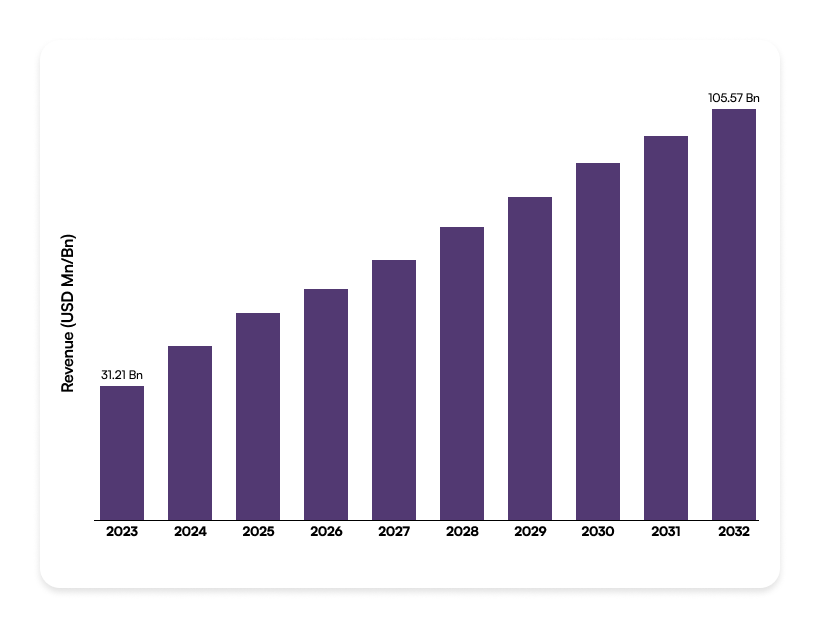
The global taxi war is fought not on the streets, but on the screen. Uber, Bolt, Lyft—they don’t just sell rides; they sell optimization, speed, and seamless user data. If you’re entering this billion-dollar market that has projected growth of USD 432+ by 2028, you know the app is the business. But here is the silent truth: 9 out of 10 startups radically underestimate the true taxi app development cost. They budget for two basic apps and forget the entire server-side brain.   

In 2026, building a successful ride-hailing platform means more than basic GPS. It means you need machine learning for dynamic pricing, follow stricter city regulations, manage features like electric vehicle (EV) charging logic, and more. This complexity makes the cost variable explode, ranging from a lean $80,000 for a local MVP to over $450,000 for a full, scalable system.  

We cut through the noise. This guide is your definitive budget blueprint. We won’t just tell you the total price; we will break down the cost of every single module—from the driver dashboard to the back-end map APIs—so you can launch with a budget that actually works. 

Tiered Cost Breakdown: MVP to Enterprise 

The cost to build a taxi app is never one number. It is a decision. You decide the features; the features set the taxi app development price. Focus on the essential truth: your budget is tied to complexity. This section shows the real investment for different app versions.  

The Core Cost Equation: MVP vs. Enterprise 

A Basic MVP focuses only on core logic. That means simple booking, working GPS, and one payment method. This low complexity saves money, keeping the price between $40,000–$70,000. The timeline is short, usually 3–4 months. You launch fast. You test the idea.  

A Mid-Tier (Full-Featured) app costs more, from $70,000–$150,000. Here, complexity rises. You add features that matter: dynamic pricing, in-app chat for drivers and riders, and a stronger Admin Panel. Development takes 5–8 months. This version competes well in a dense market.  

The Complex/Enterprise solution is a major investment, starting at $150,000 and going past $300,000+. This system includes the 2026 demands: AI matching algorithms, multi-service models (scooters, taxis, freight), and deep regulatory compliance. These projects run nine months or longer. They seek to unseat market leaders. 

App Complexity Estimated Cost Range (USD) Key Focus Development Time 
Basic MVP $40,000 – $70,000 Core booking, basic GPS, single payment method. 3–4 Months 
Mid-Tier (Full-Featured) $70,000 – $150,000 Dynamic pricing, in-app chat, scheduling, robust Admin Panel. 5–8 Months 
Complex/Enterprise $150,000 – $300,000+ AI matching, multi-service models, EV charging logistics, custom security/compliance. 9+ Months 

Key Factors for Development Cost of Taxi Booking App 

The cost to build a taxi booking app isn’t fixed. It depends on many moving parts. Think of it like building a house. A mansion costs more than a starter home. We need to look at what you want inside the app. 

Factor Typical Cost Percentage (%) Estimated Cost Range (Mid-Tier) 
Type of Application 5% – 15% $2,000 – $18,000 
App Features & Functionality 30% – 45% $12,000 – $54,000 
Platform Choice (iOS/Android/Both) 10% – 20% $4,000 – $24,000 
UI/UX Design 8% – 15% $3,200 – $18,000 
Backend Development 15% – 25% $6,000 – $30,000 
Third-Party Integrations 5% – 10% $2,000 – $12,000 
Admin Panel Development 5% – 10% $2,000 – $12,000 
Security & Compliance 3% – 7% $1,200 – $8,400 
Total Initial Development 100% $40,400 – $184,400+ 

Type of Taxi Booking App 

This is the very first, big decision. The kind of app you choose drastically changes the final price tag.  

  • Simple Aggregator: This app type connects users to existing taxi companies. It does not manage its own fleet or drivers. It’s the cheapest option. It just routes requests.  
  • Full-Fledged/Proprietary Model: Think Uber or Lyft. This is an end-to-end ecosystem. It requires three separate applications: Passenger App, Driver App, and a complex Admin Panel. This is expensive. You need real-time tracking, payment processing, and complex driver management. This model involves high complexity.  
  • Car Pool/Rental: This includes extra features like scheduling future rides or managing peer-to-peer car sharing. This adds unique logistical challenges. Expect higher development time. More features, more money, simple. 

App Features and Functionality 

More features mean more hours coded. More hours equal higher cost. Developers must build and test every single function.  

  • Basic Features: These are mandatory. User registration, basic GPS tracking, booking requests, and simple payment integration. These are baseline costs.  
  • Advanced Features: These add real value, but cost a lot. In-App Chat/Calling between driver and passenger. Surge Pricing logic. Scheduled Bookings. Real-time Ride Status updates. These require complex logic on the backend.  
  • Niche Features: Things like multiple stop support, favorite routes, in-app tipping, or splitting fares. Each feature is an extra development sprint. Every extra screen adds complexity. Don’t add features you won’t actually use. 

Platform Choice (iOS, Android, or Both) 

You need the app to reach your audience. Where are your users? On Apple or Google phones?  

  • Single Platform: Developing just for iOS or just for Android is cheaper. It cuts development time roughly in half. Good for testing markets fast.  
  • Dual Platform (Native): Building separate, native apps for both iOS and Android costs the most. You need two separate codebases. This means higher development and maintenance expenses. But the performance is the best.  
  • Cross-Platform (Hybrid): Using frameworks like React Native or Flutter. This uses one codebase for both platforms. It is generally cheaper and faster than dual native development. Performance can sometimes suffer slightly compared to native. Decide if speed or pure performance is more important to you. 

UI/UX Design 

A great design keeps users coming back. A bad design kills the app. Design costs include both User Interface (UI) and User Experience (UX).  

  • UX (User Experience): This is the blueprint. Developers must map out the entire user journey. Where does the user click? Is the booking button easy to find? This requires research and prototyping. Good UX is vital for conversion.  
  • UI (User Interface): This is the look. It includes branding, colors, icons, and animations. A unique, custom UI costs significantly more than using standard templates. Unique branding takes time to implement correctly.  
  • Complexity: Simple, clean designs are cheaper. Highly animated interfaces with custom graphics cost more money. Also, designing three distinct apps (passenger, driver, admin) multiplies the design cost instantly. Don’t skip proper design. 

Backend Development 

The backend is the brain of the operation. It manages everything the user doesn’t see. This is where the core functionality lives.  

  • Core Logic: Handles user authentication, matching drivers to riders, managing payment logic, and tracking all location data. This requires robust server architecture. It needs high performance.  
  • API Development: Creating the APIs that let the taxi booking app talk to the driver app and the server. A complex app needs more advanced and secure APIs. This is not easy and quick.  
  • Database: Choosing the right database (e.g., MongoDB, PostgreSQL) to handle massive, real-time data flow (thousands of location updates per minute). You need a database that supports seamless scalability. Failure here means the app crashes during peak demand. This must be done right. 

Location and Development Rates 

Where you hire your team makes a giant difference in the final bill. Location dictates the hourly rate.  

  • High-Rate Regions: Regions like North America, Western Europe, and Australia have very high hourly rates. The rates often range from $60-$200. 
  • Mid-Rate Regions: Eastern Europe (e.g. Poland, Ukraine) and parts of Latin America. Good balance of cost and high technical skill. A popular choice for startups. The cost range is $50-$100. 
  • Lower-Rate Regions: India and Southeast Asia. The lowest hourly rates are found here. Cost savings can be significant. Quality control and communication management become more critical at this level. You must decide if you prioritize cost over time zone convenience. The rates are around $20 – $60.  

Third-Party Integrations 

Your app must talk to other services to function. Each external service adds development time and potential subscription costs.  

  • Mapping: You need external services for location, navigation, and geocoding. Google Maps Platform or Mapbox are standard. These have usage fees.  
  • Payment Gateways: Integrating payment processors like Stripe, PayPal, or specialized local systems. Each integration needs secure setup and testing.  
  • SMS and Email: Services like Twilio or SendGrid help send notifications, verification codes, and receipts. The costs are recurring.  
  • Analytics: Tools like Google Analytics or Firebase are required for analytics. This tracks user behavior. All these external APIs must be managed and updated constantly. 

Admin Panel Development 

The Admin Panel is the control tower. It’s where your business team manages the entire operation. It is not cheap to build.  

  • Fleet Management: A system to track, approve, and manage all registered drivers and their vehicles. You need detailed profiles and status tracking.  
  • Financial Dashboard: Tools that help review transactions, manage surge pricing, track commissions, and generate financial reports. This needs robust security.  
  • Customer Support: Interface for managing customer issues, refund requests, and driver disputes. Your support team needs quick access to ride history.  

Analytics and Reporting: Must include dynamic dashboards to show real-time metrics—active drivers, current ride demand, and revenue trends. This is non-negotiable for business decisions. 

Security & Compliance 

You are dealing with money and location data. Security is not an optional feature. It must be built into the foundation.  

  • Data Encryption: Adding strong encryption for data whether it’s at rest or in transition. This protects user information and prevents data breaches.  
  • Payment Security (PCI DSS): Ensuring that the payment processing complies with industry standards. This is critical. If it fails, you face massive fines and lose trust. 
  • Regulatory Compliance: Ensuring your app meets requirements for local and international privacy laws such as GDPR and CCPA. Your method for storing and handling user data depends on the rules defined by such regulations.  
  • Fraud Detection: Creating systems that can identify and prevent fraudulent bookings or driver misuse. This adds complexity and must be constantly updated. Good security costs money. Bad security costs your entire business. 

Maintenance and Updates 

When your app is launched, the cost isn’t over. Your Taxi app will require constant maintenance. So, you should also budget for it. It includes:  

  • Bug Fixing: Fixing issues that may arise after your application is built.   
  • Updates: Updating your app to make sure it stays compliant with the latest iOS or Android OS releases. This happens yearly. Failure can result in app crashes or incompatibility.  
  • Feature Enhancements: Adding new features to stay competitive (e.g., integrating a new payment method). Innovation is continuous.  
  • Security Patches: Applying updates to third-party libraries and APIs to close security vulnerabilities. This is an ongoing necessary cost to protect your users. Budget for ongoing costs, not just the initial build. 

Taxi App Development Cost: Advanced Feature Impact 

Building a basic taxi app is one thing. But when it comes to integrating advanced features, this is where your cost gets a huge spike. Integrating these complex functionalities demands more developer hours, complex backend logic, and specialized integrations. So, these advanced functionalities increase the cost of developing taxi booking apps.  

Safety and Verification Features 

It involves implementing safety features like the SOS button, live ride tracking, and driver/rider verification. 

Cost Impact: $10,000 – $25,000 (Additional to Base) 

Why it’s high: Live tracking is a constant, high-frequency data exchange—that’s a big load on your backend infrastructure. Verification needs to integrate with third-party APIs for things like background checks or document processing. Rigorous coding and dedicated compliance measures are required, which takes time. 

Convenience and User Experience 

When you need features like multi-language support, in-app wallets, ride scheduling, and multi-stop bookings, the cost will rise.  

Cost Impact: $15,000 – $35,000 (Additional to Base)  

Why it’s high: Multi-stop booking is tricky. It needs complex route recalculation algorithms every time the user touches the map. A secure in-app wallet demands high-level security implementation and financial compliance (like PCI DSS adherence). These features require deep UI changes and intricate database logic across both the rider and driver apps.  

AI and Optimization Features 

The implementation of intelligent systems like dynamic pricing and AI-powered route suggestions makes app development costlier.  

Cost Impact: $20,000 – $45,000 (Additional to Base)  

Why it’s highest: Dynamic pricing is not a simple calculator. It requires a complex algorithm to analyze real-time supply, demand, traffic, and even weather to instantly adjust fares. This is an intense, specialized backend task. AI-powered route planning needs machine learning model integration. This moves the project into specialized data science and advanced engineering territory.  

Enhanced Communication and Utility 

Looking for features like geofencing, ride-sharing/carpooling, and in-app voice/video calls? You should be ready for an additional price as they add another layer of complexity.     

Cost Impact: $18,000 – $40,000 (Additional to Base)  

Why it’s high: Ride-sharing uses complex matching algorithms to group concurrent riders efficiently. Geofencing mandates complex map-based logic to enforce city rules or zones. Integrating voice/video calls demands dedicated communication service APIs (like Twilio), adding both development cost and recurring service fees. These features require substantial resource allocation. 

To Wrap Up 

The final cost for your taxi app is never just one number. It depends on many moving parts. Features, design, platforms—they all change the price. Understanding these factors is crucial. You need to know the right budget before you start. No surprises, please.  

This is where a good partner helps. Choosing a mobile app development service provider like Galaxy Weblinks makes a huge difference. We help you navigate this whole phase. We focus on building the best possible app. We make sure it fits the right budget. You get a feature-rich solution without wasting money. That’s smart business. 

We prioritize the features that actually make you money. We balance cost against high-value functions like dynamic pricing and safety. This strategic approach ensures your investment delivers maximum returns. We help you build smart and scale fast. 

Frequently Asked Questions 

Does choosing a cross-platform approach (like Flutter or React Native) really save money? 

Yes, you can save 20% to 40% by choosing a cross-platform framework to build your taxi booking app over native apps. With a single codebase, it helps you cut both development time and cost. 

What feature increases the development cost the most?  

If your taxi booking app relies on features that use complex real-time AI and dynamic data, there is a big impact on the cost. For example, implementing Dynamic Pricing (which analyzes supply/demand) and advanced AI-Powered Route Optimization. Such features cost more.  

Why is creating “Admin Panel” expensive?  

The Admin Panel is the operational control center. It must handle all the complex data: fleet management, financial reporting, surge pricing controls, and customer support interfaces. It needs robust security and complex logic to manage the entire ecosystem, making it a major investment alongside the rider/driver apps. 

How much will adding a custom booking flow or unique UI/UX design increase my overall taxi app development cost? 

Your taxi app development budget jumps 10%-15% with a highly customized UI/UX design. This is because it requires detailed prototyping, user testing, custom animations, and specific front-end coding. That requires customization beyond a basic template.  

What are the main recurring costs after the initial development is finished for my taxi app development cost? 

The following are the recurring costs: 

  • Cloud Hosting (servers, database management) 
  • Mapping API usage fees (like Google Maps or Mapbox) 
  • Maintenance/update budgets 
Doctor On Demand App Development: The Ultimate Guide You Need for 2026

By​‍​‌‍​‍‌​‍​‌‍​‍‌ 2030, the telehealth market is expected to reach $455.27 billion, and this figure speaks volumes about the future of healthcare. The sector is not simply scaling up; it is transforming, which will radically change our way of getting healthcare within a couple of ​‍​‌‍​‍‌​‍​‌‍​‍‌years. 

The energy of new-age healthcare technology, known as Doctor On Demand, is rapidly changing the way we access physicians, shifting from a traditional waiting room model of long waits to instant access by providing online apps that connect patients to physicians when they need an appointment.

Teladoc and Zocdoc provide a digital platform that allows patients to schedule appointments with doctors at their convenience rather than through the waiting room process. 

Originally seen as a convenience, on-demand doctor applications have become essential and create an opportunity for healthcare service providers to manage their resources more efficiently by providing this service through a single application.

If you look around, you’ll notice how quickly people have adapted to digital consultations. In fact, doctor on-demand apps are no longer just “nice to have”; they’re becoming a core part of modern healthcare.

So, without further ado, let’s get started!

Market Overview of Doctor On-Demand App Development

The market for doctor on demand mobile app development has witnessed significant growth and will continue to do so because of the easy accessibility and feasibility. Below are the key market trends that you must know:

  • The online doctor consultations market single-handedly reached $10.14 billion in 2025. (Source)
  • 80% of consumers have used telemedicine at least once.
  • The global telemedicine market size is projected to be worth $334.80 billion by 2032. (Source)

What Difference Does a Doctor On Demand App Development Actually Make

Doctor-on-demand app development has truly made the healthcare sector smarter, faster, and more connected, bridging the gap between patients and doctors. 

Here is a list of benefits for patients and doctors, individually:

For Patients:

Convenience is the key benefit, as people may obtain medical care without leaving home. Patients who use an on-demand doctor app can:

  • Schedule virtual appointments with general practitioners or specialists.
  • Receive online medications or medical advice.
  • Access healthcare services 24/7, regardless of their location.
  • Choose between video consultations, chat-based communication, or even in-app voice calls.

For Doctors:

  • Expanded Reach: Doctors can now give consultations to more patients without needing extra office space.
  • Increased Efficiency: No more paperwork or burden of scheduling, resulting in improved efficiency. 
  • Improved Patient Outcomes: Can easily do remote monitoring and improve the management of chronic diseases. 
  • Reduced No-Shows: No more appointments missing because of constant appointment reminders. 

Must-Have Features for Your Doctor-On-Demand App Development

An intuitive UI/UX design with an easy-to-navigate menu or clean layouts ain’t enough to create a successful doctor on demand app. It is important to integrate the essential features that include:

Features of Patients:

For PatientsDescription
User Profile ManagementCreate, update, and manage your personal health and account information easily. 
Appointment BookingSchedule an in-person or virtual appointment with your doctor within just a few clicks. 
Real-Time NotificationsReceived instant notifications for your upcoming appointment or medicine reminder.
Virtual ConsultationConnect with your doctor virtually (via audio or video) from literally anywhere. 
Health RecordsKeep all your health-related data in a unified digital space. 
Prescription AccessView, download, and reorder medicines by having prescription access. 
Reviews & FeedbackShare or rate your experience with consultations for improvement. 

Features for Doctors:

For DoctorsDescription 
Profile ManagementCreate and manage your profile, including professional details & availability.
Consultation ManagementEasily handle appointments, schedules, and ongoing patient consultations. 
Real-Time NotificationsGet real-time notifications for new bookings, cancellations, or patient messages. 
EHR AccessHave quick access to patients’ health records to make better decisions. 
In-App ChatStay in touch with your patients for follow-ups or any queries. 

Features for Admin Panel:

For Admin PanelDescription
User ManagementManage patient and doctor accounts, roles and access.
Analytics DashboardGet data insights on appointment bookings, revenue, and overall performance.
Feedback ManagementReview, analyze, and respond to patient or doctor’s feedback.
Content Management Update banners, articles, FAQs, or other in-app content. 

Steps to Build a Doctor-On-Demand App

If you want high-performing doctor-on-demand app development solutions to stay competitive and generate high ROI, you must hire a mobile app development company. Because when you have expertise and experience by your side, you can easily get the app of your dreams. 

Here are the key steps followed to create a doctor on-demand app, like Tata 1mg. 

  1. Define Your Business Model

Is your service a subscription-based one? Maybe pay-per-consultation? Or are you connecting doctors with clinics? Certainly, your business model will determine your every design and development move, so it is essential that you have it figured out right away.

  1. Research Regulations & Compliance

Healthcare is not just another app vertical; it is highly regulated. Be sure your solution is compliant with HIPAA (in the US) or follows the standards such as GDPR or PIPEDA applicable globally. Also, make sure that you pick a trustworthy doctor-on-demand app development company to carry out your app development task according to the latest regulations.

  1. Choose a Suitable Platform

You​‍​‌‍​‍‌​‍​‌‍​‍‌ are now at the point where you need to decide the most suitable platform for your medical app. You need to plan thoroughly and decide on the platform/systems to which your app will be available. Ask yourself: whether you want for iOS devices, Android devices, or both iOS and Android devices ​‍​‌‍​‍‌​‍​‌‍​‍‌(cross-platform)?

  1. Partner with the Right Team

Regardless of whether it is an internal build or a team to which you outsource, you have to prioritize the experience. You can consider hiring companies that have built a successful doctor-on-demand app and telehealth projects in their portfolio.

  1. Build, Test, and Launch

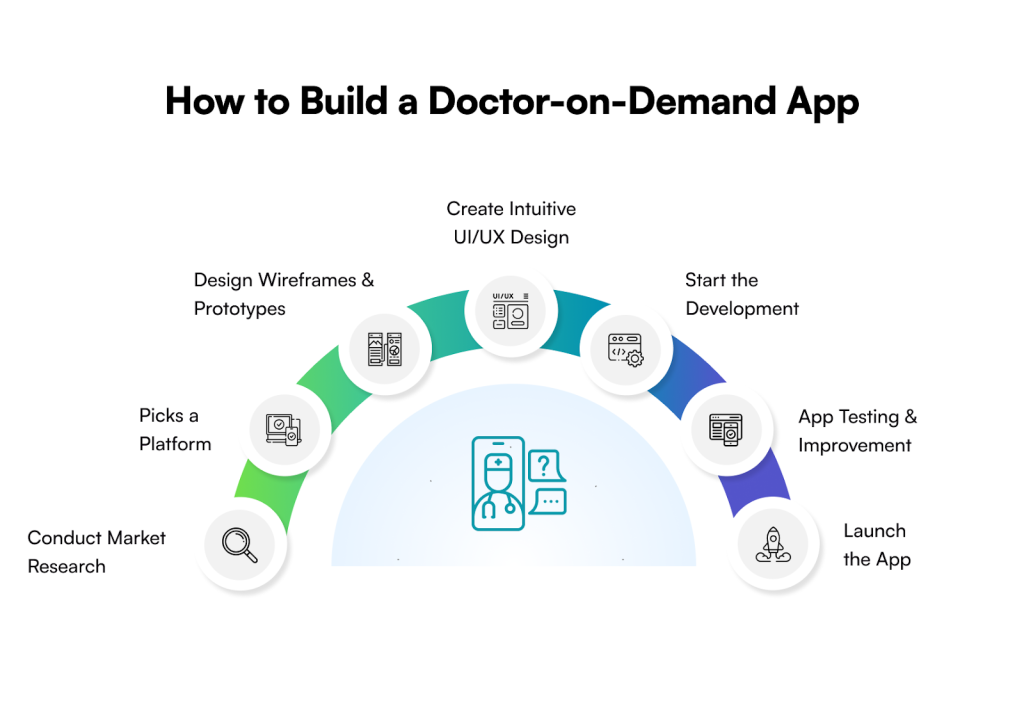
In the last phase of the development, make sure the company you hired follows an agile methodology. It is a must to always start with wireframes and then proceed to prototyping and development. 

Additionally, Quality Analysts should be involved during the entire process. As soon as you have successfully reached the MVP, always collect feedback, make changes, and ​‍​‌‍​‍‌​‍​‌‍​‍‌expand.

Suitable Tech Stack for Doctor-On-Demand App Development

A strong tech foundation is essential to developing a robust mobile application to deliver doctor-on-demand services. The following is a suitable tech stack for doctor-on-demand app development.

FrontendSwift, Java, Kotlin, React Native, Flutter, Ionic, Xamarin
BackendDjango, Node.js, Firebase
IntegrationsAPIs, payment gateways, third-party platforms
DatabaseMySQL, SQLite, Firebase, PostgreSQL, MongoDB

How Much Does It Cost to Build a Doctor-On-Demand App

There is no fixed answer to this question because it widely depends on a range of factors. Also, the number of platforms you wish to release your app (Android, iOS, or both) can vary the budget significantly. 

Usually,​‍​‌‍​‍‌​‍​‌‍​‍‌ businesses have to pay a whopping amount that can be as high as $250,000 and more and as low as $40,000. The hourly rates for the developers also differ significantly from one location to another. 

Below is a doctor-on-demand app development cost range based on the app’s complexity level:

App’s ComplexityCost RangeFeatures
Simple Complexity$1,50,000 to $2,00,000Patient data storage, file sharing, virtual appointments
Medium Complexity$2,00,000 to $2,50,000Real-time consultations, doctor profiles, ePrescriptions
High ComplexityMore than $2,50,000Medication management, AI-powered analytics and reporting

Common Challenges in Doctor-On-Demand App and Solutions

Developing a doctor-on-demand comes with its own challenges, like data security, regulatory compliance, and so on. 

Let’s take a closer look at some of the common challenges and how you can overcome them:

ChallengesSolutions
Regulatory ComplianceHire qualified legal professionals familiar with healthcare and data protection regulations to guide you in making sure your app complies with all the necessary ​‍​‌‍​‍‌​‍​‌‍​‍‌laws. 
User ExperienceDeliver a flawless user experience by creating a clean, simple, and intuitive app design. 
User Trust and EngagementPick dependable and scalable APIs to ensure that third-party apps are running smoothly without any disturbance. 
Scalability and PerformanceThe most effective practice is to partner with established, dependable service providers and ensure that your mobile application is designed for maximum scalability, allowing the addition of future integration services as they arise.

Galaxy Weblinks: Your Partner for Developing a Doctor-On-Demand Mobile Application

To sum up, developing an efficient and effective doctor-on-demand application is no longer viewed as a trend. It is now considered a necessary action to achieve accessibility and efficiency in the healthcare field. 

Other than the growing demand, investing in doctor-on-demand app development solutions has become an opportunity for businesses to rule the market. 

But, how exactly can one plan to stay competitive or ahead in the marketplace? It is possible by partnering with a trusted app development company that has experience in this same niche and has already built a successful app for the healthcare industry. 

That being said, the team at Galaxy Weblinks is the one you need. Backed by years of experience, our team has successfully delivered a HIPAA-compliant custom telehealth solution for providing virtual healthcare and consultation. [Read the full story here].

We have expertise in HIPAA and GDPR compliance, along with robust technologies that not only ensure optimal performance but also top-notch security. So, contact us to build robust digital healthcare solutions. 

FAQs

Q. What are the essential things I need to keep in mind before investing in a doctor-on-demand app development?

A. The foremost thing you need to keep in mind before you spend even a single penny is how you can make your app unique and stand out from others. The following is a list of things that you must consider:

  • Know your target audience.
  • Pick the right set of technologies.
  • Make sure to follow the essential regulatory compliance
  • List down the core features
  • Prepare the budget
  • Hire a reliable app development company

Q. How can an established business incorporate an app development solution for on-demand doctor appointments?

A. Developing and validating an MVP with stakeholders is the most effective way to execute an on-demand healthcare solution. It will reveal how comfortable they are using the software and what aspects should be enhanced for a better user experience. Partner with an expert healthcare development business to assist you throughout the implementation process.

Q. How much does it cost to design an on-demand doctor application?

A. The cost to develop an on-demand doctor application varies according to several factors, including the location of the development team, features of the application, methods for developing, available budget, etc.; there is no set price for on-demand doctor applications as they can range from $40k-$250 or even more. 

Fantasy Sports App Development Guide: Top Features, Cost, and Process 

Fantasy sports apps have exploded in popularity over the last few years. And honestly, it’s no surprise. This rise is driven by the shift toward interactive, skill‑based digital experiences. 

Their interactive gameplay hooks users fast, and the idea of using your own sports skills and knowledge to compete makes the experience feel… personal. Real. 

People love that.  

Naturally, this creates strong user retention and recurring engagement—two things entrepreneurs look for when evaluating new digital product opportunities. For founders, the opportunity is real—but so are the complexities. 

Building a fantasy sports app isn’t a simple “idea → launch” story. It never is. Most successful fantasy sports apps didn’t just appear one fine morning. They were the result of slow, deliberate work. Research. Planning. Smart decisions made at the right moments.  

A clear understanding of features, workflows, cost structures, and yes—compliances that you can’t ignore. 

Everything matters.  

And that’s exactly where things get tricky for beginners. Missing even one crucial detail can derail the entire concept. Which is why you need clarity before writing a single line of code.  

This guide aims to give you that clarity. 

This comprehensive guide on developing apps for fantasy sports works as your playbook—your roadmap—for building the right solution, step by step. From cost to develop fantasy sports app, process, and compliance to tech stack, it offers detailed insights.  

What is Fantasy Sports App Development? 

Fantasy sports app development involves creating a mobile application that allows users to build virtual teams of real-life sports players. These apps are a kind of gaming application. 

Users build their squads and when sportsmen play in real-world then points based on their performances are awarded based on established scoring logic.   

This connection between real match performance and in-app scoring is what makes fantasy sports compelling—and technically complex.  

Developing a Fantasy sports mobile app involves several steps and considerations to ensure it gets you the desired outcomes.  

Coding and features are the tip of the iceberg; there is a lot more in fantasy app development like UI/UX design, backend architecture planning, integration strategy, etc. 

You can target Android only with native app development or build for both iOS and Android with a cross-platform solution depending on your user segments. 

Market Overview for Fantasy Sports App Development 

The fantasy sports app market is rapidly growing and according to research, it is projected to grow to $563.8 billion by the end of 2030, at a CAGR of 15.2%. It shows the immense opportunities in this field that you can avail yourself of by investing in a fantasy sports app.  

For founders, this means the timing is strong—consumer demand, monetization models, and market momentum are all aligned. 

How to Develop a Fantasy Sports App? 

Building a good fantasy sports app takes clear planning. It needs research. Building a successful fantasy sports platform requires a structured approach. Following is a complete step by step fantasy sports app development process.  

Step 1: Research the Market and Plan Needs 

Start by looking closely at the market. This means studying what your competitors do. Learn what users expect. Look at successful apps in this field. Find the best features they use. You need to understand the sports you choose, like cricket or football. This research informs your product scope, feature set, and monetization strategy. Like, you may focus on fantasy football app development or fantasy cricket app development or so.  

Step 2: Build a Roadmap 

Next, turn your idea into a clear plan. Outline user flows, MVP scope, scoring logic, and compliance needs. Decide the final list of features. This step helps define the main parts of your app. It settles the basic design. Here, the best fantasy sport app development company will offer strategic guidance to build a good roadmap for you.  

Step 3: Invest in Good UI/UX Design  

A clean, intuitive UX matters because users need to make fast decisions, especially in live or time‑sensitive contests. There comes the role of UI/UX design. It involves creating intuitive interfaces and smooth user flows that make user journey frictionless. The best interaction design services create smooth user interfaces that enhance user experience. Wireframes and prototypes help validate the experience early.  

Step 4: Build with the Right Tech Stack  

After design, development begins for your fantasy sports mobile app. You can start with MVP development to validate your core idea. This allows you to launch the app with only key features to test the idea. Then the coding begins, and app developers show their skills. This phase has two main parts. 

  • Frontend development: It is the user-facing side. It requires writing code for the app’s interface. Frameworks like React Native or Flutter used here. Also, languages like Java, Kotlin, or Swift are used for coding.    
  • Backend development: The backend of your fantasy mobile app is where the business logic resides. It manages scoring engines, contest logic, leaderboards, user data, payments, and integrations. Databases, servers, APIs, caching, and CDNs, are all part of the backend infrastructure.  

Also see: Which one is the best: Flutter or React Native? 

Step 5: Test Thoroughly for Best Performance  

Your app is built. Great. But is it actually ready for real users? That’s where testing steps in — the phase people often rush, but really shouldn’t.  

The app goes through several tests. Like, API testing. That makes sure data moves flawlessly. Functional testing ensures everything works smoothly.  

Usability testing checks if the experience feels smooth, not clunky. Plus, several other checks happen. These ensure performance, accuracy, and security stay solid.    

Step 6: Deploy and Launch  

Once your app is ready and tested, it is deployed to App Store and Play Store with required configurations, compliance validation, and optimization.  

Step 7: Invest in Maintenance  

Launching is not the end. Fantasy sports apps require continuous updates—new seasons, new contests, new rules, and evolving compliance standards. This constant work is essential for scaling. The user base will grow. Post-launch support handles these challenges. You have to keep the app healthy.  

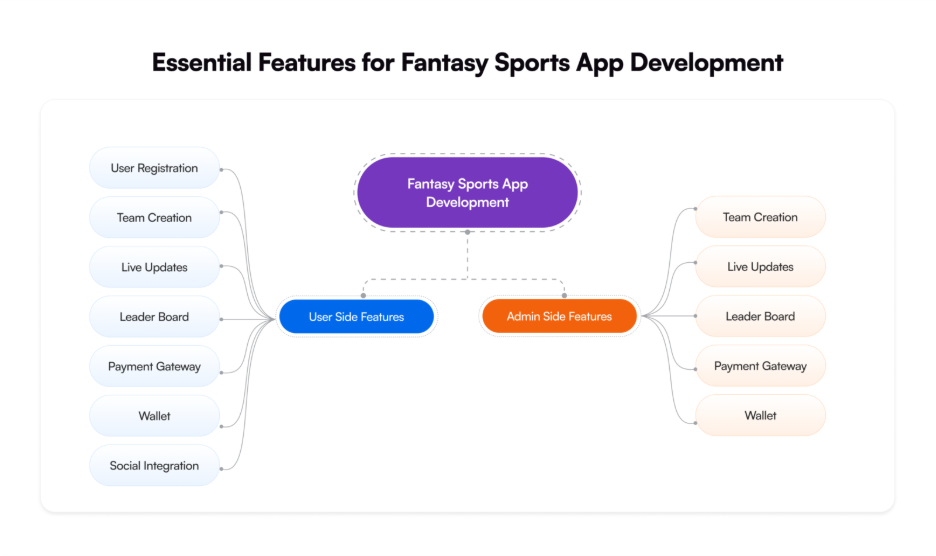
Essential Features for Fantasy Sports App Development 

Features play a vital role in making your fantasy sports app attractive and engaging. Here are the essential features that the right fantasy app should have.  

Features on User Side 

These are the user-facing features that the end users directly have access to.  

User Registration 

Users need an easy way to sign up for the app. Registration must be simple and quick for fast access. Avoid long, difficult processes. Keep the screen clean. Use only the fields that are absolutely needed. Choosing the best UI/UX design services helps create a good interface.  

Users must be able to register via email or phone number. Registration through social media like Google or Facebook has also gained popularity. It offers an easy and quick method to register.  

Team Creation 

This feature is the heart of fantasy sports app development that allows users to create their teams. Users can select players and build a team based on performance stats and strategy. For example, users can create fantasy cricket league teams.    

Live Updates 

Live updates feature includes automatic real-time scoring and tracking of points of users’ teams. These updates happen based on the actual performance of the players in the game. Scores or points are updated in real-time when a player gets strikeouts or scores a goal. Regular notifications keep users engaged and updated about the scores, live sport events, and matchup reminders.  

Leader Board 

Leaderboard provides a visual representation of rankings for different teams. It offers a dynamic list of teams in descending order powered by the point calculation engine. It provides ranking in easy and understandable format with team names, scores, and rank of each user. 

Payment Gateway 

Easy and secure payment is one of the vital features for fantasy sports app development. This requires integration of payment gateways that will enable users to add amounts to their wallets or withdraw and share amounts to their bank accounts.  

Wallet 

Users can manage their funds during gameplay with the use of a wallet. They can add money to the wallet or withdraw it by sending it to banks. It is a virtual vault that holds users’ funds, winnings, and bonuses. Users can deposit money here and see transaction history for all deposits, withdrawals, and winnings.  

Social Integration 

These are features that allow users to compete with others, connect with friends, and share data. Features like in-app chats and private leagues are part of social integration.  

Features on Admin Side 

These features are not available to end users, and only admins can access them to control and manage the app’s ecosystem.  

Rules and Scoring 

It includes custom configurations that help control the game’s rules and scoring format. The admin can set how points are awarded, manage the rules of leagues and contests, create different scoring formats, and more. 

User Management 

This feature provides complete control for managing user profiles and setting rules for them to the admin. The admin can restrict any account when necessary and identify and verify accounts.  

Payment Handling 

With this feature, the admins can manage funds. It provides control over refunds and transactions. Additionally, it helps to manage the generation and distribution of financial reports. 

Managing Contests 

Contest-related features enable the admin to design, edit, and remove contests. The admin can add entry or winning fees, number of participants, and other details.    

Data and Analytics 

Another essential feature for developing fantasy sports apps is a clean dashboard with data and analytics. It offers real-time insights into various aspects of your application including revenue, user behavior, app performance, and more. 

What is the Tech Stack to Create a Fantasy Sports App? 

Choosing the right tech stack plays a vital role in creating an efficient, scalable, and user-friendly fantasy sports mobile app. The following is a list of the top technologies for developing the app. 

Frontend Development 
Frameworks React Native, Flutter, Ionic 
Programming Languages Swift, Objective-C, Kotlin, Java 
Backend Development 
Server Nginx, Apache 
Frameworks/Platforms Node.js 
APIs and Services Sports data APIs, payment gateways, Facebook SDK, Twitter API 
Hosting and Deployment AWS, GCP, Azure 
Database MySQL, SQLite, PostgreSQL, Firebase, MongoDB, Amazon DynamoDB 
Real-Time Communication WebSockets, Firebase 
Security SSL/TLS, JSON Web Tokens (JWT) 
Tools & Platforms 
IDE/Code Editors Android Studio, Xcode, Visual Studio Code 
Project Management Jira, Microsoft Project, Trello 
DevOps & CI/CD Jenkins, Git, GitHub/GitLab, 
Analytics & Monitoring Google Analytics, Datadog 

Native vs Cross-platform vs Hybrid: Which is Best for Fantasy Sports App Development? 

Picking the right tech foundation is the biggest decision. It is the first critical step for fantasy sports app development. You got three ways to go: Native, Cross-platform, or Hybrid. The “best” choice really depends on your cash. It depends on your main goal.  

Native gives you unmatched speed. It performs great. You need that speed for real-time scores. You need it for quick bidding. Cross-platform is cheaper to build. You launch it faster. It’s perfect for testing your idea first. Hybrid is the easiest way.  

But it gives up too much performance. Fantasy sports apps need to be dynamic. For a serious, high-traffic app, Native is often the superior choice. It just gives users the best experience and stability. 

Technology Type Primary Goal Performance & Speed Cost & Time User Experience (UX) 
Native Maximum Performance Excellent (Real-time data) High Best (Seamless device integration) 
Cross-Platform Faster Time to Market Good (Slight lag possible) Medium Very Good (Shared codebase) 
Hybrid Lowest Initial Cost Fair (Relies on web wrapper) Low Limited (Feels like a website) 

Understanding the Cost: How Much Does It Cost to Build a Fantasy Sports App? 

The cost of fantasy sports app development varies due to complexity, features, and many other factors. For example, if you want to develop an app with basic features like user registration, leaderboard, scoring, and team creation, this likely cost between $5,000 – $20,000.  

Similarly, a highly complex and large fantasy app will cost $80,000 – $150,000 or more. The following table shows possible ranges for the cost to develop fantasy sports app based on app complexity.  

App Complexity Cost Range Possible Timeframe 
Simple App $5,000 – $20,000 3-6 months 
Moderate App $20,000 – $80,000 6-9 months 
Complex App $80,000 – $150,000 9-12+ months 

Note: True cost depends on compliance, real‑time data licensing, scalability requirements, design depth, and number of sports. 

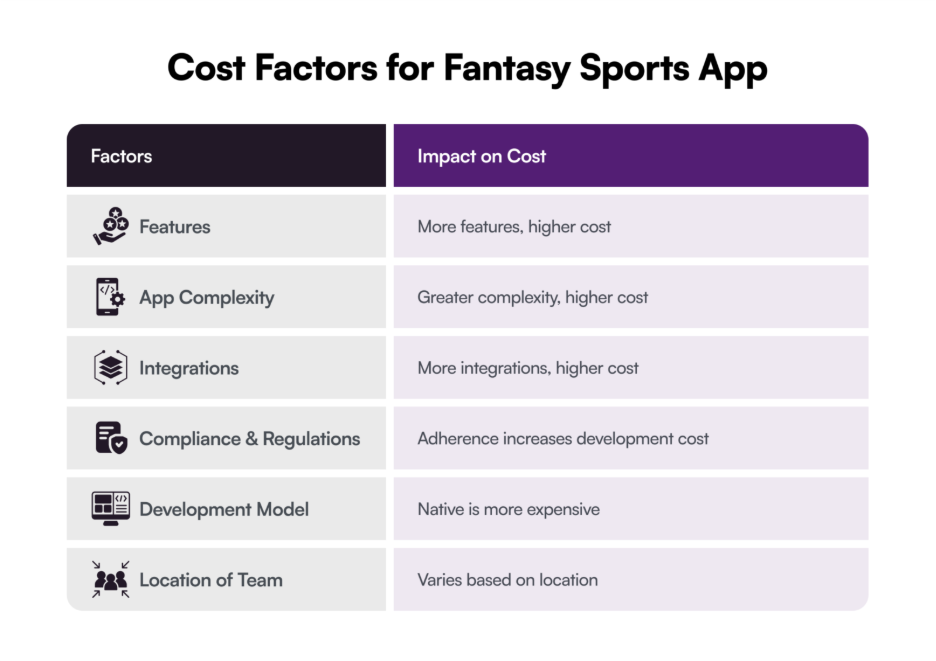
Key Factors that Influence the Cost of Fantasy Sports App Development 

Features 

The features you add to your fantasy sports app play a direct role in shaping the overall cost. A simple app with core features is always more affordable, but the cost increases as you start bringing in advanced capabilities.  

Want multi-language support? That costs extra. Adding multi-currency capability? More money. Social integration and live chats, too. These features add up. Then you look at the truly advanced stuff. AI, AR/VR, and blockchain. Those take the cost much higher. Mobile app development costs vary greatly. It all depends on your feature mix. 

App Complexity 

App complexity is also directly linked to the cost. More complexity, more costs. It’s simple math. This is because you need more time and skills in integrating advanced functionalities, complex business logic, and extensive integrations. So, naturally this excessive time and effort lead to higher costs.  

Integrations 

Often apps require third-party integrations like payment gateways, social media, and APIs. These integrations also contribute to the increase in costs. More integrations will result in more cost to develop fantasy sports apps.   

Compliance & Regulations 

The requirement for legal compliances like GDPR, CCPA, and other regional regulations also affect the cost of developing a fantasy sports app. You need to develop your app adhering to these regulations and compliances that will add more to your development cost.  

Development Model 

The way you build the app changes how much you pay to develop a fantasy sports app. Go native (separate code for iPhone and Android) and you’re basically paying for two apps. Pick React Native or Flutter instead, write the code once, and it runs great on both platforms.  

Same look, same features, half the price. Most brands today go cross-platform and pocket the savings—or use the extra cash for better design and marketing. Simple choice, big difference. 

Location of Development Team 

The geographical location of your fantasy sports app development company also plays a crucial role in app development costs. Development rates often vary widely by the region. It’s common to see hourly pricing in North America fall somewhere around $100–$250, while countries like India often offer ranges closer to $20–$60. These are general market patterns, not fixed standards — skill levels can be similar, but the overall cost of building an app can still differ a lot depending on where the team is based.   

Types of Fantasy Sports Apps 

There are different types of fantasy sports applications that you should know to make the right decision. By understanding these different apps, you can determine which one you should build. Let’s check out these apps.  

App Type Description 
Quick Contests (Daily Fantasy Sports) These apps offer short-term games. Users pick teams for one day or one week. The results come quickly. They get frequent chances to win. Platforms like DraftKings and FanDuel draw both casual fans and serious competitors. They are like quick competitions. The commitment is low. It works well during major sports seasons. 
All-Sport Games (Multi-Sport Fantasy Apps) These apps let users build teams across many sports. Think football, cricket, basketball, or golf. This keeps people playing all year. ESPN Fantasy and Yahoo Fantasy are examples. They make it easy to switch between sports. Players get versatility. Everything is simple and in one place. 
Long-Term Leagues (Season-long Fantasy Sports Apps) These apps require commitment. Users draft their teams before the season begins. They manage those teams for months. This means handling trades, injuries, and performance drops. It favors long-term planning over quick wins. NFL Fantasy and CBS Fantasy Sports keep devoted players engaged. It builds deep competition and camaraderie. 
Community Games (Social Fantasy Sports Apps) These apps focus on connecting people. They add features like friend leagues and group chats. They allow easy sharing. Platforms like Sleeper and Discord leagues make the game interactive. They strengthen relationships. The fun goes beyond just stats and scores. 
Specific Interests (Niche Fantasy Sports Apps) These apps serve small, dedicated fan bases. They cover sports like MMA, cycling, or NASCAR. The fans want a game tailored to their specific interests. PlayON offers unique features. These apps give dedicated communities a customized way to play their favorite sports. 

Fantasy Sports App Development Trends: Advanced Features You Can Integrate   

You need fresh ideas for your fantasy sports app. Think outside the box, seriously. Put in features that really stand out. You need unique selling points. Those points help you beat the competition. It’s just a simple business sense.  

So, what are those USPs? You can leverage the cutting-edge technologies and trends in fantasy sports app development to create innovative apps with advanced capabilities. Let’s see these advanced features and trends. 

AI and Machine Learning 

AI and machine learning are great tools. They push fantasy apps to a new level. They give you advanced features. Think predictive analysis. Think super-personalized recommendations. They even optimize lineups for you. These features use data. Things like score histories. Player performance. Real-time game stats, too.  

Users get essential insights to make better decisions and improve their game strategies. Besides, you can integrate AI-powered chatbots to help users answer their queries and offer an analysis of the game that results in higher user engagement.  

Blockchain 

The use of blockchain with your fantasy sports app improves security significantly. It helps in decentralized and temper-proof record-keeping to ensure fair play. Further, smart contracts make transactions more transparent and trusted to ensure fraud-proof payouts.  

The immutable blockchain ledgers help record in-game transactions and player stats quite securely that maintain transparency and reduce chances of manipulation.   

AR/VR 

Augmented Reality (AR) and Virtual Reality (VR) can take fantasy sports experience to a whole new level. With these technologies, users can experience an immersive and interactive game environment.  

With the use of VR, users can experience the game in a simulated environment. And, with the use of AR overlays, users can get real-time score updates in a more engaging and interactive way. With XR, that combines both these techs, users will get a real-life stadium-like experience. 

IoT 

The Internet of Things (IoT) brings a major change in how fantasy apps function. This technology enables apps to fetch data in real-time from wearable devices, smart stadiums, and other connected devices to enhance user decision making in games. Based on the advanced knowledge about a player’s performance, users can make the right decision that will increase their winning possibility. 

Cloud  

Cloud technology helps build a strong foundation for your fantasy app. It makes the app scalable. It keeps it efficient. This ensures top performance. Even when traffic spikes, the app stays fast. Choosing the cloud also saves money. It lowers your overall costs. The cloud provider handles the maintenance for you. 

What are the Examples of Fantasy Sports Apps that are Successful? 

There are many examples of successful fantasy sports apps around the world that have made a strong place in their markets. The following table shows the top examples of such apps.   

App Type of App Key Features User Base 
ESPN Fantasy Sports Multi-sport seasonal fantasy Wide sports coverage; expert analysis; real-time scoring; easy UI Sports fans wanting deep seasonal play 
Yahoo Fantasy Sports Multi-sport fantasy with DFS options Great draft tools; player rankings; live updates; beginner-friendly Beginners and regular multi-sport players 
Sleeper Social fantasy sports app Modern UI; strong community features; integrated chat; customizable leagues Social players and modern fantasy enthusiasts 
FanDuel Daily Fantasy Sports (DFS) Cash contests; instant payouts; expert projections; flexible teams DFS players and competitive gamers 
DraftKings Daily Fantasy Sports (DFS) Wide global sports coverage; contest variety; deep stats & insights Strategy-driven fantasy players 
Dream11 Multi-sport (India-focused) fantasy Strong cricket focus; cash contests; expert insights; private leagues Cricket fans and casual fantasy players 

Monetization Strategies: How Can You Earn with Your Fantasy Sports App?  

If you want to enter the growing fantasy sports app domain, you need to understand different monetization tactics used by these apps. This will help you build the right app with the right monetization strategy to ensure both user engagement and profitability. The following are the different strategies adopted by fantasy sports apps to earn money.  

Freemium Model 

The freemium model is simple. You offer your app free to users. They can choose to upgrade later. The paid features give them extra value. Think of a popular dating app like Tinder, for example. It gives limited profiles and features for free. If someone pays, they see more users and features. Offer better value in paid services. This encourages users to upgrade easily. 

In-App Advertisements 

Another monetization strategy you can use is integrating in-app ads, and it is popularly used by different gaming apps. Ads can be in video or banner format, or sponsored content. Companies in the sports niche often pay heavily to promote their services or products.  

Subscription Plans 

Subscription-based monetization gives you control over how users will use your app. You can provide different subscription models that users can pick from based on their budget and requirements. There can be different features, like expert predictions, advanced stats, and more with subscriptions.  

Contest Entry Fees 

You can also earn when users pay for entering a contest hosted in your app like paid tournaments and leagues that offer cash prizes. This is the common monetization strategy used in fantasy sports app development. Apps like Dream11 use this strategy.  

Essential Legal Compliances to Build Fantasy Sports App 

Entrepreneurs and business owners have to navigate the legal environment to develop fantasy sports apps that might be challenging. Plus, ignoring these compliances can result in heavy fines, legal action, app bans, and eroded user trust.  

Since it is complex and constantly evolving, understanding and adhering to these compliances can be difficult for beginners. Here we have summed up the essential legal compliances to develop your app.  

Data Privacy and Security Your app must follow the best data privacy and security practices to ensure users’ data remains safe. It ensures your compliance with data privacy and security regulations.  
Fair Play Agreements Ensure fair gameplay implementation by creating anti-cheating agreements. Such an agreement will encourage users to make a fair game approach.  
Intellectual Property Rights You can avoid infringing intellectual property rights by using public agreements and domains. Using data and names of real players can result in intellectual property right violations. 
Gambling Compliance Beware of the gambling regulations and betting app compliances in your respective region to ensure your app adheres to these regulations.  
Ads & Promotion Compliances Make sure that ads and promotions displayed in your app comply with local regulations and offer accurate information instead of misleading content.  

To Wrap Up 

The popularity of fantasy sports apps continues to grow because users want interactive, skill‑based entertainment—and founders see strong monetization potential. The increasing demand for such apps is a golden opportunity for businesses to invest and earn.  

Lots of entrepreneurs see this chance. They are eyeing the opportunity to make money. But success requires more than an idea: founders need clarity, validated scope, strong UX, reliable architecture, compliance alignment, and a long‑term product plan. 

Galaxy Weblinks helps founders build stable, scalable fantasy sports apps—from discovery and UX to engineering, AI features, and ongoing maintenance. Our approach reduces risk, accelerates development, and ensures your app is ready for real users and real competition. 

As a leading mobile app development company with over two decades of experience, Galaxy Weblinks has the expertise to help you develop a robust fantasy sports mobile app. 

We guide you and provide expertise in developing a winning application.  

Contact us now to discuss your requirements and get assistance in turning your vision into reality.  

Frequently Asked Questions 

How much does a fantasy sports app cost in 2026? 

The fantasy sports app development cost usually falls in the range $25,000 to $250,000. It actually depends on the number of features. More features simply means the price will be higher.  

How long does it take to build? 

Around 2–6 months. Complex apps take longer. There’s no shortcut here. 

Which app development type for fantasy sports is best? 

Native is best for speed. Cross-platform is best if you want to save money. You build one app. It works for both Android and iOS. 

Do I need a license to run a fantasy sports app? 

In many regions, yes. Some places are strict. You must check local laws. 

Is it possible to start with an MVP for fantasy sports apps? 

Yes absolutely. Start small, launch fast. Then you can improve your app gradually with more features based on user feedback.  

Can I integrate multiple sports in one app? 

Yes you can. But it increases cost and dev timelines. More data = more work. 

Do fantasy apps make money? 

Yes. Entry fees, ads, subscriptions. Many monetization routes. Works well if user base grows. 

Why should I hire an experienced development company? 

Less risk. Better security. Faster delivery. They know what mess to avoid. 

A Comprehensive Guide to Stock Trading App Development

Developing a stock trading app helps you enter a thriving market and reach a huge audience of investors. According to Statista’s forecast, the global online trading market grows at a rate of 6.4% per year and is expected to reach $13.3 billion in 2026.

The data speaks for itself; building a stock trading app could be a huge win in terms of innovation and business growth as the demand for financial literacy and investing keeps rising. However, creating the best app for stock trading requires intuitive UI/UX design, user-friendly features, and USPs that can make it stand out from the competition. 

That’s why choosing the right mobile application development company makes a difference, and you get the best expertise to accomplish the goal. However, turning your idea into reality requires careful planning and execution. You need to know several things about stock trading app development before you dip your toes in it. 

In this detailed guide to stock trading mobile app development, we’ll walk you through its nitty-gritty. 

From an estimated budget, considerations, and the right tech stack to essential features, we will explain everything to make a good plan for your stock app development project. 

So, without any further ado, let’s get started. 

Why Business Owners Should Invest in Trading App Development

Stock​‍​‌‍​‍‌​‍​‌‍​‍‌ trading applications allow investors to be kept in the loop about the performance of their portfolios. 

Due to this comfort, customers tend to be more willing to take up a subscription and thus become paid members of the platform. Thereby, availing of financial app development services is a good decision to get a solution that will attract investors and keep their ​‍​‌‍​‍‌​‍​‌‍​‍‌loyalty. 

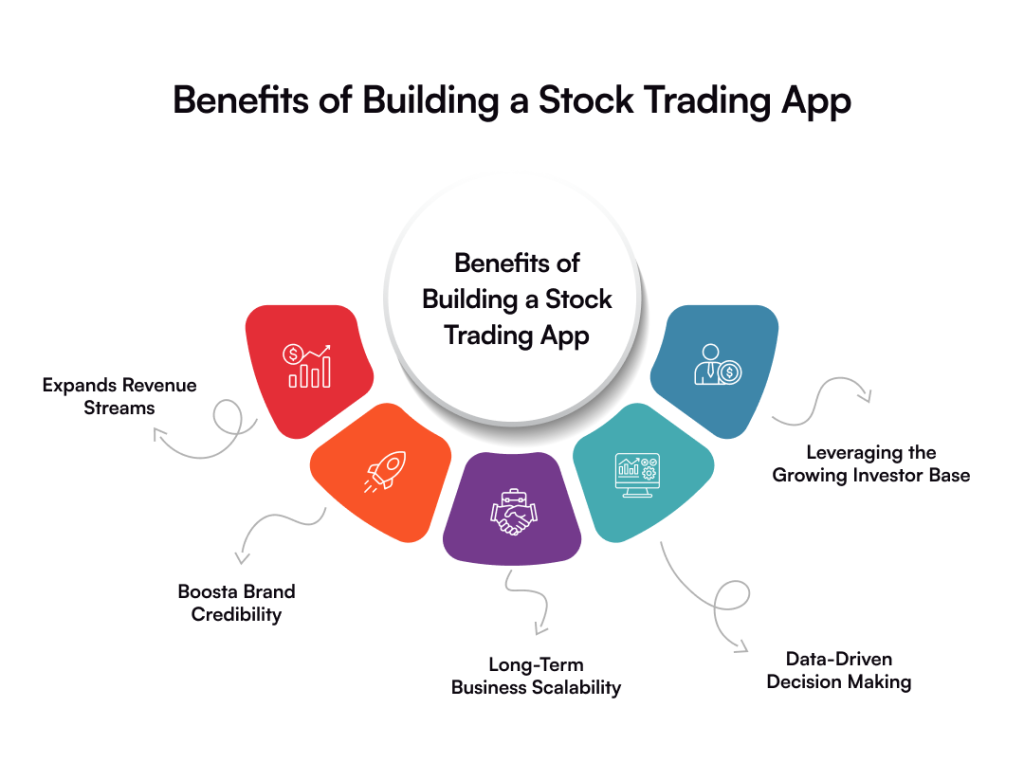
In a nutshell, the potential to benefit both financially and in terms of popularity is very high when it comes to stock trading app development. Let’s have a look at its benefits briefly:

  • Expanding Revenue Streams

Building​‍​‌‍​‍‌​‍​‌‍​‍‌ a stock trading application brings various monetization options to the table for you. Regular income can be made by you from trading commissions, subscription models, premium account upgrades, and collaborations with financial ​‍​‌‍​‍‌​‍​‌‍​‍‌institutions.

  • Boosts Brand Credibility

​‍​‌‍​‍‌​‍​‌‍​‍By introducing a stock trading application, you are essentially branding your company as one of the financially tech-savvy next movers in the market. This way, you enhance your brand’s reputation, draw the attention of potential investors, and also get the approval of those users who are most concerned about transparency, security, and innovation in electronic finance. ​‍​‌‍​‍‌​‍​‌‍​‍‌ 

  • Long-Term Business Value

As the number of users grows, you have the option to implement advanced tech, AI-based analytics, personalized investment suggestions, and real-time notifications. Such a method allows you not just to maintain the level of user engagement but also to progress your ​‍​‌‍​‍‌​‍​‌‍​‍‌company. 

  • Data-Driven Decision Making

Stock​‍​‌‍​‍‌​‍​‌‍​‍‌ trading apps have valuable insights into user behaviour. Such information can help you lead the way in making tactical decisions by feature optimization, marketing campaign improvement, customer experience enhancement, etc. 

  • Leveraging the Growing Investor Base

The​‍​‌‍​‍‌​‍​‌‍​‍‌ world trading environment is seeing a rise in the number of retail investors who are in search of user-friendly mobile solutions. When you make your app, you are reaching out to an audience that is growing very fast, and that is highly interested in accessibility and in trading in real-time. 

Must-Have Features to Integrate in Your Stock Trading App

Creating​‍​‌‍​‍‌​‍​‌‍​‍‌ a highly optimized trading app goes beyond an eye-catching design. Essentially, it is about providing those features that raise user confidence, make trading easy, and give a trouble-free app functioning. 

These are the indispensable features that you need to embed in your stock trading app to make it attract users and focus on their ​‍​‌‍​‍‌​‍​‌‍​‍‌needs. 

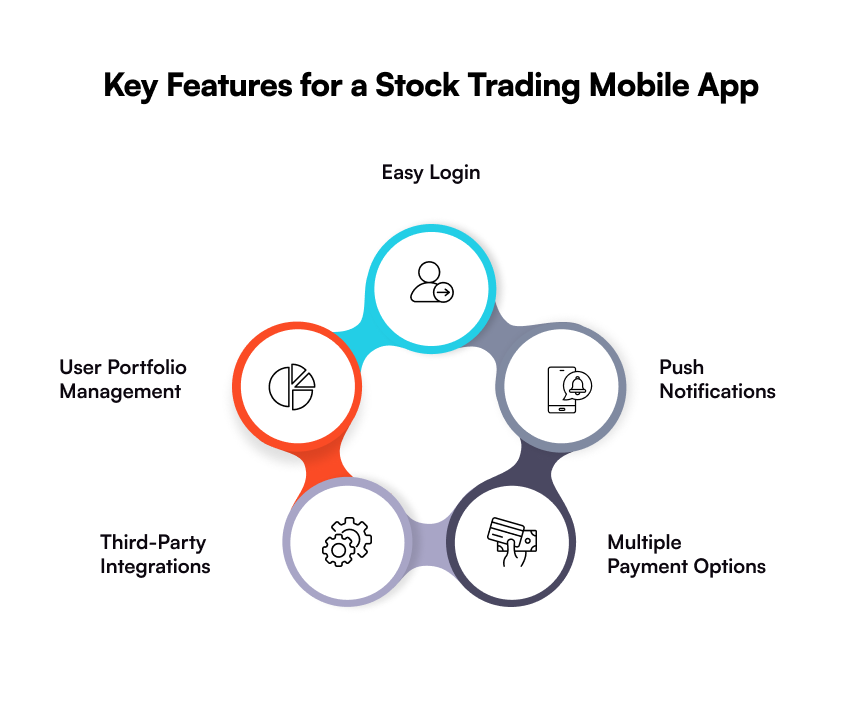
  • Easy Login

Log​‍​‌‍​‍‌​‍​‌‍​‍‌ in is the initial stage of getting access to an app, and thereby, you need to come up with the most straightforward way. An excellent online trading application may offer multiple login methods, such as biometrics and PIN codes, in order to facilitate ​‍​‌‍​‍‌​‍​‌‍​‍‌users. 

  • Push Notifications

A stock trading app should have a push notification feature so that users can be notified instantly of any price changes, news, or account activities. In this way, they are empowered to make the right decisions on the ​‍​‌‍​‍‌​‍​‌‍​‍‌spot. 

  • Multiple Payment Options

It​‍​‌‍​‍‌​‍​‌‍​‍‌ is becoming increasingly necessary to offer users different payment methods with the booming number of fintech apps. It is indispensable for users to make payments via UPI, debit cards, or any other payment options that they prefer to ​‍​‌‍​‍‌​‍​‌‍​‍‌use. 

  • Third-Party Integrations

Incorporating third-party APIs enables users to incorporate their accounts with other trading tools and applications, allowing them to analyze a wide variety of data.

  • User Portfolio Management

An​‍​‌‍​‍‌​‍​‌‍​‍‌ easy-to-understand portfolio management dashboard visually presents the user’s current investments, revenues, and expenses at a glance in real-time. This way, users can make more appropriate financial ​‍​‌‍​‍‌​‍​‌‍​‍‌decisions. 

How to Build a Stock Trading Mobile App

Building a stock trading app is not only about coding or choosing an ideal framework, but it is essentially about making a safe, simple-to-use, and regulation-compliant platform to be able to win the trust of the investors. 

The following is a guide on the way you can convert your app concept into a real trading platform that is in line with business and user ​‍​‌‍​‍‌​‍​‌‍​‍‌requirements. 

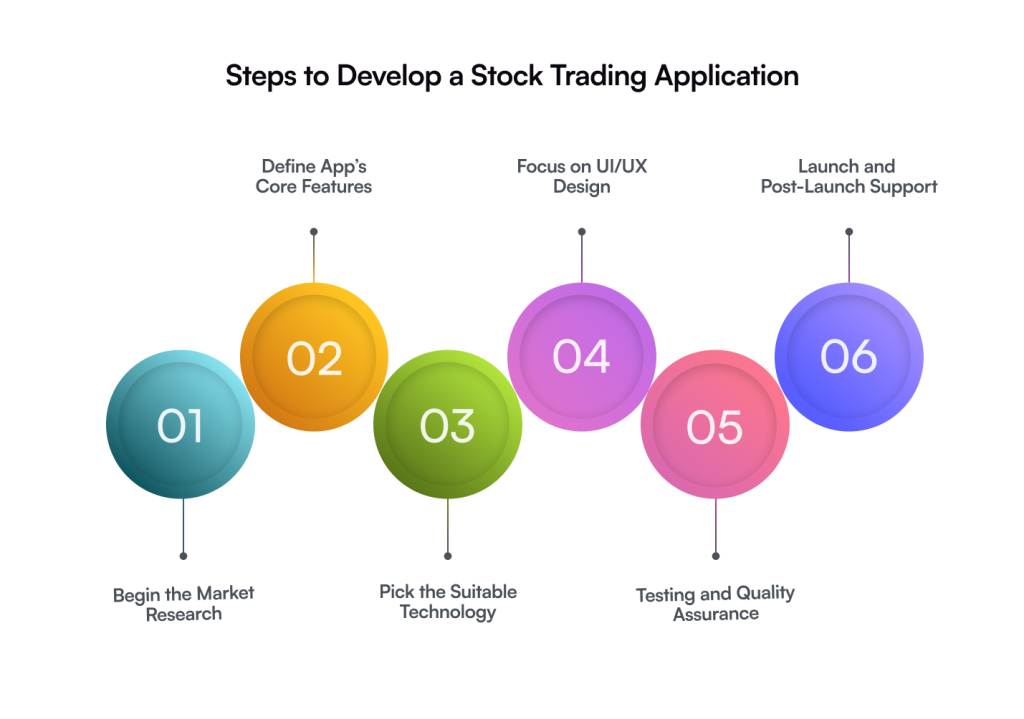
  • Step 01: Begin the Market Research

Prior to launching your product, do some market research to determine the niche it fits into. Other than this, think about the audience. What difficulties do they encounter? How can you help potential clients address them with your product? Remember your rivals: how do you differentiate yourself in the very competitive stock trading app market? 

Recognize their shortcomings and take advantage of them by adding new features, enhancing accessibility, and developing an intuitive design. You can browse through their reviews or engage specialists to do this for you.

  • Step 02: Define Core Features and App Functionality

Consider the features you plan to add to your stock market app. Dashboards and payment APIs are essential. At this stage, you should also think about any more nice-to-have features you’re going to offer that can set your firm apart from your competition.

  • Step 03: Pick the Right Tech Stack

Your app’s performance, scalability, and security rely heavily on the technologies you choose.

  • Frontend: React Native or Flutter for cross-platform compatibility
  • Backend: Node.js, Python, or Java for robust processing
  • Database: PostgreSQL or MongoDB for secure data management
  • APIs: Real-time stock data APIs, analytics, and third-party financial integrations

Partnering with an experienced provider ensures that your app is equipped with modern, scalable, and compliant technologies.

  • Step 04: Focus on UI/UX Design

Picking an appealing design is a vital stage in stock trading app development. Remember unaligned and clunky design degrades the users’ perception of an app. Therefore, select a strong UI/UX team and collaborate with them to develop your app’s design.

  • Begin the Code Development and Test MVP

Now that you have a team and a basic concept for a stock market app, it’s time to begin developing a trading platform, namely the initial version. The group will consider the nuances of the stock trading app industry. The product will be developed as planned, with excellent UI/UX design, functionality, and compliance with all applicable regulations.

Testing the MVP before release is essential. In this manner, you may correct the bugs before making the app live.

  • Step 06: Work on User Feedback

Even after it is released, the development of stock market apps is still ongoing. In order to improve the app and add features that your users felt were missing, you’ll need to examine user feedback.

Tools and Technologies Used to Build a Stock Trading App

Before developing a stock trading mobile app, choosing the right tech stack is essential to ensure your app meets business goals while staying secure, scalable, and future-ready. Here is a list of the most used tools and technologies for developing a stock trading app.

CategoryTechnologies / Tools
Frontend DevelopmentReact Native, Flutter, Swift (iOS), Kotlin (Android), HTML5, CSS3, JavaScript.
Backend DevelopmentNode.js, Python, Java, .NET, PHP
Database ManagementPostgreSQL, MongoDB, MySQL, Firebase
APIs & IntegrationsREST APIs, GraphQL, WebSocket, Market Data APIs (e.g., Alpha Vantage, Yahoo Finance, IEX Cloud)
Cloud & DevOpsAWS, Google Cloud, Microsoft Azure, Docker, Kubernetes
Security ToolsSSL Encryption, OAuth 2.0, Two-Factor Authentication, Biometric Verification
Analytics & MonitoringGoogle Analytics, Firebase Analytics, Mixpanel, New Relic
Payment GatewaysStripe, Razorpay, PayPal, Braintree

How Much Does It Cost to Develop a Stock Trading App

There​‍​‌‍​‍‌​‍​‌‍​‍‌ are various factors that influence the cost of developing a stock market app, such as the complexity of the app, features, cloud solutions, operating systems, time of production, and many others. 

Developing a Fintech solution is not an easy job, but the app should always be user-friendly to get more customer engagement. Your development team will need nearly 6 to 12 months to make a trading app. 

The total trading app development cost can be anywhere between $25,000 and $300,000. It goes without saying that the price of app development will be different depending on the selection of features and functionalities, and the level of the application. 

Partner with Galaxy Weblinks for Stock Trading App Development

Stock​‍​‌‍​‍‌​‍​‌‍​‍‌ trading app creation is a large-scale project which necessitates complicated app logic and architecture for its production. In short, by integrating suitable features and functionalities, a tech stack, and keeping up a steady development pace, the success probability is going to be higher. 

In case you plan to develop a trading app with good prospects, the best way is to follow a custom fintech app development process. 

Alternatively, you can employ a company that provides stock market app development services like Galaxy Weblinks to develop an app that is not only unique and feature-rich but also profitable. Contact us now and let our experts make it easy for you to go from an idea to a top-notch trading platform ​‍​‌‍​‍‌​‍​‌‍​‍‌development.

FAQs

Q. How much does it cost to build a stock trading app?

A. The cost to construct a stock trading app typically ranges from $25,000 to $3,00,000+, depending on the app’s functionality, design complexity, and technological stack. The price of a simple trading app with essential features like portfolio tracking and market data is lower. 

Q. Why should I invest in a stock trading app development?

A. Investing in a stock trading app development has several significant benefits, including a growing market, an emphasis on mobile-first adoption, varied revenue methods, and a greater possibility for market expansion in niche areas.

Q. Do you provide post-launch support and maintenance?

A. Yes.​‍​‌‍​‍‌​‍​‌‍​‍‌ As a trustworthy fintech app development company, we deliver post-launch support for your trading app even after the initial release. Our team will take care of feature updates, bug fixes, performance monitoring, and scalability changes to make sure your app stays competitive and meets all the necessary ​‍​‌‍​‍‌​‍​‌‍​‍‌regulations. 

How to Develop an iOS App in 2026: A Detailed Guide

Apple devices are known for their strong ecosystem, seamless integration, and flawless user experience. Their sleek, high-quality, and user-friendly design attracts users. The love for Apple devices is a reason why there is an immense demand for iOS apps. 

As iPhone usage continues to rise globally, the demand for iOS apps is only going to skyrocket. This is an immense opportunity for businesses looking to expand their operations. Investing in iOS app development services helps businesses target the premium user base.

According to Statista, there are a total of 1.5 billion iPhone users globally who believe in Apple’s robust security, smooth UI/UX design, and more. Nevertheless, only a handful of people understand that the path from ideation to execution isn’t always straightforward. 

Without properly understanding the nitty-gritty of iOS app development, you are likely to end up hitting a wall. There are many considerations and a lot of questions to ask before you decide how to make an iOS app. Budget and process are just the tip of the iceberg.  

We will explain to you everything in detail, from planning to technology, in this comprehensive iOS mobile app development guide to make the right decision. Whether you are a startup founder or bootstrapping your idea, this guide will help you navigate the challenges in developing an iOS app.  

Let’s get started without further ado!

Why iOS App Development Matters for Businesses 

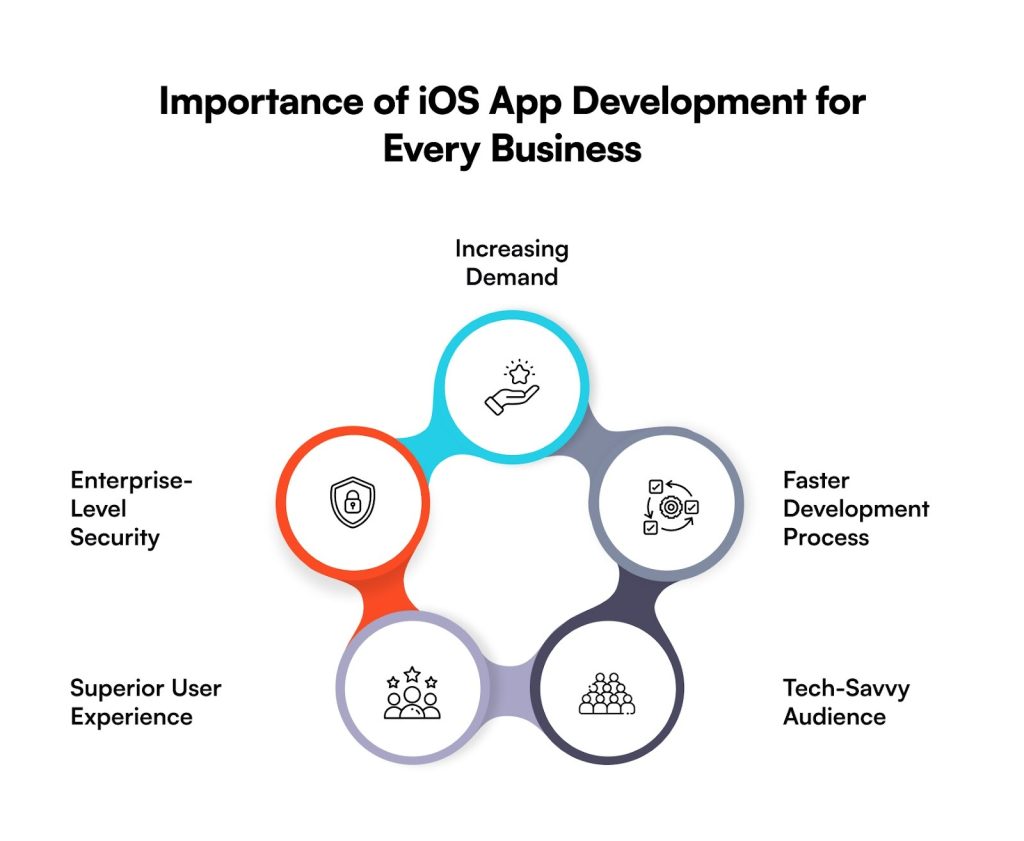
Faster performance, flawless UX, and sleek design are the core USPs that make iOS apps stand out from hybrid or Android apps. But there is more to the picture; so, let’s have a quick look at the solid reasons why businesses should invest in iOS mobile applications.

  • Increasing Demand

The adoption of the iPhone continues to increase, and so does the demand to build an iOS app. Apple has a strong and loyal customer base, who prefer quality apps – thanks to Apple’s robust security standards and consistent user experience. Because of this, business owners (like you) have the right opportunity to tap into this growing market. 

  • Enterprise-Level Security

One of the main reasons for the success of the iOS ecosystem is Apple’s security, which is basically a fortress. It is enhanced by Apple Intelligence: the system that enables on-device AI features, and at the same time, keeps personal data secure through Private Cloud Compute. When combined with features like end-to-end encryption, tracking prevention, mail privacy protection, and passkeys, iOS delivers an even better and trusted security ecosystem. 

  • Superior User Experience

If you want to enhance your brand recognition, along with a robust user base, then iOS mobile application development is an excellent strategic move. Apple strictly follows Human Intelligence Guidelines, which precisely set the standards for layout, navigation, typography, and spacing. The main advantage of this uniformity is that it allows companies to give their customers an impeccable experience that seems trustworthy and familiar. 

  • Tech-Savvy Audience

Without​‍​‌‍​‍‌​‍​‌‍​‍‌ a doubt, an iOS app will lure a tech-savvy audience, as they are generally the first ones to leverage the innovations and the most advanced features. In addition, they will not think twice before paying more when it comes to using premium features, which makes it a win-win situation for both users and business owners.

  • Faster Development Process

Most of the business owners want a faster development methodology for their app, so they can leverage what they have built. In such case scenario, iOS is definitely a go-to choice. It has a faster and less complex development process – all thanks to less fragmentation and predictable software updates. 

Choosing the Best Approach: How Will You Build Your iOS App?

Before writing a single line of code, make one critical choice: how to decide iOS app development approach. There are three main paths. Your budget, timeline, and control needs will guide your choice. Review this decision matrix to see which fits your goal:

ApproachBest ForTimelineCost RangeControl Level
DIY DevelopmentTech founders, Learning6-12 months$5K – $15KComplete
Freelance/DeveloperMost businesses, Startups3-8 months$30K – $150KHigh
No-Code/Low-CodeMVPs, Simple apps1-3 months$2K – $20KLimited

Path #1: Do It Yourself (DIY)

Choose this path if you know how to code. It is great for a personal project or if your budget is low. Realize the cost: you need a Mac. You must pay $99 yearly for a developer account. It takes most people six months to learn the basics of Swift/SwiftUI. The first app often needs over 500 hours to complete. Only about one in four first-time builders finish and launch their app.

Path #2: Hire the Experts

This is the path for most business owners. You need professional quality. You need to launch within a few months. This is the path you can rely on. The cost ranges from $30K to over $300K. Local iOS app development service providers in the USA or Europe charge more per hour than offshore teams, usually located in Asia. 

Path #3: Use Simple Platforms

If you just need to test an idea (MVP) quickly, use a no-code/low-code platform. These are fast. They are often under $20K. The downside is that they limit what you can build. Your app might not grow easily. If your app needs complex features later, you might have to rebuild the entire thing.

Native vs Hybrid: Which Type Should You Choose for iOS App Development?

Before developing an iOS app, business owners generally have to make a choice between two approaches: either choose Native or Hybrid app development. 

Both methods have their own pros and cons. Let’s have a look at each of them one by one:

  1. Native iOS App 

Native​‍​‌‍​‍‌​‍​‌‍​‍‌ app development refers to the process of building applications that are specifically designed for the operating systems of Apple. The development is done by using languages like Swift or Objective-C, an integrated development environment (IDE), or Xcode. As the apps are for specific operating systems, they render excellent performance and seamless ​‍​‌‍​‍‌​‍​‌‍​‍‌integration.

ProsCons
Optimal User ExperienceHigher Development Cost
Full Device AccessLonger Development Time
Offline Functionality Platform-Specific Knowledge
App Store SupportClosed Ecosystem
Robust SecurityComplex Maintenance
  1. Hybrid iOS App

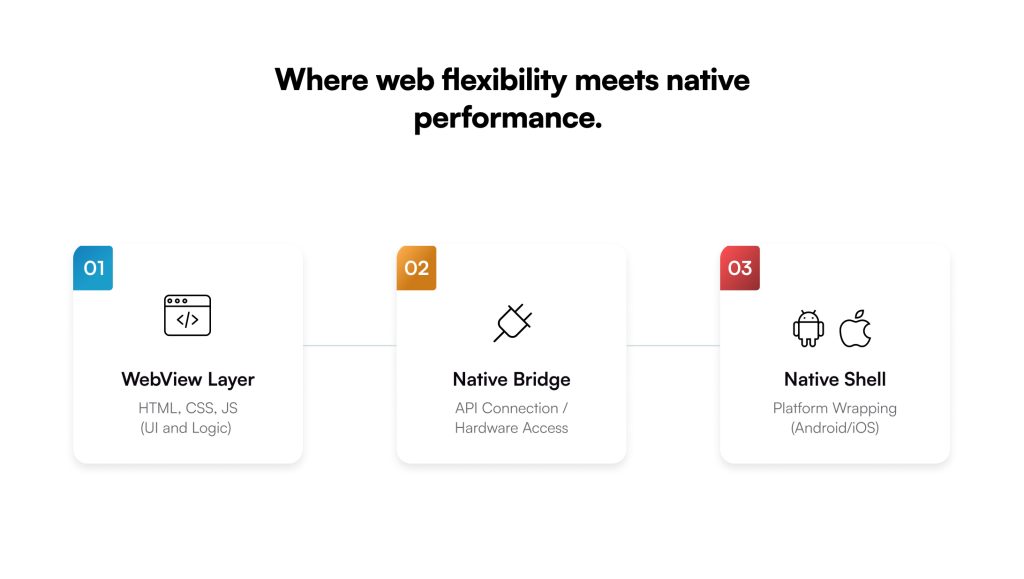
Hybrid applications make use of typical web technologies such as HTML, CSS, and JavaScript and are shown via the embedded browsing library in the native shell. A hybrid framework employs a single codebase for creating apps on both platforms. This method of work can still be very efficient, as you can save a lot of time during app development. 

ProsCons
Lower Development CostLimited Performance
Faster Development TimeInconsistent UI/UX
Simplified MaintenanceFramework Dependency
Code ReusabilityApp Store Rejections
Broader ReachLess Optimal

How to Develop an iOS Mobile Application: Step-by-Step Process

Developing an iOS app is not rocket science, but it surely does require careful planning and a strategic journey, keeping the targeted audience in mind. 

There are several phases used in developing an iOS mobile application. The following table describes these phases with duration and estimated budget in brief. 

PhaseDuration% of BudgetFocusGoal
Planning2-4 weeks10-15%Goals, Audience, Trends, and User NeedsKnow what value your app brings and who uses it. Figure out what users want. Plan the core features (MVP).
Design3-6 weeks15-25%Look and FeelCreate a simple, clean interface. Follow Apple’s design rules.
Development8-20 weeks50-60%DevelopmentWrite clean code using tools like Xcode and Swift. Build the real app.
Testing2-4 weeks10-15%Quality ControlCheck for bugs and errors. Make sure the app is safe and works well.
Launch1-3 weeks5-10%DeploymentSubmit the finished app. Get Apple’s approval for the market launch.
Total16-37 weeks/4-9 months average

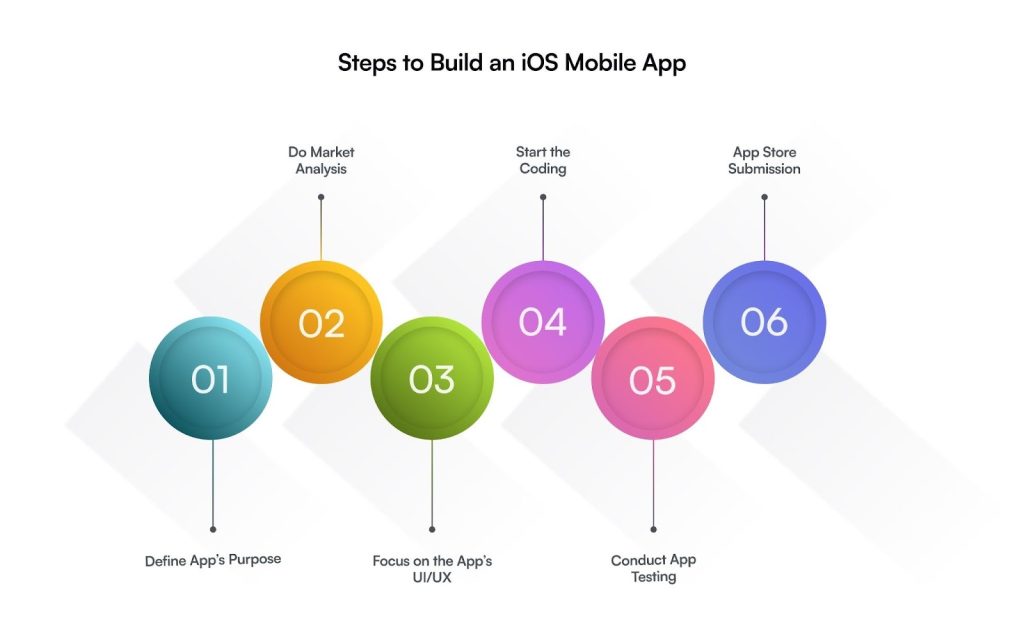
Listed below are the key detailed steps for developing an iOS application:

  1. Define App’s Core Purpose

Before availing of iOS app development services, make sure you have clearly defined the goals of your app or what exactly you’re aiming to deliver. It is advisable to properly study the market of your niche and then define a unique concept based on that. 

Ask the following questions of yourself:

  • Who is going to be your target audience?
  • What value will your app add for your targeted audience?
  • In what ways is your iOS app unique from others?
  • What features must you integrate into the app to stand out in the market?
  • Do you want to monetize your app or not?

Answer these questions, and you will know what exactly you want or what will fit the best in the market. 

  1. Conduct In-Depth Market Research

After setting up your app goals, it’s time to evaluate the market and check out the actual trends or the new things that users are expecting. The first stage is to figure out the necessities and issues of the target audience, and then figure out the features for the minimum viable product development (MVP).

In fact, a minimum viable product is a product that helps you prove the concept of your app, carry out the basic features test with real users, and collect user feedback to enhance the app. Identify competitors in the App Store, and check what kinds of features they are offering. This will help you determine the best feature for the initial version of your app and create a roadmap for iOS app development.

  1. App Design & Prototyping

First impressions are the most lasting ones, so design a user-friendly interface to capture your audience’s attention at first glance. You must make sure, the designing team you have hired is in perfect harmony with the brand spirit of your company to get the desired outcome. 

This step involves mapping user journeys, creating flow diagrams, and designing information architecture. It further involves wireframing different interfaces and creating interactive prototypes to test the viability of the design and features. 

The team must adhere to Apple’s Human Interface Guidelines (HIG) so that the app can be perceived as a standard and common one among iOS users. Above all, the design has to be simple for the user to move through and have a clean and attractive visual.  

  1. App Development

Now comes the most important part: coding. 

This is the final stage, where your concepts will become real life (or take a form). Developers​‍​‌‍​‍‌​‍​‌‍​‍‌ are writing clean, scalable, and efficient code that conforms to Apple’s recommended practices or guidelines. To make the app concept a tangible app and to maintain compatibility with all iOS devices, they use different tools such as Xcode, Swift, and ​‍​‌‍​‍‌​‍​‌‍​‍‌SwiftUI.

This step involves two phases: frontend and backend engineering. While the frontend is about creating the interface and features that users will directly interact with, the backend is about setting up the infrastructure that involves the server, databases (MySQL, PostgreSQL, MongoDB, Firebase, etc), and APIs.  

You may also need to integrate specific features like Apple Intelligence, Vision Pro, Live Activities, and Home screen/Lock screen widgets.

  1. Rigorous App Testing

It is necessary to test your iOS mobile application extensively before you launch it in the marketplace. Practice unit and integration tests, as well as performance and user acceptance tests (UAT), are conducted to prevent the occurrence of potential errors. 

The main reason for such thorough testing is to keep the app safe, make it bug-free (or glitch-free), and finally, to be able to count on it 100%. It involves various tests, like manual, automated, and beta testing, as well as performance optimization. 

  1. Launch into App Store

Voila! Here comes the step where you can finally see your dreams coming true, or rather, submitting your app to the App Store. Remember, this is the crucial phase because getting Apple’s approval is the priority here. 

Get some thorough checks or final tweaks, and ensure your iOS app is all set for a smooth launch, adhering to Apple’s strict standards and guidelines. 

Tech Stack Used for Building an iOS App

To​‍​‌‍​‍‌​‍​‌‍​‍‌ create a first-rate and high-performing iOS application, the knowledge of an expert and the right mix of tools, languages, and frameworks are necessary. Using the features of a proper tech stack is what ultimately provides app performance at its best, a user experience without any hiccups, and the possibility of ​‍​‌‍​‍‌​‍​‌‍​‍‌scaling.

Here is a list of the top technologies used for developing an iOS mobile app:

Programming Language:

Integrated Development Environment (IDE):

IDE

UI Frameworks:

Backend & APIs:

Databases:

Testing Tools:

Common Mistakes in iOS App Development & How to Avoid Them

Mistake #1: Building Features Nobody Wants: You waste time building things users will not use. The fix is simple: Launch with only the essential functions. Check usage data often and check user feedback to know what they actually need.

Mistake #2: Ignoring Design Quality: A bad design instantly drives people away. Your app must look professional from the start. Spend heavily on design, use Apple’s own guidelines, and test the look before you code.

Mistake #3: Underestimating Timeline: Every project takes more time than expected because changes will happen. Always add a 30% cushion to all your schedules. Use short, rapid work cycles to handle changes easily.

Mistake #4: Poor Post-Launch Support: Users quit fast when an app goes stale. Plan to release updates every month. Fix crashes immediately and respond to every person who leaves a review.

How Much Does It Cost to Make an iOS App

For iOS, an app development project typically costs between $40,000 and $500,000. Or even more. The price is influenced by several factors; hence, if you desire a more sophisticated iOS app, you need to allocate a higher budget. 

Just a heads up: it will all be worth it in the end!

To give you a clearer picture, here is a list of factors affecting the overall cost of mobile app development for an iOS application:

  1. Size of the app
  2. Project complexity
  3. The advancement of features
  4. App design
  5. Any additional changes you want

Below is a table outlining the pricing range from simple to high complexity iOS applications:

App TypePrice Range
Simple App$45,000 to $95,000
Medium Complexity$85,000 to $150,000
Complex App$150,000 to $300,000
High-Level Complexity $300,000 to $500,000

Factors to Consider Before Hiring an iOS App Development Company

It is important to hire a mobile app development company that understands your business needs, aligns with your goals, and, most importantly, fits your budget. But how do you determine which company is the right choice?

Below, we have given some of the factors that you must consider before hiring an iOS app development company. 

  • Technical Background: The primary factor to keep in mind is to ensure that the iOS app developers of the company have a strong technical background, stay updated with the latest tools & technologies, along with programming languages. 
  • Ratings & Reviews: Don’t forget to read the company’s reviews to get an actual idea about the company’s reputation and how effectively they deliver projects. 
  • Development Approach: Ask which development approach the developers follow. Make sure they follow Agile methodology; this way, you’ll get to see the progress of your iOS app development at every stage and suggest changes in real-time.
  • Maintains Transparency: Hire a company that maintains transparency by giving clear cost estimations and setting realistic timelines.  
  • Post-Launch Support: App development process doesn’t end after the launch because then comes the real thing, offering post-launch support and maintenance services. So, ask if the company maintains a long-term relationship or not. 

Critical Success Factors: Things to Keep in Mind to Build a Successful iOS App

Your app needs certain things to win. 

  • Solving a real problem is the first rule. Many failed apps try to fix issues that do not exist. Talk to people first. Do not build until you know the need is real.
  • Second, the user experience must be great. Follow Apple’s simple rules for design. Apps with good design keep users three times longer. Test it with real users constantly. Make the first sign-up process simple; most people quit right away.
  • The app must also be fast and reliable. Load times should be under two seconds. Crashes are unacceptable. Aim for nearly zero errors. Core features must work even when offline.
  • Next, timing the launch matters. Do not submit during busy holidays; reviews slow down. Plan your marketing for weeks before you hit the store. Build your email list early.

Finally, you must commit after the launch. Update the app often. Answer all reviews, especially the bad ones. Watch your numbers closely for the first three months. You must budget for continuous marketing. Do not stop once the app is live.

How to Make Money: Monetization Model for iOS Apps

Choosing how your app will earn money is the most important business choice you will make. You must pick the best fit from the start.

ModelBest ForProsCons
Free with AdsContent, simple toolsSimple to get usersLow income per person
FreemiumGames, productivityHuge potential user baseOnly 2–5% ever pay
Paid DownloadNiche, premium toolsMoney right awayVery few downloads
In-App PurchaseGames, digital goodsHighest income possibleHard to build well
SubscriptionServices, ongoing valueSteady, recurring revenueYou must always add value

The Reality Check: Most apps do not make much money. The bottom half of all apps earn less than $1,000 per year. Only the top 1% make over $1 million.

To actually make a profit, you need to think long-term. It takes 18 to 36 months on average just to break even on costs like development and marketing. To maximize your money, test different prices and make purchases simple—one tap is best. Look at setting prices lower in different countries, and always offer an annual discount to encourage commitment. 

Get an iOS App of Your Dreams with Galaxy Weblinks

Simply​‍​‌‍​‍‌​‍​‌‍​‍‌ put, creating an iOS app is not only a fantastic idea but also requires the correct development method, knowing your users, confirming the app concept, and other things. Each of these stages has its difficulties, and it might be too much for you to figure out the way through them by ​‍​‌‍​‍‌​‍​‌‍​‍‌yourself.

This is where you need a technology partner!

At Galaxy Weblinks, we carefully plan out the complete iOS app development journey with a guarantee of the app’s success. We have the right set of team, who can turn every vision of yours that you will bring to the table. 

We are not asking you to just believe our words; you can look for yourself and see if we can be the best companion for your upcoming project. Check out our portfolio. Meanwhile, if you have any queries or need assistance, we’re just a call away!

FAQs

  1. Why are iOS mobile applications popular among business owners?

The popularity of iOS app development is inevitable because of the following reasons:

  • Higher revenue potential
  • Strong security ecosystem
  • Better monetization opportunities
  • Consistent & premium user experience
  • Early access to innovation 
  1. How much does it cost to build an iOS app?

You cannot provide a definite answer to this question as it depends on several factors, such as the intricacy of the project, the number of features that you want to add, UI/UX, the proficiency of the development team, and so forth. 

  1. How long does it take to develop an iOS application?

There is no specific timeframe set for the overall iOS app development. However, to give you a ballpark figure, the development can be accomplished in 2-4 months with just simple (or basic) app features. Or 6-12 months and even more for the complicated ones.

  1. How secure are iOS apps for business use?

One​‍​‌‍​‍‌​‍​‌‍​‍‌ of the main reasons that iOS apps are considered to be more secure is the fact that Apple maintains a closed ecosystem. Additionally, Apple performs on-device processing, uses advanced encryption, and has a number of built-in data protection features. For this reason, iOS is always the preferred option of business owners who take the security of their data ​‍​‌‍​‍‌​‍​‌‍​‍‌seriously.

  1. Building an MVP before developing a full-fledged iOS app is useful?

Definitely, an MVP development is a way to confirm the app idea, collect the real users’ feedback, and it also enables you to refine your app based on that feedback prior to a full-scale development investment. 

Top Mobile App Development Trends to Follow in 2026 

When Spotify was launched in 2008, it was a neat desktop music player trying to take on piracy. With smartphones quickly becoming the primary device for media consumption, Spotify saw the opportunity early and moved fast. Its first mobile app was basic, but it unlocked a new growth engine.  

From there, Spotify rode and shaped major mobile app development trends: seamless cross-device syncing, offline listening, and hyper-personalized recommendations. Each trend did not just improve the app but also deepened user engagement and cemented Spotify as a global leader in digital audio. 

That is what real digital transformation looks like. Re-engineering an entire ecosystem around how people live, interact, and buy through mobile. And today, every brand is under that same pressure. And the momentum is only accelerating. 

According to Grand View Research, the global mobile app market is set to reach over $626.39 billion by 2030, fueled by AI, edge computing, and multi-platform ecosystems. This makes it important for businesses to stay ahead of the competition by adopting the latest mobile app trends. 

As we look toward mobile app development trends 2026, the real opportunity lies in building apps that act less like tools and more like adaptive, intelligent systems—ones that learn, integrate, and deliver measurable business impact. 

This blog is a view into the strategic shifts redefining mobile as the operating core of modern business. Here, we will unpack the market forces, top 10 trends, and enterprise use cases shaping the next phase of mobile transformation and what they mean for leaders building the future today. 

Understanding Mobile App Development Market 

Every new device, connection, and data stream is reshaping how businesses build, operate, and compete. Therefore, the digital transformation of mobile apps is moving more towards enhancing customer experience. And this wave of growth comes with a shift in mindset. 

The latest mobile app development trends are reinventing how businesses build digital ecosystems that adapt to evolving behaviors, markets, and technologies. 

  • Smarter devices, smarter users – With over 6.8 billion smartphone users globally, mobile has become the default digital environment. Consumers expect relevance, speed, and seamless interoperability. 
  • 5G and soon 6G connectivity – Ultra-low latency is unlocking new categories of experiences — from immersive commerce to real-time data visualization.  
  • Wearables and IoT ecosystems – Mobile apps are now control centers for connected lives — syncing watches, home devices, and even cars. 
  • The enterprise awakening – From healthcare to BFSI, large organizations are using mobile apps as operational command hubs, not just customer-facing portals. 
  • Mobile commerce dominance – Over 70% of eCommerce transactions now originate on mobile, redefining how brands design, market, and deliver.  

Top 10 Trends Shaping Mobile App Development in 2026 

The next decade of mobile app development technologies will be shaped by how fast businesses turn ideas into usable, intelligent systems. 
Below, we break down the top 10 mobile app technology trends driving this shift—each explained with a real-world use case and a strategic takeaway you can act on. 

Embedded Intelligence & Generative AI in Apps 

In mobile app development trends 2026, intelligence is the foundation. The best apps no longer react—they predict. They learn what people want, when they want it, and how to deliver it without being asked. 

A retail app might see a pattern in your searches. It knows you are close to buying. It offers a discount at the right moment. A banking app might study your habits and suggest ways to save before you ask for advice. They are calculated customer journeys powered by AI. 

Generative AI takes it further. It can create personalized content, write responses, design offers, or summarize your activity—all inside the app. The user sees speed and relevance. The business sees higher engagement, stronger loyalty, and lower churn. 

Mobile apps are transforming. They are now companions that think. They analyze, decide, and improve. 

For leaders, this change is not optional. Intelligence must be built into the architecture—not added later. And the message is simple: 

Do not design your app just for what users do. Design it for what they will do next. 

Cross-device & Multi-platform Ecosystems 

A mobile app now lives across watches, tablets, foldables, and even car dashboards. It moves where the user moves. It adapts to context. It keeps the experience unbroken. 

An enterprise workflow app can start on a smartphone, shift to a smartwatch during a task, and project data through AR glasses on the floor. The worker never stops. The system never loses track. 

This is the new design rule—continuity over confinement. The new mobile app technology trends make apps that think in ecosystems. They deliver one experience across many surfaces. 

For developers and decision-makers, this changes everything. Frameworks like Flutter and React Native must be flexible. Data must travel fast. Design must scale without breaking. Building for “phone-only” is building for the past. 

The future belongs to brands that build for movement—seamless, adaptive, and everywhere their users are. 

Immersive & Contextual UX (AR/VR, Edge, Voice) 

In mobile app development trends, the experience has stepped out of the display. It listens. It sees. It reacts to the world around the user. 

Augmented and virtual reality turn flat interfaces into environments. A shopper can view a product in their home before buying. A technician can see repair instructions projected over a machine. A student can walk through a virtual model instead of reading about it. 

Edge computing makes it all faster. Data is processed closer to the user, not in a faraway cloud. Latency drops. Reliability rises. The experience feels instant—even offline. 

Voice takes the idea further. Commands replace clicks. The app understands tone, language, and intent. It becomes part of daily behavior—natural, effortless, human. 

A field-service training app shows what this means. Workers can train through an AR overlay that runs on edge devices. The app keeps working even without a signal. Downtime disappears. So does the learning curve. 

Take a look at how we built an interactive Shopify app for our client ArtSugar for visualizing art in customer homes. This is the new standard for experience—context. The next generation of apps will not just look better. They will understand better. 

Investing only in interface upgrades is no longer enough. The future belongs to those who build for awareness—apps that sense, adapt, and respond. 

Security, Privacy & Sustainable Design as Table Stakes 

By 2026, every successful app will share one invisible trait—integrity. 

A single leak, one unclear permission, or a heavy battery drain is enough to make them leave. Trust has become the real measure of design—a defining force in mobile app development trends today. 

Security now lives inside the architecture, not at the edge. Biometric access, encrypted paths, and zero-trust systems are standard. Privacy is part of the experience—simple, transparent, and human. People want to know what you collect and why. They reward honesty with loyalty. 

Sustainability follows the same logic. Efficient code saves energy. Clean interfaces load faster. Apps that use less data feel lighter, last longer, and cost less to run. 

A fintech app shows what this means. It signs users in with biometrics, explains data policies in plain words, and runs lean to save power. The result is trust—the quiet kind that keeps users coming back. 

Low-Code / No-Code & Modular Architectures for Speed 

The old way—long sprints, heavy code, endless testing—no longer fits the pace of business. New mobile app development technologies have changed the rules. Low-code and no-code tools turn ideas into working apps in days, not months. 

A startup can build a pilot in a week, test it with real users, and scale it once the idea proves itself. Enterprises use the same approach to launch side-apps—small tools that solve one problem fast without waiting for a full release cycle. 

Modular design makes this possible. Each feature lives as an independent block. A payment module. A login module. A reporting module. Teams build, test, and deploy them separately. When one improves, the rest keep running. 

This shift cuts waste. It saves time, cost, and effort. But more than that, it changes how teams build systems that evolve. 

For leaders, time-to-value has become the new metric. Speed is no longer a trade-off against quality. It’s proof of agility. 

The future belongs to those who ship fast, learn faster, and keep moving. 

5G / 6G, Edge Compute & New Device Form-factors 

The leap from 4G to 5G was a door opening. The next, 6G, will tear down the walls. 
Data will move in real time. Latency will vanish. Apps will think and act as fast as the world around them. 

This is the quiet revolution behind mobile app development trends 2026. New networks and hardware are not just improving performance—they are redefining what mobile can do. 

A logistics app already shows how. Trucks fitted with edge devices stream live data through 5G. The app plots routes, warns drivers of hazards, and adjusts for weather, all before the driver asks. It works faster than reaction time. 

Edge computing keeps the loop tight. Processing happens inside the vehicle, not miles away in the cloud. If the signal drops, the app keeps thinking. The system stays alive. 

The same principle will guide everything, from smart factories to connected homes to cars that talk to cities.  

For builders and leaders, the message is clear. Choose mobile app technologies that look forward, not back. Build for the networks coming next, not the ones you already have. 

Hyper-Personalization & Feature as Service 

No two users are alike. Apps are finally learning that. The days of one-size-fits-all experiences are gone. The new wave of current trends in mobile app development is about precision—small, timely, personal interactions that feel human. 

A health and wellness app tracks more than steps. It reads patterns in sleep, stress, and movement. It adjusts its advice by the hour. Some days it suggests rest. Others, a run. Each user sees a different path, shaped by real behavior, not static rules. 

This is hyper-personalisation — the move from design for everyone to design for each one. It turns data into empathy and algorithms into insight. 

Feature-as-a-Service makes it scalable. Businesses can launch and update single features—a rewards engine, a meal planner, a payment layer — without touching the entire app. These modules work like services, delivered and improved continuously. 

Super-Apps & Embedded Ecosystems 

In the latest mobile app development trends, the most successful products do not stand alone—they host everything. Payments, messaging, shopping, bookings, and loyalty live inside one ecosystem. The app becomes the brand’s operating system. 

WeChat proved the model. Grab, Gojek, and Paytm followed. Now, even traditional companies are building their own versions—smaller, focused, but built on the same logic. A super-app reduces friction. It keeps users inside one environment, where every action creates data, loyalty, and value. 

A consumer brand shows how it works. Its mobile app acts as a marketplace, a rewards hub, and a digital wallet. Customers browse, buy, pay, and earn—all without leaving. The brand cuts its reliance on third-party platforms and gains direct access to its audience. 

The super-app model turns mobile into a complete business ecosystem—one that can host partners, services, and even competitors under a single experience. 

The question for every leader is simple: 
Are you building a utility, or are you building an ecosystem? 

Subscription-First & Value-Layer Monetisation Models 

The current trends in mobile app development show a clear shift, from one-time installs to ongoing relationships. The app is no longer a product you sell once. It’s a service you maintain, renew, and expand. 

Subscriptions lead this change. They create steady revenue and measurable engagement. Users pay for value that grows with them—new tools, content, or services that feel alive, not static. 

A SaaS brand proves it. It builds a companion mobile app that extends its core platform. Users can access insights, manage tasks, or sync data on the go. Each interaction feeds retention. Each new feature becomes an upgrade, not an add-on. 

Embedded commerce follows the same idea. The transaction hides inside the experience—a seamless purchase, a premium unlock, a contextual offer. No friction, no exits, no lost attention. 

This model rewards design that lasts. It values depth over reach. 
An app that earns trust once can sell forever. 

Global & Localization Strategies + Emerging Markets 

Asia-Pacific now leads the world in mobile adoption. Africa and Latin America follow close behind. Together, they define the next decade of mobile app development trends for 2026. 

The numbers are simple. More users, more devices, more opportunity, but also more complexity. Languages, networks, and payment systems differ by country, by city, even by neighborhood. A one-size-fits-all app breaks under that weight. 

A consumer brand in India shows how to do it right. Its mobile app adapts to over a hundred device types, from low-cost phones to premium models. It supports local languages and payment methods like UPI and digital wallets. The result is reach — fast, wide, and trusted. 

Localization is no longer about translation. It’s adaptation to culture, speed, connectivity, and behavior. Apps must feel native wherever they go. 

The future of mobile app development will belong to those who build globally but behave locally. 

Do not design for one market and hope it fits the rest. 
Design for difference. That’s where the growth is. 

Take Your Next Move 

The next wave of mobile app development trends 2026 is a test. A test of how fast your business can think, adapt, and build value in motion. 

Every company now runs on mobile apps. The difference lies in who uses it to lead. Apps that learn faster, ship faster, and integrate deeper will define how brands grow and stay remembered. 

This is the moment for clarity. 
Audit what you have. See how your mobile ecosystem performs. Then ask what it could become. Schedule a briefing. Map the gaps. Partner with a mobile app development company that understands speed, scale, and design that lasts. 

Do not just build another app. Build an engine—one that drives growth, loyalty, and insight. 

The Ultimate Guide to Travel App Development Cost: A Rundown for Businesses 

The travel industry is facing an all-time high competition today. This is because of the availability of dominating digital booking platforms giving various options to users and meta search platforms pushing price wars. Such rising competitive forces in the travel industry are driving businesses towards modernized solutions.  

Consequently, growth-driven travel apps are on the rise, with market volume projected to reach $2.27 billion by 2029. Meaning, as this industry is getting competitive, it is also providing businesses with lucrative opportunities to capitalize. You can get this idea from the global revenue generated by travel apps every year.  

However, with many popular apps like Airbnb, Booking.com, and Trivago already existing, making a place in the market presents a lot of challenges. Which takes us to the imperative step of travel app development, i.e., planning. Be it planning of technologies, priority features, revenue model, or most importantly, travel app development cost, following the right strategy path is highly crucial. 

How Much Does Travel App Development Cost? 

For estimating the average cost to develop a travel app, we have divided app as per 3 level of complexities: 

  • Basic / MVP 
  • Mid-level / feature-rich 
  • Advanced / high-end enterprise 

Each tier differs in feature-set, platform coverage, integrations, and backend scale. All of this drive the budget. 

Below is a summary of typical cost ranges, followed by guidance on how to align your budget with your business goals. 

Complexity Tier Typical Features & Scope Estimated Cost Range 
Basic / MVP Single platform (iOS or Android) Core booking/search/navigation features Simple UI/UX, minimal integrations. $30,000 – $50,000 
Mid-Level / Feature-Rich Both platforms (iOS & Android) Moderate custom UI/UX, booking + payments + maps + reviews 3rd-party API integrations, some scalability built in $50,000 – $120,000 
Advanced / Enterprise Full multi-platform support Advanced features (AI recommendations, AR/VR, loyalty programmes, offline mode, high user volumes) Complex backend, global scale  $120,000 – $300,000+ 

Factors Influencing Travel App Development Cost (Detailed) 

Even when two apps share similar features, their costs can differ dramatically. That’s because development cost is shaped not only by what you build but also how, where, and for whom you build it. 

Below, we have categorized the six primary cost determinants that every business should evaluate before finalizing the budget. 

Team Location & Hourly Rates (In-House vs Outsourcing / Local vs Global) 

The development team’s location remains one of the biggest cost levers. 

Region / Country Average Hourly Rate (Outsourcing Company) 
North America  $120 – $200/hr 
Western Europe  $90 – $160/hr 
Eastern Europe  $45 – $80/hr 
Middle East  $60 – $100/hr 
India / South Asia  $25 – $50/hr 
Southeast Asia  $30 – $55/hr 
Latin America  $40 – $75/hr 
Australia / New Zealand $100 – $150/hr 
Africa  $25 – $45/hr 

But selecting an app development company does not solely depend on the budgeted hourly rate, but also value per hour. 

  • In-house teams: More control, cultural alignment, direct collaboration, but high overhead (salaries, infrastructure, benefits). 
  • Outsourced teams: Lower cost, flexible contracts, wide talent pool, but require strong project governance. 
  • Hybrid model: Product owner & architects in-house, execution offshore—a common enterprise strategy balancing cost and control. 

Tip: For an enterprise-grade travel app, a hybrid approach reduces overall spend by up to 30% while maintaining delivery velocity. 

Technology Stack (Native vs Cross-Platform vs Hybrid) 

Your tech stack choice decides both the initial travel app development cost and long-term maintenance. 

Stack Type Key Description Common Tools & Frameworks Cost Implications 
Native Apps Built separately for each platform (iOS & Android) for best performance, full hardware access, and optimal UX. iOS: Swift, Objective-C, Xcode Android: Kotlin, Java, Android Studio Backend: Node.js, Django, Laravel, Firebase – Higher upfront cost (2 codebases) – Longer development cycle – Requires separate maintenance for iOS/Android 
Cross-Platform Apps Single codebase runs on both iOS & Android with native-like UI performance. Frameworks: Flutter, React Native, Xamarin, Ionic Capacitor Backend: Firebase, AWS Amplify, Express.js UI Kits: Material Design, Cupertino Widgets – May need native bridging for advanced features (AR, offline maps) – Slightly higher long-term maintenance for complex apps 
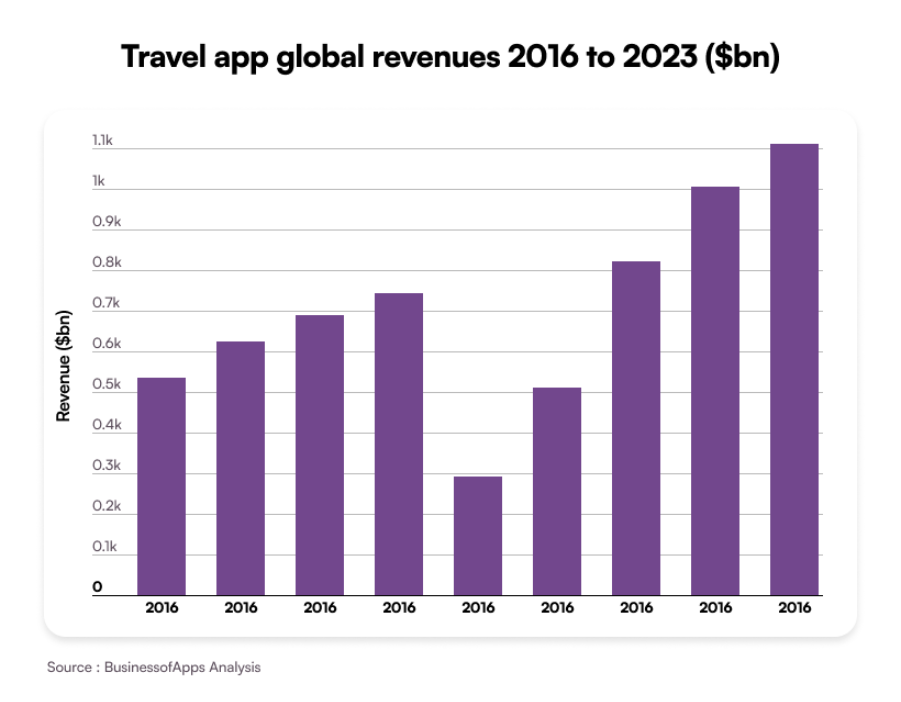
Hybrid Apps Web application embedded in native shell; uses web technologies (HTML, CSS, JS). Frameworks: Ionic, Apache Cordova, Framework7 UI Libraries: Bootstrap, Onsen UI Backend: REST APIs, GraphQL – Limited performance & offline capability – Restricted access to native APIs – Poor scalability for enterprise use 
Backend Stack (Server-Side) Manages bookings, payments, data sync, user management, and APIs. Languages: Node.js, Python, Java, Go Frameworks: Express.js, Spring Boot, Django, FastAPI Databases: PostgreSQL, MongoDB, MySQL, Redis Cloud Services: AWS, Google Cloud, Azure, DigitalOcean – Requires scalable architecture & DevOps support – Cloud costs scale with usage (pay-per-API, server uptime) 
Frontend (Web Interface) Optional web portal or admin dashboard for operators and agents. Frameworks: React.js, Angular, Vue.js Libraries: Redux, TailwindCSS, Chart.js  

Tip: For MVPs, cross-platform gives optimal ROI; for global roll-outs, native ensures durability and security. 

Backend Architecture & Integrations 

The travel industry runs on integrations. Your app will likely rely on technologies, such as: 

  • Global Distribution Systems (GDS) 
  • Online Travel Agency APIs 
  • Payment Gateways 
  • Real-time Maps 
  • Data-driven Analytics 
  • Push Notifications 

Each adds not only development effort but also licensing and compliance overhead. 

  • Simple backend: $10K–$25K (basic booking, search, payments). 
  • Complex backend with GDS/OTA, real-time inventory, personalization: $50K–$100K+. 

UI/UX Complexity 

A travel app’s usability directly impacts retention. A minimal UI costs less, but advanced experiences like interactive maps, smart itinerary transitions, or dynamic filtering demand skilled design and animation teams. 

UI/UX Level Description Added Cost Impact 
Basic Template layouts Standard navigation Low 
Moderate Custom icons Brand colors Simple animations +15–25% 
Advanced Motion design 3D transitions Real-time map layers +40%+ 

Tip: Do not cut corners on UX as every 1-second delay in search/booking flow can drop conversion by 7–10%. Read our ultimate guide to effective UI/UX design to know more about interactive and aesthetically pleasing UI/UX design. 

Compliance, Data Privacy & Localization 

As soon as your app handles personal data, payments, and travel bookings, compliance becomes a cost center. 

Data laws GDPR CCPA Any other local data privacy laws 
Payment compliance PCI-DSS 3D Secure protocol 
Localization Multi-currency conversion Date formats Timezone adjustments Multi-language support 

Note: Each additional market or region adds roughly 10–15% to localization and compliance costs. Planning this from day 1 avoids expensive post-launch fixes. 

Maintenance & Updates 

After launch, ongoing maintenance ensures stability, compliance, and user satisfaction. Annual maintenance usually accounts for 15–25% of the original build cost, but can rise to 30–40% for enterprise-scale travel apps with heavy integrations. 

It covers: 

  • OS updates (iOS/Android releases) 
  • Third-party API version upgrades 
  • Server and hosting scale-ups 
  • Bug fixes and performance tuning 
  • Adding new features based on user feedback 

Tip: Treat maintenance as a long-term investment. Budget a multi-year Total Cost of Ownership (TCO) rather than a one-time build cost. 

Core Features & Modules for Travel App Development (and their Cost Impact) 

Building a travel app means balancing user expectations, business goals, and budget realities. Every feature you add multiplies the technical complexity and, therefore, the travel mobile app development cost. 

Let’s break down the core and advanced features into three groups with clarity on functional scope and cost impact: 

  • Traveler-facing 
  • Agent/Partner-facing 
  • Admin Panel modules 

Travel App Development Cost as Per Traveler-Facing Features 

Feature Functional Scope Cost Impact Driver Estimated Cost Range 
User Registration & Profile Sign-up via email, social, or Google/Apple ID Manage itineraries Saved preferences Authentication logic Database setup Privacy compliance (GDPR, data encryption) $2,000 – $5,000 
Search & Filters (Flights/Hotels/Activities) Intelligent search across multiple APIs with price, rating, and location filters. Integration with APIs (Skyscanner, Expedia, Amadeus) Dynamic query optimization $6,000 – $12,000 
Booking Engine Reservation Seat selection Date picker Price comparison Confirmation emails Payment integration Inventory sync Cancellation flow $10,000 – $20,000 
Secure Payment Gateway Credit/debit Digital Wallet PayPal Stripe Compliance (PCI-DSS) Currency conversion Refund policies. $4,000 – $8,000 
Geolocation & Map Integration Nearby attractions Hotels Route tracking Location-based offers. Google Maps API Caching Offline access Map optimization $3,000 – $7,000 
Reviews & Ratings Traveler-generated content Moderation system Star ratings Real-time sync Anti-spam Moderation UI $2,000 – $4,000 
Push Notifications & Alerts Flight updates Offers Itinerary reminders Check-in notifications Cloud messaging setup (FCM, APNs) Personalization logic $2,000 – $5,000 
Wishlist & History Save favorite destinations Rebook previous trips User session management Data caching Cloud storage $1,500 – $3,000 

Travel App Development Cost as Per Agent/Partner-Facing Features 

Feature Functional Scope Cost Impact Driver Estimated Cost Range 
Inventory Management Manage flight seats Room availability Activity slots Cancellations Complex data syncing between GDS/OTAs Multi-vendor logic $8,000 – $15,000 
Dynamic Pricing & Commission Rules Automated pricing Agent commissions Seasonal offers Algorithm design Dashboard integration Business logic $4,000 – $10,000 
Booking Management Dashboard Real-time tracking Rescheduling Refund status Invoice generation Data consistency Backend logic Admin integration $5,000 – $10,000 
Partner Portal Access Secure login Document upload KYC verification Multi-role authentication Verification APIs Access control $3,000 – $6,000 
Analytics & Reports Performance insights for: Sales Inventory Revenue Cancellations Data visualization Export tools (PDF, Excel) Charts $3,000 – $8,000 

Travel App Development Cost as Per Admin Panel Features 

Feature Functional Scope Cost Impact Driver Estimated Cost Range 
User & Role Management Add/remove users Assign permissions Control access Role-based access control (RBAC) Database synchronization $2,000 – $5,000 
Content Management (CMS) Update banners Blogs Offers Static pages WYSIWYG editor Media management Version control. $2,000 – $4,000 
Payment & Refund Control Track transactions Initiate refunds Handle disputes Payment logs Financial API Integration Data audit trails $4,000 – $8,000 
Performance Analytics Dashboard KPIs Retention rate Revenue trends Real-time data visualization Integrating BI tools API calls Caching mechanisms $6,000 – $12,000 
Customer Support Module Chat interface Complaint tracking Ticket resolution CRM integration (Zendesk, Freshdesk) Chat widget setup $3,000 – $6,000 

Timeline and Associated Cost for Travel App Development 

Time is just as critical as budget for determining the travel mobile app development cost. For travel businesses, getting an app to market before the next peak travel season can make the difference between early adoption and missed opportunity. 

Below is a breakdown of how long each development phase typically takes and how it aligns with overall cost. 

Discovery and Planning 

The first step of travel app development is gathering all the requirements carefully, while also analyzing competitors as well as the primary objective. In this phase itself, you get to decide feature prioritization, tech stack selection, and project roadmap. Once you have solid planning in place, you can ensure your app can be developed within the decided budget. 

  • Estimated Duration: 2-4 weeks 
  • Approx. Cost Contribution: ~10% of the overall budget 

UI/UX Design 

In this phase, app designers will design wireframes, app prototypes, and define user flows along with project managers and other stakeholders. The visual design helps developers get a look at how the app will look on respective mobile screens. This further streamlines the travel app development process and contributes to the cost, too. 

  • Estimated Duration: 3-5 weeks 
  • Approx. Cost Contribution: ~15% of the overall budget 

Development (Frontend + Backend) 

Next, your app developers will take the steps for core feature coding and API & payment gateway integration. This phase also includes database setup and microservices architecture that ensure smooth data flow and the process of the travel application. 

  • Estimated Duration: 8-14 weeks 
  • Approx. Cost Contribution: ~45–50% of the overall budget 

Testing & QA 

For a successful travel app development, it should be thoroughly tested before final deployment with manual + automated testing. The QA process should give emphases on bug resolution, performance checks, and security validation. 

  • Estimated Duration: 3-5 weeks 
  • Approx. Cost Contribution: ~15% of the overall budget 

Deployment & Launch 

The smooth execution of the deployment phase is essential to take your mobile to the target audience. The key activities of this phase that add to the travel app development cost includes: 

  • App Store submission 
  • Hosting setup 
  • DevOps pipeline configuration 
  • Monitoring tools 

Here’s the duration and estimated cost of this phase: 

  • Estimated Duration: 1-2 weeks 
  • Approx. Cost Contribution: ~5% of the overall budget 

Post-Launch Maintenance (Ongoing) 

As a travel business owner, your work does not end with just app development. Continuous updates, version control, performance monitoring, bug patches, and feature rollouts are needed to keep the app up and running.  

  • Estimated Duration: Continuous 
  • Approx. Cost Contribution: ~10–15% of the overall budget annually 

Travel App Development Cost‐Optimization Strategies 

Cost-efficiency in travel app development is built through structured decisions that align technology, design, and business goals. Below are six strategies that help control costs while maintaining quality and scalability. 

Build an MVP First 

Launch a Minimum Viable Product (MVP) with the core journey, including search, book, pay, confirm. 

An MVP approach: 

  • Lowers upfront cost by 30–40%. 
  • Speeds up time-to-market. 
  • Validates product-market fit before large-scale investment. 

Once usage data starts coming in, add features that improve retention with reviews, analytics, or personalized recommendations. Build only what your audience proves they need. 

Use Cross-Platform Frameworks Wisely 

Frameworks like Flutter and React Native let you deploy on both iOS and Android from a single codebase. They shorten release cycles and reduce testing effort. 

Use them for general user flows, but switch to native development for performance-heavy areas like AR maps or live navigation. This balance keeps costs predictable while preserving quality. Compare languages like Flutter vs Kotlin to find the right fit for your travel app development.  

Rely on Proven APIs and Platforms 

Most of what powers a travel app already exists. Integrate APIs from trusted providers for bookings, payments, and maps. 

It’s faster and more stable than building custom systems. The small recurring API fees cost less than maintaining proprietary infrastructure. A major factor when calculating the total cost to develop a travel app. 

Design with a Modular Architecture 

Build the app in independent layers: booking, payments, analytics, notifications. Each can evolve or scale without rewriting the rest. 

A modular structure: 

  • Cuts long-term maintenance cost. 
  • Supports continuous updates. 
  • Limits downtime during new releases. 

It’s the simplest way to future-proof development without paying twice for scalability. 

Outsource Non-Core Modules Strategically 

Outsource specialized work like testing, UI builds, or documentation strategically to reliable offshore partners. 

This hybrid approach can save 25–40% while maintaining speed and control. Set clear deliverables, communication windows, and review cycles to prevent coordination loss. 

Invest Early in Analytics and Feedback 

Track user behavior from the first release. Integrate tools like Mixpanel, Firebase Analytics, or Amplitude to monitor feature usage and drop-off points. 

Data helps you: 

  • Identify where users convert or abandon. 
  • Remove low-value features. 
  • Plan updates based on evidence, not assumption. 

Early analytics turns guesswork into measurable strategy. The most sustainable form of cost optimization.

App Scaling: From Startup Travel App to Enterprise Platform 

For a travel app to become enterprise-grade requires steady releases, stronger infrastructure, and smarter monetization. Each stage adds new capabilities and new costs. Planning for that evolution early keeps scaling predictable instead of reactive. 

The Foundation Phase: Building for Core Functionality 

This is where most startups begin. The focus is usability, not expansion. 

The app covers only essential journeys: search, booking, and payments. Infrastructure is minimal with a single cloud instance, shared databases, and lean analytics. 

Key Priorities: 

  • Clean architecture for easy upgrades. 
  • Keep APIs modular for future integrations. 
  • Document every feature and dependency. 

Cost Behavior: 

  • Most of the budget (70-80%) goes into development. 
  • Maintenance costs remain low, about 10-15% of the build per year for updates and small fixes. 

The Growth Phase: Scaling Infrastructure and Experience 

Once adoption grows, the focus shifts to scale and reliability. Users expect faster load times, personalized recommendations, and multi-device continuity. 

Key Additions: 

  • Server Upgrades 
  • Load Balancing 
  • New Features 
  • Analytics Expansion 

Cost Behavior: 

  • Infrastructure and monitoring add 20-25% to annual operational cost. 
  • Feature expansion raises maintenance to 20-30% of original build cost. 
  • Bug fixes and OS updates become ongoing expenses. 

The Enterprise Phase: Scaling Operations and Monetization 

At enterprise scale, the app becomes a complete digital ecosystem. You manage data, user behavior, revenue models, and multi-market compliance. 

Key Developments: 

  • Microservices Architecture: Modules for booking, payments, analytics, and CRM run independently for resilience. 
  • AI and Automation: Personalized trip suggestions, predictive pricing, smart notifications. 
  • Security and Compliance: PCI-DSS, GDPR, and multi-currency regulations. 
  • Data Governance: Clear ownership, retention, and auditing policies. 

Cost Behavior: 

  • Maintenance and infrastructure can rise to 35-40% of total annual operating cost. 
  • Cloud expenses scale with user base and API usage. 
  • Dedicated QA and support teams become ongoing line items. 

Monetization Models of Travel Apps That Support Growth 

A scalable app needs scalable revenue. Monetization should grow alongside user volume and product maturity. 

Monetization Model How It Works When to Introduce 
Commission-Based Earn margin per booking or referral. Early stage (post-MVP). 
Subscription / Premium Plans Offer ad-free experiences, exclusive deals, or concierge support. Growth stage once retention stabilizes. 
Partnership Integrations Revenue sharing with hotels, airlines, or activity providers. Growth to enterprise transition. 
Advertising & Sponsored Listings Promote travel brands within the app. After steady daily active users (DAU). 
Dynamic Pricing & Loyalty Use AI to adjust pricing and reward frequent users. Enterprise phase, data maturity required. 

Guiding Principle: Monetization should evolve with user trust. When you push revenue models too early and you lose adoption. And if you delay it too long, you miss compounding growth. 

Choosing the Right Partner for Travel App Development 

Selecting the right travel and hospitality software services determines how your app drives business transformation. The right tech partner brings more than development skills. They bring industry experience, system integration expertise, and a long-term scalability vision that supports your growth. 

Questions to Ask Before You Commit 

  • What similar apps have you built in travel, mobility, or logistics? 
  • How do you ensure real-time performance across multiple APIs? 
  • Can you show examples of system migrations or app revamps? 
  • What’s your approach to scalability testing before launch? 
  • How do you handle SLAs for uptime, bug fixes, and cloud performance? 

Why Businesses Trust Galaxy Weblinks as Tech Partner? 

Over the years, we have designed and modernized multiple enterprise-grade applications, including AI-powered tools, cross-platform apps, and legacy-to-cloud migrations that keep businesses aligned with user demand. 

For instance, look at the case of our developed transportation management software that empowers organizations to optimize their entire transportation ecosystem, from scheduling and dispatch to driver management and performance analysis. The platform unified operations through intelligent automation and modular dashboards, reducing manual overhead and improving fleet visibility for large-scale logistics and travel operations. 

Our approach combines: 

  • Modern architecture with microservices for scalability. 
  • AI-based analytics for real-time decision-making. 
  • Continuous delivery pipelines for faster releases and updates. 

This hands-on experience across travel, mobility, and logistics ecosystems allows us to apply the same scalability principles to every travel app project we take on. 

Want to know how we can contribute to your travel app development journey? Contact us today and find out. 

Conclusion: Understanding the Total Travel App Development Cost 

The total cost to develop a travel app depends on what you want it to achieve: 

  • A lean MVP that validates an idea 
  • A global platform that scales across devices and regions. 

There’s no single figure that applies to every business, but there is a pattern. 

A basic travel app with standard features typically costs between $50,000 and $90,000, whereas a mid-level app with multiple API integrations and analytics dashboards ranges from $90,000 to $150,000.  

On the other hand, an enterprise-grade travel platform can reach anywhere from $150,000 to $300,000 or more, depending on integrations, infrastructure, and performance goals.  

The true investment, however, goes beyond development. Maintenance, feature rollouts, server scaling, and security compliance can add 15–30% annually to ensure performance and uptime. 

FAQs 

1. Can I build a travel app on a budget? 

Yes. If you start lean and scale smart. 
Begin with a Minimum Viable Product (MVP) that focuses on core features like search, booking, and payments. 
Use cross-platform frameworks such as Flutter or React Native to reduce cost and timeline, and integrate trusted third-party APIs instead of building every system from scratch. 
Once user traction grows, reinvest in advanced capabilities like personalization, loyalty programs, or in-app analytics. 

2. What should I not cut costs on? 

  • Security: Payment and user data protection must meet PCI-DSS and GDPR standards. 
  • Architecture: A scalable, modular backend prevents expensive rebuilds later. 
  • User Experience (UX): A clean, fast interface directly impacts conversions. 
  • Testing: Skipping QA often costs more in rework and reputation loss than it saves in budget. 

3. How long will travel app development take? 

Time to develop a travel app depends on complexity. More integrations, platforms, and compliance requirements means longer build. 

  • MVP: 12-16 weeks  
  • Mid-Level App: 20-28 weeks  
  • Enterprise Platform: 32-48 weeks 

4. What is the travel app maintenance cost? 

Post-launch maintenance typically accounts for 15-30% of the original development cost per year. 
This includes: 

  • Bug fixes and OS updates 
  • API version upgrades 
  • Server optimization and scaling 
  • New feature releases based on user feedback 

Ongoing maintenance keeps the app compliant, fast, and competitive, turning it from a one-time product into a long-term business asset. 

Shopify vs WooCommerce: Which Platform is Right for Your Online Store?  

Every eCommerce story begins with a decision. The platform you choose becomes your foundation—your engine for growth, control, and profit. And the debate always boils down to a situation like: Shopify vs WooCommerce.  

On one hand, Shopify is the all-in-one system that handles hosting, security, and performance straight out of the box. So, you build fast and launch faster. As a matter of fact, that simplicity fuels over 6.3 million active stores worldwide.   

WooCommerce takes a different route. It’s a WordPress plugin—open, flexible, and deeply customizable. It powers over a third of global online stores because it bends to your will. You own your data, your design, your infrastructure. But that freedom comes with responsibility. You maintain it. You optimize it. You grow it.  

The contrast is sharp. Shopify is speed and structure. WooCommerce is freedom and control. One prioritizes simplicity; the other rewards technical depth.  

In this guide, we’ll break down both ecommerce platforms on pricing, scalability, customization, real-world usability, and more—to uncover which platform aligns with your business goals. You won’t just find information; you will also get insights to decide between WooCommerce vs Shopify. 

A Quick Comparison Table for Shopify vs WooCommerce 

Before you dive into the technical depth, you need a rapid, honest assessment. This at-a-glance comparison exposes the fundamental trade-offs immediately. Shopify offers simple, fixed subscription pricing and unmatched ease of use, letting you launch a store in hours without code. However, it restricts deep customization.  

WooCommerce is deceptively “free” software; its true cost is variable, tied to hosting and plugins. It demands technical skills and forces you to manage the server. In return, it grants absolute customization freedom, as you own the entire codebase. 

Feature Shopify WooCommerce 
Hosting Included Self-managed 
Ease of Use Beginner-friendly Developer-dependent 
Customization Moderate Unlimited 
Pricing Fixed monthly rates Variable costs 
Support 24/7 reliable support Community + hosting provider 

WooCommerce vs Shopify: Understanding the Fundamentals 

Every ecommerce platform begins with a philosophy. In the case of Shopify vs WooCommerce, that philosophy shapes how you build, launch, and grow an online store. 

Shopify is an all-inclusive solution with a fully hosted SaaS platform, designed for businesses that want speed, not setup. You don’t manage servers or security—Shopify does. The result is simplicity at scale. Its ecosystem powers millions of merchants who want to focus on selling, not maintaining. Shopify’s strength lies in its integrated tools—inventory, payments, marketing—all working from day one. It’s the online store builder that trades customization for convenience.  

WooCommerce takes the opposite approach. It’s an open-source ecommerce plugin built on WordPress. You bring your own hosting, domain, and control. Every pixel, every line of code is yours to modify. It’s favored by developers and brands that want freedom over structure. With 6.6 million active users, WooCommerce dominates the global market share because it lets you create without constraint.  

The trade-off is clear. Shopify delivers convenience and consistency. WooCommerce offers flexibility and ownership. The decision between WooCommerce vs Shopify isn’t technical—it’s strategic. You’re choosing between managed simplicity and limitless control. 

A Full-Fledged Comparison of Shopify and WooCommerce 

A full-fledged comparison of Shopify and WooCommerce goes beyond surface features — it’s about control, convenience, and scalability. Shopify delivers an all-in-one ecosystem built for simplicity and speed.  

WooCommerce offers deep customization for those who want full ownership and flexibility. This section breaks down pricing, performance, design freedom, integrations, and long-term growth potential — so you can decide which platform truly fits your business vision. 

Ease of Use and Setup Process  

Every entrepreneur asks the same question before launching: which is easier, Shopify or WooCommerce? The answer lies in how each platform approaches setup, management, and day-to-day usability.  

Shopify Setup Experience 

  • Shopify is frictionless by design.  
  • Account creation: Enter your email and password. The onboarding wizard begins immediately.  
  • Guided onboarding: A short series of questions helps tailor your store’s setup.  
  • Product management: Adding products is straightforward — the “Products” tab sits second on the sidebar, exactly where you expect it.  
  • Learning curve: Minimal. No coding, no plugins, no configuration files.  
  • Time to launch: Within hours, your store can go live.  
  • Interface: Every screen is purpose-built for ecommerce, clean and predictable.  

WooCommerce Setup Experience 

  • WooCommerce is freedom with effort.  
  • Initial requirements: You start with a hosting plan and a domain.  
  • WordPress installation: WooCommerce runs as a plugin atop WordPress.  
  • Configuration: Shipping, taxes, and payment gateways require manual setup.  
  • Product creation: Modeled after WordPress posts, with more options and detail.  
  • Learning curve: Noticeably steeper — technical familiarity helps.  
  • Time investment: Setup can stretch into days depending on customization.  

Daily Management Comparison 

Shopify’s dashboard is streamlined and ready. WooCommerce offers flexibility but demands management. In the Shopify vs WooCommerce debate, Shopify wins on ease — the faster path for sellers who value launch speed over tinkering. 

Design Flexibility and Customization  

The design of an ecommerce store defines its first impression. In Shopify vs WooCommerce, this is where the contrast is striking — one values simplicity, the other embraces creative control.  

Shopify themes are built for speed and polish. With over 800 professionally designed themes—23 free and the rest ranging from $100 to $500—store owners can launch fast with minimal effort. Every theme is mobile-responsive by default and optimized for conversion. However, deeper customization is limited.  

If you want to build something beyond preset layouts with Shopify, you’ll need to work with its templating language – Liquid. Alternatively, upgrading to higher tier plans also provides more options. Shopify’s AI theme generator, introduced in 2025, simplifies some of this by auto-designing layouts based on brand inputs, but the creative boundaries remain fixed.  

On the other hand, you have almost complete freedom with WooCommerce. It comes with a massive pool of WordPress themes, and many of them are even available for free apart from the premium themes.  

Since it is open source, it can be customized right to its root by manually tweaking with the HTML, CSS, or PHP, or using visual builders like Elementor to customize without writing any code. Additionally, the availability of tens of thousands of plugins makes the WooCommerce designer’s sandbox — malleable, capable, and limitless.  

The contrast is evident. Shopify provides form and velocity. WooCommerce provides flexibility and unlimited creative freedom. When it comes to WooCommerce themes, there are a lot of options, and for Shopify themes, the options are relatively limited. So, in the game of customization, WooCommerce bears an edge over Shopify. 

Scalability and Performance  

Growth might become a hurdle for every ecommerce store when it lacks sufficient ability to scale with your business. In Shopify vs WooCommerce, scalability is not just how well your ecommerce store handles traffic — it’s also about how gracefully a system grows without being overwhelmed by traffic spikes.  

Shopify offers smooth expansion. Since it is a fully hosted platform, its infrastructure, caching, and server optimization are managed to meet your business needs. So, your Shopify ecommerce store can seamlessly handle traffic no matter if you have 100 or 100,000 daily visitors. Shopify’s system automatically adjusts resources to manage traffic surges with zero technical input.  

Apart from this, Shopify Plus, the enterprise-grade solution for ecommerce, can handle large-scale operations, supporting complex workflows, API-heavy integrations, and massive product catalogs. Bonus points: no need for server maintenance, configuration, or downtime management; it’s all automated with flawless scaling for your business.  

WooCommerce takes a different path. Scalability is directly dependent on your hosting environment and the way it’s configured. Yet, WooCommerce can achieve enterprise-grade performance when you have the right hosting and caching configurations.  

But this flexibility has some responsibility. In that case, you will be in charge of managing server load, optimizing databases, and handling updates manually. Your costs will increase as your infrastructure needs grow, and performance tuning also requires technical skills.  

So, the contrast between Shopify and WooCommerce is clear when it comes to scalability. Shopify scales automatically; WooCommerce requires manual efforts. Shopify offers smoother, hands-free scalability for fast-growing brands, while WooCommerce rewards those ready to engineer their own performance. 

Security and Maintenance  

Security defines trust in ecommerce. In Shopify vs WooCommerce, the difference lies in who carries the responsibility.  

Shopify runs on a fully managed security model. Every update, patch, and vulnerability fix is handled automatically. SSL certificates come pre-installed on all stores, and PCI compliance for secure payments is built into the platform. Backups run in the background. There’s no need to worry about plugins or hosting safety — the system simply works. It’s security without supervision.  

WooCommerce, by contrast, puts the control — and the risk — in your hands. It relies on third-party hosting and plugins, each with its own security footprint. You must install SSL, manage updates, and run backups manually. The flexibility is powerful, but it demands vigilance. 

The contrast is clear: Shopify is hands-off and secure by design, while WooCommerce offers freedom with responsibility. 

Payment Processing and Transaction Fees  

Payment processing is the one critical checkout where every purchase journey concludes. Seamless payment processing ensures a successful purchase. And this is where we can consider the Shopify vs WooCommerce payment fees comparison.    

Shopify makes everything easy for you. Its built-in payment processor – Shopify Payments – helps you avoid hefty transaction fees. Besides, this ecommerce platform also supports more than 100 global payment gateways in addition to multi-currency functionality without any extension.  

But this convenience also has a cost — Shopify allows third-party gateways like PayPal or Stripe, there are extra transaction fees on top of the usual credit card rates when using such options. You’re trading simplicity for flexibility.    

Now, WooCommerce leaves all payment controls in your hands. You can seamlessly integrate your WooCommerce store with Stripe, PayPal, and any other payment gateway. It also offers WooPayments, which doesn’t have any platform fees and pays only the gateway’s standard rates. WooCommerce becomes more cost-efficient for businesses that prioritize control and long-term savings. 

Sales Features and Inventory Management  

If we compare Shopify vs WooCommerce for selling, the difference is in the way each of them handles buying cycle and inventory. Shopify is engineered to solve diverse challenges in ecommerce including related to sales and stock management.  

It offers advanced inventory tools, low-stock alerts, multi-channel selling, and an integrated POS system to make the process painless. Such features make it a powerhouse for omnichannel brands. So, it syncs every sale whether online or in-store seamlessly.  

Now considering WooCommerce, it purely focuses on flexibility. You can sell unlimited variable products, customize your checkout flow, and extend functionality with plugins for seamless sales and inventory management. But this also requires technical management, especially when you are using multi-channel selling and inventory automation. 

So, Shopify gives you convenience and WooCommerce offers more flexibility. Here is a quick overview of the comparison between Shopify and WooCommerce based on inventory management and sales features.  

Feature Shopify WooCommerce 
Built-in Sales Tools Comprehensive Plugin-based 
Multi-Channel Selling Native Requires add-ons 
Abandoned Cart Recovery In-built Depends on plugins 
Scalability Enterprise-grade Hosting-dependent 

Support and Assistance 

Customer support defines how smooth your ecommerce journey is when using any of these platforms. Shopify offers reliable support through 24/7 live chat, phone, and email. You also get guided onboarding, and an extensive knowledge base.  

WooCommerce thrives on its community-driven model, where you can get support and assistance from the community forums. Besides, it offers rich documentation to troubleshoot technical issues, but there’s no live or phone assistance like Shopify. 

Which One is the Best for You Shopify or WooCommerce?  

The decision of whether to choose WooCommerce or Shopify boils down to the choice between control and convenience. Shopify excels as an all-in-one, fully managed ecosystem that thrives in speed, stability, and scalability.  

WooCommerce, on the other hand, is built for flexibility and freedom to create deeply customized commerce experiences. So, flexibility outweighs convenience in this case. You should make a decision based on technical skills, business goals, long-term growth plans, and many other factors. 

Choose Shopify if you:  

  • Want to quickly launch an online store without many efforts  
  • Prefer an all-inclusive ecommerce solution without technical setup  
  • Need advanced sales tools and inventory management  
  • Plan to scale rapidly with large product catalogs  
  • Value 24/7 dedicated customer support  
  • Lack in-house development expertise  
  • Want predictable monthly costs and simplicity  

Choose WooCommerce if you:  

  • Already run a WordPress site or content-focused business  
  • Need complete design and functionality customization  
  • Want full ownership and control of your store  
  • Have technical or developer resources  
  • Prefer flexible, gradual cost scaling and no platform lock-in 

In a Nutshell  

There is no universal winner in the Shopify vs WooCommerce debate — only the right fit for your business. Your choice depends entirely on priorities: simplicity or control, speed or flexibility, managed convenience or full ownership. Each platform dominates in different aspects. There are pros and cons of both these platforms, and the right decision depends on which one aligns with your business or requirements.  

Apart from choosing an ecommerce platform, selecting a good ecommerce development company also plays a vital role in developing a robust online store that will meet your business requirements. A good company will carefully analyze your business requirements, challenges, audience, and other aspects to also determine the best-suited ecommerce platform.  

This is where Galaxy Weblinks fits in. As a leading ecommerce development services company, we offer end-to-end services to build a cutting-edge online store for you. From selecting the best tech stack, creating customized themes, to optimizing performance, we help you build a strong ecommerce store with the best features and performance along with security and compliances.  

React out to us and discuss your requirements, so we can provide the most perfect path for success in ecommerce development.  

Frequently Asked Questions 

Which one is cheaper, Shopify vs WooCommerce? 

WooCommerce as a platform is free, but you incur costs related to hosting, customization, SSL, etc. The costs are variable based on your ecommerce store. Shopify is more stable in terms of costs. There is fixed platform costs based on which plan you have chosen. So, WooCommerce can be cheaper in the short term and Shopify might be cheaper in the long term. 

Is Shopify beginner-friendly than WooCommerce? 

Yes, Shopify offers convenient over WooCommerce as it is an all-in-one platform to build an ecommerce store.  

Which platform is more cost-effective for small businesses? 

WooCommerce can be cheaper initially since it’s free and open-source, but costs vary based on hosting and extensions. Shopify has predictable monthly pricing, making it simpler to budget for but potentially more expensive long-term depending on your store size. 

Which is easier to use, Shopify or WooCommerce? 

Shopify is easier to set up and manage, offering a fully hosted solution with built-in tools. WooCommerce provides more flexibility and control but requires more hands-on setup, hosting, and maintenance. 

Flutter vs. Kotlin: Which One is the Right Choice for Your Business? 

In 2025, mobile apps are no longer side projects as they have become the digital revenue engines of modern brands. With the global mobile application market value estimated at roughly USD 330.6 billion in 2025, and projected to exceed USD 1.1 trillion by 2034, the playing field has shifted decisively. For business owners, the choice of development framework now carries far more weight than simply “which language works best.” It defines scalability, performance, and user experience. The very signals of brand credibility in a mobile-first world. 

When you decide between Flutter vs. Kotlin, you are making a strategic business decision. One framework can push you to market faster, another can enable deeper platform-control; one influences how quickly you iterate, the other how reliably you scale. The real question is not which one is “best” in a vacuum—it’s which aligns with your business vision, your market context, and your long-term product trajectory. 

Flutter vs. Kotlin: Head-to-Head Comparison 

A concise comparison matrix that delivers analytical clarity: 

Criteria Flutter Kotlin (KMP or Native) 
Development Approach Single codebase for iOS, Android, Web, Desktop Separate native codebases, shared logic with KMP 
Performance Near-native, but depends on UI complexity True native performance 
UI/UX Design Highly consistent across platforms via widgets Platform-specific UI; native look and feel 

Development Speed Faster for cross-platform apps Slower initially, faster for Android-only 
Scalability Excellent for small to mid-scale apps Better for enterprise and complex apps 
Maintenance One codebase simplifies updates Multiple codebases unless KMP used 
Community & Support Fast-growing Flutter ecosystem Mature Android + expanding KMP ecosystem 
Team Skill Requirement Easier learning curve Requires native Android expertise 
Cost Efficiency Lower for multi-platform launches Higher initial cost, lower over long-term 
Best For Startups, MVPs, UI-driven products Enterprise apps, Android ecosystems, complex logic 

Introducing Flutter: The Cross-Platform Power Play 

In a market that rewards speed as much as stability, Flutter has become the go-to framework for businesses seeking reach without redundancy. Developed by Google, Flutter is an open-source SDK designed to let teams build for Android, iOS, web, and desktop — all from a single codebase. 

Under the hood, it runs on Dart, Google’s expressive, modern language built for reactive, high-performance UIs. But Flutter’s real strength isn’t its syntax; it’s its philosophy — to remove the walls between design and development. 

Key Features and Capabilities 

  • Single Codebase Efficiency 
    Flutter’s biggest advantage is its unified development model — one codebase powering every major platform. This not only reduces duplication but ensures simultaneous updates and cohesive experiences across ecosystems. 
  • Widget-Based Architecture 
    Everything in Flutter is a widget, allowing unparalleled design precision and brand fidelity. Whether your app runs on an iPhone or an Android tablet, the visual and interaction patterns remain consistent — a crucial factor for companies investing in brand trust and design consistency. 
  • Hot Reload for Instant Iteration 
    Designers and developers can modify code and instantly preview results, collapsing the traditional build-test cycle into seconds. This capability transforms development velocity, particularly for MVPs and dynamic user testing environments. 
  • Expanding Ecosystem and Integrations 
    Flutter’s ecosystem has matured rapidly, with thousands of open-source packages, official Google plugins, and an active global community. Its increasing adoption by large enterprises signals confidence in long-term support and scalability. 

Strategic Business Benefits 

At a strategic level, Flutter directly impacts time-to-market, brand cohesion, and team efficiency — all of which translate into measurable ROI. 

  • Reduced Development Cost and Timeline 
    One engineering team. One design system. Multiple platforms launched simultaneously — lowering cost and accelerating deployment cycles. 
  • Simultaneous Feature Rollouts 
    Feature parity is no longer a concern. Flutter enables synchronized updates, ensuring that customer experiences evolve uniformly across ecosystems. 
  • Cross-Functional Collaboration 
    With shared code and visual consistency, designers and engineers operate in closer alignment — improving delivery speed, reducing miscommunication, and enhancing user experience coherence. 

Introducing Kotlin: The Native Strength of Precision 

Developed by JetBrains and backed by Google, Kotlin has become the foundation of modern Android development—favored by organizations that build for scale, not speed. 

It runs natively on Android, integrates cleanly with Java, and delivers the kind of performance that enterprise systems rely on. Where cross-platform frameworks prioritize convenience, Kotlin focuses on control. It gives teams full access to device-level functions, system APIs, and runtime behavior—ensuring every interaction feels consistent and predictable. 

As mobile ecosystems mature, Kotlin has also evolved. Kotlin Multiplatform (KMP) now extends this reliability beyond Android, allowing shared business logic across iOS, desktop, and web without compromising native integrity. It’s an approach that supports code reuse while keeping platform-specific experiences intact—a practical balance of efficiency and authenticity. 

Key Features and Capabilities 

Native Android Integration 
Kotlin works directly with Android’s native environment, giving developers full access to hardware, APIs, and runtime features. The result—uninterrupted performance and predictable behavior across devices. 

Interoperability with Java 
It integrates smoothly into existing Java-based projects, enabling enterprises to modernize without rewriting entire systems. This makes Kotlin particularly effective for organizations managing legacy Android infrastructure. 

Coroutines for Concurrency 
Kotlin simplifies real-time operations such as data streaming, syncing, or background processing. Its concurrency model ensures applications remain stable and responsive even under high load. 

Kotlin Multiplatform (KMP) 
KMP allows shared business logic across multiple platforms while preserving native UI. It’s a step toward unified development—without giving up the advantages of native execution. 

Strategic Business Benefits 

Native-Level Performance 
Kotlin runs directly within Android’s runtime, ensuring speed, stability, and low memory overhead—critical for performance-driven products. 

Seamless Modernization 
Its Java interoperability reduces migration friction. Teams can adopt Kotlin progressively, modernizing legacy systems without disruption. 

Ecosystem Confidence 
Backed by JetBrains and Google, Kotlin benefits from mature tooling, active community support, and long-term stability—making it a dependable investment for enterprise environments. 

Matching the Technology Choice to Business Goals 

Your choice should depend on what you value most. Flutter is about speed. Kotlin is about control. Kotlin Multiplatform is about balance. 

When the goal is speed to market, Flutter leads. One codebase, fast build cycles, and unified design make it ideal for testing ideas, launching MVPs, or scaling consumer apps quickly. It’s the framework for brands that want to move first and learn fast. 

When the priority shifts to performance and scalability, Kotlin holds the advantage. Running natively within Android, it delivers precision, security, and long-term reliability—qualities that matter when an app becomes core infrastructure, not an experiment. 

For teams building cross-platform ecosystems but unwilling to sacrifice native quality, Kotlin Multiplatform offers a middle ground. Shared business logic, native UI, and cleaner maintenance. It’s a sustainable way to scale without duplicating effort. 

Talent and cost structure play a role too. Flutter talent is abundant and accessible, making team assembly easier. But Kotlin’s maturity compounds value over time—experienced engineers, stable tooling, and lower long-term maintenance overhead keep total cost of ownership predictable. 

The decision isn’t about code—it’s about intent. 
Flutter accelerates ideas. 
Kotlin sustains systems. 
Kotlin Multiplatform connects both, creating room for growth without compromise. 

Flutter vs. Kotlin: What to Consider Before Making the Choice? 

A few fundamentals shape the Flutter vs. Kotlin decision more than anything else: 

Product Lifecycle – Is this an MVP designed for validation or a long-term platform meant to evolve? Flutter accelerates prototypes. Kotlin sustains mature systems. 

Team Composition – What skills already exist in your engineering team? Flutter’s learning curve is lighter, but Kotlin aligns better with experienced Android and backend developers. 

User Expectations – How sensitive is your audience to performance and platform nuances? For consumer apps, parity matters; for enterprise apps, precision does. 

Scalability and Maintenance – Will your product evolve across platforms or deepen within one? KMP offers code reuse across ecosystems, while Kotlin ensures consistency in high-scale Android environments. 

Total Cost of Ownership (TCO) – Faster development doesn’t always mean cheaper in the long run. Flutter saves in early releases. Kotlin repays over time through stability and lower maintenance cost. 

Decision Framework: The Right Choice Between Flutter and Kotlin 

The Flutter vs. Kotlin choice is not about technology. It’s about alignment between what you are building now and what you plan to sustain later. 

Go Flutter when speed defines success. 
If your product roadmap depends on faster releases, unified design, and lower upfront cost, Flutter keeps you ahead of the cycle. It’s built for MVPs, agile teams, and brands that prioritize reach and velocity over platform nuance. 

Go Kotlin when performance and precision can’t be compromised. 
If your product is Android-first, data-heavy, or infrastructure-critical, Kotlin gives you native access, long-term reliability, and complete control over how your system evolves. It’s the choice when stability is a strategy, not an afterthought. 

Go Kotlin Multiplatform when your vision spans ecosystems. 
If your roadmap includes mobile, web, and desktop—and you want shared logic with native execution—KMP delivers a balanced architecture that scales cleanly without fragmenting your team. 

CTA

The Future View: Beyond Frameworks 

The conversation is already moving past frameworks. The next evolution is not Flutter vs. Kotlin—it’s about how well you can orchestrate experiences across platforms, teams, and technologies. 

In the years ahead, the advantage won’t come from choosing the “right” SDK. It’ll come from how seamlessly your digital systems connect—how your front-end, backend, and data intelligence shape one unified experience. 

Businesses that align technology choices with brand velocity—not just platform compatibility—will move faster, adapt quicker, and stay ahead longer. Frameworks will evolve. Architectures will shift. What remains constant is the intent: creating experiences that deliver value at every touchpoint. 

“The frameworks will change. The goal won’t — building experiences that move at the speed of your ambition.” 

Why Choose Galaxy Weblinks for Your Next App Development Project? 

Choosing the right partner for your Flutter app development services is about technical capability and strategic alignment. At Galaxy Weblinks, we approach app development as a business decision, not a code exercise. Our teams combine product insight, design clarity, and engineering depth to help brands build apps that perform, scale, and evolve with purpose. 

Whether it’s a Flutter build for fast cross-platform releases or a Kotlin architecture engineered for longevity, we tailor every solution to fit the product’s lifecycle and your business vision. 

With expertise spanning enterprise-grade systems, user experience strategy, and AI-driven innovation, we help companies move beyond development and toward measurable digital outcomes. 

Your next app deserves more than functionality. It deserves focus, speed, and intent — the kind that turns technology into a strategic advantage. 

Hybrid App Development: An Expert Guide to Accelerating Success  

The race to create seamless mobile experiences is redefining how modern applications are built. Businesses now operate in ecosystems filled with countless devices, platforms, and user expectations. Each interaction must be fast, consistent, and accessible. 

The scale of this shift is clear. According to Statista, the global mobile app market is projected to exceed $613 billion by 2030, driven by faster deployment cycles and the growing adoption of hybrid and cross-platform frameworks. This marks a deeper transformation as development is no longer a choice between web and native, but a blend of both to achieve efficiency and scalability. 

Hybrid app development captures that balance. It merges native performance with web flexibility through a shared codebase and unified architecture. The outcome is faster releases, easier maintenance, and consistent performance across platforms, without sacrificing user experience. 

This guide breaks down the fundamentals of hybrid app development, how it differs from native and cross-platform models, and why it has become central to enterprise mobility strategies.  

What is Hybrid App Development? 

Create once and deliver everywhere 

Where web flexibility meets native performance 

Hybrid mobile app development uses one codebase to create apps that run on both Android and iOS. The goal is simple: 

  • Reduce effort 
  • Increase reach 
  • Keep performance close to native 

At its core, a hybrid app runs inside a native shell. The shell connects the web code to the device. Inside it, a WebView layer renders the interface and bridges access to hardware features like camera or GPS. Everything feels native to the user, even though much of the app is powered by web technologies underneath. 


Developers build these apps using HTML5, CSS, and JavaScript, supported by frameworks like React Native, Flutter, Ionic, and Xamarin. Each framework brings its own strengths — some favor performance, others speed or flexibility. 

Native vs. Hybrid Mobile App Development 

Factor Native App Development Hybrid App Development 
Codebase Separate codebases for each platform (iOS, Android) Single codebase for all platforms 
Performance Highest, optimized for specific OS Near-native, slightly lower for complex tasks 
Development Time Longer — separate builds and testing Shorter — shared development and faster releases 
Maintenance Complex — dual updates and bug fixes Easier — one update for all platforms 
Access to Hardware Full access to device features Partial, via plugins or APIs through WebView 
UI Consistency Tailored for each platform Uniform design across platforms 
Scalability High, but resource-intensive High, with faster iteration cycles 
Cost Efficiency Higher initial and maintenance cost Lower upfront and lifecycle cost 

Once you start planning your mobile app, the first decision you face is how to build it. Native or hybrid. Both deliver apps. But they take very different paths to get there. 

Native mobile app development builds separate apps for each platform. Swift for iOS. Kotlin or Java for Android. It gives complete access to device hardware, delivers the best performance, and offers fine control over UI. The trade-off is cost and time. Two teams. Two codebases. Two release cycles. Every update doubles the effort. 

Hybrid mobile app development takes a more unified route. It uses one codebase wrapped inside a native shell, making it run across platforms. The app feels native but draws its interface from web code through a WebView layer. Development is faster, updates are simpler, and the overall cost stays lower. 

Performance is close to native for most use cases. The gap may show only in high-intensity applications like heavy gaming, advanced graphics, or hardware-dependent tasks. That’s where native still makes sense. 

For everything eCommerce, enterprise dashboards, banking, logistics, healthcare apps hybrid strikes the right balance. 

Explaining the Hybrid App Development Frameworks 

Write once, run anywhere. 

Hybrid app development connects web code with native device features. 

The architecture is layered. At the top sits the WebView, where HTML, CSS, and JavaScript render the interface. Beneath it lies the Native Bridge, the layer that lets web components talk to device hardware — camera, GPS, storage, and sensors. Plugins extend this bridge, giving access to native APIs that the browser alone can’t reach. Together, these layers make the app feel and behave like a native one while maintaining the flexibility of the web. 

This framework design allows code reusability at scale. Developers build once and reuse the same modules across operating systems. It also supports native API integration, enabling smooth performance and offline access through caching or local storage. The result — faster builds, consistent updates, and fewer moving parts to maintain. 

Several frameworks dominate the hybrid ecosystem today, each built with a slightly different purpose. Each brings its own balance of performance, flexibility, and ecosystem support. The choice depends on what matters more, be it UI fluidity, team skill set, or integration depth. 

Comparison of Leading Hybrid App Development Frameworks 

Framework Supported Platforms Ideal Use Case Community & Support 
React Native iOS, Android Enterprise apps with native-like performance Strong, active, backed by Meta 
Flutter iOS, Android, Web Design-heavy apps, startups, and enterprise prototypes Rapidly growing, backed by Google 
Ionic iOS, Android, Web, Desktop Content-driven apps, internal enterprise tools Large, open-source community 
Apache Cordova iOS, Android Lightweight apps, quick MVPs Moderate, legacy but stable 
Xamarin iOS, Android, Windows Enterprise systems integrated with .NET Reliable, backed by Microsoft 

A well-chosen hybrid app development framework does more than simplify code. It accelerates product velocity, strengthens maintainability, and ensures that design and performance scale together. For enterprises balancing speed with structure, it is the foundation that turns hybrid development from an experiment into a long-term strategy. 

What are the Benefits of Hybrid App Development? 

The benefits of hybrid app development go beyond cost or convenience. They touch speed, scalability, and sustainability that decide how fast a product grows. 

  • Speed to Market: The first advantage is speed to market. With a single codebase, teams build once and deploy across Android, iOS, and the web. No duplication. No platform lag. This allows faster releases and quicker validation of product ideas. 
  • Scalability: The second is scalability. Hybrid apps grow easily across markets and devices. The same code adapts to multiple screen sizes and OS versions, reducing dependency on platform-specific rebuilds. 
  • Maintenance: Maintenance is simpler too. Updates roll out once and reflect everywhere. Bug fixes, version changes, and security patches require less coordination between teams. That translates into lower downtime and smoother operations. 
  • Offline Capability:  Hybrid frameworks also support offline capability through caching and local storage. This ensures access to critical app functions even without network connectivity — a vital feature for enterprise and field applications. 
  • Cost Efficiency: Then there’s cost efficiency. One development effort means fewer resources, lower testing overhead, and easier maintenance. Over time, this lowers total cost of ownership without compromising user experience.
  • Consistency:Finally, consistency. Hybrid apps maintain a uniform design and interaction pattern across platforms. For brands, that means unified identity and predictable user behavior everywhere. 

Best Examples of Hybrid Mobile App Development 

Some of the most widely used apps today run on hybrid mobile app development platforms. Their success proves that hybrid isn’t a compromise — it’s a strategy built for scale. 

Instagram is one of the clearest examples. Built using React Native, it merges web speed with native experience. The shared codebase allows quick feature rollouts and consistent performance across iOS and Android. For a platform handling billions of user interactions daily, that efficiency is critical. 

Uber follows a similar model. Its driver and rider apps rely on hybrid frameworks to maintain real-time functionality while managing constant updates. The hybrid layer enables faster iteration cycles, ensuring both apps evolve together without separate rebuilds. 

Evernote uses a hybrid structure to manage its multi-device ecosystem. The app’s web foundation keeps note synchronization smooth, while native integrations ensure fast search, camera access, and offline usability. 

Amazon Appstore also embraces hybrid architecture to support its massive catalog across devices and regions. The shared core allows Amazon to maintain design consistency, add new features faster, and streamline global deployment. 

Each of these brands balances hybrid scalability with native optimization layers. Performance-critical elements — like animations or real-time features — often run on native modules, while hybrid components handle structure, layout, and data flow. The result is a blend that delivers reach without losing responsiveness. 

For enterprises, these examples show what hybrid can achieve at scale — faster updates, unified design, and global reach without the complexity of maintaining separate native codebases. 

Hybrid isn’t the future of mobile development. It’s already powering it. 

Analyzing Hybrid App Development Cost 

The cost of hybrid mobile app development is never a flat number. It shifts with structure, complexity, and the depth of integrations behind the interface. Two apps may look similar, but the engineering beneath defines the difference. 

Below are the key factors that drive cost — and why understanding them early helps you plan smarter. 

Key Cost Drivers 

  1. Framework Selection 
    The foundation decides performance and cost. Frameworks like React Native and Flutter deliver near-native quality but need experienced developers. Ionic or Cordova work faster for simpler builds but may add effort later if you scale. 
  1. App Complexity 
    A minimal MVP costs less than an enterprise-grade app. Advanced apps involve multiple modules, user roles, databases, and security layers — all of which raise time and budget. 
  1. Integrations and APIs 
    Adding payment systems, analytics, CRMs, or push notifications increases build hours. Each integration requires testing and compliance checks, especially in enterprise environments. 
  1. Backend Architecture 
    A strong backend is essential for speed and scalability. Microservices, caching, and database design all add to engineering time. It’s the backbone that defines how well the app handles growth. 
  1. UI and UX Design 
    Complex UI elements, animations, or adaptive layouts require more effort. Clean design costs less to build but may offer limited flexibility. 
  1. Deployment and Maintenance 
    Post-launch costs often exceed initial builds. Hybrid reduces this burden through a single codebase — one update, one QA cycle, one deployment. 

Approximate Cost Range by App Type 

App Type Description Estimated Cost Range (USD) 
MVP / Prototype Basic UI, minimal features, few integrations $15,000 – $30,000 
Mid-Complexity App Multi-screen, multiple APIs, moderate backend $30,000 – $70,000 
Enterprise-Grade App Scalable backend, security layers, dashboards $70,000 – $200,000+ 
High-Interactivity App Real-time sync, animations, offline support $100,000 – $250,000+ 
Ready to understand your website development cost with clarity

In-House vs. Offshore Hybrid Mobile Development Team 

Building in-house gives direct oversight but comes with higher fixed costs — salaries, management, and infrastructure. 
Partnering with an offshore hybrid mobile development team often reduces expenses by 30–50%. It brings specialized expertise, flexible engagement models, and faster turnaround without compromising quality. 

Long-Term Value 

Hybrid development lowers total ownership cost by consolidating updates and reducing team size. The same codebase powers multiple platforms — simplifying support, versioning, and maintenance across releases. 

The real value lies in control — predictable budgets, faster delivery, and scalable growth built on a single, maintainable core. 

Partner Galaxy Weblinks for Hybrid App Development 

Choosing the right partner defines how well your hybrid strategy performs. The technology may decide speed, but execution decides success. 

At Galaxy Weblinks, we offer enterprise-grade hybrid app development services built for scale, stability, and performance. Our teams bring deep technical expertise across leading frameworks like React Native, Flutter, Ionic, and Xamarin, enabling faster builds and consistent cross-platform results. 

Every project follows a structured, full-lifecycle approach from architecture design and UI development to integration, testing, and deployment. Our engineering processes emphasize the three pillars of reliable enterprise software: 

  • Security 
  • Scalability 
  • Maintainability 

We design hybrid apps that move as fast as your business does. Whether it’s improving time-to-market, streamlining updates, or scaling across platforms, our goal is simple — to help you build once and deliver everywhere. 

Discover how our hybrid app solutions can accelerate your product’s journey from concept to scale. Contact us Today!