Your cheat sheet to delivering a robust and crash-free app

You’re working happily on your app and all is well, then suddenly – POOF! – it crashes. Aaargh!!

Apparently ‘Crashes decrease with new session the very next day by almost 8x’ (Cue sad violin).

It happens to the best of us.

Stability issues can derail the success of even the best apps. Buggy apps can drive your users away, uninstallations aside, they have the potential to wreck your reputation when users leave one too many distasteful reviews.

Something to bear in mind is that it’s not only about crashes. Users face errors that are not necessarily a crash, so tracking user-facing errors such as error messages and API response times is also important. There are several types of crashes an app can experience- either it can be ANR errors or crashes related to API integrations.

Bug fixing doesn’t need to be hard. You’re likely to worsen the situation if you freak out and start changing things at random, hoping the bug will magically go away.

Instead, you need to take a methodical approach and learn how to reason your way through a crash and maintain app stability.

You can’t fix what you can’t find

a man looking for something

The first order of business is to find out where exactly in your code the crash occurred: in which file and on which line.

You do have control over some of the errors and can find them. You can let the user know of the problem via building a communication channel when a user loses their WiFi connection while file transfer is in the process.

When errors are from unexpected app behaviour, your mobile app testing kit will need app monitoring and tracking tools to detect the behaviour that leads to app crashes. There are tools that are not only for mobile apps but also for OTT and Unity as well. In addition, no matter what tool you use, it’s normally an SDK that reports you about the crash alerts.

Even if you are able to collect all this data, it’s difficult to figure out which crashes to troubleshoot and fix first. And this issue follows our next approach to a stable app.

Follow Eisenhower’s Urgent/Important Principle

It’s important to prioritize and sift the problems most users are facing first.

As it’s common that teams tend to tackle bugs on a first come first served basis. Especially if the report comes from a loud voice or a key stakeholder.

This principle comes handy in such a situation which is more like a Rule of Thumb. This principle can tell you to quickly identify the activities that have an outcome that leads to us achieving our goals (Important), and activities that demands immediate attention (Urgent) that you should focus on, and the ones you should ignore.

Basically there are a couple of crashes or bugs that might be causing complaints, solve those first and iterate your priorities accordingly – you will see your crash rate and complaints decrease dramatically.

Practice better Exception Handling

An exception happens when something goes wrong. Tried to open a file but it doesn’t exist? You’ve got an exception. Attempted to call a method on an object but the variable was null? Boom! Exception.

And here comes Exception handling which is an error-handling mechanism. When something goes wrong, an exception is thrown. The exception causes your application to crash, if you do nothing.

For example: Developers often find themselves in a situation like- Is there a way to avoid an EXC_BAD_ACCESS from crashing an app, and handle an exception gracefully?

To handle the exception that was thrown, you need to catch it. You can do this by using an exception-handling block i.e. by using ‘try block and catch block’.

Proper Memory Management

GIF of chrome as pacman

One of the biggest causes behind app crashes is the lack of memory because not all users possess powerful smartphones and high-end tablets. Whereas, people write code as though only their apps exist.

Taking the similar example from above: You can also get EXC_BAD_ACCESS (while attempting to access nonexistent memory) because of the usable memory already being assigned to other processes. The unavailability of enough memory will prompt your app to shut down.

How to go on about this?

  • Do your best to avoid using too much memory and use caching whenever possible.
  • Find where your app holds the biggest data structures or uses the most amount of data and see if everything is absolutely necessary.
  • You can profile your app to see if there is any memory leak.
  • If there is no way to save memory, then prioritize what data/ features to dispense and keep, to save memory when it is already low.

These kinds of crashes become very rare with just a little defense and care in programming, and using “treat warnings as errors”.

While improving app usability, knowing how to deal with dysfunctional apps can be of great help. If you want assistance in development and testing of mobile applications, you can chat with us here.


Gutenberg vs Page builders | Settling an year long debate

The appeal of WordPress is simplicity. The debate on Gutenberg and Page builders is much more than functionalities. It’s more about ease of use.

In the world of page builders, Gutenberg emerged as a complete paradigm shift for the users. The battle goes on whether the page builders will be replaced by Gutenberg and lose their influence? Or is Gutenberg alienating most of the current user base because of its workflow?

In this blog, we are going to compare WordPress page builder plugins with Gutenberg to help you select an ideal choice that suits your WordPress website requirement.

Live visual editing

If you want to figure out how things would appear without saving the page – through an actual live preview of a page as you edit it – then here is a big turn up you will find in the differences.

Page builder offers the level of visual editing that Gutenberg doesn’t. A page builder lets you design the entire page in a WYSIWYG interface. You can save the preview time by making direct changes in the layout and style of the web page.

Styles and themes compatibility

Page builders provide more style options in comparison to Gutenberg editor. Elementor and Divi Builders are among the perfect examples for it.

For a button, Page builder offers a lot of customizations like color, border radius, animations, filters etc. But Guntenberg will only have few choices in its bag like shape, background color, and text color.

Gutenberg relies on WordPress for themes and styles. With custom CSS, you can customize your blocks but the overall look of the page will be the same as your theme. On the other hand, Page builder lets you override themes and styles. Thus help in creating a unique experience for standalone landing pages.

Responsive design controls

Gutenberg does not have a responsive design control. But plugin like Kadence blocks adds custom blocks to extend Gutenberg’s editing capabilities. You will be able to better control columns for different screen sizes and will be responsive according to your theme.

But you can’t change how that responsive design will work in Gutenberg.

Whereas page builders provide responsive design control for each element. Therefore, if you want to have full control on the design, you must prefer page builders as an ideal option.

Layout functionality

You can’t customize margins and paddings for individual blocks in WordPress’ new default editor. It gives some basic options for alignment such as left, right, and centre. On the other hand, a page builder gives you the option to edit every single entity on the screen like margins and paddings.

Gutenberg has some third party extensions to let you use drag and drop options to adjust different layouts for different devices. One of the most popular extensions is Kadence blocks. It adds detailed layouts in a web page. But Gutenberg’s default column block is limited and cannot be compared to page builders.

It’s for this reason, you will always require a page builder to get full layout control.

Scope

Gutenberg comes with limited actions. Ease of use is the main goal of Gutenberg. It is intended to be used by writers, bloggers, and businesses.
Whereas, Page builders work well for people who rely on customizations for their development needs.

Page builders are commonly used by eCommerce stores, WordPress agencies, aspiring designers, small businesses, among others.

Takeaways

  • Gutenberg is for people who put reliability and ease-of-use over a buffet of customizations.
  • You can prefer Page builder when you have specific vision for site’s design. You can create unique designs according to your needs and preferences.
  • You can use Page builders when you want to add some specific features that are not present in Block editor. Some of these features include media carousels and subscription forms.
  • People who are used to the freedom of customizations in page builders will find the simplicity of gutenberg quite limiting.

Currently, Gutenberg is not powerful enough to replace highly flexible page builder plugins. It’s just a modern version of the classic editor. But there’s a good news Gutenberg enthusiasts…

Integrating page builder plugins within Gutenberg has the potential to bring out the best of both worlds. Maybe WordPress is heading that way only with custom fields integration.

As a result, you’ll be able to use different modules as separate blocks in Gutenberg editor itself. It would help you to create rich and more flexible web experience. At the same time a future with a win-win situation for all.

Making web more inclusive with Manual Accessibility Testing

People don’t want to miss out on the digital era. And accessibility testing is how we make sure that smart devices and computers are accessible for everyone, regardless of ability or age.

Manual testing is the oldest form of testing in which testing is done via empathy, knowledge, and experience. While automated tests are done on the basis of a set pattern written in code.

Manual accessibility testing is an amalgamation of web browser plugins, assistive computer technologies, and keyboard-only interactions which help testers determine the usability of software, applications, websites or pages.

Why manual accessibility testing is important?

People with laptops and books in front of a desk

Manual accessibility testing is very effective, as it is capable of detecting issues and defects that cannot be traced programmatically. An automation test requires coding, which is time-consuming while testing a number of small changes. Whereas you could test the same functionalities or changes manually on the fly.

Manual testing is mainly needed for keyboard-only commands, compatibility with various assistive technologies, and coordination with color-adjustment plugins for web browsers & software.

Here are the three ‘Must Do’s’ of manual testing:

Screen reader compatibility

Assistive technologies such as screen-readers (Talkback,VoiceOver, JAWS, NVDA, etc.) help people with vision impairments to understand and use the web better by reading what appears on the application.

There are certain assistive situations which are difficult to replicate in an automated setting like- understanding the context of alternative text, determining where links lead, or navigating menus. This is where manual testing is useful to determine how readable your content is for various assistive technologies.

Keyboard only navigation

It’s the most basic and the easiest way of testing accessibility manually. It is done by pressing ‘tab’ key of the keyboard. Ideally, each link will get focused on every ‘tab’ press and thus the user will be able to navigate through the application. Manual accessibility testing helps you determine if your site is optimized for keyboard-only functionality such as accessing all menu, moving between sections of a page and more.

Double-checking the colors

Most of the automated scans and browser plugins are not that accurate with contrast ratio of images related to background images. Manual testing helps in spot check for color contrast, particularly on text overlaid or embedded in images. Manually testing each area of your website against established standards help make sure your content is understandable to a broader range of users.

Who performs manual accessibility testing?

Testing experts and users are two important tester groups for manual accessibility testing. It’s only after getting the web page or application tested by the experts and users that the process of testing is termed successful. The experts test the technical aspects and basic code of the software, whereas users help validate the effectiveness and quality of the accessibility testing.

Testing experts

In manual testing, the software testers execute the test cases and generate test reports without the help of any automation software testing tools. In this process, the tester checks all the essential features of the given software or application.

Group of Users

User testing is mainly performed with the help of assistive technologies (as they check the software from the end users point of view), wherein the users check various features of the web page or software that offer accessibility to every person and not only with disabilities.

Cases where manual accessibility tests are a must

Here are the scenarios when you should go for manual accessibility tests:

Usability Testing

Here, human observation is the most important factor, so a manual approach is preferable. In this type of testing you need to measure how convenient, efficient, or user-friendly the product or software is for the end users.

Exploratory Testing

We need the human curiosity to execute the testing process in this scenario. This is an area in which you require the tester’s creativity, logical/analytical skills, experience, and knowledge. The test is characterized here by a short time for execution and/or a poorly written specification documentation.

Ad-hoc Testing

It is a totally unplanned method of testing where the insight and understanding of the tester is the only important factor. In this type of testing, there is no specific approach.

Manual accessibility testing is more preferable in small projects, when the testing phase runs for a short period of time, because:

  • Running simultaneous multiple test cases aren’t that necessary
  • Maintenance and installation is time consuming and costly
  • Lack of time to get the resources trained in the tools and start testing

In addition to first impressions, when we talk about the functionality, there’s no replacement for manual testing. It goes beyond fail/pass as manual accessibility testing also ensures less time taken between a customer issue and a fix. In fact, there will always be a place for manual testing in ensuring accessibility of an application or a web page, no matter how much automated testing evolves.

Achieving quality output well within your budget and timeline can be difficult for you. We can help you find the best approach based on your testing situation to reach your goal.

Galaxy Weblinks featured by Clutch in Top 1000 B2B firms 2019

Here at Galaxy Weblinks, we believe that top notch web development and mobile apps are required to fuel successful companies and amazing digital strategy. We recognized the potential of technology landscape back in 1998. Since then, we’ve been helping companies understand the totality of the technology landscape and implement solutions that fit their needs. With over 1000 projects and 200 clients under our belt, we’re confident in our abilities to help companies achieve their full technical potential.

In light of our success, we’ve been recognized as a top custom software development partner on The Clutch 1000. This is a list of the top B2B service providers around the globe, verified by Clutch, a ratings and reviews platform. Out of 160,000 vendors with profiles on the platform, we fall in the top, as #830. We’re one out of over 100 web development firms featured but only one out of 16 companies listed from Boston Massachusetts!

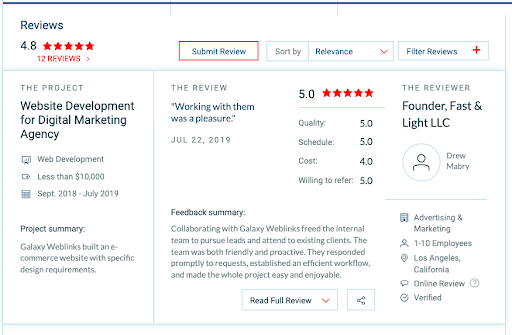
We’d like to dedicate this award to our wonderful customers for participating in client interviews on our behalf, to gauge our impact. They rated our services based on the product quality, attention to deadlines, and cost-effectiveness. In reflection of that data, we’ve been awarded a phenomenal 4.8 out of 5-stars! Please take a look at one of the recent reviews below:

Reviews

“Receiving recognition from Clutch means a lot to our organization. We’re honored to be among their list of top B2B custom software development leaders. This award has established our credibility in the industry which demonstrates our commitment, and reflects the value we offer to our global customers.” – Varun Bihani – CEO of Galaxy Weblinks Inc.

For those who might not know, Clutch is a market research firm that employs a unique rating formula to assess leaders. We’re also featured on The Manifest, a business data resource that lists metrics for a range of services and industries. Visual Objects, a portfolio content site, named us on their directory of top mobile app development as well.

Thank you once again to our customers and to the Clutch team for making this award possible! Please drop us a line today if you’d like to collaborate with us.

Vue or React | Which Javascript framework should you choose?

The pursuit for finding the perfect “javascript framework” can seem like a wild goose chase. But it never is. There are one too many frameworks and each one has traits that makes choosing more difficult.

Whether you’re trying to get into frontend or shifting from PHP or C++ to Javascript, these comparison points between Vue and React are just the thing to get your started.

Popularity

Javascript is quick in releasing frameworks and libraries. The only constant thing is the continuous change in the top positions of the frameworks and libraries.

According to the trends Vue might not seem like a go-to choice of people.

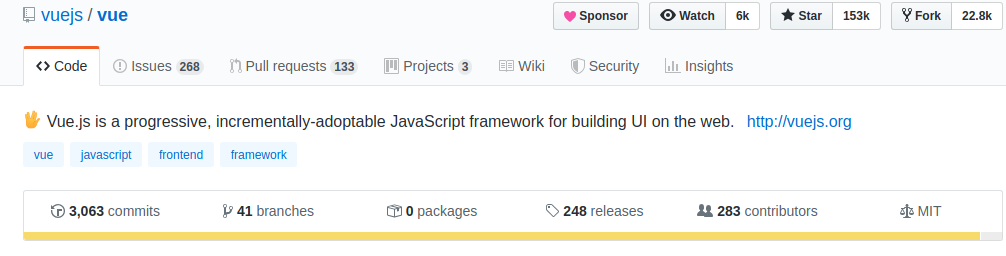
Screenshot of Vue Github stars

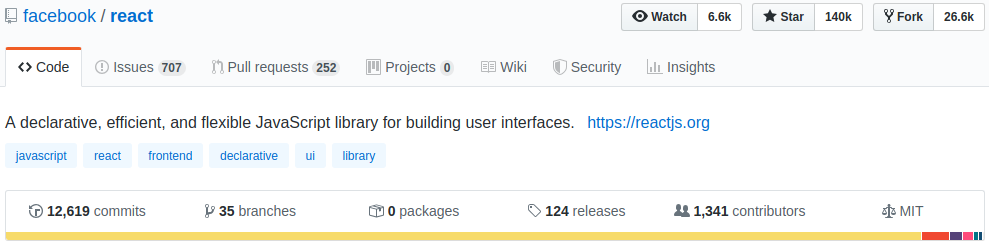
But GitHub stars tell a different story altogether. In June this year VueJS surpassed React. And Vue is still in the lead with 152k stars in comparison to React’s 140k stars.

A point to be noted is that Vue has lesser number of commits and contributors. A possible explanation is that Vue is driven by the open source community where as React has Facebook’s employees as its contributors.

Community support

Facebook’s backing to React signifies strong community support. Till date, React has 171k questions on StackOverflow in comparison to Vue’s 44k questions. But React’s community is more fragmented than Vue’s. This makes it difficult to find answers to even common issues and roadblocks. But Vue gained immense popularity and support from the developers. Vue has successfully created its own name without any major brand’s backing.

Learning curve

Developing your website via React will require you to have a huge knowledge of third party libraries as React is a library and not a framework. Whereas Vue has tools like Vue CLI 3 and Vue UI which will help you in building MVPs real quick. Vue is considered to be more developer friendly due to it’s short learning curve. Also Vue has taken inspiration from Angular and React which makes the transition easier for developers.

Performance

Performance can be measured on various aspects. Measuring it on the basis of framework’s size, Vue has a smaller framework size in comparison with React. Vue’s framework size is of 80KB whereas React is of 100KB. This will have an impact on the initial load time as well.

Virtual DOM is used by both React and Vue. But Vue has better performance and memory allocation due to its well built structure. A word of caution, the final performance will also depend on your application size and how well your code is optimized.

Documentation

Vue’s development team has put in a lot of effort in the tool’s documentation. The API reference is said to be the best in the industry. There is a detailed overview of Vue’s ecosystem, which is absent in React’s documentation. All the information required for creating Vue’s applications is well-written and accessible with ease. All this goes in Vue’s favour. React’s documentation includes basics and some advanced concepts, however it fails to present it in an easily accessible manner.

Use cases

Vue and React are both used by known global names for their websites and applications. Behance, Louis Vuitton and LiveStorm have used Vue. And Airbnb, Netflix and PayPal have selected React. The list is long for both. Vue is scalable and gets integrated easily, so it can be used for bigger development projects as well. However, using React for smaller projects is not a smart decision according to industry experts.

So, When to select one over the other?

If you are a fan of:

  • Flexibility
  • Experimenting with lots of libraries and tools
  • Large community support
  • Javascript more than HTML

React will be your go to option.

If you are someone who:

  • Is looking for short learning curve
  • Likes clean code
  • Wants a lightweight framework
  • Need an MVP on short notice

Vue should be your go to option.

The battle for choosing the ‘best suited’ framework depends upon your specific requirements. And your requirements will change over the course of time. Be prepared for that change as well.

Bugzilla vs Jira: Choosing the Right Agile Bug Tracking Tool in 2024

According to a 2023 IDC analysis, ineffective bug tracking caused 74% of software projects to incur cost overruns and delays. Clearly indicates in 2024 that selecting an appropriate tool is a strategic choice as well as a technical one. This choice impacts not just project timelines but a business’s agility and success. Bugzilla and Jira stand out as key tools in this domain, each offering unique benefits to streamline development and enhance team productivity. Understanding their differences and strengths is essential for any team aiming to deliver high-quality software efficiently in today’s fast-paced market.

Understanding Bugzilla and Jira

Bugzilla, a tool developed by the Mozilla Foundation, is known for its straightforward approach to tracking bugs and issues. Bugzilla offers a robust, open-source solution for bug tracking, emphasizing simplicity and effectiveness. It shines in environments where straightforward bug tracking is paramount, supported by its customizable issue fields and automated email notifications. However, its integration into Agile workflows can be less intuitive, requiring additional configuration to align with Agile methodologies.

Jira,  developed by Atlassian, renowned for its comprehensive project management features, seamlessly integrates Agile methodologies with bug tracking. It offers scrum and kanban boards, customizable workflows, and extensive reporting capabilities, making it an ideal choice for teams deeply invested in Agile practices. Jira’s ability to adapt to complex project needs, coupled with its wide range of integrations, positions it as a versatile tool for dynamic development environments. 

Feature Comparison: Jira and Bugzilla

Bugzilla Features:

  • Open-source and free to use
  • Customizable fields and workflows for bug tracking
  • Advanced search capabilities for issue management
  • Email notifications for updates and changes

Jira Features:

  • Agile project management tools, including scrum and kanban boards
  • Customizable workflows to match team or project needs
  • Extensive integration options with other tools and platforms
  • Advanced reporting and analytics for better decision-making

Agile Bug Tracking: The Core of Agile Success

Agile methodologies prioritize continuous improvement and adaptability, with bug tracking being a key component. Efficient bug tracking helps teams identify, prioritize, and resolve issues quickly, minimizing disruption and maintaining project momentum. The right tool should integrate seamlessly into the team’s workflow, facilitating swift identification, prioritization, and resolution of issues. Integrating bug tracking tools into Agile workflows enhances team collaboration, sprint planning, and overall project visibility. Jira’s built-in Agile features, like sprints and boards, provide teams with efficient task management tools, reflecting Agile principles. Bugzilla, with its customizable approach, can be tailored to fit Agile workflows but may require more effort.

Bugzilla vs Jira in Agile Environments

In Agile environments, the flexibility and adaptability of the bug tracking tool are paramount. Jira, with its agile project management features, is designed to support Agile methodologies out of the box. It allows teams to create sprints, track progress with boards, and adapt workflows on the fly. Bugzilla, while highly effective in bug tracking, requires more customization to fit into Agile workflows but offers unparalleled depth in issue management.

The Importance of Choosing the Right Tool

An ill-suited bug tracking system can be a bottleneck, causing delays, inefficiencies, and communication breakdowns. Startups might gravitate towards Bugzilla for its cost-effectiveness and simplicity, whereas larger entities with intricate Agile projects might prefer Jira’s comprehensive suite of project management tools.

The decision between Bugzilla and Jira transcends mere preference; it’s a strategic one. A tool that aligns with your team’s size, workflow, and project complexity can significantly impact productivity and project outcomes. For instance, startups or small teams might lean towards Bugzilla for its cost-effectiveness and simplicity, while larger teams or those with intricate Agile projects might find Jira’s extensive features more aligned with their needs.

The Business Impact in 2024

The contemporary software development scene demands swift adaptation, efficient workflows, and high-quality outputs. The selection between Bugzilla and Jira has far-reaching implications on a company’s agility, project management efficacy, and market responsiveness.

Actionable Insights for Tool Adoption

  1. Evaluate Your Team’s Workflow: Choose a tool that mirrors your team’s current workflow or the Agile methodology you aspire to implement.
  2. Consider Integration Needs: Assess the need for integration with other tools and platforms. Jira’s extensive marketplace offers a wide range of add-ons, whereas Bugzilla’s open-source nature allows for custom integration.
  3. Prioritize Usability: Ensure the tool you choose is user-friendly for your team. A complex tool might offer extensive features but can lead to low adoption rates.

Empowering Agile Teams with Strategic Tool Selection

As the debate of Bugzilla vs Jira continues, it’s clear that the choice depends on specific project needs, organizational size, and workflow preferences. Whether you’re leaning towards the comprehensive Agile project management features of Jira or the straightforward, focused approach of Bugzilla, the key is to select a tool that supports your team’s journey towards Agile excellence.

At Galaxy Weblinks, we understand the crucial role of efficient bug tracking in achieving Agile success. We’re not just technology experts; we’re strategic partners, offering comprehensive IT consulting and software services to support your journey at every stage. From selecting the ideal bug tracking tool aligned with your needs to streamlining your entire software development process, we craft tailored solutions to ensure your projects run smoothly, your teams operate efficiently, and your business achieves enduring success.

Is your business fully leveraging its technology potential? Book a free discovery call with us at Galaxy Weblinks to explore how our wide range of IT consulting and software services can align with your goals, ensuring you’re equipped with the right tools and strategies for success.

The ultimate best practices guide to a robust mobile application

No software is perfect, just like humans. But the pursuit of perfection is not futile.

If you look around the web you’ll find thousands, maybe millions of posts telling you how to code, improve performance & stability, scale, and secure your applications. What you might not find is a comprehensive guide that has all the aspects that are needed for a robust mobile application. 

In this blog you’ll get to learn about the best practices from design pattern and server setup to coding and security. 

Design

Designing is the most crucial stage in an applications development life cycle. Conversions rely heavily on designs and how they’re implemented. Here are some of the best practices that can make your app a usability treat.

  • Create efficient onboarding: The goal of onboarding is to show the value of your app to the user by demonstrating how they can achieve what they want in a quick and efficient way. If the user is having trouble within the first few screens, they’ll likely drop off without hesitation.
  • Improve usability: Help your users by telling them which icons can be selected, tapped, or swiped. Ensure that you remain consistent with gestures throughout the app to optimize usability, e.g., if swiping up deletes an item, make sure that the same is true for all screens within the app. 
  • Prioritize actions: For each screen, there should be a primary action. This results in an easy-to-learn interface. You can show prioritization with contrasting colors, different fonts, or buttons.
  • Construct a navigation that’s easy and apparent: But, how do I do this? Here are a few points that we follow during our development :
    • Don’t hide it — the more obvious it is, the better. Never make a user hunt for it.
    • Deliver consistent navigation throughout the app. If you hide it on internal pages, you’ll only add confusion.
    • Indicate to users where they are by highlighting their location. This can be a problem for apps as users become “lost” and may abandon the task.
    • Utilize a standard navigation platform. For iOS, “Tab Bar” is a good option, while Android works well with “Navigation Drawer.” Stick to simple — it will help you more than spending time on clever.

Scalability

An app that isn’t designed and developed to seamlessly handle continuous growth will eventually end up being a failure. Hence here are some scalability best practices that ensure your app holds up as your business grows.

  • Choose the right architecture that way the app can grow organically with increasing traffic to the user base. Based on your needs you can go for MVVM, MVP or MVC pattern. 
  • When it comes to the server side, it must use “Auto Scaling” so that the server can perform well when the user base grows.
  • Try going stateless: Keep APIs stateless. In each request, the client should provide all the information which would be required to fulfill that request. This might not be possible in all cases. Sometimes, we might have to query our database and other services. But try to follow as much as possible.

Security

We know that security is key to putting web/app users’ minds at ease as well as your own! There are six essential security elements that will protect users’ information. If one of these six elements is omitted, then the information is at risk.

  • Availability refers to how you’re able to access information or resources in a particular location as well as in the right format. When a system isn’t functioning properly, information and data availability is compromised and it will affect the users.
  • Utility isn’t always considered as a pillar in information security, but let’s say that you encrypt one copy of some important information and then the encryption key is accidentally deleted. The information would be available — it just wouldn’t be accessible or usable.
  • Integrity references methods of guaranteeing that the data is real, accurate, and protected from any changes from an unauthorized user.
  • Authenticity aka “authentication” makes certain that the user’s identity is validated.
  • Confidentiality allows authorized users to access sensitive and protected information. Sensitive information and data needs to be disclosed to only authorized users.
  • Nonrepudiation is a method of ensuring that message transmissions between parties have a digital signature and/or encryption. A data hash will help you acquire proof of authentic data and data origination. 

Cloud and DevOps

Now that almost every app is on cloud with user bases exceeding millions on an average, it is business-critical to have a proper cloud infrastructure and DevOps in place. Here are some practices related to the same. 

  • Create isolated environment with the help of VPC (virtual private cloud) and define subnet on GCP (Google Cloud Platform)            .
  • Using IAM(Identity and Access management) services is handy to provide role-based access to any external users.
  • For database services, we recommend using cloud SQL.
  • For some of our clients, we have used Kubernetes engine for container based hosting.
  • Use Continuous Integration (CI) and continuous Delivery/Deployment (CD) to make deployment strategy automatic.
  • Using GCP Firewall for server security.
  • Configure server environment with auto scaling.
  • For email servicing, being experienced in configuring G-Suite will help.   
  • Use multi-region, load balancer on GCP to route the traffic region wise.

Testing and Optimization

Testing is crucial for a successful project as it enables developers to reveal performance gaps at early stages preventing any development overheads. Based on the identified performance gaps the app can optimized for quality and stability.

  • Apply profiling tools for monitoring: Use tools like X-code profiler and Android profiler. With the help of profiling tools, you can detect the crashes and, thereby, get an alternate code against the same instantly.
  • Test the app on multiple devices in order to make sure it performs well on most popular devices.
  • Prepare for varying network speeds: A mobile user would mostly be using the app on the go, so make sure the app works well in case of switching from WIFI to mobile data or vice versa. 
  • Optimize queries:
  • By optimizing queries, you can control output at the first end, which helps to prevent use of looping, reduce the number of statements, and the excessive use of other controls on the code end. This results in optimal performance for your site.
  • Optimizing will create database normalization rules.

Monitoring and Maintenance

Contemporary applications are accessed from different platforms like phones, tablets and desktops. These platforms come with different operating systems, software/hardware platforms, security setups and other limitations. Therefore, continuous application performance monitoring is an essential part for smooth operations.

  • Load testing: Check performance of the site with speed test tools, such as GTmetrix, pagespeedtest.org, etc., and implement its suggestions
  • Use crash reporting: We recommend integrating a crash reporting tool, such as Fabric Crashlytics
  • Make use of short statements — fragmentation of a big function to reduce the same code across multiple places
  • Maintain error logs: This helps keep you organized
  • Write rules to send email notification to developers/responsible person in case of any issue/error occurs.

Combining the above best practices will help you deliver a site/app above the rest

If the above seems like it’s overwhelming to handle or even for your team to handle alone, reach out to us and we’d be happy to help you in all things related to optimizing your site or app.

Galaxy Weblinks has a dedicated team of designers and developers that are well-versed in creating efficient websites and mobile apps, so reach out to us a

How can I create an effective User Story?

If you’ve heard of what a user story is, that’s great. If not, then here’s a general understanding. It’s basically mapping out your ideal user’s end goal when using either your website or mobile app. Creating a user story will convey what your customer wants to accomplish, laid out in a simple way.

Why should I create a User Story?

A user story gets your whole team on the same page about why they are building a feature for potential customers as well as the value it produces for end users. This will really help you when it comes to improving your user experience (UX), guaranteeing that the user can follow through and complete the task they set out to accomplish on your software.

Here are 3 benefits to user stories:

  • User stories focus on a user’s desires and help your team remember that they’re solving problems for real people, not a generalized audience.
  • Developers, project managers, stakeholders, and clients, all understand what’s expected and how best to serve the target audience, supporting better collaboration and understanding across all teams from client to provider.
  • Stories foster more creative solutions. Instead of focusing on the “what” and “how,” your team can dive into the “why” customers do what they do, which helps when developing ideas for functionality.

When should I use a User Story?

Galaxy Weblinks recommends that you start forming a user story during discovery phase of your development project. It might be a good idea to have a business analyst, who is assigned to the project, develop the user stories in the discovery phase and maintain it throughout the agile project.

Once the discovery phase is finished, the rest of the team should contribute to create a product backlog of user stories. This backlog will fully lay out the functionality that needs to be added during the lifespan of the project. In an agile project, you can always add new stories to the product backlog at any time and by anyone.

Where to start? Here are our 4 steps in forming a great user story:

1. Recognize the needs of the users

Your client will have to clearly define the users who will use the application. This sets the tone for the whole process — you need to know the user, their pain points, needs, and goals. It’s advisable to have a strong understanding of your users, but even if you think you know them well, market research and interviewing potential users before and during the discovery phase will be your greatest ally.

This is a great time to encourage your clients to collaborate with you on the process and will show them that you care enough to do your homework on their target audience. Work with business analysts and UX researchers to deliver focus groups, perform interviews, and compile other findings to create data-driven UX maps and user personas.

2. Form Epics

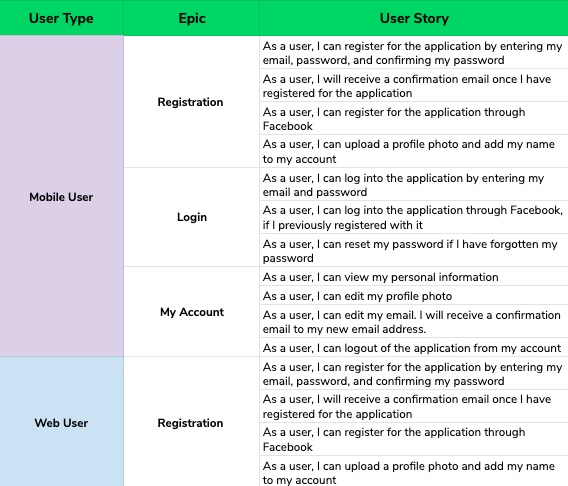
An Epic is usually a large portion of work that has a single, common objective. These are usually formed before the user stories are written. They’re also continually developed as more user stories are identified. The user stories are then grouped into these epics.

Let’s say a user wants to fill out a contact form to reach you. The user will probably appreciate if your contact form is autofill-friendly. As you can imagine, this step really helps when planning what features developers need to build, in what order, and provides them with a high-level understanding of the features of the application.

3. Creating the actual User Story

Once you have narrowed down the users and started considering the epics, the business analyst on the project will start a draft of the user story. Along the way, the analyst may add and redefine some of the epics, and that will happen. It’s also a good idea to ask your clients if they’d like to contribute during this time — they may greatly appreciate being kept “in the loop.”

Most user stories follow this format – Define type of user and their role, user seeks a goal (to have pain taken away, to add happiness, etc.), and user seeks this goal for a result — will we be able to deliver their desired outcome?

Here are 6 guidelines to make sure your user story hits its mark:

  • Should be autonomous. When the developers implement the user story, it should work with any sequence.
  • Keep it flexible. Don’t fill it out with minute details. It needs to be adaptable for different user situations.
  • Make it human. Remember that the user should get some value from the story.
  • Plan ahead. Use project management to help your team plan project timelines.
  • The shorter, the better. It shouldn’t be void of content or only have a few sentences, but smaller stories are easier to manage than large ones.
  • Measurable. Your team should be able to know when and where the story “ends.” What’s the outcome/result for the user?

4. Define your acceptance criteria

This is used to layout the specifics of your user story in layman’s terms. This will help the developers get a better grasp for the requirements and details of the user story. Testers can also use this as a checklist when testing the application.

The business analyst defines acceptance criteria, and then once the project moves onto development, the entire team contributes in defining it. When the developers contribute along with the team, it guarantees that the details of the user story are doable and can be efficiently implemented.

Some handy tips:

  • Define the acceptance criteria before development starts. It will help you to understand the user intent first before the development begins, rather than forming the user story around the development reality.
  • Remove all ambiguity. It is important to consider edge cases and be prepared for possible scenarios, i.e., “What if they log out during a transaction?” You’ll be on top of UX and will give you superior test coverage.

What Should the User Story Look Like by the End?

At the end of the day, user stories are crucial in helping us form applications that solve real problems for real people. If you can research your users and truly understand their needs, you can create a great set of user stories that clearly lists the users’ goals/desires and how you can solve their needs.

We love working with clients to form user stories based on research and their knowledge. We conduct interviews and collect data that way when we work on your website or mobile app, we’ll have an advanced understanding of your customers’ needs.

Drop us message here and we’d be glad to answer any questions you have about our process and how it can benefit you, your business, and your clients.

5G is not just an extension of 4G technology

Commercial 5G network is going live. Big carriers like Verizon, AT&T, Qualcomm, and SKT are building out their 5G networks. But, it’s going to take them some time before they can make it a new standard and available for most people.

The world is going to need high-speed connectivity and 5G will offer it with higher spectrum use and data rates, where 4G falls short. 5G will offer opportunities in various uses cases like self-driving cars, cloud gaming, instant movie streaming, and more.

5G is not there yet. Why should I bother?

When 4G emerged, it improved speed and the user experience on devices. But, when it wasn’t reliable, we still leaned on 3G. Similar to 4G, 5G is on its way. Although that means 5G won’t replace 4G overnight, it does mean that you need to prepare for when it does.

Although Apple and Google haven’t adopted 5G yet, according to The National Interest, around 1.5 billion mobile users (40% of current global activity) will be using 5G wireless networks by 2024.

Such clear insight into the bright future of 5G will impact the app development process. Developers that launch and prepare new and existing apps with 5G possibilities in mind are going to be ahead of the curve and reap the rewards once 5G becomes widespread.

Let’s first dive into the 5G landscape to understand how it’s defining the future of connectivity.

What difference will 5G make over 4G?

Picture of building with stair case direction on it

Speed is the biggest noticeable difference. 5G promises device speeds around 10 times faster than 4G.

Whereas, latency of 10-20 ms less than 4G will make delays virtually impossible to perceive — and in the best cases to around 1 ms of delay.

That means, with 5G, things will be a lot faster. Consumers won’t have to deal with the frustration of high-quality videos buffering or the disruptions when sharing videos from crowded places. This is a great advantage for creating 4K/8K video streaming and AR/VR applications.

In a test environment (UK’s 5G Innovation Centre), 5G has reached around 1Tbps, which is roughly 65,000 times faster than a typical 4G connection.

But, it doesn’t mean 4G is done. Many of us rely on 3G when 4G is unavailable and that’s exactly what will happen when 5G is on end user’s devices. As a matter of fact, many speed tests performed in Chicago lately have proved this in a way that while even walking halfway down the block/node, it’d start bouncing back and forth between 4G and 5G.

Here is the reason why…

Faster speeds of 5G come at the cost of shorter range

5G uses millimeter waves and here is the catch — the higher the frequency of any wave, the shorter the wavelength. The other reason why 5G doesn’t travel well is that it can’t make it through solid objects like buildings, trees, or walls.

There are some solutions out there, however. One could use carrier-specific signal boosters or hotspots. In order for 5G to have larger coverage, there would need to be many more, which is another reason why 5G has a little way to go before it reaches mainstream adoption.

But, it’s not only about speed

4G’s popularity boils down to higher speeds for data and video streaming. But, 5G will also enable any device that has a chip in it to be connected to the network all the time. Whether that’s a car, television, refrigerator, tablet, smartphone — you name it. So, it will be much more advanced than 4G ever was, which is why it isn’t simply an extension of 4G.

This also comes with other app development advantages:

  • Location Accuracy 5G will ship with much better precision capabilities because of its shorter wavelengths and higher radio frequencies than those used by 4G. This is a great advantage for developers creating high-precision, GPS-enabled mobile apps.
  • Increased Connection Density 5G supports the connectivity of up to 98,000 devices more in the same space as compared to 4G. This will prove extremely useful for IoT mobile app developers.

How will 5G impact app development?

Picture of a tablet with AR

Mobile users will consume 3 hours’ worth more video content weekly — of which one hour will be on AR/VR glasses in a 5G future. This belongs to the predictions of massive change in future usage of 5G.

With such game-changing opportunities, the mobile app development will experience major changes. Some include:

  • Apps related to 3D gaming and immersive augmented reality will get a great boost
  • Less dependency on the processing power of the hardware of mobile devices
  • Some good UX practices such as loaders will slowly become irrelevant with 5G
  • VR experiences will be smoother and the frustrating buffering and lag will be a thing of the past

What’s Next?

5G will serve enterprises, consumers, and take IoT to the next level, instead of personal communication only. But real, widespread adoption is still a few years away. In the grand scheme of a business, though, that isn’t an abundance of time when it comes to developing and implementing fully functional, top-of-the-line mobile apps.

Developers all over the world have started working on applications, existing and new, that’ll be able to utilize the full potential of 5G. These preemptive plans aim to release an app at the right time when 5G becomes mainstream, which gives their app a huge advantage over others. If you want your app to be ahead of the curve, you can count on us to create one for you.

If you want to do more than just understanding near-term consumer benefits of 5G, contact us to make sure that your applications will stand out above the rest.

Tips To Remember While Designing a Website

In the world of online business and marketing, website plays an important role. Website signifies the online presence of your business. Hence your website should look good and it should represent your company or business.

Your website should be attractive and presentable. An online business fate depends upon the structure of your website. There are many important factors that should be considered in creating a successful website.

Here are some tips that should be remembered while designing a website:

Website objective

Before designing a website, you should properly know what are your goals? After that you can start working on them. You should make a plan before designing a website. Planning is the best way to reach to your objectives. Your website objective can be anything from selling of a product or service to providing information. Objectives will help you in overall designing of the website.

Budget

You can spend a lot of money on designing a website, but it’s better to make a budget. Your budget should be planned according to the elements of your website. If you don’t have enough money, you can go to online software program which will help you in designing a website. But still you need to spend money on marketing and hosting of the website. Experts say that you should spend 50% on marketing and 50% on website design and updating your website.

Quality content

It is mostly seen that people spend a lot of time on the designing part of the website and they forget about the content. Content is the king of the website. Content has the power to attract the potential audience. Content on the website explains your business goals and objectives which will help you to excel your business. If you are not a good writer, you can hire someone. If you want to grab attention of your target audience unique and quality content will help you.

Visual Aspects

You only have 8 seconds to grab your visitor’s attention. And it all starts with a good visual hierarchy. A clean and organized hierarchy will act as an invisible guide for your visitors. It will lead users on your designed user flow. You can achieve it by using visual cues, typography, color, contrast ratios, and ample white space. Avoid using a lot of typography and colors as it may distract your visitors. But you can play around in CTAs, as these are supposed to draw visitor’s attention.

Branding

Which style represents your organization? Is it chic, elegant ,old school, or a bold brand. Design a website which mirrors your brand’s style. Make your logo the first thing a user encounters by placing it in the upper left corner as users will scan your website in F or Z pattern. Leverage your current client testimonials as evidence of your work. You should link your active social media accounts for letting visitors connect with you instantly. Your social media activities will help in establishing your stand on various topics, CSR activities, work culture, etc. All this will play a role in building your brand.

Usability and Accessibility

Your website’s usability will be established with its intuitiveness from the user’s perspective. Are all possible answers that your user is looking for available to them? It includes an easy CTA for your newsletter subscription, simple navigation, having autofill activated for forms, et al. Carry out usability tests to know where your users are struggling and if the features are easily discoverable. It will help in establishing your website’s usability from the end user perspective.

One in every five American citizens has some disability pertaining to eye sight, hearing, and motor skills among others. When you design your website without taking care of accessibility norms, you are missing out on potential clients. Use the accessibility guidelines to make the website content compliant to at least AA level of the WCAG. Level AA of the Web Content Accessibility Guidelines (WCAG) is widely accepted, highest level being AAA.

Responsive website

We live in an era of varying screen sizes. Designing only for PCs and Macs is no longer the norm. Design your website keeping in mind your mobile and tablet visitors as well. Your website should not appear cluttered when seen on smaller screens. You should check for the
functionality of your website on every device. Test out every button and interaction before the final release. Taking care of these aspects will ensure similar user experience across all the screens.

Market your website

After designing your website, don’t think that your work is done. Submit your website to all search engines. You can also do active marketing through social media sites like Facebook, Twitter and Google+. You can add your website links to other famous websites so that traffic gets diverted to your site. Marketing and advertising of a website may take some time, you need to be patient.

A website is an identity of your business. And when it comes to online business, your first impression is the last impression. So you should be careful while designing a website.

At Galaxy Weblinks we offer web development services. We specialize in developing custom websites and web applications with robust and stable backend process. For details please visit us here.